OCR
OCR படங்கள், ஸ்கேன் கோப்புகள் மற்றும் ஆவண திரைப்பிடிப்புகளில் இருந்து உரையை பிரித்தெடுக்கிறது.
அடையாளம் காணப்பட்ட பிறகு, முடிவை நகலெடுக்கலாம், Markdown, PDF அல்லது Word ஆக ஏற்றுமதி செய்யலாம், அல்லது பல வடிவங்களை ஒன்றாக தொகுத்து பதிவிறக்கலாம்.
OCR செய்யக்கூடியவை
| அம்சம் | விளக்கம் |
|---|---|
| பட உரை அடையாளம் காணல் | படங்கள், திரைப்பிடிப்புகள் மற்றும் ஸ்கேன் கோப்புகளில் இருந்து உரையை பிரித்தெடுக்கிறது. |
| ஆவண தளவமைப்பு அடையாளம் காணல் | அட்டவணைகள், சூத்திரங்கள், முத்திரைகள் மற்றும் உரை-பட கலந்த தளவமைப்புகளுக்கு சிறந்தது. |
| பல சேவைகள் | Baidu PaddleOCR, Microsoft Azure Vision மற்றும் Google Vision ஆதரிக்கப்படுகின்றன. |
| முடிவுகளை நகலெடுத்தல் | செயலாக்கத்திற்குப் பிறகு அடையாளம் காணப்பட்ட உரையை நகலெடுக்கலாம். |
| கோப்புகளை ஏற்றுமதி செய்தல் | Markdown, PDF மற்றும் Word ஆக ஏற்றுமதி செய்யலாம். |
| தொகுதி தொகுத்தல் | பல கோப்புகளை அடையாளம் கண்ட பிறகு முடிவுகளை தொகுப்பாக பதிவிறக்கலாம். |
முதலில் OCR சேவைகளை அமைக்கவும்
திறக்கவும்:
text
System Settings -> Other Settings -> OCR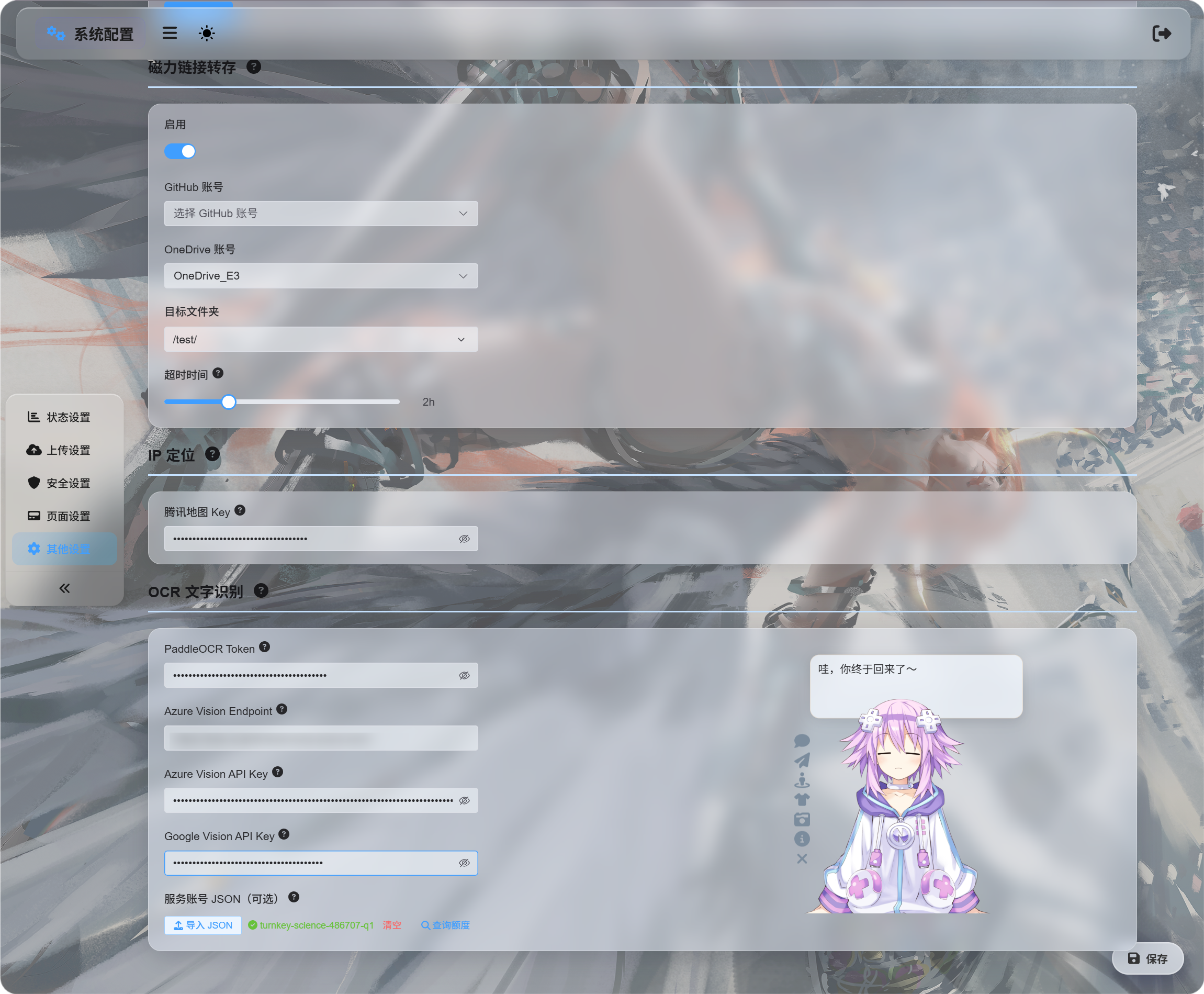
நீங்கள் பயன்படுத்த விரும்பும் சேவைகளுக்கான சான்றுகளை நிரப்பவும்:
| சேவை | உள்ளிட வேண்டியது | சிறந்த பயன்பாடு |
|---|---|---|
| Baidu PaddleOCR | PaddleOCR Token | முதன்மை பரிந்துரை. ஆவணங்கள், படங்கள், அட்டவணைகள் மற்றும் கலந்த தளவமைப்புகளுக்கு நல்லது. |
| Microsoft Azure Vision | Azure Vision Endpoint மற்றும் Azure Vision API Key | Microsoft கிளவுட் சேவைகளை ஏற்கனவே பயன்படுத்தினால் பயனுள்ளது. |
| Google Vision | Google Vision API Key. சேவை கணக்கு JSON ஒதுக்கீடு விசாரணைக்கு மட்டும் பயன்படுத்தப்படும். | Google Cloud சேவைகளை பயன்படுத்தினால் பயனுள்ளது. |
சான்றுகளை நிரப்பிய பிறகு சேமிக்கவும்.
தொடக்க சோதனைக்கு ஒரு சேவையை மட்டும் அமைக்கலாம். மூன்றையும் அமைக்க வேண்டியதில்லை.
Google Vision அமைப்பு
Google அமைப்பில் இரண்டு பகுதிகள் உள்ளன:
| நோக்கம் | தேவை |
|---|---|
| OCR பயன்படுத்துதல் | Cloud Vision API இயக்கி, பின்னர் API Key உருவாக்கவும். |
| பயன்பாட்டு எண்ணிக்கையைப் பார்க்குதல் | சேவை கணக்கை உருவாக்கி, Monitoring Viewer பங்கை வழங்கி, பின்னர் சேவை கணக்கு JSON பதிவிறக்கவும். |
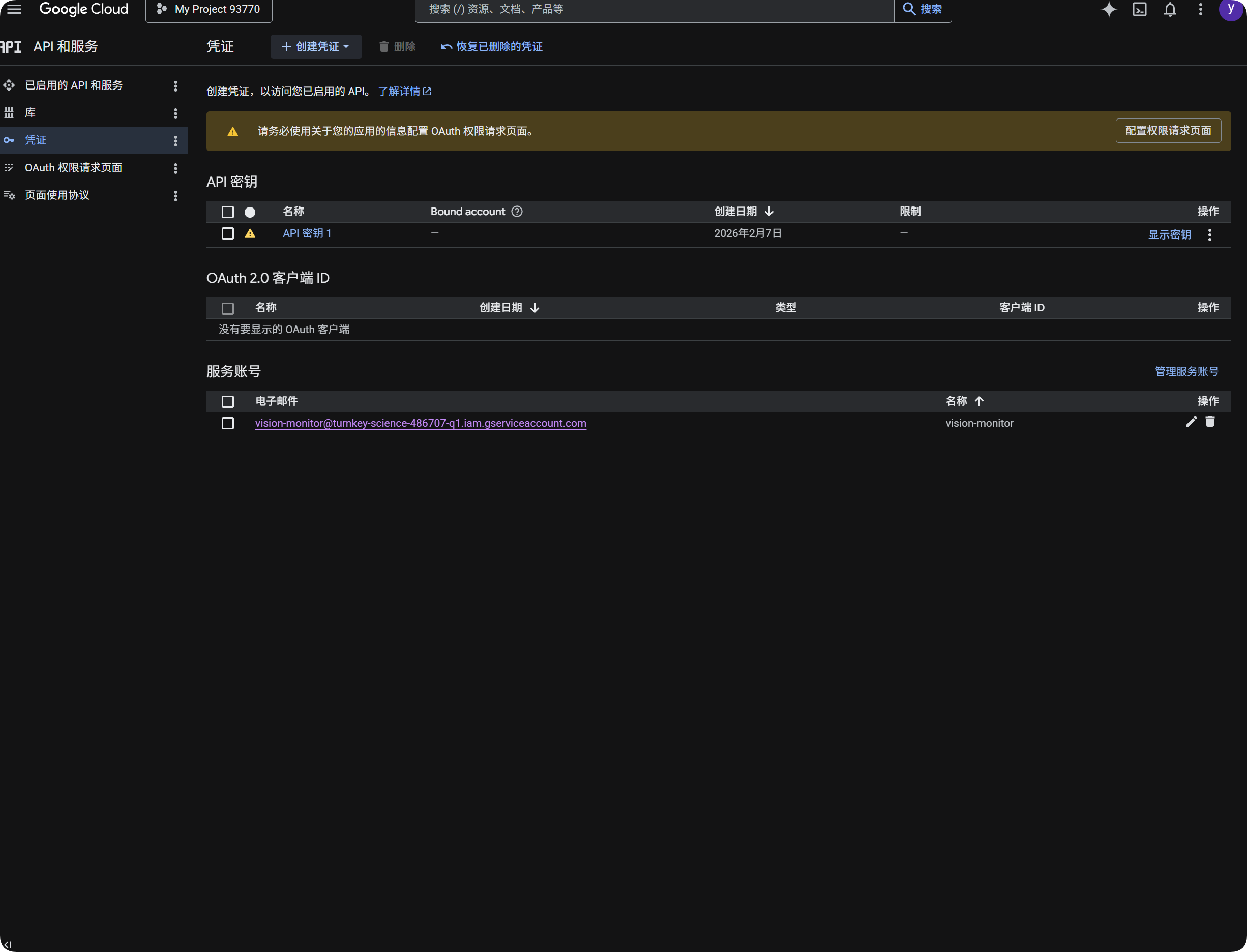
OCR-க்கு Google பயன்படுத்துதல்
- Google Cloud Console திறக்கவும்.
APIs & Servicesசெல்லவும்.Libraryதிறந்துCloud Vision APIதேடி இயக்கவும்.Credentials-க்கு திரும்பவும்.API Keyஉருவாக்கவும்.- API Key-ஐ திறந்து நகலெடுக்கவும்.
- ImgHost-ல்
Google Vision API Key-க்கு ஒட்டவும். - சேமிக்கவும்.
பின்னர் OCR உரையாடலில் Google Vision-ஐ தேர்வு செய்யலாம்.
Google பயன்பாட்டு எண்ணிக்கையைப் பார்க்குதல்
ஒதுக்கீடு விசாரணை அடையாளம் காணலுக்கு அவசியமில்லை.
அது கடந்த 30 நாட்களில் Google Vision அழைப்புகள் சுமார் எத்தனை பயன்படுத்தப்பட்டன என்பதை மட்டும் காட்டும்.
- Google Cloud Console-ல்
IAM & Adminதிறக்கவும். Service Accountsதிறக்கவும்.vision-monitorபோன்ற ஒரு சேவை கணக்கை உருவாக்கவும்.- அதற்கு
Monitoring Viewerபங்கை வழங்கவும். - சேவை கணக்கு விவரங்களை திறந்து ஒரு விசை உருவாக்கவும்.
JSONதேர்வு செய்யவும்.- உருவாக்கப்பட்ட JSON கோப்பை பதிவிறக்கவும்.
- ImgHost-க்கு திரும்பி அதை சேவை கணக்கு
JSON-ல் இறக்குமதி செய்யவும் (விருப்பம்). - இறக்குமதி வெற்றியடைந்த பிறகு, ஒதுக்கீடு விசாரணையை கிளிக் செய்யவும்.
இறக்குமதிக்குப் பிறகு, அந்த சேவை கணக்கின் திட்டப் பெயரை ImgHost காட்டும். பயன்பாட்டு எண்ணிக்கையை சரிபார்க்கும்போது, ImgHost Google கண்காணிப்பு தரவை படித்து இந்த மாதத்தின் அழைப்பு எண்ணிக்கையை காட்டும்.
சுருக்கமாக:
| உருப்படி | நோக்கம் |
|---|---|
Google Vision API Key | OCR அடையாளம் காணலை செய்கிறது. |
சேவை கணக்கு JSON | Google Vision அழைப்புகள் எத்தனை பயன்படுத்தப்பட்டன என்பதை சரிபார்க்கிறது. |
Monitoring Viewer பங்கு | சேவை கணக்கிற்கு பயன்பாட்டு தரவை படிக்க அனுமதிக்கிறது. |
Baidu PaddleOCR Token பெறுதல்
Baidu PaddleOCR-க்கு அணுகல் டோக்கன் தேவை.
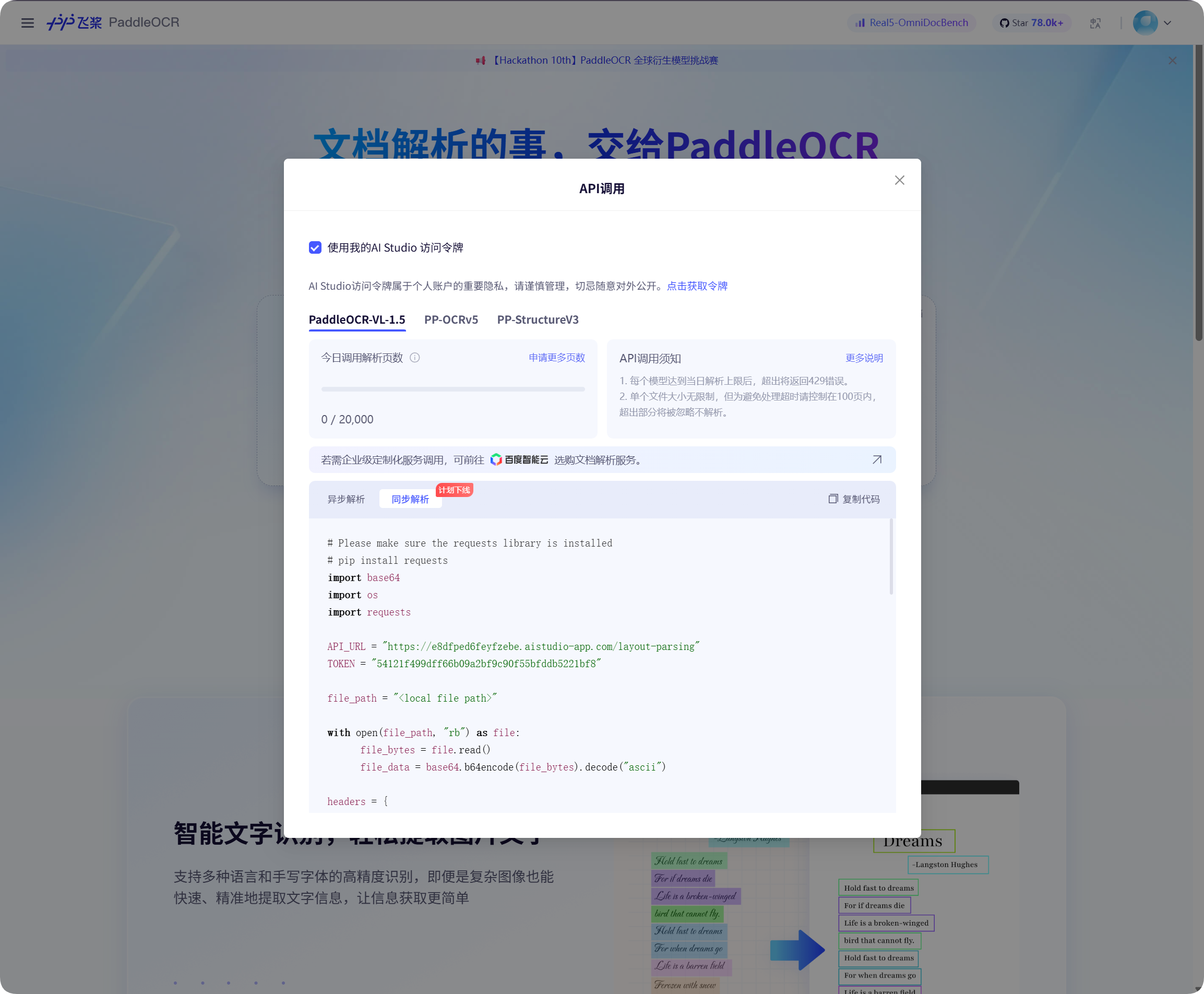
Baidu PaddleOCR பக்கத்தில் API அழைப்பு சாளரத்தை திறந்து, டோக்கன் பெற கிளிக் செய்து அதை நகலெடுக்கவும்.
ImgHost-க்கு திரும்பி அதை PaddleOCR Token-ல் ஒட்டி சேமிக்கவும்.
அடையாளம் காணலை தொடங்குதல்
கோப்பு மேலாண்மையில், ஒரு படம் அல்லது ஆவண திரைப்பிடிப்பை தேர்வு செய்து OCR-ஐ கிளிக் செய்யவும்.
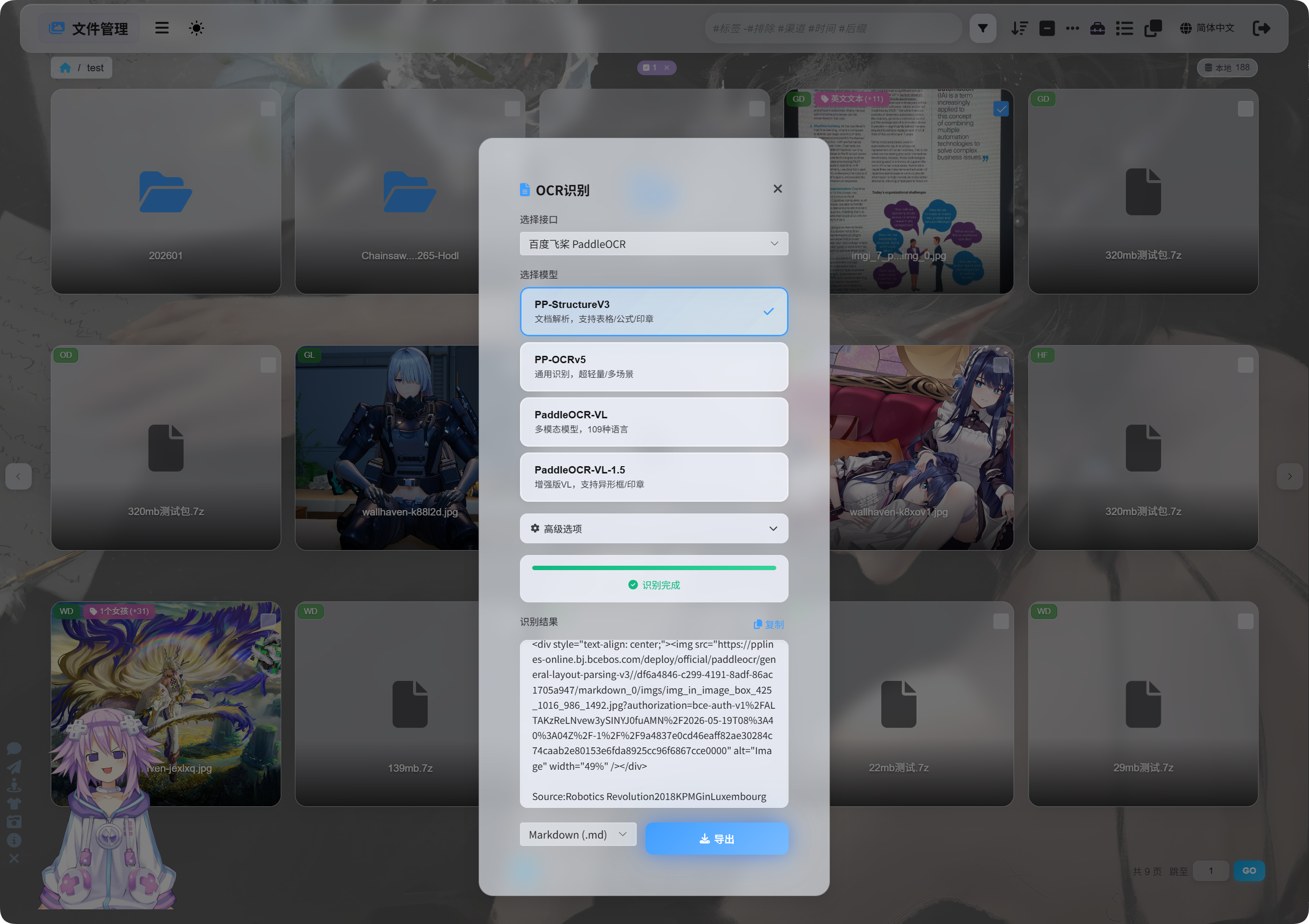
உரையாடலில் அடையாளம் காணும் சேவையையும் மாதிரியையும் தேர்வு செய்யவும்.
பொதுவான PaddleOCR மாதிரி தேர்வுகள்:
| மாதிரி | சிறந்த பயன்பாடு |
|---|---|
PP-StructureV3 | பரிந்துரைக்கப்படும் இயல்புநிலை. ஆவணங்கள், அட்டவணைகள், சூத்திரங்கள், முத்திரைகள் மற்றும் கலந்த தளவமைப்புகளுக்கு நல்லது. |
PP-OCRv5 | எளிய படங்கள், சாதாரண உரை மற்றும் இலகுவான அடையாளம் காணல். |
PaddleOCR-VL | பலமொழி, சிக்கலான படங்கள் மற்றும் விளக்கப்படம் போன்ற உள்ளடக்கம். |
PaddleOCR-VL-1.5 | மேலும் சிக்கலான ஆவண பக்கங்கள் மற்றும் தளவமைப்பு மீட்பு. |
நிச்சயமில்லையெனில் PP-StructureV3-இல் தொடங்கவும்.
மேம்பட்ட விருப்பங்கள்
| விருப்பம் | விளக்கம் |
|---|---|
| திசை திருத்தம் | படம் சுழன்றோ சாய்ந்தோ இருந்தால் பயன்படுத்தவும். |
| ஆவண சமப்படுத்தல் | வளைவு அல்லது சாய்வு உள்ள புகைப்பட ஆவணங்களுக்கு பயன்படுத்தவும். |
| தளவமைப்பு கண்டறிதல் | தலைப்புகள், பத்திகள், அட்டவணைகள் மற்றும் பட அமைப்பை பாதுகாக்க விரும்பினால் பயன்படுத்தவும். |
| விளக்கப்பட அடையாளம் காணல் | படத்தில் விளக்கப்படங்கள் அல்லது சிக்கலான அமைப்புகள் இருந்தால் பயன்படுத்தவும். |
Markdown அழகுபடுத்தல் | ஏற்றுமதி செய்யப்பட்ட Markdown-ஐ வாசிக்க எளிதாக்கும். |
சாதாரண திரைப்பிடிப்புகளுக்கு குறைந்த விருப்பங்களையே வைத்திருக்கவும். ஆவண ஸ்கேன்களுக்கு ஆவண தொடர்பான விருப்பங்களை அதிகமாக இயக்கவும்.
முடிவுகளை பார்க்குதல்
அடையாளம் காணல் முடிந்த பிறகு, உரையாடல் முடிவை காட்டும்.
அதை நேரடியாக நகலெடுக்கலாம் அல்லது ஏற்றுமதி வடிவங்களை தேர்வு செய்யலாம்.
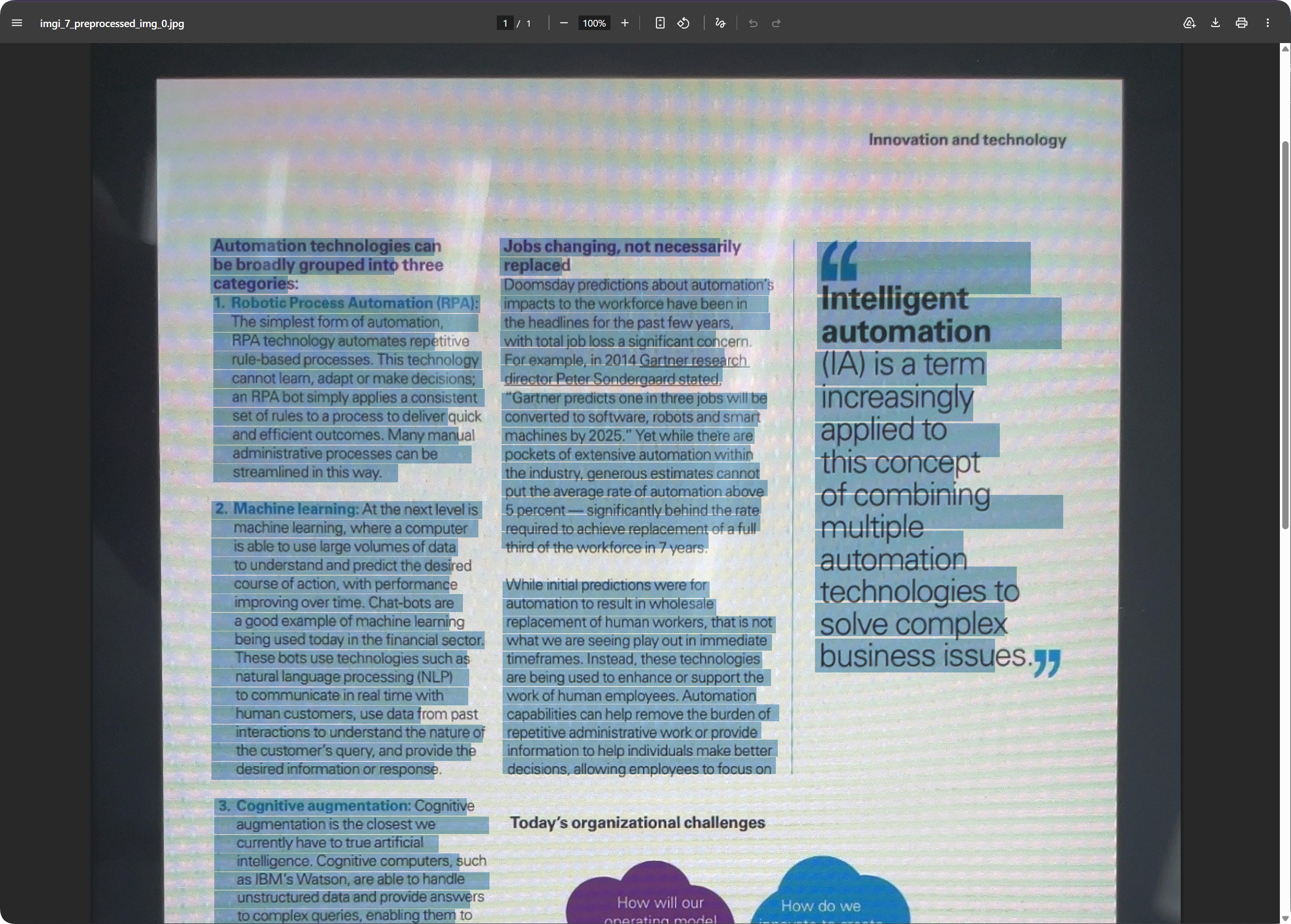
ஆவண பக்கங்களுக்கு, ஏற்றுமதி செய்யப்பட்ட PDF பக்க தோற்றத்தை பாதுகாத்து உரையை தேடக்கூடியதாக வைத்திருக்க முடியும். இது ஸ்கேன் கோப்புகளை காப்பகப்படுத்தவும் பின்னர் உள்ளடக்கத்தை தேடவும் உதவும்.
ஏற்றுமதி வடிவத்தை தேர்வு செய்தல்
| வடிவம் | சிறந்த பயன்பாடு |
|---|---|
Markdown (.md) | குறிப்புகள், ஆவண அமைப்புகள் மற்றும் பின்னர் திருத்துதல். |
PDF (.pdf) | பக்க தோற்றத்தையும் ஸ்கேன் செய்யப்பட்ட ஆவண முடிவுகளையும் பாதுகாத்தல். |
Word (.docx) | வடிவமைப்பை தொடர்ந்து திருத்துதல், உரை மாற்றுதல் மற்றும் பிறருக்கு ஒப்படைத்தல். |
| அனைத்தையும் ஏற்றுமதி செய் | பல வடிவங்களையும் மூல படத்தையும் சேமிக்கும்; முக்கிய காப்பகங்களுக்கு ஏற்றது. |
உரையே தேவைப்பட்டால் Markdown-ஐ ஏற்றுமதி செய்யவும்.
பக்க தோற்றம் தேவைப்பட்டால் PDF அல்லது Word பயன்படுத்தவும்.
Word வெளியீடு
ஏற்றுமதி செய்யப்பட்ட Word ஆவணங்களை அலுவலக மென்பொருளில் திறந்து திருத்தலாம்.
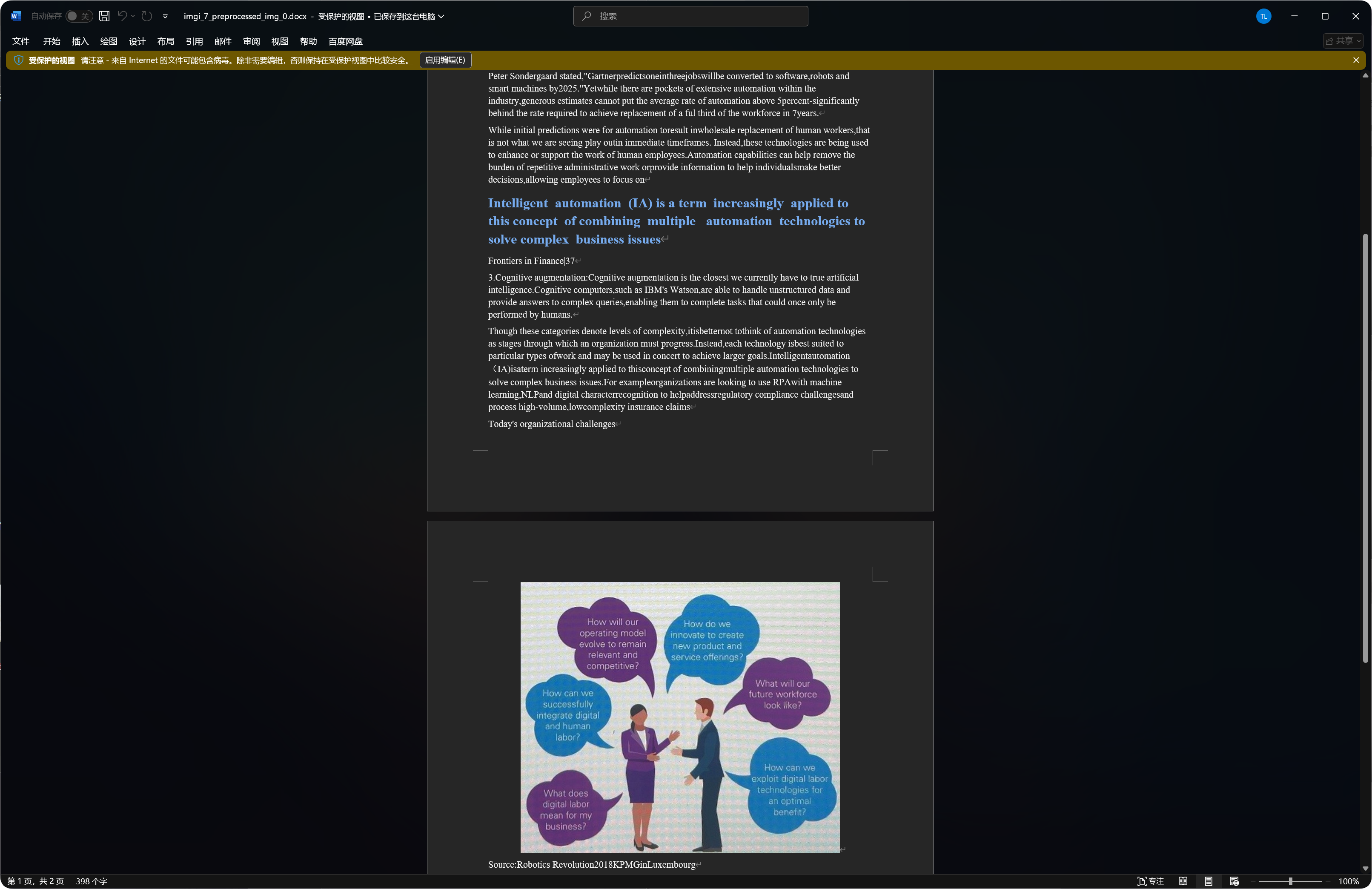
சில ஆவணங்கள் Word வெளியீட்டில் அடையாளம் காணப்பட்ட படங்கள், தலைப்புகள் மற்றும் பத்திகளை சேர்க்கலாம்.
அடையாளம் காணும் தரம் மூல படத்தின் தெளிவு, மாதிரி தேர்வு மற்றும் ஆவண சிக்கல்தன்மையை சார்ந்தது.
OCR-க்கு சிறந்த கோப்பு வகைகள்
| கோப்பு வகை | பரிந்துரை |
|---|---|
| தெளிவான திரைப்பிடிப்புகள் | நேரடியாக அடையாளம் காணவும். |
| ஸ்கேன்கள் | PP-StructureV3 விரும்பத்தக்கது. |
| புகைப்படம் எடுத்த ஆவணங்கள் | திசை திருத்தம் மற்றும் ஆவண சமப்படுத்தலை இயக்கவும். |
| அட்டவணைகள், சூத்திரங்கள், முத்திரைகள் | கட்டமைப்பு மாதிரிகளை விரும்பவும். |
| எளிய குறுகிய உரைப் படங்கள் | PP-OCRv5 பொதுவாக போதுமானது. |
மேலும் தெளிவான, நேரான உரையுள்ள படங்கள் பொதுவாக சிறந்த முடிவுகளை தரும்.
பொதுவான நிலைகள்
| நிலை | பொருள் |
|---|---|
| அடையாளம் காணல் தோல்வியடைகிறது | சேவை டோக்கன் அல்லது விசை சேமிக்கப்பட்டுள்ளதா சரிபார்க்கவும். |
| அடையாளம் காணல் மெதுவாக உள்ளது | சிக்கலான ஆவணங்கள் மற்றும் பெரிய படங்கள் அதிக நேரம் எடுக்கும். |
| அட்டவணை முழுமையில்லை | கட்டமைப்பு மாதிரியை முயற்சிக்கவும். |
| உரையில் பிழைகள் உள்ளன | மங்கல், ஒளிச்சுடர் மற்றும் சாய்வு அடையாளம் காணும் பிழைகளை அதிகரிக்கும். மேலும் தெளிவான படத்தை முயற்சிக்கவும். |
| Word வெளியீட்டில் பல படங்கள் உள்ளன | கட்டமைப்பு மாதிரிகள் அடையாளம் காணப்பட்ட சில படங்களை பாதுகாக்கலாம். இது சாதாரணம். |
Google ஒதுக்கீடு விசாரணை தோல்வியடைகிறது
சரிபார்க்கவும்:
- சேவை கணக்கு
JSONஇறக்குமதி செய்யப்பட்டிருக்க வேண்டும். - சேவை கணக்கிற்கு
Monitoring Viewerபங்கு இருக்க வேண்டும். - திட்டத்தில்
Cloud Vision APIஇயக்கப்பட்டிருக்க வேண்டும்.
உங்களுக்கு OCR மட்டும் தேவை, பயன்பாட்டு விசாரணை தேவையில்லை என்றால், சேவை கணக்கு JSON-ஐ புறக்கணித்து Google Vision API Key மட்டும் நிரப்பலாம்.
விரைவு நடைமுறை
text
Open System Settings
-> Open Other Settings
-> Fill OCR service credentials
-> Save
-> Return to File Management
-> Select a file and click OCR
-> Choose a model
-> Wait for recognition
-> Copy results or export Markdown / PDF / Word