பதிவேற்ற அமைப்புகள்
பதிவேற்ற அமைப்புகள் ImgHost-ஐ உங்கள் சொந்த சேமிப்பு சேனல்களுடன் இணைக்கின்றன. ஒரு சேனல் அமைக்கப்பட்ட பிறகு, பதிவேற்றப்பட்ட படங்களும் கோப்புகளும் நீங்கள் தேர்ந்தெடுத்த சேவையில் சேமிக்கப்படும். அணுகல் இணைப்புகள், கோப்பு பதிவுகள், முன்னோட்டங்கள், பொது கேலரி, சீரற்ற படம் API, WebDAV அணுகல் மற்றும் தொடர்புடைய செயல்முறைகளை ImgHost நிர்வகிக்கும்.
ஒவ்வொரு பயனருக்கும் பொருத்தமான சேனல் வேறுபடும். எளிய தொடக்கம் வேண்டும் என்றால் Telegram, Discord அல்லது GitHub Releases நல்ல தேர்வுகள். கொள்ளளவு, வேகம் மற்றும் நீண்டகால நிலைத்தன்மை முக்கியமானவை என்றால் Cloudflare R2, S3, OneDrive, Google Drive, Dropbox, Yandex, pCloud அல்லது உங்கள் சொந்த WebDAV சேவையை பயன்படுத்தலாம்.
தொடங்குவதற்கு முன்
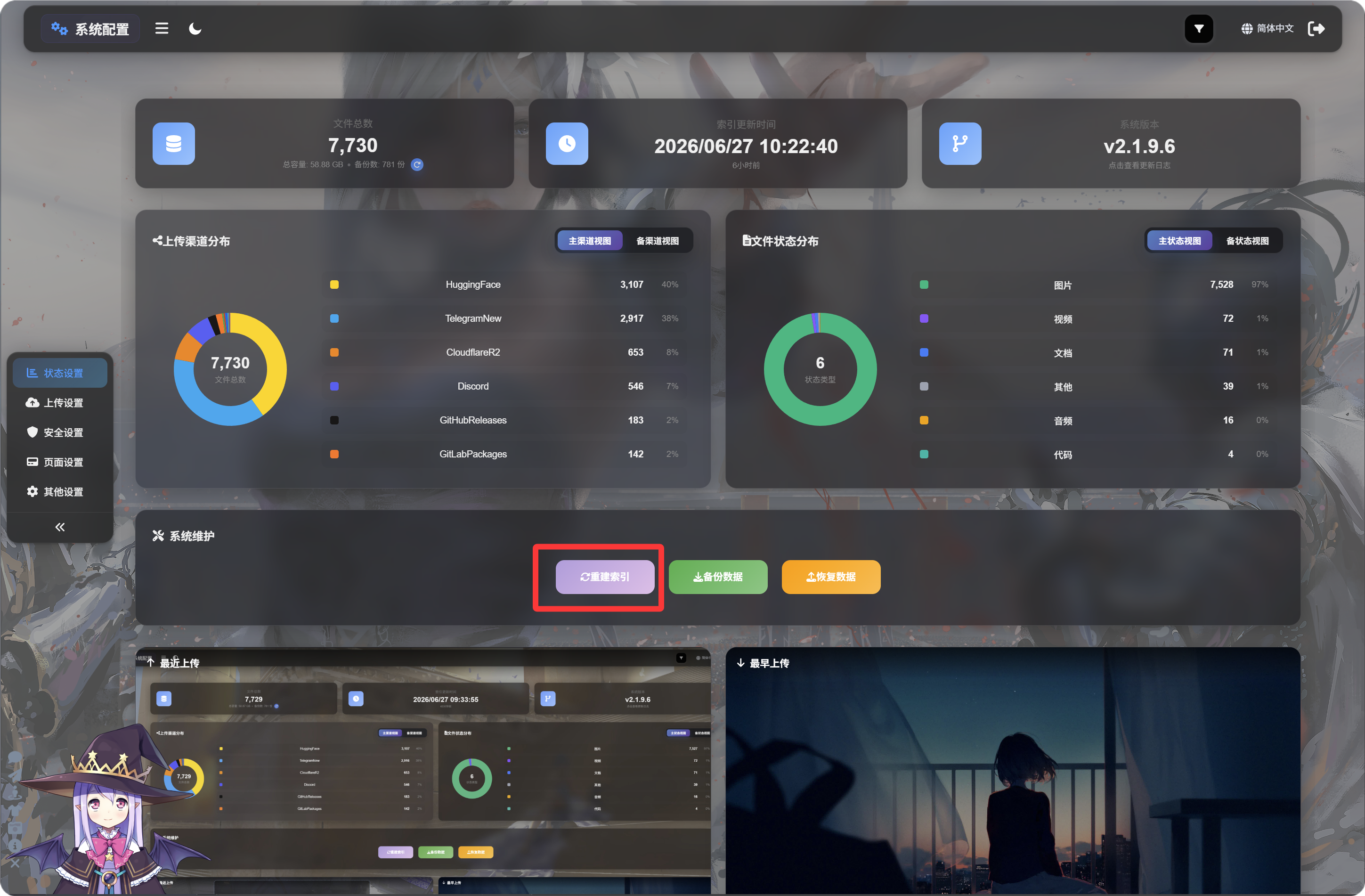
ImgHost-ஐ முதல் முறையாக பயன்படுத்துவதற்கு முன், தொடக்க அமைப்பு பக்கத்துக்குச் சென்று "சுட்டியை மீண்டும் உருவாக்கு" என்பதை கட்டாயம் கிளிக் செய்ய வேண்டும். இதனால் தேவையான D1 தரவு அட்டவணைகள் நிறைவு செய்யப்படுகின்றன, பின்னர் வரும் அம்சங்களில் பிழைகள் தவிர்க்கப்படுகின்றன.
விருப்பத் தேர்வு: D1 வாசிப்பு பிரதியாக்கத்தை இயக்குதல்
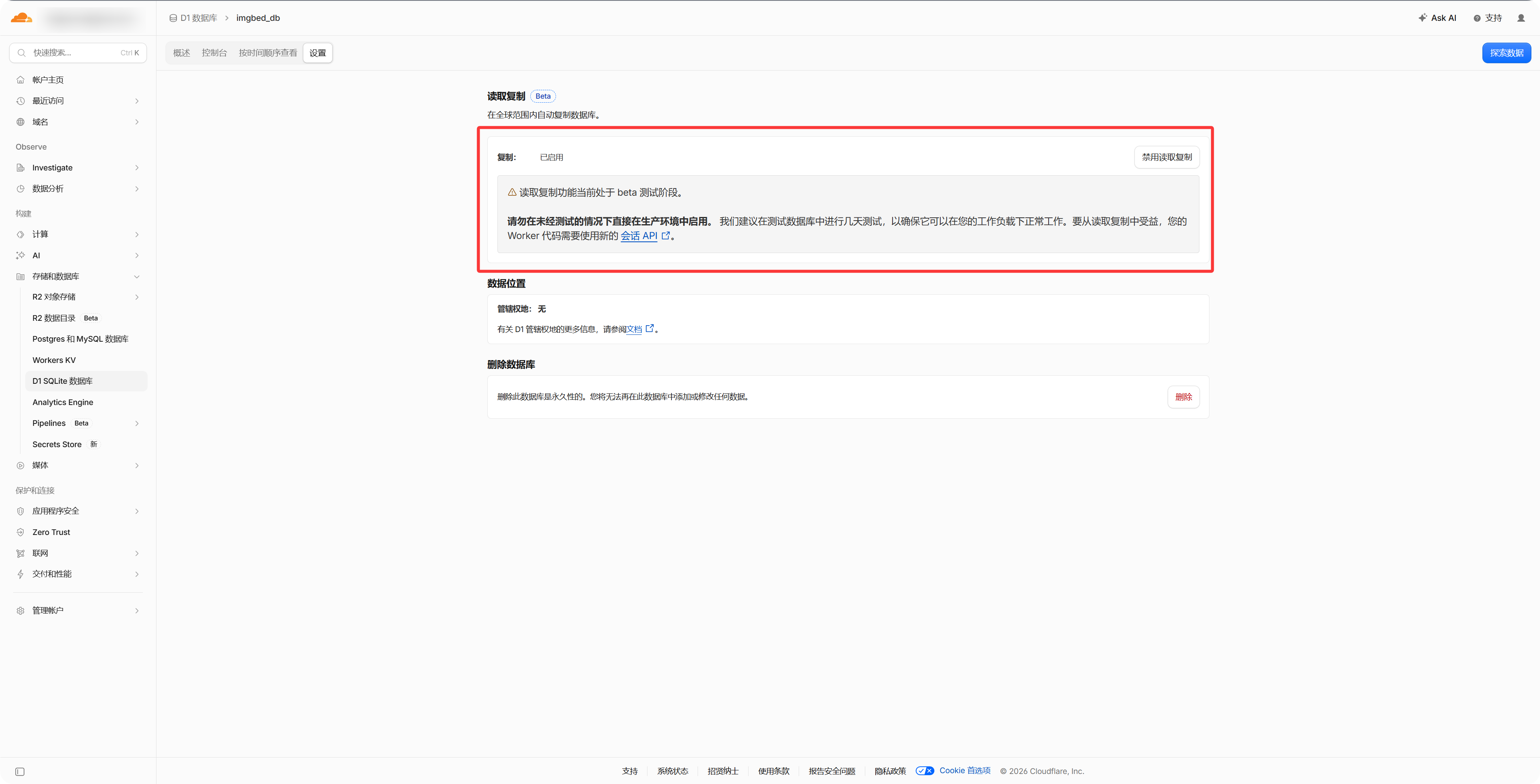
Cloudflare கட்டுப்பாட்டுப் பலகையில் உள்ள D1 தரவுத்தள அமைப்புகளில் "Read Replication" என்பதை இயக்கினால், கோப்பு மேலாண்மை, பொது காட்சியகம் மற்றும் சீரற்ற படம் API ஆகியவற்றை விரைவாக அணுகலாம். இதை இயக்காவிட்டாலும் ImgHost வழக்கம்போல் செயல்படும்.
- பயன்படுத்த வேண்டிய சேமிப்பு கணக்கு அல்லது API சான்றுகளை தயார் வைத்துக்கொள்ளுங்கள்.
- உங்கள் ImgHost டொமைன் அணுகக்கூடியதா என்பதை உறுதிப்படுத்துங்கள்; OAuth அடிப்படையிலான சேனல்களுக்கு திரும்ப அழைப்பு URL தேவைப்படும்.
- சேனல் சேர்த்த பிறகு முதலில் ஒரு சோதனைப் படத்தை பதிவேற்றுங்கள்; கோப்பு சரியாக சேமிக்கப்படுகிறதா மற்றும் திறக்கப்படுகிறதா என்பதை உறுதிப்படுத்துங்கள்.
சேனல் பட்டியல்
- Telegram
- Cloudflare R2
- S3
- WebDAV
- Discord
- Hugging Face
- GitHub Releases
- GitLab Packages
- OneDrive
- Google Drive
- Dropbox
- Yandex
- pCloud
இந்த அத்தியாயம் விளக்கும் விஷயங்கள்
- ஒவ்வொரு பதிவேற்ற சேனலுக்கும் அமைப்பதற்கு முன் தேவையான தகவல்கள்.
- வெளிப்புற தளங்களில் பயன்பாட்டை உருவாக்குவது, விசைகளை நகலெடுப்பது அல்லது டோக்கனை அங்கீகரிப்பது.
- ImgHost-ல் சேனல் அமைப்புகளை நிரப்பி, பதிவேற்றம் சரியாக செயல்படுகிறதா என்பதை உறுதிப்படுத்துவது.