अपलोड सेटिंग्स
अपलोड सेटिंग्स ImgHost को आपके अपने भंडारण चैनलों से जोड़ती हैं। किसी चैनल को कॉन्फ़िगर करने के बाद अपलोड की गई छवियाँ और फ़ाइलें आपके चुने हुए सेवा में सहेजी जाती हैं। ImgHost फ़ाइल रिकॉर्ड, एक्सेस लिंक, पूर्वावलोकन, सार्वजनिक गैलरी सुविधाएँ, रैंडम इमेज API एक्सेस, WebDAV एक्सेस और संबंधित प्रवाहों को संभालता है।
हर उपयोगकर्ता अलग-अलग चैनल पसंद कर सकता है। यदि आप सरल सेटअप चाहते हैं, तो Telegram, Discord या GitHub Releases अच्छे शुरुआती विकल्प हो सकते हैं। यदि क्षमता, गति और दीर्घकालिक स्थिरता अधिक महत्वपूर्ण है, तो Cloudflare R2, S3, OneDrive, Google Drive, Dropbox, Yandex, pCloud या अपनी WebDAV सेवा पर विचार करें।
शुरू करने से पहले
ImgHost का पहली बार उपयोग करने से पहले, आवश्यक D1 डेटा तालिकाएँ पूरी करने और बाद की सुविधाओं में त्रुटियों से बचने के लिए आरंभीकरण पृष्ठ खोलकर "इंडेक्स फिर से बनाएँ" पर क्लिक करना अनिवार्य है।
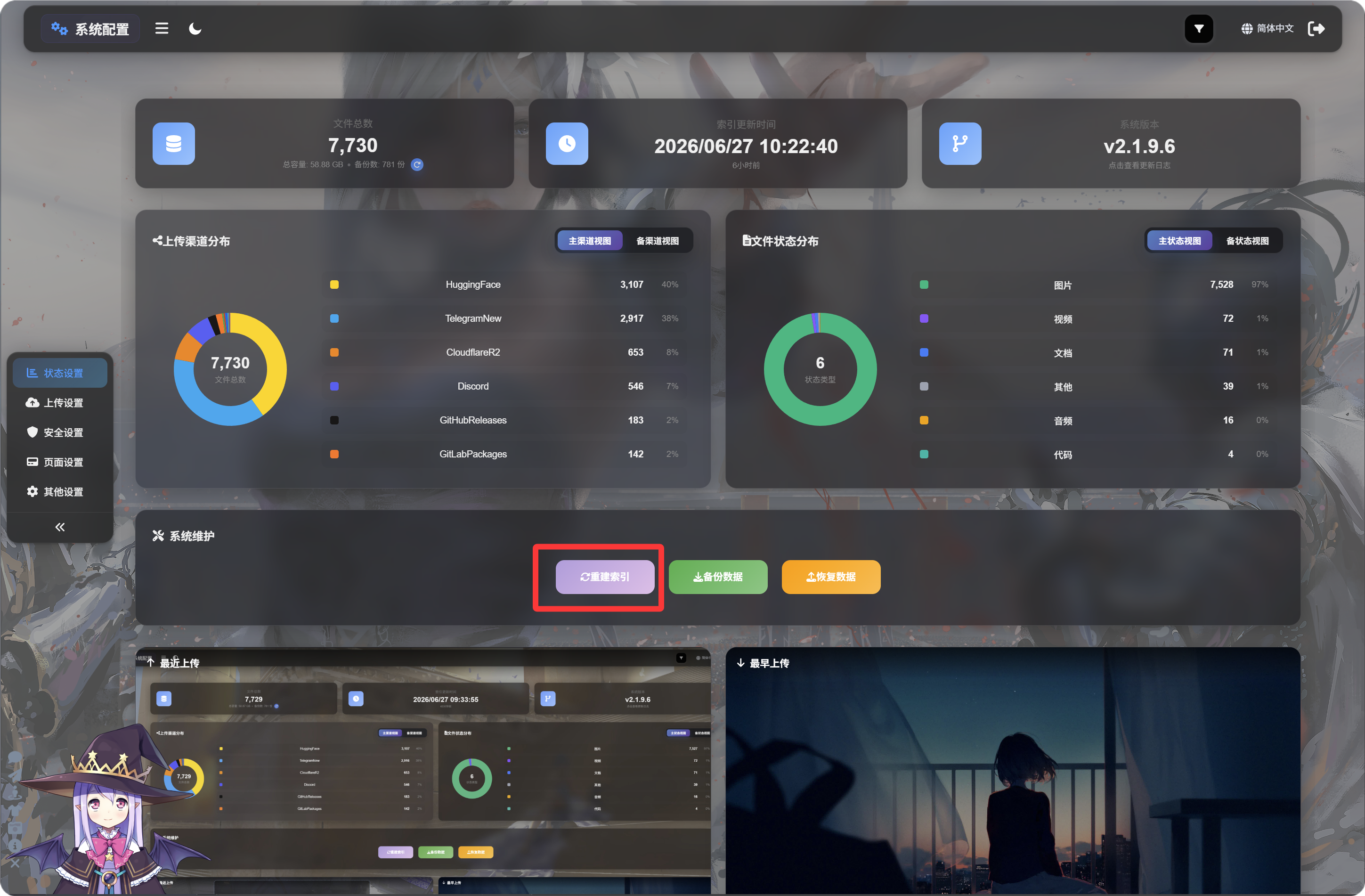
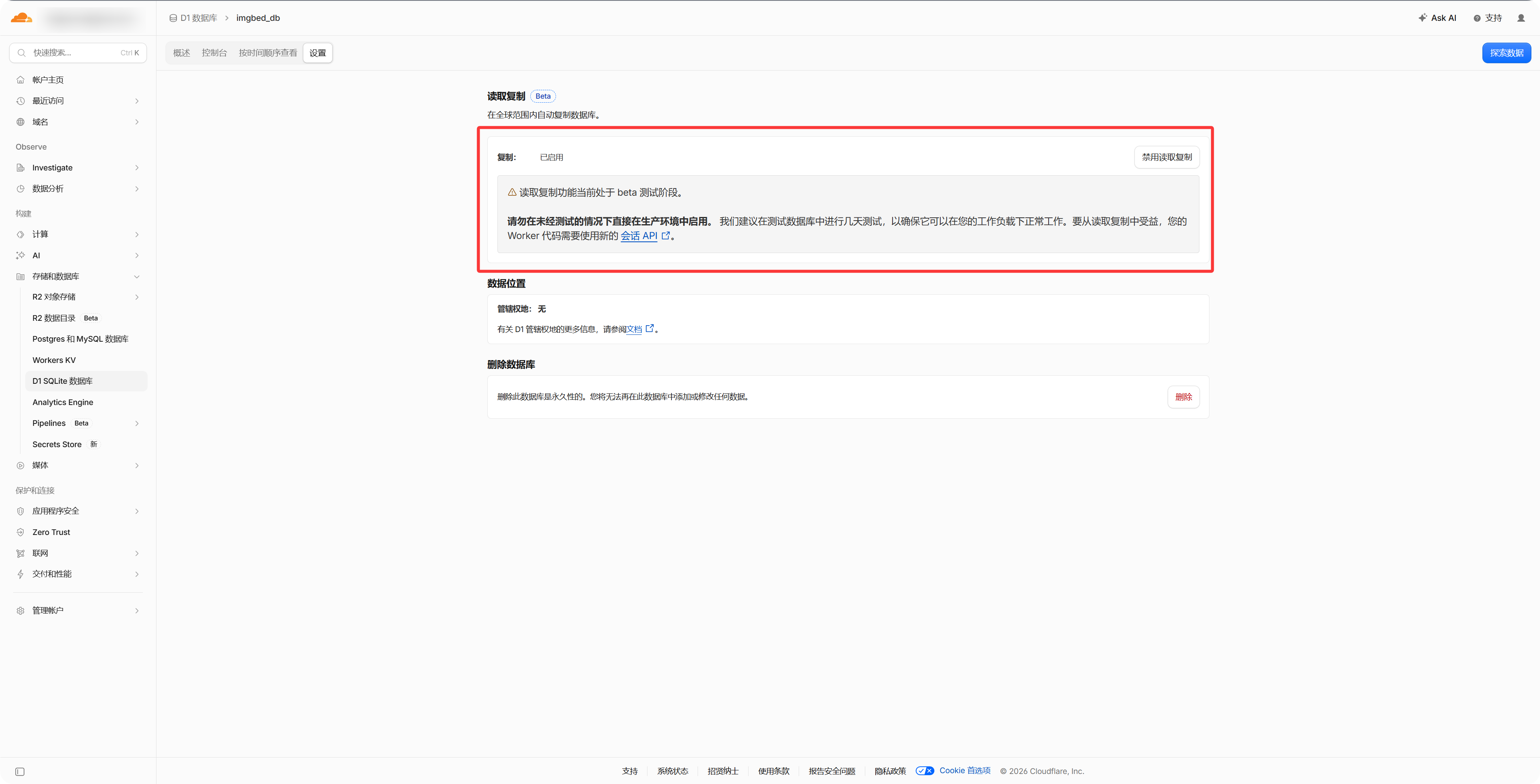
वैकल्पिक: D1 रीड रेप्लिकेशन चालू करें
Cloudflare डैशबोर्ड में D1 डेटाबेस की सेटिंग्स से "Read Replication" चालू करें। इससे फ़ाइल प्रबंधन, सार्वजनिक गैलरी और रैंडम इमेज API की पहुँच तेज़ हो सकती है। इसे चालू किए बिना भी ImgHost सामान्य रूप से काम करेगा।
- जिस भंडारण खाते या API क्रेडेंशियल की आवश्यकता है, उसे तैयार रखें।
- सुनिश्चित करें कि आपका ImgHost डोमेन पहुँच योग्य है, क्योंकि OAuth आधारित चैनलों को कॉलबैक URL चाहिए।
- चैनल जोड़ने के बाद पहले एक परीक्षण छवि अपलोड करें, ताकि पुष्टि हो सके कि फ़ाइलें सही तरह से सहेजी और खोली जा रही हैं।
चैनल सूची
- Telegram
- Cloudflare R2
- S3
- WebDAV
- Discord
- Hugging Face
- GitHub Releases
- GitLab Packages
- OneDrive
- Google Drive
- Dropbox
- Yandex
- pCloud
यह अध्याय क्या समझाता है
- प्रत्येक अपलोड चैनल को कॉन्फ़िगर करने से पहले किन चीज़ों की आवश्यकता होती है।
- बाहरी प्लेटफ़ॉर्म पर ऐप्लिकेशन बनाना, कुंजियाँ कॉपी करना या टोकन अधिकृत करना।
- ImgHost में चैनल कॉन्फ़िगरेशन भरना और यह पुष्टि करना कि अपलोड सही तरह से काम कर रहे हैं।