मैग्नेट स्थानांतरण
मैग्नेट स्थानांतरण किसी मैग्नेट लिंक से फ़ाइलें डाउनलोड करता है और उन्हें आपके चुने हुए क्लाउड स्टोरेज चैनल पर अपने आप अपलोड कर देता है।
यह एनीमे एपिसोड, वीडियो, संपीड़ित फ़ाइलों और इसी तरह की फ़ाइलों को स्थानांतरित करने के लिए उपयोगी है। मैग्नेट लिंक पेस्ट करें, और ImgHost पृष्ठभूमि में डाउनलोड कार्य बना देता है। डाउनलोड पूरा होने के बाद फ़ाइल ImgHost पर अपलोड होती है और अंतिम लिंक अपलोड सूची में दिखाई देता है।
इसे कहाँ उपयोग करें
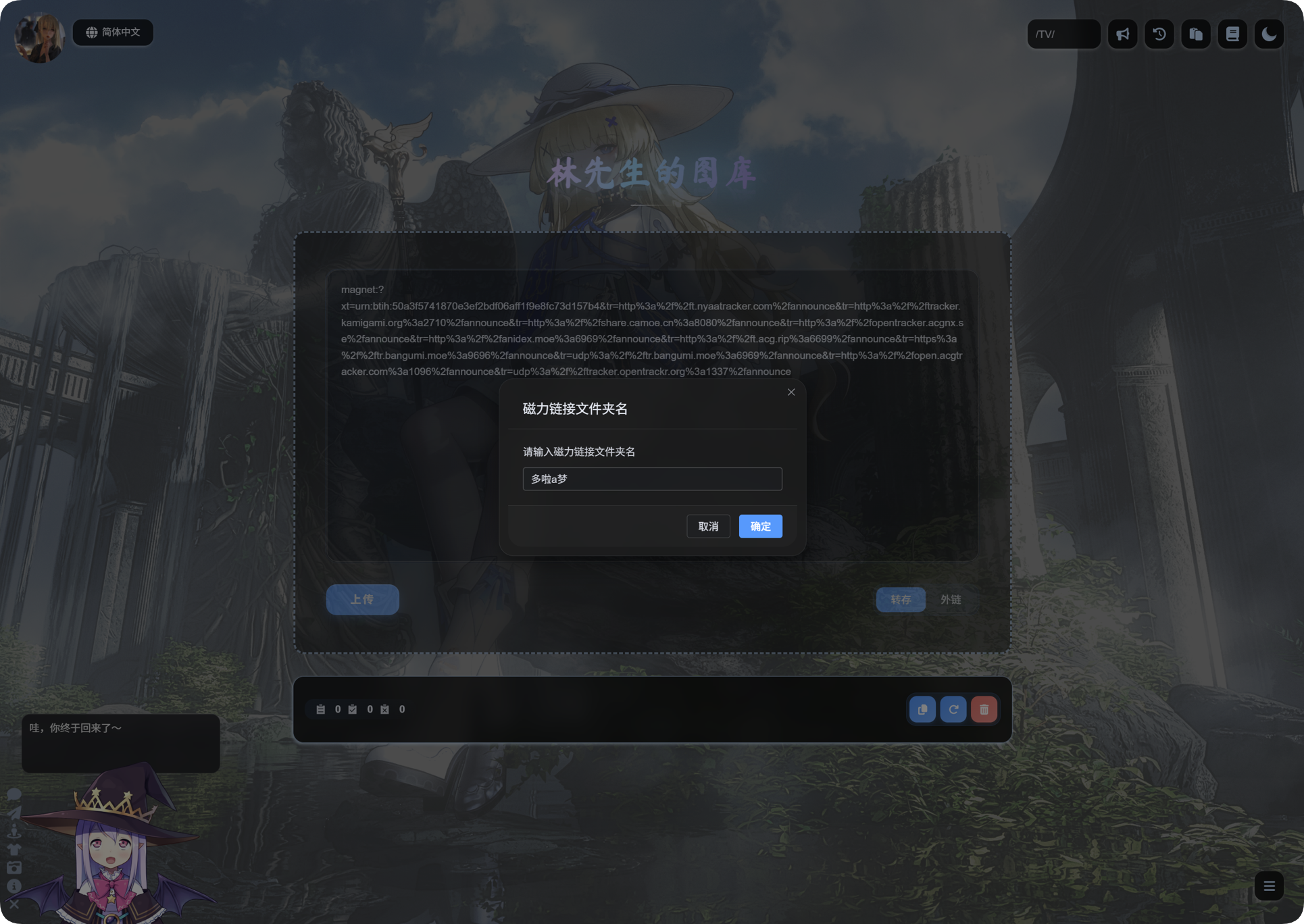
मैग्नेट स्थानांतरण का प्रवेश बिंदु होमपेज के अपलोड क्षेत्र में है।
मैग्नेट लिंक को इनपुट बॉक्स में पेस्ट करें, Transfer चुनें, फिर अपलोड करें।
पहली बार उपयोग से पहले
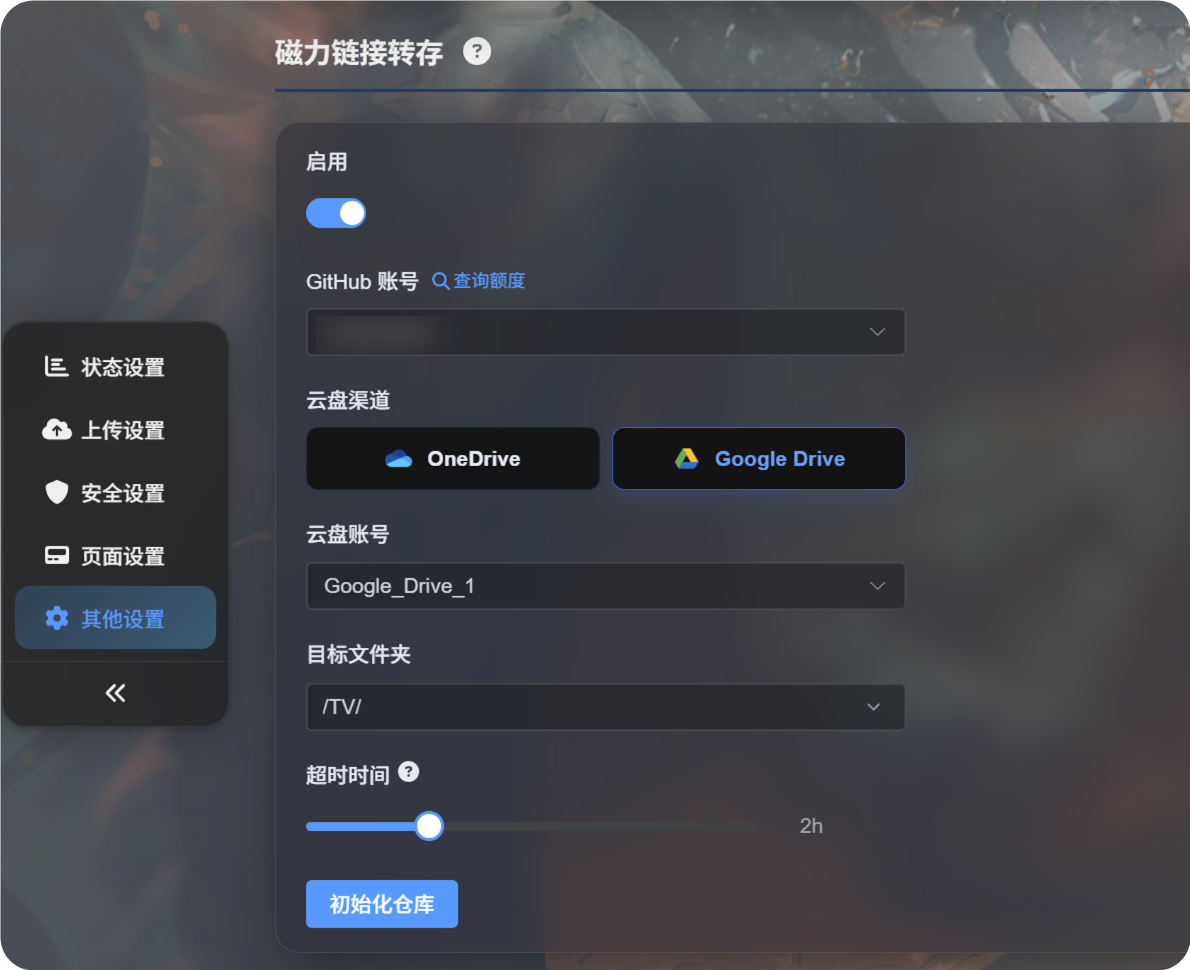
पहले एडमिन पैनल में मैग्नेट स्थानांतरण कॉन्फ़िगर करें।
आमतौर पर आपको चाहिए:
- डाउनलोड कार्य चलाने के लिए GitHub खाता।
- कोई क्लाउड अपलोड चैनल, जैसे Google Drive या OneDrive।
- लक्ष्य अपलोड डायरेक्टरी।
- कार्य की समय-सीमा।
सेटिंग्स तैयार होने के बाद, होमपेज पर लौटें और स्थानांतरण शुरू करने के लिए मैग्नेट लिंक पेस्ट करें।
मैग्नेट लिंक अपलोड करना
- होमपेज के अपलोड बॉक्स में मैग्नेट लिंक पेस्ट करें।
- सुनिश्चित करें कि मोड
Transferपर सेट है। - अपलोड पर क्लिक करें।
- ImgHost द्वारा मैग्नेट कार्य बनाए जाने की प्रतीक्षा करें।
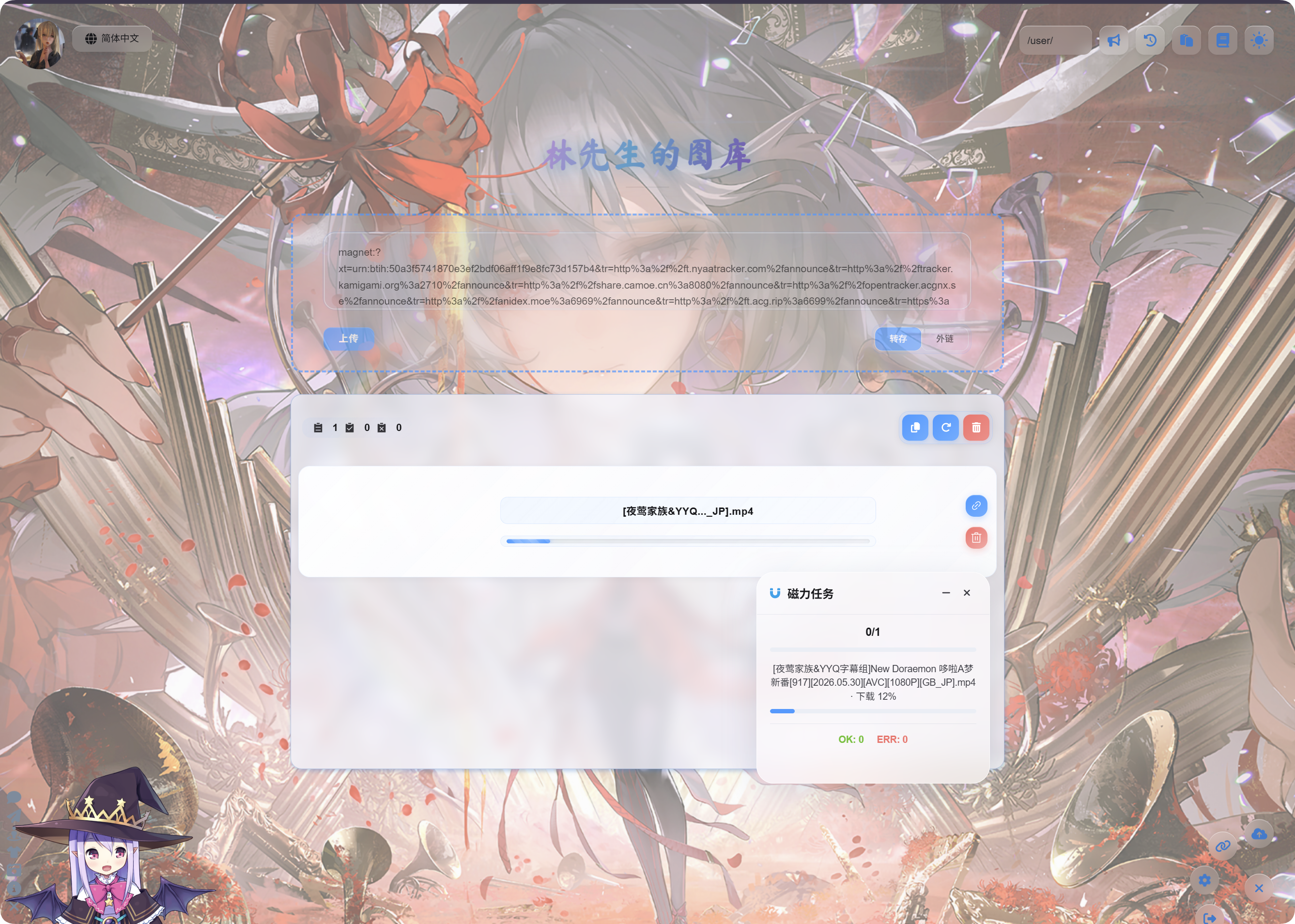
- कार्य शुरू होने के बाद प्रगति देखने के लिए नीचे दाएँ कोने में मौजूद
Magnet Tasksफ़्लोटिंग पैनल का उपयोग करें।
डाउनलोड और अपलोड में समय लग सकता है। गति मैग्नेट संसाधन, GitHub रनटाइम वातावरण और चुने गए क्लाउड स्टोरेज चैनल पर निर्भर करती है।
पूरा होने के बाद
कार्य पूरा होने के बाद, अपलोड सूची फ़ाइल नाम और लिंक दिखाती है।
वीडियो में वीडियो पूर्वावलोकन, छवियों में छवि पूर्वावलोकन और अन्य फ़ाइलों में सामान्य फ़ाइल आइकन दिखाई देता है।
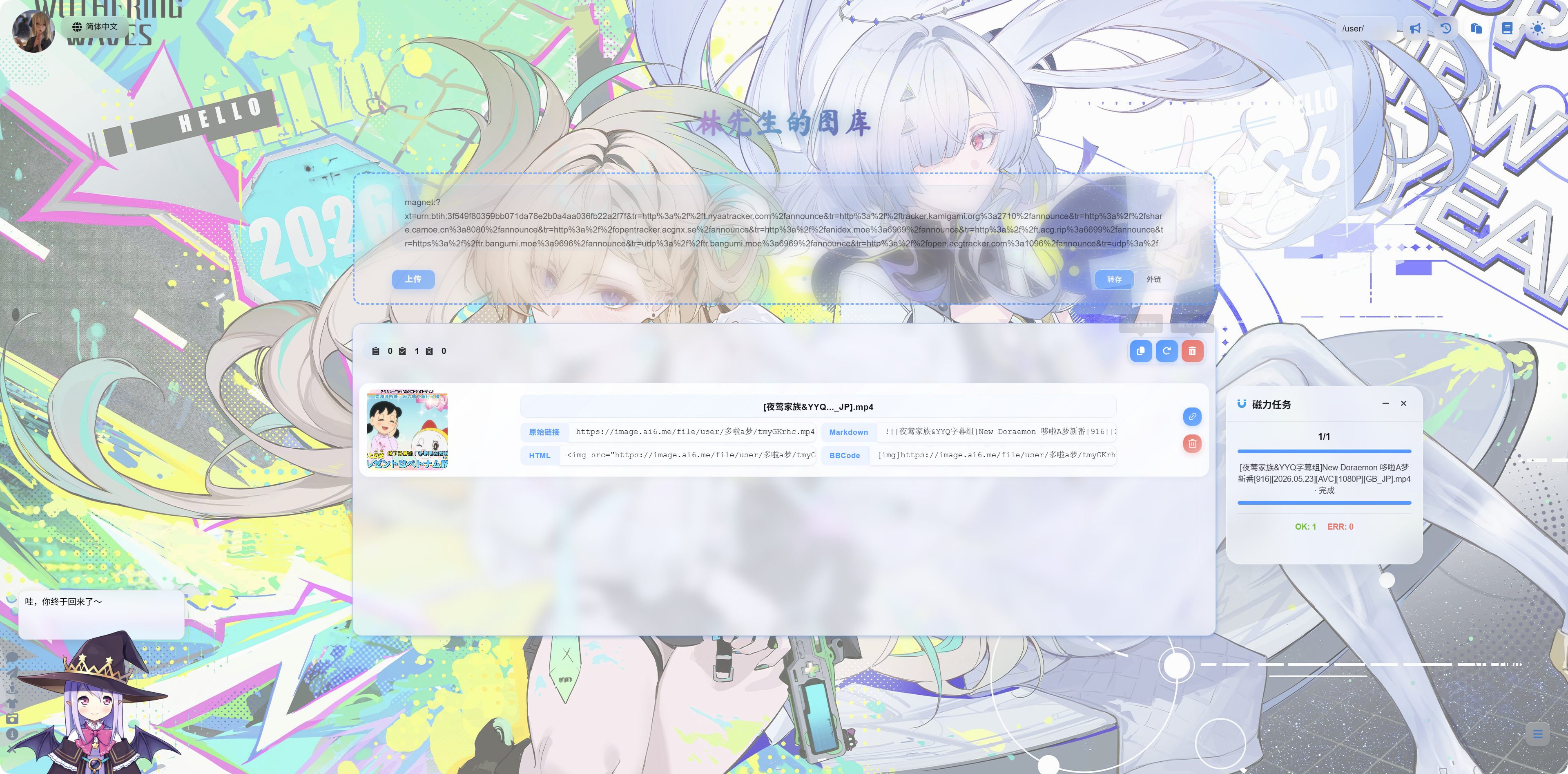
आप कॉपी कर सकते हैं:
| लिंक प्रकार | उपयोग का मामला |
|---|---|
| मूल लिंक | फ़ाइल तक सीधी पहुँच |
| Markdown | Markdown पोस्ट या नोट्स |
| HTML | वेब पेज कोड |
| BBCode | BBCode का समर्थन करने वाले फ़ोरम |
मैग्नेट कार्य पैनल
नीचे दाएँ स्थित मैग्नेट कार्य पैनल कार्य संख्या, कार्य नाम, प्रगति और अंतिम स्थिति दिखाता है।
सामान्य स्थितियाँ:
| स्थिति | अर्थ |
|---|---|
| प्रतीक्षा में | कार्य बनाया जा चुका है और चलने की प्रतीक्षा कर रहा है। |
| डाउनलोड हो रहा है | मैग्नेट संसाधन डाउनलोड हो रहा है। |
| अपलोड हो रहा है | फ़ाइल डाउनलोड हो चुकी है और क्लाउड स्टोरेज पर अपलोड हो रही है। |
| पूर्ण | अपलोड सफल हुआ और लिंक कॉपी किया जा सकता है। |
| विफल | कार्य सफलतापूर्वक पूरा नहीं हुआ। संदेश देखें और फिर प्रयास करें। |
सुझाव
- यदि मैग्नेट लिंक में कई फ़ाइलें हैं, तो ImgHost प्रदर्शन के लिए मुख्य पूर्ण फ़ाइल को प्राथमिकता देता है।
- बड़ी फ़ाइलों में अधिक समय लगता है। पेज रीफ़्रेश करने से पहले कार्य पूरा होने की प्रतीक्षा करें।
- यदि मैग्नेट संसाधन के लिए कोई उपलब्ध पीयर नहीं है, तो यह बहुत धीमा हो सकता है या विफल हो सकता है।
- यदि क्लाउड खाते का कोटा समाप्त हो गया है, अनुमति की अवधि समाप्त हो गई है या अपलोड डायरेक्टरी गलत है, तो कार्य विफल हो सकता है।
- अपलोड पूरा होने के बाद वीडियो पूर्वावलोकन में कुछ सेकंड लग सकते हैं।
अक्सर पूछे जाने वाले प्रश्न
मैग्नेट लिंक पेस्ट करने के बाद कुछ शुरू नहीं होता
पुष्टि करें कि एडमिन पैनल में मैग्नेट स्थानांतरण सक्षम है और उपयोग योग्य GitHub खाता तथा क्लाउड चैनल चुने गए हैं।
डाउनलोड हमेशा धीमा है
मैग्नेट की गति संसाधन पर निर्भर करती है। यदि कोई उपलब्ध पीयर नहीं है, तो डाउनलोड बहुत धीमा या असंभव हो सकता है।
अपलोड के बाद कोई पूर्वावलोकन नहीं दिखता
पहले पुष्टि करें कि फ़ाइल लिंक खुलता है। वीडियो फ़ाइलों को ब्राउज़र में लोड होने में थोड़ा समय लग सकता है, या आप लिंक को सीधे खोल सकते हैं।
कार्य विफल होने पर क्या जाँचें?
जाँचें कि मैग्नेट लिंक मान्य है या नहीं, क्लाउड चैनल काम कर रहा है या नहीं, और अपलोड डायरेक्टरी सही है या नहीं। फिर कार्य दोबारा सबमिट करें।