उपयोगकर्ता अपलोड दर सीमाएँ
उपयोगकर्ता दर सीमाएँ नियंत्रित करती हैं कि सामान्य उपयोगकर्ता या आगंतुक होमपेज से कितनी बार फ़ाइलें अपलोड कर सकते हैं। इससे सार्वजनिक अपलोड पेजों के दुरुपयोग को रोकने में मदद मिलती है।
यह सुविधा केवल होमपेज अपलोड को प्रभावित करती है। व्यवस्थापक अपलोड और API Tokens से किए गए अपलोड उपयोगकर्ता दर सीमाओं से सीमित नहीं होते।
कहाँ सेट करें
प्रशासन पैनल खोलें, फिर यहाँ जाएँ:
text
System Settings -> Security Settings -> Upload Management -> User Rate Limits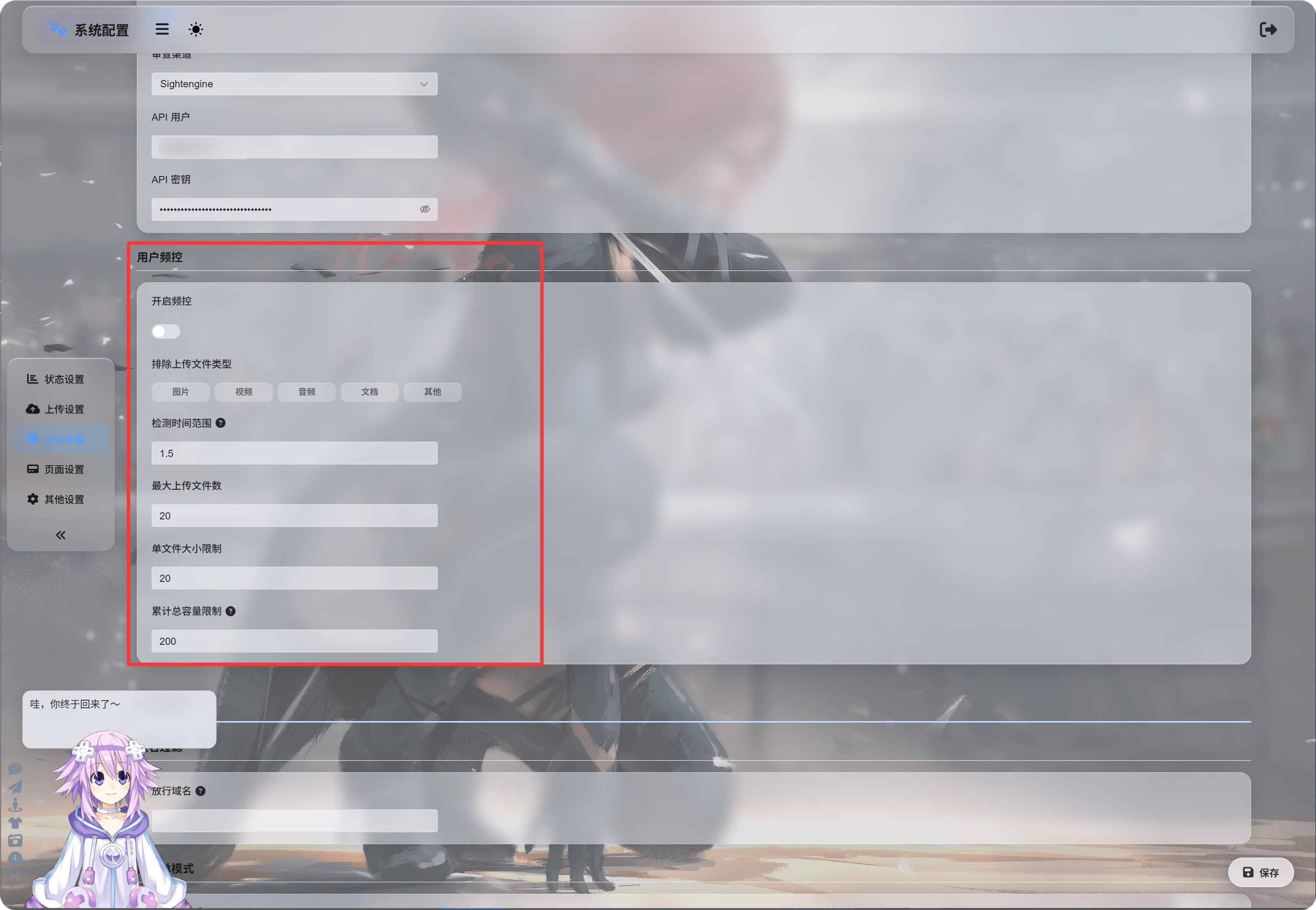
दर सीमाएँ सक्षम करना
“दर सीमाएँ सक्षम करें” चालू होने के बाद ImgHost अपलोड करने वाले के IP पते के आधार पर हाल के अपलोड ट्रैक करता है।
डिफ़ॉल्ट मान:
| सेटिंग | डिफ़ॉल्ट | विवरण |
|---|---|---|
| पहचान विंडो | 1.5 घंटे | अपलोड रिकॉर्ड कितने पीछे तक गिने जाएँ। |
| अधिकतम फ़ाइल संख्या | 20 | पहचान विंडो में अनुमत अधिकतम फ़ाइल संख्या। |
| एक फ़ाइल आकार सीमा | 20 MB | एक फ़ाइल का अधिकतम आकार। |
| कुल अपलोड आकार सीमा | 200 MB | पहचान विंडो में कुल अपलोड का अधिकतम आकार। |
उदाहरण के लिए, 1.5 घंटे की विंडो, 20 फ़ाइलें, प्रति फ़ाइल 20 MB और कुल 200 MB होने पर, उसी IP से अपलोड किसी भी सेट सीमा से ऊपर जाते ही रोक दिए जाते हैं।
फ़ाइल प्रकार बाहर करना
“बाहर किए गए अपलोड फ़ाइल प्रकार” सामान्य उपयोगकर्ताओं या आगंतुकों को चुनी गई फ़ाइल श्रेणियाँ अपलोड करने से रोकता है।
उपलब्ध श्रेणियाँ:
| प्रकार | विवरण |
|---|---|
| छवियाँ | jpg, png, webp, gif और समान छवि फ़ाइलें |
| वीडियो | mp4, webm, mov और समान वीडियो फ़ाइलें |
| ऑडियो | mp3, flac, wav और समान ऑडियो फ़ाइलें |
| दस्तावेज़ | pdf, txt, md, docx और समान दस्तावेज़ फ़ाइलें |
| अन्य | ऊपर की श्रेणियों से बाहर की फ़ाइलें, जैसे zip, rar, exe, apk |
डिफ़ॉल्ट रूप से कोई प्रकार चयनित नहीं होता, यानी वह अनुमति प्राप्त है।
किसी प्रकार पर क्लिक करने से वह हाइलाइट होता है, यानी वह प्रकार अवरुद्ध है।
यदि “अन्य” चुना गया है, तो zip या rar फ़ाइल अपलोड करने वाले आगंतुक अवरुद्ध होंगे और उन्हें बताया जाएगा कि यह फ़ाइल प्रकार समर्थित नहीं है।
अवरोध संदेश
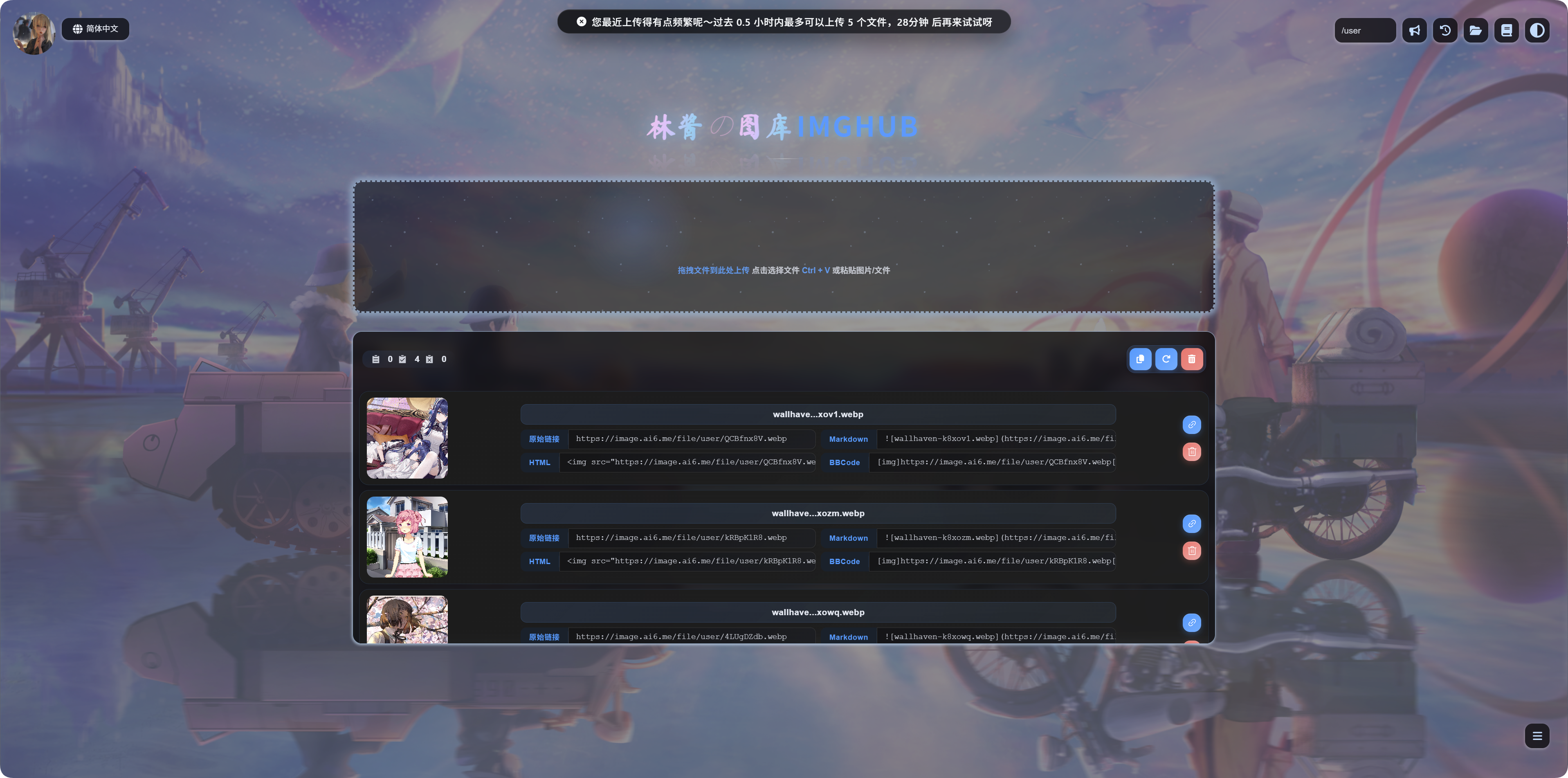
जब कोई सीमा सक्रिय होती है, उपयोगकर्ताओं को संबंधित संदेश दिखता है:
| स्थिति | संदेश का अर्थ |
|---|---|
| एक फ़ाइल बहुत बड़ी है | फ़ाइल बहुत बड़ी है और अपलोड से पहले संपीड़ित की जानी चाहिए। |
| फ़ाइल प्रकार अवरुद्ध है | यह फ़ाइल प्रकार समर्थित नहीं है। इसे हटाएँ और फिर प्रयास करें। |
| अपलोड बहुत बार हो रहे हैं | हाल के अपलोड बहुत बार हुए हैं, और फिर प्रयास करने का समय दिखता है। |
| कुल आकार बहुत अधिक है | हाल का कुल अपलोड आकार बहुत अधिक है, और फिर प्रयास करने का समय दिखता है। |
कब सक्षम करें
यदि आपका अपलोड होमपेज सार्वजनिक रूप से उपलब्ध है, तो उपयोगकर्ता दर सीमाएँ सक्षम करें।
सामान्य कारण:
- आपको स्क्रिप्ट से बड़े पैमाने पर अपलोड की चिंता है।
- आप आगंतुकों के बड़े अपलोड सीमित करना चाहते हैं।
- आप चाहते हैं कि सामान्य उपयोगकर्ता केवल छवियाँ अपलोड करें, संग्रह या इंस्टॉलर नहीं।
- आप संसाधन उपयोग नियंत्रित करते हुए सार्वजनिक अपलोड उपलब्ध रखना चाहते हैं।
यदि साइट केवल आपके लिए है, या केवल व्यवस्थापक अपलोड कर सकते हैं, तो इसे बंद छोड़ा जा सकता है।