အသုံးပြုသူ အကြိမ်နှုန်း ကန့်သတ်ချက်များ
အသုံးပြုသူ အကြိမ်နှုန်း ကန့်သတ်ချက်များသည် ပုံမှန် အသုံးပြုသူများ သို့မဟုတ် ဧည့်သည်များက ပင်မစာမျက်နှာမှ ဖိုင်များကို မည်မျှ မကြာခဏ အပ်လုဒ် လုပ်နိုင်မည်ကို ထိန်းချုပ်သည်။ ၎င်းသည် အများပြည်သူ အပ်လုဒ် စာမျက်နှာများကို အလွဲသုံးစား ပြုလုပ်ခြင်းမှ ကာကွယ်ရန် ကူညီသည်။
ဤ feature သည် ပင်မစာမျက်နှာ uploads များကိုသာ သက်ရောက်စေသည်။ စီမံခန့်ခွဲသူ uploads နှင့် API Tokens အသုံးပြုသော uploads များကို အသုံးပြုသူ အကြိမ်နှုန်း ကန့်သတ်ချက်များက မကန့်သတ်ပါ။
သတ်မှတ်ရာနေရာ
စီမံခန့်ခွဲမှု ပန်နယ်ကို ဖွင့်ပြီး အောက်ပါနေရာသို့ သွားပါ။
text
System Settings -> Security Settings -> Upload Management -> User Rate Limits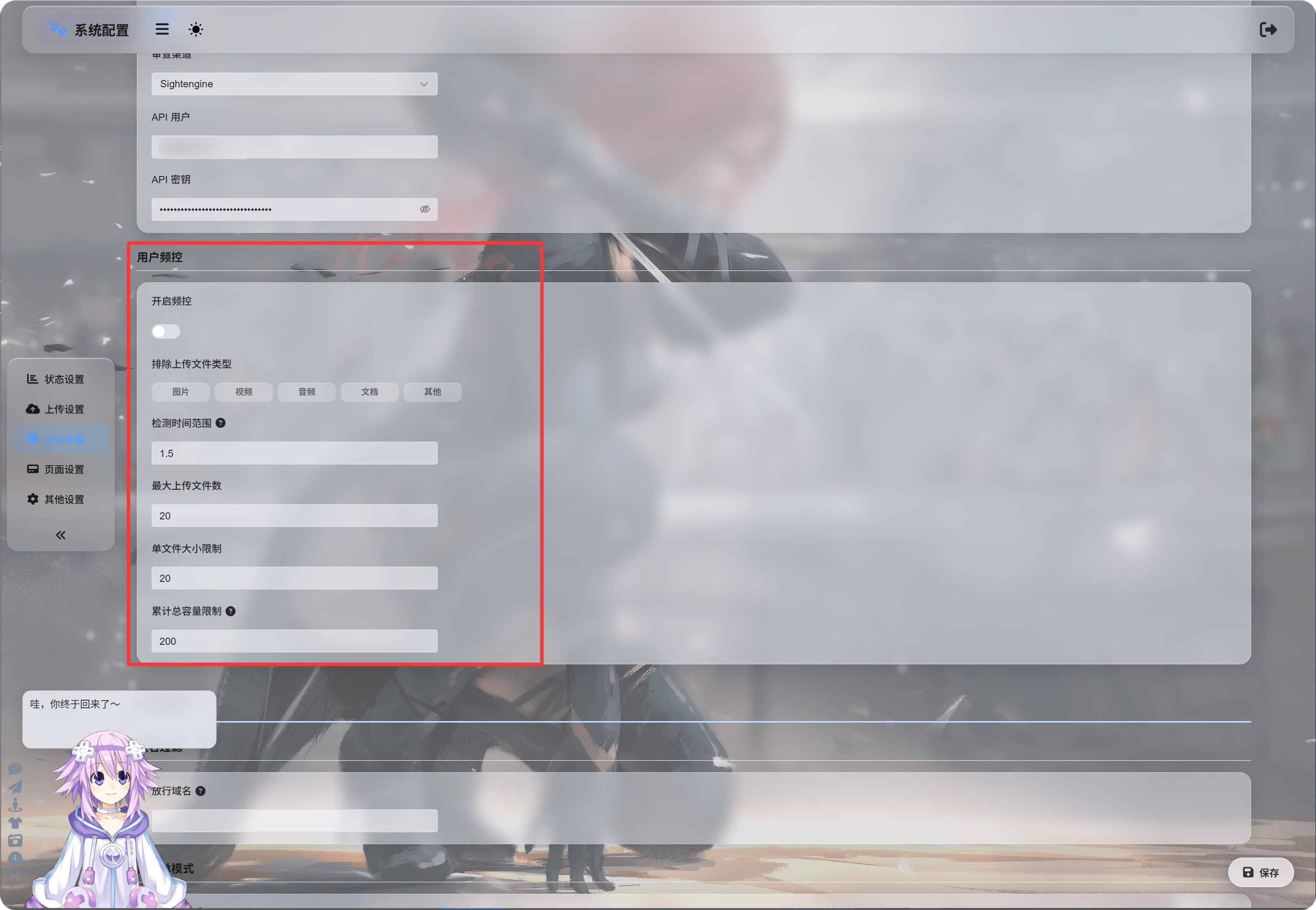
အကြိမ်နှုန်း ကန့်သတ်ချက်များ ဖွင့်ခြင်း
အကြိမ်နှုန်း ကန့်သတ်ချက်များ ဖွင့်ရန် ကို ဖွင့်ပြီးနောက် ImgHost သည် uploader IP address အပေါ် မူတည်၍ လတ်တလော uploads များကို စောင့်ကြည့်သည်။
မူလတန်ဖိုးများ:
| သတ်မှတ်ချက် | မူလတန်ဖိုး | ဖော်ပြချက် |
|---|---|---|
| စစ်ဆေးချိန် ပြတင်းပေါက် | 1.5 hours | upload records များကို အတိတ်သို့ မည်မျှ အထိ ရေတွက်မည်။ |
| အများဆုံး ဖိုင်အရေအတွက် | 20 | စစ်ဆေးချိန် ပြတင်းပေါက်အတွင်း ခွင့်ပြုသော အများဆုံး ဖိုင်အရေအတွက်။ |
| တစ်ဖိုင် အရွယ်အစား ကန့်သတ်ချက် | 20 MB | တစ်ဖိုင်၏ အများဆုံး အရွယ်အစား။ |
| စုစုပေါင်း upload အရွယ်အစား ကန့်သတ်ချက် | 200 MB | စစ်ဆေးချိန် ပြတင်းပေါက်အတွင်း စုစုပေါင်း upload အရွယ်အစား ကန့်သတ်ချက်။ |
ဥပမာ 1.5 hours window၊ 20 files၊ တစ်ဖိုင် 20 MB နှင့် စုစုပေါင်း 200 MB ဖြစ်ပါက IP တူမှ uploads များသည် သတ်မှတ်ထားသော limit တစ်ခုခု ကျော်လွန်သည်နှင့် ပိတ်ဆို့ခံရမည်။
ဖိုင်အမျိုးအစားများ ဖယ်ထုတ်ခြင်း
ဖယ်ထုတ်ထားသော upload file types သည် ရွေးထားသော ဖိုင်အမျိုးအစားများကို ပုံမှန် အသုံးပြုသူများ သို့မဟုတ် ဧည့်သည်များ အပ်လုဒ် မလုပ်နိုင်အောင် ပိတ်ဆို့သည်။
အသုံးပြုနိုင်သော အမျိုးအစားများ:
| အမျိုးအစား | ဖော်ပြချက် |
|---|---|
| ပုံများ | jpg, png, webp, gif နှင့် ဆင်တူသော image files |
| ဗီဒီယိုများ | mp4, webm, mov နှင့် ဆင်တူသော video files |
| အသံ | mp3, flac, wav နှင့် ဆင်တူသော audio files |
| စာရွက်စာတမ်းများ | pdf, txt, md, docx နှင့် ဆင်တူသော document files |
| အခြား | အထက်ပါ အမျိုးအစားများမှ အပြင်ဘက် ဖိုင်များ၊ ဥပမာ zip, rar, exe, apk |
မူလအားဖြင့် မည်သည့်အမျိုးအစားမျှ မရွေးထားပါ။ ဆိုလိုသည်မှာ ခွင့်ပြုထားသည်။
အမျိုးအစားတစ်ခုကို နှိပ်ပါက ၎င်းကို highlight လုပ်ပြီး ထိုအမျိုးအစားကို ပိတ်ဆို့ထားကြောင်း ဆိုလိုသည်။
အခြား ကို ရွေးပါက zip သို့မဟုတ် rar files များကို အပ်လုဒ် လုပ်သော ဧည့်သည်များ ပိတ်ဆို့ခံရပြီး ထိုဖိုင်အမျိုးအစားကို မပံ့ပိုးကြောင်း အသိပေးခံရမည်။
ပိတ်ဆို့ မက်ဆေ့ချ်များ
ကန့်သတ်ချက် trigger ဖြစ်သောအခါ အသုံးပြုသူများသည် သက်ဆိုင်ရာ မက်ဆေ့ချ်ကို မြင်ရမည်။
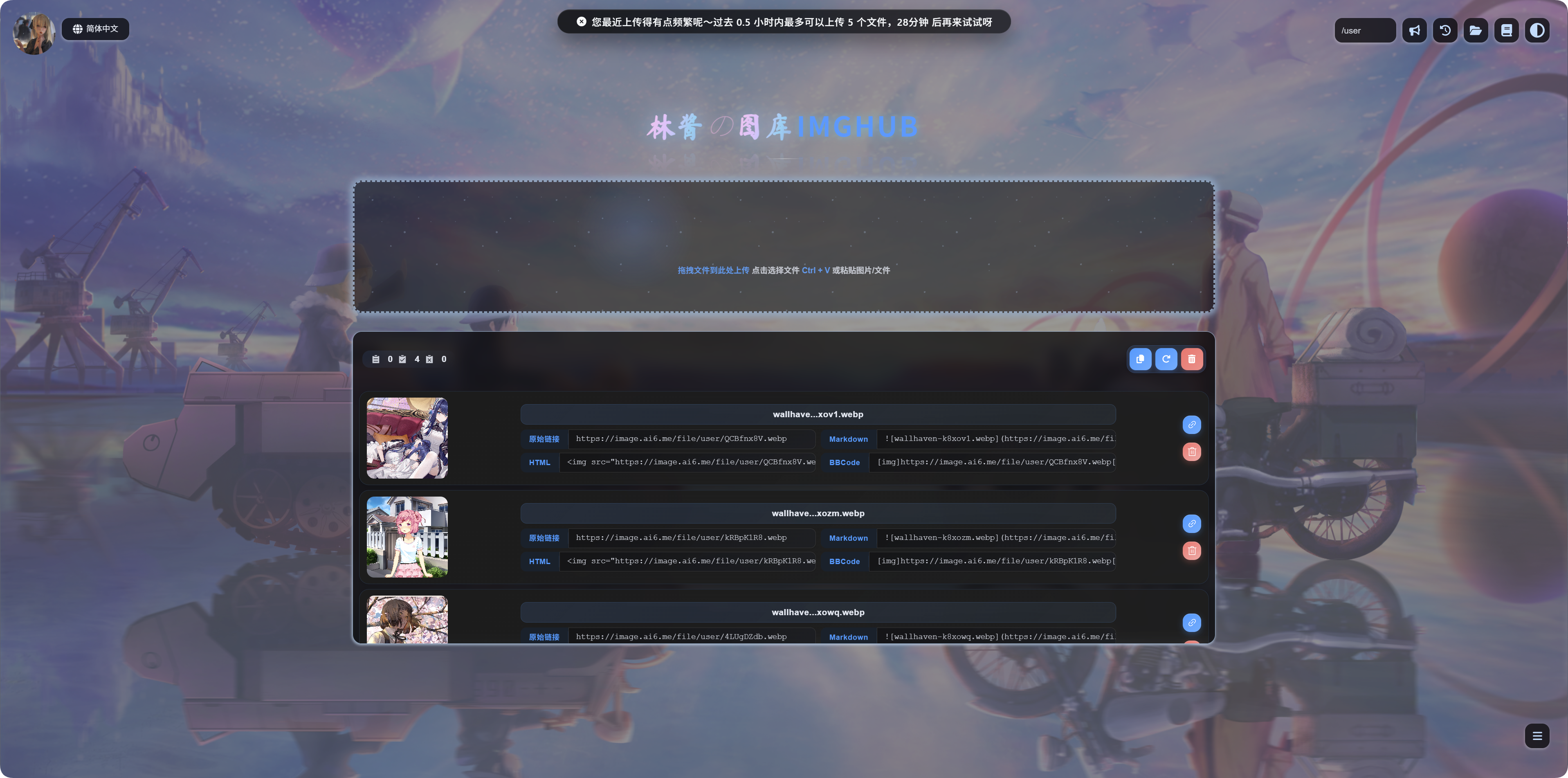
| အခြေအနေ | မက်ဆေ့ချ် အဓိပ္ပါယ် |
|---|---|
| တစ်ဖိုင် အလွန်ကြီးခြင်း | ဖိုင်အလွန်ကြီးပြီး upload မလုပ်မီ compress လုပ်သင့်သည်။ |
| ဖိုင်အမျိုးအစား ပိတ်ဆို့ထားခြင်း | ဤဖိုင်အမျိုးအစားကို မပံ့ပိုးပါ။ ထိုဖိုင်ကို ဖယ်ရှားပြီး ထပ်စမ်းပါ။ |
| Uploads အလွန် မကြာခဏ ဖြစ်ခြင်း | လတ်တလော uploads များ အလွန် မကြာခဏ ဖြစ်ပြီး retry time ကို ပြသသည်။ |
| စုစုပေါင်း အရွယ်အစား အလွန်မြင့်ခြင်း | လတ်တလော စုစုပေါင်း upload size အလွန်မြင့်ပြီး retry time ကို ပြသသည်။ |
မည်သည့်အချိန်တွင် ဖွင့်သင့်သလဲ
သင့် ပင်မစာမျက်နှာ upload ကို အများပြည်သူ ဝင်ရောက်နိုင်ပါက အသုံးပြုသူ အကြိမ်နှုန်း ကန့်သတ်ချက်များကို ဖွင့်ပါ။
အများဆုံး အကြောင်းရင်းများ:
- script ဖြင့် bulk uploads များကို စိုးရိမ်ခြင်း။
- ဧည့်သည်များ၏ large uploads များကို ကန့်သတ်လိုခြင်း။
- ပုံများသာ အပ်လုဒ် လုပ်စေလိုပြီး archives သို့မဟုတ် installers မဟုတ်စေလိုခြင်း။
- အများပြည်သူ အပ်လုဒ်ကို ဆက်လက် ရရှိနိုင်စေပြီး resource usage ကို ထိန်းချုပ်လိုခြင်း။
Site ကို သင်တစ်ဦးတည်း အသုံးပြုပါက သို့မဟုတ် စီမံခန့်ခွဲသူများသာ upload လုပ်နိုင်ပါက disabled အတိုင်း ထားနိုင်သည်။