pCloud ချန်နယ် ထည့်သွင်းခြင်း
အသင့်တော်ဆုံး အခြေအနေ
- သင့်တွင် pCloud အကောင့်ရှိပြီး ImgHost ကို pCloud ထဲတွင် ပုံများသိမ်းစေလိုပါက။
- pCloud အကောင့်အီးမေးလ် နှင့် စကားဝှက် ကို channel credential အဖြစ် အသုံးပြုရခြင်းကို လက်ခံနိုင်ပါက။
ဦးစွာ လိုအပ်သည့်အရာများ
| လိုအပ်ချက် | လိုအပ်ရသည့်အကြောင်းရင်း |
|---|---|
| pCloud အကောင့်အီးမေးလ် | pCloud API သို့ sign in ဝင်ရန် အသုံးပြုသည် |
| pCloud စကားဝှက် | pCloud API သို့ sign in ဝင်ရန် အသုံးပြုသည် |
| API host | မူရင်း သည် api.pcloud.com ဖြစ်သည်။ EU account များသည် eapi.pcloud.com ကိုအသုံးပြုနိုင်သည်။ |
| သိုလှောင်မှု ဖိုင်တွဲ | ဖိုင်များသိမ်းဆည်းမည့်နေရာ။ မူရင်း သည် imgbed ဖြစ်သည်။ |
ထည့်သွင်းမည့်နေရာ
- စနစ် ဆက်တင်များ ကိုဖွင့်ပါ။
- အပ်လုဒ် ဆက်တင်များ ကိုဖွင့်ပါ။
- ညာဘက်အပေါ်ထောင့်ရှိ
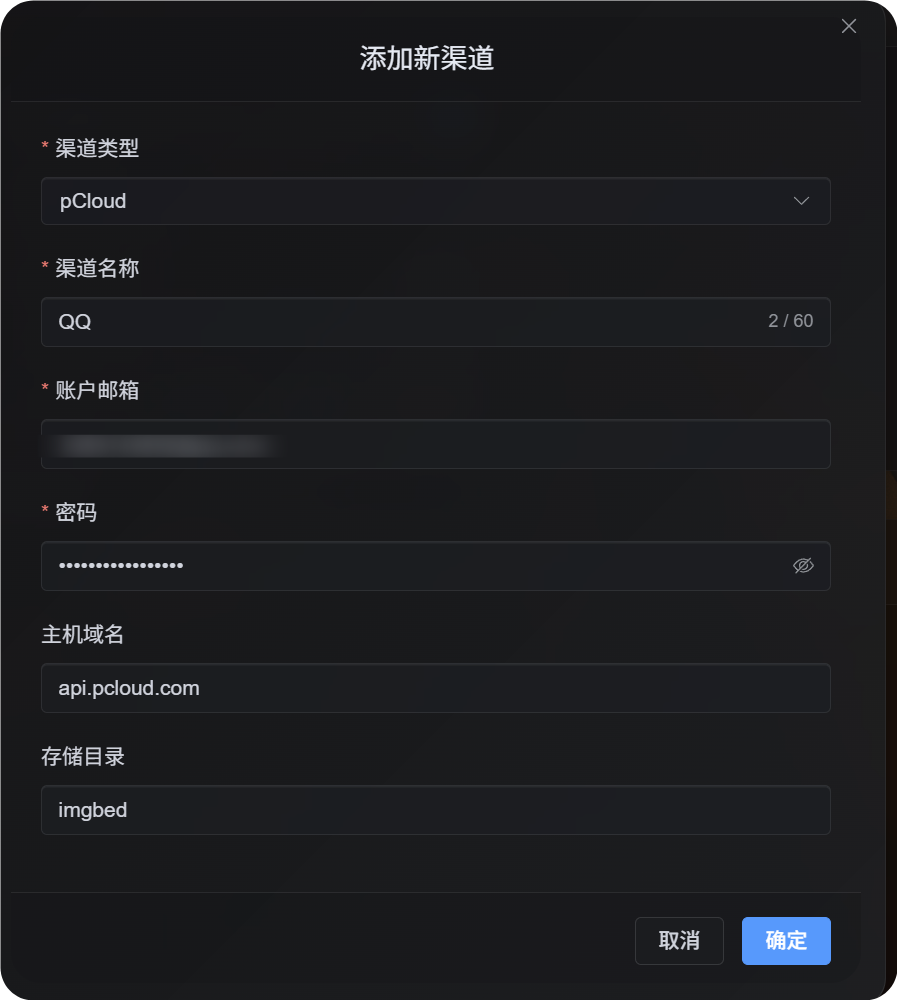
Add Channelကိုနှိပ်ပါ။ pCloudကိုရွေးပါ။
အကွက် ရည်ညွှန်းချက်
| အကွက် | ရည်ရွယ်ချက် | လိုအပ်မှု |
|---|---|---|
| ချန်နယ်အမည် | ဤ pCloud ချန်နယ်ကို ခွဲခြားသိနိုင်စေသည်။ ဥပမာ Personal pCloud | ဟုတ်သည် |
| အကောင့်အီးမေးလ် | သင်၏ pCloud login email | ဟုတ်သည် |
| စကားဝှက် | သင်၏ pCloud စကားဝှက် | ဟုတ်သည် |
| API host | pCloud API host။ မူရင်း သည် api.pcloud.com ဖြစ်သည်။ | မဟုတ်ပါ |
| သိုလှောင်မှု ဖိုင်တွဲ | ဖိုင်များသိမ်းဆည်းရန် အသုံးပြုသော directory။ မူရင်း သည် imgbed ဖြစ်သည်။ | မဟုတ်ပါ |
သင်၏ account region အပေါ်မူတည်၍ API host ကိုရွေးပါ။
| Account Region | API Host |
|---|---|
| မူရင်း / US | api.pcloud.com |
| Europe | eapi.pcloud.com |
ပြင်ဆင်မှု အဆင့်များ
- အပ်လုဒ် ဆက်တင်များ ကိုဖွင့်ပါ။
Add Channelကိုနှိပ်ပါ။pCloudကိုရွေးပါ။- သင်မှတ်မိနိုင်သော ချန်နယ်အမည် ကိုထည့်ပါ။
- သင်၏ pCloud အကောင့်အီးမေးလ် ကိုထည့်ပါ။
- သင်၏ pCloud စကားဝှက် ကိုထည့်ပါ။
- API host ကို
api.pcloud.comအဖြစ်ထားပါ၊ သို့မဟုတ် EU account များအတွက်eapi.pcloud.comကိုအသုံးပြုပါ။ - သိုလှောင်မှု ဖိုင်တွဲ ကို
imgbedအဖြစ်ထားပါ၊ သို့မဟုတ် သင်နှစ်သက်သော folder သို့ပြောင်းပါ။ - Channel ကိုသိမ်းပါ။
အတည်ပြုနည်း
| စစ်ဆေးချက် | မျှော်မှန်းရလဒ် |
|---|---|
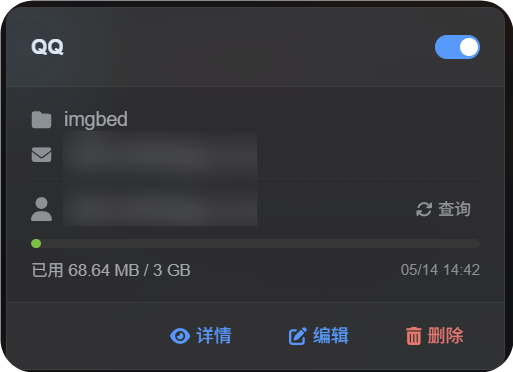
| ချန်နယ်ကတ် | သိမ်းပြီးနောက် pCloud ချန်နယ်ကတ် ပေါ်လာသည်။ |
| ချန်နယ် switch | Card ပေါ်ရှိ switch သည် enable ဖြစ်နေသည်။ |
| Email display | Card တွင် ချိတ်ဆက်ထားသော pCloud email ကိုပြသည်။ |
| Quota query | Query အောင်မြင်ပြီးနောက် used capacity နှင့် total capacity ကိုပြသည်။ |
| အပ်လုဒ် စမ်းသပ်မှု | စမ်းသပ်ပုံသည် ပြင်ဆင်ထားသော pCloud storage directory ထဲတွင် ပေါ်လာသည်။ |
ပြဿနာဖြေရှင်းခြင်း
OAuth2 ကို ဘာကြောင့် မသုံးသနည်း။
pCloud OAuth2 သည် မူရင်းအားဖြင့် ကိုယ်တိုင်ဖွင့်နိုင်သော ဝန်ဆောင်မှုမဟုတ်ပါ။ ၎င်းကို ဖွင့်လိုပါက pCloud သို့ အီးမေးလ်ပို့ပြီး တောင်းဆိုရန် လိုအပ်သည်။
လက်ရှိ pCloud OAuth2 flow သည် ImgHost လိုအပ်သော short-lived upload link workflow ကိုလည်း မပံ့ပိုးပါ။ ထို့ကြောင့် ဤချန်နယ်သည် အကောင့်အီးမေးလ် နှင့် စကားဝှက် login ကို အသုံးပြုသည်။
ဘယ် API Host ကို အသုံးပြုသင့်သနည်း။
မူရင်း:
text
api.pcloud.comEU account များအတွက်-
text
eapi.pcloud.comအမြန် Flow
text
Prepare your pCloud email and password
-> Open Upload Settings
-> Add Channel
-> Choose pCloud
-> Fill channel name / email / password
-> Keep API host as api.pcloud.com unless your account is in Europe
-> Keep storage directory as imgbed unless you need another folder
-> Save
-> Query quota
-> Upload a test image