အလိုအလျောက် တဂ်တပ်ခြင်း
အလိုအလျောက် တဂ်တပ်ခြင်းကို အောက်ပါနေရာတွင် သတ်မှတ်နိုင်သည်။
text
System Settings -> Other Settings -> Auto Taggingဤလုပ်ဆောင်ချက်သည် ပုံတဂ်များကို အလိုအလျောက် ထုတ်ပေးသည်။ ထိုတဂ်များသည် ရှာဖွေခြင်း၊ ကျပန်းပုံ စစ်ထုတ်ခြင်း၊ အများပြည်သူ ဂယ်လာရီ စစ်ထုတ်ခြင်းနှင့် အသက်အဆင့် သတ်မှတ်ချက်အခြေခံ အသုံးပြုခွင့်ထိန်းချုပ်မှုများအတွက် အသုံးဝင်သည်။
အလိုအလျောက် တဂ်တပ်ခြင်းဖြင့် လုပ်နိုင်သောအရာများ
| လုပ်ဆောင်ချက် | ဖော်ပြချက် |
|---|---|
| အကြောင်းအရာတဂ်များ ထုတ်ပေးခြင်း | လူများ၊ မြင်ကွင်းများ၊ အရာဝတ္ထုများ၊ အနုပညာစတိုင်နှင့် ဆင်တူသော မြင်ကွင်းအကြောင်းအရာများအတွက် တဂ်များကို ထည့်ပေးသည်။ |
| ဇာတ်ကောင်တဂ်များ ထုတ်ပေးခြင်း | အန်နီမေးပုံများနှင့် ပန်းချီပုံများအတွက် အသုံးဝင်သည်။ |
| ဦးတည်ချက်တဂ်များ ထည့်ခြင်း | landscape၊ portrait သို့မဟုတ် square ကို ထည့်ပေးသည်။ |
| ပုံအဆင့်သတ်မှတ်ချက် ထည့်ခြင်း | သာမန်၊ ထိလွယ်ရှလွယ်၊ သံသယဖြစ်ဖွယ် သို့မဟုတ် လိင်ပိုင်းဆိုင်ရာ ထင်ရှားသော အကြောင်းအရာများအတွက် G/S/Q/E အဆင့်သတ်မှတ်ချက်ရလဒ်များကို သိမ်းဆည်းသည်။ |
| အပ်လုဒ်တင်ချိန်တွင် အလိုအလျောက် တဂ်တပ်ခြင်း | အသစ်တင်ထားသောပုံများသည် တဂ်တပ်ခြင်း လုပ်ငန်းစဉ်သို့ အလိုအလျောက် ဝင်ရောက်သည်။ |
| အစုလိုက် တဂ်တပ်ခြင်း | ဖိုင်တွဲအားလုံး သို့မဟုတ် ရွေးထားသောဖိုင်တွဲများရှိ ပုံဟောင်းများတွင် တဂ်များ ထည့်ပေးသည်။ |
ပထမဆုံး လိုအပ်သောအရာ
ဝင်ရောက်အသုံးပြုနိုင်သော Hugging Face Space URL အနည်းဆုံးတစ်ခုကို ပြင်ဆင်ထားပါ။
အကြံပြုသည့်နည်းလမ်းမှာ SmilingWolf ၏ wd-tagger Space ကို သင့် Hugging Face အကောင့်ထဲသို့ မိတ္တူပွားယူခြင်း ဖြစ်သည်။
text
https://huggingface.co/spaces/SmilingWolf/wd-taggerအများသုံး Space ကို ယာယီအသုံးပြုနိုင်သော်လည်း အများသုံး Spaces များကို အသုံးပြုသူများစွာ မျှဝေသုံးစွဲကြသောကြောင့် စောင့်တန်းရနိုင်သည်၊ နှေးနိုင်သည် သို့မဟုတ် မရနိုင်သည့်အချိန်များ ရှိနိုင်သည်။ သင့်အကောင့်အောက်တွင် မိတ္တူပွားထားသော Space သည် ရေရှည် အလိုအလျောက် တဂ်တပ်ခြင်းအတွက် ပိုမိုတည်ငြိမ်သည်။
SmilingWolf ၏ Space ကို မိတ္တူပွားခြင်း
- Hugging Face သို့ ဝင်ရောက်ပါ။
https://huggingface.co/spaces/SmilingWolf/wd-taggerကို ဖွင့်ပါ။
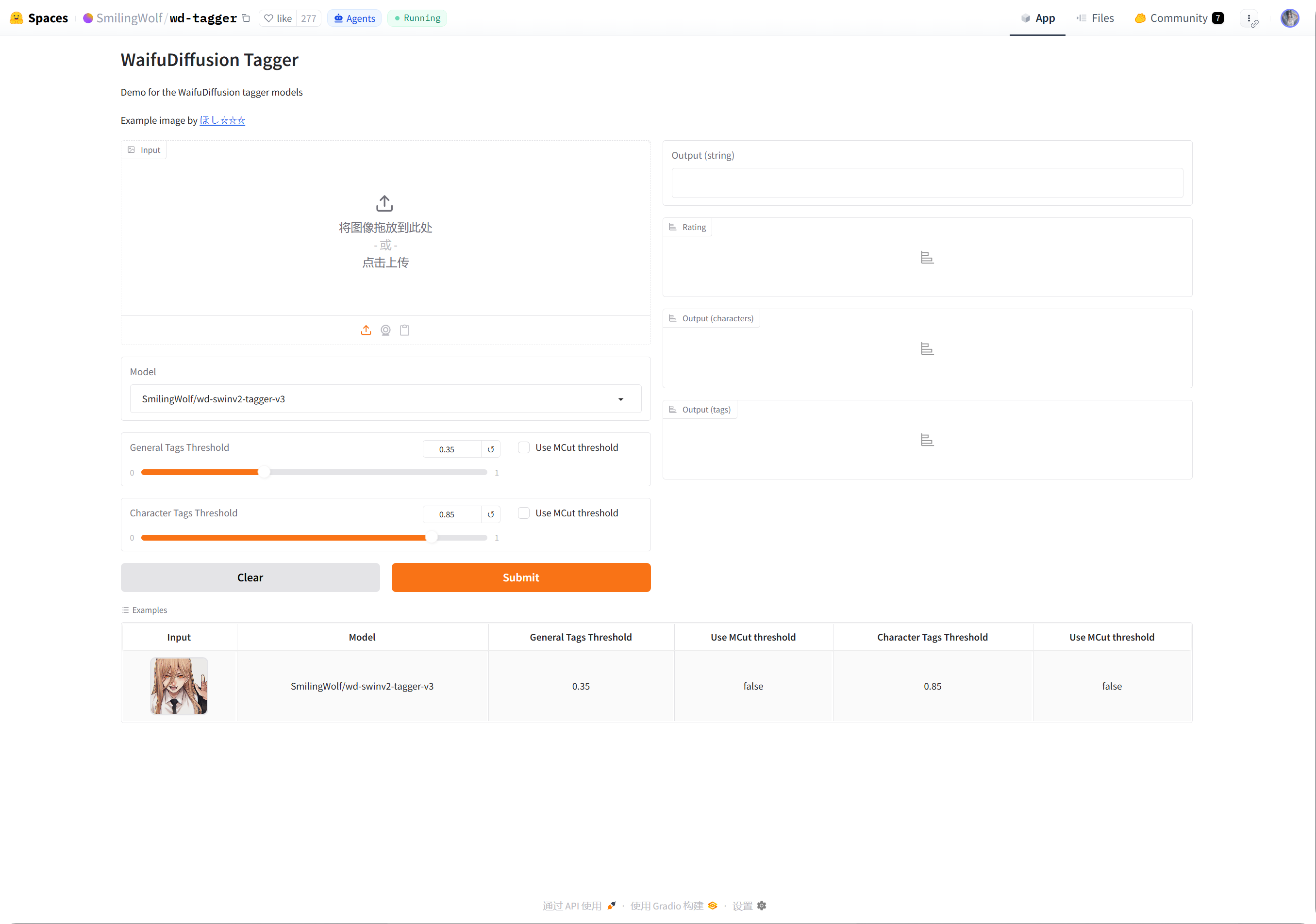
- ညာဘက်အပေါ်ထောင့်ရှိ အစက်သုံးစက် မီနူးကို နှိပ်ပါ။
Duplicate this Spaceကို ရွေးပါ။- မူလ Space အမည်ကို ထားနိုင်သလို
wd-taggerကဲ့သို့ ကိုယ်ပိုင်အမည်ကိုလည်း ရွေးနိုင်သည်။ - မြင်နိုင်မှုကို
Publicအဖြစ် သတ်မှတ်ပါ။ Public Spaces များကို ImgHost မှ ခေါ်သုံးရန် ပိုလွယ်သည်။ - အစပိုင်းတွင် မူလ အခမဲ့ ဟာ့ဒ်ဝဲကိုသာ ထားပါ။ စောင့်တန်းမှု သိသာလာမှသာ နောက်ပိုင်းတွင် အဆင့်မြှင့်ပါ။
- Space ကို ဖန်တီးပြီး တည်ဆောက်မှု ပြီးဆုံးသည်အထိ စောင့်ပါ။
တည်ဆောက်မှု ပြီးဆုံးပြီးနောက် သင့် Space စာမျက်နှာကို ဖွင့်ပါ။ URL သည် ပုံမှန်အားဖြင့် အောက်ပါပုံစံဖြစ်သည်။
text
https://huggingface.co/spaces/your-name/wd-taggerဘရောက်ဇာ URL ကို ကူးယူပြီး ImgHost ၏ Space URLs ထဲသို့ ထည့်ပါ။
Space URL အများအပြား ဖြည့်ခြင်း
တစ်ကြောင်းလျှင် Space URL တစ်ခုစီ ထည့်ပါ။
ဥပမာများ:
| တန်ဖိုး | ဖော်ပြချက် |
|---|---|
https://huggingface.co/spaces/SmilingWolf/wd-tagger | SmilingWolf ၏ အများသုံး Space။ ယာယီစမ်းသပ်ရန် သင့်တော်သည်။ |
https://huggingface.co/spaces/lintonxue00/wd-tagger | ကူးယူထားသော Space စာမျက်နှာ URL။ |
https://huggingface.co/spaces/your-name/wd-tagger | သင့်ကိုယ်ပိုင် မိတ္တူပွားထားသော Space စာမျက်နှာ URL။ |
URL အများအပြား ထည့်နိုင်သည်။ ImgHost သည် Spaces အများအပြားကို အတူတကွ အသုံးပြုသောကြောင့် မြန်နှုန်း တိုးတက်နိုင်သည်။
Space တစ်ခု ယာယီမရနိုင်ပါက အခြား Spaces များသည် ဆက်လက်လုပ်ဆောင်နိုင်သည်။
ဆက်တင်များ
| ရွေးချယ်စရာ | အကြံပြုချက် |
|---|---|
Space URLs | သင်ပြင်ဆင်ထားသော Space URLs များကို ထည့်ပါ။ အနည်းဆုံးတစ်ခု အသုံးပြုပါ။ |
| ပစ်မှတ်ဖိုင်တွဲ | ဖိုင်တွဲအားလုံးအတွက် အလွတ်ထားပါ။ သီးခြား ဖိုင်တွဲတစ်ခုကိုသာ လုပ်ဆောင်လိုသည့်အခါမှသာ ဖိုင်တွဲကို ရွေးပါ။ |
| အသိအမှတ်ပြုမော်ဒယ် | မူလအတိုင်း wd-swinv2-tagger-v3 ကို ထားပါ။ |
| အထွေထွေတဂ် ကန့်သတ်တန်ဖိုး | မူလတန်ဖိုးသည် ပုံအများစုအတွက် သင့်တော်သည်။ တန်ဖိုးနိမ့်လျှင် တဂ်ပိုများပြီး တန်ဖိုးမြင့်လျှင် တဂ်ပိုနည်းသည်။ |
| ဇာတ်ကောင်တဂ် ကန့်သတ်တန်ဖိုး | မူလတန်ဖိုးသည် သတိထားသောတန်ဖိုးဖြစ်ပြီး မှားယွင်းသော ဇာတ်ကောင်တဂ်များကို ရှောင်ရှားရန် ကူညီသည်။ |
MCut အလိုအလျောက် ကန့်သတ်တန်ဖိုး | အစတွင် ပိတ်ထားပါ။ မော်ဒယ်ကို တဂ်အရေအတွက် အလိုအလျောက် ဆုံးဖြတ်စေလိုသည့်အခါ ဖွင့်ပါ။ |
| အပ်လုဒ်တင်ချိန်တွင် အလိုအလျောက် တဂ်တပ်ခြင်း | အသစ်တင်သောပုံများကို အလိုအလျောက် တဂ်ရစေလိုပါက ဖွင့်ပါ။ |
| တဂ်တပ်ခြင်း စတင်ရန် | ပုံဟောင်းများကို လက်ဖြင့် အစုလိုက် တဂ်တပ်သည်။ |
အကြံပြုထားသော စတင်တန်ဖိုးများ
| ရွေးချယ်စရာ | အကြံပြုတန်ဖိုး |
|---|---|
| အသိအမှတ်ပြုမော်ဒယ် | wd-swinv2-tagger-v3 |
| အထွေထွေတဂ် ကန့်သတ်တန်ဖိုး | 0.35 |
| ဇာတ်ကောင်တဂ် ကန့်သတ်တန်ဖိုး | 0.85 |
MCut | အစတွင် ပိတ် |
| အပ်လုဒ်တင်ချိန်တွင် အလိုအလျောက် တဂ်တပ်ခြင်း | လိုအပ်ပါက ဖွင့်ပါ |
တဂ်များ များလွန်းပါက အထွေထွေ ကန့်သတ်တန်ဖိုးကို အနည်းငယ် မြှင့်ပါ။
တဂ်များ နည်းလွန်းပါက အထွေထွေ ကန့်သတ်တန်ဖိုးကို အနည်းငယ် လျှော့ပါ။
အစုလိုက် တဂ်တပ်ခြင်း
Space URLsကို ဖြည့်ပါ။- ပစ်မှတ်ဖိုင်တွဲကို ရွေးပါ။
- တဂ်တပ်ခြင်း စတင်ရန် နှိပ်ပါ။
- တိုးတက်မှု ပြီးဆုံးသည်အထိ စောင့်ပါ။
ပစ်မှတ်ဖိုင်တွဲ အလွတ်ဖြစ်ပါက ImgHost သည် ဖိုင်တွဲအားလုံးကို လုပ်ဆောင်သည်။
အစုလိုက် တဂ်တပ်ခြင်းသည် ပုံဟောင်းများအတွက် အကောင်းဆုံးဖြစ်သည်။ ပုံအသစ်များအတွက် အပ်လုဒ်တင်ချိန်တွင် အလိုအလျောက် တဂ်တပ်ခြင်းကို ဖွင့်ထားပါက တစ်ခါတစ်ရံ လက်ဖြင့် ပြန်လုပ်ရန် မလိုပါ။
အပ်လုဒ်တင်ချိန်တွင် အလိုအလျောက် တဂ်တပ်ခြင်း
အပ်လုဒ်တင်ချိန်တွင် အလိုအလျောက် တဂ်တပ်ခြင်းကို ဖွင့်ပြီးနောက် အသစ်တင်သောပုံများသည် သတ်မှတ်ထားသော Space URLs ကို အလိုအလျောက် ခေါ်သုံးသည်။
ဤသည်မှာ ရေရှည်အသုံးပြုရန် သင့်တော်သည်။
သင့် Space သည် စောင့်တန်းနေပါက အပ်လုဒ်တင်ခြင်းကို အရင်ဆုံး ပြီးစေနိုင်ပြီး တဂ်တပ်ခြင်းကို နောက်မှ ဆက်လက်လုပ်ဆောင်နိုင်သည်။
မည်သည့်ပုံများကို လုပ်ဆောင်သနည်း
အလိုအလျောက် တဂ်တပ်ခြင်းသည် အဓိကအားဖြင့် ပုံဖိုင်များကို လုပ်ဆောင်သည်။
တဂ်၊ ဦးတည်ချက်၊ အဆင့်သတ်မှတ်ချက်၊ အကျယ်နှင့် အမြင့် ပြည့်စုံပြီးသား ပုံများကို မလိုအပ်သော Space ခေါ်ဆိုမှုများ မဖြစ်စေရန် ကျော်သွားသည်။
ဖြစ်နိုင်သည့်အခါ ImgHost သည် ပျောက်နေသောအချက်အလက်များကိုသာ ဖြည့်သည်။ ဥပမာ၊ ဦးတည်ချက်တစ်ခုတည်းသာ ပျောက်နေပါက အကြောင်းအရာတဂ်လုပ်ငန်းစဉ် အပြည့်အစုံကို မခေါ်ဘဲ ဦးတည်ချက်ကို ထည့်ရန် ကြိုးစားသည်။
မေးလေ့ရှိသော မေးခွန်းများ
ကိုယ်ပိုင် Space ကို ဘာကြောင့် မိတ္တူပွားသင့်သနည်း
အများသုံး Spaces များကို အသုံးပြုသူများစွာ မျှဝေသုံးစွဲကြသည်။ သင့်ကိုယ်ပိုင် မိတ္တူပွားထားသော Space သည် အဓိကအားဖြင့် သင့် ImgHost ဆိုက်ကသာ အသုံးပြုသောကြောင့် ပုံမှန်အားဖြင့် ပိုမြန်ပြီး ပိုယုံကြည်စိတ်ချရသည်။
Space သည် စတင်နေဆဲ ဖြစ်နေသည်
ပထမဆုံး ဖန်တီးပြီးနောက် သို့မဟုတ် ကြာမြင့်စွာ မသုံးဘဲထားပြီးနောက် Space စတင်ရန် အချိန်လိုနိုင်သည်။
အရင်ဆုံး သင့် Space စာမျက်နှာကို ဖွင့်ပါ။ ပုံတစ်ပုံကို ပုံမှန် အသိအမှတ်ပြုနိုင်ပြီဆိုပါက ImgHost သို့ ပြန်သွားပြီး တဂ်တပ်ခြင်းကို စတင်ပါ။
Space URL ကို ဘယ်လို ကူးယူမလဲ
သင့် Hugging Face Space စာမျက်နှာကို ဖွင့်ပြီး ဘရောက်ဇာ လိပ်စာကို ကူးယူပါ။
ဥပမာများ:
text
https://huggingface.co/spaces/lintonxue00/wd-tagger
https://huggingface.co/spaces/SmilingWolf/wd-tagger
Spaces အများအပြား ထည့်နိုင်သလား
ထည့်နိုင်သည်။ တစ်ကြောင်းလျှင် Space URL တစ်ခုစီ ထည့်ပါ။
Spaces အများအပြားသည် ပုံများကို အတူတကွ လုပ်ဆောင်ပြီး ပုံများများရှိသောအခါ အသုံးဝင်သည်။
တဂ်များ ဘာကြောင့် အင်္ဂလိပ်ဘာသာဖြစ်သနည်း
SmilingWolf မော်ဒယ်များသည် အင်္ဂလိပ်တဂ်များကို ထုတ်ပေးသည်။ ဤသည်မှာ မျှော်လင့်ထားသည့် အပြုအမူဖြစ်သည်။
တဂ်များကို အဓိကအားဖြင့် ရှာဖွေခြင်း၊ စစ်ထုတ်ခြင်း၊ ကျပန်းပုံ API နှင့် အများပြည်သူ ဂယ်လာရီ စစ်ထုတ်မှုများအတွက် အသုံးပြုသည်။
အဆင့်သတ်မှတ်ချက်တဂ်များကို ဘာအတွက် အသုံးပြုသနည်း
အဆင့်သတ်မှတ်ချက်ရလဒ်များသည် လုံခြုံရေး ဆက်တင်များထဲရှိ အသုံးပြုခွင့်မုဒ်နှင့်အတူ အလုပ်လုပ်သည်။
ဥပမာ၊ ဧည့်သည်အသုံးပြုခွင့်ကို အသက်အဆင့်သတ်မှတ်ချက်ဖြင့် ကန့်သတ်ထားပါက အများပြည်သူ ကြည့်ရှုခြင်းနှင့် ကျပန်းပုံ လုပ်ဆောင်ချက်များသည် ထိုစည်းမျဉ်းများအတိုင်း ပုံများကို စစ်ထုတ်သည်။
အမြန်လုပ်ငန်းစဉ်
text
Sign in to Hugging Face
-> Open SmilingWolf/wd-tagger
-> Duplicate this Space
-> Wait for the Space to build
-> Copy your Space URL
-> Fill Space URLs in ImgHost
-> Choose model and thresholds
-> Start tagging or enable auto-tag on upload