اتومات ټګ کول
اتومات ټګ کول له دې ځایه تنظیمېږي:
text
System Settings -> Other Settings -> Auto Taggingدا ځانګړنه د انځورونو لپاره ټګونه په اتومات ډول جوړوي. دغه ټګونه د لټون، د تصادفي انځور فلټر کولو، د عامه ګالرۍ فلټر کولو او د عمر درجې پر بنسټ د لاسرسي کنټرول لپاره ګټور دي.
اتومات ټګ کول څه کولی شي
| ځانګړنه | تشریح |
|---|---|
| د منځپانګې ټګونه جوړول | د خلکو، صحنو، شیانو، هنري سبک او ورته لیدیزې منځپانګې لپاره ټګونه زیاتوي. |
| د کرکټر ټګونه جوړول | د انیمې انځورونو او انځورګریو لپاره ګټور دي. |
| د جهت ټګونه زیاتول | landscape، portrait یا square زیاتوي. |
| د انځور درجه زیاتول | د عمومي، حساس، مشکوک یا څرګندې منځپانګې لپاره د G/S/Q/E درجه بندۍ پایلې خوندي کوي. |
| د اپلوډ پر مهال اتومات ټګ کول | نوي اپلوډ شوي انځورونه په اتومات ډول د ټګ کولو بهیر ته ننوځي. |
| ډله ییز ټګ کول | په ټولو فولډرونو یا ټاکل شوو فولډرونو کې زړو انځورونو ته ټګونه زیاتوي. |
لومړی څه ته اړتیا لرئ
لږ تر لږه یوه د لاسرسي وړ Hugging Face Space URL چمتو کړئ.
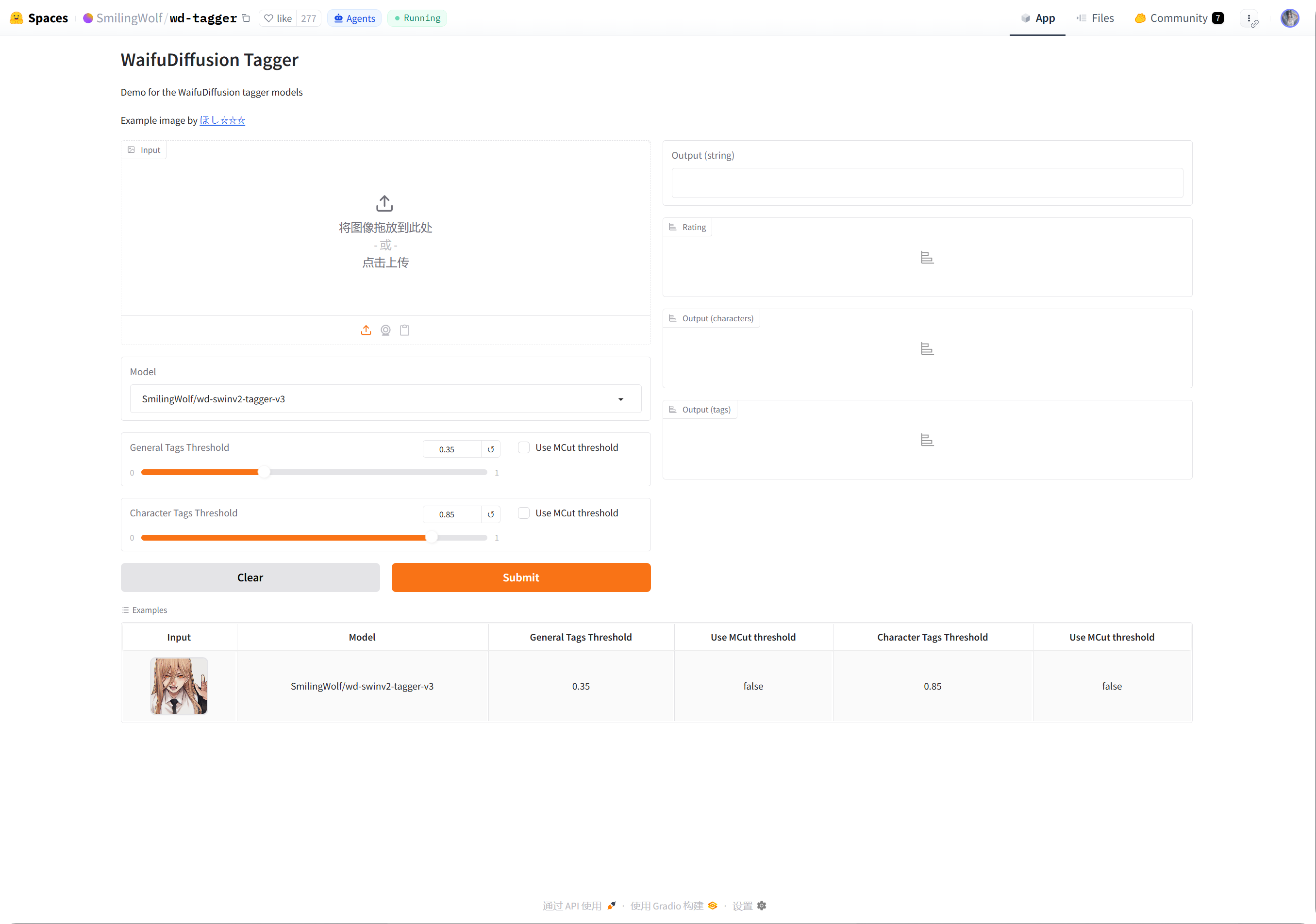
سپارښتنه دا ده چې د SmilingWolf wd-tagger Space خپل Hugging Face حساب ته نقل کړئ:
text
https://huggingface.co/spaces/SmilingWolf/wd-taggerتاسو کولای شئ د لنډمهالې ازموینې لپاره عامه Space وکاروئ، خو عامه Spaces د ډېرو کاروونکو له خوا شریک کارول کېږي او کېدای شي قطار، ورووالی یا لنډمهاله نه شتون ولري. په خپل حساب کې نقل شوی Space د اوږدمهاله اتومات ټګ کولو لپاره ډېر ثابت وي.
د SmilingWolf Space نقل کول
- Hugging Face ته ننوزئ.
https://huggingface.co/spaces/SmilingWolf/wd-taggerپرانیزئ.
- په ښي پورتني کونج کې د درې ټکو مېنو کلیک کړئ.
Duplicate this Spaceوټاکئ.- د Space اصلي نوم وساتئ یا خپل نوم وټاکئ، لکه
wd-tagger. - ښکاره والی پر
Publicوټاکئ. عامه Spaces د ImgHost له خوا د غږولو لپاره اسانه وي. - په پیل کې وړیا اصلي هارډویر وساتئ. یوازې هغه وخت یې لوړ کړئ چې قطار څرګند ستونزه شي.
- Space جوړ کړئ او د جوړېدو د بشپړېدو انتظار وکړئ.
د جوړېدو له بشپړېدو وروسته، خپل Space پاڼه پرانیزئ. URL عموما داسې ښکاري:
text
https://huggingface.co/spaces/your-name/wd-taggerد براوزر URL کاپي کړئ او د ImgHost په Space URLs کې یې ولګوئ.
څو Space URLs ډکول
په هره کرښه کې یو Space URL ولیکئ.
بېلګې:
| ارزښت | تشریح |
|---|---|
https://huggingface.co/spaces/SmilingWolf/wd-tagger | د SmilingWolf عامه Space. د لنډمهالې ازموینې لپاره مناسب دی. |
https://huggingface.co/spaces/lintonxue00/wd-tagger | د کاپي شوې Space پاڼې URL. |
https://huggingface.co/spaces/your-name/wd-tagger | ستاسو خپله نقل شوې Space پاڼه. |
تاسو کولای شئ څو URLونه دننه کړئ. ImgHost څو Spaces یو ځای کاروي، چې سرعت ښه کولای شي.
که یو Space موقتا موجود نه وي، نور Spaces پروسس ته دوام ورکولای شي.
تنظیمات
| اختیار | سپارښتنه |
|---|---|
Space URLs | هغه Space URLs ولیکئ چې چمتو کړي مو دي. لږ تر لږه یو وکاروئ. |
| هدف فولډر | د ټولو فولډرونو لپاره یې تش پرېږدئ. یوازې هغه وخت فولډر وټاکئ چې ځانګړی فولډر پروسس کول غواړئ. |
| د پېژندنې ماډل | په اصلي ډول wd-swinv2-tagger-v3 وساتئ. |
| د عمومي ټګ حد | اصلي ارزښت د ډېرو انځورونو لپاره کار کوي. ټیټ ارزښتونه ډېر ټګونه جوړوي؛ لوړ ارزښتونه لږ ټګونه جوړوي. |
| د کرکټر ټګ حد | اصلي ارزښت محافظه کار دی او د ناسمو کرکټر ټګونو په مخنیوي کې مرسته کوي. |
د MCut اتومات حد | په پیل کې یې بند پرېږدئ. هغه وخت یې فعال کړئ چې غواړئ ماډل د ټګونو شمېر په خپله وټاکي. |
| د اپلوډ پر مهال اتومات ټګ کول | فعال یې کړئ که نوي اپلوډ شوي انځورونه باید په اتومات ډول ټګونه واخلي. |
| ټګ کول پیلول | زاړه انځورونه په لاس ډله ییز ټګ کوي. |
سپارښتل شوي پیل ارزښتونه
| اختیار | سپارښتل شوی ارزښت |
|---|---|
| د پېژندنې ماډل | wd-swinv2-tagger-v3 |
| د عمومي ټګ حد | 0.35 |
| د کرکټر ټګ حد | 0.85 |
MCut | په پیل کې بند |
| د اپلوډ پر مهال اتومات ټګ کول | د اړتیا په صورت کې فعال کړئ |
که ټګونه ډېر وي، عمومي حد لږ لوړ کړئ.
که ټګونه کم وي، عمومي حد لږ ټیټ کړئ.
ډله ییز ټګ کول
Space URLsډک کړئ.- هدف فولډر وټاکئ.
- د ټګ کولو د پیل تڼۍ کلیک کړئ.
- د پرمختګ د بشپړېدو انتظار وکړئ.
که هدف فولډر تش وي، ImgHost ټول فولډرونه پروسس کوي.
ډله ییز ټګ کول د زړو انځورونو لپاره تر ټولو مناسب دي. د نویو انځورونو لپاره د اپلوډ پر مهال اتومات ټګ کول فعال کړئ، څو هر ځل یې په لاس ونه چلوئ.
د اپلوډ پر مهال اتومات ټګ کول
کله چې د اپلوډ پر مهال اتومات ټګ کول فعال شي، نوي اپلوډ شوي انځورونه په اتومات ډول تنظیم شوي Space URLs غږوي.
دا د اوږدمهاله کارونې لپاره مناسب دی.
که ستاسو Space په قطار کې وي، اپلوډ پخپله لومړی بشپړېدای شي او ټګ کول وروسته دوام کوي.
کوم انځورونه پروسس کېږي
اتومات ټګ کول تر ډېره د انځور فایلونه پروسس کوي.
هغه انځورونه چې بشپړ ټګونه، جهت، درجه، پلنوالی او لوړوالی لا لري، پرېښودل کېږي څو بې اړتیا Space غوښتنې ونه شي.
ImgHost د امکان تر حده یوازې ورک معلومات ډکوي. د بېلګې په توګه، که یوازې جهت ورک وي، هڅه کوي جهت زیات کړي پرته له دې چې د منځپانګې د بشپړ ټګ کولو بهیر وغږوي.
عامې پوښتنې
ولې خپل Space نقل کړم؟
عامه Spaces د ډېرو کاروونکو له خوا شریک کارول کېږي. ستاسو خپله نقل شوې Space تر ډېره ستاسو د ImgHost سایټ له خوا کارېږي، نو عموما چټکه او باوري وي.
Space تل د پیل په حال کې ښکاري
له لومړي جوړېدو وروسته، یا له اوږدې بې کارۍ وروسته، Space ښايي د پیل لپاره وخت وغواړي.
لومړی خپل Space پاڼه پرانیزئ. کله چې عادي ډول یو انځور وپېژني، ImgHost ته بېرته لاړ شئ او ټګ کول پیل کړئ.
Space URL څنګه کاپي کړم؟
خپله Hugging Face Space پاڼه پرانیزئ او د براوزر پته کاپي کړئ.
بېلګې:
text
https://huggingface.co/spaces/lintonxue00/wd-tagger
https://huggingface.co/spaces/SmilingWolf/wd-tagger
ایا څو Spaces زیاتولای شم؟
هو. په هره کرښه کې یو Space URL ولیکئ.
څو Spaces انځورونه یو ځای پروسس کوي او هغه وخت ګټور دي چې ډېر انځورونه لرئ.
ولې ټګونه په انګلیسي دي؟
د SmilingWolf ماډلونه انګلیسي ټګونه راوباسي. دا تمه کېدونکې خبره ده.
ټګونه تر ډېره د لټون، فلټر کولو، د تصادفي انځور API او د عامه ګالرۍ فلټرونو لپاره کارېږي.
د درجه بندۍ ټګونه د څه لپاره کارېږي؟
د درجه بندۍ پایلې د امنیتي تنظیماتو د لاسرسي حالت سره کار کوي.
د بېلګې په توګه، کله چې د لیدونکو لاسرسی د عمر درجې له مخې محدود وي، عامه کتنه او د تصادفي انځور ځانګړنې د هماغو قواعدو له مخې انځورونه فلټر کوي.
چټک بهیر
text
Sign in to Hugging Face
-> Open SmilingWolf/wd-tagger
-> Duplicate this Space
-> Wait for the Space to build
-> Copy your Space URL
-> Fill Space URLs in ImgHost
-> Choose model and thresholds
-> Start tagging or enable auto-tag on upload