د IP جغرافيايي ځای موندنه او د کاروونکو مدیریت
د IP جغرافيايي ځای موندنه د اپلوډ کوونکو ریکارډونو، د ننوتلو وسایلو او ورته ثبتونو کې IP پتې په نږدې ځایونو بدلوي.
له تنظیم وروسته، اداري پنل کولای شي د اپلوډ او لاسرسي سرچینې روښانه وښيي. د کاروونکو مدیریت تاسو ته دا هم اجازه درکوي چې د شکمنو IP پتو لپاره د اپلوډ لاسرسی بند یا بېرته فعال کړئ.
چېرته یې تنظیم کړئ
دا پرانیزئ:
text
System Settings -> Other Settings -> IP Geolocation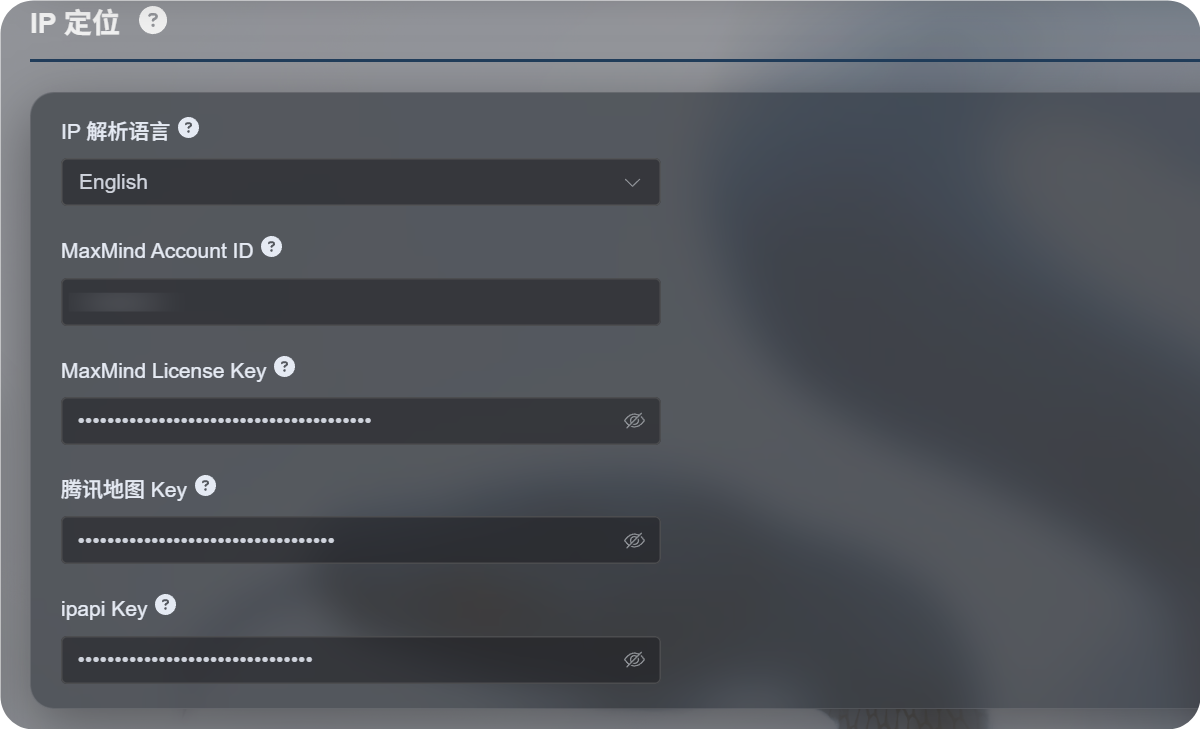
شته تنظیمات
نوی د IP جغرافيايي ځای موندنې بهیر د یوې نقشې خدمت پر ځای د څو سرچینو ملاتړ کوي.
| تنظیم | موخه |
|---|---|
| د IP جغرافيايي ځای موندنې ژبه | د ښودلو ژبه ټاکي، لکه انګلیسي، ساده شوې چینایي، جاپاني، فرانسوي او نورې. |
| MaxMind Account ID | د MaxMind GeoLite Web Service لپاره د MaxMind حساب ID. |
| MaxMind License Key | د MaxMind د جواز کیلي. |
| Tencent Map Key | د Tencent Location Service کیلي. د چینایي پتو او د چین اصلي خاورې IP پتو لپاره ګټوره ده. |
| ipapi Key | د APILayer ipapi کیلي. د څو ژبو IP جغرافيايي ځای موندنې ملاتړ کوي. |
یوازې هغه خدمتونه ډک کړئ چې اړتیا ورته لرئ. د هرې برخې تنظیمول اړین نه دي.
که هېڅ کیلي ورنه کړل شي، ImgHost بیا هم دننه جوړې وړیا سرچینې ازمويي، خو ثبات، د ژبې ملاتړ او دقت یې کېدای شي له هغه خدمت څخه کم وي چې تاسو یې خپله تنظیموئ.
سپارښتل شوي انتخابونه
که تاسو تر ډېره چینایي پتو ته اړتیا لرئ:
- د IP جغرافيايي ځای موندنې ژبه ساده شوې چینایي ته وټاکئ.
- Tencent Map Key تنظیم کړئ.
- که اړتیا وي MaxMind یا ipapi د بدیلو سرچینو په توګه زیات کړئ.
که تاسو تر ډېره انګلیسي یا څو ژبې پتې غواړئ:
- هغه ژبه وټاکئ چې اړتیا ورته لرئ.
- MaxMind Account ID او License Key تنظیم کړئ.
- که غوره څو ژبې پایلې غواړئ، ipapi Key زیات کړئ.
د MaxMind تنظیم
MaxMind دې ته اړتیا لري:
text
MaxMind Account ID
MaxMind License Key
حساب ID د MaxMind په کنټرول پاڼه کې ومومئ او License Key د License Keys پاڼې څخه جوړ کړئ.
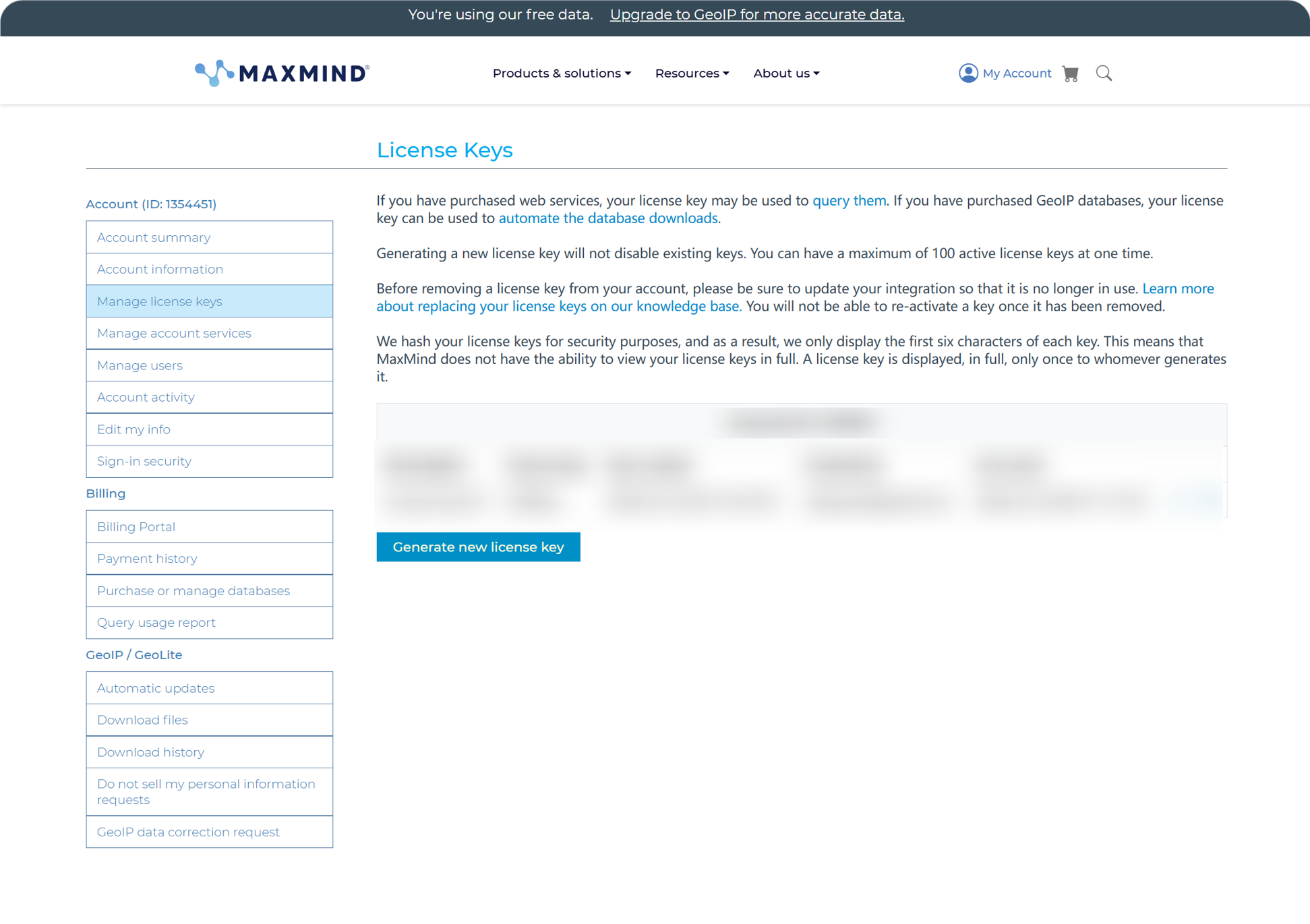
له جوړولو وروسته، Account ID او License Key په ImgHost کې ولګوئ او خوندي یې کړئ.
د MaxMind وړیا پلان د ورځني استعمال لپاره مناسب دی، خو د غوښتنو محدودیتونه لري. که د غوښتنو حد واوړي، ImgHost نورې شته سرچینې ازمويي.
د ipapi تنظیم
ipapi د APILayer API کیلي کاروي.
د ipapi کنټرول پاڼه پرانیزئ او هلته ښودل شوې API کیلي کاپي کړئ.
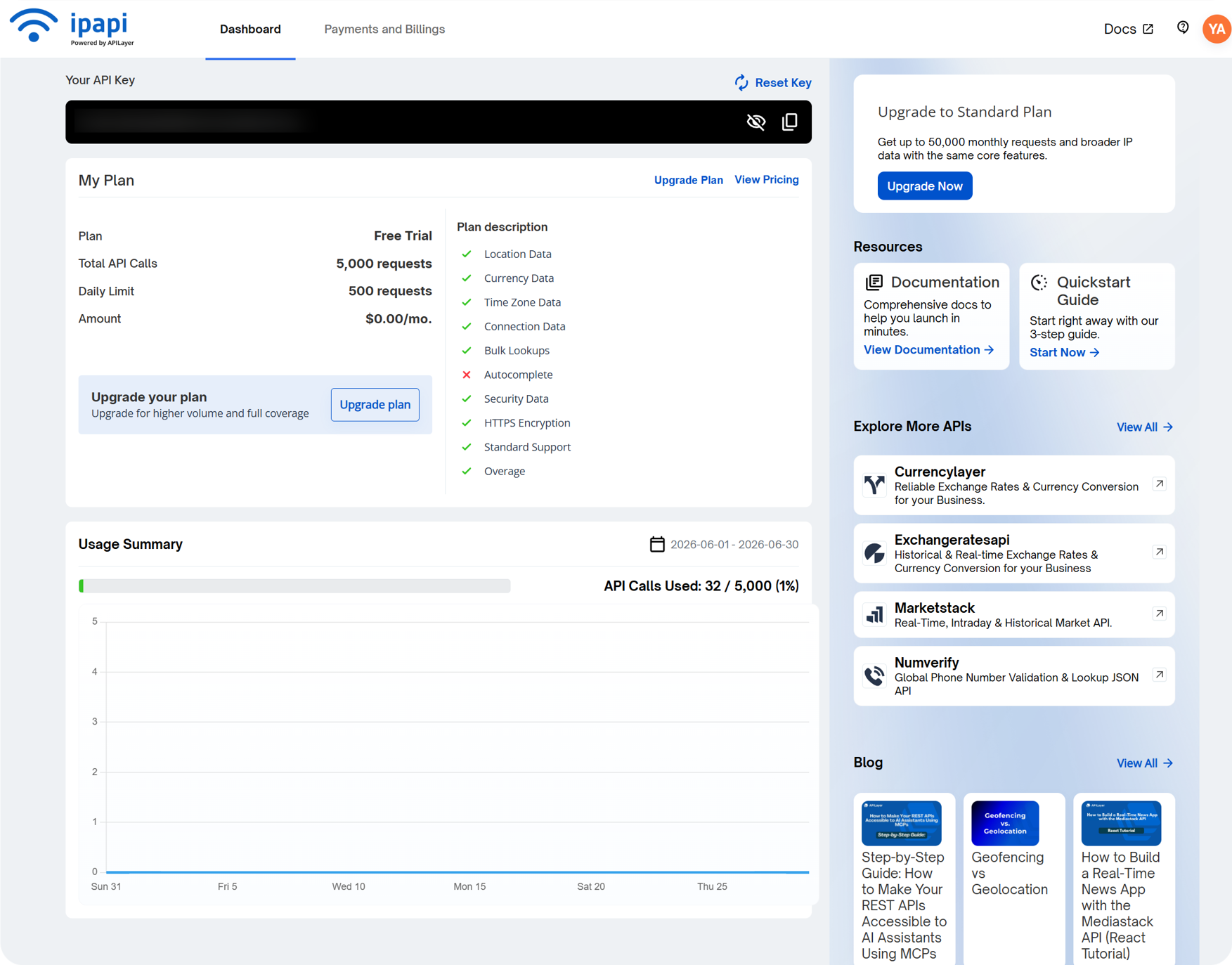
دا د ImgHost په ipapi Key ډګر کې ولګوئ او خوندي یې کړئ.
ipapi د څو ژبو IP جغرافيايي ځای موندنې ملاتړ کوي او هغه وخت ګټور دی چې غواړئ پتې په ټاکلې ژبه وښودل شي. وړیا پلان یې هم د غوښتنو محدودیتونه لري. که د غوښتنو حد ختم شي، ImgHost نورې شته سرچینې ازمويي.
د Tencent Map Key تنظیم
Tencent Map Key د چینایي پتو لپاره ګټوره ده، په ځانګړي ډول د چین اصلي خاورې IP پتو لپاره.
کله چې په Tencent Location Service کې کیلي جوړوئ، دا فعال کړئ:
text
WebServiceAPIله جوړېدو وروسته، کیلي په Tencent Map Key کې ولګوئ او خوندي یې کړئ.
که یوازې بنسټیزې چینایي IP جغرافيايي ځای موندنې ته اړتیا لرئ، Tencent Map Key د پیل لپاره بس دی.
د کاروونکو مدیریت کې څه وګورئ
د کاروونکو مدیریت د اداري پنل له سر څخه لاسرسی لري.
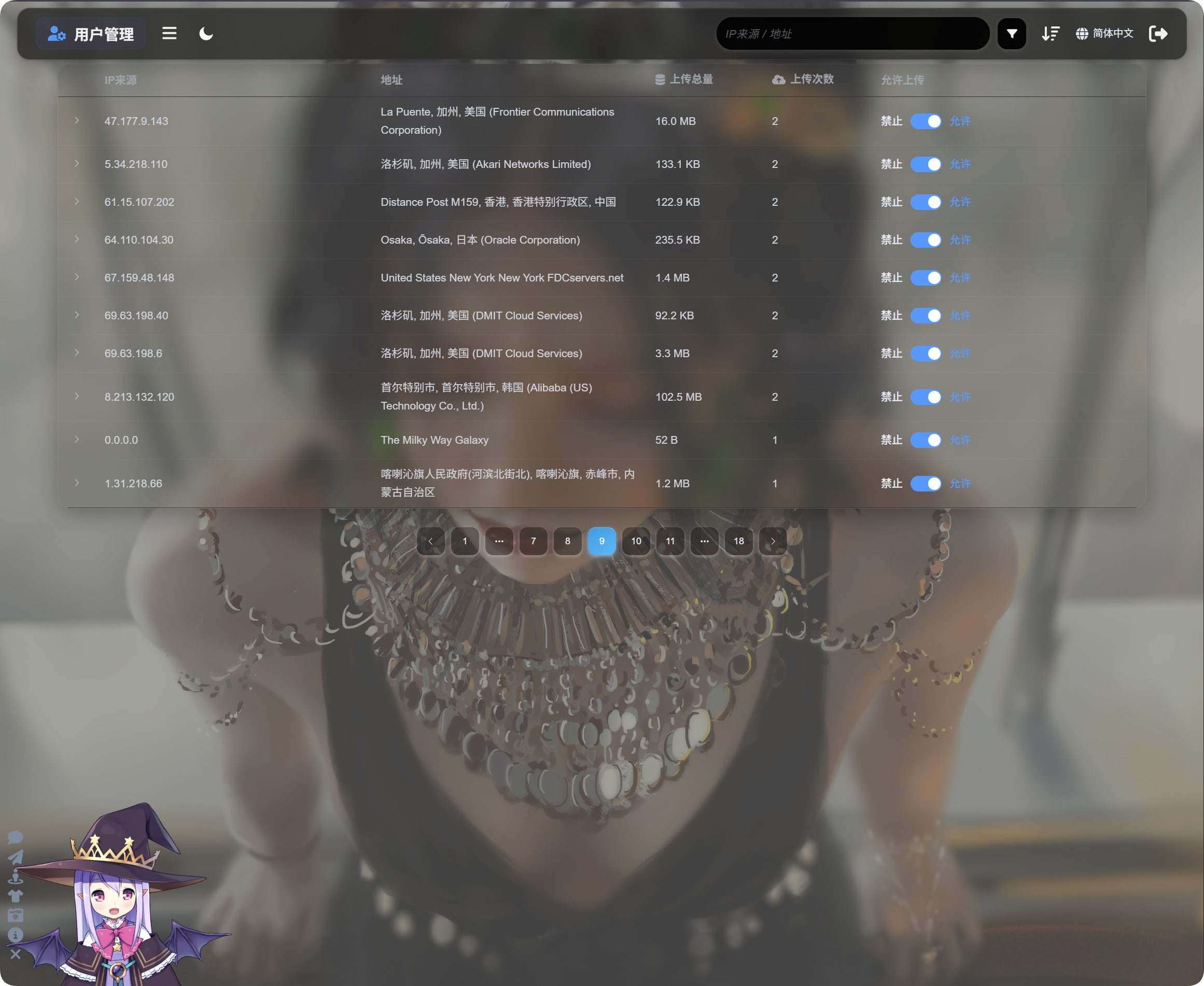
د کاروونکو مدیریت د IP له مخې د اپلوډ فعالیت ښيي:
| ډګر | تشریح |
|---|---|
| د IP سرچینه | د اپلوډ کوونکي سرچینه IP. |
| پته | هغه نږدې ځای چې له IP څخه موندل شوی. |
| د اپلوډ ټوله اندازه | د دې IP له خوا د اپلوډ شوو فایلونو ټوله اندازه. |
| د اپلوډ شمېر | له دې IP څخه د اپلوډونو شمېر. |
| د اپلوډ اجازه | فعال حالت معنا اپلوډونو ته اجازه شته. غیرفعال حالت معنا اپلوډونه بند دي. |
د چپ اړخ غشی کلیک کړئ څو د هغه IP له خوا اپلوډ شوي فایلونو لست پراخ شي.
د فایلونو لست د فایل نوم، مخکتنه، د فایل اندازه، د ارزونې پایله، د فایل حالت او د اپلوډ وخت ښيي. کله چې اپلوډونه شکمن ښکاري، لومړی IP پراخ کړئ، فایلونه وګورئ، بیا پرېکړه وکړئ چې نور اپلوډونه بند کړئ که نه.
که یو IP شکمن وي، Upload allowed بند کړئ. راتلونکي اپلوډونه له هغه IP څخه بندېږي.
لټون، ترتیب او پرمختللي فلټرونه
د کاروونکو مدیریت په سر کې د IP سرچینې یا پتې له مخې لټون وکړئ.
د وخت، د اپلوډ شمېر یا د اپلوډ ټولې اندازې له مخې ترتیب وکړئ، څو وروستي اپلوډ کوونکي، ډېر تکراري اپلوډ کوونکي یا د ډېرې کارونې IP پتې ومومئ.
د ژورې څېړنې لپاره پرمختللي فلټرونه پرانیزئ.
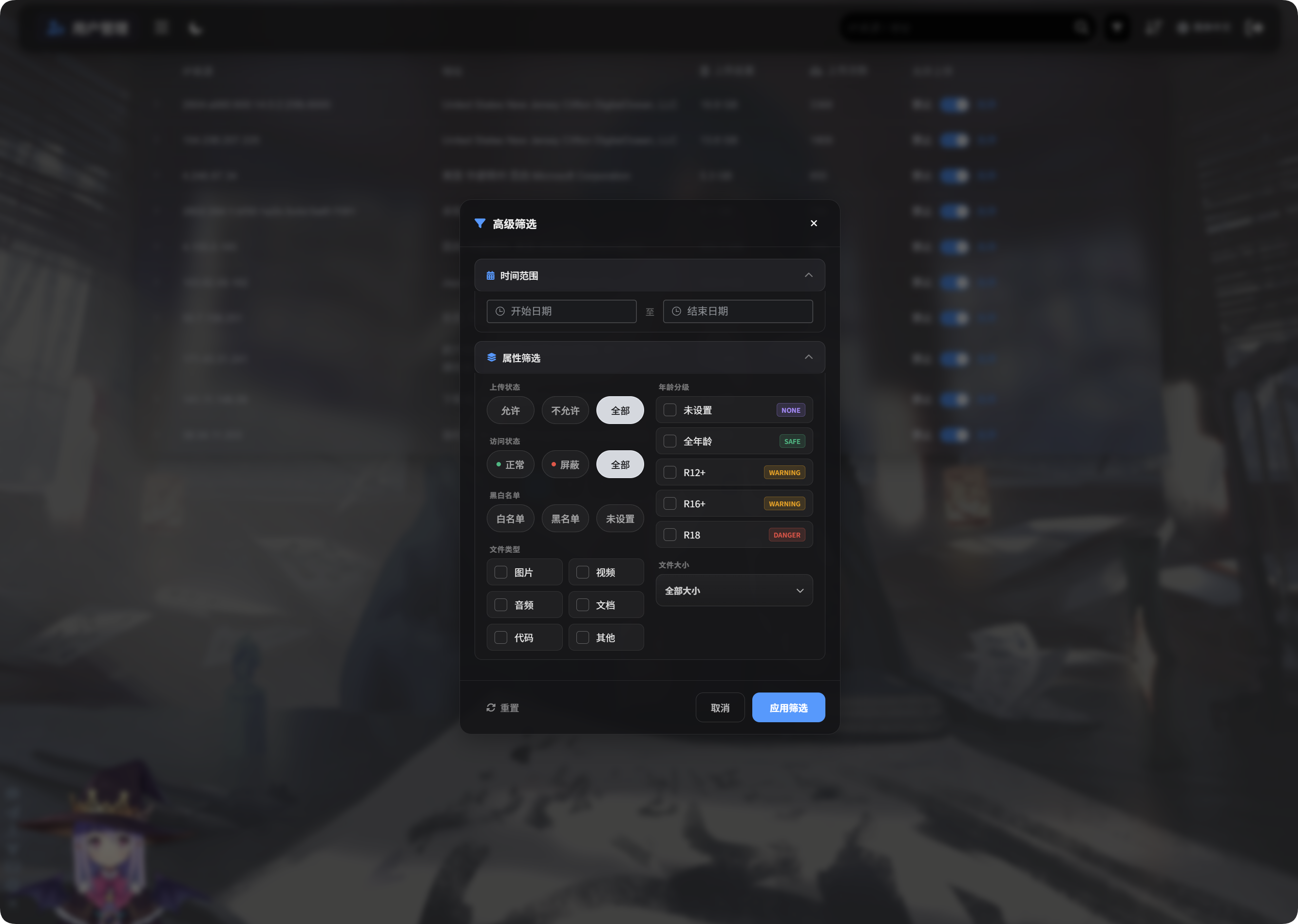
پرمختللي فلټرونه دا ملاتړ کوي:
| فلټر | کارونه |
|---|---|
| د وخت موده | هغه IP پتې ښيي چې په ټاکلې موده کې یې فایلونه اپلوډ کړي وي. |
| د لاسرسي حالت | د عادي، بند او ورته حالتونو له مخې فلټر کوي. |
| د اجازې/بند لست | د اجازې لست، د بندولو لست یا نه ټاکل شوي حالت له مخې فلټر کوي. |
| د فایل ډول | هغه IP پتې ښيي چې انځورونه، ویډیوګانې، غږ، سندونه، کوډ یا نور فایلونه یې اپلوډ کړي وي. |
| د فایل اندازه | د اپلوډ شوي فایل د اندازې د محدودې له مخې فلټر کوي. |
| د عمر درجه | د نه ټاکل شوي، General، R12+، R16+، R18 او ورته درجې له مخې فلټر کوي. |
| د فایل حالت | د اوسني فایل حالت له مخې فلټر کوي، څو غیر عادي فایلونه وڅېړل شي. |
Apply Filters کلیک کړئ څو فلټرونه وکارول شي. Reset وکاروئ څو ټولو معلوماتو ته بېرته لاړ شئ.
موبایل لید
په موبایل کې د کاروونکو مدیریت د کارت بڼې ته بدلېږي.
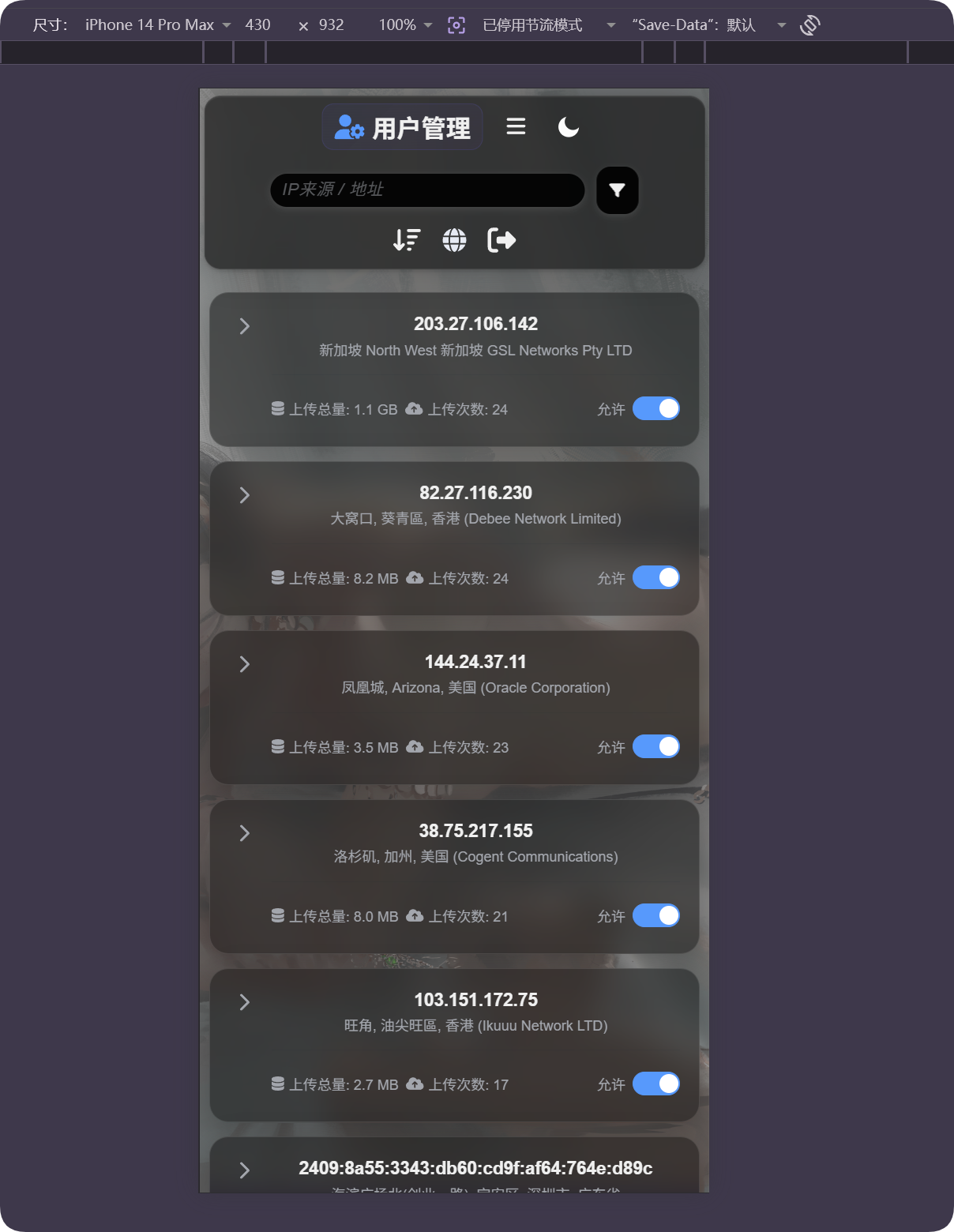
هر کارت IP، پته، د اپلوډ ټوله اندازه، د اپلوډ شمېر او د اپلوډ اجازې تڼۍ ښيي. تاسو کولای شئ پرته له افقي جدول ښویولو کاروونکي اداره کړئ.
که ځای غلط ښکاري
د IP جغرافيايي ځای موندنه اټکلي ده. دا د کوڅې دقیقه پته نه ده.
که کاروونکی د پراکسي، د معلوماتو مرکز، کلاوډ سرور یا د پولو هاخوا شبکې تر شا وي، ښودل شوی ځای له واقعي ځای سره توپیر لرلای شي.
دا ځانګړنه د نږدې سرچینې د پوهېدو، غیر عادي اپلوډونو د موندلو او د بندولو پرېکړو سره د مرستې لپاره وکاروئ. دا د دقیق تعقیب په توګه مه کاروئ.
عام حالتونه
| حالت | معنا |
|---|---|
| پته تشه ده | د IP ځای ښايي لا نه وي موندل شوی، یا اوسنۍ سرچینه موقتا نه وي شته. |
| د پتې ژبه غلطه ده | د IP جغرافيايي ځای موندنې ژبه وګورئ او ډاډه شئ چې داسې سرچینه تنظیم شوې چې له هغې ژبې ملاتړ کوي. |
| پته د معلوماتو مرکز ښيي | ډېر پراکسيان، کلاوډ سرورونه او کرالرونه د معلوماتو مرکز یا ISP پتې په توګه ښکاري. |
| د اپلوډ شمېر لوړ دی | دا IP په دقت وګورئ او که اړتیا وي اپلوډونه بند کړئ. |
| د اپلوډ ټوله اندازه لویه ده | ترتیب یا فلټر وکړئ، IP پراخ کړئ او مشخص فایلونه وګورئ. |
| له بندولو وروسته بېرته فعالول اړین دي | Upload allowed بېرته فعال کړئ. |
چټک بهیر
text
Open IP Geolocation in Other Settings
-> Choose IP geolocation language
-> Fill MaxMind, Tencent Map, or ipapi credentials as needed
-> Save settings
-> Open User Management
-> Review IP source, address, total upload size, and upload count
-> Use search, sort, or advanced filters to find abnormal IPs
-> Allow or block uploads as needed