د S3 چینل اضافه کول
کله مناسب دی
S3 چینل هغه وخت وکاروئ چې:
- غواړئ هر S3-compatible object زېرمه خدمت وصل کړئ، لکه Cloudflare R2، Backblaze B2، MinIO، AWS S3 یا بل compatible provider.
- د standard S3 تنظیمات model غوره کوئ:
Endpoint، لاسرسی Key او Secret Key. - نه غواړئ native Cloudflare R2 binding چینل وکاروئ، یا ستاسې زېرمه provider Cloudflare R2 نه وي.
د پیل مخکې اړتیاوې
| اړتیا | موخه |
|---|---|
| S3 Endpoint | د object زېرمه خدمت S3 API endpoint. |
| Bucket name | هغه bucket چې فایلونه پکې ساتل کېږي. |
| Region | زېرمه region. د Cloudflare R2 لپاره عموماً auto. |
| لاسرسی Key ID | S3 لاسرسی key ID. |
| Secret لاسرسی Key | S3 secret لاسرسی key. |
| CDN ډومېن | د فایل لاسرسی لپاره اختیاري custom ډومېن. |
د Cloudflare R2 لپاره د S3 API له لارې مثال:
text
Endpoint: https://your-account-id.r2.cloudflarestorage.com
Bucket: your-r2-bucket-name
Region: auto
Access Key ID: copied from the Cloudflare R2 API token
Secret Access Key: copied from the Cloudflare R2 API token
چېرته یې اضافه کړو
- د سیسټم تنظیمات پرانیزئ.
- د اپلوډ تنظیمات ته ولاړ شئ.
- په پورته ښي لوري کې چینل اضافه کړئ کلیک کړئ.
S3وټاکئ.
د فیلډونو لارښود
| فیلډ | څه کوي | اړین |
|---|---|---|
| د چینل نوم | د دې S3 چینل لپاره پېژندل کېدونکی نوم، لکه s3test یا R2-S3. | Yes |
| Enable چینل | کنټرولوي چې دا چینل په اپلوډ selection کې ګډون وکړي که نه. | سپارښتنه کېږي |
| Endpoint | بشپړ S3 خدمت endpoint د https:// سره. | Yes |
| Custom CDN ډومېن | اختیاري. که set شي، generated فایل links به دا ډومېن غوره کړي. | No |
| Bucket name | bucket name، لکه s3test یا img-r2. | Yes |
| Bucket region | Region. د Cloudflare R2 لپاره عموماً auto. | Yes |
| لاسرسی Key ID | S3 لاسرسی key ID. | Yes |
| Secret لاسرسی Key | S3 secret لاسرسی key. | Yes |
| Path-style لاسرسی | compatibility switch. اصلي off دی. ځینې MinIO، OpenList یا self-hosted S3 خدمتs یې غواړي. | No |
| Quota limit | کنټرولوي چې دا S3 چینل د capacity له مخې اپلوډ selection کې ګډون وکړي که نه. | No |
| Capacity limit | د کوټه limit له enable وروسته اړین، لکه 10 GB. | اړین دی کله چې د کوټې محدودیت فعال وي |
| Threshold | کله چې usage دې percentage ته ورسېږي write بندوي، لکه 90%. | اړین دی کله چې د کوټې محدودیت فعال وي |
| یادښت | د خپل maintenance لپاره یادښتونه. | No |
Cloudflare R2 S3 API Keys جوړ کړئ
- Cloudflare Dashboard پرانیزئ.
R2 Object Storageته ولاړ شئ.Manage R2 API Tokensیا API ټوکن management entry ومومئ.
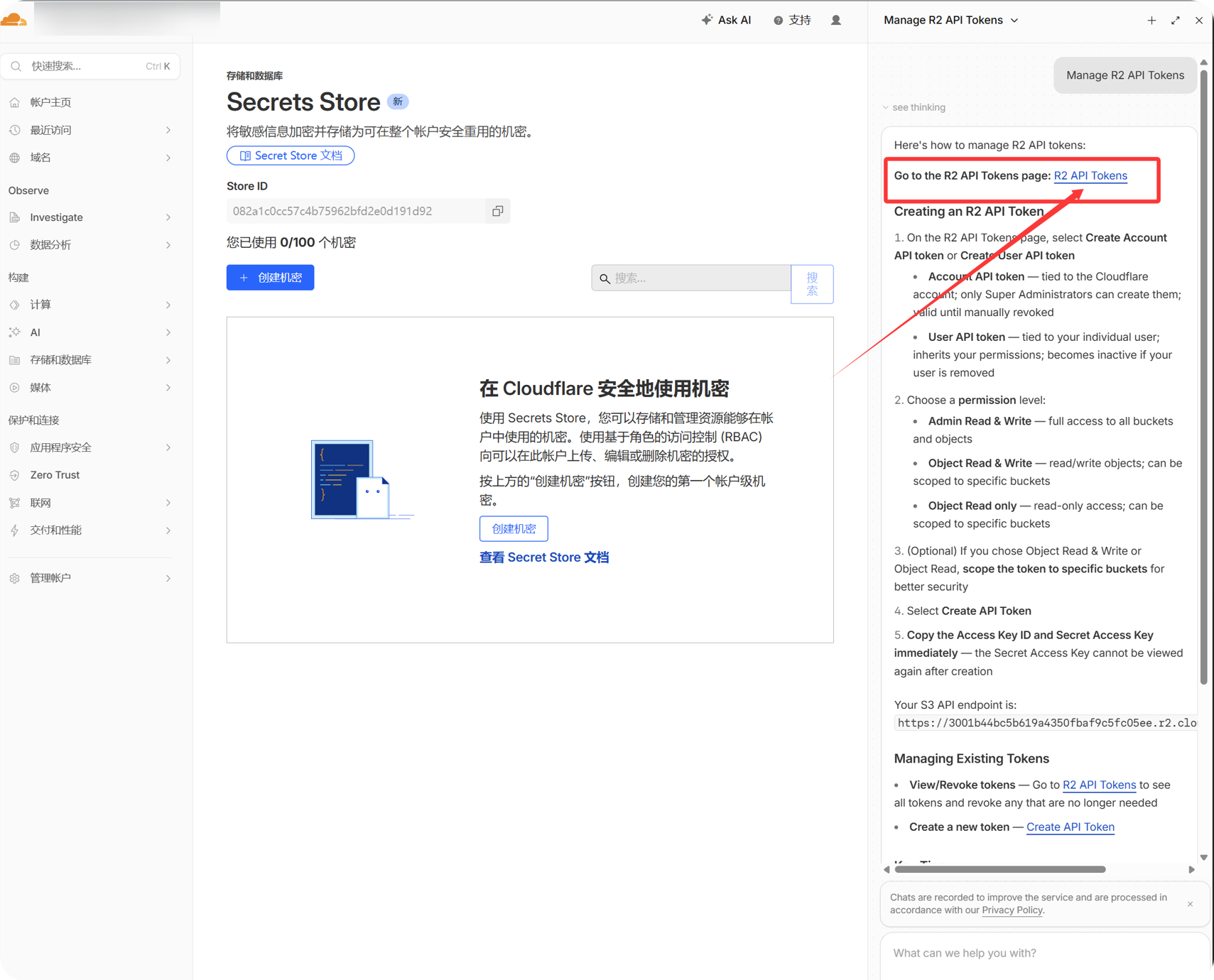
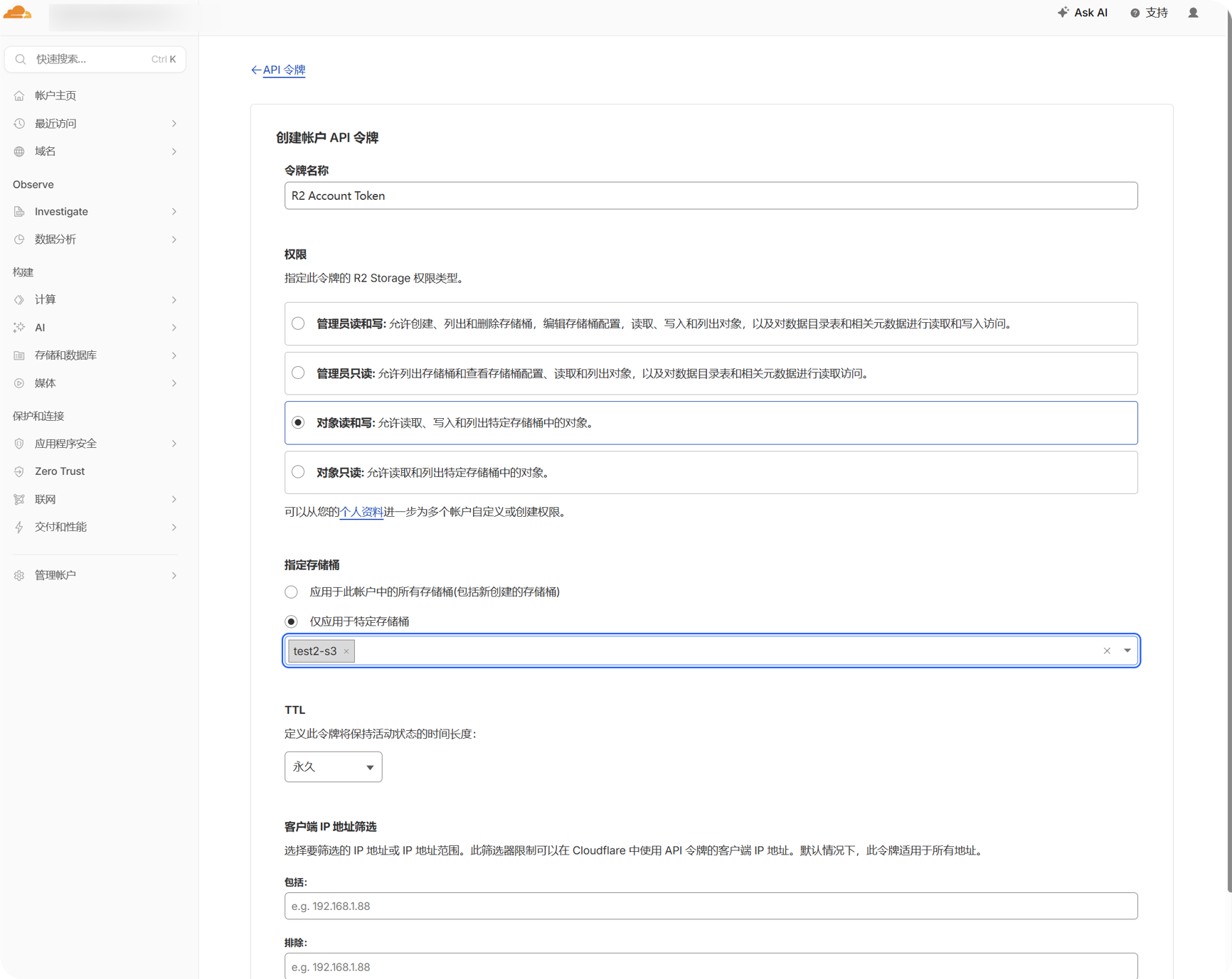
- داسې R2 API ټوکن جوړ کړئ چې target bucket ته لاسرسی ولري.
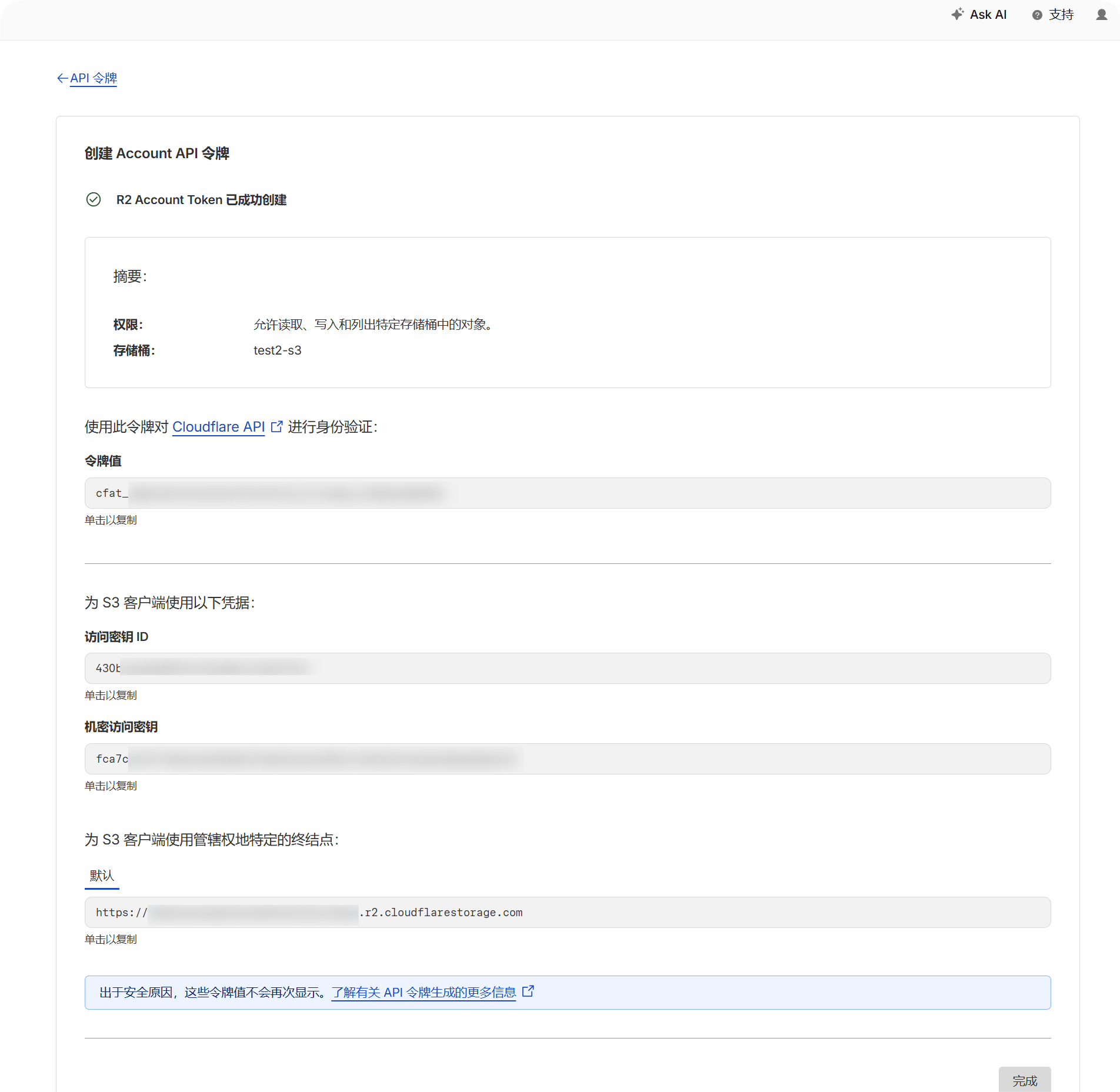
- generated
Access Key IDاوSecret Access Keyکاپي کړئ.
- R2 bucket page ته بېرته ولاړ شئ او bucket name confirm کړئ.
- د حساب لپاره S3 API endpoint ولیکئ. عموماً داسې ښکاري:
text
https://your-account-id.r2.cloudflarestorage.comد تنظیم ګامونه
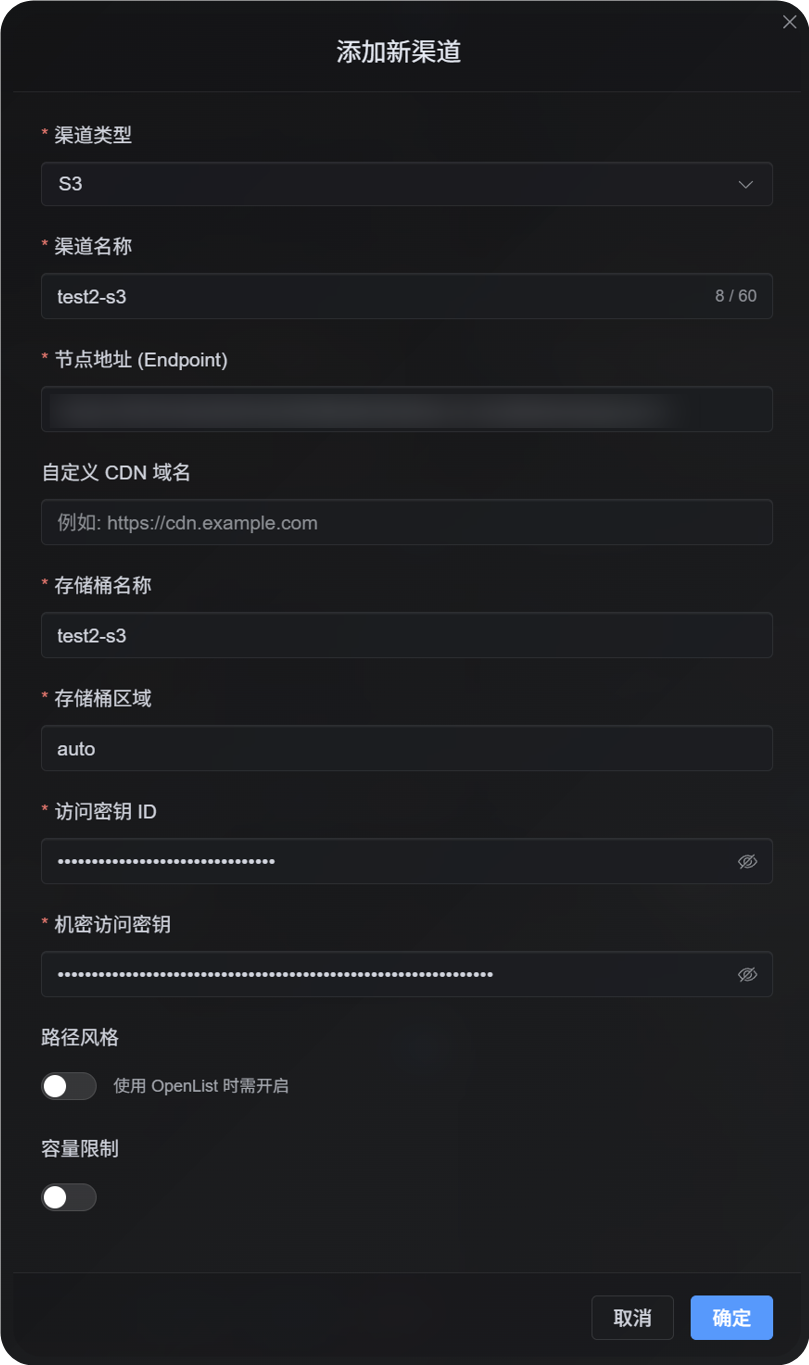
- د اپلوډ تنظیمات پرانیزئ.
- چینل اضافه کړئ کلیک کړئ.
S3وټاکئ.- یو پېژندل کېدونکی چینل name ولیکئ، لکه
s3test. - S3 API endpoint په
Endpointکې ولیکئ. - که custom CDN لرئ، په
Custom CDN domainکې یې ولیکئ؛ که نه، خالي یې پرېږدئ. - bucket name ولیکئ.
- region ولیکئ. د Cloudflare R2 مثال لپاره
autoوکاروئ. - لاسرسی Key ID او Secret لاسرسی Key ولیکئ.
- path-style لاسرسی off پرېږدئ، مګر provider یې صریحاً وغواړي.
- که capacity control غواړئ، کوټه limit enable کړئ او capacity limit او threshold ولیکئ.
- خوندي کلیک کړئ.
څنګه یې Verify کړو
| کتنه | د verify طریقه |
|---|---|
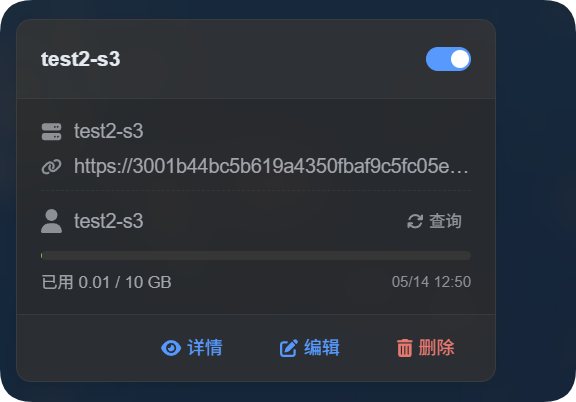
| چینل card اپears | له خوندي وروسته د اپلوډ تنظیمات باید S3 چینل card وښيي. |
| چینل is enabled | د card په پورته ښي لوري کې switch باید on پاتې شي. |
| Key fields are خونديd | detail view باید Endpoint، Bucket، Region، path-style لاسرسی او اړوند fields وښيي. |
| اپلوډ works | test image اپلوډ کړئ او confirm کړئ چې object په target bucket کې جوړ شوی. |
| Link opens | له اپلوډ وروسته returned image link باید عادي پرانستل شي. |
| Capacity display works | که کوټه limit enabled وي، card باید used capacity او تنظیمd limit وښيي. |
د S3 د ظرفیت شمېرې د provider bucket په ریښتیني وخت کې نه query کوي؛ بلکې د ImgHost له ځايي فایل ریکارډونو څخه حسابېږي. د S3 تنظیمات له خوندي کولو وروسته سیستم د اوسنیو D1 ریکارډونو څخه د کوټې دفتر بیا محاسبه کوي.
FAQ
path-style لاسرسی enable کړم؟
عموماً نه.
یوازې هغه وخت یې enable کړئ چې S3-compatible provider مو virtual-hosted-style URLs نه support کوي، یا provider documentation صریحاً path-style لاسرسی غواړي.
CDN ډومېن د څه لپاره دی؟
که د bucket مخې ته CDN یا custom لاسرسی ډومېن لرئ، دلته یې ولیکئ.
له تنظیم وروسته جوړ شوي فایل لینکونه به دا ډومېن غوره کړي. که CDN نه کاروئ، فیلډ خالي پرېږدئ.
ولې اپلوډ fail کېږي؟
لومړی دا وګورئ:
- Endpoint د
https://سره بشپړ URL لري. - bucket name سم دی.
- Region د provider اړتیا سره برابر دی.
- لاسرسی Key ID او Secret لاسرسی Key بشپړ کاپي شوي.
- key د target bucket لپاره write permission لري.
- provider path-style لاسرسی نه غواړي، یا که غواړي enabled دی.
چټک چکلېست
text
Prepare S3 Endpoint, Bucket, Region, Access Key, and Secret Key
-> Open Upload Settings
-> Add Channel
-> Select S3
-> Enter Endpoint / Bucket / Region / Access Key / Secret Key
-> Enter a CDN domain if needed
-> Leave path-style access off by default
-> Enable quota limit if needed
-> Save
-> Upload a test image and check the result