د اپلوډ تنظیمات
د اپلوډ تنظیمات ImgHost ستاسو له خپلو زېرمهکولو چینلونو سره نښلوي. د چینل له تنظیمېدو وروسته، اپلوډ شوي انځورونه او فایلونه هغه خدمت ته خوندي کېږي چې تاسې یې ټاکئ. ImgHost د لاسرسي تړنې، د فایلونو ثبتونه، مخکتنې، عامه ګالري، د تصادفي انځور API، WebDAV لاسرسی او اړوند کاري بهیرونه اداره کوي.
د هر کاروونکي لپاره مناسب چینل توپیر لري. که ساده پیل غواړئ، Telegram، Discord یا GitHub Releases ښه انتخابونه دي. که ظرفیت، سرعت او اوږدمهاله ثبات درته مهم وي، Cloudflare R2، S3، OneDrive، Google Drive، Dropbox، Yandex، pCloud یا خپل WebDAV خدمت وکاروئ.
له پیل مخکې
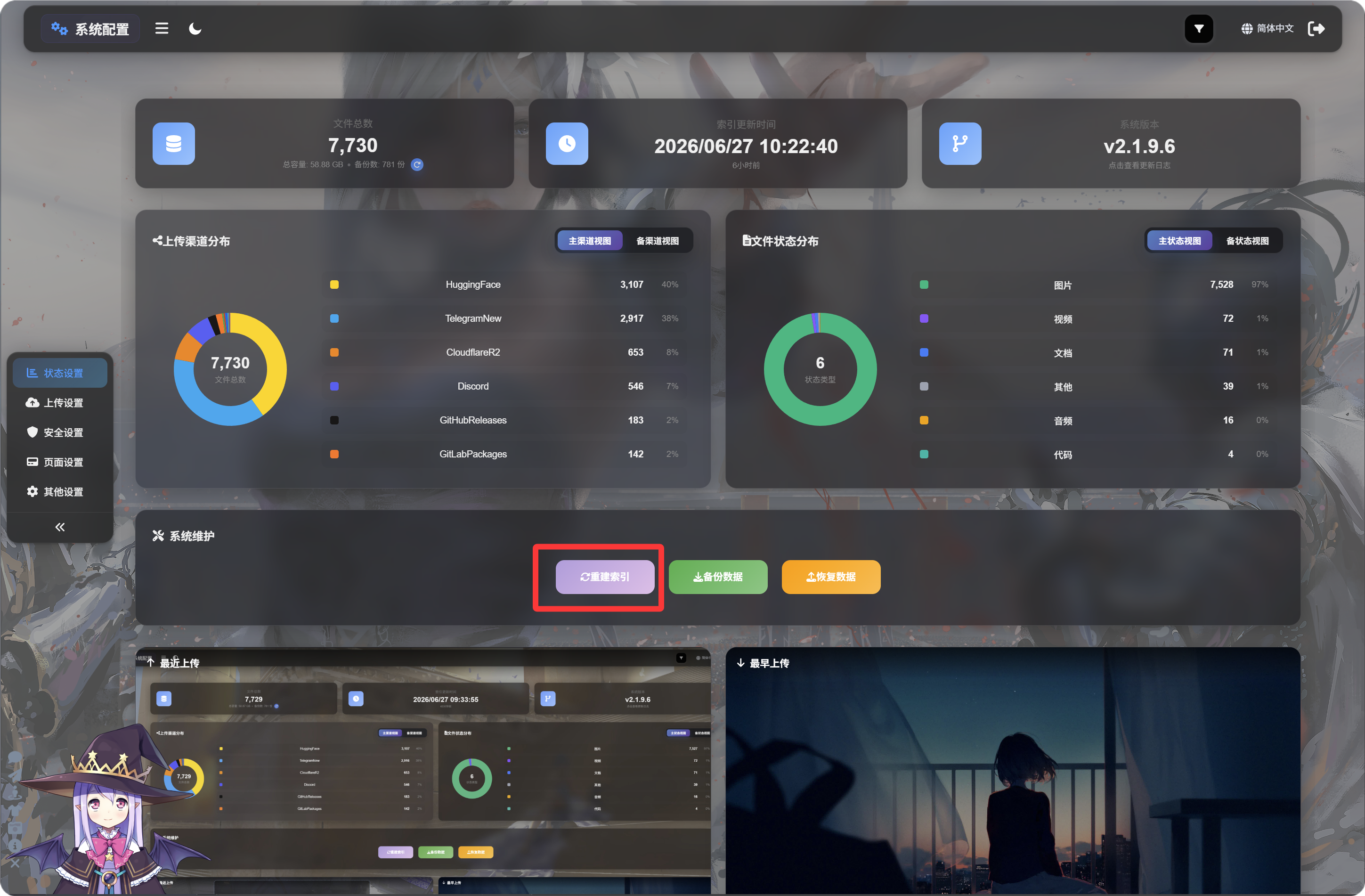
د ImgHost د لومړي ځل کارولو مخکې، باید د پیلني تنظیم پاڼې ته ولاړ شئ او "شاخص بیا جوړ کړئ" کلیک کړئ، څو اړین D1 جدولونه بشپړ شي او د راتلونکو دندو تېروتنې مخنیوی وشي.
اختیاري: د D1 د لوستلو نقل فعالول
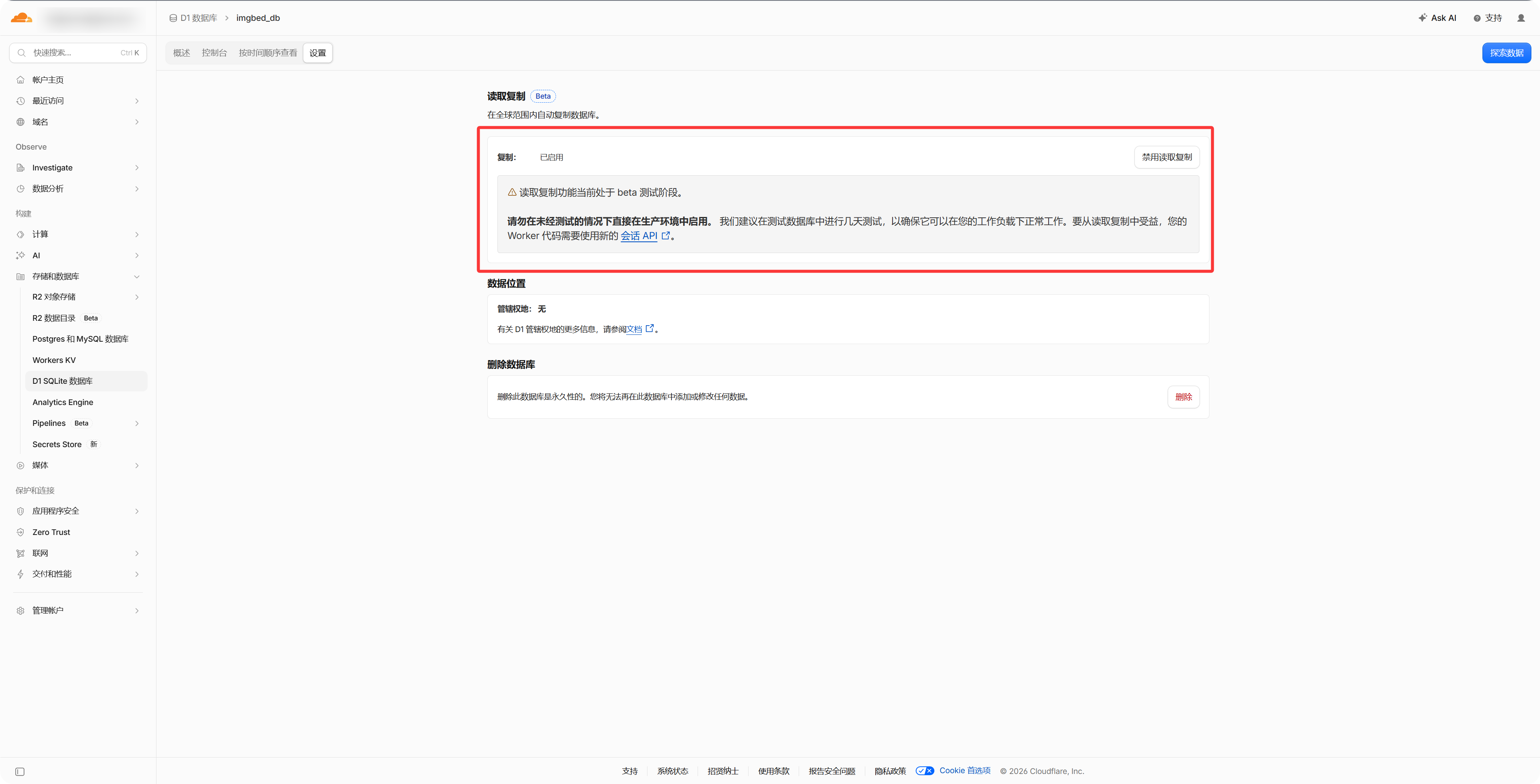
د Cloudflare په ډشبورډ کې د D1 ډیټابیس له تنظیماتو څخه "Read Replication" فعال کړئ، څو د فایل مدیریت، عامه ګالري او د تصادفي انځور API ته لاسرسی چټک شي. که دا فعال نه کړئ، ImgHost بیا هم عادي کار کوي.
- هغه زېرمهکولو حساب یا API اعتبارلیکونه چمتو کړئ چې کاروئ یې.
- ډاډ ترلاسه کړئ چې ستاسو د ImgHost ډومېن د لاسرسي وړ دی، ځکه د OAuth پر بنسټ چینلونه د بېرتهغوښتنې URL ته اړتیا لري.
- د چینل له زیاتولو وروسته لومړی یو ازمایښتي انځور اپلوډ کړئ، څو ډاډ ترلاسه شي چې فایل سم خوندي کېږي او پرانیستل کېږي.
د چینل فهرست
- Telegram
- Cloudflare R2
- S3
- WebDAV
- Discord
- Hugging Face
- GitHub Releases
- GitLab Packages
- OneDrive
- Google Drive
- Dropbox
- Yandex
- pCloud
په دې فصل کې څه راځي
- هر اپلوډ چینل له تنظیم مخکې کومو معلوماتو ته اړتیا لري.
- په بهرنیو پلېټفارمونو کې د اپ جوړولو، کیلي کاپي کولو یا ټوکن واکمنولو طریقه.
- په ImgHost کې د چینل تنظیمات ډکول او د اپلوډ سم کار کول تاییدول.