اپ لوڈ سیٹنگز
اپ لوڈ سیٹنگز ImgHost کو آپ کے اپنے اسٹوریج چینلز سے جوڑتی ہیں۔ چینل ترتیب دینے کے بعد اپ لوڈ کی گئی تصاویر اور فائلیں آپ کی منتخب کردہ سروس میں محفوظ ہوتی ہیں۔ ImgHost رسائی کے لنکس، فائل ریکارڈز، پیش منظر، عوامی گیلری، رینڈم امیج API، WebDAV رسائی اور متعلقہ ورک فلو کو سنبھالتا ہے۔
ہر صارف کے لیے مناسب چینل مختلف ہو سکتا ہے۔ اگر آپ آسان آغاز چاہتے ہیں تو Telegram، Discord یا GitHub Releases اچھے انتخاب ہیں۔ اگر گنجائش، رفتار اور طویل مدتی استحکام زیادہ اہم ہیں تو Cloudflare R2، S3، OneDrive، Google Drive، Dropbox، Yandex، pCloud یا اپنی WebDAV سروس استعمال کریں۔
شروع کرنے سے پہلے
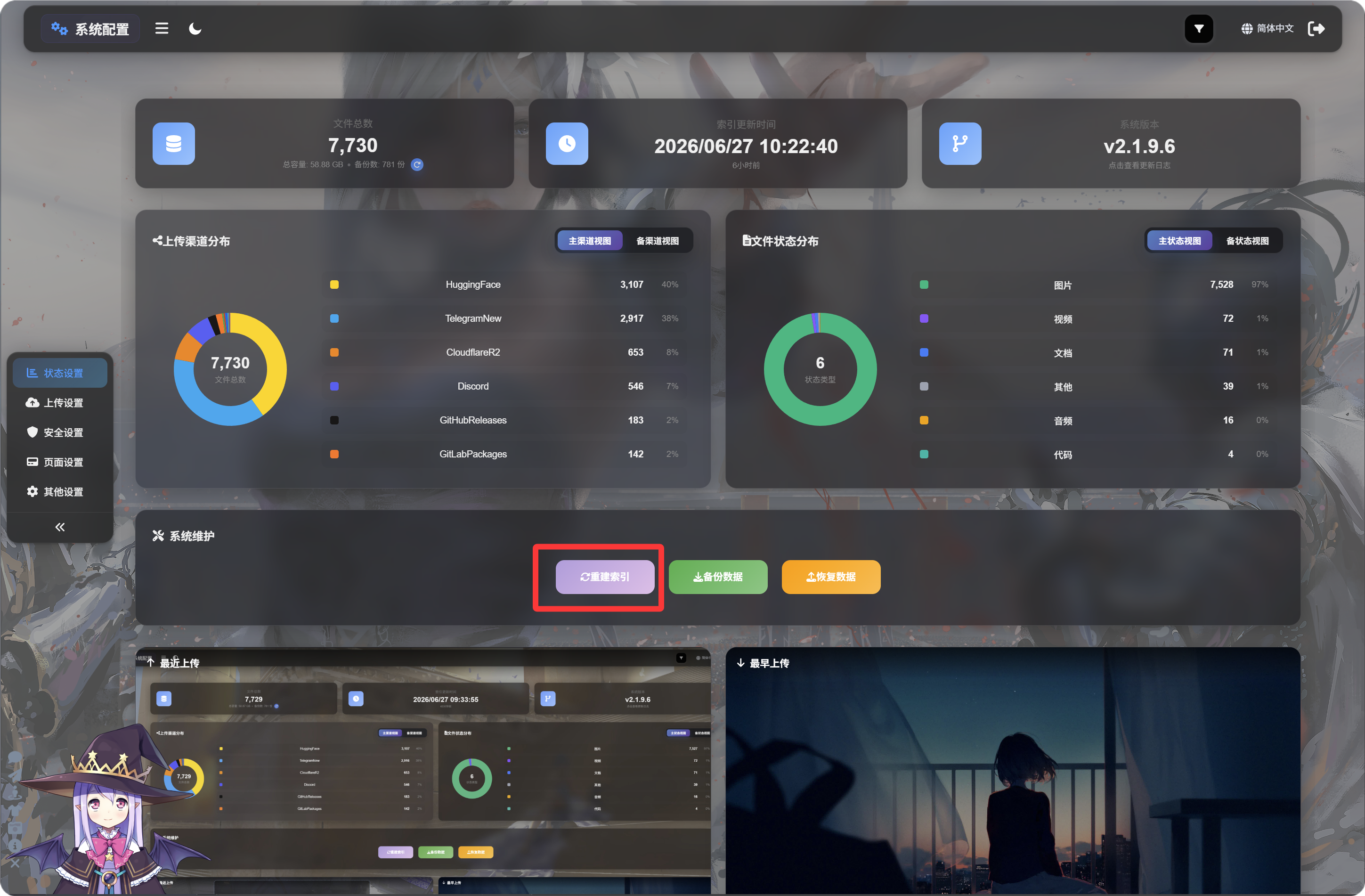
ImgHost پہلی بار استعمال کرنے سے پہلے، ضروری D1 ڈیٹا ٹیبلز مکمل کرنے اور بعد کی خصوصیات میں خرابیوں سے بچنے کے لیے ابتدا کاری کے صفحے پر جا کر "انڈیکس دوبارہ بنائیں" پر کلک کرنا لازمی ہے۔
اختیاری: D1 ریڈ ریپلیکیشن فعال کریں
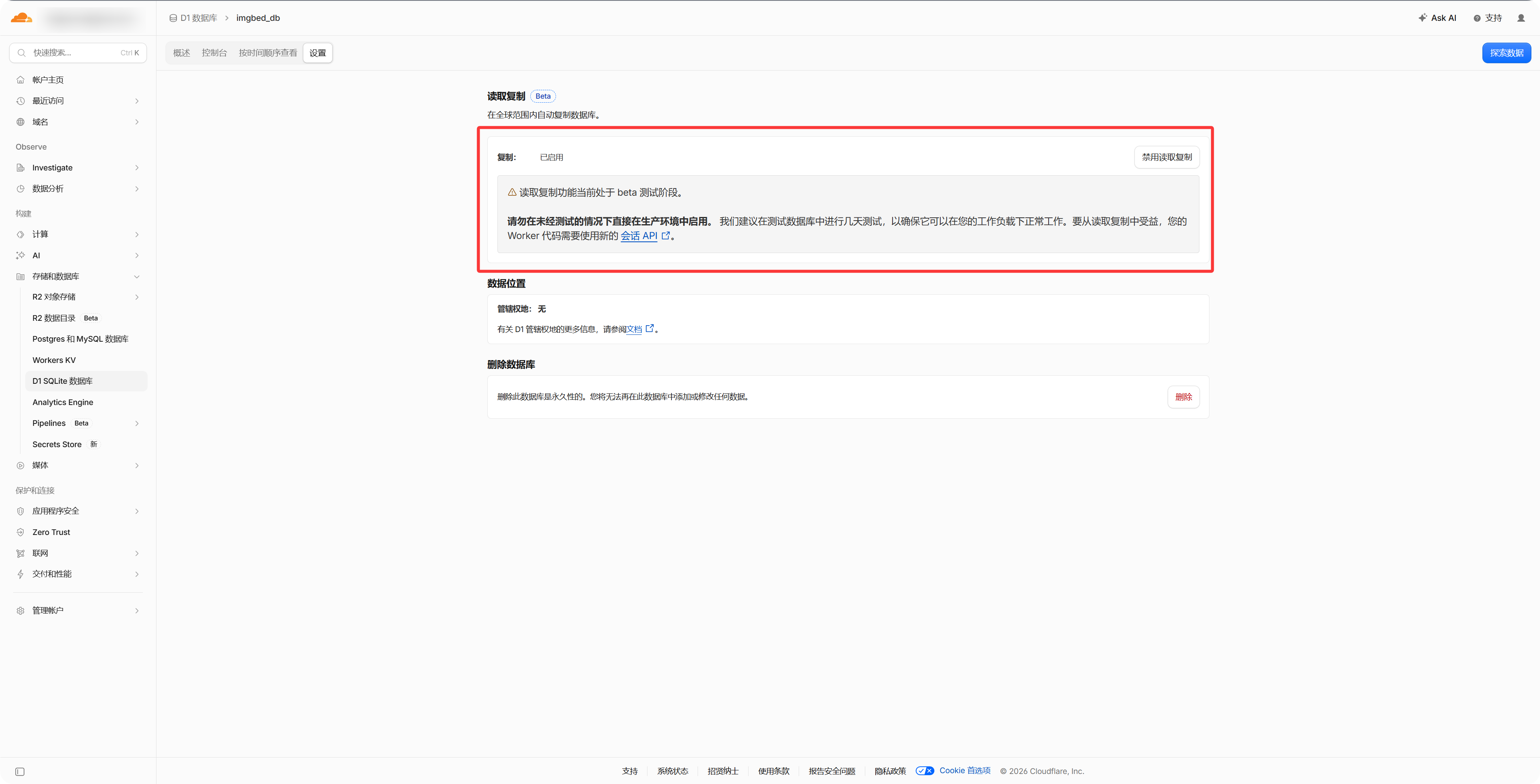
Cloudflare ڈیش بورڈ میں D1 ڈیٹابیس کی سیٹنگز سے "Read Replication" فعال کریں، اس سے فائل مینجمنٹ، عوامی گیلری اور رینڈم امیج API تک رسائی تیز ہو سکتی ہے۔ اسے فعال کیے بغیر بھی ImgHost معمول کے مطابق کام کرتا ہے۔
- جس اسٹوریج اکاؤنٹ یا API اسناد کو استعمال کرنا ہے، انہیں تیار رکھیں۔
- یقینی بنائیں کہ آپ کا ImgHost ڈومین قابل رسائی ہے، کیونکہ OAuth پر مبنی چینلز کو کال بیک URL کی ضرورت ہوتی ہے۔
- چینل شامل کرنے کے بعد پہلے ایک آزمائشی تصویر اپ لوڈ کریں، تاکہ تصدیق ہو سکے کہ فائل صحیح طور پر محفوظ اور کھل رہی ہے۔
چینل فہرست
- Telegram
- Cloudflare R2
- S3
- WebDAV
- Discord
- Hugging Face
- GitHub Releases
- GitLab Packages
- OneDrive
- Google Drive
- Dropbox
- Yandex
- pCloud
اس باب میں کیا ہے
- ہر اپ لوڈ چینل کو ترتیب دینے سے پہلے کن معلومات کی ضرورت ہے۔
- بیرونی پلیٹ فارمز پر ایپ بنانا، کلیدیں کاپی کرنا یا ٹوکن کی اجازت دینا۔
- ImgHost میں چینل کی ترتیب درج کرنا اور اپ لوڈ کے درست کام کرنے کی تصدیق کرنا۔