API Token فہرست سازی اور فلٹرنگ
API Token فہرست سازی اسکرپٹس اس وقت مفید ہوتے ہیں جب اسکرپٹس، خودکار کاموں، یا فریق ثالث پروگراموں کو ImgHost ڈیٹا پڑھنے کی ضرورت ہو۔ یہ صرف list permission استعمال کرتے ہیں۔ یہ فائلیں اپ لوڈ نہیں کرتے، فائلیں حذف نہیں کرتے، ترتیب تبدیل نہیں کرتے، اور کسی IP پتے کو block یا allow نہیں کرتے۔
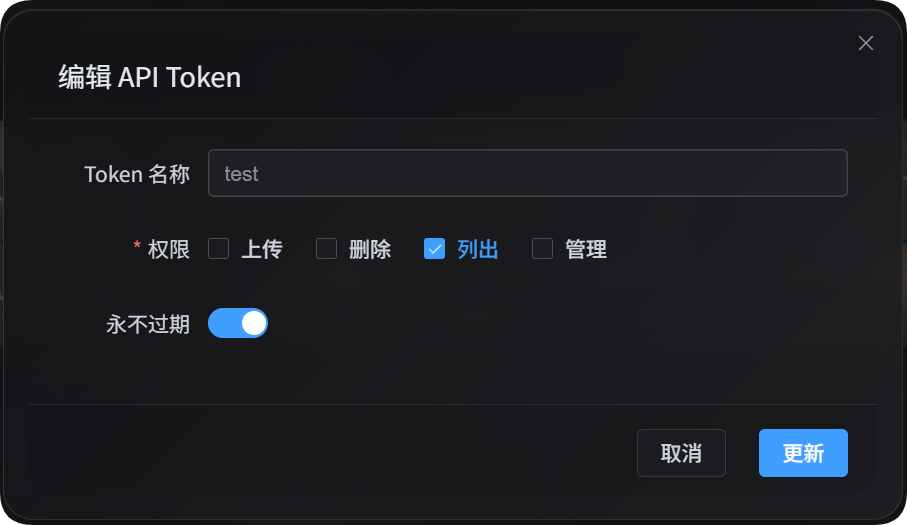
اہم استعمالات:
| خصوصیت | وضاحت |
|---|---|
| فائل مینیجر فہرست | ایڈمن فائل فہرست پڑھتا ہے اور فائل مینجمنٹ میں دستیاب وہی advanced filters استعمال کرتا ہے۔ |
| صارف انتظام فہرست | صارف/IP اپ لوڈ statistics پڑھتا ہے اور صارف انتظام میں دستیاب filters استعمال کرتا ہے۔ |
| اپ لوڈ چینل فہرست | حساس معلومات سے پاک اپ لوڈ چینلز، child channels، capacity data، اور load-balancing status پڑھتا ہے۔ |
| ڈائریکٹری statistics | ڈائریکٹری statistics اور paginated directory information پڑھتا ہے۔ |
شروع کرنے سے پہلے
ایڈمن پینل کھولیں، پھر یہاں جائیں:
text
System Settings -> Security Settings -> API TokenAPI Token بناتے یا ترمیم کرتے وقت یقینی بنائیں کہ token فہرست سازی کی اجازت دیتا ہے۔ اس اسکرپٹ کو صرف list permission درکار ہے۔
آپ token کو environment variable میں بھی رکھ سکتے ہیں:
powershell
$env:IMGHOST_API_TOKEN="your API Token"اسکرپٹ ڈاؤن لوڈ کریں
| اسکرپٹ | مقصد |
|---|---|
| فہرست سازی اور فلٹرنگ اسکرپٹ | فائل مینیجر فہرست، صارف انتظام فہرست، اپ لوڈ چینل فہرست، اور ڈائریکٹری statistics۔ |
Node.js 18 یا بعد کا ورژن درکار ہے۔
مشترک پیرامیٹرز
| پیرامیٹر | ضروری | وضاحت |
|---|---|---|
--base-url <url> | ہاں | ImgHost سائٹ URL، مثلاً https://image.ai6.me۔ |
--token <token> | ہاں | API Token۔ آپ IMGHOST_API_TOKEN environment variable بھی استعمال کر سکتے ہیں۔ |
--retries <n> | نہیں | عارضی ناکامی پر دوبارہ کوششوں کی تعداد۔ طے شدہ قدر 3۔ |
--timeout-ms <n> | نہیں | ہر درخواست کا timeout۔ طے شدہ قدر 180000۔ |
--output <pretty|json> | نہیں | output format۔ طے شدہ قدر pretty؛ پروگراموں کے لیے json استعمال کریں۔ |
--save-response <path> | نہیں | حتمی نتیجہ JSON فائل کے طور پر محفوظ کریں۔ |
-h / --help | نہیں | اسکرپٹ help دکھائیں۔ |
فائل مینیجر فہرست
فائل مینجمنٹ میں فائلیں list کریں:
powershell
node imghost-token-list.mjs `
  --base-url "https://your-domain" `
  --token "your API Token" `
  --files `
  --count 10
JSON output:
powershell
node imghost-token-list.mjs `
  --base-url "https://your-domain" `
  --token "your API Token" `
  --files `
  --count 10 `
  --output json
موجودہ filters کے تحت صرف count پڑھیں:
powershell
node imghost-token-list.mjs `
  --base-url "https://your-domain" `
  --token "your API Token" `
  --file-summary `
  --dir "photos/2026" `
  --recursive
فائل مینیجر پیرامیٹرز
| پیرامیٹر | وضاحت |
|---|---|
--files | فائلیں list کریں۔ |
--file-summary | صرف count statistics پڑھیں۔ |
--start <n> | pagination offset۔ |
--count <n> | واپس آنے والے records کی تعداد۔ |
--dir <path> | target directory۔ |
--recursive | child directories میں موجود فائلیں بھی شامل کریں۔ |
--search <text> | search keyword۔ |
--channel <key> | upload channel کے مطابق filter کریں، مثلاً github، s3، یا yandex۔ |
--channel-scope <primary|backup|all> | channel filter scope: primary channel، backup channel، یا all۔ |
--channel-name-groups <value> | child channel group filter، بیک اینڈ تک pass-through کیا جاتا ہے۔ |
--list-type <csv> | list type، عموماً None,White,Block۔ |
--include-tags <csv> | یہ tags لازمی شامل ہوں۔ |
--exclude-tags <csv> | یہ tags خارج کریں۔ |
--time-start <ms> | اپ لوڈ وقت آغاز، ملی سیکنڈ وقت مہر میں۔ |
--time-end <ms> | اپ لوڈ وقت اختتام، ملی سیکنڈ وقت مہر میں۔ |
--file-exts <csv> | صرف مخصوص extensions شامل کریں، مثلاً jpg,png,pdf۔ |
--exclude-file-exts <csv> | مخصوص extensions خارج کریں۔ |
--file-status-categories <csv> | File categories: image,audio,video,document,code,other۔ |
--upload-ip <ip> | upload IP prefix کے مطابق filter کریں۔ |
--age-ratings <csv> | عمر درجہ بندیاں: none,all-ages,r12,r16,r18۔ |
--orientation <csv> | orientation filter، بیک اینڈ تک pass-through کیا جاتا ہے۔ |
--read-source <csv> | read-source filter، بیک اینڈ تک pass-through کیا جاتا ہے۔ |
--access-status <normal|blocked> | عوامی رسائی status۔ |
--min-width <n> | کم سے کم width۔ |
--max-width <n> | زیادہ سے زیادہ width۔ |
--min-height <n> | کم سے کم height۔ |
--max-height <n> | زیادہ سے زیادہ height۔ |
--min-file-size <mb> | کم سے کم file size، بیک اینڈ کے موجودہ MB parameter کے مطابق۔ |
--max-file-size <mb> | زیادہ سے زیادہ file size، بیک اینڈ کے موجودہ MB parameter کے مطابق۔ |
فائل مینیجر مثالیں
PDFs تلاش کریں:
powershell
node imghost-token-list.mjs `
  --base-url "https://your-domain" `
  --token "your API Token" `
  --files `
  --search "pdf" `
  --file-status-categories "document" `
  --count 20
upload IP اور channel سے filter کریں:
powershell
node imghost-token-list.mjs `
  --base-url "https://your-domain" `
  --token "your API Token" `
  --files `
  --upload-ip "103.62" `
  --channel yandex `
  --channel-scope primary
مکمل نتیجہ محفوظ کریں:
powershell
node imghost-token-list.mjs `
  --base-url "https://your-domain" `
  --token "your API Token" `
  --files `
  --count 100 `
  --output json `
  --save-response ".\files.json"
صارف انتظام فہرست
صارف/IP اپ لوڈ statistics list کریں:
powershell
node imghost-token-list.mjs `
  --base-url "https://your-domain" `
  --token "your API Token" `
  --users `
  --count 20
IP یا address تلاش کریں:
powershell
node imghost-token-list.mjs `
  --base-url "https://your-domain" `
  --token "your API Token" `
  --users `
  --search "43.198.183.56"
ایک IP سے اپ لوڈ کی گئی فائلیں دیکھیں:
powershell
node imghost-token-list.mjs `
  --base-url "https://your-domain" `
  --token "your API Token" `
  --user-detail `
  --ip "43.198.183.56" `
  --count 20
بلاک شدہ upload IPs list کریں:
powershell
node imghost-token-list.mjs `
  --base-url "https://your-domain" `
  --token "your API Token" `
  --blocked-ips
صارف انتظام پیرامیٹرز
| پیرامیٹر | وضاحت |
|---|---|
--users | صارف/IP اپ لوڈ statistics list کریں۔ |
--user-detail | کسی مخصوص IP سے اپ لوڈ کی گئی فائلیں دیکھیں۔ |
--blocked-ips | بلاک شدہ upload IPs list کریں۔ |
--ip <ip> | --user-detail کے ساتھ ضروری ہے۔ |
--start <n> | pagination offset۔ |
--count <n> | واپس آنے والے records کی تعداد۔ |
--sort <value> | sort order: timeDesc, timeAsc, countDesc, countAsc, totalSizeDesc, totalSizeAsc۔ |
--search <text> | IP یا address تلاش کریں۔ |
--upload-status <allowed|blocked> | آیا uploads allowed ہیں یا blocked۔ |
--start-time <ms> | statistics start time، ملی سیکنڈ وقت مہر میں۔ |
--end-time <ms> | statistics end time، ملی سیکنڈ وقت مہر میں۔ |
--file-status-categories <csv> | file category filter۔ |
--age-ratings <csv> | عمر درجہ بندی filter۔ |
--min-file-size <mb> | کم سے کم file size۔ |
--max-file-size <mb> | زیادہ سے زیادہ file size۔ |
--list-type <csv> | list type، عموماً None,White,Block۔ |
--access-status <normal|blocked> | عوامی رسائی status۔ |
صارف انتظام مثالیں
اپ لوڈ سے بلاک صارفین list کریں:
powershell
node imghost-token-list.mjs `
  --base-url "https://your-domain" `
  --token "your API Token" `
  --users `
  --upload-status blocked
address keyword سے تلاش کریں:
powershell
node imghost-token-list.mjs `
  --base-url "https://your-domain" `
  --token "your API Token" `
  --users `
  --search "Hong Kong"
upload count کے مطابق sort کریں:
powershell
node imghost-token-list.mjs `
  --base-url "https://your-domain" `
  --token "your API Token" `
  --users `
  --sort countDesc `
  --count 50
اپ لوڈ چینل فہرست
حساس معلومات سے پاک اپ لوڈ چینل configuration list کریں:
powershell
node imghost-token-list.mjs `
  --base-url "https://your-domain" `
  --token "your API Token" `
  --channels
واپس آنے والے data میں شامل ہے:
| فیلڈ | وضاحت |
|---|---|
type | اپ لوڈ چینل type، مثلاً github، s3، یا yandex۔ |
name | child channel یا account name۔ |
enabled | آیا یہ فعال ہے۔ |
load_balance_enabled | آیا اس channel type کے لیے load balancing فعال ہے۔ |
quota_enabled | آیا capacity checks فعال ہیں۔ |
quota_limit_bytes | capacity limit۔ |
quota_used_bytes | used capacity۔ |
quota_checked_at | capacity check time۔ |
tag_json | non-sensitive tags، جیسے public repository یا private repository۔ |
created_at / updated_at | creation اور update time۔ |
یہ API secrets، ریفریش ٹوکنز، access tokens، پاس ورڈز، یا دیگر sensitive configuration واپس نہیں کرتا۔
ڈائریکٹری اعدادوشمار
ڈائریکٹری statistics list کریں:
powershell
node imghost-token-list.mjs `
  --base-url "https://your-domain" `
  --token "your API Token" `
  --directories `
  --limit 20
full directory paths list کریں اور prefix سے تلاش کریں:
powershell
node imghost-token-list.mjs `
  --base-url "https://your-domain" `
  --token "your API Token" `
  --directories `
  --scope full `
  --search-prefix "test" `
  --include-parents `
  --limit 10
ڈائریکٹری اعدادوشمار کے پیرامیٹرز
| پیرامیٹر | وضاحت |
|---|---|
--directories | ڈائریکٹری statistics list کریں۔ |
--dir <path> | شروع کرنے کی directory۔ |
--scope <direct|full> | direct صرف direct child directories list کرتا ہے؛ full full paths list کرتا ہے۔ |
--search-prefix <path> | directory prefix سے تلاش کریں۔ |
--include-parents | full mode میں parent directories بھی شامل کریں۔ |
--limit <n> | واپس آنے والے records کی تعداد۔ بیک اینڈ maximum 100 ہے۔ |
--cursor <path> | next-page cursor۔ |
خروجی فارمیٹ
طے شدہ pretty output انسانی پڑھنے کے لیے مناسب ہے:
powershell
node imghost-token-list.mjs --base-url "https://your-domain" --token "your API Token" --users --count 5دوسرے پروگراموں کے لیے --output json استعمال کریں:
powershell
node imghost-token-list.mjs --base-url "https://your-domain" --token "your API Token" --users --count 5 --output jsonآپ مکمل نتیجہ بھی محفوظ کر سکتے ہیں:
powershell
node imghost-token-list.mjs `
  --base-url "https://your-domain" `
  --token "your API Token" `
  --users `
  --count 5 `
  --output json `
  --save-response ".\users.json"
عمومی سوالات
کیا یہ اسکرپٹ ڈیٹا تبدیل کرتا ہے؟
نہیں۔ یہ اسکرپٹ صرف read APIs کو call کرتا ہے۔ یہ upload، delete، move، edit configuration نہیں کرتا، اور نہ ہی کسی IP address کو block یا allow کرتا ہے۔
list اجازت کیوں درکار ہے؟
فائل مینیجر فہرست، صارف انتظام فہرست، حساس معلومات سے پاک چینل فہرستیں، اور ڈائریکٹری statistics read capabilities ہیں، اس لیے انہیں صرف API Token list permission درکار ہے۔
تمام دستیاب پیرامیٹرز کیسے دیکھوں؟
چلائیں:
powershell
node imghost-token-list.mjs --helpاسکرپٹ تمام actions اور parameters list کرے گا۔