API Token 목록 조회와 필터링
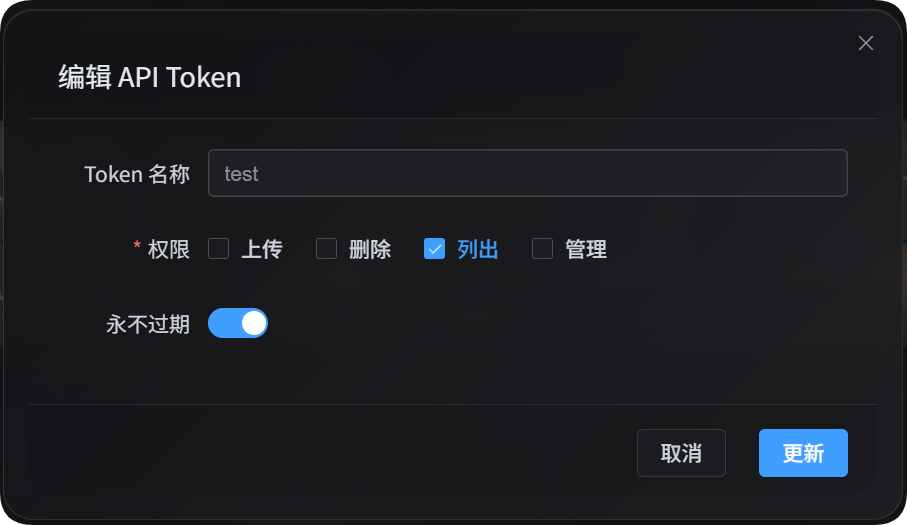
API Token 목록 조회 스크립트는 스크립트, 자동화 작업, 외부 프로그램에서 ImgHost 데이터를 읽을 때 사용합니다. 이 스크립트는 list 권한만 사용합니다. 파일 업로드, 파일 삭제, 설정 변경, 특정 IP의 업로드 금지나 허용은 하지 않습니다.
주요 용도:
| 기능 | 설명 |
|---|---|
| 파일 관리 목록 조회 | 관리자 화면의 파일 목록을 읽고, 파일 관리에서 쓰는 고급 필터 매개변수도 지원합니다 |
| 사용자 관리 목록 조회 | 사용자/IP 업로드 통계를 읽고, 사용자 관리에서 쓰는 필터 매개변수도 지원합니다 |
| 업로드 채널 목록 | 민감한 정보를 제외한 업로드 채널, 하위 채널, 용량, 부하 분산 정보를 읽습니다 |
| 디렉터리 통계표 | 디렉터리 통계와 디렉터리 페이지 정보를 읽습니다 |
준비하기
관리자 화면에서 다음 위치로 이동합니다.
text
System Settings -> Security Settings -> API TokenAPI Token을 만들거나 수정할 때 이 Token에 목록 조회 권한이 있는지 확인하세요. 이 스크립트에는 list 권한만 필요합니다.
Token은 환경 변수에 넣을 수도 있습니다.
powershell
$env:IMGHOST_API_TOKEN="your API Token"목록 조회 스크립트 다운로드
| 스크립트 | 용도 |
|---|---|
| 목록 조회와 필터링 스크립트 | 파일 관리 목록 조회, 사용자 관리 목록 조회, 업로드 채널 목록, 디렉터리 통계표 |
실행하려면 Node.js 18 이상이 필요합니다.
공통 매개변수
| 매개변수 | 필수 | 설명 |
|---|---|---|
--base-url <url> | 예 | ImgHost 사이트 주소. 예: https://image.ai6.me |
--token <token> | 예 | API Token. IMGHOST_API_TOKEN 환경 변수도 사용할 수 있습니다. |
--retries <n> | 아니요 | 일시적 실패 재시도 횟수. 기본값은 3입니다. |
--timeout-ms <n> | 아니요 | 단일 요청 제한 시간. 기본값은 180000입니다. |
--output <pretty|json> | 아니요 | 출력 형식. 기본값은 pretty입니다. 프로그램에서 처리할 때는 json을 권장합니다. |
--save-response <path> | 아니요 | 최종 결과를 JSON 파일로 저장합니다. |
-h / --help | 아니요 | 스크립트 도움말을 표시합니다. |
파일 관리 목록 조회
파일 관리의 파일을 조회합니다.
powershell
node imghost-token-list.mjs `
  --base-url "https://your-domain" `
  --token "your API Token" `
  --files `
  --count 10
JSON으로 출력합니다.
powershell
node imghost-token-list.mjs `
  --base-url "https://your-domain" `
  --token "your API Token" `
  --files `
  --count 10 `
  --output json
현재 필터 조건에 해당하는 개수만 읽습니다.
powershell
node imghost-token-list.mjs `
  --base-url "https://your-domain" `
  --token "your API Token" `
  --file-summary `
  --dir "photos/2026" `
  --recursive
파일 관리 매개변수
| 매개변수 | 설명 |
|---|---|
--files | 파일을 조회합니다 |
--file-summary | 개수 통계만 읽습니다 |
--start <n> | 페이지 시작 위치 |
--count <n> | 반환할 개수 |
--dir <path> | 디렉터리를 지정합니다 |
--recursive | 하위 디렉터리 파일도 포함합니다 |
--search <text> | 키워드로 검색합니다 |
--channel <key> | 업로드 상위 채널로 필터링합니다. 예: github, s3, yandex |
--channel-scope <primary|backup|all> | 채널 필터 범위: 기본 채널, 백업 채널, 전체 |
--channel-name-groups <value> | 하위 채널 그룹 필터입니다. 백엔드 기존 매개변수로 그대로 전달합니다 |
--list-type <csv> | 목록 유형. 자주 쓰는 값은 None,White,Block입니다 |
--include-tags <csv> | 반드시 포함할 태그 |
--exclude-tags <csv> | 제외할 태그 |
--time-start <ms> | 업로드 시간 시작점. 밀리초 타임스탬프 |
--time-end <ms> | 업로드 시간 끝점. 밀리초 타임스탬프 |
--file-exts <csv> | 지정한 확장자만 포함합니다. 예: jpg,png,pdf |
--exclude-file-exts <csv> | 지정한 확장자를 제외합니다 |
--file-status-categories <csv> | 파일 분류: image,audio,video,document,code,other |
--upload-ip <ip> | 업로드 IP 접두사로 필터링합니다 |
--age-ratings <csv> | 연령 등급: none,all-ages,r12,r16,r18 |
--orientation <csv> | 가로세로 방향 필터입니다. 백엔드 기존 값을 그대로 전달합니다 |
--read-source <csv> | 읽기 출처 필터입니다. 백엔드 기존 값을 그대로 전달합니다 |
--access-status <normal|blocked> | 공개 접근 상태 |
--min-width <n> | 최소 너비 |
--max-width <n> | 최대 너비 |
--min-height <n> | 최소 높이 |
--max-height <n> | 최대 높이 |
--min-file-size <mb> | 최소 파일 크기. 단위는 백엔드 기존 MB 매개변수를 따릅니다 |
--max-file-size <mb> | 최대 파일 크기. 단위는 백엔드 기존 MB 매개변수를 따릅니다 |
파일 관리 예
PDF 검색:
powershell
node imghost-token-list.mjs `
  --base-url "https://your-domain" `
  --token "your API Token" `
  --files `
  --search "pdf" `
  --file-status-categories "document" `
  --count 20
업로드 IP와 채널로 필터링:
powershell
node imghost-token-list.mjs `
  --base-url "https://your-domain" `
  --token "your API Token" `
  --files `
  --upload-ip "103.62" `
  --channel yandex `
  --channel-scope primary
전체 결과 저장:
powershell
node imghost-token-list.mjs `
  --base-url "https://your-domain" `
  --token "your API Token" `
  --files `
  --count 100 `
  --output json `
  --save-response ".\files.json"
사용자 관리 목록 조회
사용자/IP 업로드 통계를 조회합니다.
powershell
node imghost-token-list.mjs `
  --base-url "https://your-domain" `
  --token "your API Token" `
  --users `
  --count 20
특정 IP 또는 지역을 검색합니다.
powershell
node imghost-token-list.mjs `
  --base-url "https://your-domain" `
  --token "your API Token" `
  --users `
  --search "43.198.183.56"
특정 IP가 업로드한 파일 상세 내역을 봅니다.
powershell
node imghost-token-list.mjs `
  --base-url "https://your-domain" `
  --token "your API Token" `
  --user-detail `
  --ip "43.198.183.56" `
  --count 20
업로드 금지 IP를 조회합니다.
powershell
node imghost-token-list.mjs `
  --base-url "https://your-domain" `
  --token "your API Token" `
  --blocked-ips
사용자 관리 매개변수
| 매개변수 | 설명 |
|---|---|
--users | 사용자/IP 업로드 통계를 조회합니다 |
--user-detail | 특정 IP가 업로드한 파일 상세 내역을 봅니다 |
--blocked-ips | 업로드 금지 IP를 조회합니다 |
--ip <ip> | --user-detail에서는 필수입니다 |
--start <n> | 페이지 시작 위치 |
--count <n> | 반환할 개수 |
--sort <value> | 정렬: timeDesc, timeAsc, countDesc, countAsc, totalSizeDesc, totalSizeAsc |
--search <text> | IP 또는 지역 검색 |
--upload-status <allowed|blocked> | 업로드 허용 여부 |
--start-time <ms> | 통계 시간 시작점. 밀리초 타임스탬프 |
--end-time <ms> | 통계 시간 끝점. 밀리초 타임스탬프 |
--file-status-categories <csv> | 파일 분류 필터 |
--age-ratings <csv> | 연령 등급 필터 |
--min-file-size <mb> | 최소 파일 크기 |
--max-file-size <mb> | 최대 파일 크기 |
--list-type <csv> | 목록 유형. 자주 쓰는 값은 None,White,Block입니다 |
--access-status <normal|blocked> | 공개 접근 상태 |
사용자 관리 예
업로드 금지 사용자를 조회합니다.
powershell
node imghost-token-list.mjs `
  --base-url "https://your-domain" `
  --token "your API Token" `
  --users `
  --upload-status blocked
지역 키워드로 검색합니다.
powershell
node imghost-token-list.mjs `
  --base-url "https://your-domain" `
  --token "your API Token" `
  --users `
  --search "Hong Kong"
업로드 횟수순으로 정렬합니다.
powershell
node imghost-token-list.mjs `
  --base-url "https://your-domain" `
  --token "your API Token" `
  --users `
  --sort countDesc `
  --count 50
업로드 채널 목록
민감한 정보를 제외한 업로드 채널 설정을 조회합니다.
powershell
node imghost-token-list.mjs `
  --base-url "https://your-domain" `
  --token "your API Token" `
  --channels
반환 내용:
| 필드 | 설명 |
|---|---|
type | 업로드 상위 채널. 예: github, s3, yandex |
name | 하위 채널 또는 계정 이름 |
enabled | 활성화 여부 |
load_balance_enabled | 해당 상위 채널에서 부하 분산을 켰는지 여부 |
quota_enabled | 용량 검사를 켰는지 여부 |
quota_limit_bytes | 용량 한도 |
quota_used_bytes | 사용한 용량 |
quota_checked_at | 용량 검사 시간 |
tag_json | 공개 저장소, 비공개 저장소 같은 민감하지 않은 태그 |
created_at / updated_at | 생성 및 업데이트 시간 |
이 API는 비밀 키, 갱신 토큰, 임시 토큰, 비밀번호 같은 민감한 설정을 반환하지 않습니다.
디렉터리 통계표
디렉터리 통계를 조회합니다.
powershell
node imghost-token-list.mjs `
  --base-url "https://your-domain" `
  --token "your API Token" `
  --directories `
  --limit 20
전체 디렉터리 경로를 조회하고 접두사로 검색합니다.
powershell
node imghost-token-list.mjs `
  --base-url "https://your-domain" `
  --token "your API Token" `
  --directories `
  --scope full `
  --search-prefix "test" `
  --include-parents `
  --limit 10
디렉터리 통계 매개변수
| 매개변수 | 설명 |
|---|---|
--directories | 디렉터리 통계표를 조회합니다 |
--dir <path> | 조회를 시작할 디렉터리 |
--scope <direct|full> | direct는 바로 아래 디렉터리만 조회하고, full은 전체 경로를 조회합니다 |
--search-prefix <path> | 디렉터리 접두사로 검색합니다 |
--include-parents | full 모드에서 상위 디렉터리도 함께 포함합니다 |
--limit <n> | 반환할 개수. 백엔드 최대값은 100입니다 |
--cursor <path> | 다음 페이지 커서 |
출력 형식
기본값인 pretty 출력은 사람이 확인하기에 적합합니다.
powershell
node imghost-token-list.mjs --base-url "https://your-domain" --token "your API Token" --users --count 5다른 프로그램에서 처리하려면 --output json을 사용하세요.
powershell
node imghost-token-list.mjs --base-url "https://your-domain" --token "your API Token" --users --count 5 --output json전체 결과를 저장할 수도 있습니다.
powershell
node imghost-token-list.mjs `
  --base-url "https://your-domain" `
  --token "your API Token" `
  --users `
  --count 5 `
  --output json `
  --save-response ".\users.json"
자주 묻는 질문
이 스크립트가 데이터를 변경하나요?
변경하지 않습니다. 이 스크립트는 읽기 API만 호출합니다. 업로드, 삭제, 이동, 설정 편집, 특정 IP의 업로드 금지나 허용은 하지 않습니다.
왜 list 권한이 필요한가요?
파일 관리 목록 조회, 사용자 관리 목록 조회, 민감한 정보를 제외한 채널 목록, 디렉터리 통계는 모두 읽기 기능이므로 API Token의 list 권한만 필요합니다.
어떤 매개변수를 쓸 수 있는지 확인하려면?
다음을 실행하세요.
powershell
node imghost-token-list.mjs --help스크립트가 모든 작업과 매개변수를 표시합니다.