API Token 列出和筛选
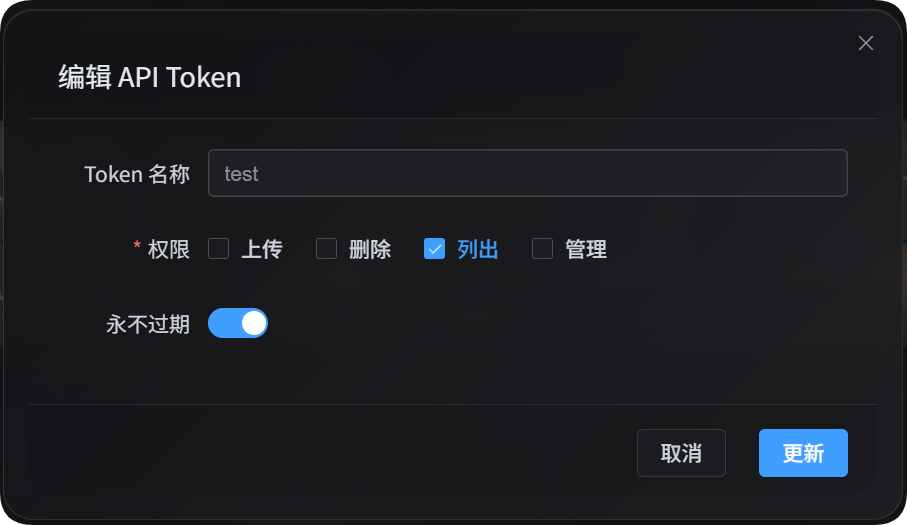
API Token 列出脚本适合给脚本、自动化任务和第三方程序读取图床数据。它只使用 list 权限,不会上传文件、删除文件、修改配置,也不会禁用或允许某个 IP 上传。
主要用途:
| 功能 | 说明 |
|---|---|
| 文件管理列出 | 读取后台文件列表,并支持文件管理里的高级筛选参数 |
| 用户管理列出 | 读取用户/IP 上传统计,并支持用户管理里的筛选参数 |
| 上传渠道列表 | 读取脱敏后的上传渠道、子渠道、容量和负载均衡信息 |
| 目录统计表 | 读取目录统计和目录分页信息 |
准备工作
进入后台后,打开:
系统配置 → 安全设置 → API Token
创建或编辑 API Token 时,确认这个 Token 允许列出。这个脚本只需要 list 权限。
也可以把 Token 放到环境变量里:
powershell
$env:IMGHOST_API_TOKEN="你的 API Token"下载脚本
| 脚本 | 用途 |
|---|---|
| 列出和筛选脚本 | 文件管理列出、用户管理列出、上传渠道列表、目录统计表 |
运行脚本需要本机安装 Node.js 18 或更高版本。
通用参数
| 参数 | 必填 | 说明 |
|---|---|---|
--base-url <url> | 是 | 图床站点地址,例如 https://image.ai6.me |
--token <token> | 是 | API Token;也可以用 IMGHOST_API_TOKEN 环境变量 |
--retries <n> | 否 | 临时失败重试次数,默认 3 |
--timeout-ms <n> | 否 | 单个请求超时时间,默认 180000 |
--output <pretty|json> | 否 | 输出格式,默认 pretty;程序调用建议用 json |
--save-response <path> | 否 | 把最终结果保存成 JSON 文件 |
-h / --help | 否 | 查看脚本帮助 |
文件管理列出
列出文件管理中的文件:
powershell
node imghost-token-list.mjs `
  --base-url "https://你的域名" `
  --token "你的 API Token" `
  --files `
  --count 10
输出 JSON:
powershell
node imghost-token-list.mjs `
  --base-url "https://你的域名" `
  --token "你的 API Token" `
  --files `
  --count 10 `
  --output json
只读取当前筛选条件下的数量:
powershell
node imghost-token-list.mjs `
  --base-url "https://你的域名" `
  --token "你的 API Token" `
  --file-summary `
  --dir "photos/2026" `
  --recursive
文件管理参数
| 参数 | 说明 |
|---|---|
--files | 列出文件 |
--file-summary | 只读取数量统计 |
--start <n> | 分页偏移 |
--count <n> | 返回数量 |
--dir <path> | 指定目录 |
--recursive | 包含子目录文件 |
--search <text> | 搜索关键词 |
--channel <key> | 按上传大渠道筛选,例如 github、s3、yandex |
--channel-scope <primary|backup|all> | 渠道筛选范围:主渠道、备份渠道、全部 |
--channel-name-groups <value> | 子渠道分组筛选,透传后端现有参数 |
--list-type <csv> | 名单类型,常用 None,White,Block |
--include-tags <csv> | 必须包含这些标签 |
--exclude-tags <csv> | 排除这些标签 |
--time-start <ms> | 上传时间起点,毫秒时间戳 |
--time-end <ms> | 上传时间终点,毫秒时间戳 |
--file-exts <csv> | 只包含指定扩展名,例如 jpg,png,pdf |
--exclude-file-exts <csv> | 排除指定扩展名 |
--file-status-categories <csv> | 文件分类:image,audio,video,document,code,other |
--upload-ip <ip> | 按上传 IP 前缀筛选 |
--age-ratings <csv> | 年龄分级:none,all-ages,r12,r16,r18 |
--orientation <csv> | 横竖图筛选,透传后端现有值 |
--read-source <csv> | 读取来源筛选,透传后端现有值 |
--access-status <normal|blocked> | 公共访问状态 |
--min-width <n> | 最小宽度 |
--max-width <n> | 最大宽度 |
--min-height <n> | 最小高度 |
--max-height <n> | 最大高度 |
--min-file-size <mb> | 最小文件大小,单位使用后端现有 MB 参数 |
--max-file-size <mb> | 最大文件大小,单位使用后端现有 MB 参数 |
文件管理示例
搜索 PDF:
powershell
node imghost-token-list.mjs `
  --base-url "https://你的域名" `
  --token "你的 API Token" `
  --files `
  --search "pdf" `
  --file-status-categories "document" `
  --count 20
按上传 IP 和渠道筛选:
powershell
node imghost-token-list.mjs `
  --base-url "https://你的域名" `
  --token "你的 API Token" `
  --files `
  --upload-ip "103.62" `
  --channel yandex `
  --channel-scope primary
保存完整结果:
powershell
node imghost-token-list.mjs `
  --base-url "https://你的域名" `
  --token "你的 API Token" `
  --files `
  --count 100 `
  --output json `
  --save-response ".\files.json"
用户管理列出
列出用户/IP 上传统计:
powershell
node imghost-token-list.mjs `
  --base-url "https://你的域名" `
  --token "你的 API Token" `
  --users `
  --count 20
搜索某个 IP 或地址:
powershell
node imghost-token-list.mjs `
  --base-url "https://你的域名" `
  --token "你的 API Token" `
  --users `
  --search "43.198.183.56"
查看某个 IP 上传的文件明细:
powershell
node imghost-token-list.mjs `
  --base-url "https://你的域名" `
  --token "你的 API Token" `
  --user-detail `
  --ip "43.198.183.56" `
  --count 20
列出禁止上传 IP:
powershell
node imghost-token-list.mjs `
  --base-url "https://你的域名" `
  --token "你的 API Token" `
  --blocked-ips
用户管理参数
| 参数 | 说明 |
|---|---|
--users | 列出用户/IP 上传统计 |
--user-detail | 查看某个 IP 上传的文件明细 |
--blocked-ips | 列出禁止上传 IP |
--ip <ip> | --user-detail 必填 |
--start <n> | 分页偏移 |
--count <n> | 返回数量 |
--sort <value> | 排序:timeDesc、timeAsc、countDesc、countAsc、totalSizeDesc、totalSizeAsc |
--search <text> | 搜索 IP 或地址 |
--upload-status <allowed|blocked> | 是否允许上传 |
--start-time <ms> | 统计时间起点,毫秒时间戳 |
--end-time <ms> | 统计时间终点,毫秒时间戳 |
--file-status-categories <csv> | 文件分类筛选 |
--age-ratings <csv> | 年龄分级筛选 |
--min-file-size <mb> | 最小文件大小 |
--max-file-size <mb> | 最大文件大小 |
--list-type <csv> | 名单类型,常用 None,White,Block |
--access-status <normal|blocked> | 公共访问状态 |
用户管理示例
列出禁止上传的用户:
powershell
node imghost-token-list.mjs `
  --base-url "https://你的域名" `
  --token "你的 API Token" `
  --users `
  --upload-status blocked
按地址关键词搜索:
powershell
node imghost-token-list.mjs `
  --base-url "https://你的域名" `
  --token "你的 API Token" `
  --users `
  --search "香港"
按上传次数排序:
powershell
node imghost-token-list.mjs `
  --base-url "https://你的域名" `
  --token "你的 API Token" `
  --users `
  --sort countDesc `
  --count 50
上传渠道列表
列出脱敏后的上传渠道配置:
powershell
node imghost-token-list.mjs `
  --base-url "https://你的域名" `
  --token "你的 API Token" `
  --channels
返回内容包含:
| 字段 | 说明 |
|---|---|
type | 上传大渠道,例如 github、s3、yandex |
name | 子渠道或账号名称 |
enabled | 是否启用 |
load_balance_enabled | 该大渠道是否开启负载均衡 |
quota_enabled | 是否启用容量检查 |
quota_limit_bytes | 容量上限 |
quota_used_bytes | 已用容量 |
quota_checked_at | 容量检查时间 |
tag_json | 非敏感标签,例如公开仓库、私有仓库 |
created_at / updated_at | 创建和更新时间 |
这个接口不会返回密钥、刷新令牌、临时令牌、密码等敏感配置。
目录统计表
列出目录统计:
powershell
node imghost-token-list.mjs `
  --base-url "https://你的域名" `
  --token "你的 API Token" `
  --directories `
  --limit 20
列出完整目录路径并搜索前缀:
powershell
node imghost-token-list.mjs `
  --base-url "https://你的域名" `
  --token "你的 API Token" `
  --directories `
  --scope full `
  --search-prefix "test" `
  --include-parents `
  --limit 10
目录统计参数
| 参数 | 说明 |
|---|---|
--directories | 列出目录统计表 |
--dir <path> | 从哪个目录开始列 |
--scope <direct|full> | direct 只列直属目录,full 列完整路径 |
--search-prefix <path> | 按目录前缀搜索 |
--include-parents | full 模式下把父级目录也带出来 |
--limit <n> | 返回数量,后端最多 100 |
--cursor <path> | 下一页游标 |
输出格式
默认 pretty 输出适合人工查看:
powershell
node imghost-token-list.mjs --base-url "https://你的域名" --token "你的 API Token" --users --count 5如果要给其他程序处理,使用 --output json:
powershell
node imghost-token-list.mjs --base-url "https://你的域名" --token "你的 API Token" --users --count 5 --output json也可以保存完整结果:
powershell
node imghost-token-list.mjs `
  --base-url "https://你的域名" `
  --token "你的 API Token" `
  --users `
  --count 5 `
  --output json `
  --save-response ".\users.json"
常见问题
这个脚本会修改数据吗
不会。这个脚本只调用读取接口,不会上传、删除、移动、编辑配置,也不会禁用或允许某个 IP 上传。
为什么需要 list 权限
文件管理列出、用户管理列出、脱敏渠道列表和目录统计都属于读取能力,所以只需要 API Token 的 list 权限。
怎么确认有哪些参数
执行:
powershell
node imghost-token-list.mjs --help脚本会列出所有动作和参数。