API Token Listing And Filtering
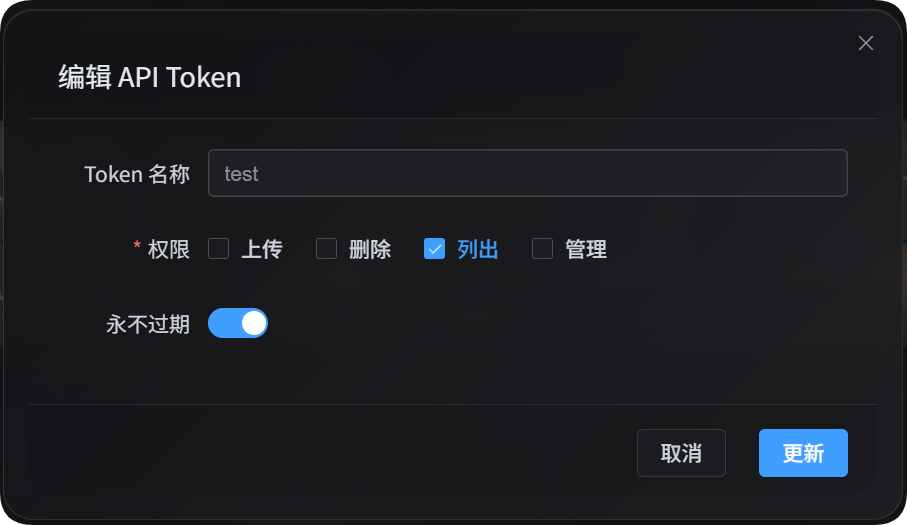
API Token listing scripts are useful when scripts, automation jobs, or third-party programs need to read ImgHost data. They only use the list permission. They do not upload files, delete files, change configuration, or block or allow any IP address.
Main uses:
| Feature | Description |
|---|---|
| File manager listing | Read the admin file list and use the same advanced filters available in file management. |
| User management listing | Read user/IP upload statistics and use the filters available in user management. |
| Upload channel list | Read sanitized upload channels, child channels, capacity data, and load-balancing status. |
| Directory statistics | Read directory statistics and paginated directory information. |
Before You Start
Open the admin panel, then go to:
text
System Settings -> Security Settings -> API TokenWhen creating or editing the API Token, make sure the token allows listing. This script only needs the list permission.
You can also place the token in an environment variable:
powershell
$env:IMGHOST_API_TOKEN="your API Token"Download The Script
| Script | Purpose |
|---|---|
| listing and filtering script | File manager listing, user management listing, upload channel list, and directory statistics. |
Node.js 18 or later is required.
Common Parameters
| Parameter | Required | Description |
|---|---|---|
--base-url <url> | Yes | ImgHost site URL, for example https://image.ai6.me. |
--token <token> | Yes | API Token. You can also use the IMGHOST_API_TOKEN environment variable. |
--retries <n> | No | Temporary failure retry count. Defaults to 3. |
--timeout-ms <n> | No | Request timeout for each request. Defaults to 180000. |
--output <pretty|json> | No | Output format. Defaults to pretty; use json for programs. |
--save-response <path> | No | Save the final result as a JSON file. |
-h / --help | No | Show script help. |
File Manager Listing
List files in file management:
powershell
node imghost-token-list.mjs `
  --base-url "https://your-domain" `
  --token "your API Token" `
  --files `
  --count 10
Output JSON:
powershell
node imghost-token-list.mjs `
  --base-url "https://your-domain" `
  --token "your API Token" `
  --files `
  --count 10 `
  --output json
Read only the count under the current filters:
powershell
node imghost-token-list.mjs `
  --base-url "https://your-domain" `
  --token "your API Token" `
  --file-summary `
  --dir "photos/2026" `
  --recursive
File Manager Parameters
| Parameter | Description |
|---|---|
--files | List files. |
--file-summary | Read only count statistics. |
--start <n> | Pagination offset. |
--count <n> | Number of records to return. |
--dir <path> | Target directory. |
--recursive | Include files in child directories. |
--search <text> | Search keyword. |
--channel <key> | Filter by upload channel, for example github, s3, or yandex. |
--channel-scope <primary|backup|all> | Channel filter scope: primary channel, backup channel, or all. |
--channel-name-groups <value> | Child channel group filter, passed through to the backend. |
--list-type <csv> | List type, commonly None,White,Block. |
--include-tags <csv> | Require these tags. |
--exclude-tags <csv> | Exclude these tags. |
--time-start <ms> | Upload time start, in millisecond timestamp. |
--time-end <ms> | Upload time end, in millisecond timestamp. |
--file-exts <csv> | Include only specific extensions, for example jpg,png,pdf. |
--exclude-file-exts <csv> | Exclude specific extensions. |
--file-status-categories <csv> | File categories: image,audio,video,document,code,other. |
--upload-ip <ip> | Filter by upload IP prefix. |
--age-ratings <csv> | Age ratings: none,all-ages,r12,r16,r18. |
--orientation <csv> | Orientation filter, passed through to the backend. |
--read-source <csv> | Read-source filter, passed through to the backend. |
--access-status <normal|blocked> | Public access status. |
--min-width <n> | Minimum width. |
--max-width <n> | Maximum width. |
--min-height <n> | Minimum height. |
--max-height <n> | Maximum height. |
--min-file-size <mb> | Minimum file size, using the backend's existing MB parameter. |
--max-file-size <mb> | Maximum file size, using the backend's existing MB parameter. |
File Manager Examples
Search for PDFs:
powershell
node imghost-token-list.mjs `
  --base-url "https://your-domain" `
  --token "your API Token" `
  --files `
  --search "pdf" `
  --file-status-categories "document" `
  --count 20
Filter by upload IP and channel:
powershell
node imghost-token-list.mjs `
  --base-url "https://your-domain" `
  --token "your API Token" `
  --files `
  --upload-ip "103.62" `
  --channel yandex `
  --channel-scope primary
Save the full result:
powershell
node imghost-token-list.mjs `
  --base-url "https://your-domain" `
  --token "your API Token" `
  --files `
  --count 100 `
  --output json `
  --save-response ".\files.json"
User Management Listing
List user/IP upload statistics:
powershell
node imghost-token-list.mjs `
  --base-url "https://your-domain" `
  --token "your API Token" `
  --users `
  --count 20
Search for an IP or address:
powershell
node imghost-token-list.mjs `
  --base-url "https://your-domain" `
  --token "your API Token" `
  --users `
  --search "43.198.183.56"
View files uploaded by one IP:
powershell
node imghost-token-list.mjs `
  --base-url "https://your-domain" `
  --token "your API Token" `
  --user-detail `
  --ip "43.198.183.56" `
  --count 20
List blocked upload IPs:
powershell
node imghost-token-list.mjs `
  --base-url "https://your-domain" `
  --token "your API Token" `
  --blocked-ips
User Management Parameters
| Parameter | Description |
|---|---|
--users | List user/IP upload statistics. |
--user-detail | View files uploaded by a specific IP. |
--blocked-ips | List blocked upload IPs. |
--ip <ip> | Required with --user-detail. |
--start <n> | Pagination offset. |
--count <n> | Number of records to return. |
--sort <value> | Sort order: timeDesc, timeAsc, countDesc, countAsc, totalSizeDesc, totalSizeAsc. |
--search <text> | Search IP or address. |
--upload-status <allowed|blocked> | Whether uploads are allowed. |
--start-time <ms> | Statistics start time, in millisecond timestamp. |
--end-time <ms> | Statistics end time, in millisecond timestamp. |
--file-status-categories <csv> | File category filter. |
--age-ratings <csv> | Age rating filter. |
--min-file-size <mb> | Minimum file size. |
--max-file-size <mb> | Maximum file size. |
--list-type <csv> | List type, commonly None,White,Block. |
--access-status <normal|blocked> | Public access status. |
User Management Examples
List users blocked from uploading:
powershell
node imghost-token-list.mjs `
  --base-url "https://your-domain" `
  --token "your API Token" `
  --users `
  --upload-status blocked
Search by address keyword:
powershell
node imghost-token-list.mjs `
  --base-url "https://your-domain" `
  --token "your API Token" `
  --users `
  --search "Hong Kong"
Sort by upload count:
powershell
node imghost-token-list.mjs `
  --base-url "https://your-domain" `
  --token "your API Token" `
  --users `
  --sort countDesc `
  --count 50
Upload Channel List
List sanitized upload channel configuration:
powershell
node imghost-token-list.mjs `
  --base-url "https://your-domain" `
  --token "your API Token" `
  --channels
Returned data includes:
| Field | Description |
|---|---|
type | Upload channel type, for example github, s3, or yandex. |
name | Child channel or account name. |
enabled | Whether it is enabled. |
load_balance_enabled | Whether load balancing is enabled for this channel type. |
quota_enabled | Whether capacity checks are enabled. |
quota_limit_bytes | Capacity limit. |
quota_used_bytes | Used capacity. |
quota_checked_at | Capacity check time. |
tag_json | Non-sensitive tags, such as public repository or private repository. |
created_at / updated_at | Creation and update time. |
This API does not return secrets, refresh tokens, access tokens, passwords, or other sensitive configuration.
Directory Statistics
List directory statistics:
powershell
node imghost-token-list.mjs `
  --base-url "https://your-domain" `
  --token "your API Token" `
  --directories `
  --limit 20
List full directory paths and search by prefix:
powershell
node imghost-token-list.mjs `
  --base-url "https://your-domain" `
  --token "your API Token" `
  --directories `
  --scope full `
  --search-prefix "test" `
  --include-parents `
  --limit 10
Directory Statistics Parameters
| Parameter | Description |
|---|---|
--directories | List directory statistics. |
--dir <path> | Directory to start from. |
--scope <direct|full> | direct lists only direct child directories; full lists full paths. |
--search-prefix <path> | Search by directory prefix. |
--include-parents | In full mode, include parent directories too. |
--limit <n> | Number of records to return. Backend maximum is 100. |
--cursor <path> | Next-page cursor. |
Output Format
The default pretty output is suitable for human reading:
powershell
node imghost-token-list.mjs --base-url "https://your-domain" --token "your API Token" --users --count 5For other programs, use --output json:
powershell
node imghost-token-list.mjs --base-url "https://your-domain" --token "your API Token" --users --count 5 --output jsonYou can also save the full result:
powershell
node imghost-token-list.mjs `
  --base-url "https://your-domain" `
  --token "your API Token" `
  --users `
  --count 5 `
  --output json `
  --save-response ".\users.json"
FAQ
Does this script modify data?
No. This script only calls read APIs. It does not upload, delete, move, edit configuration, or block or allow any IP address.
Why is the list permission required?
File manager listing, user management listing, sanitized channel lists, and directory statistics are read capabilities, so they only need the API Token list permission.
How do I check all available parameters?
Run:
powershell
node imghost-token-list.mjs --helpThe script will list all actions and parameters.