API Token File Uploads
API Token uploads are intended for scripts, automation jobs, and third-party programs. You do not need to open the web UI. As long as you provide the site URL, token, local file path, and a real upload channel, the file can be uploaded to ImgHost and the response will include the file URL.
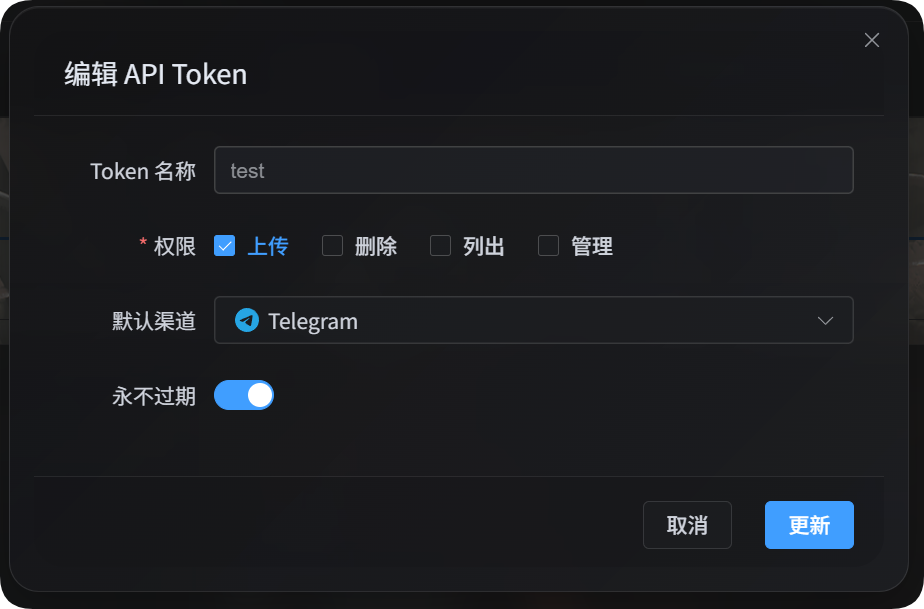
Before You Start
Open the admin panel, then go to:
text
System Settings -> Security Settings -> API TokenWhen creating or editing the API Token, make sure it has the upload permission and uses a real default upload channel. API Token uploads do not use the Smart Dispatch entry, and scripts should also pass a real channel.
Download The Upload Scripts
The documentation package provides two Node.js scripts:
| Script | Purpose |
|---|---|
| single-request upload script | Calls /upload once. Useful for small files and connectivity tests. |
| chunked upload script | Uses API Token chunking, direct upload, or platform upload sessions. Recommended for large files. |
Node.js 18 or later is required.
List Available Channels
Both scripts can list the upload channels available to the current API Token:
powershell
node imghost-token-single-upload.mjs --base-url "https://your-domain" --token "your API Token" --list-channels
node imghost-token-chunk-upload.mjs --base-url "https://your-domain" --token "your API Token" --list-channels
When listing channels, --file and --channel are not required. The response includes the default upload channel, upload channel keys, child channel names, and load-balance status. Secrets, refresh tokens, and other sensitive configuration values are not returned.
Choosing An Upload Mode
| Mode | Best For | Description |
|---|---|---|
| Single-request upload | Small files, simple scripts, connectivity tests | Sends the whole file to /upload in one request. |
| Chunked upload | Large files or files likely to time out | The script chooses the channel-specific chunked, direct, or upload-session flow. |
For larger files, use the chunked upload script first. Single-request uploads are limited by Cloudflare request size, Worker memory, and each platform's own limits.
Single-Request Upload
The single-request script sends one request to /upload.
powershell
node imghost-token-single-upload.mjs `
  --base-url "https://your-domain" `
  --token "your API Token" `
  --file "D:\test\image.png" `
  --channel s3 `
  --folder "photos/2026"
You can also place the token in an environment variable:
powershell
$env:IMGHOST_API_TOKEN="your API Token"
node imghost-token-single-upload.mjs --base-url "https://your-domain" --file "D:\test\image.png" --channel s3
Single-Request Parameters
| Parameter | Required | Description |
|---|---|---|
--base-url <url> | Yes | ImgHost site URL, for example https://image.ai6.me. |
--token <token> | Yes | API Token. You can also use the IMGHOST_API_TOKEN environment variable. |
--file <path> | Yes | Local file path. |
--channel <key> | Yes | Upload channel. |
--folder <path> | No | Upload folder, for example photos/2026 or /user/. |
--name-type <type> | No | Naming mode, mapped to backend uploadNameType. Defaults to default. |
--channel-name <name> | No | Selects a child channel/account. If omitted, the backend channel configuration decides. |
--retries <n> | No | Temporary failure retry count. Defaults to 3. |
--timeout-ms <n> | No | Request timeout. Defaults to 180000. |
--output <pretty|json> | No | Output format. Defaults to pretty. |
--save-response <path> | No | Save the final JSON response to a file. |
--list-channels | No | List channels available to the current token and exit. |
Single-Request Channels
| Channel Key | Channel |
|---|---|
telegram / tg | Telegram |
discord / dc | Discord |
cfr2 / r2 | Cloudflare R2 |
s3 | S3 |
webdav / wd | WebDAV storage channel |
github / gh | GitHub Releases |
gitlab / gl | GitLab Packages |
huggingface / hf | Hugging Face |
onedrive / od | OneDrive |
googledrive / google / gd | Google Drive |
dropbox / db | Dropbox |
yandex / yx | Yandex Disk |
pcloud / pd | pCloud |
Single-Request Size Limits
Keep single-request files under 100 MB where possible.
These channels have explicit single-request /upload blocking thresholds:
| Channel | Single-Request Limit |
|---|---|
| Telegram | 20 MiB |
| Discord | 10 MiB |
| S3 | 64 MiB |
| WebDAV | 64 MiB |
| GitHub Releases | 64 MiB |
| GitLab Packages | 64 MiB |
When a file exceeds one of these limits, the script reports the matching error locally. Other channels do not have a hardcoded 100 MB local check in the script. If the request body exceeds Cloudflare or platform capacity, Cloudflare or the remote platform will return the error.
Chunked Upload
The chunked upload script first asks the backend to resolve the target file and then follows the large-file flow for the selected channel. You do not need to write chunk session, merge, or completion requests yourself.
powershell
node imghost-token-chunk-upload.mjs `
  --base-url "https://your-domain" `
  --token "your API Token" `
  --file "D:\test\video.zip" `
  --channel github `
  --folder "photos/2026" `
  --concurrency 3
Chunked Upload Parameters
| Parameter | Required | Description |
|---|---|---|
--base-url <url> | Yes | ImgHost site URL. |
--token <token> | Yes | API Token. You can also use the IMGHOST_API_TOKEN environment variable. |
--file <path> | Yes | Local file path. |
--channel <key> | Yes | Upload channel. |
--folder <path> | No | Upload folder. |
--name-type <type> | No | Naming mode, mapped to backend uploadNameType. Defaults to default. |
--channel-name <name> | No | Selects a child channel/account. If omitted, the backend channel configuration decides. |
--concurrency <n> | No | Concurrent uploads. Defaults to 1, maximum 3. |
--retries <n> | No | Temporary failure retry count. Defaults to 3. |
--timeout-ms <n> | No | Per-request timeout. Defaults to 180000. |
--output <pretty|json> | No | Output format. Defaults to pretty. |
--save-response <path> | No | Save the final JSON response to a file. |
--list-channels | No | List channels available to the current token and exit. |
Chunked Upload Channels
| Channel Key | Upload Flow |
|---|---|
telegram / tg | Real chunked /upload session |
discord / dc | Real chunked /upload session |
cfr2 / r2 | Real chunked /upload session |
github / gh | Real chunked /upload session |
gitlab / gl | Real chunked /upload session |
webdav / wd | Real chunked /upload session |
s3 | S3 multipart upload |
onedrive / od | OneDrive upload session |
googledrive / google / gd | Google Drive resumable upload |
dropbox / db | Dropbox upload session |
yandex / yx | Yandex direct upload URL |
pcloud / pd | pCloud upload link |
huggingface / hf | Hugging Face LFS upload |
Yandex compressed-file samples were unstable in testing. Non-compressed files have been verified to upload successfully.
Upload Response
After a successful upload, the script prints:
text
success
src: /file/photos/2026/example.png
url: https://your-domain/file/photos/2026/example.png
fileId: photos/2026/example.png| Field | Description |
|---|---|
src | Internal site file path. |
url | Full public URL, suitable for your own scripts or database records. |
fileId | File ID, useful for later queries, management, or logs. |
channelName | The chunked script may return the actual child channel/account used. |
With --output json, the script prints the full JSON response for programmatic use.
Direct Single-Request API Call
If you do not use the script, you can call the single-request upload endpoint directly:
text
POST https://your-domain/upload?uploadChannel=s3&uploadFolder=photos/2026&uploadNameType=default
Authorization: Bearer your API Token
Content-Type: multipart/form-data
Form field:
| Field | Required | Description |
|---|---|---|
file | Yes | File to upload. |
Query parameters:
| Parameter | Required | Description |
|---|---|---|
uploadChannel | Yes | Real upload channel. |
uploadFolder | No | Upload folder. |
uploadNameType | No | Naming mode. |
channelName | No | Selects a child channel/account. |
Successful responses look like this:
json
{
  "success": true,
  "src": "/file/photos/2026/example.png",
  "url": "https://your-domain/file/photos/2026/example.png",
  "fileId": "photos/2026/example.png"
}
FAQ
Large Single-Request Uploads Fail
Single-request /upload sends the whole file in one request. Large files may be blocked by Cloudflare or the remote platform. Use the chunked upload script for large files.
--channel-name Is Set But Upload Still Fails
Check that the selected channel really has a child channel with that name and that it is enabled. If --channel-name is omitted, the backend chooses an available account according to that channel's configuration.
I Want To Use The Result In Another Program
Use --output json, or add --save-response result.json. Read the url field to get the full file URL.
Yandex Cannot Upload Archives
Yandex does not support archive formats. This may be caused by their platform policy. When using Yandex, upload non-archive files where possible.