API Token فائل اپ لوڈز
API Token اپ لوڈز اسکرپٹس، خودکار کاموں، اور فریق ثالث پروگراموں کے لیے ہیں۔ آپ کو web UI کھولنے کی ضرورت نہیں۔ جب تک آپ سائٹ URL، token، مقامی فائل path، اور حقیقی اپ لوڈ چینل فراہم کرتے ہیں، فائل ImgHost پر اپ لوڈ کی جا سکتی ہے اور response میں فائل URL شامل ہوگا۔
شروع کرنے سے پہلے
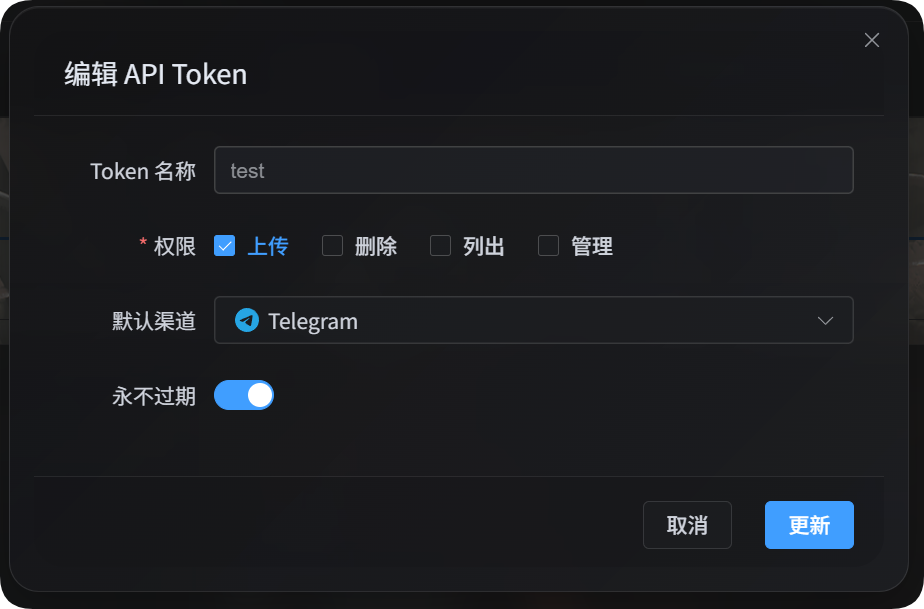
ایڈمن پینل کھولیں، پھر یہاں جائیں:
text
System Settings -> Security Settings -> API TokenAPI Token بناتے یا ترمیم کرتے وقت یقینی بنائیں کہ اس کے پاس upload permission ہے اور یہ حقیقی طے شدہ اپ لوڈ چینل استعمال کرتا ہے۔ API Token اپ لوڈز ذہین dispatch داخلہ استعمال نہیں کرتے، اور اسکرپٹس کو بھی حقیقی چینل pass کرنا چاہیے۔
اپ لوڈ اسکرپٹس ڈاؤن لوڈ کریں
دستاویزاتی package دو Node.js اسکرپٹس فراہم کرتا ہے:
| اسکرپٹ | مقصد |
|---|---|
| ایک درخواست اپ لوڈ اسکرپٹ | /upload کو ایک بار call کرتا ہے۔ چھوٹی فائلوں اور connectivity tests کے لیے مفید۔ |
| حصوں میں اپ لوڈ اسکرپٹ | API Token chunking، direct upload، یا platform upload sessions استعمال کرتا ہے۔ بڑی فائلوں کے لیے تجویز کردہ۔ |
Node.js 18 یا بعد کا ورژن درکار ہے۔
دستیاب چینلز کی فہرست دیکھیں
دونوں اسکرپٹس موجودہ API Token کو دستیاب اپ لوڈ چینلز list کر سکتے ہیں:
powershell
node imghost-token-single-upload.mjs --base-url "https://your-domain" --token "your API Token" --list-channels
node imghost-token-chunk-upload.mjs --base-url "https://your-domain" --token "your API Token" --list-channels
چینلز list کرتے وقت --file اور --channel ضروری نہیں ہوتے۔ response میں default upload channel، upload channel keys، child channel names، اور load-balance status شامل ہوتے ہیں۔ secrets، ریفریش ٹوکنز، اور دیگر sensitive configuration values واپس نہیں کی جاتیں۔
اپ لوڈ موڈ منتخب کرنا
| موڈ | بہترین استعمال | وضاحت |
|---|---|---|
| Single-request upload | چھوٹی فائلیں، سادہ اسکرپٹس، connectivity tests | پوری فائل ایک درخواست میں /upload کو بھیجتا ہے۔ |
| Chunked upload | بڑی فائلیں یا timeout ہونے کے امکان والی فائلیں | اسکرپٹ چینل کے مطابق chunked، direct، یا upload-session flow منتخب کرتا ہے۔ |
بڑی فائلوں کے لیے پہلے chunked upload script استعمال کریں۔ Single-request uploads Cloudflare request size، Worker memory، اور ہر platform کی اپنی limits سے محدود ہوتے ہیں۔
ایک درخواست والا اپ لوڈ
single-request script /upload کو ایک درخواست بھیجتا ہے۔
powershell
node imghost-token-single-upload.mjs `
  --base-url "https://your-domain" `
  --token "your API Token" `
  --file "D:\test\image.png" `
  --channel s3 `
  --folder "photos/2026"
آپ token کو environment variable میں بھی رکھ سکتے ہیں:
powershell
$env:IMGHOST_API_TOKEN="your API Token"
node imghost-token-single-upload.mjs --base-url "https://your-domain" --file "D:\test\image.png" --channel s3
ایک درخواست والے اپ لوڈ کے پیرامیٹرز
| پیرامیٹر | ضروری | وضاحت |
|---|---|---|
--base-url <url> | ہاں | ImgHost سائٹ URL، مثلاً https://image.ai6.me۔ |
--token <token> | ہاں | API Token۔ آپ IMGHOST_API_TOKEN environment variable بھی استعمال کر سکتے ہیں۔ |
--file <path> | ہاں | مقامی فائل path۔ |
--channel <key> | ہاں | اپ لوڈ چینل۔ |
--folder <path> | نہیں | اپ لوڈ folder، مثلاً photos/2026 یا /user/۔ |
--name-type <type> | نہیں | naming mode، بیک اینڈ uploadNameType سے mapped۔ طے شدہ قدر default ہے۔ |
--channel-name <name> | نہیں | child channel/account منتخب کرتا ہے۔ نہ دینے پر بیک اینڈ channel configuration فیصلہ کرتی ہے۔ |
--retries <n> | نہیں | عارضی ناکامی پر دوبارہ کوششوں کی تعداد۔ طے شدہ قدر 3۔ |
--timeout-ms <n> | نہیں | request timeout۔ طے شدہ قدر 180000۔ |
--output <pretty|json> | نہیں | output format۔ طے شدہ قدر pretty۔ |
--save-response <path> | نہیں | حتمی JSON response فائل میں محفوظ کریں۔ |
--list-channels | نہیں | موجودہ token کو دستیاب چینلز list کریں اور exit کریں۔ |
ایک درخواست والے اپ لوڈ کے چینلز
| چینل key | چینل |
|---|---|
telegram / tg | Telegram |
discord / dc | Discord |
cfr2 / r2 | Cloudflare R2 |
s3 | S3 |
webdav / wd | WebDAV storage channel |
github / gh | GitHub Releases |
gitlab / gl | GitLab Packages |
huggingface / hf | Hugging Face |
onedrive / od | OneDrive |
googledrive / google / gd | Google Drive |
dropbox / db | Dropbox |
yandex / yx | Yandex Disk |
pcloud / pd | pCloud |
ایک درخواست والے اپ لوڈ کی حجم حدود
ممکن ہو تو single-request فائلیں 100 MB سے کم رکھیں۔
ان چینلز کے لیے single-request /upload blocking thresholds واضح طور پر مقرر ہیں:
| چینل | Single-Request حد |
|---|---|
| Telegram | 20 MiB |
| Discord | 10 MiB |
| S3 | 64 MiB |
| WebDAV | 64 MiB |
| GitHub Releases | 64 MiB |
| GitLab Packages | 64 MiB |
جب فائل ان حدود میں سے کسی سے تجاوز کرتی ہے تو اسکرپٹ متعلقہ error locally report کرتا ہے۔ دوسرے چینلز کے لیے اسکرپٹ میں hardcoded 100 MB local check نہیں ہے۔ اگر request body Cloudflare یا platform capacity سے تجاوز کرے تو Cloudflare یا remote platform error واپس کرے گا۔
حصوں میں اپ لوڈ
chunked upload script پہلے بیک اینڈ سے target file resolve کراتا ہے، پھر selected channel کے لیے large-file flow follow کرتا ہے۔ آپ کو chunk session، merge، یا completion requests خود لکھنے کی ضرورت نہیں۔
powershell
node imghost-token-chunk-upload.mjs `
  --base-url "https://your-domain" `
  --token "your API Token" `
  --file "D:\test\video.zip" `
  --channel github `
  --folder "photos/2026" `
  --concurrency 3
حصوں میں اپ لوڈ کے پیرامیٹرز
| پیرامیٹر | ضروری | وضاحت |
|---|---|---|
--base-url <url> | ہاں | ImgHost سائٹ URL۔ |
--token <token> | ہاں | API Token۔ آپ IMGHOST_API_TOKEN environment variable بھی استعمال کر سکتے ہیں۔ |
--file <path> | ہاں | مقامی فائل path۔ |
--channel <key> | ہاں | اپ لوڈ چینل۔ |
--folder <path> | نہیں | اپ لوڈ folder۔ |
--name-type <type> | نہیں | naming mode، بیک اینڈ uploadNameType سے mapped۔ طے شدہ قدر default ہے۔ |
--channel-name <name> | نہیں | child channel/account منتخب کرتا ہے۔ نہ دینے پر بیک اینڈ channel configuration فیصلہ کرتی ہے۔ |
--concurrency <n> | نہیں | concurrent uploads۔ طے شدہ قدر 1، زیادہ سے زیادہ 3۔ |
--retries <n> | نہیں | عارضی ناکامی پر دوبارہ کوششوں کی تعداد۔ طے شدہ قدر 3۔ |
--timeout-ms <n> | نہیں | ہر درخواست کا timeout۔ طے شدہ قدر 180000۔ |
--output <pretty|json> | نہیں | output format۔ طے شدہ قدر pretty۔ |
--save-response <path> | نہیں | حتمی JSON response فائل میں محفوظ کریں۔ |
--list-channels | نہیں | موجودہ token کو دستیاب چینلز list کریں اور exit کریں۔ |
حصوں میں اپ لوڈ کے چینلز
| چینل key | اپ لوڈ flow |
|---|---|
telegram / tg | حقیقی chunked /upload session |
discord / dc | حقیقی chunked /upload session |
cfr2 / r2 | حقیقی chunked /upload session |
github / gh | حقیقی chunked /upload session |
gitlab / gl | حقیقی chunked /upload session |
webdav / wd | حقیقی chunked /upload session |
s3 | S3 multipart upload |
onedrive / od | OneDrive upload session |
googledrive / google / gd | Google Drive resumable upload |
dropbox / db | Dropbox upload session |
yandex / yx | Yandex direct upload URL |
pcloud / pd | pCloud upload link |
huggingface / hf | Hugging Face LFS upload |
Yandex compressed-file samples testing میں unstable تھے۔ non-compressed files کامیابی سے upload ہونا verified ہیں۔
اپ لوڈ جواب
کامیاب اپ لوڈ کے بعد اسکرپٹ print کرتا ہے:
text
success
src: /file/photos/2026/example.png
url: https://your-domain/file/photos/2026/example.png
fileId: photos/2026/example.png| فیلڈ | وضاحت |
|---|---|
src | اندرونی site file path۔ |
url | مکمل public URL، آپ کے اپنے اسکرپٹس یا database records کے لیے مناسب۔ |
fileId | file ID، بعد کی queries، management، یا logs کے لیے مفید۔ |
channelName | chunked script اصل استعمال شدہ child channel/account واپس کر سکتا ہے۔ |
--output json کے ساتھ اسکرپٹ programmatic use کے لیے مکمل JSON response print کرتا ہے۔
براہ راست ایک درخواست والی API کال
اگر آپ اسکرپٹ استعمال نہیں کرتے تو single-request upload رسائی نقطے کو براہ راست call کر سکتے ہیں:
text
POST https://your-domain/upload?uploadChannel=s3&uploadFolder=photos/2026&uploadNameType=default
Authorization: Bearer your API Token
Content-Type: multipart/form-data
Form field:
| فیلڈ | ضروری | وضاحت |
|---|---|---|
file | ہاں | اپ لوڈ کرنے والی فائل۔ |
Query parameters:
| پیرامیٹر | ضروری | وضاحت |
|---|---|---|
uploadChannel | ہاں | حقیقی اپ لوڈ چینل۔ |
uploadFolder | نہیں | اپ لوڈ folder۔ |
uploadNameType | نہیں | naming mode۔ |
channelName | نہیں | child channel/account منتخب کرتا ہے۔ |
کامیاب responses اس طرح ہوتے ہیں:
json
{
  "success": true,
  "src": "/file/photos/2026/example.png",
  "url": "https://your-domain/file/photos/2026/example.png",
  "fileId": "photos/2026/example.png"
}
عمومی سوالات
بڑے ایک درخواست والے اپ لوڈز ناکام ہوتے ہیں
Single-request /upload پوری فائل ایک درخواست میں بھیجتا ہے۔ بڑی فائلیں Cloudflare یا remote platform سے block ہو سکتی ہیں۔ بڑی فائلوں کے لیے chunked upload script استعمال کریں۔
--channel-name مقرر ہے لیکن اپ لوڈ پھر بھی ناکام ہے
چیک کریں کہ منتخب channel میں واقعی اس نام کا child channel موجود ہے اور وہ فعال ہے۔ اگر --channel-name نہ دیا جائے تو بیک اینڈ اس channel کی configuration کے مطابق دستیاب account منتخب کرتا ہے۔
میں نتیجہ کسی دوسرے پروگرام میں استعمال کرنا چاہتا ہوں
--output json استعمال کریں، یا --save-response result.json شامل کریں۔ مکمل file URL حاصل کرنے کے لیے url field پڑھیں۔
Yandex آرکائیوز اپ لوڈ نہیں کر سکتا
Yandex archive formats کو support نہیں کرتا۔ یہ ان کی platform policy کی وجہ سے ہو سکتا ہے۔ Yandex استعمال کرتے وقت جہاں ممکن ہو non-archive files اپ لوڈ کریں۔