Hugging Face Channel شامل کریں
شروع کرنے سے پہلے کیا چاہیے
آپ کو صرف تین چیزیں درکار ہیں:
| ضرورت | مقصد |
|---|---|
| Hugging Face account | access token بنانے اور repository own کرنے کے لیے۔ |
| Hugging Face User Access Token | ImgHost کو Hugging Face API access، repositories بنانے، اور files upload کرنے کے لیے۔ |
| Repository name | صرف repository name درج کر سکتے ہیں، مثلاً image۔ |
سیٹ اپ کے مراحل
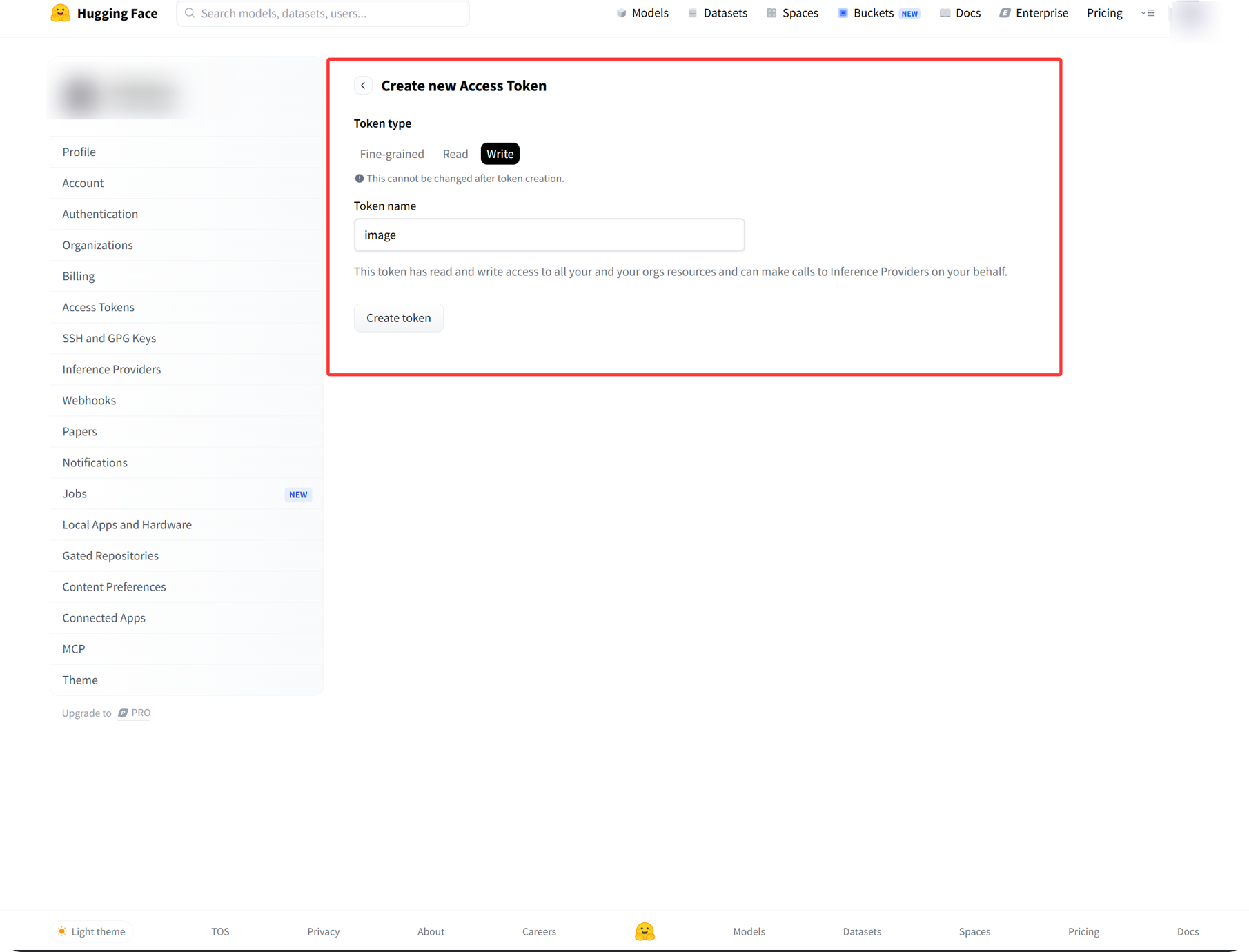
مرحلہ 1: Hugging Face میں sign in کریں اور Access Token بنائیں
- Hugging Face میں sign in کریں۔
- اوپر دائیں corner میں avatar پر کلک کریں اور
Settingsکھولیں۔ - left sidebar سے
Access Tokensکھولیں۔ - نیا token بنائیں۔
- token کو قابل شناخت نام دیں۔
writepermission منتخب کریں۔- token بنتے ہی فوراً کاپی کر کے محفوظ کریں۔
مرحلہ 2: ImgHost میں Hugging Face Channel بھریں
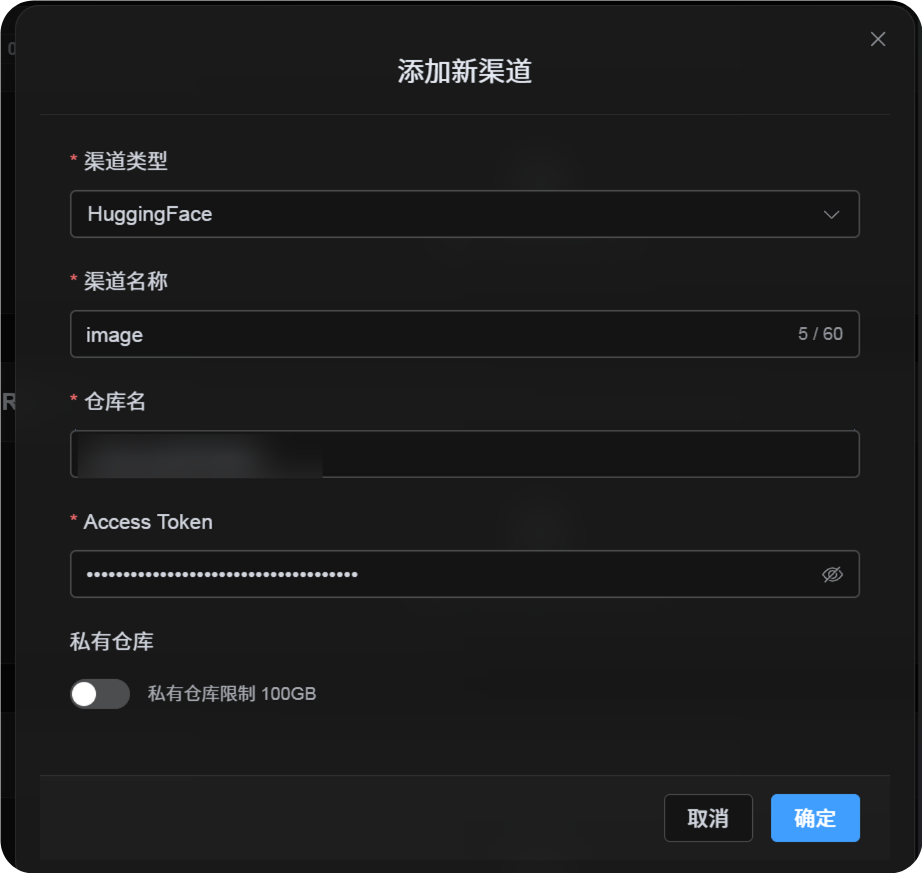
اپ لوڈ سیٹنگز میں Hugging Face منتخب کرنے کے بعد فیلڈز یوں بھریں:
| UI فیلڈ | کیا درج کریں |
|---|---|
| Channel name | اپنی پسند کا نام، مثلاً hf-primary۔ |
| Repository name | مختصر repo name جیسے image، یا مکمل path جیسے username/image۔ |
| Access Token | ابھی بنایا ہوا Hugging Face User Access Token۔ |
| Private repository | اپنی ضرورت کے مطابق on یا off کریں۔ |
| Remark | اختیاری، مثلاً Primary upload channel۔ |
مرحلہ 3: چینل محفوظ کریں
فیلڈز بھرنے کے بعد Save پر کلک کریں۔
نظام پھر یہ details خود سنبھال کرے گا:
| نظام کا رویہ | وضاحت |
|---|---|
| Short repository name | ImgHost موجودہ Hugging Face account پہچان کر قدر کو مکمل repository path میں وسیع کرتا ہے۔ |
| Full repository path | ImgHost username/repository path کو بالکل اسی طرح استعمال کرتا ہے جیسے درج کیا گیا ہو۔ |
| repository کی جانچ | موجودہ personal account path ہو تو ImgHost repository نہ ہونے پر اسے بنانے کی کوشش کرتا ہے۔ مکمل path دستی طور پر درج ہو تو ImgHost وہی path استعمال کرتا ہے۔ |
| Repository type | یہ channel dataset repository استعمال کرتا ہے۔ |
| Public/private state | repository visibility موجودہ switch کے مطابق sync ہوتی ہے۔ |
فوری چیک لسٹ
text
Sign in to Hugging Face
-> Create an Access Token
-> Select write permission
-> Return to ImgHost and enter the token and repository name
-> Save
-> If only a repo name is entered, ImgHost adds the current username automatically
-> If username/repo is entered, ImgHost uses it as-is
-> ImgHost checks or creates the dataset repository
-> Upload a test image