API Token ترتیب کا انتظام
API Token configuration management خودکار اسکرپٹس، operations tools، یا فریق ثالث control panels کے لیے ہے۔ یہ ایڈمن صفحہ کھولے بغیر upload channel configuration، security settings، page settings، other settings، اور lightweight federation relations پڑھ اور update کر سکتا ہے۔
Management permission صرف ایسی lightweight operations ظاہر کرتی ہے جو scripts کے لیے مناسب ہوں۔ Heavy operations جن کے لیے براؤزر confirmation، فرنٹ اینڈ batch jobs، یا federation index cleanup درکار ہو، اب بھی براؤزر ایڈمن پینل میں سنبھالنی ہوں گی۔
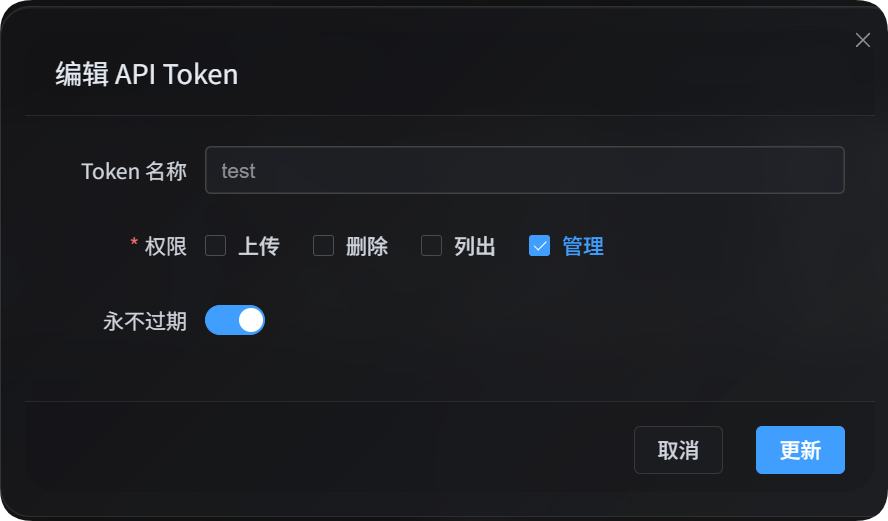
شروع کرنے سے پہلے
ایڈمن پینل کھولیں، پھر یہاں جائیں:
text
System Settings -> Security Settings -> API TokenAPI Token بناتے یا ترمیم کرتے وقت یقینی بنائیں کہ اس کے پاس management permission ہے۔ Management permission سائٹ configuration تبدیل کر سکتی ہے، اس لیے اسے صرف trusted scripts یا trusted users کو دیں۔
تینوں management scripts write operations کے لیے default طور پر dry-run mode استعمال کرتے ہیں۔ preview دیکھنے کے بعد تبدیلیاں واقعی save کرنے کے لیے --apply شامل کریں۔
آپ token کو environment variable میں بھی رکھ سکتے ہیں:
powershell
$env:IMGHOST_API_TOKEN="your API Token"انتظامی اسکرپٹس ڈاؤن لوڈ کریں
دستاویزاتی package تین Node.js scripts فراہم کرتا ہے:
| اسکرپٹ | مقصد |
|---|---|
| اپ لوڈ ترتیبات مینجمنٹ اسکرپٹ | اپ لوڈ چینلز، child channels، اور load balancing manage کریں۔ |
| سائٹ ترتیبات مینجمنٹ اسکرپٹ | security settings، page settings، اور other settings manage کریں۔ |
| فیڈریشن تعلقات مینجمنٹ اسکرپٹ | lightweight federation relation actions، requests، اور messages manage کریں۔ |
Node.js 18 یا بعد کا ورژن درکار ہے۔
مشترک پیرامیٹرز
| پیرامیٹر | ضروری | وضاحت |
|---|---|---|
--base-url <url> | ہاں | ImgHost سائٹ URL، مثلاً https://image.ai6.me۔ |
--token <token> | ہاں | API Token۔ آپ IMGHOST_API_TOKEN environment variable بھی استعمال کر سکتے ہیں۔ |
--retries <n> | نہیں | عارضی ناکامی پر دوبارہ کوششوں کی تعداد۔ طے شدہ قدر 3۔ |
--timeout-ms <n> | نہیں | request timeout۔ طے شدہ قدر 180000۔ |
--output <pretty|json> | نہیں | output format۔ طے شدہ قدر pretty؛ programs کے لیے json استعمال کریں۔ |
--save-response <path> | نہیں | حتمی JSON result فائل میں محفوظ کریں۔ |
--apply | نہیں | writes واقعی perform کریں۔ اس کے بغیر write operations صرف preview دکھاتی ہیں۔ |
-h / --help | نہیں | script help دکھائیں۔ |
اپ لوڈ ترتیبات
upload settings script upload child channels کو list، read، create، edit، اور delete کرتا ہے۔ یہ ایک top-level upload channel کے لیے load balancing بھی toggle کر سکتا ہے۔
powershell
node imghost-token-upload-settings.mjs --base-url "https://your-domain" --token "your API Token" --listاپ لوڈ ترتیبات کے پیرامیٹرز
| پیرامیٹر | وضاحت |
|---|---|
--list | upload setting groups list کریں۔ |
--get | top-level channel یا اس کے نیچے ایک child channel پڑھیں۔ |
--upsert | ایک child channel create یا edit کریں۔ --apply نہ ہو تو dry-run۔ |
--delete | ایک child channel delete کریں۔ --apply نہ ہو تو dry-run۔ |
--load-balance <true|false> | top-level channel کے لیے load balancing فعال یا غیر فعال کریں۔ |
--channel <key> | top-level upload channel، جیسے s3، github، یا telegram۔ |
--channel-name <name> | child channel یا account name۔ |
--set key=value | ایک field set کریں۔ repeatable ہے۔ dot paths supported ہیں۔ |
--patch-json <path> | JSON file سے fields merge کریں۔ |
--apply | write result save کریں۔ |
چینل keys
| چینل key | چینل |
|---|---|
telegram / tg | Telegram |
discord / dc | Discord |
cfr2 / r2 | Cloudflare R2 |
s3 | S3 |
webdav / wd | WebDAV storage channel |
github / gh | GitHub Releases |
gitlab / gl | GitLab Packages |
huggingface / hf | Hugging Face |
onedrive / od | OneDrive |
googledrive / google / gd | Google Drive |
dropbox / db | Dropbox |
yandex / yx | Yandex Disk |
pcloud / pd | pCloud |
اپ لوڈ ترتیبات کی مثالیں
تمام upload settings list کریں:
powershell
node imghost-token-upload-settings.mjs `
  --base-url "https://your-domain" `
  --token "your API Token" `
  --list
S3 channel configuration پڑھیں:
powershell
node imghost-token-upload-settings.mjs `
  --base-url "https://your-domain" `
  --token "your API Token" `
  --get `
  --channel s3
ایک S3 child channel پڑھیں:
powershell
node imghost-token-upload-settings.mjs `
  --base-url "https://your-domain" `
  --token "your API Token" `
  --get `
  --channel s3 `
  --channel-name "backup-s3"
ایک child channel create یا edit کریں۔ preview کے لیے پہلے اسے --apply کے بغیر چلائیں:
powershell
node imghost-token-upload-settings.mjs `
  --base-url "https://your-domain" `
  --token "your API Token" `
  --upsert `
  --channel webdav `
  --channel-name "backup-webdav" `
  --set enabled=false `
  --set remark="backup test"
تصدیق کے بعد save کریں:
powershell
node imghost-token-upload-settings.mjs `
  --base-url "https://your-domain" `
  --token "your API Token" `
  --upsert `
  --channel webdav `
  --channel-name "backup-webdav" `
  --set enabled=false `
  --set remark="backup test" `
  --apply
ایک child channel delete کریں:
powershell
node imghost-token-upload-settings.mjs `
  --base-url "https://your-domain" `
  --token "your API Token" `
  --delete `
  --channel webdav `
  --channel-name "backup-webdav" `
  --apply
S3 load balancing فعال کریں:
powershell
node imghost-token-upload-settings.mjs `
  --base-url "https://your-domain" `
  --token "your API Token" `
  --load-balance true `
  --channel s3 `
  --apply
complex fields کے لیے JSON file لکھیں اور --patch-json کے ساتھ pass کریں:
json
{
  "enabled": true,
  "remark": "primary account"
}
powershell
node imghost-token-upload-settings.mjs `
  --base-url "https://your-domain" `
  --token "your API Token" `
  --upsert `
  --channel s3 `
  --channel-name "primary-s3" `
  --patch-json ".\s3-channel.json" `
  --apply
سائٹ ترتیبات
site settings script تین configuration areas manage کرتا ہے:
| area | پیرامیٹر | وضاحت |
|---|---|---|
| security settings | security | user authentication، admin authentication، login devices، API Token، image moderation، user rate limits، WebDAV، وغیرہ۔ |
| page settings | page | global page، user-side page، admin page، اور متعلقہ display settings۔ |
| other settings | others | بے ترتیب تصویر API، public browsing، local federation node، auto tagging، IP geolocation، backup channel، OCR، وغیرہ۔ |
editable areas، sections، اور fields دیکھنے کے لیے پہلے --list-sections استعمال کریں:
powershell
node imghost-token-site-settings.mjs `
  --base-url "https://your-domain" `
  --token "your API Token" `
  --list-sections
سائٹ ترتیبات کے پیرامیٹرز
| پیرامیٹر | وضاحت |
|---|---|
--list-sections | editable areas، sections، اور fields list کریں۔ |
--get | ایک settings section پڑھیں۔ |
--area <security|page|others> | configuration area منتخب کریں۔ |
--section <name> | section منتخب کریں۔ --list-sections میں دکھائے گئے names استعمال کریں۔ |
--set key=value | ایک field set کریں۔ repeatable ہے۔ |
--apply | write result save کریں۔ |
page area کے لیے، --set page config item IDs استعمال کرتا ہے، مثلاً starsEffect=true۔ security اور others کے لیے، --set اس section کا field name استعمال کرتا ہے، مثلاً email=admin@example.com۔
سائٹ ترتیبات کی مثالیں
system update notification settings پڑھیں:
powershell
node imghost-token-site-settings.mjs `
  --base-url "https://your-domain" `
  --token "your API Token" `
  --get `
  --area security `
  --section systemUpdate
system update notification email تبدیل کریں۔ preview کے لیے پہلے --apply کے بغیر چلائیں:
powershell
node imghost-token-site-settings.mjs `
  --base-url "https://your-domain" `
  --token "your API Token" `
  --area security `
  --section systemUpdate `
  --set email="admin@example.com"
تصدیق کے بعد save کریں:
powershell
node imghost-token-site-settings.mjs `
  --base-url "https://your-domain" `
  --token "your API Token" `
  --area security `
  --section systemUpdate `
  --set email="admin@example.com" `
  --apply
admin page star effect تبدیل کریں:
powershell
node imghost-token-site-settings.mjs `
  --base-url "https://your-domain" `
  --token "your API Token" `
  --area page `
  --section adminSettings `
  --set starsEffect=true `
  --apply
IP geolocation language تبدیل کریں:
powershell
node imghost-token-site-settings.mjs `
  --base-url "https://your-domain" `
  --token "your API Token" `
  --area others `
  --section ipGeolocation `
  --set language="en" `
  --apply
Local federation node settings normal fields جیسے فعال حالت، sync directory، اور invite code پڑھ اور update کر سکتی ہیں۔ Domain confirmation API Token کے ذریعے handle نہیں ہوتی۔ اگر ایڈمن پینل report کرے کہ local node domain موجودہ access domain سے مختلف ہے، تو براؤزر ایڈمن پینل میں confirmation complete کریں۔
فیڈریشن تعلقات
federation script local node status، outgoing nodes، incoming nodes، messages، join requests، no-record reapply actions، approvals، denials، اور lightweight relation actions manage کرتا ہے جنہیں index cleanup کی ضرورت نہیں ہوتی۔
Index update، federation index deletion، اور domain-change confirmation مکمل براؤزر workflow پر depend کرتے ہیں۔ script یہ heavy operations handle نہیں کرتا۔
ہلکی اور بھاری فیڈریشن کارروائیاں
| action | script support | وضاحت |
|---|---|---|
| local node status دیکھنا اور relations list کرنا | Supported | صرف relation records پڑھتا ہے۔ |
| messages پڑھنا اور messages بھیجنا | Supported | relation messages پڑھتا یا لکھتا ہے۔ |
| کسی دوسرے node میں join request دینا | Supported | invite link سے request submit کرتا ہے۔ |
| no-record relation کے لیے reapply کرنا | Supported | صرف lastResult=none والے outgoing cards کے لیے؛ 6-character invite code درکار ہے۔ |
| outgoing pending request cancel کرنا | Supported | صرف pending request cancel کرتا ہے۔ |
| incoming request accept یا deny کرنا | Supported | آپ کے node میں شامل ہونے والے nodes کی requests handle کرتا ہے۔ |
| accepted incoming relation remove کرنا | Supported | incoming relation record update کرتا ہے اور peer کو notify کرتا ہے۔ |
| incoming terminal record delete کرنا | Supported | صرف incoming terminal relation record delete کرتا ہے۔ |
| accepted outgoing subscription cancel کرنا | صرف براؤزر | local federation index deletion درکار ہے، جسے براؤزر batches میں چلاتا ہے۔ |
| outgoing terminal record delete کرنا | صرف براؤزر | پہلے federation index cleanup درکار ہو سکتا ہے۔ |
| domain change confirm یا cancel کرنا | صرف براؤزر | current-domain confirmation اور domain-change index handling درکار ہے۔ |
| indexes publish، pull، یا batch-delete کرنا | صرف براؤزر | یہ فرنٹ اینڈ batch tasks ہیں۔ |
فیڈریشن پیرامیٹرز
| پیرامیٹر | وضاحت |
|---|---|
--status | local federation node status، outgoing nodes، اور incoming nodes دیکھیں۔ |
--list | federation relations list کریں۔ |
--chat | ایک relation کے کیش شدہ messages پڑھیں۔ |
--send-message | ایک established relation کو message بھیجیں۔ |
--join | invite link کے ذریعے کسی دوسرے node میں join request دیں۔ |
--reapply | no-record relation کے لیے reapply کریں۔ 6-character invite code درکار ہے۔ |
--accept | incoming request accept کریں۔ |
--deny | incoming request deny کریں۔ |
--cancel | outgoing pending request cancel کریں، یا accepted incoming relation remove کریں۔ |
--delete | incoming terminal relation record delete کریں۔ |
--direction <outgoing|incoming|all> | relation direction۔ outgoing سے مراد وہ nodes ہیں جن میں آپ joined ہیں؛ incoming سے مراد آپ کے node میں joined nodes ہیں۔ |
--domain <url> | relation node domain۔ |
--invite-link <url> | peer node کا invite link۔ |
--invite-code <code> | reapply کے لیے استعمال ہونے والا 6-character invite code۔ |
--text <message> | message text۔ |
--apply | write result save کریں۔ |
فیڈریشن مثالیں
local node status اور دونوں relation lists دیکھیں:
powershell
node imghost-token-federation.mjs `
  --base-url "https://your-domain" `
  --token "your API Token" `
  --status
صرف outgoing nodes list کریں:
powershell
node imghost-token-federation.mjs `
  --base-url "https://your-domain" `
  --token "your API Token" `
  --list `
  --direction outgoing
صرف incoming nodes list کریں:
powershell
node imghost-token-federation.mjs `
  --base-url "https://your-domain" `
  --token "your API Token" `
  --list `
  --direction incoming
کسی دوسرے node میں join request دیں۔ preview کے لیے پہلے --apply کے بغیر چلائیں:
powershell
node imghost-token-federation.mjs `
  --base-url "https://your-domain" `
  --token "your API Token" `
  --join `
  --invite-link "https://peer-domain/federation/invite/abcdef"
تصدیق کے بعد save کریں:
powershell
node imghost-token-federation.mjs `
  --base-url "https://your-domain" `
  --token "your API Token" `
  --join `
  --invite-link "https://peer-domain/federation/invite/abcdef" `
  --apply
no-record relation کے لیے reapply کریں:
powershell
node imghost-token-federation.mjs `
  --base-url "https://your-domain" `
  --token "your API Token" `
  --reapply `
  --domain "https://peer-domain" `
  --invite-code "abc123" `
  --apply
incoming request accept کریں:
powershell
node imghost-token-federation.mjs `
  --base-url "https://your-domain" `
  --token "your API Token" `
  --accept `
  --domain "https://peer-domain" `
  --apply
incoming request deny کریں:
powershell
node imghost-token-federation.mjs `
  --base-url "https://your-domain" `
  --token "your API Token" `
  --deny `
  --domain "https://peer-domain" `
  --apply
established relation کو message بھیجیں:
powershell
node imghost-token-federation.mjs `
  --base-url "https://your-domain" `
  --token "your API Token" `
  --send-message `
  --direction outgoing `
  --domain "https://peer-domain" `
  --text "Hello, this is a test message." `
  --apply
outgoing pending request cancel کریں:
powershell
node imghost-token-federation.mjs `
  --base-url "https://your-domain" `
  --token "your API Token" `
  --cancel `
  --direction outgoing `
  --domain "https://peer-domain" `
  --apply
accepted incoming relation remove کریں:
powershell
node imghost-token-federation.mjs `
  --base-url "https://your-domain" `
  --token "your API Token" `
  --cancel `
  --direction incoming `
  --domain "https://peer-domain" `
  --apply
incoming terminal record delete کریں:
powershell
node imghost-token-federation.mjs `
  --base-url "https://your-domain" `
  --token "your API Token" `
  --delete `
  --direction incoming `
  --domain "https://peer-domain" `
  --apply
accepted outgoing subscription cancellation اور outgoing record deletion براؤزر ایڈمن پینل میں handle ہونی چاہیے، کیونکہ ان actions کو پہلے local federation index cleanup کی ضرورت ہو سکتی ہے۔
ڈومین عدم مطابقت
اگر relation میں local node domain اور pending domain match نہ کریں تو script currentDomain اور pendingDomain کے ساتھ error report کرتا ہے۔ اسے براؤزر ایڈمن پینل میں handle کریں کیونکہ domain changes میں outgoing index cleanup اور confirmation بھی شامل ہوتے ہیں۔
اگر join request FEDERATION_NODE_DOMAIN_MISMATCH واپس کرے تو invite link میں استعمال ہونے والا domain peer node کے saved local domain سے match نہیں کرتا۔ response میں currentOrigin اور detectedOrigin شامل ہوتے ہیں۔ peer کا current confirmed domain استعمال کریں، یا peer سے کہیں کہ پہلے اپنے براؤزر ایڈمن پینل میں domain confirm کرے۔
عمومی سوالات
میری تبدیلی مؤثر کیوں نہیں ہوئی؟
write commands default طور پر preview mode میں چلتی ہیں۔ preview دیکھنے کے بعد تبدیلی واقعی save کرنے کے لیے --apply شامل کریں۔
مجھے کیسے معلوم ہو کہ کون سے فیلڈز تبدیل کیے جا سکتے ہیں؟
upload settings کے لیے موجودہ child channel structure دیکھنے کے لیے --get استعمال کریں۔ security settings، page settings، اور other settings کے لیے editable areas، sections، اور fields دیکھنے کے لیے --list-sections استعمال کریں۔
میں نتیجہ کسی دوسرے پروگرام میں استعمال کرنا چاہتا ہوں
--output json استعمال کریں، یا --save-response result.json شامل کریں۔ آپ کا program saved JSON file براہ راست پڑھ سکتا ہے۔