API Token 설정 관리
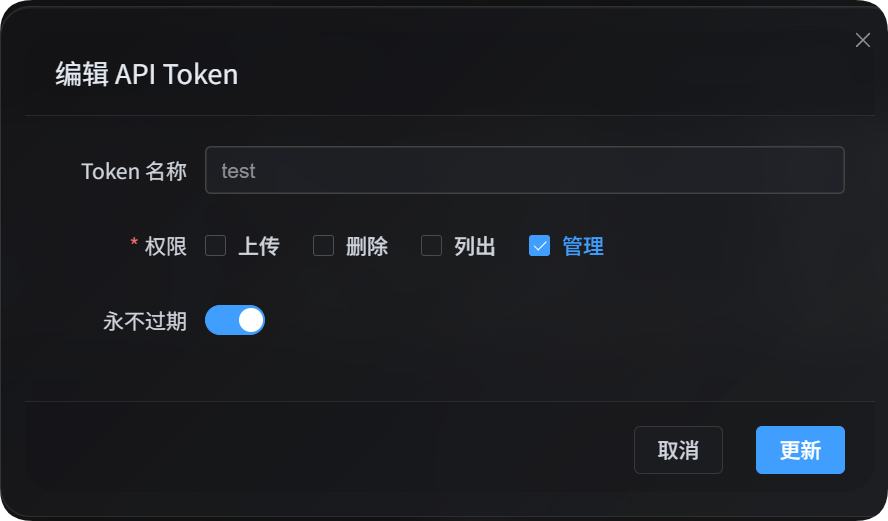
API Token 설정 관리는 자동화 스크립트, 운영 도구, 외부 제어 패널에서 사용하기 위한 기능입니다. 관리자 화면을 열지 않고도 업로드 채널 설정, 보안 설정, 페이지 설정, 기타 설정, 가벼운 연합 관계를 읽고 수정할 수 있습니다.
관리 권한은 스크립트에서 처리하기 적합한 가벼운 작업만 제공합니다. 브라우저 확인, 웹 인터페이스의 분할 작업, 연합 인덱스 정리가 필요한 무거운 작업은 여전히 브라우저 관리자 화면에서 처리해야 합니다.
준비하기
관리자 화면에서 다음 위치로 이동합니다.
text
System Settings -> Security Settings -> API TokenAPI Token을 만들거나 수정할 때 관리 권한을 켜세요. 관리 권한은 사이트 설정을 변경할 수 있으므로 신뢰할 수 있는 스크립트나 사용자에게만 제공하는 것이 좋습니다.
세 관리 스크립트의 쓰기 작업은 기본적으로 미리보기 모드입니다. 미리보기 내용을 확인한 뒤 --apply를 추가해야 실제로 저장됩니다.
Token은 환경 변수에 넣을 수도 있습니다.
powershell
$env:IMGHOST_API_TOKEN="your API Token"관리 스크립트 다운로드
문서에는 세 개의 Node.js 스크립트가 포함되어 있습니다.
| 스크립트 | 용도 |
|---|---|
| 업로드 설정 관리 스크립트 | 업로드 채널, 하위 채널, 부하 분산을 관리합니다. |
| 사이트 설정 관리 스크립트 | 보안 설정, 페이지 설정, 기타 설정을 관리합니다. |
| 연합 관계 관리 스크립트 | 가벼운 연합 관계 작업, 신청, 메시지를 관리합니다. |
실행하려면 Node.js 18 이상이 필요합니다.
공통 매개변수
| 매개변수 | 필수 | 설명 |
|---|---|---|
--base-url <url> | 예 | ImgHost 사이트 주소. 예: https://image.ai6.me |
--token <token> | 예 | API Token. IMGHOST_API_TOKEN 환경 변수도 사용할 수 있습니다. |
--retries <n> | 아니요 | 일시적 실패 재시도 횟수. 기본값은 3입니다. |
--timeout-ms <n> | 아니요 | 단일 요청 제한 시간. 기본값은 180000입니다. |
--output <pretty|json> | 아니요 | 출력 형식. 기본값은 pretty이며, 프로그램에서 처리할 때는 json이 편합니다. |
--save-response <path> | 아니요 | 최종 결과를 JSON 파일로 저장합니다. |
--apply | 아니요 | 실제로 쓰기를 실행합니다. 없으면 미리보기만 합니다. |
-h / --help | 아니요 | 스크립트 도움말을 표시합니다. |
업로드 설정
업로드 설정 스크립트는 업로드 하위 채널의 목록 조회, 읽기, 생성, 수정, 삭제를 처리합니다. 특정 상위 채널의 부하 분산도 전환할 수 있습니다.
powershell
node imghost-token-upload-settings.mjs --base-url "https://your-domain" --token "your API Token" --list업로드 설정 매개변수
| 매개변수 | 설명 |
|---|---|
--list | 업로드 설정 그룹을 나열합니다. |
--get | 상위 채널 또는 그 아래의 특정 하위 채널을 읽습니다. |
--upsert | 하위 채널을 만들거나 수정합니다. --apply가 없으면 미리보기만 합니다. |
--delete | 하위 채널을 삭제합니다. --apply가 없으면 미리보기만 합니다. |
--load-balance <true|false> | 상위 채널의 부하 분산을 켜거나 끕니다. |
--channel <key> | 상위 업로드 채널. 예: s3, github, telegram |
--channel-name <name> | 하위 채널 또는 계정 이름 |
--set key=value | 필드 하나를 설정합니다. 여러 번 사용할 수 있고 점 경로도 지원합니다. |
--patch-json <path> | JSON 파일에서 필드를 병합합니다. |
--apply | 쓰기 결과를 실제로 저장합니다. |
채널 키
| 채널 키 | 채널 |
|---|---|
telegram / tg | Telegram |
discord / dc | Discord |
cfr2 / r2 | Cloudflare R2 |
s3 | S3 |
webdav / wd | WebDAV 저장 채널 |
github / gh | GitHub Releases |
gitlab / gl | GitLab Packages |
huggingface / hf | Hugging Face |
onedrive / od | OneDrive |
googledrive / google / gd | Google Drive |
dropbox / db | Dropbox |
yandex / yx | Yandex Disk |
pcloud / pd | pCloud |
업로드 설정 예시
모든 업로드 설정을 나열합니다.
powershell
node imghost-token-upload-settings.mjs `
  --base-url "https://your-domain" `
  --token "your API Token" `
  --list
S3 채널 설정을 읽습니다.
powershell
node imghost-token-upload-settings.mjs `
  --base-url "https://your-domain" `
  --token "your API Token" `
  --get `
  --channel s3
S3의 특정 하위 채널을 읽습니다.
powershell
node imghost-token-upload-settings.mjs `
  --base-url "https://your-domain" `
  --token "your API Token" `
  --get `
  --channel s3 `
  --channel-name "backup-s3"
하위 채널을 만들거나 수정합니다. 처음에는 --apply 없이 실행해 미리보기를 확인하세요.
powershell
node imghost-token-upload-settings.mjs `
  --base-url "https://your-domain" `
  --token "your API Token" `
  --upsert `
  --channel webdav `
  --channel-name "backup-webdav" `
  --set enabled=false `
  --set remark="backup test"
확인 후 저장합니다.
powershell
node imghost-token-upload-settings.mjs `
  --base-url "https://your-domain" `
  --token "your API Token" `
  --upsert `
  --channel webdav `
  --channel-name "backup-webdav" `
  --set enabled=false `
  --set remark="backup test" `
  --apply
하위 채널을 삭제합니다.
powershell
node imghost-token-upload-settings.mjs `
  --base-url "https://your-domain" `
  --token "your API Token" `
  --delete `
  --channel webdav `
  --channel-name "backup-webdav" `
  --apply
S3 부하 분산을 켭니다.
powershell
node imghost-token-upload-settings.mjs `
  --base-url "https://your-domain" `
  --token "your API Token" `
  --load-balance true `
  --channel s3 `
  --apply
복잡한 필드는 JSON 파일로 작성한 뒤 --patch-json으로 전달할 수 있습니다.
json
{
  "enabled": true,
  "remark": "primary account"
}
powershell
node imghost-token-upload-settings.mjs `
  --base-url "https://your-domain" `
  --token "your API Token" `
  --upsert `
  --channel s3 `
  --channel-name "primary-s3" `
  --patch-json ".\s3-channel.json" `
  --apply
사이트 설정
사이트 설정 스크립트는 세 가지 설정 영역을 관리합니다.
| 영역 | 매개변수 | 설명 |
|---|---|---|
| 보안 설정 | security | 사용자 인증, 관리자 인증, 로그인 기기, API Token, 이미지 검사, 사용자 빈도 제한, WebDAV 등 |
| 페이지 설정 | page | 전역 페이지, 사용자 페이지, 관리자 페이지 등 |
| 기타 설정 | others | 랜덤 이미지 API, 공개 탐색, 로컬 연합 노드, 자동 태그, IP 위치 정보, 백업 채널, OCR 등 |
먼저 --list-sections로 현재 스크립트가 지원하는 영역, 섹션, 필드를 확인하세요.
powershell
node imghost-token-site-settings.mjs `
  --base-url "https://your-domain" `
  --token "your API Token" `
  --list-sections
사이트 설정 매개변수
| 매개변수 | 설명 |
|---|---|
--list-sections | 편집 가능한 영역, 섹션, 필드를 나열합니다. |
--get | 설정 섹션 하나를 읽습니다. |
--area <security|page|others> | 설정 영역을 지정합니다. |
--section <name> | 설정 섹션을 지정합니다. 이름은 --list-sections 출력에 따릅니다. |
--set key=value | 필드 하나를 설정합니다. 여러 번 사용할 수 있습니다. |
--apply | 쓰기 결과를 실제로 저장합니다. |
page 영역의 --set은 starsEffect=true처럼 페이지 설정 항목 ID를 사용합니다. security와 others 영역은 email=admin@example.com처럼 해당 섹션의 필드 이름을 사용합니다.
사이트 설정 예시
시스템 업데이트 알림 설정을 읽습니다.
powershell
node imghost-token-site-settings.mjs `
  --base-url "https://your-domain" `
  --token "your API Token" `
  --get `
  --area security `
  --section systemUpdate
시스템 업데이트 알림 이메일을 변경합니다. 처음에는 --apply 없이 실행해 미리보기를 확인하세요.
powershell
node imghost-token-site-settings.mjs `
  --base-url "https://your-domain" `
  --token "your API Token" `
  --area security `
  --section systemUpdate `
  --set email="admin@example.com"
확인 후 저장합니다.
powershell
node imghost-token-site-settings.mjs `
  --base-url "https://your-domain" `
  --token "your API Token" `
  --area security `
  --section systemUpdate `
  --set email="admin@example.com" `
  --apply
관리자 페이지의 별빛 효과를 변경합니다.
powershell
node imghost-token-site-settings.mjs `
  --base-url "https://your-domain" `
  --token "your API Token" `
  --area page `
  --section adminSettings `
  --set starsEffect=true `
  --apply
IP 위치 정보 언어를 변경합니다.
powershell
node imghost-token-site-settings.mjs `
  --base-url "https://your-domain" `
  --token "your API Token" `
  --area others `
  --section ipGeolocation `
  --set language="en" `
  --apply
로컬 연합 노드 설정은 활성화 상태, 동기화 디렉터리, 초대 코드 같은 일반 필드를 읽고 수정할 수 있습니다. 도메인 확인은 API Token으로 처리하지 않습니다. 관리자 화면에서 로컬 노드 도메인과 현재 접속 도메인이 다르다고 표시되면 브라우저 관리자 화면에서 확인을 완료하세요.
연합 관계
연합 관계 스크립트는 로컬 노드 상태, 내가 가입한 노드, 내 노드에 가입한 노드, 메시지, 가입 신청, 기록 없음 재신청, 승인, 거절, 인덱스 정리가 필요 없는 가벼운 관계 작업을 관리합니다.
인덱스 업데이트, 연합 인덱스 삭제, 도메인 변경 확인은 브라우저의 전체 흐름에 의존합니다. 스크립트는 이런 무거운 작업을 처리하지 않습니다.
가벼운 작업과 무거운 작업의 경계
| 작업 | 스크립트 지원 | 설명 |
|---|---|---|
| 로컬 노드 상태 확인, 관계 목록 | 지원 | 관계 기록만 읽습니다. |
| 메시지 보기, 메시지 보내기 | 지원 | 관계 메시지를 읽고 씁니다. |
| 다른 노드에 가입 신청 | 지원 | 초대 링크로 신청합니다. |
| 기록 없음 관계 재신청 | 지원 | lastResult=none인 outgoing 카드만 가능하며 6자리 초대 코드가 필요합니다. |
| outgoing 대기 신청 취소 | 지원 | pending 신청만 취소합니다. |
| incoming 신청 승인 또는 거절 | 지원 | 내 노드에 가입하려는 요청을 처리합니다. |
| 승인된 incoming 관계 제거 | 지원 | incoming 관계 기록을 수정하고 상대에게 알립니다. |
| incoming 종료 기록 삭제 | 지원 | incoming 종료 관계 기록만 삭제합니다. |
| 승인된 outgoing 구독 취소 | 브라우저 전용 | 로컬 연합 인덱스 삭제가 필요하며 브라우저가 분할 처리합니다. |
| outgoing 종료 기록 삭제 | 브라우저 전용 | 먼저 연합 인덱스 정리가 필요할 수 있습니다. |
| 도메인 변경 확인 또는 취소 | 브라우저 전용 | 현재 도메인 확인과 도메인 변경 후 인덱스 처리가 필요합니다. |
| 인덱스 게시, 가져오기, 분할 삭제 | 브라우저 전용 | 웹 인터페이스의 분할 작업입니다. |
연합 관계 매개변수
| 매개변수 | 설명 |
|---|---|
--status | 로컬 연합 노드 상태, outgoing, incoming을 봅니다. |
--list | 연합 관계 목록을 봅니다. |
--chat | 특정 관계의 캐시 메시지를 읽습니다. |
--send-message | 이미 맺어진 관계의 노드에 메시지를 보냅니다. |
--join | 초대 링크로 다른 노드에 가입 신청합니다. |
--reapply | 기록 없음 관계를 재신청합니다. 6자리 초대 코드가 필요합니다. |
--accept | incoming 신청을 승인합니다. |
--deny | incoming 신청을 거절합니다. |
--cancel | outgoing 대기 신청을 취소하거나 승인된 incoming 관계를 제거합니다. |
--delete | incoming 종료 관계 기록을 삭제합니다. |
--direction <outgoing|incoming|all> | 관계 방향입니다. outgoing은 내가 가입한 노드, incoming은 내 노드에 가입한 노드입니다. |
--domain <url> | 관계 노드 도메인 |
--invite-link <url> | 상대 노드 초대 링크 |
--invite-code <code> | 재신청에 쓰는 6자리 초대 코드 |
--text <message> | 메시지 내용 |
--apply | 쓰기 결과를 실제로 저장합니다. |
연합 관계 예시
로컬 노드 상태와 양쪽 관계 목록을 봅니다.
powershell
node imghost-token-federation.mjs `
  --base-url "https://your-domain" `
  --token "your API Token" `
  --status
내가 가입한 노드만 봅니다.
powershell
node imghost-token-federation.mjs `
  --base-url "https://your-domain" `
  --token "your API Token" `
  --list `
  --direction outgoing
내 노드에 가입한 노드만 봅니다.
powershell
node imghost-token-federation.mjs `
  --base-url "https://your-domain" `
  --token "your API Token" `
  --list `
  --direction incoming
초대 링크로 다른 노드에 가입 신청합니다. 처음에는 --apply 없이 실행해 미리보기를 확인하세요.
powershell
node imghost-token-federation.mjs `
  --base-url "https://your-domain" `
  --token "your API Token" `
  --join `
  --invite-link "https://peer-domain/federation/invite/abcdef"
확인 후 저장합니다.
powershell
node imghost-token-federation.mjs `
  --base-url "https://your-domain" `
  --token "your API Token" `
  --join `
  --invite-link "https://peer-domain/federation/invite/abcdef" `
  --apply
기록 없음 관계를 재신청합니다.
powershell
node imghost-token-federation.mjs `
  --base-url "https://your-domain" `
  --token "your API Token" `
  --reapply `
  --domain "https://peer-domain" `
  --invite-code "abc123" `
  --apply
incoming 신청을 승인합니다.
powershell
node imghost-token-federation.mjs `
  --base-url "https://your-domain" `
  --token "your API Token" `
  --accept `
  --domain "https://peer-domain" `
  --apply
incoming 신청을 거절합니다.
powershell
node imghost-token-federation.mjs `
  --base-url "https://your-domain" `
  --token "your API Token" `
  --deny `
  --domain "https://peer-domain" `
  --apply
이미 맺어진 관계에 메시지를 보냅니다.
powershell
node imghost-token-federation.mjs `
  --base-url "https://your-domain" `
  --token "your API Token" `
  --send-message `
  --direction outgoing `
  --domain "https://peer-domain" `
  --text "Hello, this is a test message." `
  --apply
outgoing 대기 신청을 취소합니다.
powershell
node imghost-token-federation.mjs `
  --base-url "https://your-domain" `
  --token "your API Token" `
  --cancel `
  --direction outgoing `
  --domain "https://peer-domain" `
  --apply
승인된 incoming 관계를 제거합니다.
powershell
node imghost-token-federation.mjs `
  --base-url "https://your-domain" `
  --token "your API Token" `
  --cancel `
  --direction incoming `
  --domain "https://peer-domain" `
  --apply
incoming 종료 기록을 삭제합니다.
powershell
node imghost-token-federation.mjs `
  --base-url "https://your-domain" `
  --token "your API Token" `
  --delete `
  --direction incoming `
  --domain "https://peer-domain" `
  --apply
승인된 outgoing 구독 취소와 outgoing 기록 삭제는 브라우저 관리자 화면에서 처리해야 합니다. 이런 작업은 먼저 로컬 연합 인덱스를 정리해야 할 수 있습니다.
도메인 불일치
로컬 노드에 저장된 도메인과 관계 안의 대기 도메인이 다르면 스크립트는 currentDomain과 pendingDomain을 포함한 오류를 반환합니다. 도메인 변경은 outgoing 인덱스 정리와 확인 절차가 함께 필요하므로 브라우저 관리자 화면에서 처리하세요.
가입 신청 중 상대가 FEDERATION_NODE_DOMAIN_MISMATCH를 반환하면, 초대 링크로 접근한 도메인과 상대 노드에 저장된 로컬 도메인이 다르다는 뜻입니다. 응답에는 currentOrigin과 detectedOrigin이 포함됩니다. 상대가 현재 확인한 도메인을 사용하거나, 상대에게 브라우저 관리자 화면에서 먼저 도메인을 확인해 달라고 요청하세요.
자주 묻는 질문
변경 명령을 실행했는데 적용되지 않습니다
쓰기 명령은 기본적으로 미리보기 모드입니다. 내용을 확인한 뒤 --apply를 추가해야 실제로 저장됩니다.
어떤 필드를 수정할 수 있는지 알고 싶습니다
업로드 설정은 먼저 --get으로 기존 하위 채널 구조를 확인하세요. 보안 설정, 페이지 설정, 기타 설정은 --list-sections로 스크립트가 편집할 수 있는 영역, 섹션, 필드를 확인하세요.
결과를 다른 프로그램에서 사용하고 싶습니다
--output json을 사용하거나 --save-response result.json을 추가하세요. 저장된 JSON 파일을 프로그램에서 바로 읽을 수 있습니다.