API Token ဖြင့် ဖွဲ့စည်းမှု စီမံခန့်ခွဲခြင်း
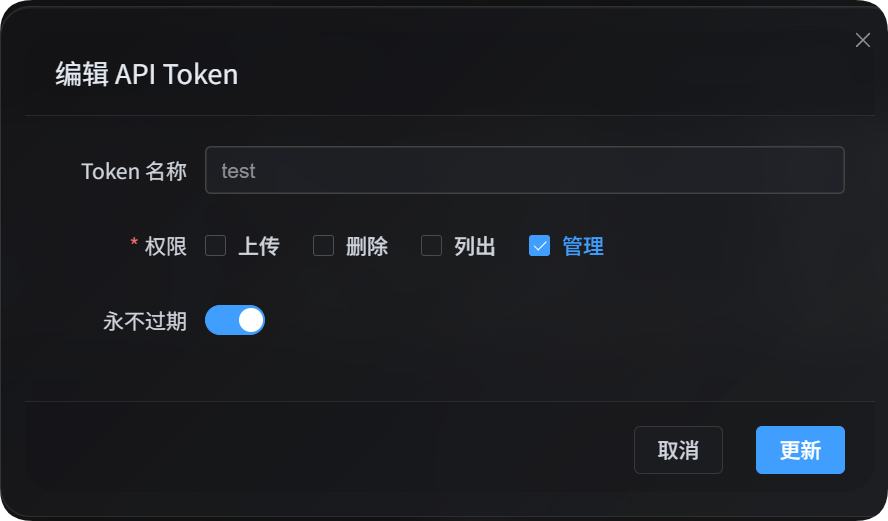
API Token ဖြင့် ဖွဲ့စည်းမှု စီမံခန့်ခွဲခြင်းသည် အလိုအလျောက် script များ၊ လုပ်ငန်းလည်ပတ်ရေး tool များနှင့် ပြင်ပ control panel များအတွက် ရည်ရွယ်သည်။ manage ခွင့်ပြုချက်ရှိသော API Token သည် စီမံခန့်ခွဲမှု ပန်နယ် မဖွင့်ဘဲ upload channel ဖွဲ့စည်းမှုများ၊ လုံခြုံရေး သတ်မှတ်ချက်များ၊ စာမျက်နှာ သတ်မှတ်ချက်များ၊ အခြား သတ်မှတ်ချက်များနှင့် federation ဆက်နွယ်မှု အချို့ကို ဖတ်ရန်၊ ပြောင်းရန် အသုံးပြုနိုင်သည်။
ဤ manage ခွင့်ပြုချက်သည် script များအတွက် သင့်တော်သော ပေါ့ပါးသည့် လုပ်ဆောင်ချက်များကိုသာ ဖွင့်ပေးသည်။ ဘရောက်ဇာထဲတွင် အတည်ပြုရန်လိုသော လေးလံသည့် လုပ်ဆောင်ချက်များ၊ web interface ထဲရှိ အဆင့်လိုက် အလုပ်များ သို့မဟုတ် federation index ရှင်းလင်းမှုများကို စီမံခန့်ခွဲမှု ပန်နယ်မှ ဆက်လက် ပြုလုပ်ရမည်။
မစတင်မီ
စီမံခန့်ခွဲမှု ပန်နယ်ကို ဖွင့်ပြီး အောက်ပါနေရာသို့ သွားပါ။
text
System Settings -> Security Settings -> API TokenAPI Token ဖန်တီး သို့မဟုတ် တည်းဖြတ်သောအခါ manage ခွင့်ပြုချက်ကို ဖွင့်ပါ။ ဤခွင့်ပြုချက်သည် site ဖွဲ့စည်းမှုကို ပြောင်းနိုင်သောကြောင့် ယုံကြည်ရသော script များ သို့မဟုတ် အသုံးပြုသူများထံသာ ပေးပါ။
စီမံခန့်ခွဲမှု script သုံးခုရှိ ရေးသားမှု လုပ်ဆောင်ချက်များသည် မူလအားဖြင့် preview သာ ပြသသည်။ Preview ကို စစ်ဆေးပြီးမှ ပြောင်းလဲမှုများကို တကယ် သိမ်းရန် --apply ထည့်ပါ။
API Token ကို environment variable ထဲတွင်လည်း ထားနိုင်သည်။
powershell
$env:IMGHOST_API_TOKEN="your API Token"စီမံခန့်ခွဲမှု Script များ ဒေါင်းလုဒ်လုပ်ခြင်း
ImgHost စာတမ်းတွင် Node.js script သုံးခု ပါသည်။
| Script | အသုံးပြုမှု |
|---|---|
| အပ်လုဒ်ဆက်တင်များ စီမံခန့်ခွဲရေးစခရစ် | Upload channel များ၊ subchannel များနှင့် load balancing ကို စီမံရန် |
| ဆိုက်ဆက်တင်များ စီမံခန့်ခွဲရေးစခရစ် | လုံခြုံရေး သတ်မှတ်ချက်များ၊ စာမျက်နှာ သတ်မှတ်ချက်များနှင့် အခြား သတ်မှတ်ချက်များကို စီမံရန် |
| ဖက်ဒရေးရှင်းဆက်ဆံရေး စီမံခန့်ခွဲရေးစခရစ် | ပေါ့ပါးသော ဆက်နွယ်မှု လုပ်ဆောင်ချက်များ၊ join requests နှင့် messages များကို စီမံရန် |
Script များသည် Node.js 18 သို့မဟုတ် ၎င်းထက် အသစ် လိုအပ်သည်။
အထွေထွေ Parameter များ
| Parameter | လိုအပ် | ဖော်ပြချက် |
|---|---|---|
--base-url <url> | ဟုတ် | ImgHost site URL၊ ဥပမာ https://image.ai6.me |
--token <token> | ဟုတ် | API Token။ IMGHOST_API_TOKEN environment variable ကိုလည်း အသုံးပြုနိုင်သည် |
--retries <n> | မဟုတ် | ယာယီ မအောင်မြင်မှုအတွက် retry အကြိမ်ရေ။ မူလတန်ဖိုး 3 |
--timeout-ms <n> | မဟုတ် | request တစ်ခုစီ၏ timeout ကို millisecond ဖြင့် သတ်မှတ်သည်။ မူလတန်ဖိုး 180000 |
--output <pretty|json> | မဟုတ် | Output format။ မူလတန်ဖိုး pretty၊ program integration အတွက် json သုံးပါ |
--save-response <path> | မဟုတ် | နောက်ဆုံးရလဒ်ကို JSON file အဖြစ် သိမ်းသည် |
--apply | မဟုတ် | ရေးသားမှုကို တကယ် လုပ်ဆောင်သည်။ မပါလျှင် preview သာ ဖြစ်သည် |
-h / --help | မဟုတ် | Script help ကို ပြသည် |
Upload Settings
Upload settings script သည် subchannel များကို list, read, create, edit, delete လုပ်နိုင်သည်။ ထို့အပြင် main channel အတွက် load balancing ကို ဖွင့်၊ ပိတ်နိုင်သည်။
powershell
node imghost-token-upload-settings.mjs --base-url "https://your-domain" --token "your API Token" --listUpload Settings Parameter များ
| Parameter | ဖော်ပြချက် |
|---|---|
--list | Upload setting group များကို စာရင်းပြသည် |
--get | Main channel သို့မဟုတ် ၎င်းအောက်ရှိ သီးခြား subchannel ကို ဖတ်သည် |
--upsert | Subchannel ဖန်တီး သို့မဟုတ် တည်းဖြတ်သည်။ --apply မပါလျှင် preview သာ ဖြစ်သည် |
--delete | Subchannel ကို ဖျက်သည်။ --apply မပါလျှင် preview သာ ဖြစ်သည် |
--load-balance <true|false> | Main channel ၏ load balancing ကို ဖွင့် သို့မဟုတ် ပိတ်သည် |
--channel <key> | Main upload channel၊ ဥပမာ s3, github, telegram |
--channel-name <name> | Subchannel သို့မဟုတ် account အမည် |
--set key=value | Field တစ်ခုကို သတ်မှတ်သည်။ ထပ်ခါထပ်ခါ သုံးနိုင်ပြီး dotted path များကိုလည်း ထောက်ပံ့သည် |
--patch-json <path> | JSON file မှ field အများအပြားကို ပေါင်းထည့်သည် |
--apply | ပြောင်းလဲမှုများကို တကယ် သိမ်းသည် |
Channel Key များ
| Channel key | Channel |
|---|---|
telegram / tg | Telegram |
discord / dc | Discord |
cfr2 / r2 | Cloudflare R2 |
s3 | S3 |
webdav / wd | WebDAV storage channel |
github / gh | GitHub Releases |
gitlab / gl | GitLab Packages |
huggingface / hf | Hugging Face |
onedrive / od | OneDrive |
googledrive / google / gd | Google Drive |
dropbox / db | Dropbox |
yandex / yx | Yandex Disk |
pcloud / pd | pCloud |
Upload Settings ဥပမာများ
Upload settings အားလုံးကို စာရင်းပြရန်:
powershell
node imghost-token-upload-settings.mjs `
  --base-url "https://your-domain" `
  --token "your API Token" `
  --list
S3 channel ဖွဲ့စည်းမှုကို ဖတ်ရန်:
powershell
node imghost-token-upload-settings.mjs `
  --base-url "https://your-domain" `
  --token "your API Token" `
  --get `
  --channel s3
S3 အောက်ရှိ သီးခြား subchannel ကို ဖတ်ရန်:
powershell
node imghost-token-upload-settings.mjs `
  --base-url "https://your-domain" `
  --token "your API Token" `
  --get `
  --channel s3 `
  --channel-name "backup-s3"
WebDAV subchannel ကို ဖန်တီး သို့မဟုတ် တည်းဖြတ်ရန်။ Preview ကြည့်ရန် --apply မပါဘဲ အရင် run ပါ:
powershell
node imghost-token-upload-settings.mjs `
  --base-url "https://your-domain" `
  --token "your API Token" `
  --upsert `
  --channel webdav `
  --channel-name "backup-webdav" `
  --set enabled=false `
  --set remark="backup test"
Preview မှန်ကန်ပါက --apply ဖြင့် ထပ် run ပါ:
powershell
node imghost-token-upload-settings.mjs `
  --base-url "https://your-domain" `
  --token "your API Token" `
  --upsert `
  --channel webdav `
  --channel-name "backup-webdav" `
  --set enabled=false `
  --set remark="backup test" `
  --apply
Subchannel ကို ဖျက်ရန်:
powershell
node imghost-token-upload-settings.mjs `
  --base-url "https://your-domain" `
  --token "your API Token" `
  --delete `
  --channel webdav `
  --channel-name "backup-webdav" `
  --apply
S3 load balancing ကို ဖွင့်ရန်:
powershell
node imghost-token-upload-settings.mjs `
  --base-url "https://your-domain" `
  --token "your API Token" `
  --load-balance true `
  --channel s3 `
  --apply
Field အများအပြား ပြောင်းရန် JSON file ကို ပြင်ဆင်ပြီး --patch-json ကို သုံးပါ:
json
{
  "enabled": true,
  "remark": "primary account"
}
powershell
node imghost-token-upload-settings.mjs `
  --base-url "https://your-domain" `
  --token "your API Token" `
  --upsert `
  --channel s3 `
  --channel-name "primary-s3" `
  --patch-json ".\s3-channel.json" `
  --apply
အခြား Site Settings
Site settings script သည် အပိုင်းသုံးခုကို စီမံသည်။
| Area | --area တန်ဖိုး | ဖော်ပြချက် |
|---|---|---|
| လုံခြုံရေး | security | အသုံးပြုသူနှင့် စီမံခန့်ခွဲသူ authentication, login devices, API Token, image moderation, user rate limits, WebDAV |
| စာမျက်နှာ | page | Global page, user page, admin page နှင့် visual effects |
| အခြား | others | ကျပန်းပုံ API, အများပြည်သူပြခန်း, local federation node, auto tagging, IP geolocation, backup, OCR |
တည်းဖြတ်နိုင်သော area, section, field များကို အရင် ကြည့်ပါ:
powershell
node imghost-token-site-settings.mjs `
  --base-url "https://your-domain" `
  --token "your API Token" `
  --list-sections
Site Settings Parameter များ
| Parameter | ဖော်ပြချက် |
|---|---|
--list-sections | တည်းဖြတ်နိုင်သော area, section, field များကို ပြသည် |
--get | Configuration section တစ်ခုကို ဖတ်သည် |
--area <security|page|others> | Configuration area ကို ရွေးသည် |
--section <name> | Section ကို ရွေးသည်။ --list-sections output ထဲရှိ အမည်ကို အသုံးပြုပါ |
--set key=value | Field တစ်ခုကို သတ်မှတ်သည်။ ထပ်ခါထပ်ခါ သုံးနိုင်သည် |
--apply | ပြောင်းလဲမှုကို တကယ် သိမ်းသည် |
page area တွင် --set သည် starsEffect=true ကဲ့သို့ page setting ID ကို အသုံးပြုသည်။ security နှင့် others areas တွင် email=admin@example.com ကဲ့သို့ section အတွင်းရှိ field အမည်ကို အသုံးပြုပါ။
Site Settings ဥပမာများ
System update notification settings ကို ဖတ်ရန်:
powershell
node imghost-token-site-settings.mjs `
  --base-url "https://your-domain" `
  --token "your API Token" `
  --get `
  --area security `
  --section systemUpdate
Update notification email ကို ပြောင်းရန်။ --apply မပါဘဲ အရင် run ပါ:
powershell
node imghost-token-site-settings.mjs `
  --base-url "https://your-domain" `
  --token "your API Token" `
  --area security `
  --section systemUpdate `
  --set email="admin@example.com"
ထို့နောက် --apply ဖြင့် သိမ်းပါ:
powershell
node imghost-token-site-settings.mjs `
  --base-url "https://your-domain" `
  --token "your API Token" `
  --area security `
  --section systemUpdate `
  --set email="admin@example.com" `
  --apply
Admin page ရှိ star effect ကို ပြောင်းရန်:
powershell
node imghost-token-site-settings.mjs `
  --base-url "https://your-domain" `
  --token "your API Token" `
  --area page `
  --section adminSettings `
  --set starsEffect=true `
  --apply
IP geolocation language ကို ပြောင်းရန်:
powershell
node imghost-token-site-settings.mjs `
  --base-url "https://your-domain" `
  --token "your API Token" `
  --area others `
  --section ipGeolocation `
  --set language="en" `
  --apply
Local federation node ရှိ active status, sync folder, invite code ကဲ့သို့ ပုံမှန် field များကို ဖတ်နိုင်၊ ပြောင်းနိုင်သည်။ Domain confirmation ကို API Token မှ မလုပ်ပါ။ စီမံခန့်ခွဲမှု ပန်နယ်က local node domain သည် လက်ရှိ access domain နှင့် မတူကြောင်း ပြပါက ဘရောက်ဇာထဲတွင် confirmation ကို ဖြေရှင်းပါ။
Federation ဆက်နွယ်မှုများ
Federation script သည် local node status, သင် follow လုပ်ထားသော node များ, သင့် node ကို follow လုပ်သော node များ, messages, join requests, relationship မရှိသော မှတ်တမ်းများအတွက် reapply, accept, deny နှင့် index cleanup မလိုသော ပေါ့ပါးသည့် relationship actions များကို စီမံသည်။
Index publish, index pull, staged index deletion နှင့် domain change confirmation တို့သည် ဘရောက်ဇာထဲရှိ အပြည့်အစုံ workflow ပေါ် မူတည်သည်။ Script သည် ထိုလေးလံသော လုပ်ဆောင်ချက်များကို မကိုင်တွယ်ပါ။
ပေါ့ပါးနှင့် လေးလံ လုပ်ဆောင်ချက်များ၏ ကန့်သတ်ချက်
| လုပ်ဆောင်ချက် | Script ထောက်ပံ့မှု | ဖော်ပြချက် |
|---|---|---|
| Local node status နှင့် relationship list ကြည့်ခြင်း | ထောက်ပံ့သည် | Relationship book ကိုသာ ဖတ်သည် |
| Message ဖတ်ခြင်းနှင့် ပို့ခြင်း | ထောက်ပံ့သည် | Relationship message များကို ဖတ် သို့မဟုတ် ရေးသည် |
| အခြား node သို့ join request ပို့ခြင်း | ထောက်ပံ့သည် | Invite link ကို အသုံးပြုသည် |
| Relationship မရှိသော record အတွက် reapply | ထောက်ပံ့သည် | lastResult=none ပါသော outgoing card အတွက်သာ။ 6-character invite code လိုအပ်သည် |
Pending outgoing request ကို cancel လုပ်ခြင်း | ထောက်ပံ့သည် | Pending request များကိုသာ cancel လုပ်သည် |
incoming request ကို accept သို့မဟုတ် deny လုပ်ခြင်း | ထောက်ပံ့သည် | သင့် node သို့ ဝင်လာသော request များကို ကိုင်တွယ်သည် |
Accepted incoming relationship ဖျက်ခြင်း | ထောက်ပံ့သည် | Incoming relationship book ကို ပြောင်းပြီး အခြားဘက်ကို အသိပေးသည် |
Final incoming record ဖျက်ခြင်း | ထောက်ပံ့သည် | Final status ရှိ incoming record ကို ဖျက်သည် |
Accepted outgoing subscription cancel လုပ်ခြင်း | ဘရောက်ဇာသာ | Local federation index cleanup လိုအပ်နိုင်သည် |
Final outgoing record ဖျက်ခြင်း | ဘရောက်ဇာသာ | Index ကို အရင် ရှင်းလင်းရန် လိုနိုင်သည် |
| Domain change ကို confirm သို့မဟုတ် cancel လုပ်ခြင်း | ဘရောက်ဇာသာ | လက်ရှိ domain confirmation နှင့် index relationship handling လိုအပ်သည် |
| Index ကို publish, pull သို့မဟုတ် staged delete လုပ်ခြင်း | ဘရောက်ဇာသာ | Web interface ထဲရှိ staged job ဖြစ်သည် |
Federation Relationship Parameter များ
| Parameter | ဖော်ပြချက် |
|---|---|
--status | Local federation node status နှင့် outgoing, incoming relationships များကို ပြသည် |
--list | Federation relationship များကို စာရင်းပြသည် |
--chat | Relationship တစ်ခုမှ သိမ်းထားသော message များကို ဖတ်သည် |
--send-message | Relationship ရှိပြီးသား node သို့ message ပို့သည် |
--join | Invite link မှတစ်ဆင့် အခြား node သို့ join request ပို့သည် |
--reapply | Record မရှိသော relationship အတွက် reapply လုပ်သည်။ 6-character code လိုအပ်သည် |
--accept | incoming request ကို လက်ခံသည် |
--deny | incoming request ကို ငြင်းသည် |
--cancel | Pending outgoing request ကို cancel လုပ်ခြင်း သို့မဟုတ် accepted incoming relationship ကို ဖျက်ခြင်း |
--delete | Final incoming record ကို ဖျက်သည် |
--direction <outgoing|incoming|all> | Relationship direction။ outgoing သည် သင် follow လုပ်သော node, incoming သည် သင့် node ကို follow လုပ်သော node ဖြစ်သည် |
--domain <url> | Relationship node domain |
--invite-link <url> | အခြား node မှ invite link |
--invite-code <code> | Reapply အတွက် 6-character invite code |
--text <message> | Message body |
--apply | ပြောင်းလဲမှုများကို တကယ် သိမ်းသည် |
Federation Relationship ဥပမာများ
Local node status နှင့် relationship list နှစ်ခုစလုံးကို ကြည့်ရန်:
powershell
node imghost-token-federation.mjs `
  --base-url "https://your-domain" `
  --token "your API Token" `
  --status
သင် follow လုပ်သော node များကိုသာ ပြရန်:
powershell
node imghost-token-federation.mjs `
  --base-url "https://your-domain" `
  --token "your API Token" `
  --list `
  --direction outgoing
သင့် node ကို follow လုပ်သော node များကိုသာ ပြရန်:
powershell
node imghost-token-federation.mjs `
  --base-url "https://your-domain" `
  --token "your API Token" `
  --list `
  --direction incoming
Invite link ဖြင့် join request ပို့ရန်။ --apply မပါဘဲ အရင် run ပါ:
powershell
node imghost-token-federation.mjs `
  --base-url "https://your-domain" `
  --token "your API Token" `
  --join `
  --invite-link "https://peer-domain/federation/invite/abcdef"
စစ်ပြီးပါက သိမ်းပါ:
powershell
node imghost-token-federation.mjs `
  --base-url "https://your-domain" `
  --token "your API Token" `
  --join `
  --invite-link "https://peer-domain/federation/invite/abcdef" `
  --apply
Relationship မရှိသော record အတွက် reapply လုပ်ရန်:
powershell
node imghost-token-federation.mjs `
  --base-url "https://your-domain" `
  --token "your API Token" `
  --reapply `
  --domain "https://peer-domain" `
  --invite-code "abc123" `
  --apply
incoming request ကို လက်ခံရန်:
powershell
node imghost-token-federation.mjs `
  --base-url "https://your-domain" `
  --token "your API Token" `
  --accept `
  --domain "https://peer-domain" `
  --apply
incoming request ကို ငြင်းရန်:
powershell
node imghost-token-federation.mjs `
  --base-url "https://your-domain" `
  --token "your API Token" `
  --deny `
  --domain "https://peer-domain" `
  --apply
တည်ဆောက်ပြီးသော relationship သို့ message ပို့ရန်:
powershell
node imghost-token-federation.mjs `
  --base-url "https://your-domain" `
  --token "your API Token" `
  --send-message `
  --direction outgoing `
  --domain "https://peer-domain" `
  --text "Hello, this is a test message." `
  --apply
Pending outgoing request ကို cancel လုပ်ရန်:
powershell
node imghost-token-federation.mjs `
  --base-url "https://your-domain" `
  --token "your API Token" `
  --cancel `
  --direction outgoing `
  --domain "https://peer-domain" `
  --apply
Accepted incoming relationship ကို ဖျက်ရန်:
powershell
node imghost-token-federation.mjs `
  --base-url "https://your-domain" `
  --token "your API Token" `
  --cancel `
  --direction incoming `
  --domain "https://peer-domain" `
  --apply
Final incoming record ကို ဖျက်ရန်:
powershell
node imghost-token-federation.mjs `
  --base-url "https://your-domain" `
  --token "your API Token" `
  --delete `
  --direction incoming `
  --domain "https://peer-domain" `
  --apply
Accepted outgoing subscription ကို cancel လုပ်ခြင်းနှင့် outgoing record ဖျက်ခြင်းတို့ကို ဘရောက်ဇာရှိ စီမံခန့်ခွဲမှု ပန်နယ်မှသာ လုပ်ရမည်၊ အကြောင်းမှာ local federation index ကို အရင် ရှင်းလင်းရန် လိုနိုင်သောကြောင့် ဖြစ်သည်။
Domain မကိုက်ညီခြင်း
Local node တွင် သိမ်းထားသော domain သည် relationship ထဲတွင် pending ဖြစ်နေသော domain နှင့် မတူပါက script သည် ချက်ချင်း error ပြန်ပေးပြီး currentDomain နှင့် pendingDomain ကို ပြသသည်။ Domain change သည် outgoing index cleanup နှင့် confirmation ကိုပါ ဆက်စပ်သောကြောင့် ဤအခြေအနေကို ဘရောက်ဇာရှိ စီမံခန့်ခွဲမှု ပန်နယ်တွင် ဖြေရှင်းရမည်။
Join request က FEDERATION_NODE_DOMAIN_MISMATCH ပြန်ပေးပါက invite link ထဲရှိ domain သည် destination node တွင် သိမ်းထားသော domain နှင့် မကိုက်ညီဟု ဆိုလိုသည်။ Response တွင် currentOrigin နှင့် detectedOrigin ပါသည်။ အခြားဘက်မှ အတည်ပြုထားသော domain ကို အသုံးပြုပါ၊ သို့မဟုတ် ၎င်းတို့ကို ဘရောက်ဇာရှိ စီမံခန့်ခွဲမှု ပန်နယ်မှ domain အတည်ပြုခိုင်းပါ။
FAQ
Change command ကို run လုပ်သော်လည်း မသက်ရောက်ပါ
ရေးသားမှု command များသည် မူလအားဖြင့် preview သာ ပြသည်။ Preview ကို စစ်ပြီးနောက် --apply ထည့်ပါ။
ပြောင်းနိုင်သော field များကို မည်သို့ သိနိုင်မလဲ
Upload settings အတွက် --get ကို အရင် run ပြီး ရှိပြီးသား subchannel structure ကို ကြည့်ပါ။ Security, page နှင့် other settings အတွက် --list-sections ကို run ပြီး ခွင့်ပြုထားသော area, section, field များကို ကြည့်ပါ။
ရလဒ်ကို အခြား program က အသုံးပြုလိုသည်
--output json သို့မဟုတ် --save-response result.json ကို အသုံးပြုပါ။ Program သည် သိမ်းထားသော JSON file ကို တိုက်ရိုက် ဖတ်နိုင်သည်။