မက်ဂ္နက်လင့်ခ် ပြောင်းရွှေ့တင်ခြင်း
မက်ဂ္နက်လင့်ခ် ပြောင်းရွှေ့တင်ခြင်းသည် မက်ဂ္နက်လင့်ခ်ထဲရှိ ဖိုင်များကို ဒေါင်းလုဒ်လုပ်ပြီး သင်ရွေးထားသော ကလောက်ဒ်သိုလှောင်မှုချန်နယ်သို့ အလိုအလျောက် အပ်လုဒ်တင်ပေးသည်။
ဤလုပ်ဆောင်ချက်သည် အန်နီမေးအပိုင်းများ၊ ဗီဒီယိုများ၊ ဖိုင်ချုံ့ထုပ်များနှင့် အလားတူဖိုင်များကို ပြောင်းရွှေ့သိမ်းဆည်းရာတွင် အသုံးဝင်သည်။ မက်ဂ္နက်လင့်ခ်ကို ကူးထည့်လိုက်ရုံဖြင့် ImgHost သည် နောက်ခံဒေါင်းလုဒ်လုပ်ငန်းတစ်ခု ဖန်တီးပေးသည်။ ဒေါင်းလုဒ်ပြီးဆုံးပြီးနောက် ဖိုင်ကို ImgHost သို့ အပ်လုဒ်တင်ပြီး နောက်ဆုံးလင့်ခ်ကို အပ်လုဒ်စာရင်းတွင် ပြသမည်။
အသုံးပြုရမည့်နေရာ
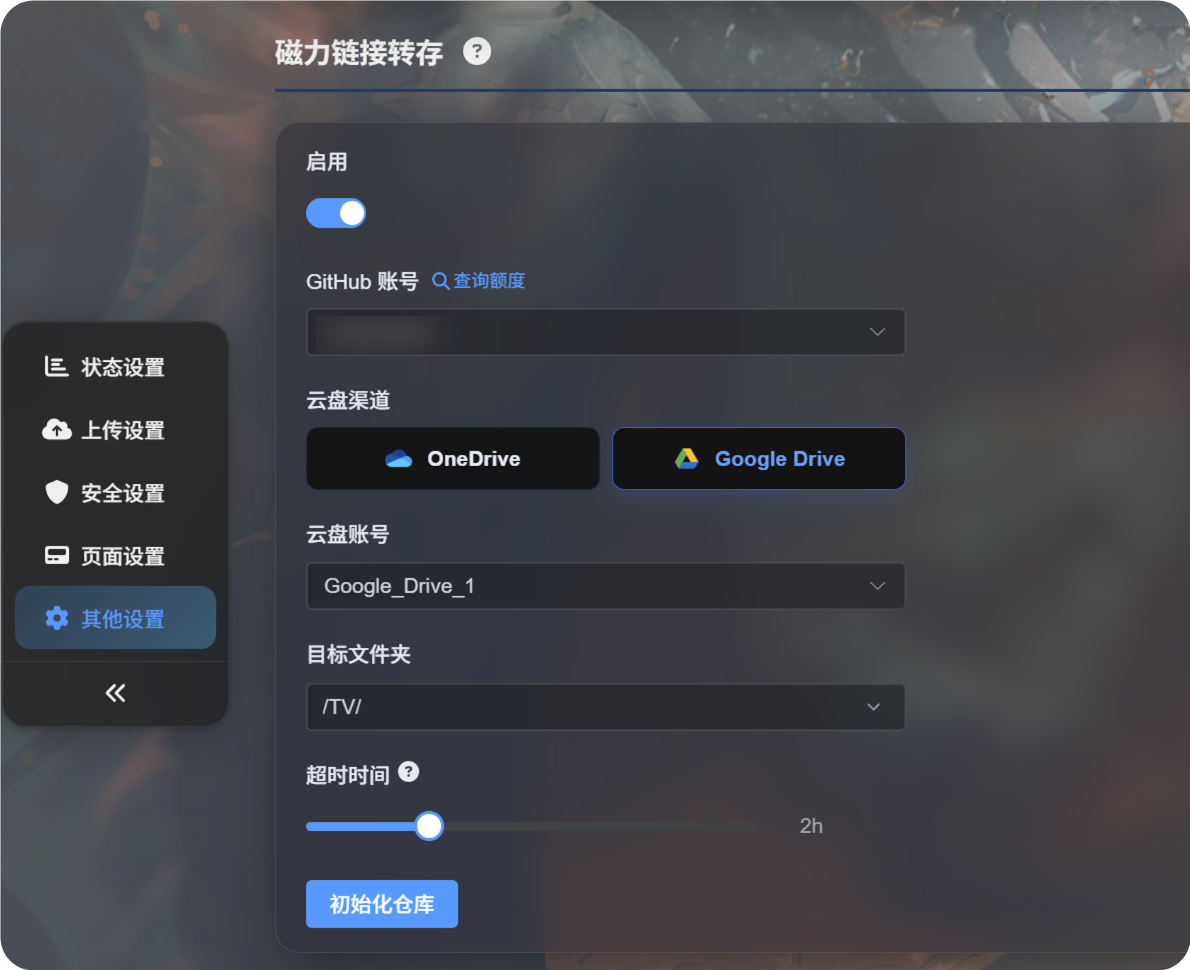
မက်ဂ္နက်လင့်ခ် ပြောင်းရွှေ့တင်ခြင်း၏ ဝင်ရောက်ရာနေရာသည် မူလစာမျက်နှာရှိ အပ်လုဒ်ဧရိယာတွင် ရှိသည်။
မက်ဂ္နက်လင့်ခ်ကို ထည့်သွင်းအကွက်ထဲသို့ ကူးထည့်ပြီး Transfer ကို ရွေးပါ။ ထို့နောက် အပ်လုဒ်တင်ပါ။
ပထမဆုံးအသုံးမပြုမီ
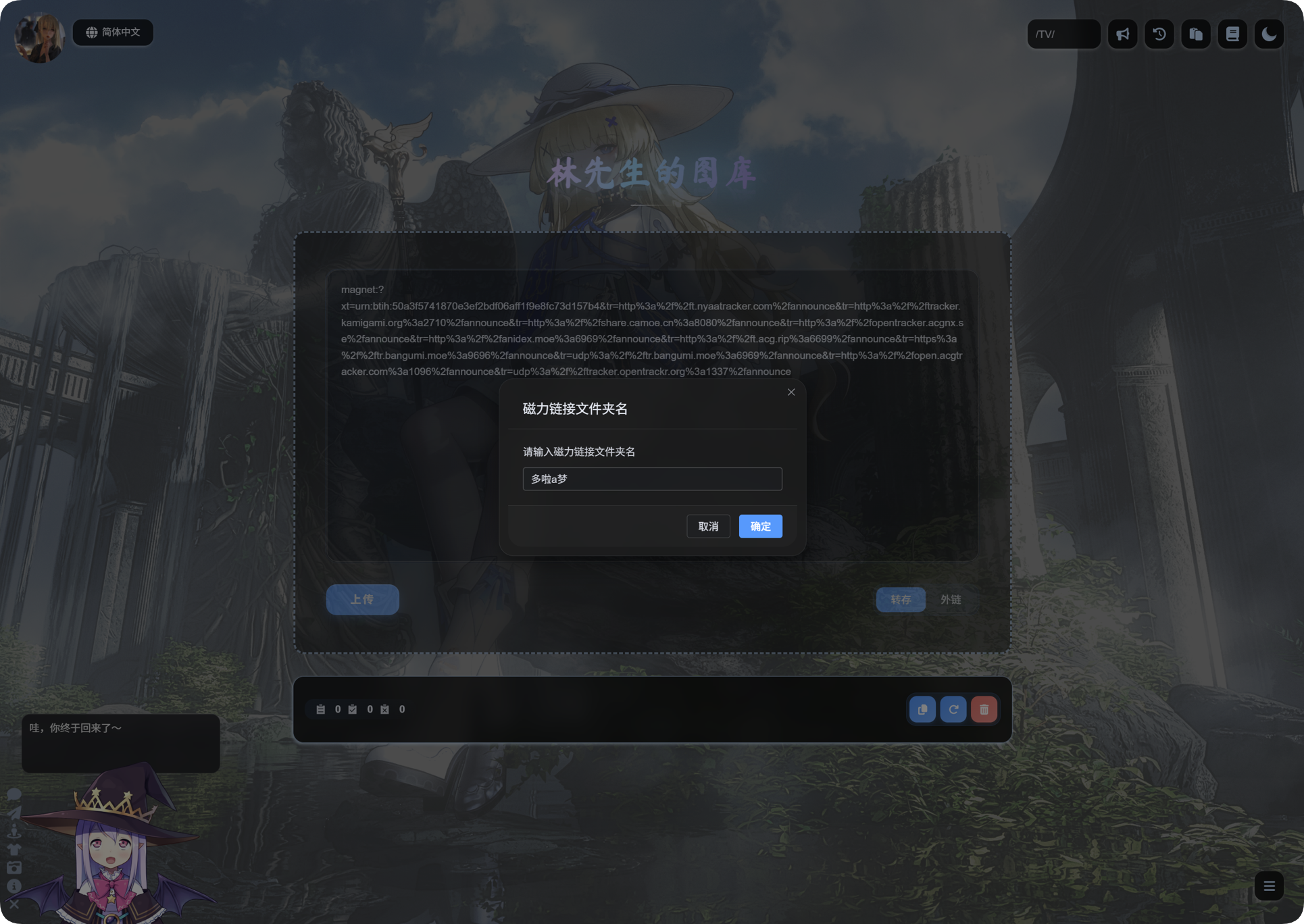
မက်ဂ္နက်လင့်ခ် ပြောင်းရွှေ့တင်ခြင်းကို စီမံခန့်ခွဲရေးပန်နယ်တွင် အရင်ဆုံး ပြင်ဆင်သတ်မှတ်ပါ။
ပုံမှန်အားဖြင့် အောက်ပါတို့ လိုအပ်သည်:
- ဒေါင်းလုဒ်လုပ်ငန်းကို လုပ်ဆောင်ရန် GitHub အကောင့်။
- Google Drive သို့မဟုတ် OneDrive ကဲ့သို့သော ကလောက်ဒ်အပ်လုဒ်ချန်နယ်။
- တင်မည့် ဖိုင်တွဲ။
- လုပ်ငန်းအချိန်ကန့်သတ်ချက်။
ဆက်တင်များ ပြင်ဆင်ပြီးပါက မူလစာမျက်နှာသို့ ပြန်သွားပြီး မက်ဂ္နက်လင့်ခ်ကို ကူးထည့်၍ ပြောင်းရွှေ့တင်ခြင်း စတင်နိုင်သည်။
မက်ဂ္နက်လင့်ခ် တင်ခြင်း
- မူလစာမျက်နှာရှိ အပ်လုဒ်အကွက်ထဲသို့ မက်ဂ္နက်လင့်ခ်ကို ကူးထည့်ပါ။
- မုဒ်ကို
Transferဟု သတ်မှတ်ထားကြောင်း သေချာစစ်ဆေးပါ။ - အပ်လုဒ်တင်ရန် နှိပ်ပါ။
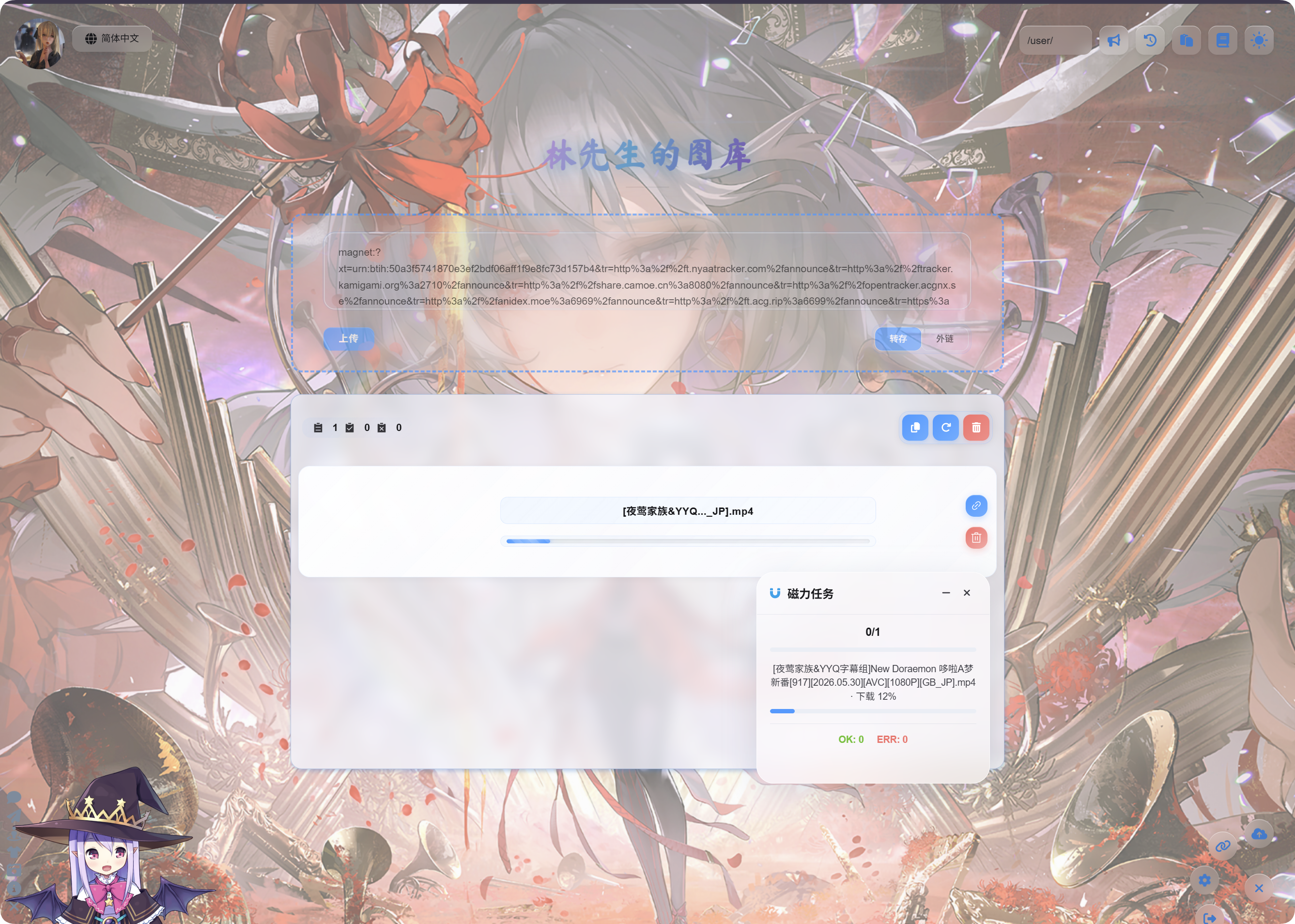
- ImgHost က မက်ဂ္နက်လုပ်ငန်း ဖန်တီးသည်အထိ စောင့်ပါ။
- လုပ်ငန်းစတင်ပြီးနောက် ညာဘက်အောက်ထောင့်ရှိ
Magnet Tasksပေါ်ပန်နယ်တွင် တိုးတက်မှုကို ကြည့်ပါ။
ဒေါင်းလုဒ်နှင့် အပ်လုဒ်လုပ်ငန်းစဉ်သည် အချိန်ယူနိုင်သည်။ မြန်နှုန်းသည် မက်ဂ္နက်ရင်းမြစ်၊ GitHub လုပ်ဆောင်မှုပတ်ဝန်းကျင်နှင့် ရွေးထားသော ကလောက်ဒ်သိုလှောင်မှုချန်နယ်တို့အပေါ် မူတည်သည်။
ပြီးဆုံးပြီးနောက်
လုပ်ငန်းပြီးဆုံးသည့်အခါ အပ်လုဒ်စာရင်းတွင် ဖိုင်အမည်နှင့် လင့်ခ်ကို ပြသမည်။
ဗီဒီယိုများအတွက် ဗီဒီယိုအစမ်းကြည့်ပုံကို ပြသပြီး၊ ပုံများအတွက် ပုံအစမ်းကြည့်ပုံကို ပြသမည်။ အခြားဖိုင်များကို သာမန်ဖိုင်အိုင်ကွန်ဖြင့် ပြသမည်။
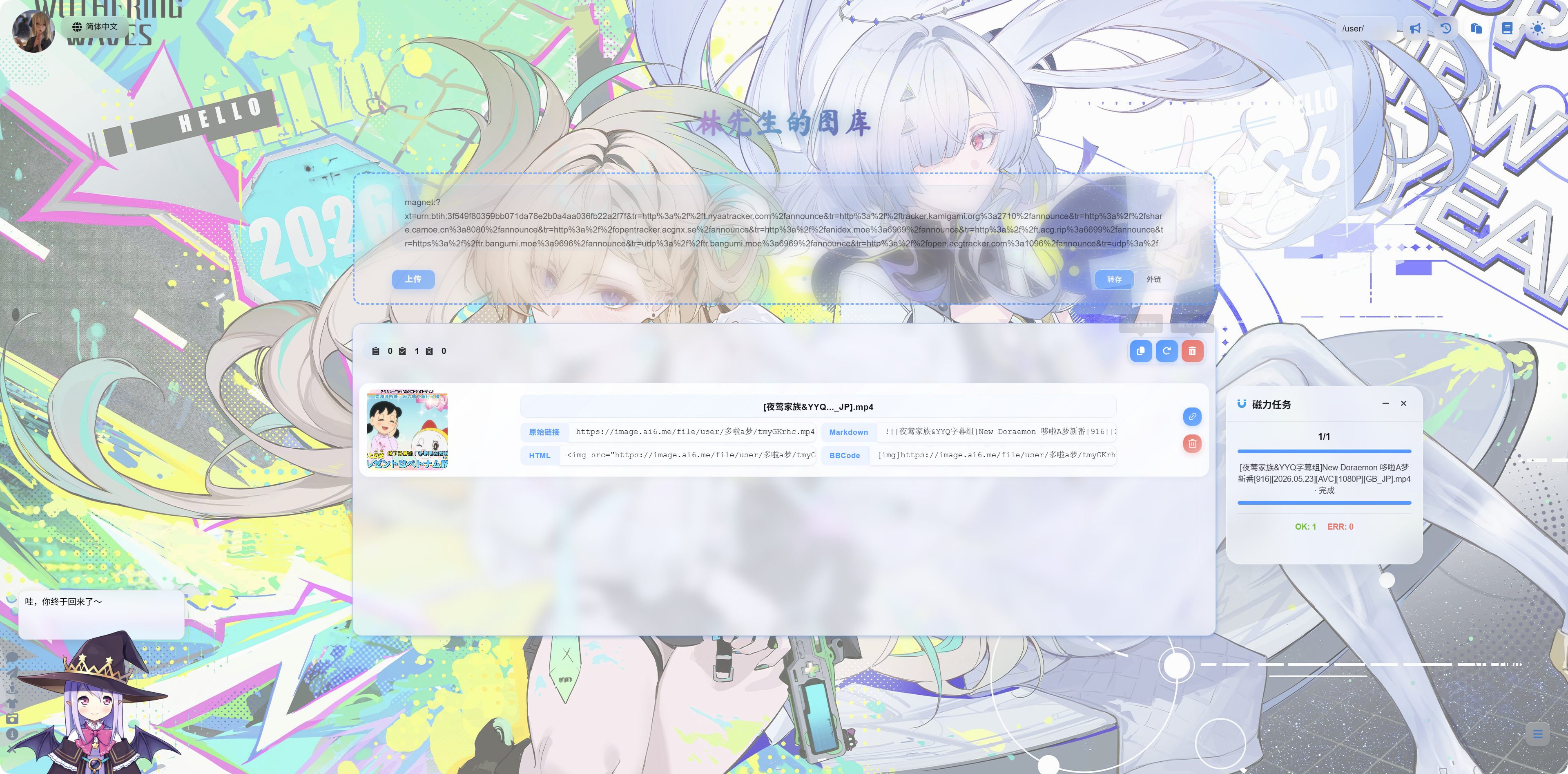
အောက်ပါတို့ကို ကူးယူနိုင်သည်။
| လင့်ခ်အမျိုးအစား | အသုံးပြုပုံ |
|---|---|
| မူရင်းလင့်ခ် | ဖိုင်ကို တိုက်ရိုက်ဝင်ရောက်ရန် |
| Markdown | Markdown ဆောင်းပါးများ သို့မဟုတ် မှတ်စုများ |
| HTML | ဝဘ်စာမျက်နှာကုဒ် |
| BBCode | BBCode ကို ထောက်ပံ့သော ဖိုရမ်များ |
မက်ဂ္နက်လုပ်ငန်း ပန်နယ်
ညာဘက်အောက်ထောင့်ရှိ မက်ဂ္နက်လုပ်ငန်းပန်နယ်သည် လုပ်ငန်းအရေအတွက်၊ လုပ်ငန်းအမည်၊ တိုးတက်မှုနှင့် နောက်ဆုံးအခြေအနေကို ပြသသည်။
တွေ့ရလေ့ရှိသော အခြေအနေများ:
| အခြေအနေ | အဓိပ္ပာယ် |
|---|---|
| စောင့်ဆိုင်းနေသည် | လုပ်ငန်းကို ဖန်တီးပြီးဖြစ်ပြီး လုပ်ဆောင်ရန် စောင့်နေသည်။ |
| ဒေါင်းလုဒ်လုပ်နေသည် | မက်ဂ္နက်ရင်းမြစ်ကို ဒေါင်းလုဒ်လုပ်နေသည်။ |
| အပ်လုဒ်တင်နေသည် | ဖိုင်ကို ဒေါင်းလုဒ်ပြီးဖြစ်ပြီး ကလောက်ဒ်သိုလှောင်မှုသို့ အပ်လုဒ်တင်နေသည်။ |
| ပြီးဆုံးသည် | အပ်လုဒ်အောင်မြင်ပြီး လင့်ခ်ကို ကူးယူနိုင်သည်။ |
| မအောင်မြင်ပါ | လုပ်ငန်း မအောင်မြင်ပါ။ မက်ဆေ့ချ်ကို စစ်ဆေးပြီး ထပ်ကြိုးစားပါ။ |
အကြံပြုချက်များ
- မက်ဂ္နက်လင့်ခ်တစ်ခုတွင် ဖိုင်များစွာ ပါဝင်ပါက ImgHost သည် ပြသရန် အဓိကပြီးဆုံးထားသော ဖိုင်ကို ဦးစားပေးရွေးချယ်သည်။
- ဖိုင်ကြီးများသည် အချိန်ပိုယူသည်။ စာမျက်နှာကို ပြန်လည်အသစ်မလုပ်မီ လုပ်ငန်းပြီးဆုံးသည်အထိ စောင့်ပါ။
- မက်ဂ္နက်ရင်းမြစ်တွင် ရရှိနိုင်သော ချိတ်ဆက်ဖော်များ မရှိပါက အလွန်နှေးနိုင်သည် သို့မဟုတ် မအောင်မြင်နိုင်ပါ။
- ကလောက်ဒ်အကောင့်ခွဲတမ်း မလုံလောက်ခြင်း၊ ခွင့်ပြုချက် သက်တမ်းကုန်ခြင်း သို့မဟုတ် အပ်လုဒ်ဖိုင်တွဲ မှားခြင်းတို့ကြောင့်လည်း လုပ်ငန်း မအောင်မြင်နိုင်ပါ။
- ဗီဒီယိုအပ်လုဒ်ပြီးဆုံးပြီးနောက် စာမျက်နှာအစမ်းကြည့်ပုံ ပေါ်ရန် စက္ကန့်အနည်းငယ် ကြာနိုင်သည်။
မေးလေ့ရှိသော မေးခွန်းများ
မက်ဂ္နက်လင့်ခ် ကူးထည့်ပြီးနောက် ဘာမှမစတင်ပါ
စီမံခန့်ခွဲရေးပန်နယ်တွင် မက်ဂ္နက်လင့်ခ် ပြောင်းရွှေ့တင်ခြင်းကို ဖွင့်ထားပြီး အသုံးပြုနိုင်သော GitHub အကောင့်နှင့် ကလောက်ဒ်ချန်နယ်ကို ရွေးထားကြောင်း စစ်ဆေးပါ။
ဒေါင်းလုဒ်သည် အမြဲနှေးနေသည်
မက်ဂ္နက်မြန်နှုန်းသည် ရင်းမြစ်ကိုယ်တိုင်အပေါ် မူတည်သည်။ ရရှိနိုင်သော ချိတ်ဆက်ဖော်များ မရှိပါက ဒေါင်းလုဒ်သည် အလွန်နှေးနိုင်သည် သို့မဟုတ် လုံးဝမပြီးနိုင်ပါ။
အပ်လုဒ်ပြီးနောက် အစမ်းကြည့်ပုံ မပေါ်ပါ
ပထမဆုံး ဖိုင်လင့်ခ်ကို ဖွင့်နိုင်ကြောင်း စစ်ဆေးပါ။ ဗီဒီယိုဖိုင်များသည် ဘရောက်ဇာထဲတွင် တင်ရန် အချိန်တိုတစ်ခု လိုနိုင်သည်။ လင့်ခ်ကို တိုက်ရိုက်ဖွင့်၍လည်း ကြည့်နိုင်သည်။
လုပ်ငန်း မအောင်မြင်ပါက ဘာကို စစ်ဆေးရမလဲ
မက်ဂ္နက်လင့်ခ် မှန်ကန်မှု၊ ကလောက်ဒ်ချန်နယ် အလုပ်လုပ်မှုနှင့် အပ်လုဒ်ဖိုင်တွဲ မှန်ကန်မှုတို့ကို စစ်ဆေးပါ။ ထို့နောက် လုပ်ငန်းကို ပြန်လည်တင်သွင်းပါ။