Yandex ချန်နယ် ထည့်သွင်းခြင်း
ဦးစွာ လိုအပ်သည့်အရာများ
| လိုအပ်ချက် | လိုအပ်ရသည့်အကြောင်းရင်း |
|---|---|
| Yandex အကောင့်တစ်ခု | Sign in ဝင်ရန်နှင့် Yandex Disk ကို authorize လုပ်ရန် အသုံးပြုသည် |
| Yandex OAuth app တစ်ခု | Client ID နှင့် Client Secret ထုတ်လုပ်ရန် အသုံးပြုသည် |
| သင်၏ ImgHost ဒိုမိန်း | OAuth redirect URI အတွက် အသုံးပြုသည် |
| အသုံးပြုနိုင်သော Yandex Disk storage | လက်တွေ့ဖိုင်သိုလှောင်ရာနေရာအဖြစ် အသုံးပြုသည် |
ပြင်ဆင်မှု အဆင့်များ
အဆင့် 1: Yandex OAuth App ဖန်တီးပါ
- Yandex OAuth app creation page ကိုဖွင့်ပါ။
text
https://oauth.yandex.com/client/new- Sign in စာမျက်နှာသို့ redirect ဖြစ်ပါက Yandex အကောင့်ဖြင့် ဦးစွာ sign in ဝင်ပါ။
- App အသစ်တစ်ခု ဖန်တီးပါ။
- App ကို မှတ်မိလွယ်သောအမည် ပေးပါ။ ဥပမာ
imgbed-yandex။ - Callback သို့မဟုတ် redirect URL settings ကိုရှာပါ။
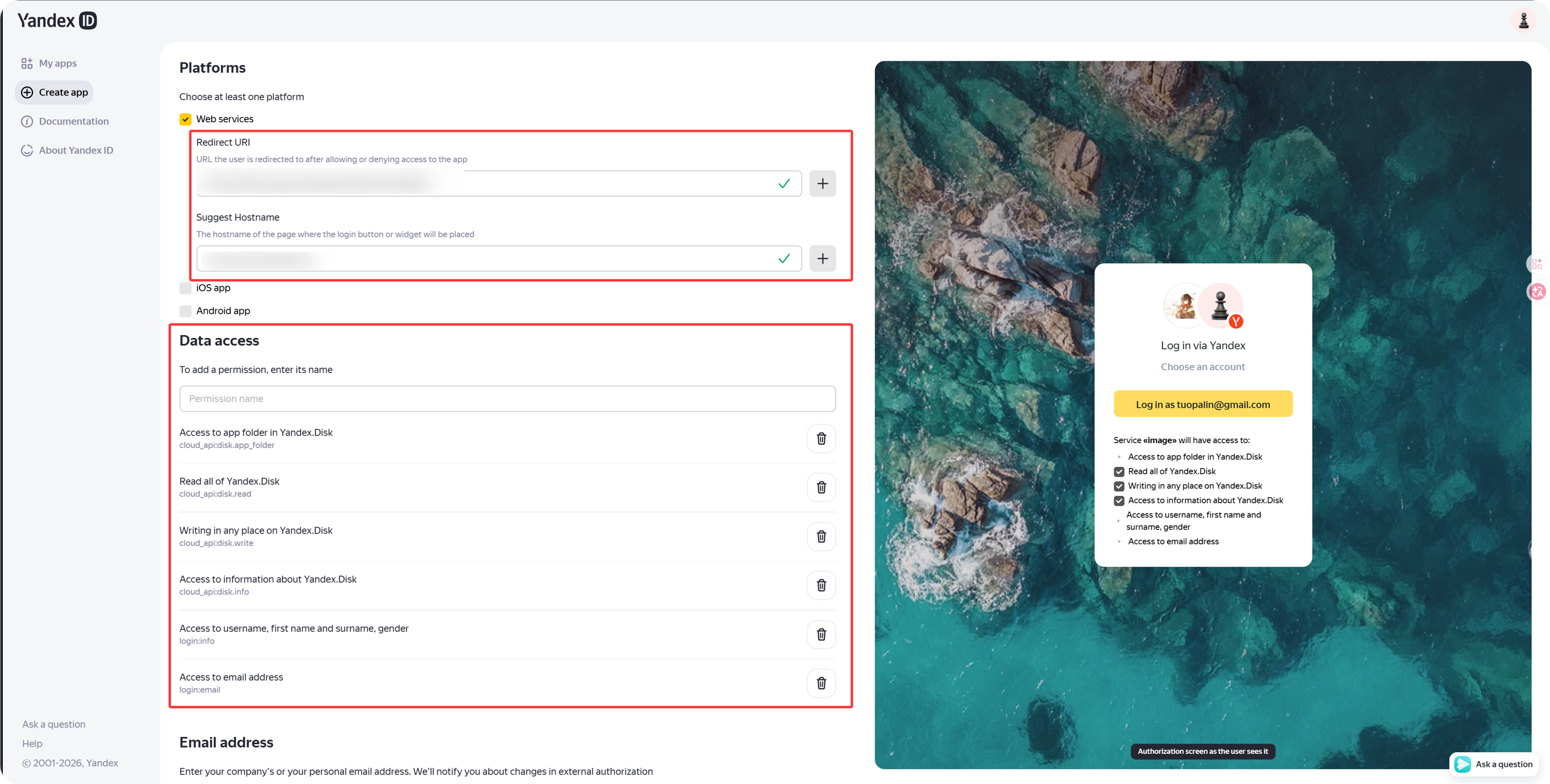
- အောက်ပါကို ထည့်ပါ။
text
https://your-domain.com/api/oauth/yandex/callbackအဆင့် 2: Permission များကို အတည်ပြုပါ
လက်ရှိ ImgHost Yandex integration အတွက် Yandex.Disk REST API အောက်တွင် အောက်ပါ permission လေးခုကို ထားရှိပါ။
| Permission | ရည်ရွယ်ချက် |
|---|---|
cloud_api:disk.app_folder | ImgHost ကို app folder ထဲတွင် ဖိုင်များသိမ်းခွင့်ပြုသည် |
cloud_api:disk.read | ဖိုင်များနှင့် download link များကိုဖတ်သည် |
cloud_api:disk.write | ဖိုင်များကို အပ်လုဒ်လုပ်သည်၊ folder များဖန်တီးသည်၊ ဖိုင်များဖျက်သည် |
Access to information about Yandex.Disk | Disk quota နှင့် used space ကိုဖတ်သည် |
Yandex ID API အောက်တွင် အောက်ပါ permission များကိုလည်း တွေ့ပါက ၎င်းတို့သည် ရွေးချယ်နိုင်သည်။
| Permission Text | အကြံပြုချက် |
|---|---|
Access to username, first name and surname, gender | ရွေးချယ်နိုင်သည် |
Access to email address | ရွေးချယ်နိုင်သည် |
အဓိက upload၊ download၊ deletion နှင့် quota လုပ်ဆောင်ချက်များသည် အထက်ပါ Yandex.Disk REST API permission လေးခုအပေါ် အဓိကမူတည်သည်။
အဆင့် 3: App Credential များကို ကူးယူပါ
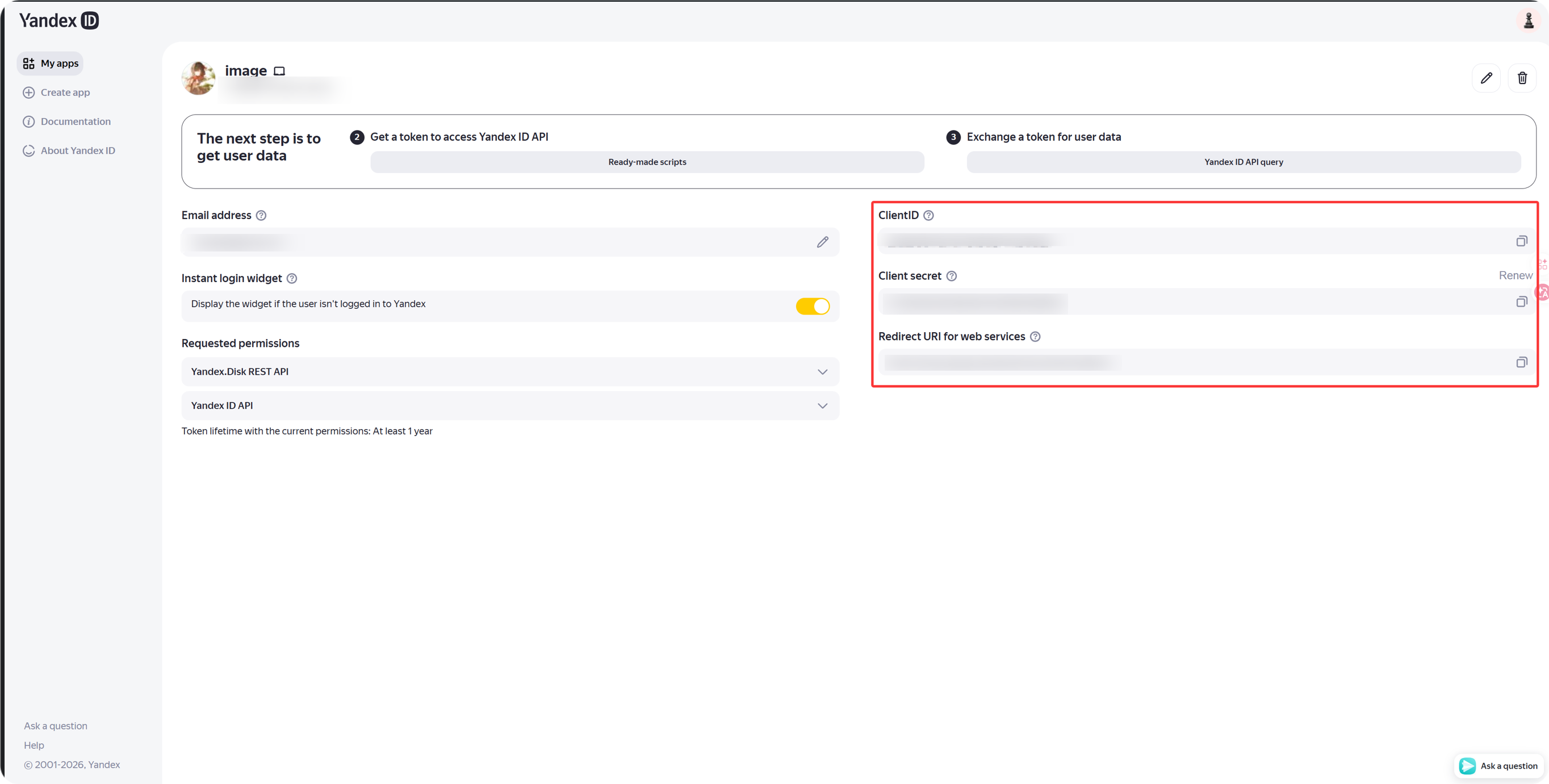
App ဖန်တီးပြီးနောက် အောက်ပါတို့ကို ကူးယူပါ။
| Yandex အကွက် | ImgHost အကွက် |
|---|---|
Client ID | Client ID |
Client Secret | Client Secret |
အဆင့် 4: Yandex Channel ကိုဖြည့်ပါ
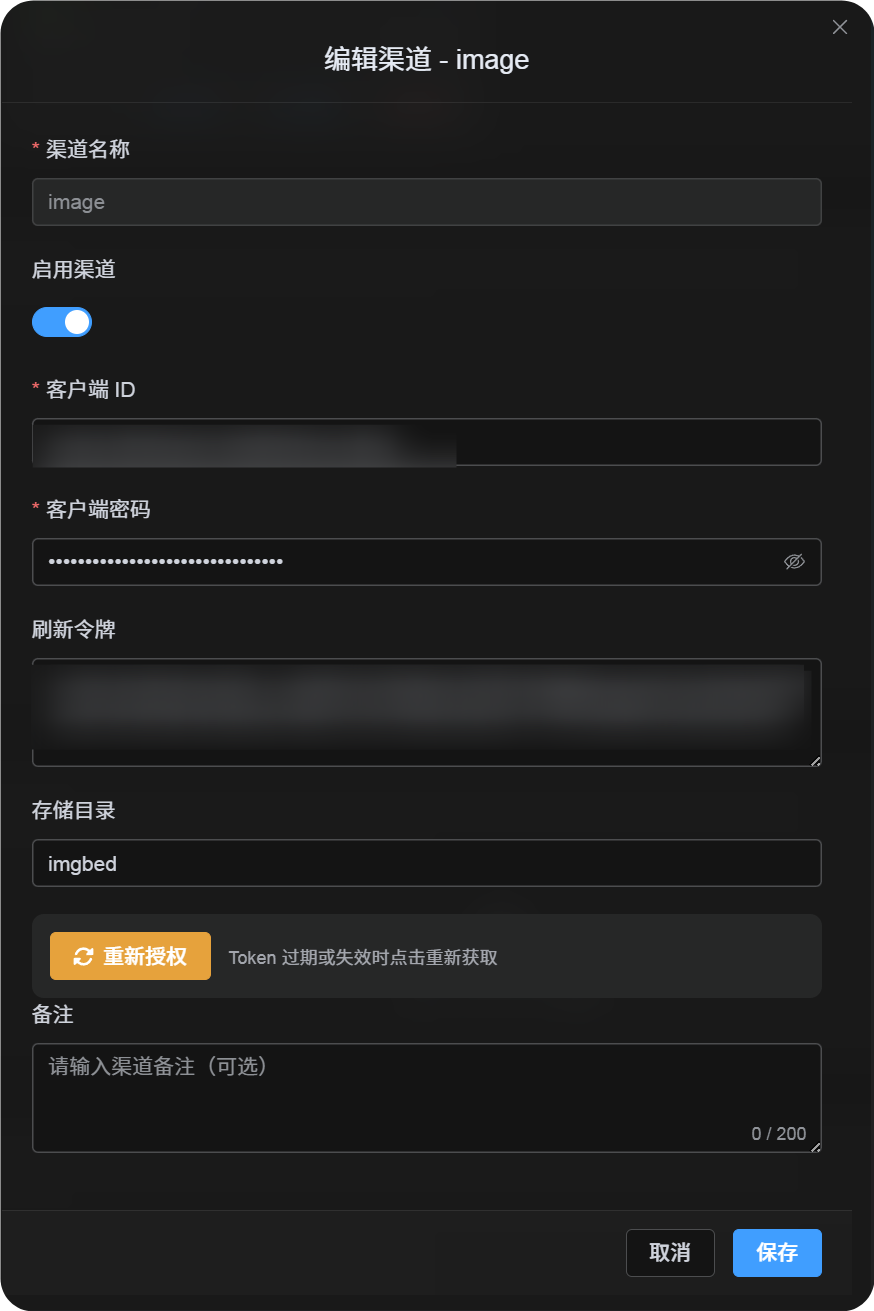
အပ်လုဒ် ဆက်တင်များ တွင် Yandex ကိုရွေးပြီး အောက်ပါအတိုင်း ဖြည့်ပါ။
| ImgHost အကွက် | ထည့်ရန်အရာ |
|---|---|
| ချန်နယ်အမည် | မှတ်မိလွယ်သောအမည်၊ ဥပမာ Main Yandex |
| Client ID | Yandex app Client ID |
| Client Secret | Yandex app Client Secret |
| Refresh Token | ယခုအချိန်တွင် အလွတ်ထားပါ |
| အမြစ် ဖိုင်တွဲ | ရွေးချယ်နိုင်သည်။ မူရင်း သည် imgbed ဖြစ်သည်။ |
အဆင့် 5: Refresh Token ရယူပါ
- ImgHost တွင်
Get Tokenကိုနှိပ်ပါ။ - ချိတ်ဆက်လိုသော Yandex အကောင့်သို့ sign in ဝင်ပါ။
- Authorization prompt ကို approve လုပ်ပါ။
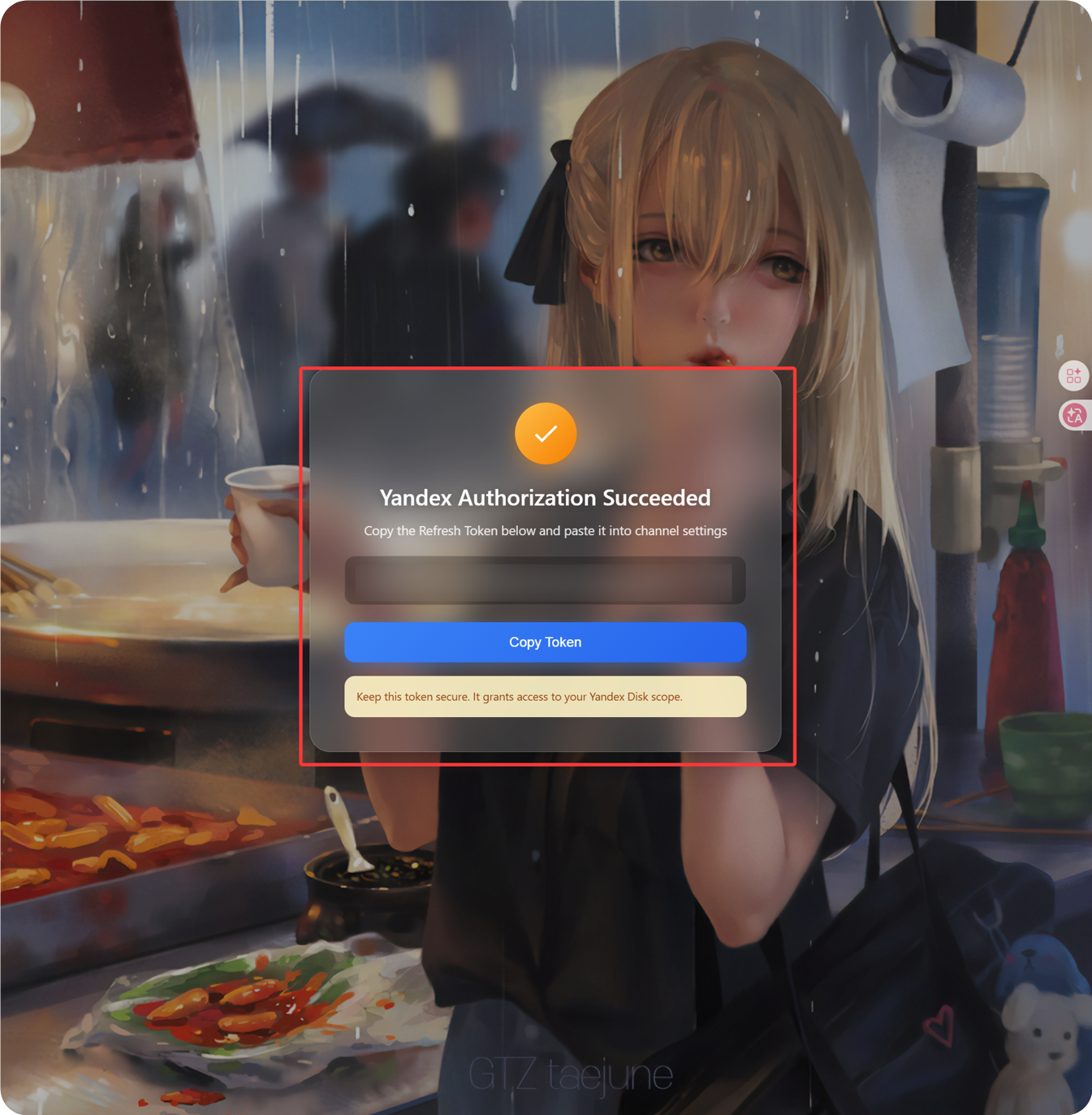
- Callback စာမျက်နှာတွင်
Refresh Tokenကိုပြမည်။ - ၎င်းကိုကူးယူပါ။
- ImgHost သို့ ပြန်သွားပြီး
Refresh Tokenအကွက်ထဲသို့ paste လုပ်ပါ။
အဆင့် 6: Channel ကိုသိမ်းပါ
အကွက် အားလုံးဖြည့်ပြီးပါက channel ကိုသိမ်းပါ။
အမြန် Flow
text
Open Yandex OAuth Console
-> Create an app
-> Add https://your-domain.com/api/oauth/yandex/callback
-> Confirm Yandex Disk permissions
-> Copy Client ID and Client Secret
-> Fill Client ID / Client Secret into ImgHost
-> Click Get Token
-> Copy the Refresh Token from the callback page
-> Paste it back into ImgHost and save
ကိုးကားချက်များ
- Register a Yandex app: https://yandex.com/dev/id/doc/en/register-client
- Get an authorization code through URL: https://yandex.com/dev/id/doc/en/codes/code-url
- Yandex OAuth token endpoint: https://yandex.com/dev/id/doc/en/tokens/token