Cloudflare API Token
Cloudflare API အထောက်အထားများသည် ဖိုင်များ ပြောင်းလဲပြီးနောက် ImgHost က Cloudflare CDN ယာယီသိုလှောင်မှု ကို ရှင်းလင်းနိုင်စေသည်။
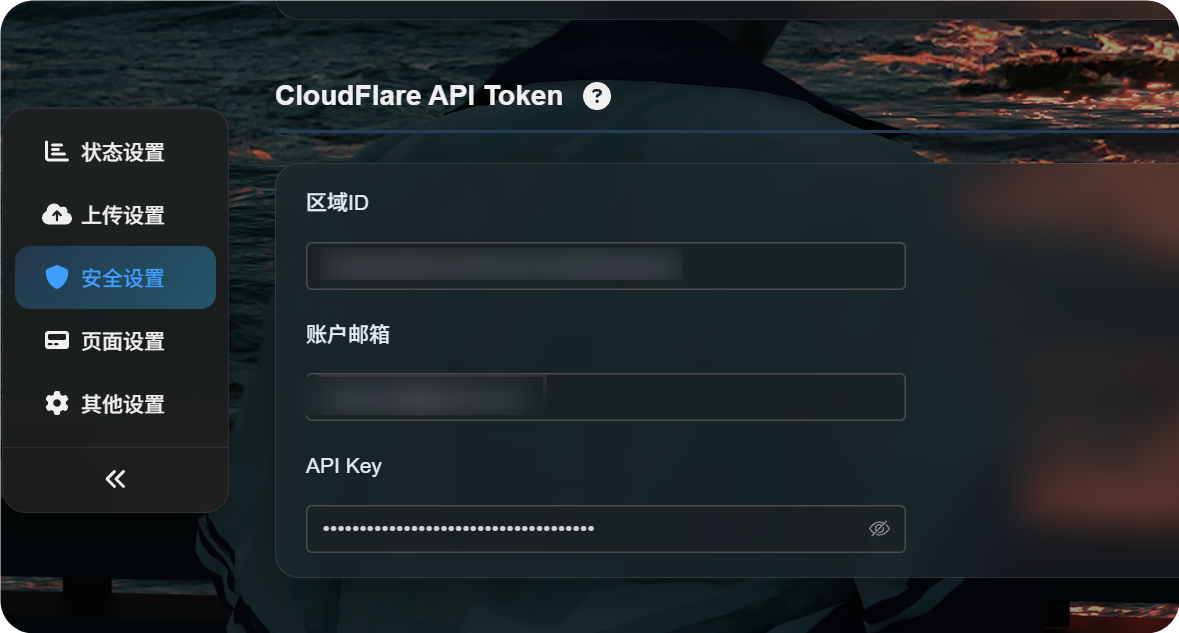
သတ်မှတ်ရာနေရာ
စီမံခန့်ခွဲမှု ပန်နယ်ကို ဖွင့်ပြီး အောက်ပါနေရာသို့ သွားပါ။
text
System Settings -> Security Settings -> Cloudflare API Tokenအောက်ပါတို့ကို ဖြည့်ရန် လိုအပ်သည်။
- Zone ID
- အကောင့် အီးမေးလ်
- API Key
ဤသတ်မှတ်ချက်၏ လုပ်ဆောင်ချက်
Cloudflare သည် အများပြည်သူ ပုံ URL များကို ယာယီသိုလှောင်မှု ထဲတွင် သိမ်းထားနိုင်သည်။
ယာယီသိုလှောင်မှု သည် ပုံများပေးပို့မှုကို ပိုမြန်စေသော်လည်း ဖိုင်ကို ဖျက်ခြင်း၊ ပိတ်ဆို့ခြင်း၊ အစားထိုးခြင်း သို့မဟုတ် ရွှေ့ခြင်းပြီးနောက် အချိန်အနည်းငယ်အထိ အကြောင်းအရာဟောင်းကို မြင်ရနိုင်သည်။
Cloudflare API အထောက်အထားများ သတ်မှတ်ပြီးပါက ထိုလုပ်ဆောင်မှုများ ပြီးဆုံးသောအခါ ImgHost သည် သက်ဆိုင်ရာ Cloudflare ယာယီသိုလှောင်မှု ကို ရှင်းလင်းရန် ကြိုးစားသည်။
ဤအရာသည် အောက်ပါအခြေအနေများတွင် အသုံးဝင်သည်။
- ပုံကို ဖျက်ပြီး အများပြည်သူ link ကို အမြန်ဆုံး မလုပ်ဆောင်စေချင်သောအခါ။
- ပုံကို ပိတ်ဆို့ပြီး ဧည့်သည်များအား မူရင်းဖိုင် မမြင်စေချင်သောအခါ။
- အမည်တူ ဖိုင်ဖြင့် အစားထိုးပြီး ဧည့်သည်များအား ဗားရှင်းအသစ်ကို ပိုမြန်စွာ မြင်စေချင်သောအခါ။
- ဖိုင်များကို ရွှေ့ခြင်း သို့မဟုတ် အမည်ပြောင်းခြင်းပြီး လမ်းကြောင်းဟောင်း ယာယီသိုလှောင်မှု ကို ပိုမြန်စွာ ပြန်လည်သစ်လွင်စေချင်သောအခါ။
- အများပြည်သူ ဝင်ရောက်ခွင့် စည်းမျဉ်းများကို ပြောင်းပြီး အများပြည်သူပြခန်း သို့မဟုတ် ကျပန်းပုံ ယာယီသိုလှောင်မှု ကို ပိုမြန်စွာ ပြန်လည်သစ်လွင်စေချင်သောအခါ။
ဗလာထားပါက
ဤသတ်မှတ်ချက် မရှိလည်း ImgHost သည် ပုံမှန်အတိုင်း လုပ်ဆောင်သည်။
ကွာခြားချက်မှာ ImgHost သည် Cloudflare CDN ယာယီသိုလှောင်မှု ကို တက်ကြွစွာ ရှင်းလင်းမည်မဟုတ်ပါ။ ဧည့်သည်များသည် Cloudflare ယာယီသိုလှောင်မှု သဘာဝအတိုင်း သက်တမ်းကုန်သည်အထိ အကြောင်းအရာဟောင်းကို ဆက်မြင်နိုင်သည်။
Zone ID ရှာနည်း
Zone ID သည် သင့် ImgHost domain အသုံးပြုသော site ၏ Cloudflare Zone ID ဖြစ်သည်။
- Cloudflare dashboard သို့ လော့ဂ်အင် ဝင်ပါ။
- သင့် ImgHost domain ပါဝင်သော site ကို ဖွင့်ပါ။
- site overview page တွင်
Zone IDကို ရှာပါ။ - ImgHost ရှိ
Zone IDfield ထဲသို့ ကူးထည့်ပါ။
၎င်းသည် site Zone ID ဖြစ်ပြီး account ID မဟုတ်ပါ။
အကောင့် အီးမေးလ်
Cloudflare သို့ လော့ဂ်အင် ဝင်ရာတွင် အသုံးပြုသော အီးမေးလ် လိပ်စာကို ထည့်ပါ။
ဤအီးမေးလ်သည် အောက်ပါ API Key နှင့် ကိုက်ညီရမည်။
API Key
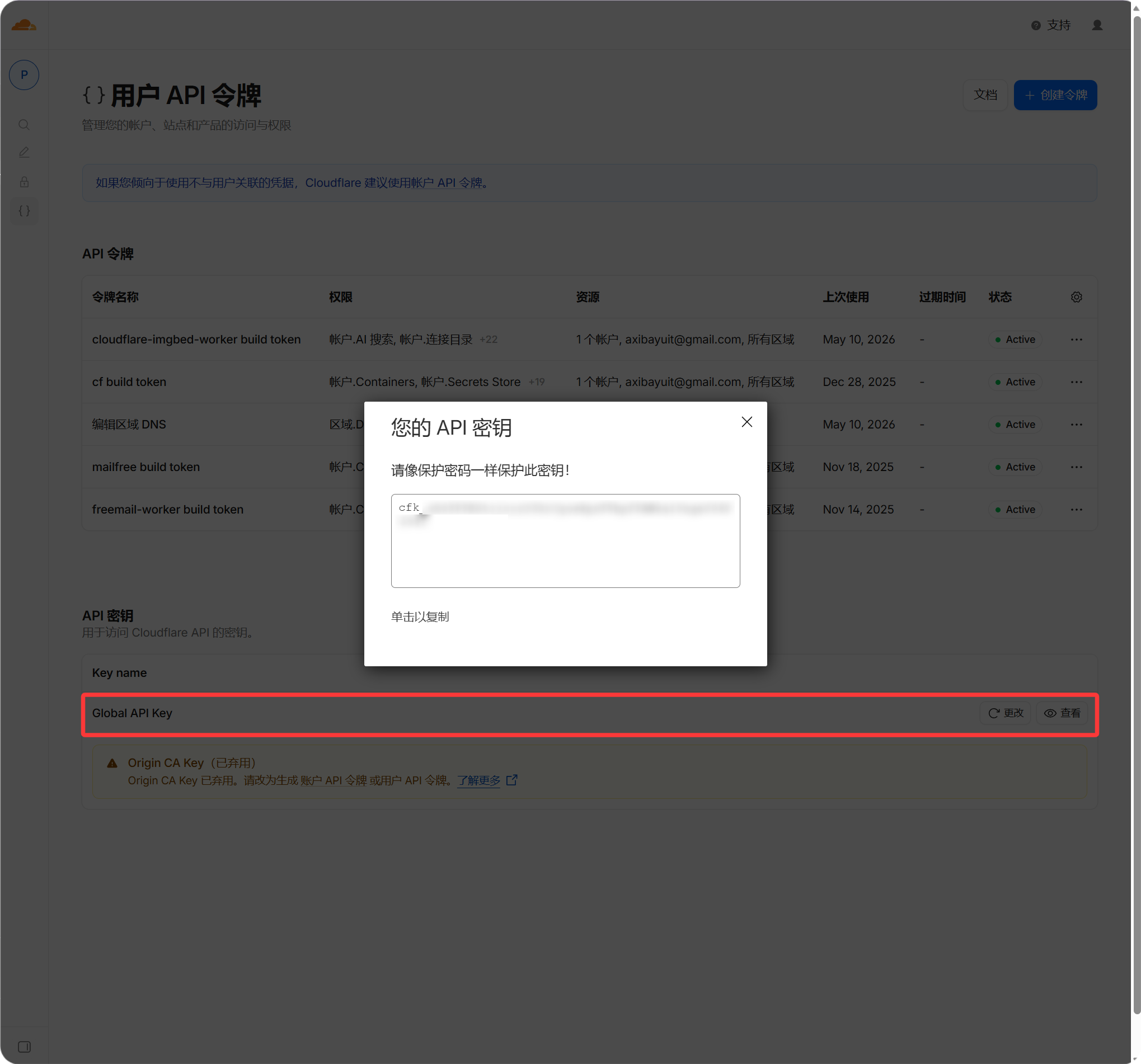
Cloudflare Global API Key ကို ထည့်ပါ။
- Cloudflare dashboard သို့ လော့ဂ်အင် ဝင်ပါ။
- profile ကို ဖွင့်ပါ။
- API Tokens page သို့ သွားပါ။
Global API Keyကို ရှာပါ။- ကြည့်ပြီး ကူးယူပါ။
- ImgHost ရှိ
API Keyfield ထဲသို့ ထည့်ပါ။
ဘယ်အချိန်တွင် အသက်ဝင်မလဲ
Field များ ဖြည့်ပြီးနောက် settings ကို သိမ်းပါ။
ထို့နောက် ဖြစ်ပေါ်သော ဖိုင်ပြောင်းလဲမှုများသည် Cloudflare ယာယီသိုလှောင်မှု ကို အလိုအလျောက် ရှင်းလင်းရန် ကြိုးစားမည်။ ယခင်လုပ်ဆောင်ချက်များကို နောက်ကြောင်းပြန် ရှင်းလင်းမည်မဟုတ်ပါ။ ဤသတ်မှတ်ချက် မလုပ်မီ ဖိုင်ကို ဖျက် သို့မဟုတ် အစားထိုးထားပါက Cloudflare ယာယီသိုလှောင်မှု သက်တမ်းကုန်ရန် စောင့်ပါ သို့မဟုတ် Cloudflare တွင် ကိုယ်တိုင် ရှင်းလင်းပါ။
FAQ
မဖြစ်မနေ လိုအပ်ပါသလား။
မလိုအပ်ပါ။
သင့် domain သည် Cloudflare ကို မသုံးပါက သို့မဟုတ် CDN ယာယီသိုလှောင်မှု နှောင့်နှေးမှုကို မစိုးရိမ်ပါက ဗလာထားနိုင်သည်။
အထောက်အထားများ မှားပါက အပ်လုဒ်ကို ထိခိုက်မလား။
ပုံမှန်အားဖြင့် မထိခိုက်ပါ။
မှားယွင်းသော အထောက်အထားများသည် ImgHost ကို Cloudflare ယာယီသိုလှောင်မှု ရှင်းလင်းရာတွင် မအောင်မြင်စေခြင်းသာ ဖြစ်သည်။ အပ်လုဒ်နှင့် ပုံမှန် ဖိုင်ဝင်ရောက်မှု ဆက်လက် လုပ်ဆောင်သင့်သည်။
ဖျက်ထားသော ပုံကို ဘာကြောင့် ဆက်ဖွင့်နိုင်သေးသလဲ။
အများဆုံး ဖြစ်တတ်သော အကြောင်းရင်းမှာ Cloudflare သည် ဖိုင်ဟောင်းကို ယာယီသိုလှောင်မှု ထဲတွင် သိမ်းထားသေးခြင်း ဖြစ်သည်။
မှန်ကန်သော Cloudflare API အထောက်အထားများ ရှိပါက ဖိုင်ဖျက်သည့်အချိန်တွင် ImgHost သည် သက်ဆိုင်ရာ URL ယာယီသိုလှောင်မှု ကို ရှင်းလင်းသည်။
ဖိုင်အစားထိုးပြီးနောက် ပုံဟောင်းကို ဘာကြောင့် ဆက်မြင်ရသလဲ။
ဤအရာသည်လည်း များသောအားဖြင့် CDN ယာယီသိုလှောင်မှု ကြောင့် ဖြစ်သည်။
ဤသတ်မှတ်ချက်ကို ပြုလုပ်ပြီးပါက အမည်တူ ဖိုင်ကို overwrite လုပ်သောအခါ ImgHost သည် URL ယာယီသိုလှောင်မှု ဟောင်းကို ရှင်းလင်းရန် ကြိုးစားသည်။