Cloudflare API Token
Thông tin xác thực Cloudflare API cho phép ImgHost xóa bộ nhớ đệm Cloudflare CDN sau khi tệp thay đổi.
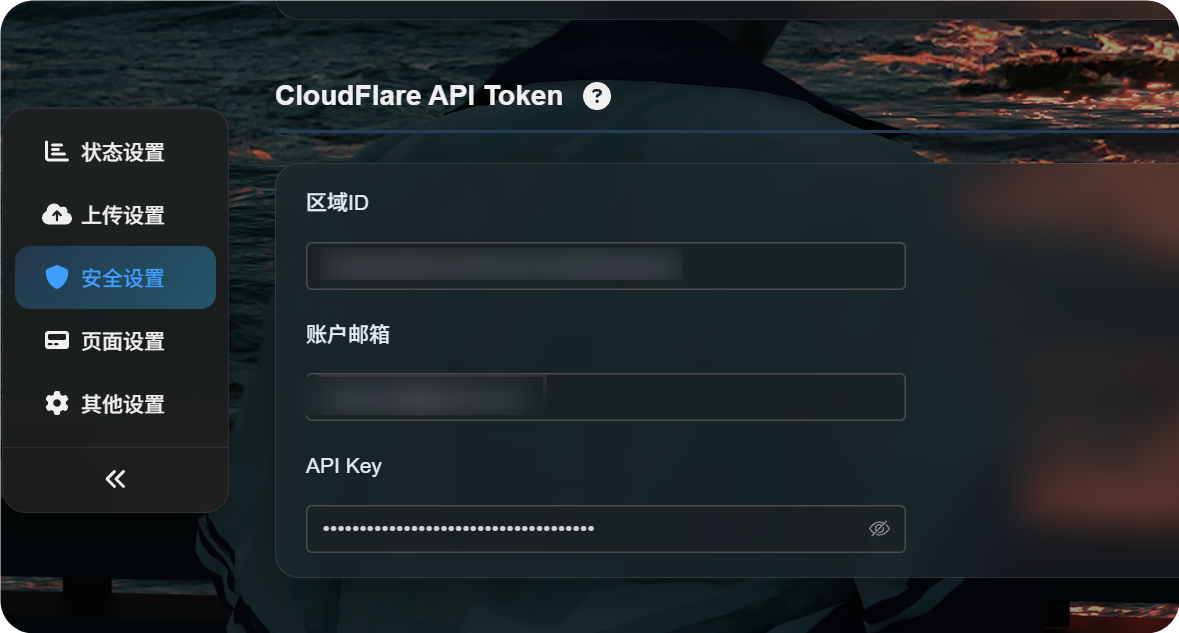
Nơi cấu hình
Mở bảng quản trị, rồi đi tới:
text
System Settings -> Security Settings -> Cloudflare API TokenBạn cần điền:
- Zone ID
- Email tài khoản
- API Key
Cài đặt này làm gì
Cloudflare có thể lưu bộ nhớ đệm các URL hình ảnh công khai.
Việc lưu bộ nhớ đệm giúp phân phối hình ảnh nhanh hơn, nhưng cũng có thể khiến nội dung cũ vẫn hiển thị một thời gian sau khi bạn xóa, chặn, thay thế hoặc di chuyển tệp.
Sau khi cấu hình thông tin xác thực Cloudflare API, ImgHost sẽ cố gắng xóa bộ nhớ đệm Cloudflare liên quan khi các thao tác đó hoàn tất.
Điều này hữu ích khi:
- Bạn xóa một hình ảnh và muốn liên kết công khai ngừng hoạt động sớm nhất có thể.
- Bạn chặn một hình ảnh và muốn khách truy cập không còn thấy tệp gốc.
- Bạn thay thế một tệp bằng cùng tên và muốn khách truy cập thấy phiên bản mới sớm hơn.
- Bạn di chuyển hoặc đổi tên tệp và muốn bộ nhớ đệm của đường dẫn cũ được làm mới nhanh.
- Bạn thay đổi quy tắc truy cập công khai và muốn bộ nhớ đệm của thư viện công khai hoặc API hình ảnh ngẫu nhiên cập nhật sớm hơn.
Điều gì xảy ra nếu để trống
ImgHost vẫn hoạt động bình thường nếu không có cài đặt này.
Khác biệt duy nhất là ImgHost sẽ không chủ động xóa bộ nhớ đệm Cloudflare CDN. Khách truy cập có thể tiếp tục thấy nội dung cũ cho đến khi bộ nhớ đệm Cloudflare tự hết hạn.
Cách tìm Zone ID
Zone ID là Cloudflare Zone ID của trang web dùng cho miền ImgHost của bạn.
- Đăng nhập vào bảng điều khiển Cloudflare.
- Mở trang web chứa miền ImgHost của bạn.
- Tìm
Zone IDtrên trang tổng quan của trang web. - Sao chép giá trị đó vào trường
Zone IDtrong ImgHost.
Đây là Zone ID của trang web, không phải account ID.
Email tài khoản
Nhập địa chỉ email bạn dùng để đăng nhập Cloudflare.
Địa chỉ này phải khớp với API Key bạn cung cấp bên dưới.
API Key
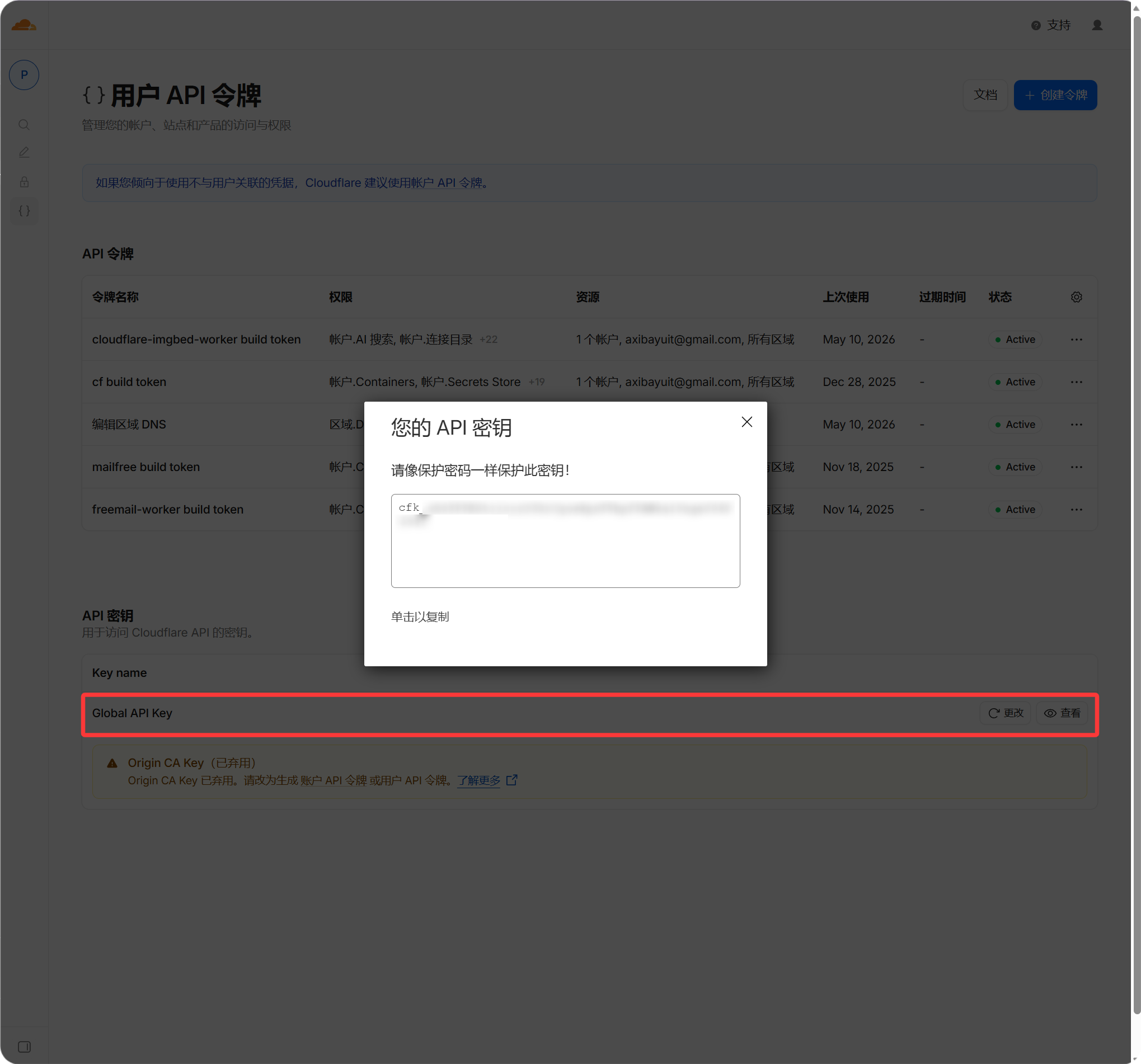
Nhập Cloudflare Global API Key của bạn.
- Đăng nhập vào bảng điều khiển Cloudflare.
- Mở hồ sơ của bạn.
- Đi tới trang API Tokens.
- Tìm
Global API Key. - Xem và sao chép giá trị đó.
- Dán vào trường
API Keytrong ImgHost.
Khi nào có hiệu lực
Sau khi điền các trường, hãy lưu cài đặt.
Các thay đổi tệp trong tương lai sẽ tự động cố gắng xóa bộ nhớ đệm Cloudflare. Các thao tác trước đó không được xóa ngược lại. Nếu bạn đã xóa hoặc thay thế tệp trước khi thiết lập mục này, hãy chờ bộ nhớ đệm Cloudflare hết hạn hoặc xóa thủ công trong Cloudflare.
Câu hỏi thường gặp
Có bắt buộc không?
Không.
Nếu miền của bạn không dùng Cloudflare, hoặc bạn không ngại độ trễ bộ nhớ đệm CDN, bạn có thể để trống.
Thông tin xác thực sai có làm hỏng tải lên không?
Thông thường là không.
Thông tin xác thực sai chỉ khiến ImgHost không xóa được bộ nhớ đệm Cloudflare. Tải lên và truy cập tệp thông thường vẫn nên hoạt động.
Vì sao hình ảnh đã xóa vẫn mở được?
Lý do thường gặp nhất là Cloudflare vẫn đang lưu tệp cũ trong bộ nhớ đệm.
Với thông tin xác thực Cloudflare API đúng, ImgHost xóa bộ nhớ đệm URL liên quan khi tệp bị xóa.
Vì sao tôi vẫn thấy hình ảnh cũ sau khi thay thế tệp?
Điều này cũng thường do bộ nhớ đệm CDN gây ra.
Sau khi cài đặt này được cấu hình, ImgHost cố gắng xóa bộ nhớ đệm URL cũ khi một tệp có cùng tên bị ghi đè.