Định Vị IP Và Quản Lý Người Dùng
Định vị IP chuyển các địa chỉ IP trong bản ghi của người tải lên, thiết bị đăng nhập và các nhật ký tương tự thành vị trí gần đúng.
Sau khi cấu hình, bảng quản trị có thể hiển thị nguồn tải lên và nguồn truy cập rõ ràng hơn. Quản lý người dùng cũng cho phép bạn chặn hoặc khôi phục quyền tải lên đối với các địa chỉ IP đáng ngờ.
Cấu Hình Ở Đâu
Mở:
text
System Settings -> Other Settings -> IP Geolocation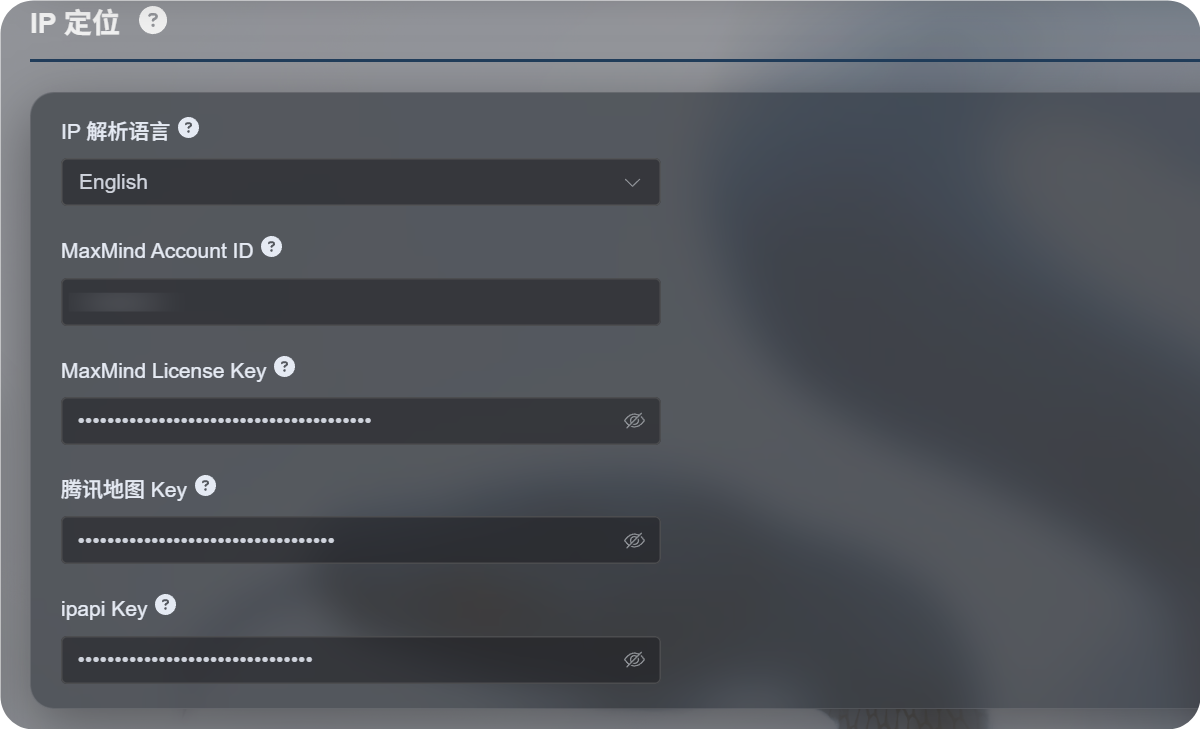
Cài Đặt Có Sẵn
Luồng định vị IP mới hỗ trợ nhiều nguồn thay vì phụ thuộc vào một dịch vụ bản đồ duy nhất.
| Cài đặt | Mục đích |
|---|---|
| Ngôn ngữ định vị IP | Chọn ngôn ngữ hiển thị, như tiếng Anh, tiếng Trung giản thể, tiếng Nhật, tiếng Pháp và các ngôn ngữ khác. |
| MaxMind Account ID | ID tài khoản MaxMind cho MaxMind GeoLite Web Service. |
| MaxMind License Key | License Key của MaxMind. |
| Tencent Map Key | Khóa Tencent Location Service. Hữu ích cho địa chỉ tiếng Trung và IP Trung Quốc đại lục. |
| ipapi Key | Khóa APILayer ipapi. Hỗ trợ định vị IP đa ngôn ngữ. |
Chỉ điền các dịch vụ bạn cần. Không cần cấu hình mọi trường.
Nếu không cung cấp khóa nào, ImgHost vẫn sẽ thử các nguồn miễn phí tích hợp sẵn, nhưng độ ổn định, hỗ trợ ngôn ngữ và độ chính xác có thể thấp hơn dịch vụ bạn tự cấu hình.
Lựa Chọn Khuyến Nghị
Nếu bạn chủ yếu cần địa chỉ tiếng Trung:
- Đặt ngôn ngữ định vị IP thành tiếng Trung giản thể.
- Cấu hình Tencent Map Key.
- Có thể thêm MaxMind hoặc ipapi làm nguồn dự phòng.
Nếu bạn chủ yếu cần địa chỉ tiếng Anh hoặc đa ngôn ngữ:
- Chọn ngôn ngữ cần dùng.
- Cấu hình MaxMind Account ID và License Key.
- Thêm ipapi Key nếu cần kết quả đa ngôn ngữ tốt hơn.
Thiết Lập MaxMind
MaxMind cần:
text
MaxMind Account ID
MaxMind License Key
Tìm account ID trong bảng điều khiển MaxMind và tạo License Key từ trang License Keys.
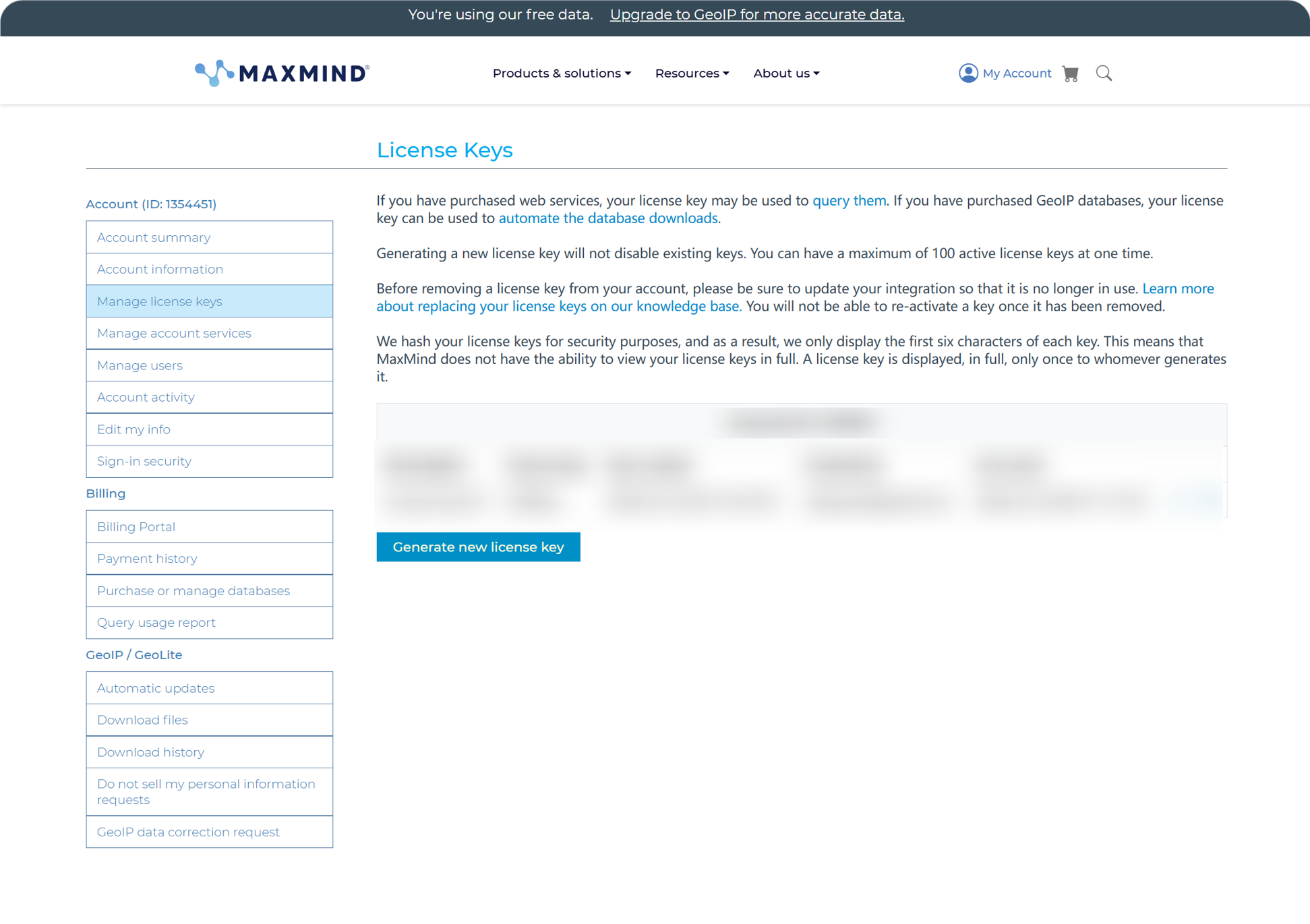
Sau khi tạo, dán Account ID và License Key vào ImgHost rồi lưu.
Gói miễn phí của MaxMind phù hợp cho sử dụng hằng ngày, nhưng có giới hạn số yêu cầu. Nếu vượt hạn mức, ImgHost tiếp tục thử các nguồn khả dụng khác.
Thiết Lập ipapi
ipapi dùng APILayer API Key.
Mở bảng điều khiển của ipapi và sao chép API Key hiển thị ở đó.
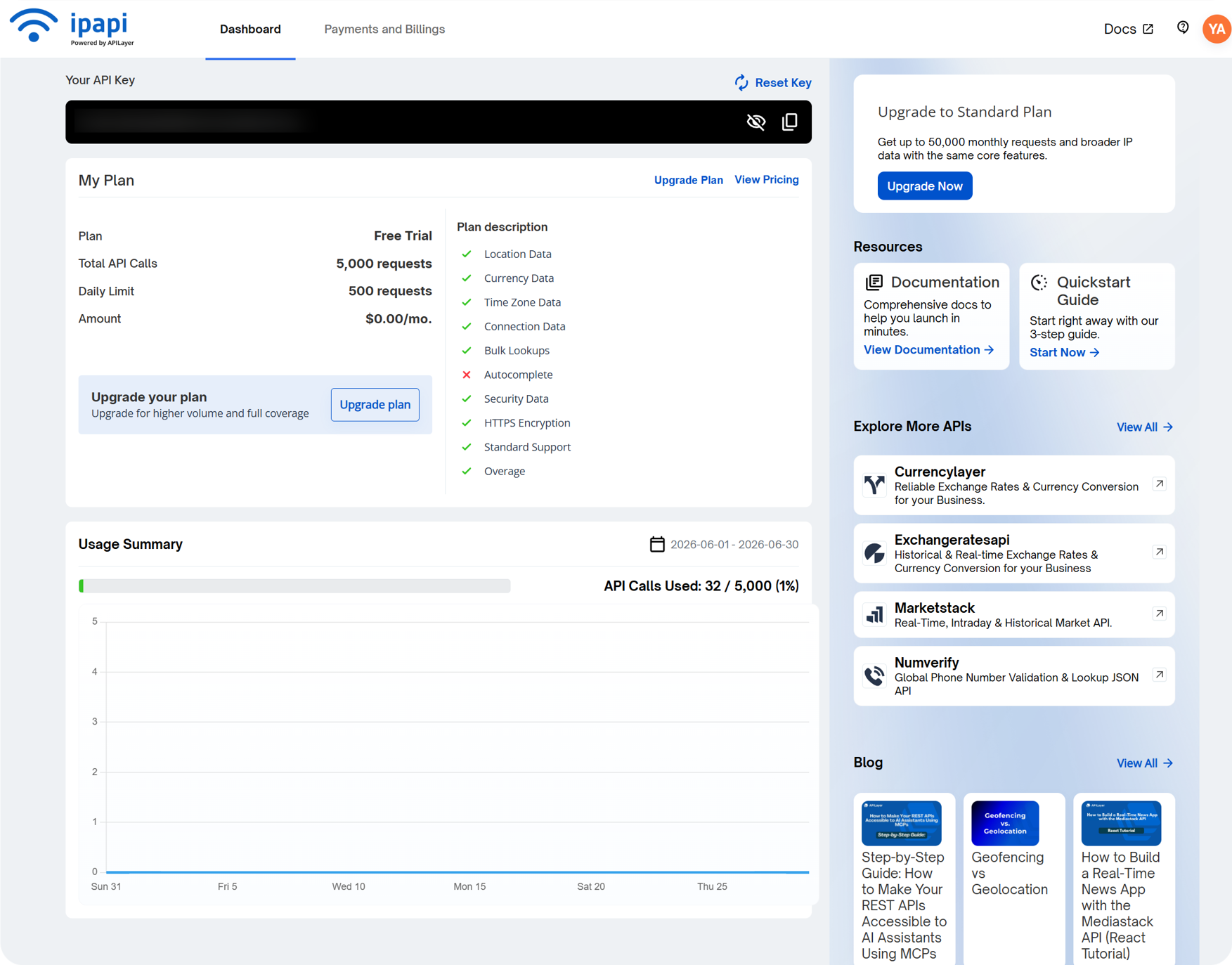
Dán vào trường ipapi Key trong ImgHost rồi lưu.
ipapi hỗ trợ định vị IP đa ngôn ngữ và hữu ích khi bạn muốn địa chỉ hiển thị bằng ngôn ngữ đã chọn. Gói miễn phí cũng có giới hạn số yêu cầu. Nếu hết hạn mức, ImgHost tiếp tục thử các nguồn khả dụng khác.
Thiết Lập Tencent Map Key
Tencent Map Key hữu ích cho địa chỉ tiếng Trung, đặc biệt là IP Trung Quốc đại lục.
Khi tạo khóa trong Tencent Location Service, hãy bật:
text
WebServiceAPISau khi tạo, dán khóa vào Tencent Map Key rồi lưu.
Nếu bạn chỉ cần định vị IP Trung Quốc cơ bản, Tencent Map Key là đủ để bắt đầu.
Cần Xem Gì Trong Quản Lý Người Dùng
Quản lý người dùng có ở phần trên của bảng quản trị.
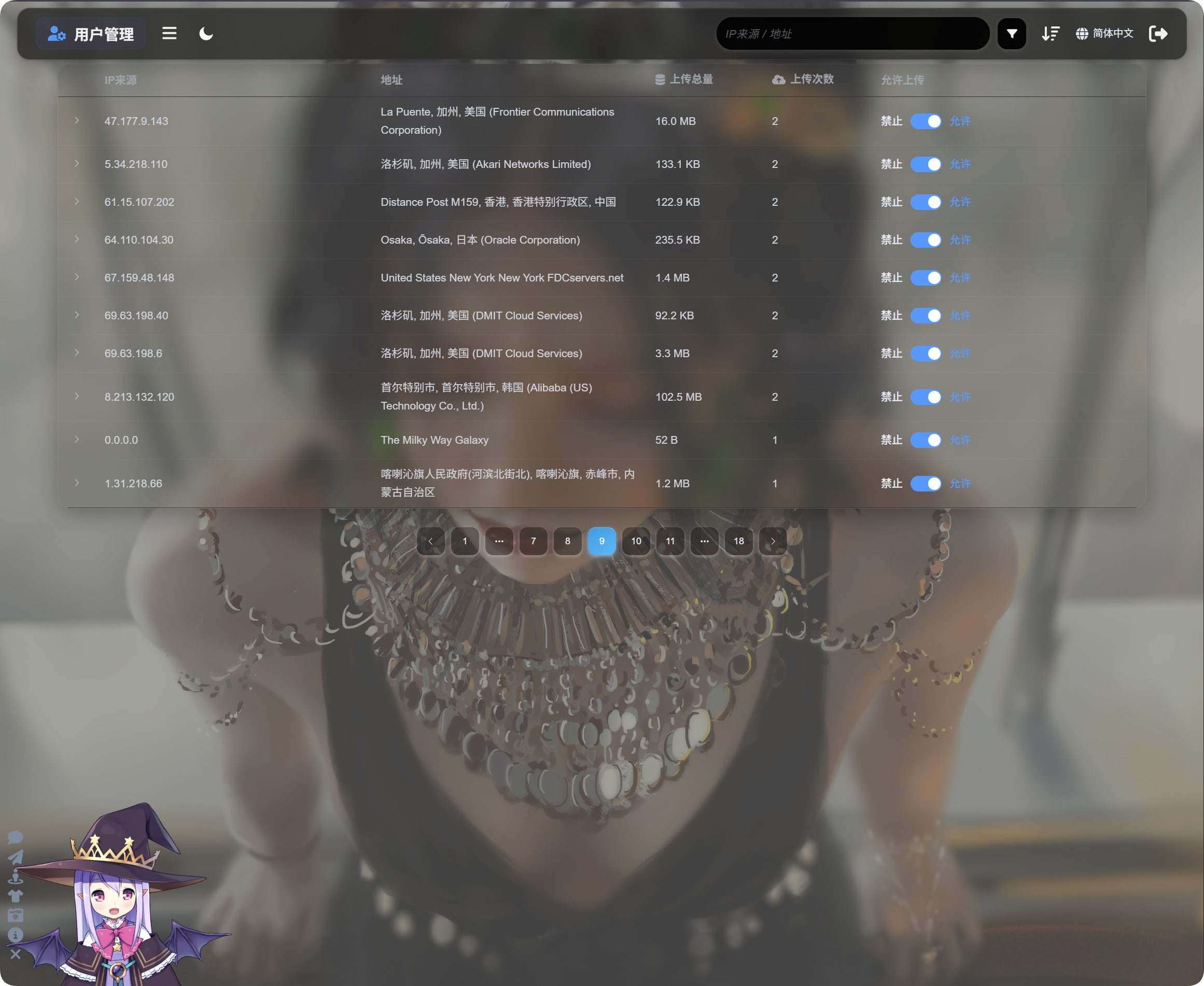
Quản lý người dùng hiển thị hoạt động tải lên theo IP:
| Trường | Mô tả |
|---|---|
| Nguồn IP | IP nguồn của người tải lên. |
| Địa chỉ | Vị trí gần đúng được phân giải từ IP. |
| Tổng dung lượng tải lên | Tổng dung lượng tệp được tải lên từ IP này. |
| Số lần tải lên | Số lượt tải lên từ IP này. |
| Cho phép tải lên | Bật nghĩa là cho phép tải lên. Tắt nghĩa là chặn tải lên. |
Nhấp mũi tên bên trái để mở rộng danh sách tệp đã được tải lên từ IP đó.
Danh sách tệp hiển thị tên tệp, xem trước, dung lượng tệp, kết quả kiểm duyệt, trạng thái tệp và thời gian tải lên. Khi lượt tải lên có vẻ đáng ngờ, hãy mở rộng IP trước, xem lại các tệp, rồi quyết định có chặn các lượt tải lên tiếp theo hay không.
Nếu một IP đáng ngờ, hãy tắt Upload allowed. Các lượt tải lên trong tương lai từ IP đó sẽ bị chặn.
Tìm Kiếm, Sắp Xếp Và Bộ Lọc Nâng Cao
Ở đầu Quản lý người dùng, tìm kiếm theo nguồn IP hoặc địa chỉ.
Sắp xếp theo thời gian, số lần tải lên hoặc tổng dung lượng tải lên để tìm người tải lên gần đây, người tải lên với tần suất cao hoặc IP dùng nhiều dung lượng.
Để điều tra sâu hơn, mở bộ lọc nâng cao.
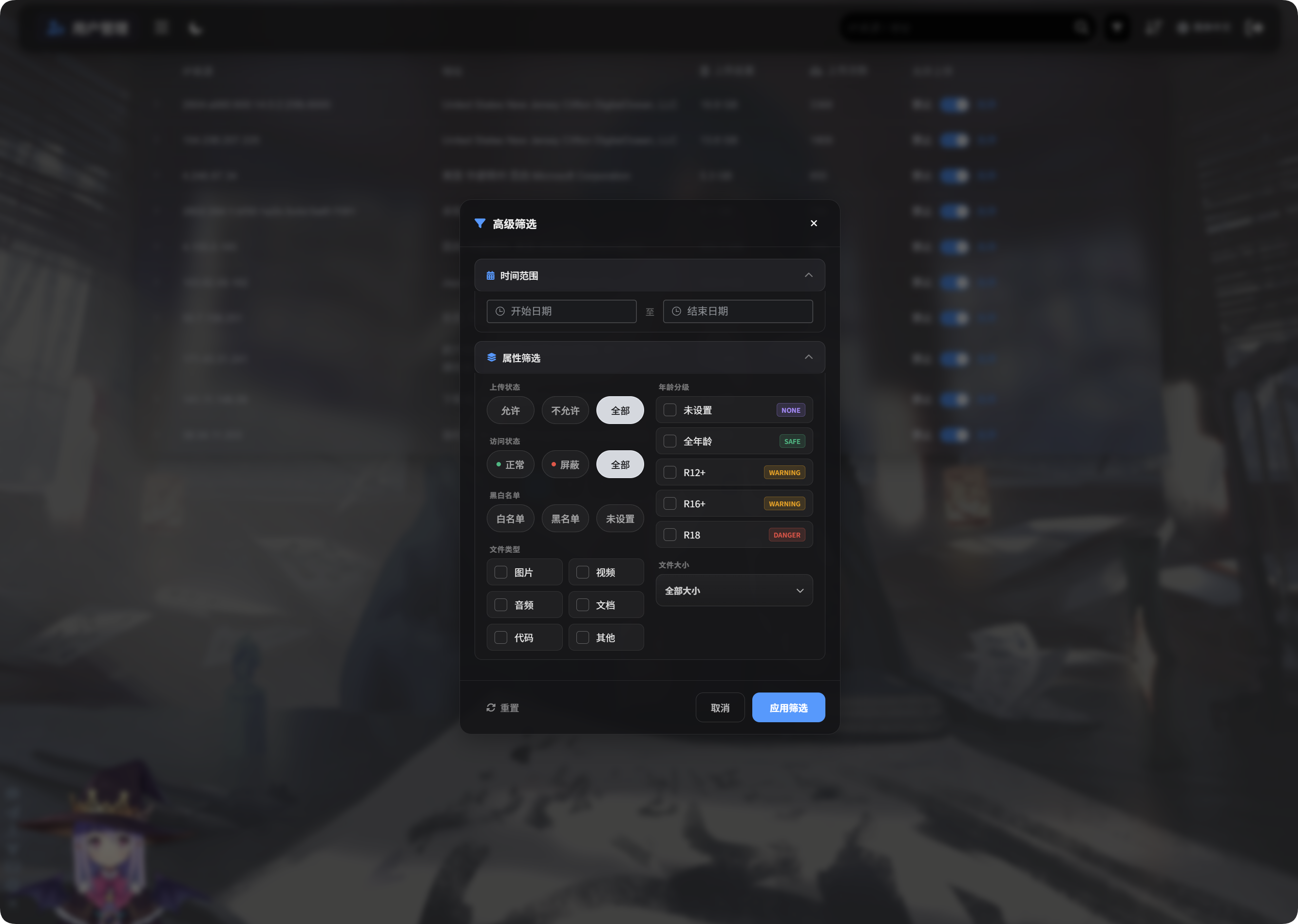
Bộ lọc nâng cao hỗ trợ:
| Bộ lọc | Cách dùng |
|---|---|
| Khoảng thời gian | Hiển thị IP đã tải tệp lên trong khoảng thời gian đã chọn. |
| Trạng thái truy cập | Lọc theo trạng thái bình thường, bị chặn và các trạng thái tương tự. |
| Danh sách cho phép/chặn | Lọc theo danh sách cho phép, danh sách chặn hoặc chưa đặt. |
| Loại tệp | Hiển thị IP đã tải lên hình ảnh, video, âm thanh, tài liệu, mã hoặc tệp khác. |
| Dung lượng tệp | Lọc theo khoảng dung lượng tệp đã tải lên. |
| Phân loại độ tuổi | Lọc theo chưa đặt, General, R12+, R16+, R18 và các phân loại tương tự. |
| Trạng thái tệp | Lọc theo trạng thái tệp hiện tại để điều tra tệp bất thường. |
Nhấp Apply Filters để áp dụng. Dùng Reset để quay lại toàn bộ dữ liệu.
Giao Diện Di Động
Trên di động, Quản lý người dùng chuyển sang bố cục thẻ.
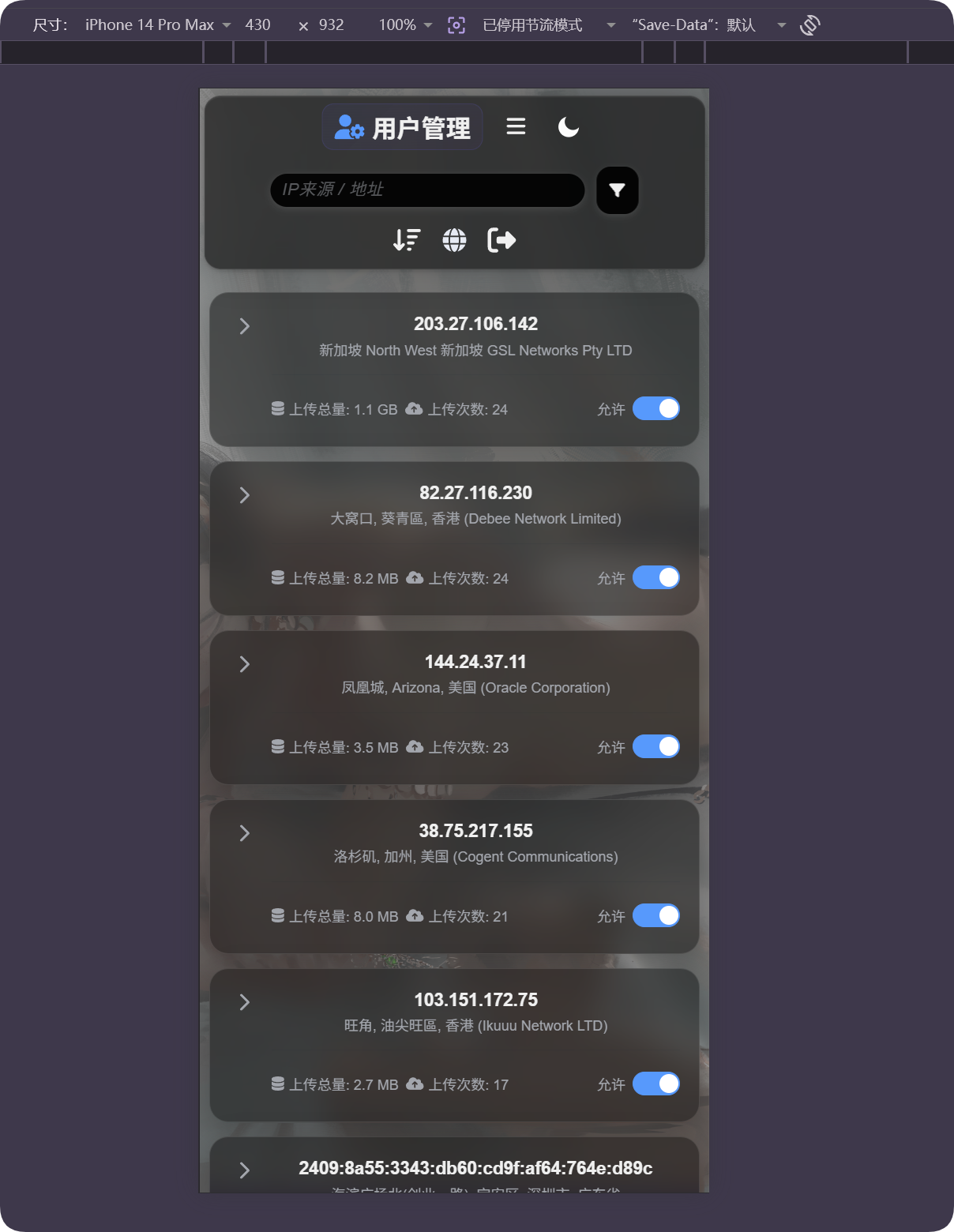
Mỗi thẻ hiển thị IP, địa chỉ, tổng dung lượng tải lên, số lần tải lên và công tắc cho phép tải lên. Bạn có thể quản lý người dùng mà không cần cuộn bảng ngang.
Nếu Vị Trí Có Vẻ Sai
Định vị IP là gần đúng. Đây không phải địa chỉ đường phố chính xác.
Nếu người dùng ở sau proxy, trung tâm dữ liệu, máy chủ đám mây hoặc mạng xuyên biên giới, vị trí hiển thị có thể khác vị trí thật.
Hãy dùng tính năng này để hiểu nguồn gốc gần đúng, tìm lượt tải lên bất thường và hỗ trợ quyết định chặn. Đừng coi đây là theo dõi chính xác.
Trường Hợp Thường Gặp
| Trường hợp | Ý nghĩa |
|---|---|
| Địa chỉ trống | IP có thể chưa được phân giải, hoặc nguồn hiện tại tạm thời không khả dụng. |
| Ngôn ngữ địa chỉ sai | Kiểm tra ngôn ngữ định vị IP và nguồn hỗ trợ ngôn ngữ đó đã được cấu hình hay chưa. |
| Địa chỉ hiển thị trung tâm dữ liệu | Nhiều proxy, máy chủ đám mây và trình thu thập dữ liệu xuất hiện dưới dạng địa chỉ trung tâm dữ liệu hoặc ISP. |
| Số lần tải lên cao | Kiểm tra kỹ IP này và chặn tải lên nếu cần. |
| Tổng dung lượng tải lên lớn | Sắp xếp hoặc lọc, mở rộng IP và kiểm tra các tệp cụ thể. |
| Cần khôi phục sau khi chặn | Bật lại Upload allowed. |
Luồng Nhanh
text
Open IP Geolocation in Other Settings
-> Choose IP geolocation language
-> Fill MaxMind, Tencent Map, or ipapi credentials as needed
-> Save settings
-> Open User Management
-> Review IP source, address, total upload size, and upload count
-> Use search, sort, or advanced filters to find abnormal IPs
-> Allow or block uploads as needed