IP புவியிட நிர்ணயம் மற்றும் பயனர் மேலாண்மை
IP புவியிட நிர்ணயம், பதிவேற்றுநர் பதிவுகள், உள்நுழைவு சாதனங்கள் மற்றும் இதற்கு ஒத்த பதிவுகளில் உள்ள IP முகவரிகளை அண்மித்த இடங்களாக மாற்றுகிறது.
அமைத்த பிறகு, நிர்வாக பலகம் பதிவேற்ற மற்றும் அணுகல் மூலங்களை தெளிவாக காட்ட முடியும். பயனர் மேலாண்மை சந்தேகமான IP முகவரிகளுக்கான பதிவேற்ற அணுகலை தடுக்கவும் மீட்டெடுக்கவும் உதவும்.
எங்கு அமைப்பது
திறக்கவும்:
text
System Settings -> Other Settings -> IP Geolocation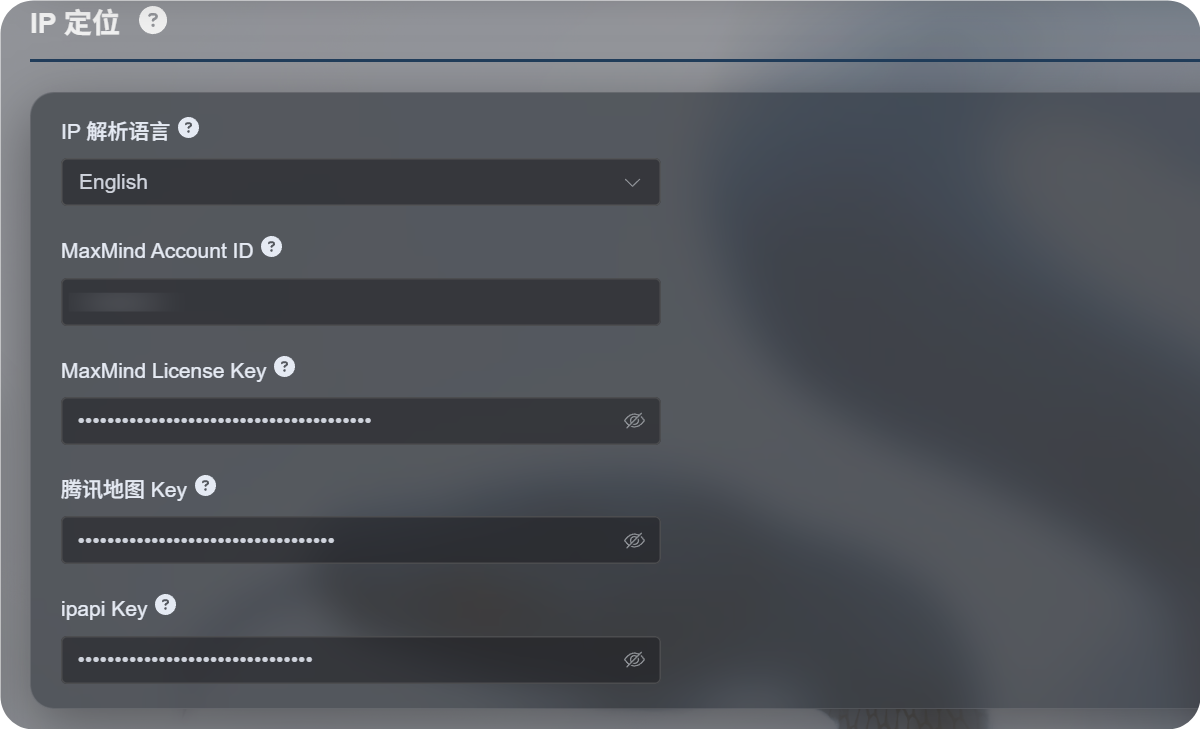
கிடைக்கும் அமைப்புகள்
புதிய IP புவியிட நிர்ணய செயல்முறை ஒரே வரைபட சேவையை சாராமல் பல மூலங்களை ஆதரிக்கிறது.
| அமைப்பு | நோக்கம் |
|---|---|
| IP புவியிட மொழி | ஆங்கிலம், எளிமைப்படுத்தப்பட்ட சீனம், ஜப்பானியம், பிரெஞ்சு போன்ற காட்சி மொழியை தேர்வு செய்கிறது. |
| MaxMind Account ID | MaxMind GeoLite Web Service-க்கான MaxMind கணக்கு ID. |
| MaxMind License Key | MaxMind License Key. |
| Tencent Map Key | Tencent Location Service விசை. சீன முகவரிகள் மற்றும் சீன மெய்நிலப் பகுதி IP-களுக்கு பயனுள்ளது. |
| ipapi Key | APILayer ipapi விசை. பலமொழி IP புவியிட நிர்ணயத்தை ஆதரிக்கிறது. |
தேவையான சேவைகளை மட்டும் நிரப்பவும். ஒவ்வொரு புலத்தையும் அமைக்க வேண்டியதில்லை.
எந்த விசையும் வழங்கப்படவில்லை என்றாலும் ImgHost உட்பொதிக்கப்பட்ட இலவச மூலங்களை முயற்சிக்கும். ஆனால் நிலைத்தன்மை, மொழி ஆதரவு மற்றும் துல்லியம், நீங்கள் அமைக்கும் சேவையை விட குறையலாம்.
பரிந்துரைக்கப்படும் தேர்வுகள்
உங்களுக்கு முக்கியமாக சீன முகவரிகள் தேவைப்பட்டால்:
- IP புவியிட மொழியை எளிமைப்படுத்தப்பட்ட சீனமாக அமைக்கவும்.
- Tencent Map Key அமைக்கவும்.
- விருப்பமாக MaxMind அல்லது ipapi-ஐ மாற்று மூலங்களாக சேர்க்கவும்.
உங்களுக்கு முக்கியமாக ஆங்கில அல்லது பலமொழி முகவரிகள் தேவைப்பட்டால்:
- தேவையான மொழியை தேர்வு செய்யவும்.
- MaxMind Account ID மற்றும் License Key அமைக்கவும்.
- சிறந்த பலமொழி முடிவுகள் தேவைப்பட்டால் ipapi Key சேர்க்கவும்.
MaxMind அமைப்பு
MaxMind-க்கு இவை தேவை:
text
MaxMind Account ID
MaxMind License Key
MaxMind கட்டுப்பாட்டு பலகையில் கணக்கு ID-ஐ கண்டுபிடித்து, License Keys பக்கத்தில் License Key உருவாக்கவும்.
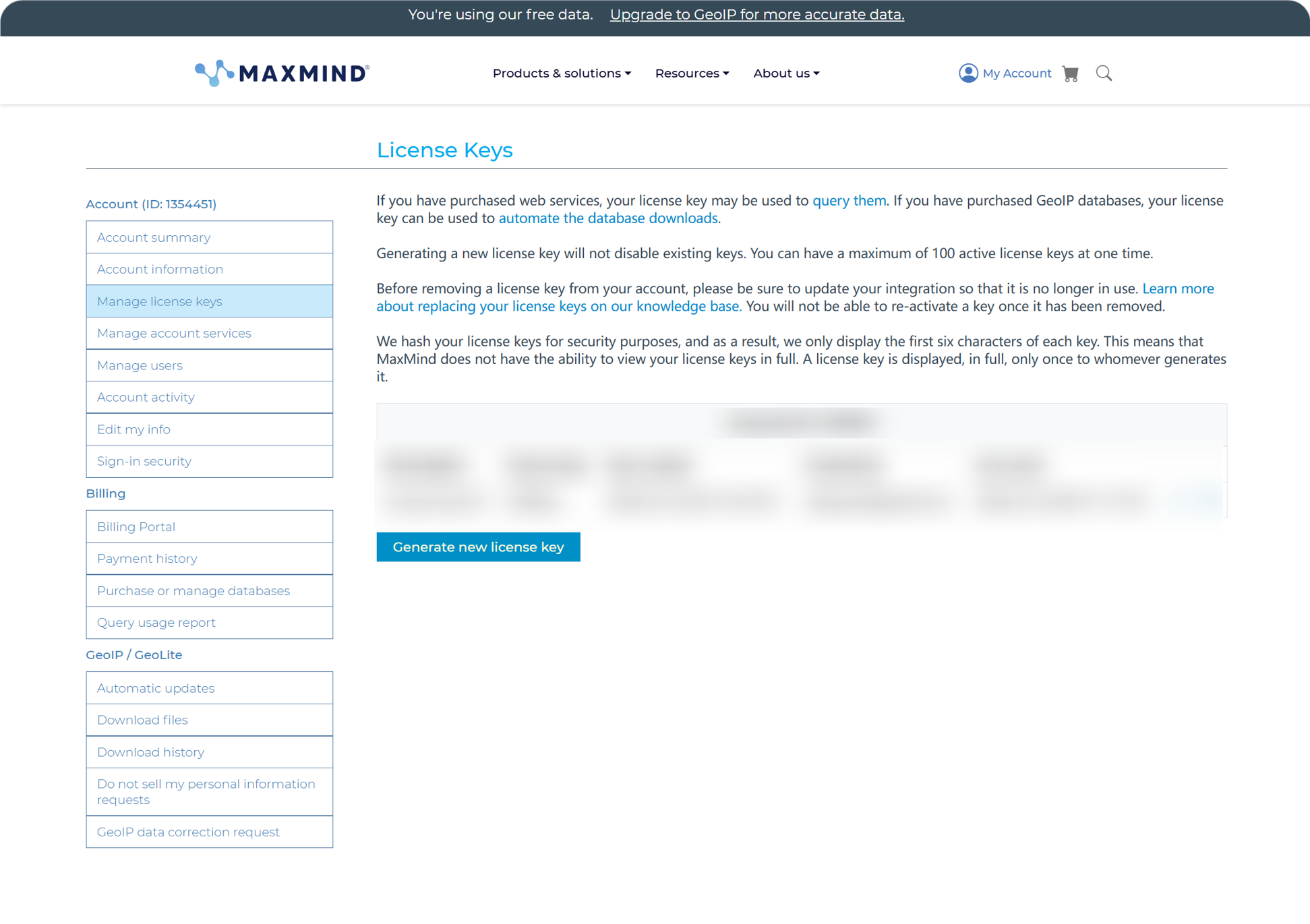
உருவாக்கிய பிறகு Account ID மற்றும் License Key-ஐ ImgHost-ல் ஒட்டி சேமிக்கவும்.
MaxMind-ன் இலவச திட்டம் நாளாந்த பயன்பாட்டுக்கு ஏற்றது, ஆனால் அதற்கு கோரிக்கை வரம்புகள் உள்ளன. ஒதுக்கீடு மீறப்பட்டால் ImgHost கிடைக்கும் பிற மூலங்களை தொடர்ந்து முயற்சிக்கும்.
ipapi அமைப்பு
ipapi APILayer API Key-ஐ பயன்படுத்துகிறது.
ipapi கட்டுப்பாட்டு பலகையை திறந்து அங்கே காட்டப்படும் API Key-ஐ நகலெடுக்கவும்.
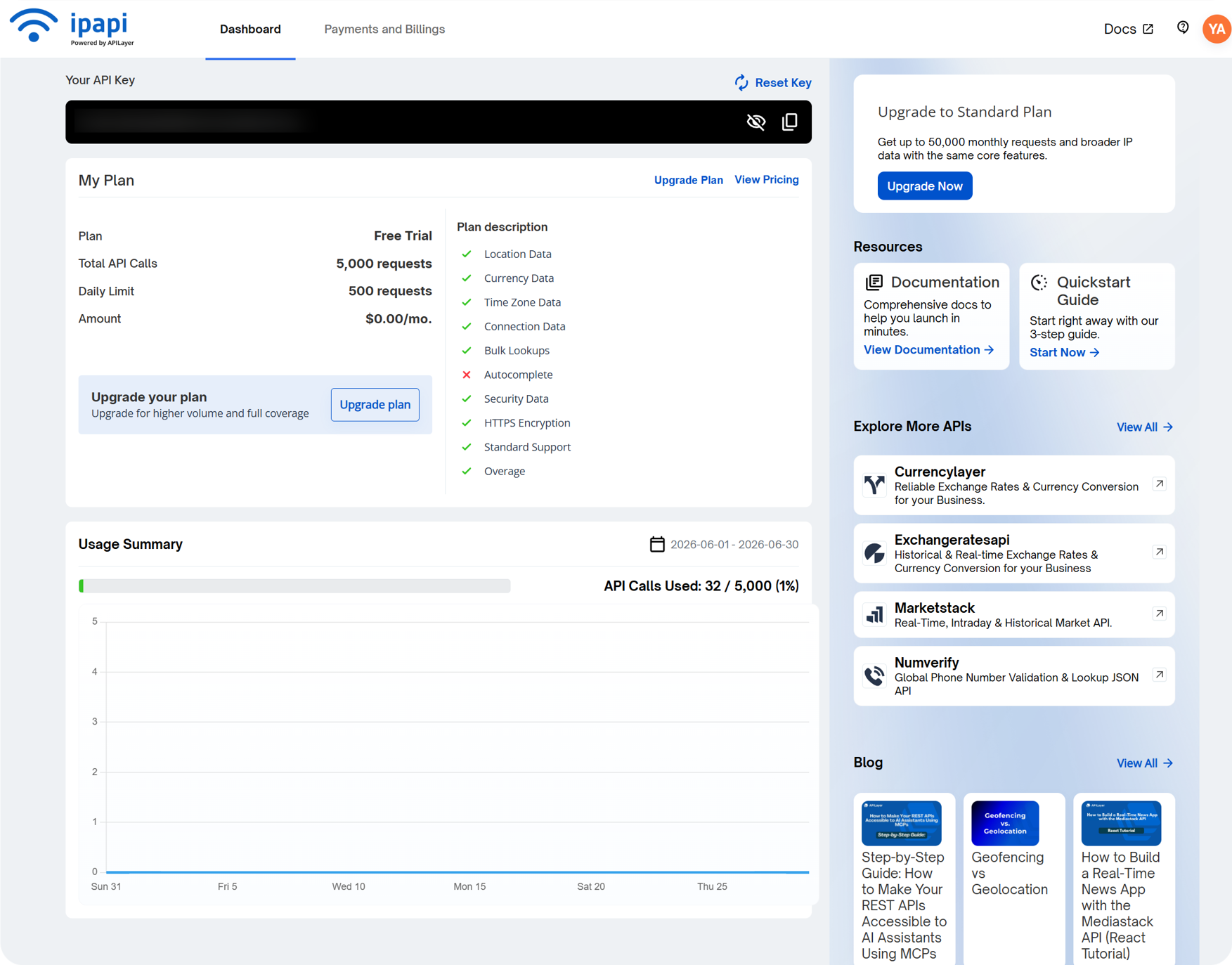
அதை ImgHost-ல் உள்ள ipapi Key புலத்தில் ஒட்டி சேமிக்கவும்.
ipapi பலமொழி IP புவியிட நிர்ணயத்தை ஆதரிக்கிறது. தேர்ந்தெடுத்த மொழியில் முகவரிகளை காட்ட வேண்டுமெனில் இது பயனுள்ளதாக இருக்கும். அதன் இலவச திட்டத்திற்கும் கோரிக்கை வரம்புகள் உள்ளன. ஒதுக்கீடு முடிந்தால் ImgHost கிடைக்கும் பிற மூலங்களை தொடர்ந்து முயற்சிக்கும்.
Tencent Map Key அமைப்பு
Tencent Map Key சீன முகவரிகளுக்கு, குறிப்பாக சீன மெய்நிலப் பகுதி IP-களுக்கு, பயனுள்ளது.
Tencent Location Service-ல் விசை உருவாக்கும்போது இதை இயக்கவும்:
text
WebServiceAPIஉருவாக்கிய பிறகு விசையை Tencent Map Key-ல் ஒட்டி சேமிக்கவும்.
அடிப்படை சீன IP புவியிட நிர்ணயம் மட்டுமே தேவைப்பட்டால், தொடங்க Tencent Map Key போதுமானது.
பயனர் மேலாண்மையில் பார்க்க வேண்டியது
பயனர் மேலாண்மை நிர்வாக பலகையின் மேல் பகுதியிலிருந்து கிடைக்கும்.
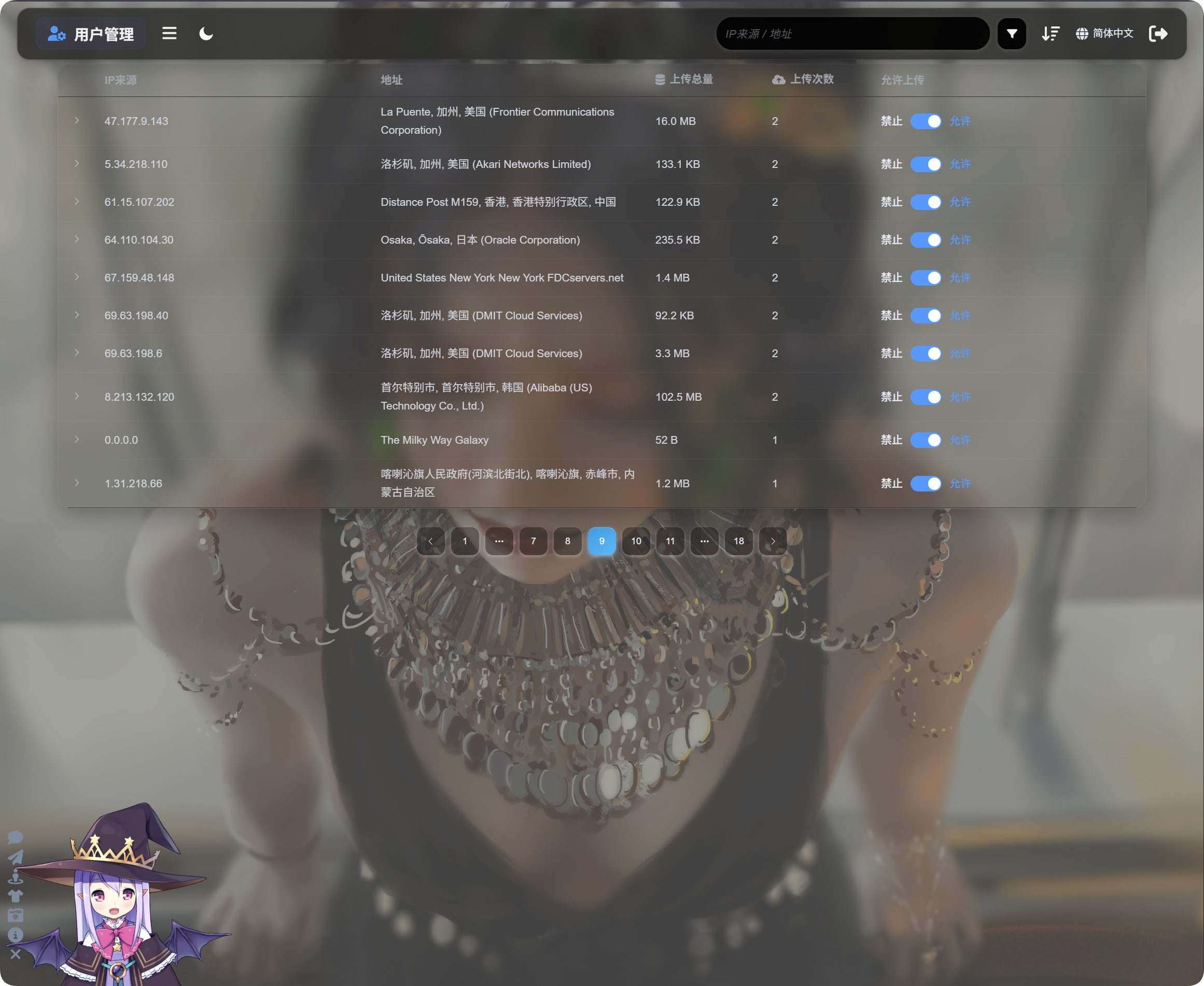
பயனர் மேலாண்மை IP அடிப்படையில் பதிவேற்ற செயல்பாட்டை காட்டும்:
| புலம் | விளக்கம் |
|---|---|
| IP மூலம் | பதிவேற்றுநரின் மூல IP. |
| முகவரி | IP-யிலிருந்து தீர்மானிக்கப்பட்ட அண்மித்த இடம். |
| மொத்த பதிவேற்ற அளவு | இந்த IP பதிவேற்றிய கோப்புகளின் மொத்த அளவு. |
| பதிவேற்ற எண்ணிக்கை | இந்த IP-யிலிருந்து வந்த பதிவேற்றங்களின் எண்ணிக்கை. |
| பதிவேற்ற அனுமதி | இயக்கத்தில் இருந்தால் பதிவேற்றங்கள் அனுமதிக்கப்படும். முடக்கப்பட்டிருந்தால் பதிவேற்றங்கள் தடுக்கப்படும். |
அந்த IP பதிவேற்றிய கோப்புகளின் பட்டியலை விரிக்க இடதுபுற அம்பை கிளிக் செய்யவும்.
கோப்பு பட்டியல் கோப்பு பெயர், முன்னோட்டம், கோப்பு அளவு, பரிசோதனை முடிவு, கோப்பு நிலை மற்றும் பதிவேற்ற நேரத்தை காட்டும். பதிவேற்றங்கள் சந்தேகமாக இருந்தால், முதலில் IP-ஐ விரித்து கோப்புகளை பரிசீலித்து, பின்னர் மேலதிக பதிவேற்றங்களை தடுக்க வேண்டுமா என்று முடிவு செய்யவும்.
ஒரு IP சந்தேகமாக இருந்தால், Upload allowed அணைக்கவும். அந்த IP-யிலிருந்து வரும் எதிர்கால பதிவேற்றங்கள் தடுக்கப்படும்.
தேடல், வரிசைப்படுத்தல் மற்றும் மேம்பட்ட வடிகட்டிகள்
பயனர் மேலாண்மையின் மேல் பகுதியில் IP மூலம் அல்லது முகவரியால் தேடலாம்.
சமீபத்திய பதிவேற்றுநர்கள், அதிக அடிக்கடி பதிவேற்றும் IP-கள் அல்லது அதிக பயன்பாட்டுள்ள IP-களை கண்டறிய நேரம், பதிவேற்ற எண்ணிக்கை அல்லது மொத்த பதிவேற்ற அளவின்படி வரிசைப்படுத்தவும்.
ஆழமான விசாரணைக்கு மேம்பட்ட வடிகட்டிகளை திறக்கவும்.
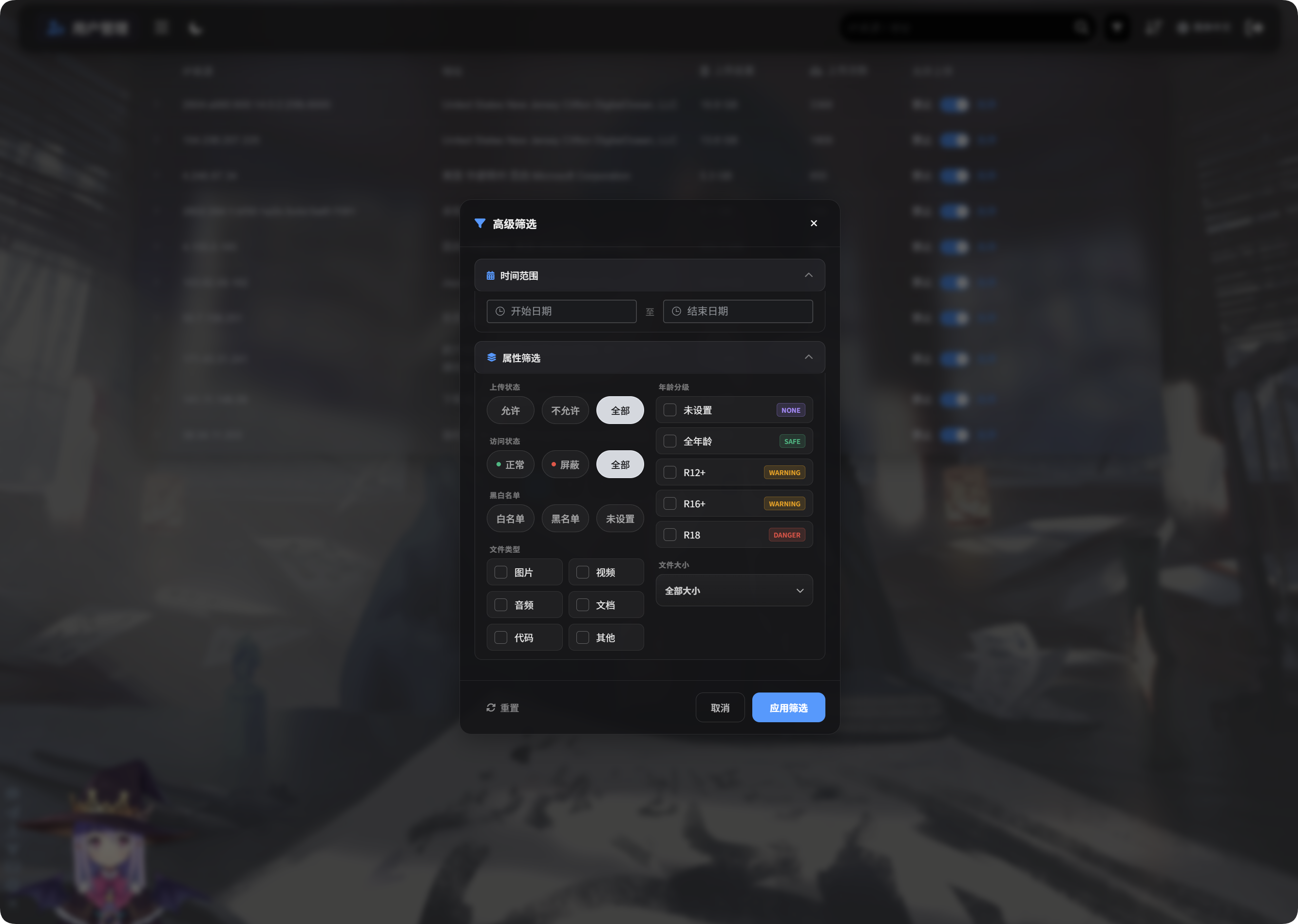
மேம்பட்ட வடிகட்டிகள் ஆதரிப்பவை:
| வடிகட்டி | பயன்பாடு |
|---|---|
| நேர வரம்பு | தேர்ந்தெடுத்த காலத்தில் கோப்புகளை பதிவேற்றிய IP-களை காட்டும். |
| அணுகல் நிலை | இயல்பு, தடுக்கப்பட்டது மற்றும் இதற்கு ஒத்த நிலைகளின்படி வடிகட்டும். |
| அனுமதி/தடை பட்டியல் | அனுமதி பட்டியல், தடை பட்டியல் அல்லது அமைக்கப்படாத நிலை ஆகியவற்றின்படி வடிகட்டும். |
| கோப்பு வகை | படங்கள், வீடியோக்கள், ஒலி, ஆவணங்கள், குறியீடு அல்லது பிற கோப்புகளை பதிவேற்றிய IP-களை காட்டும். |
| கோப்பு அளவு | பதிவேற்றப்பட்ட கோப்பு அளவு வரம்பின்படி வடிகட்டும். |
| வயது மதிப்பீடு | அமைக்கப்படாதது, General, R12+, R16+, R18 மற்றும் இதற்கு ஒத்த மதிப்பீடுகளின்படி வடிகட்டும். |
| கோப்பு நிலை | அசாதாரண கோப்புகளை ஆய்வு செய்ய தற்போதைய கோப்பு நிலையின்படி வடிகட்டும். |
பயன்படுத்த Apply Filters கிளிக் செய்யவும். எல்லா தரவுகளுக்கும் திரும்ப Reset பயன்படுத்தவும்.
மொபைல் பார்வை
மொபைலில் பயனர் மேலாண்மை அட்டை அமைப்புக்கு மாறும்.
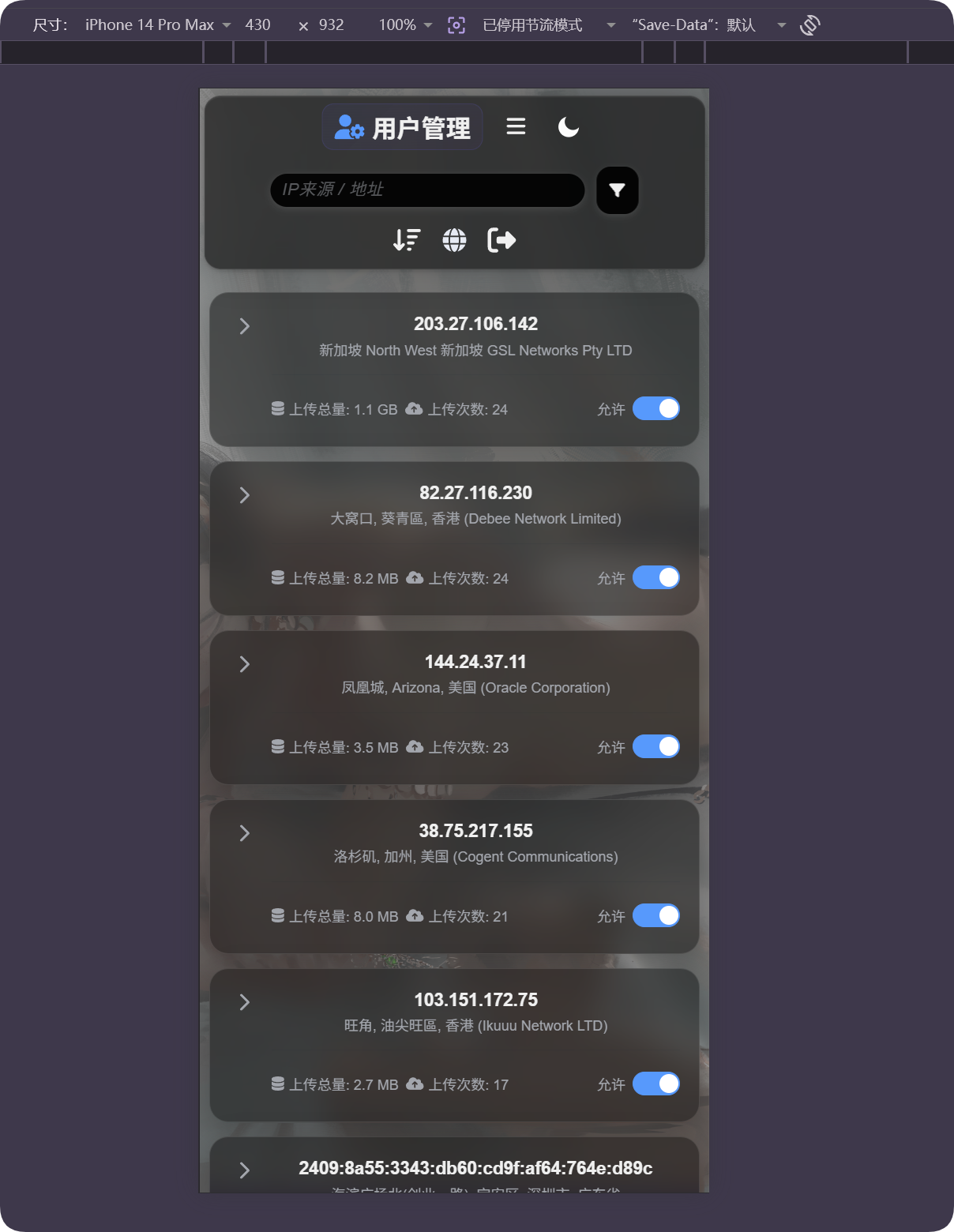
ஒவ்வொரு அட்டையும் IP, முகவரி, மொத்த பதிவேற்ற அளவு, பதிவேற்ற எண்ணிக்கை மற்றும் பதிவேற்ற அனுமதி சுவிட்சை காட்டும். கிடைமட்ட அட்டவணை உருட்டல் இல்லாமல் பயனர்களை நிர்வகிக்கலாம்.
இடம் தவறாக தெரிந்தால்
IP புவியிட நிர்ணயம் அண்மித்தது. இது துல்லியமான தெரு முகவரி அல்ல.
பயனர் ப்ராக்ஸி, தரவு மையம், மேக சேவையகம் அல்லது எல்லை தாண்டும் வலையமைப்பின் பின்னால் இருந்தால், காட்டப்படும் இடம் உண்மையான இடத்திலிருந்து மாறுபடலாம்.
தோராயமான மூலத்தை புரிந்துகொள்ள, அசாதாரண பதிவேற்றங்களை கண்டறிய, தடை முடிவுகளுக்கு உதவ இந்த அம்சத்தை பயன்படுத்தவும். இதை துல்லியமான கண்காணிப்பாக கருத வேண்டாம்.
பொதுவான நிலைகள்
| நிலை | பொருள் |
|---|---|
| முகவரி காலியாக உள்ளது | IP இன்னும் தீர்மானிக்கப்படாமல் இருக்கலாம், அல்லது தற்போதைய மூலம் தற்காலிகமாக கிடைக்காமல் இருக்கலாம். |
| முகவரி மொழி தவறாக உள்ளது | IP புவியிட மொழியையும், அந்த மொழியை ஆதரிக்கும் மூலம் அமைக்கப்பட்டுள்ளதா என்பதையும் சரிபார்க்கவும். |
| முகவரி தரவு மையமாக காட்டுகிறது | பல ப்ராக்ஸிகள், மேக சேவையகங்கள் மற்றும் கிராலர்கள் தரவு மையம் அல்லது ISP முகவரிகளாக தோன்றும். |
| பதிவேற்ற எண்ணிக்கை அதிகம் | இந்த IP-ஐ கவனமாக பரிசீலித்து, தேவைப்பட்டால் பதிவேற்றங்களை தடுக்கவும். |
| மொத்த பதிவேற்ற அளவு பெரியது | வரிசைப்படுத்தவும் அல்லது வடிகட்டவும், IP-ஐ விரித்து குறிப்பிட்ட கோப்புகளை ஆய்வு செய்யவும். |
| தடுத்த பிறகு மீட்டெடுக்க வேண்டும் | Upload allowed மீண்டும் இயக்கவும். |
விரைவு நடைமுறை
text
Open IP Geolocation in Other Settings
-> Choose IP geolocation language
-> Fill MaxMind, Tencent Map, or ipapi credentials as needed
-> Save settings
-> Open User Management
-> Review IP source, address, total upload size, and upload count
-> Use search, sort, or advanced filters to find abnormal IPs
-> Allow or block uploads as needed