கூட்டமைப்பு விநியோகிக்கப்பட்ட குறியீடு
கூட்டமைப்பு விநியோகிக்கப்பட்ட குறியீடு பல ImgHost தளங்கள் ஒன்றுக்கொன்று கோப்பு பட்டியல்களை பகிர அனுமதிக்கிறது.
எளிமையாக:
- உங்கள் தளத்திலிருந்து தேர்ந்தெடுத்த கோப்புறைகளை மற்றவர்களுடன் பகிரலாம்.
- மற்றொரு முனையில் சேர்ந்து, அந்த முனை பகிரும் கோப்பு பட்டியலை உங்கள் நிர்வாக பலகைக்கு ஒத்திசைக்கலாம்.
- கூட்டமைப்பு கோப்புகள் முக்கியமாக உலாவல், தேடல் மற்றும் இணைப்புகளை திறப்பதற்காக. அவை உங்கள் சொந்த சேமிப்பகத்திற்கு மீண்டும் பதிவேற்றப்படாது.
எங்கு அமைப்பது
திறக்கவும்:
text
System Settings -> Other Settings -> Federated Distributed Index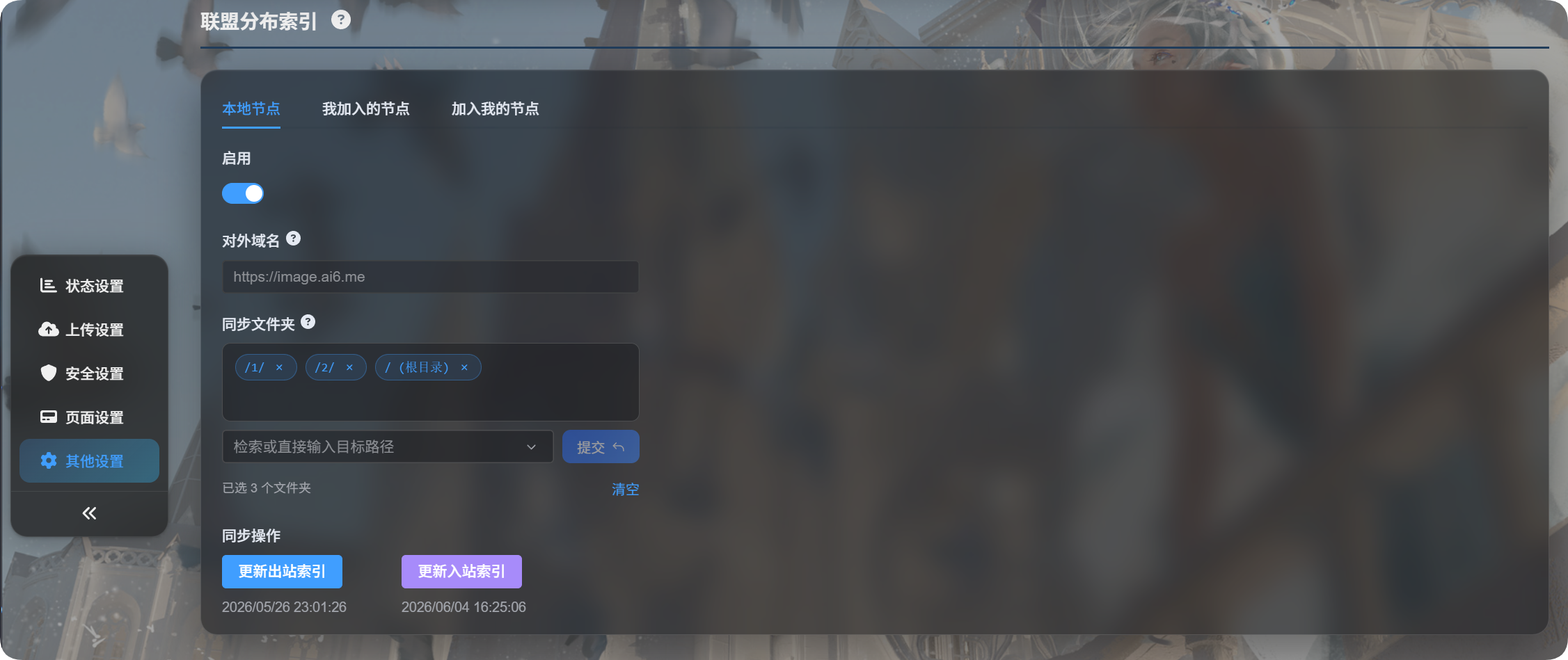
பக்கத்தில் மூன்று தாவல்கள் உள்ளன:
| தாவல் | நோக்கம் |
|---|---|
| உள்ளூர் முனை | உங்கள் முனையை இயக்குதல், பொது டொமைனை உறுதிப்படுத்துதல், பகிரப்பட்ட கோப்புறைகளை தேர்வு செய்தல், வெளிச்செல்லும் குறியீட்டை புதுப்பித்தல் |
| நான் சேர்ந்த முனைகள் | நீங்கள் சேர்ந்துள்ள பிற ImgHost முனைகளை நிர்வகித்தல் |
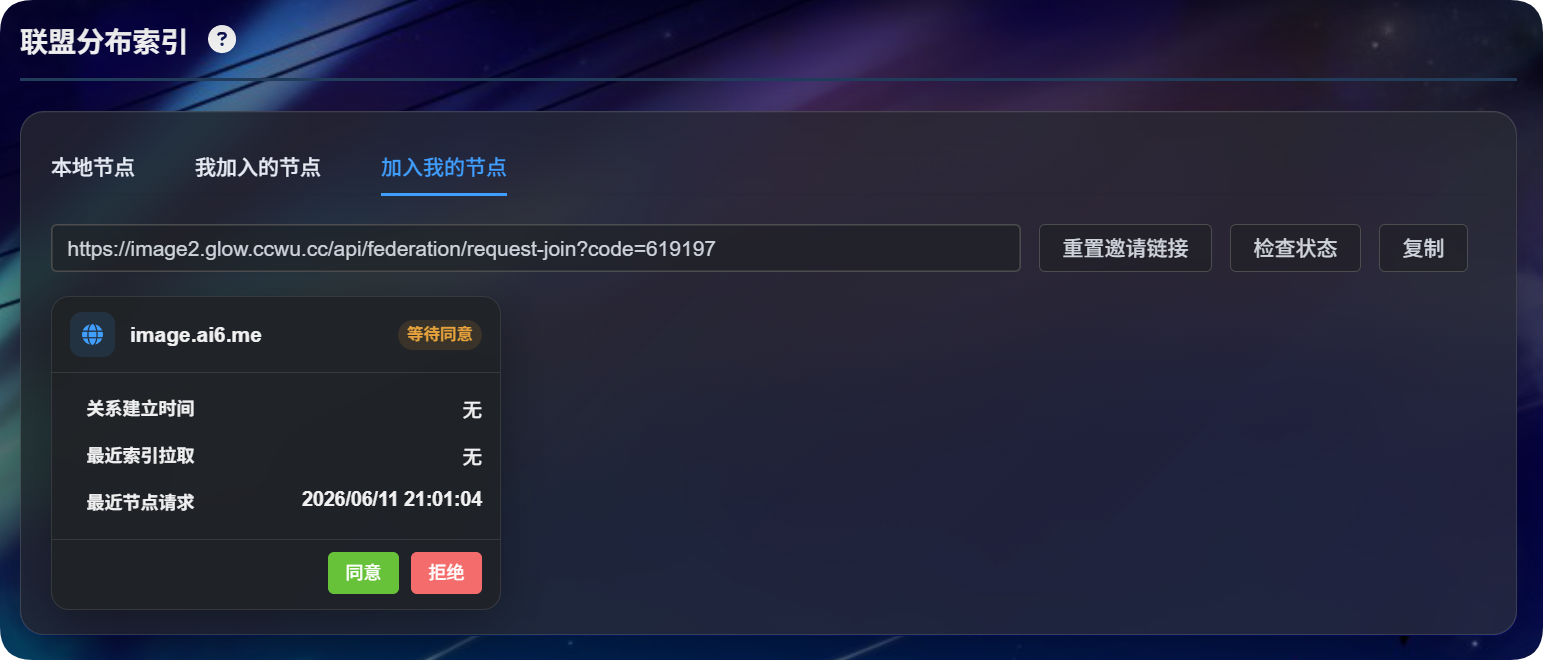
| என்னுடன் சேரும் முனைகள் | உங்கள் முனையில் சேர விரும்பும் பிறரின் கோரிக்கைகளை நிர்வகித்தல் |
முதல் முறை அமைப்பு
Local Nodeதிறக்கவும்.Enableஇயக்கவும்.Sync foldersகீழ் பகிர வேண்டிய கோப்புறைகளை தேர்வு செய்யவும்.Update Outbound Indexகிளிக் செய்யவும்.- ImgHost டொமைன் மாற்றத்தை கண்டறிந்தால், தொடரும் முன் தற்போதைய டொமைன் சரியானதா என்பதை உறுதிப்படுத்தவும்.
பல ஒத்திசைவு கோப்புறைகளை தேர்வு செய்யலாம்.
ஒத்திசைவு கோப்புறை பட்டியல் காலியாக இருந்தால், அனைத்து கோப்புறைகளும் பகிரப்படும்.
உள்ளூர் முனை
பொது டொமைன்
பொது டொமைன் என்பது பிற முனைகள் உங்கள் முனையை அணுக பயன்படுத்தும் தள URL ஆகும்.
ImgHost இதை தானாக கண்டறியும். நீங்கள் அதை கைமுறையாக உள்ளிட தேவையில்லை. முதல் முறையாக குறியீட்டை புதுப்பிக்கும்போது, தற்போதைய அணுகல் URL உற்பத்தி டொமைனா என்று ImgHost உறுதிப்படுத்த கேட்கும்.
பின்னர் டொமைனை மாற்றினால், குறியீட்டை புதுப்பிக்கும்போது மீண்டும் உறுதிப்படுத்தல் கேட்கப்படும்.
ஒத்திசைவு கோப்புறைகள்
ஒத்திசைவு கோப்புறைகள் கூட்டமைப்பு முனைகளுடன் எந்த கோப்புகள் பகிரப்படுகின்றன என்பதை தீர்மானிக்கும்.
உதாரணமாக, நீங்கள் இதை மட்டும் தேர்வு செய்தால்:
text
/1/
/2/
பிற முனைகள் அந்த இரண்டு அடைவுகளிலுள்ள கோப்புகளையே பார்க்க முடியும்.
வெளிச்செல்லும் குறியீட்டை புதுப்பித்தல்
இது பிற முனைகள் உங்களிடமிருந்து ஒத்திசைக்கக்கூடிய கோப்பு பட்டியலை புதுப்பிக்கும்.
இதைக் கீழ்க்கண்ட சமயங்களில் பயன்படுத்தவும்:
- கூட்டமைப்பை முதல் முறையாக இயக்கும்போது.
- பகிர விரும்பும் கோப்புகளை பதிவேற்றியபோது.
- ஒத்திசைவு கோப்புறைகளை மாற்றியபோது.
- பொது டொமைனை மாற்றி அதை உறுதிப்படுத்த வேண்டியபோது.
நான் சேர்ந்த முனைகள்
Nodes I Joined என்பது நீங்கள் சேர்ந்துள்ள பிற முனைகளை நிர்வகிக்கும் இடம்.
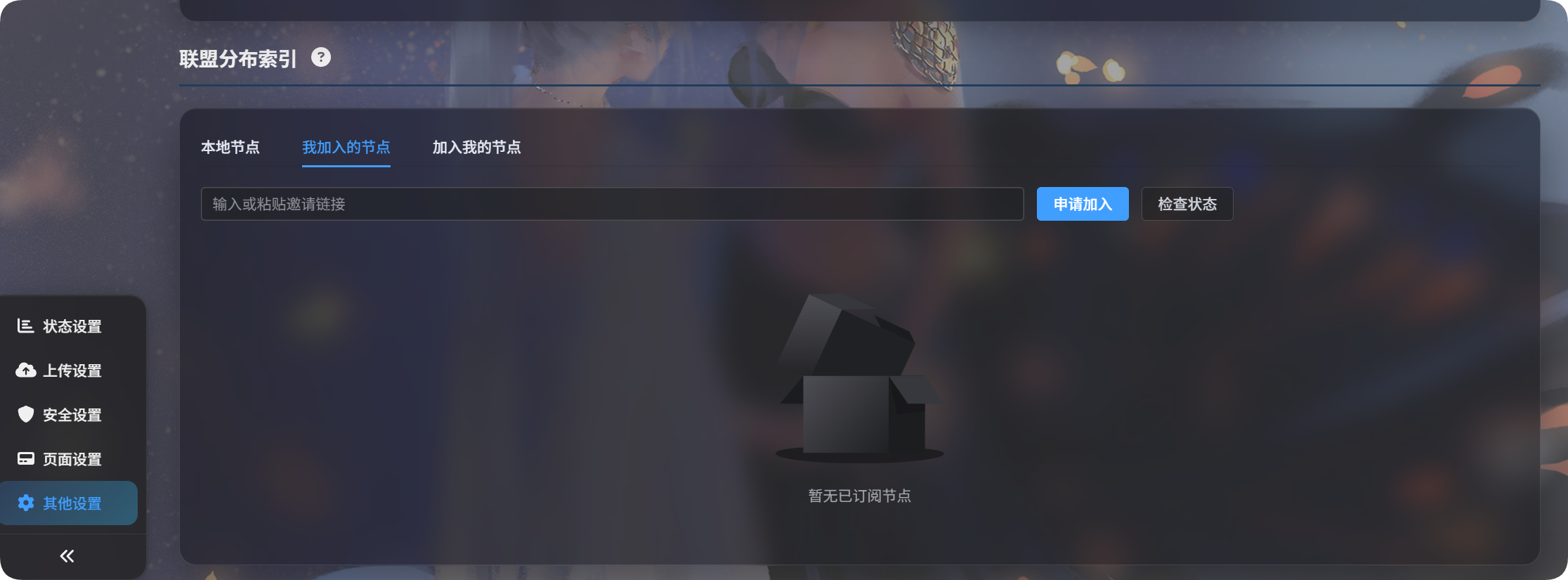
மற்றொரு முனையில் சேர கோரிக்கை அனுப்புதல்
- மற்ற உரிமையாளரிடம் அழைப்பிணைப்பை கேட்கவும்.
- அதை உள்ளீட்டு பெட்டியில் ஒட்டவும்.
Request to Joinகிளிக் செய்யவும்.- மற்ற உரிமையாளர் தனது நிர்வாக பலகையில் அதை ஒப்புதல் அளிக்கும் வரை காத்திருக்கவும்.
ஒப்புதலுக்குப் பிறகு, முனை நிலை ஒப்புதல் பெற்றதாக மாறும்.
உள்வரும் குறியீட்டை புதுப்பித்தல்
Update Inbound Index நீங்கள் சேர்ந்துள்ள முனைகளிலிருந்து கோப்பு பட்டியல்களை ஒத்திசைக்கும்.
இதைக் கீழ்க்கண்ட சமயங்களில் பயன்படுத்தவும்:
- மற்ற உரிமையாளர் உங்கள் கோரிக்கையை இப்போது ஒப்புதல் அளித்திருந்தால்.
- பகிரப்பட்ட உள்ளடக்கம் புதுப்பிக்கப்பட்டதாக மற்ற உரிமையாளர் தெரிவித்தால்.
- சேர்ந்துள்ள அனைத்து கூட்டமைப்பு கோப்பு பட்டியல்களையும் புதுப்பிக்க விரும்பினால்.
ஒரே ஒரு முனையை மட்டும் புதுப்பிக்க, அந்த முனையின் அட்டையில் Update Index கிளிக் செய்யவும்.
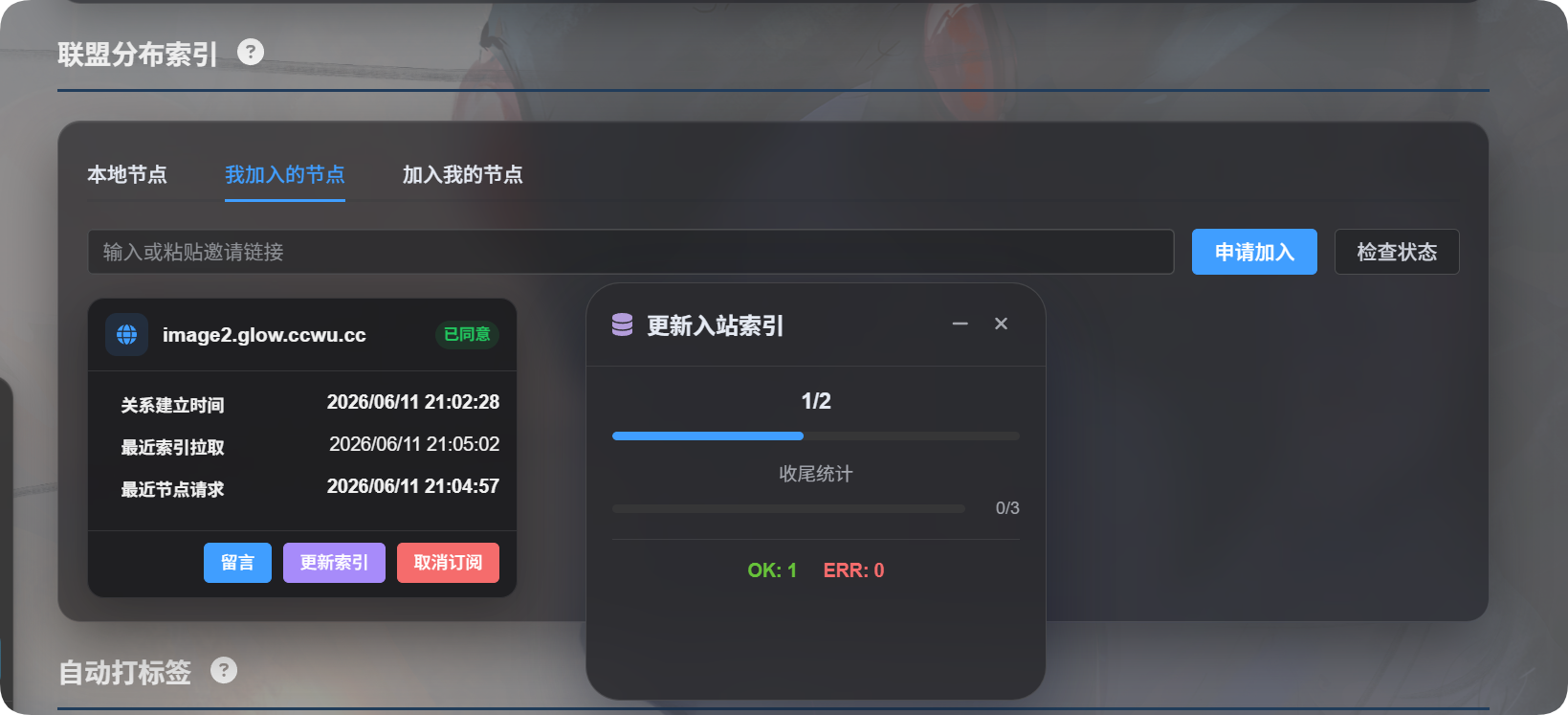
சந்தாவை ரத்து செய்தல்
ஒரு முனையை இனி ஒத்திசைக்க வேண்டாம் என்றால் Unsubscribe கிளிக் செய்யவும்.
சந்தாவை ரத்து செய்த பிறகு, அந்த முனையின் கூட்டமைப்பு குறியீடு உங்கள் உள்ளூர் தளத்திலிருந்து அகற்றப்படும்.
என்னுடன் சேரும் முனைகள்
Nodes Joining Me என்பது பிறரிடமிருந்து வரும் கோரிக்கைகளை கையாளும் இடம்.
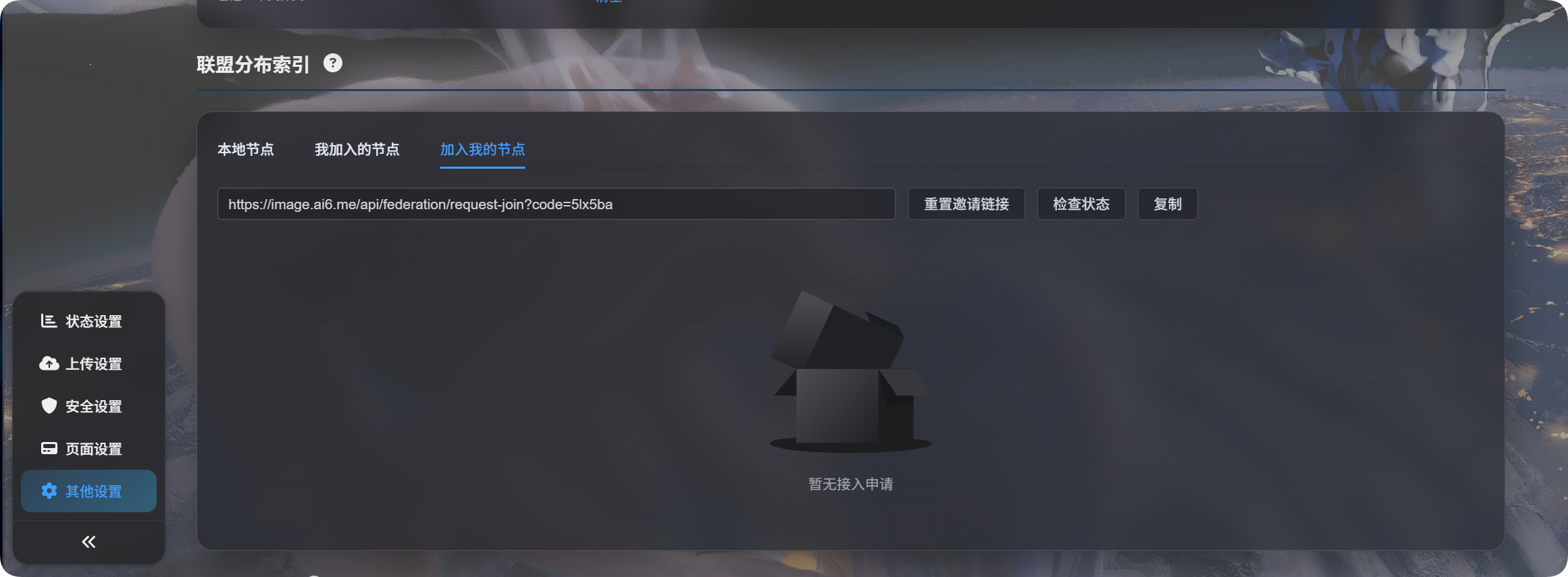
அழைப்பிணைப்பை உருவாக்குதல்
- உள்ளூர் முனை இயக்கப்பட்டுள்ளதா என்பதை உறுதிப்படுத்தவும்.
- ImgHost பொது டொமைனை உறுதிப்படுத்த, குறைந்தது ஒருமுறை
Update Outbound Indexகிளிக் செய்யவும். Nodes Joining Meதிறக்கவும்.Reset Invitation Linkகிளிக் செய்யவும்.- அழைப்பிணைப்பை நகலெடுத்து மற்ற உரிமையாளருக்கு அனுப்பவும்.
அழைப்பிணைப்பு காலியாக இருந்தால், பொதுவாக பொது டொமைன் இன்னும் உறுதிப்படுத்தப்படவில்லை. Local Node-க்கு திரும்பி Update Outbound Index கிளிக் செய்யவும்.
சேரும் கோரிக்கைகளை கையாளுதல்
யாராவது கோரிக்கை சமர்ப்பித்தால், அது Nodes Joining Me பட்டியலில் தோன்றும்.
| செயல் | பொருள் |
|---|---|
| ஒப்புதல் | மற்ற முனை உங்கள் பகிரப்பட்ட கோப்பு பட்டியலை ஒத்திசைக்க அனுமதிக்கும் |
| நிராகரிப்பு | சேரும் கோரிக்கையை மறுக்கும் |
| நீக்கம் | முடிந்த பதிவை அகற்றும் |
| நிலை சரிபார்ப்பு | மறுபுறம் இந்த உறவை இன்னும் வைத்திருக்கிறதா என்று சரிபார்க்கும் |
ஒப்புதலுக்குப் பிறகும், உங்கள் பகிரப்பட்ட கோப்புகள் அங்கு தோன்ற மற்ற பக்கம் Update Inbound Index கிளிக் செய்ய வேண்டும்.
செய்திகள்
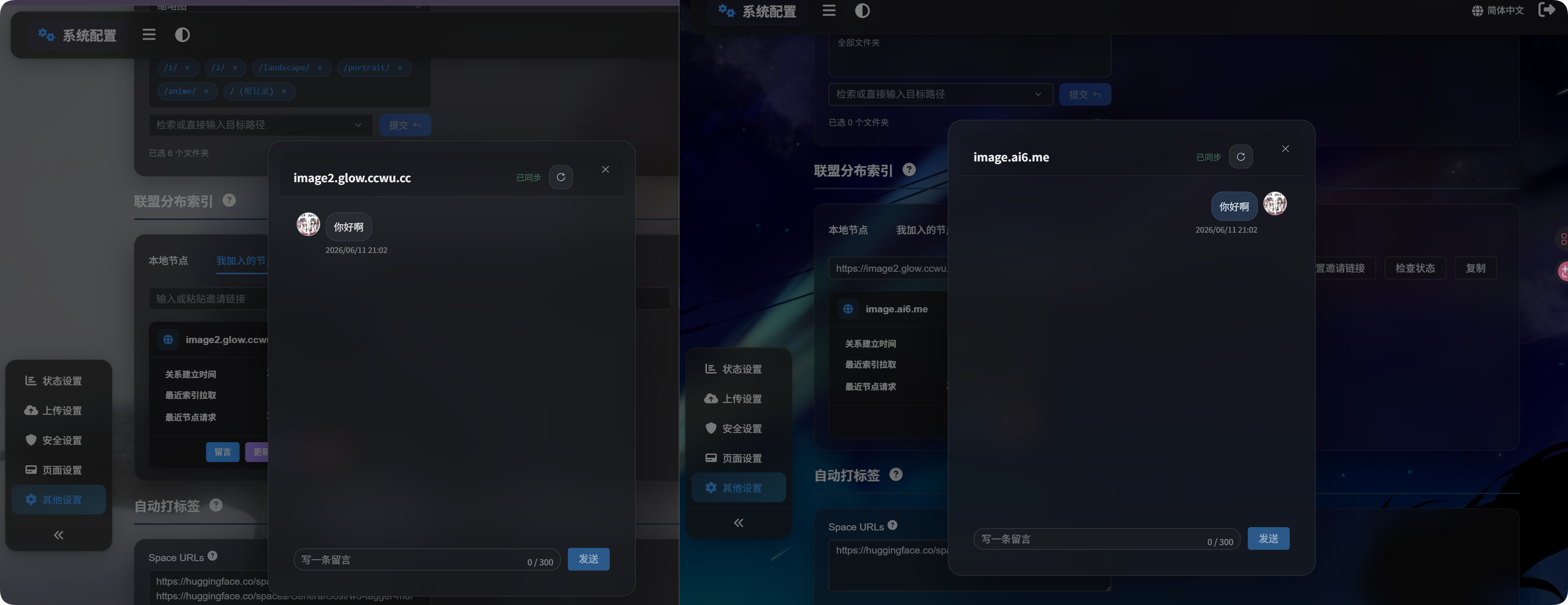
உறவு ஒப்புதல் பெற்ற பிறகு, முனை அட்டையில் Message கிளிக் செய்யவும்.
செய்திகள் கூட்டமைப்பு உறவைப் பற்றிய தொடர்புக்கு மட்டும். அவை கோப்புகள், குறிச்சொற்கள், அடைவுகள் அல்லது அனுமதிகளை மாற்றாது.
கூட்டமைப்பு கோப்புகளை பார்வையிடுதல்
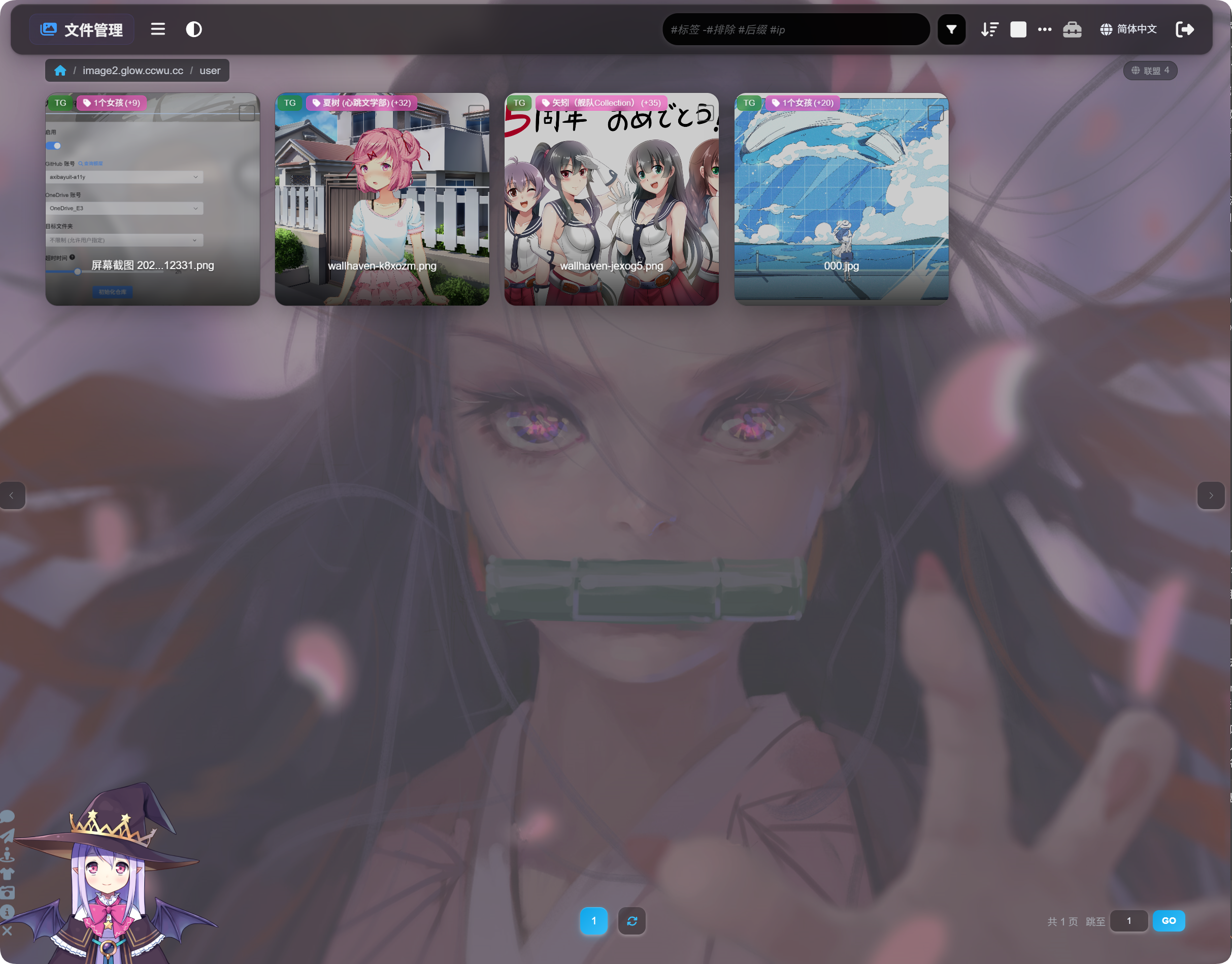
ஒத்திசைவு முடிந்த பிறகு நிர்வாக கோப்பு பட்டியலுக்கு திரும்பவும்.
பக்கத்தின் மேல் பகுதியில், உள்ளூர் கோப்புகள் மற்றும் கூட்டமைப்பு கோப்புகளுக்கு இடையில் மாறலாம். கூட்டமைப்பு கோப்புகளில் ஒத்திசைக்கப்பட்ட உள்ளடக்கத்தை உலாவலாம்.
கூட்டமைப்பு கோப்புகள் முக்கியமாக பார்வையிடுதல், தேடுதல், முன்னோட்டம் பார்ப்பது மற்றும் இணைப்புகளை நகலெடுப்பதற்காக. அவை உள்ளூர் கோப்புகள் அல்ல; எனவே உங்கள் சொந்த தளத்திலிருந்து அவற்றை நகர்த்த, நீக்க, குறிச்சொற்களை மாற்ற அல்லது காப்புப்பிரதி எடுக்க முடியாது.
அடிக்கடி கேட்கப்படும் கேள்விகள்
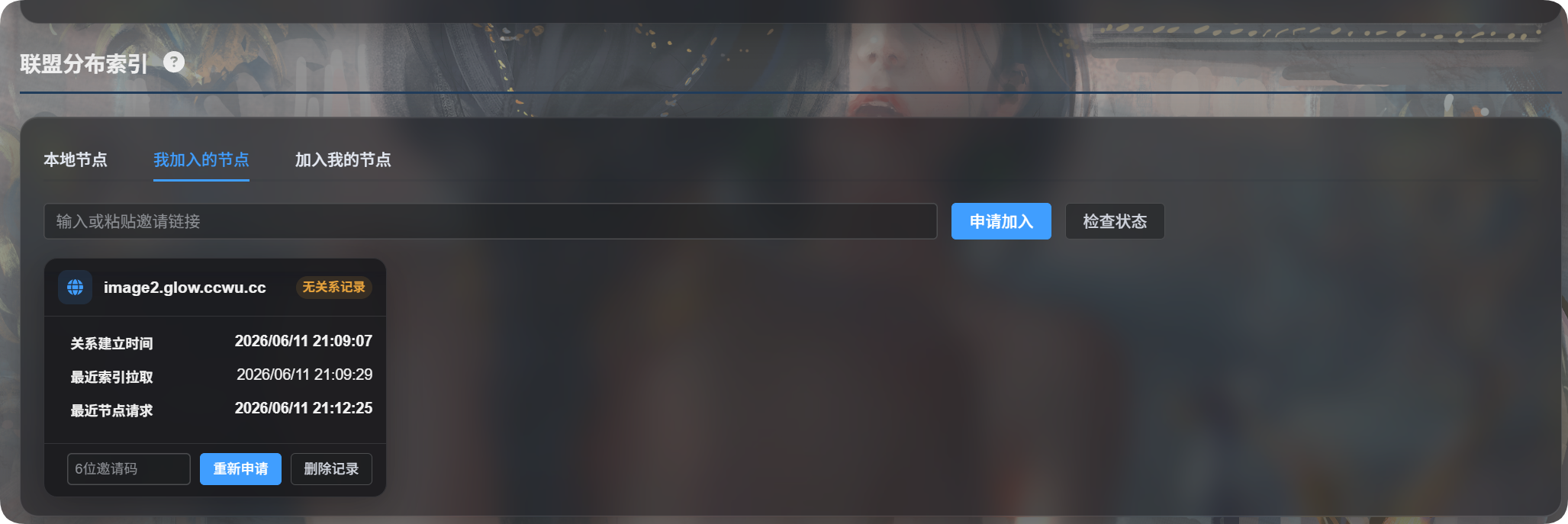
உறவு பதிவு இல்லை என்பதால் மீண்டும் விண்ணப்பிக்கச் சொல்வது ஏன்?
பொதுவாக, மறுபக்கம் உங்களை நீக்கி பதிவையும் அகற்றியதால் உங்கள் உறவை இனி கண்டுபிடிக்க முடியாது என்பதைக் குறிக்கும். புதிய சேரும் கோரிக்கையை சமர்ப்பிக்கவும்.
சேர்ந்த பிறகு கோப்புகள் தெரியாதது ஏன்?
சரிபார்க்கவும்:
- மற்ற உரிமையாளர் உங்கள் கோரிக்கையை ஒப்புதல் அளித்திருக்க வேண்டும்.
- மற்ற உரிமையாளர்
Update Outbound Indexகிளிக் செய்திருக்க வேண்டும். - நீங்கள்
Update Inbound Indexகிளிக் செய்திருக்க வேண்டும். - மற்ற உரிமையாளரின் ஒத்திசைவு கோப்புறைகளில் அவர் பகிர விரும்பும் அடைவுகள் இருக்க வேண்டும்.
டொமைன் மாற்றம் கண்டறியப்பட்டால் என்ன செய்ய வேண்டும்?
நீங்கள் தற்போது உற்பத்தி டொமைன் மூலம் நிர்வாக பலகையை திறந்திருந்தால், உறுதிப்படுத்தி தொடரவும்.
தற்காலிக முகவரியை பயன்படுத்தினால், ரத்து செய்து, உற்பத்தி டொமைன் மூலம் நிர்வாக பலகையை மீண்டும் திறந்து மறுபடியும் முயற்சிக்கவும்.
காலியான ஒத்திசைவு கோப்புறை பட்டியல் என்றால் என்ன?
காலியான ஒத்திசைவு கோப்புறை பட்டியல் என்றால் அனைத்து கோப்புறைகளும் பகிரப்படும்.
சில அடைவுகளை மட்டும் பகிர வேண்டும் என்றால், அவற்றை கைமுறையாக தேர்வு செய்யவும்.
வெளிச்செல்லும் மற்றும் உள்வரும் குறியீட்டு புதுப்பிப்புகளின் வித்தியாசம்
| பொத்தான் | எளிய பொருள் |
|---|---|
| வெளிச்செல்லும் குறியீட்டை புதுப்பித்தல் | பிறர் என்னிடமிருந்து ஒத்திசைக்கக்கூடியவற்றை புதுப்பிக்கும் |
| உள்வரும் குறியீட்டை புதுப்பித்தல் | நான் பிறரிடமிருந்து ஒத்திசைத்தவற்றை புதுப்பிக்கும் |