pCloud சேனல் சேர்க்கவும்
எப்போது பொருத்தம்
- உங்களிடம் pCloud கணக்கு உள்ளது; ImgHost படங்கள்-ஐ pCloud-ல் சேமிக்க வேண்டும்.
- pCloud கணக்கு email மற்றும் password-ஐ சேனல் சான்றுகள் ஆக பயன்படுத்துவது உங்களுக்கு ஏற்றதாக இருந்தால்.
முதலில் தேவையானவை
| தேவை | ஏன் தேவை |
|---|---|
| pCloud கணக்கு email | pCloud API-க்கு உள்நுழைய செய்ய |
| pCloud password | pCloud API-க்கு உள்நுழைய செய்ய |
| API host | இயல்புநிலை api.pcloud.com. EU கணக்குs eapi.pcloud.com பயன்படுத்தலாம். |
| சேமிப்பு அடைவு | கோப்புகள் சேமிக்கப்படும் இடம். இயல்புநிலை imgbed. |
எங்கு சேர்ப்பது
- அமைப்பு அமைப்புகள் திறக்கவும்.
- பதிவேற்ற அமைப்புகள் திறக்கவும்.
- மேல் வலது மூலையில்
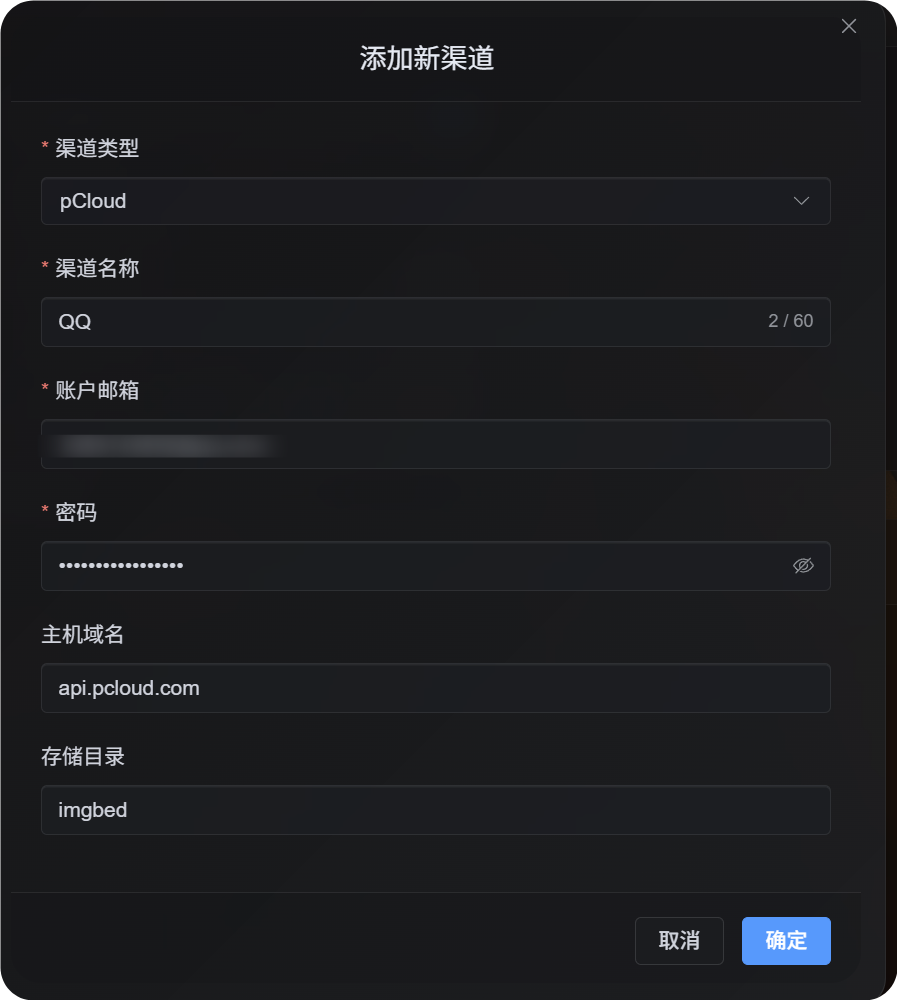
Add Channelகிளிக் செய்யவும். pCloudதேர்வு செய்யவும்.
புல விவரம்
| புலம் | நோக்கம் | அவசியம் |
|---|---|---|
| சேனல் பெயர் | இந்த pCloud சேனலை அடையாளம் காண, உதா. Personal pCloud | ஆம் |
| கணக்கு மின்னஞ்சல் | உங்கள் pCloud உள்நுழைவு மின்னஞ்சல் | ஆம் |
| கடவுச்சொல் | உங்கள் pCloud கடவுச்சொல் | ஆம் |
| API host | pCloud API host. இயல்புநிலை api.pcloud.com. | இல்லை |
| சேமிப்பு அடைவு | கோப்புகள் சேமிக்கப்படும் directory. இயல்புநிலை imgbed. | இல்லை |
கணக்கு region படி API host தேர்வு:
| கணக்கு Region | API Host |
|---|---|
| இயல்புநிலை / US | api.pcloud.com |
| Europe | eapi.pcloud.com |
அமைப்பு படிகள்
- பதிவேற்ற அமைப்புகள் திறக்கவும்.
Add Channelகிளிக் செய்யவும்.pCloudதேர்வு செய்யவும்.- அறியக்கூடிய சேனல் name உள்ளிடவும்.
- pCloud கணக்கு email உள்ளிடவும்.
- pCloud password உள்ளிடவும்.
- API host-ஐ
api.pcloud.comஆக வைத்திருக்கவும்; EU கணக்கு என்றால்eapi.pcloud.com. - சேமிப்பு directory-ஐ
imgbedஆக வைத்திருக்கவும், அல்லது உங்கள் folder-ஐ கொடுக்கவும். - சேனல் சேமி செய்யவும்.
Verify செய்வது
| சரிபார்ப்பு | எதிர்பார்க்கப்படும் முடிவு |
|---|---|
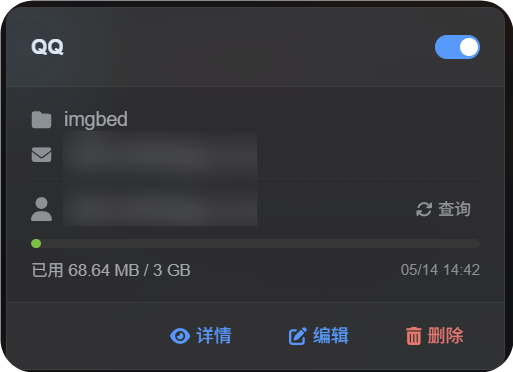
| சேனல் card | சேமித்த பிறகு pCloud சேனல் card தெரியும். |
| சேனல் switch | card switch இயக்கத்தில் இருக்கும். |
| Email காட்சி | card இணைக்கப்பட்ட pCloud email-ஐ காட்டும். |
| Quota query | வெற்றிகரமான query-க்கு பிறகு used மற்றும் total capacity தெரியும். |
| பதிவேற்றச் சோதனை | test image கட்டமைக்கப்பட்ட pCloud சேமிப்பு directory-ல் தெரியும். |
சிக்கல் தீர்வு
ஏன் OAuth2 இல்லை?
pCloud OAuth2 இயல்புநிலை ஆக self-சேவை இல்லை. அதை enable செய்ய pCloud-க்கு email செய்ய வேண்டும்.
தற்போதைய pCloud OAuth2 flow ImgHost-க்கு தேவையான short-lived பதிவேற்றம் link workflow-ஐ support செய்யவில்லை. அதனால் இந்த சேனல் கணக்கு email/password login பயன்படுத்துகிறது.
எந்த API Host பயன்படுத்த வேண்டும்?
இயல்புநிலை:
text
api.pcloud.comEU கணக்குs:
text
eapi.pcloud.comவிரைவு ஓட்டம்
text
Prepare your pCloud email and password
-> Open Upload Settings
-> Add Channel
-> Choose pCloud
-> Fill channel name / email / password
-> Keep API host as api.pcloud.com unless your account is in Europe
-> Keep storage directory as imgbed unless you need another folder
-> Save
-> Query quota
-> Upload a test image