Menambahkan Kanal pCloud
Cocok Untuk
- Anda memiliki akun pCloud dan ingin ImgHost menyimpan gambar di pCloud.
- Anda tidak keberatan menggunakan email dan kata sandi akun pCloud sebagai kredensial kanal.
Yang Diperlukan Sebelum Memulai
| Kebutuhan | Alasan Diperlukan |
|---|---|
| Email akun pCloud | Digunakan untuk masuk ke API pCloud |
| Kata sandi pCloud | Digunakan untuk masuk ke API pCloud |
| Host API | Nilai bawaannya api.pcloud.com. Akun EU dapat menggunakan eapi.pcloud.com. |
| Direktori penyimpanan | Tempat berkas disimpan. Nilai bawaannya imgbed. |
Tempat Menambahkannya
- Buka Pengaturan Sistem.
- Buka Pengaturan Unggah.
- Klik
Add Channeldi sudut kanan atas. - Pilih
pCloud.
Referensi Kolom
| Kolom | Fungsi | Wajib |
|---|---|---|
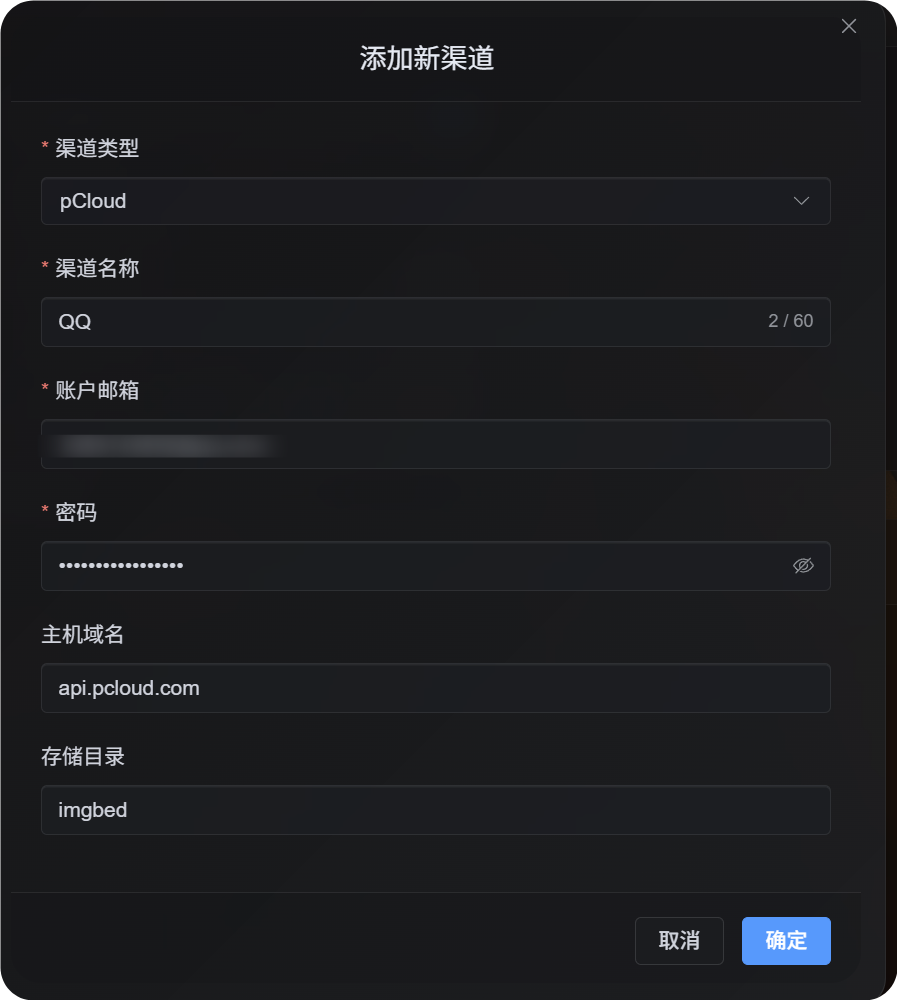
| Nama kanal | Mengidentifikasi kanal pCloud ini, misalnya Personal pCloud | Ya |
| Email akun | Email yang Anda gunakan untuk masuk ke pCloud | Ya |
| Kata sandi | Kata sandi pCloud Anda | Ya |
| Host API | Host API pCloud. Nilai bawaannya api.pcloud.com. | Tidak |
| Direktori penyimpanan | Direktori yang digunakan untuk menyimpan berkas. Nilai bawaannya imgbed. | Tidak |
Pilih host API berdasarkan wilayah akun Anda:
| Wilayah Akun | Host API |
|---|---|
| Default / AS | api.pcloud.com |
| Eropa | eapi.pcloud.com |
Langkah Konfigurasi
- Buka Pengaturan Unggah.
- Klik
Add Channel. - Pilih
pCloud. - Masukkan nama kanal yang mudah Anda kenali.
- Masukkan email akun pCloud Anda.
- Masukkan kata sandi pCloud Anda.
- Biarkan host API sebagai
api.pcloud.com, atau gunakaneapi.pcloud.comuntuk akun EU. - Biarkan direktori penyimpanan sebagai
imgbed, atau ubah ke folder yang Anda inginkan. - Simpan kanal.
Cara Memverifikasinya
| Pemeriksaan | Hasil yang Diharapkan |
|---|---|
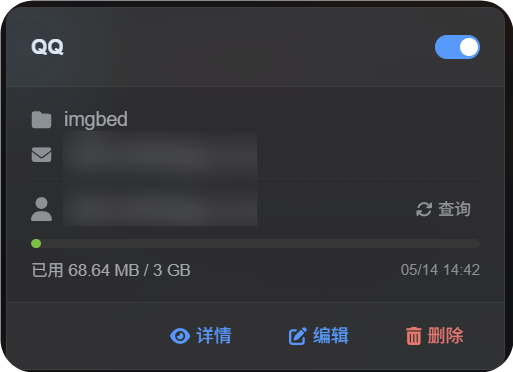
| Kartu kanal | Kartu kanal pCloud muncul setelah disimpan. |
| Sakelar kanal | Sakelar pada kartu tetap aktif. |
| Tampilan email | Kartu menampilkan email pCloud yang terhubung. |
| Kueri kuota | Setelah kueri berhasil, kapasitas terpakai dan total kapasitas ditampilkan. |
| Uji unggah | Gambar uji muncul di direktori penyimpanan pCloud yang dikonfigurasi. |
Pemecahan Masalah
Mengapa Tidak OAuth2?
OAuth2 pCloud tidak tersedia sebagai layanan mandiri secara default. Anda perlu mengirim email ke pCloud dan meminta mereka mengaktifkannya.
Alur OAuth2 pCloud saat ini juga tidak mendukung alur kerja tautan unggah berumur pendek yang dibutuhkan ImgHost. Karena itu, kanal ini menggunakan email dan kata sandi akun untuk masuk.
Host API Mana yang Harus Digunakan?
Default:
text
api.pcloud.comUntuk akun EU:
text
eapi.pcloud.comAlur Cepat
text
Prepare your pCloud email and password
-> Open Upload Settings
-> Add Channel
-> Choose pCloud
-> Fill channel name / email / password
-> Keep API host as api.pcloud.com unless your account is in Europe
-> Keep storage directory as imgbed unless you need another folder
-> Save
-> Query quota
-> Upload a test image