เพิ่มช่องทาง pCloud
เหมาะกับ
- คุณมี pCloud account และต้องการให้ ImgHost จัดเก็บรูปภาพใน pCloud
- คุณสะดวกใช้ pCloud account email และ password เป็น credentials ของช่องทาง
สิ่งที่ต้องเตรียมก่อน
| ข้อกำหนด | ทำไมต้องใช้ |
|---|---|
| pCloud account email | ใช้เข้าสู่ระบบ pCloud API |
| pCloud password | ใช้เข้าสู่ระบบ pCloud API |
| API host | ค่าเริ่มต้น api.pcloud.com EU accounts ใช้ eapi.pcloud.com ได้ |
| Storage directory | ที่เก็บไฟล์ ค่าเริ่มต้นคือ imgbed |
เพิ่มได้จากที่ไหน
- เปิดการตั้งค่าระบบ
- เปิดการตั้งค่าการอัปโหลด
- คลิก
Add Channelที่มุมขวาบน - เลือก
pCloud
รายละเอียดฟิลด์
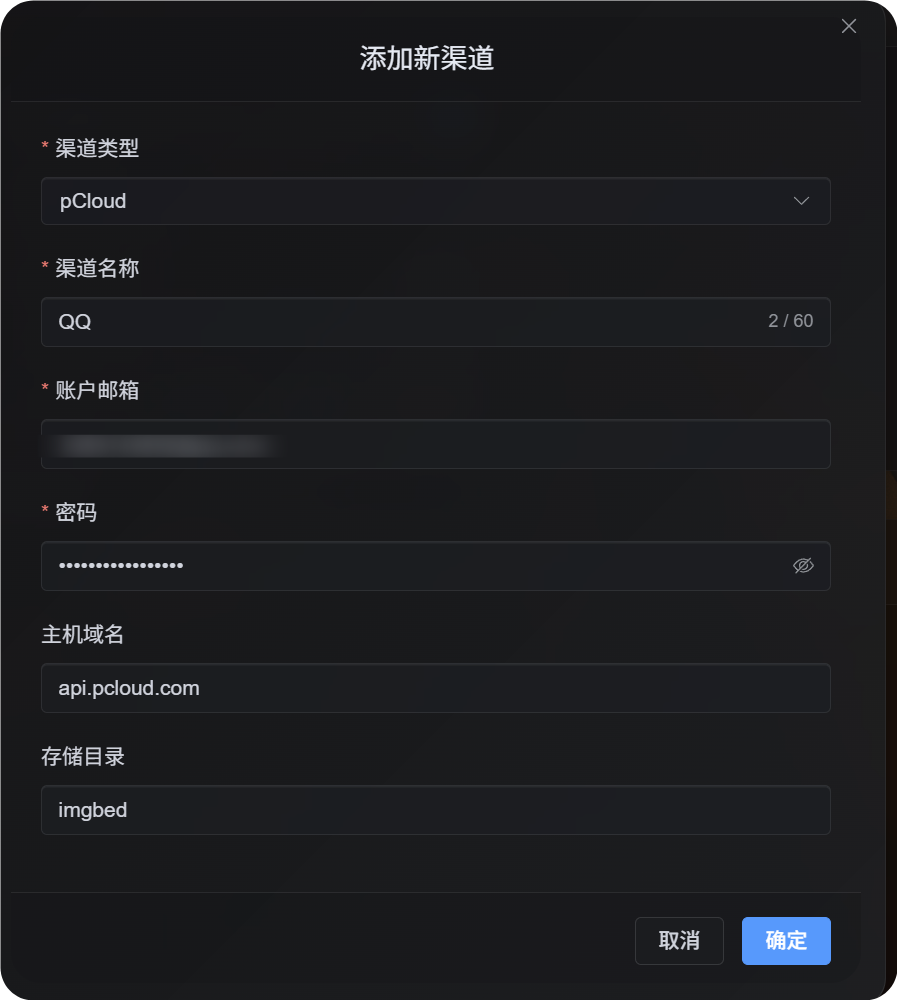
| ฟิลด์ | วัตถุประสงค์ | จำเป็น |
|---|---|---|
| Channel name | ใช้ระบุช่องทาง pCloud นี้ เช่น Personal pCloud | ใช่ |
| Account email | อีเมลเข้าสู่ระบบ pCloud ของคุณ | ใช่ |
| Password | รหัสผ่าน pCloud ของคุณ | ใช่ |
| API host | pCloud API host ค่าเริ่มต้น api.pcloud.com | ไม่ |
| Storage directory | Directory สำหรับเก็บไฟล์ ค่าเริ่มต้น imgbed | ไม่ |
เลือก API host ตาม region ของ account:
| Region ของ account | API Host |
|---|---|
| ค่าเริ่มต้น / US | api.pcloud.com |
| Europe | eapi.pcloud.com |
ขั้นตอนตั้งค่า
- เปิด Upload Settings
- คลิก
Add Channel - เลือก
pCloud - ใส่ channel name ที่จำได้
- ใส่ pCloud account email
- ใส่ pCloud password
- ปล่อย API host เป็น
api.pcloud.comหรือใช้eapi.pcloud.comสำหรับ EU accounts - ปล่อย storage directory เป็น
imgbedหรือเปลี่ยนเป็น folder ที่ต้องการ - บันทึกช่องทาง
วิธีตรวจสอบ
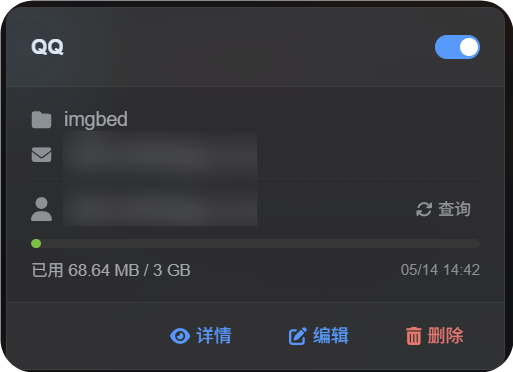
| รายการตรวจสอบ | ผลลัพธ์ที่คาดหวัง |
|---|---|
| การ์ดช่องทาง | การ์ดช่องทาง pCloud แสดงหลังบันทึก |
| สวิตช์ช่องทาง | สวิตช์บนการ์ดเปิดใช้งานอยู่ |
| การแสดงอีเมล | การ์ดแสดงอีเมล pCloud ที่เชื่อมต่อแล้ว |
| Quota query | Query สำเร็จแล้วแสดง used และ total capacity |
| ทดสอบอัปโหลด | รูปทดสอบปรากฏใน pCloud storage directory ที่กำหนดค่าไว้ |
การแก้ไขปัญหา
ทำไมไม่ใช้ OAuth2?
pCloud OAuth2 ไม่ได้เปิดให้บริการแบบ self-service โดยค่าเริ่มต้น ต้อง email ไปขอให้ pCloud enable
Flow pCloud OAuth2 ปัจจุบันยังไม่รองรับ workflow ของ short-lived upload link ที่ ImgHost ต้องใช้ ช่องทางนี้จึงใช้ account email และ password login แทน
ควรใช้ API Host ไหน?
ค่าเริ่มต้น:
text
api.pcloud.comสำหรับ EU accounts:
text
eapi.pcloud.comลำดับขั้นตอนด่วน
text
Prepare your pCloud email and password
-> Open Upload Settings
-> Add Channel
-> Choose pCloud
-> Fill channel name / email / password
-> Keep API host as api.pcloud.com unless your account is in Europe
-> Keep storage directory as imgbed unless you need another folder
-> Save
-> Query quota
-> Upload a test image