การยืนยันตัวตนและการจัดการอุปกรณ์เข้าสู่ระบบ
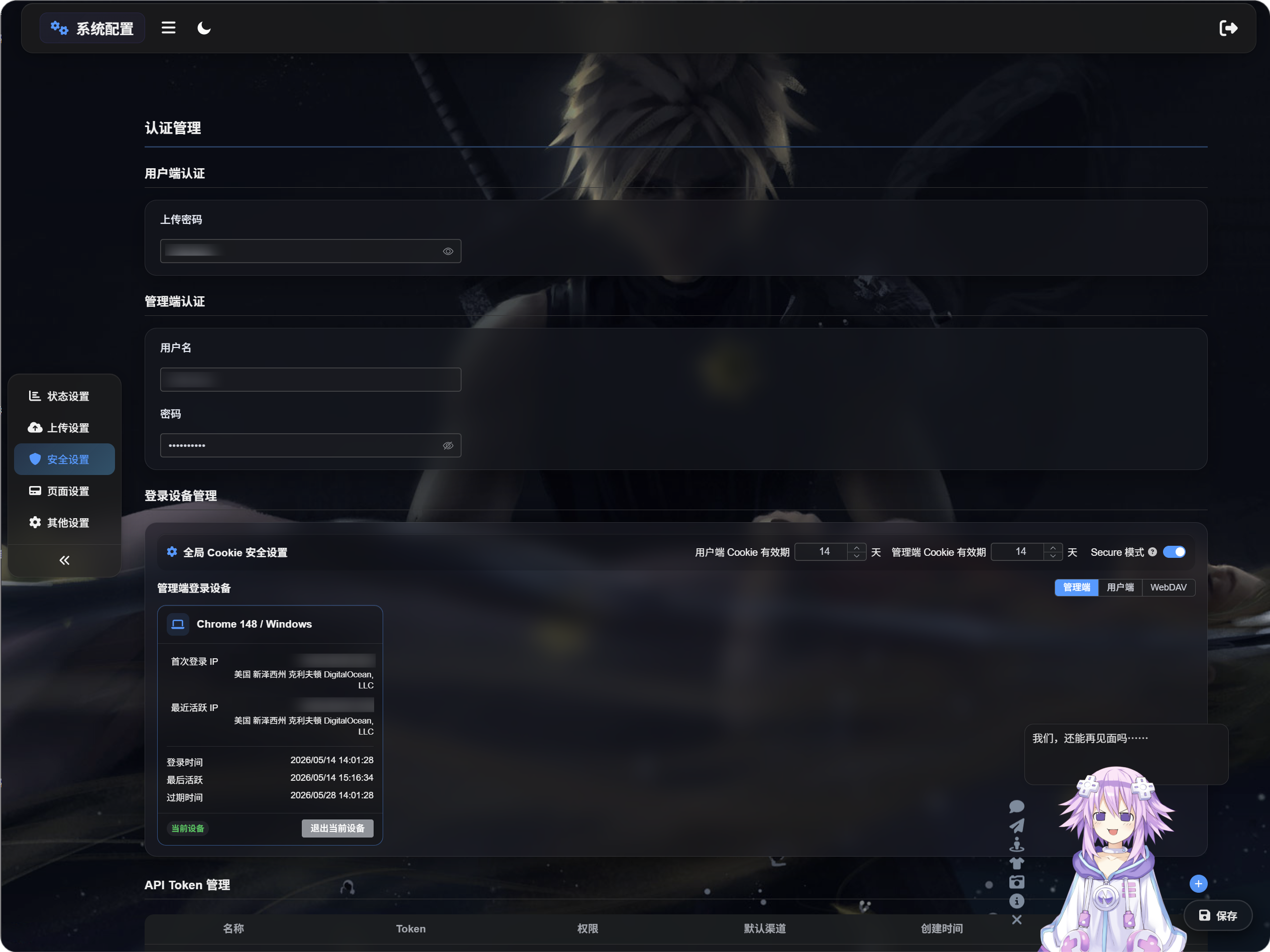
การจัดการการยืนยันตัวตน และ การจัดการอุปกรณ์เข้าสู่ระบบ ช่วยปกป้องแผงผู้ดูแลระบบ ImgHost, ทางเข้าการอัปโหลดสาธารณะ และการเข้าถึง WebDAV
ใช้หน้านี้เพื่อตั้งค่าข้อมูลรับรองการเข้าถึง ตรวจสอบอุปกรณ์ที่เข้าสู่ระบบ และเพิกถอนเซสชันเก่าเมื่อจำเป็น
ตั้งค่าที่ไหน
เปิดแผงผู้ดูแลระบบ แล้วไปที่:
text
System Settings -> Security Settingsหน้านี้มีสองส่วนหลัก:
- การจัดการการยืนยันตัวตน
- การจัดการอุปกรณ์เข้าสู่ระบบ
การจัดการการยืนยันตัวตนทำอะไร
การจัดการการยืนยันตัวตนเก็บข้อมูลรับรองการเข้าถึง
มีสองประเภท:
- การยืนยันตัวตนฝั่งผู้ใช้
- การยืนยันตัวตนฝั่งผู้ดูแลระบบ
การยืนยันตัวตนฝั่งผู้ใช้
การยืนยันตัวตนฝั่งผู้ใช้คือรหัสผ่านสำหรับอัปโหลด
หลังจากตั้งรหัสผ่านสำหรับอัปโหลดแล้ว ผู้เยี่ยมชมทั่วไปต้องป้อนรหัสผ่านก่อนใช้หน้าอัปโหลด วิธีนี้มีประโยชน์เมื่อคุณไม่ต้องการให้หน้าอัปโหลดสาธารณะเปิดให้ทุกคนใช้
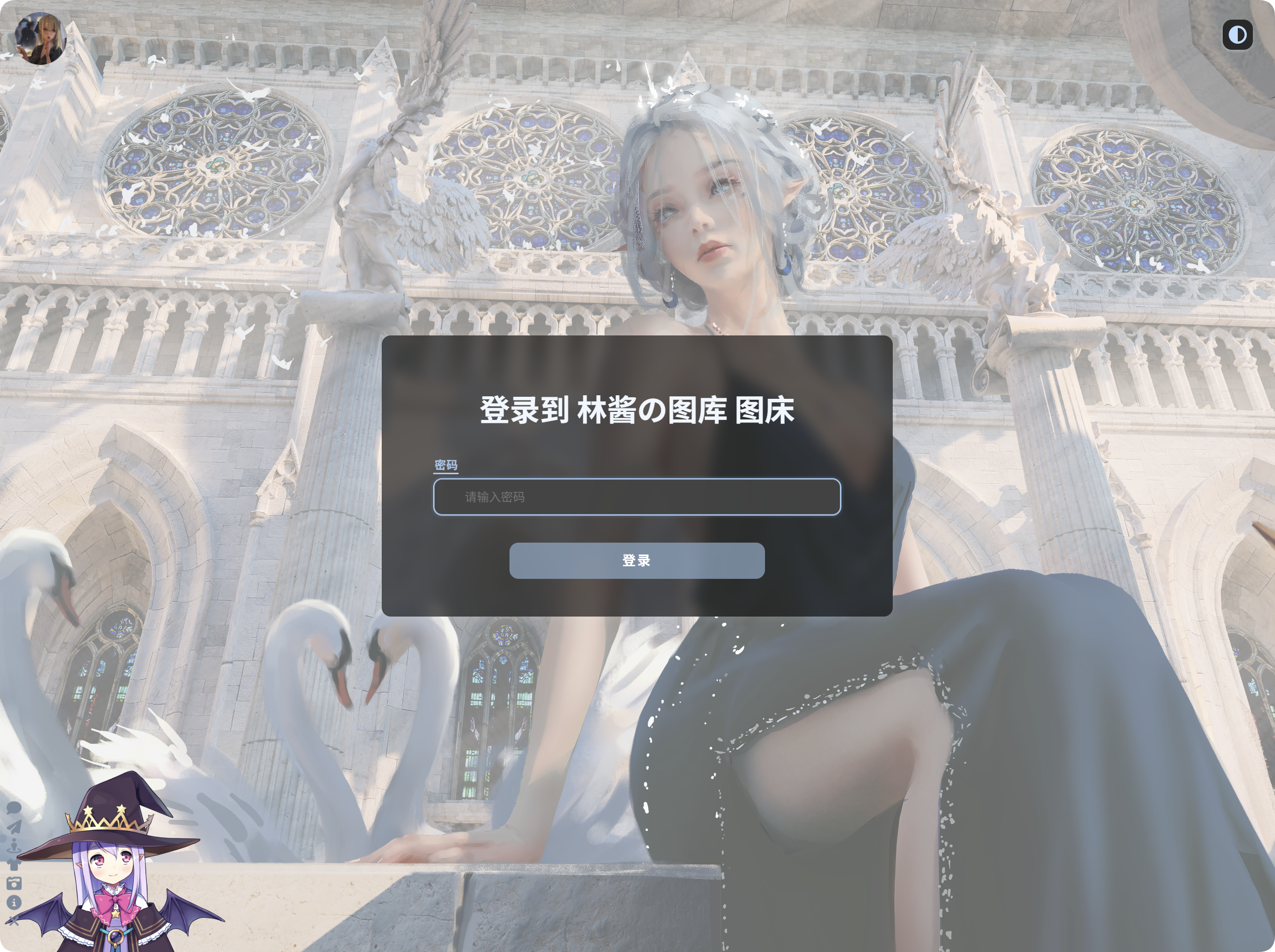
การตั้งรหัสผ่านสำหรับอัปโหลด
เมื่อกำหนดรหัสผ่านสำหรับอัปโหลดแล้ว:
- ผู้เยี่ยมชมต้องป้อนรหัสผ่านก่อนใช้หน้าอัปโหลด
- จะอัปโหลดได้หลังจากรหัสผ่านถูกยอมรับแล้วเท่านั้น
- หากเปิดใช้เซสชันอุปกรณ์ฝั่งผู้ใช้ ImgHost จะบันทึกอุปกรณ์ฝั่งผู้ใช้นั้น
การเปลี่ยนรหัสผ่านสำหรับอัปโหลดจะทำให้เซสชันฝั่งผู้ใช้เก่าใช้ไม่ได้ ผู้เยี่ยมชมต้องป้อนรหัสผ่านใหม่อีกครั้ง
การยืนยันตัวตนฝั่งผู้ดูแลระบบ
การยืนยันตัวตนฝั่งผู้ดูแลระบบใช้ชื่อผู้ใช้ผู้ดูแลระบบและรหัสผ่าน
สิ่งนี้ปกป้องแผงผู้ดูแลระบบ สำหรับการใช้งานจริง คุณควรตั้งค่าไว้เสมอ
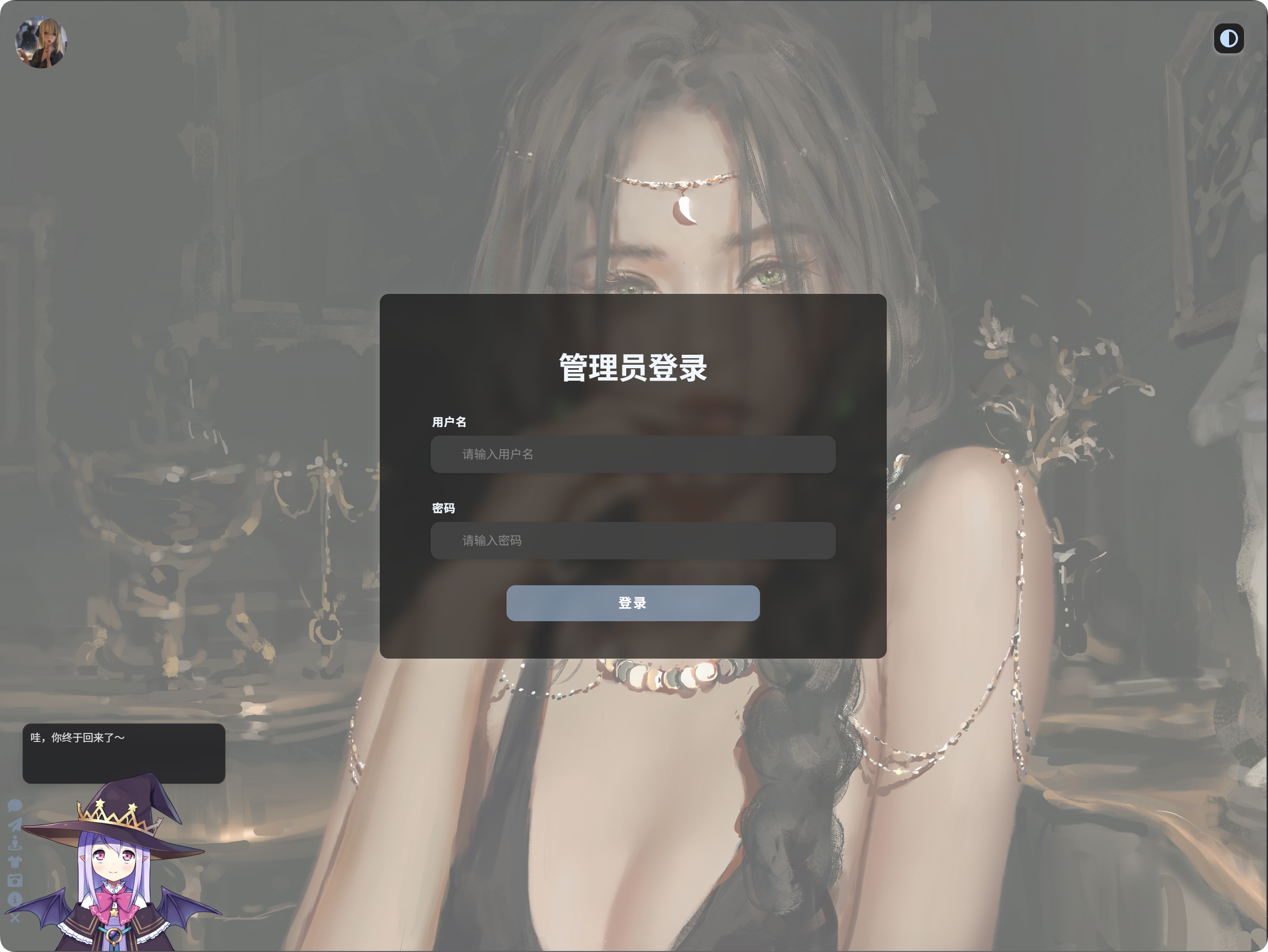
การตั้งค่าข้อมูลรับรองผู้ดูแลระบบ
เมื่อกำหนดชื่อผู้ใช้ผู้ดูแลระบบและรหัสผ่านแล้ว:
- การเปิดแผงผู้ดูแลระบบต้องเข้าสู่ระบบ
- การเข้าสู่ระบบสำเร็จจะสร้างบันทึกอุปกรณ์ผู้ดูแลระบบ
- คุณสามารถตรวจสอบ ล้าง หรือบังคับให้อุปกรณ์ออฟไลน์ได้ในส่วนการจัดการอุปกรณ์เข้าสู่ระบบ
การเปลี่ยนชื่อผู้ใช้ผู้ดูแลระบบหรือรหัสผ่านจะทำให้เซสชันผู้ดูแลระบบเก่าใช้ไม่ได้ คุณต้องเข้าสู่ระบบใหม่
การจัดการอุปกรณ์เข้าสู่ระบบทำอะไร
การจัดการอุปกรณ์เข้าสู่ระบบแสดงอุปกรณ์ที่เคยเข้าสู่ระบบ
ช่วยให้คุณตรวจสอบได้ว่า:
- อุปกรณ์ใดเข้าถึงแผงผู้ดูแลระบบแล้ว
- อุปกรณ์ใดเข้าถึงหน้าอัปโหลดฝั่งผู้ใช้แล้ว
- ไคลเอนต์ WebDAV ใดเชื่อมต่อแล้ว
- เซสชันของอุปกรณ์ยังใช้ได้หรือไม่
- ควรบังคับให้อุปกรณ์เก่าออฟไลน์หรือไม่
หน้านี้มีสามแท็บ:
- ผู้ดูแลระบบ
- ผู้ใช้
- WebDAV
ความปลอดภัย cookie แบบรวม
ด้านบนของการจัดการอุปกรณ์เข้าสู่ระบบ คุณสามารถตั้งค่าพฤติกรรม cookie แบบรวมได้
อายุ cookie ของผู้ใช้
ควบคุมว่าการเข้าสู่ระบบฝั่งผู้ใช้จะคงอยู่ได้กี่วัน
ตัวอย่างเช่น หากตั้งเป็น 14 วัน ผู้เยี่ยมชมมักไม่ต้องป้อนรหัสผ่านสำหรับอัปโหลดอีกภายใน 14 วัน
อายุ cookie ของผู้ดูแลระบบ
ควบคุมว่าการเข้าสู่ระบบของผู้ดูแลระบบจะคงอยู่ได้กี่วัน
ตัวอย่างเช่น หากตั้งเป็น 14 วัน ผู้ดูแลระบบมักไม่ต้องเข้าสู่ระบบอีกภายใน 14 วัน
โหมดปลอดภัย
เมื่อเปิดโหมดปลอดภัย เบราว์เซอร์จะส่ง cookie เข้าสู่ระบบผ่าน HTTPS เท่านั้น
เปิดใช้สำหรับไซต์จริงที่ใช้ HTTPS อย่าเปิดใช้ในการทดสอบ HTTP ภายในเครื่อง มิฉะนั้นคุณอาจพบพฤติกรรมแบบ "เข้าสู่ระบบสำเร็จ แต่รีเฟรชแล้วถูกออกจากระบบ"
อุปกรณ์เข้าสู่ระบบของผู้ดูแลระบบ
แท็บผู้ดูแลระบบแสดงอุปกรณ์ที่เข้าสู่แผงผู้ดูแลระบบ
บันทึกอุปกรณ์จะปรากฏหลังจากตั้งค่าข้อมูลรับรองผู้ดูแลระบบและเข้าแผงผู้ดูแลระบบผ่านการล็อกอินแล้วเท่านั้น
การ์ดอุปกรณ์แต่ละใบอาจแสดง:
- ข้อมูลอุปกรณ์และเบราว์เซอร์
- IP ที่เข้าสู่ระบบครั้งแรก
- IP ที่ใช้งานล่าสุด
- เวลาเข้าสู่ระบบ
- เวลาใช้งานล่าสุด
- เวลาหมดอายุ
- สถานะปัจจุบัน
หากเห็นอุปกรณ์ที่ไม่คุ้นเคย ให้ใช้ บังคับให้ออฟไลน์ เพื่อทำให้เซสชันนั้นใช้ไม่ได้
ล้างอุปกรณ์เก่า
ล้างอุปกรณ์เก่า จะลบบันทึกการเข้าสู่ระบบเก่าในแท็บปัจจุบันแบบเป็นชุด
ใช้เมื่อคุณสงสัยว่าเซสชันเก่าบนอุปกรณ์อื่นอาจยังคงใช้งานอยู่
บังคับให้ออฟไลน์
บังคับให้ออฟไลน์ ทำให้เซสชันของอุปกรณ์หนึ่งเครื่องใช้ไม่ได้
หลังจากอุปกรณ์ถูกบังคับให้ออฟไลน์:
- อุปกรณ์ผู้ดูแลระบบต้องเข้าสู่ระบบใหม่
- อุปกรณ์ฝั่งผู้ใช้ต้องป้อนรหัสผ่านสำหรับอัปโหลดอีกครั้ง
- ไคลเอนต์ WebDAV ต้องยืนยันตัวตนอีกครั้ง
สามารถลบอุปกรณ์ที่หมดอายุหรือใช้ไม่ได้แล้วได้เช่นกัน
ออกจากระบบอุปกรณ์ปัจจุบัน
การ์ดของอุปกรณ์ปัจจุบันจะถูกทำเครื่องหมายว่า อุปกรณ์ปัจจุบัน
หลังจากออกจากระบบอุปกรณ์ปัจจุบัน:
- เซสชันผู้ดูแลระบบปัจจุบันจะถูกออกจากระบบ
- เซสชันฝั่งผู้ใช้ปัจจุบันจะถูกออกจากระบบ
คุณต้องเข้าสู่ระบบใหม่ก่อนใช้งานส่วนนั้นต่อ