การติดแท็กอัตโนมัติ
การติดแท็กอัตโนมัติตั้งค่าได้ที่:
text
System Settings -> Other Settings -> Auto Taggingฟังก์ชันนี้จะสร้างแท็กรูปภาพโดยอัตโนมัติ ซึ่งมีประโยชน์สำหรับการค้นหา การกรองรูปภาพสุ่ม การกรองในแกลเลอรีสาธารณะ และการควบคุมการเข้าถึงตามระดับอายุ
การติดแท็กอัตโนมัติทำอะไรได้บ้าง
| ฟีเจอร์ | คำอธิบาย |
|---|---|
| สร้างแท็กเนื้อหา | เพิ่มแท็กสำหรับบุคคล ฉาก วัตถุ สไตล์งานศิลป์ และเนื้อหาภาพลักษณะใกล้เคียง |
| สร้างแท็กตัวละคร | มีประโยชน์กับภาพอนิเมะและภาพประกอบ |
| เพิ่มแท็กแนวภาพ | เพิ่ม landscape, portrait หรือ square |
| เพิ่มเรตติ้งรูปภาพ | บันทึกผลเรตติ้ง G/S/Q/E สำหรับเนื้อหาทั่วไป อ่อนไหว น่าสงสัย หรือโจ่งแจ้ง |
| ติดแท็กอัตโนมัติเมื่ออัปโหลด | รูปภาพที่อัปโหลดใหม่จะเข้าสู่ขั้นตอนติดแท็กโดยอัตโนมัติ |
| ติดแท็กแบบชุด | เพิ่มแท็กให้รูปภาพเก่าในทุกโฟลเดอร์หรือในโฟลเดอร์ที่เลือก |
สิ่งที่ต้องเตรียมก่อน
เตรียม URL ของ Hugging Face Space ที่เข้าถึงได้อย่างน้อยหนึ่งรายการ
วิธีที่แนะนำคือทำสำเนา Space wd-tagger ของ SmilingWolf ไปยังบัญชี Hugging Face ของคุณเอง:
text
https://huggingface.co/spaces/SmilingWolf/wd-taggerคุณสามารถใช้ Space สาธารณะชั่วคราวได้ แต่ Space สาธารณะมีผู้ใช้ร่วมกันจำนวนมาก จึงอาจต้องรอคิว ช้าลง หรือใช้งานไม่ได้ชั่วคราว Space ที่ทำสำเนาไว้ในบัญชีของคุณเองจะเสถียรกว่าสำหรับการติดแท็กอัตโนมัติระยะยาว
ทำสำเนา Space ของ SmilingWolf
- ลงชื่อเข้าใช้ Hugging Face
- เปิด
https://huggingface.co/spaces/SmilingWolf/wd-tagger
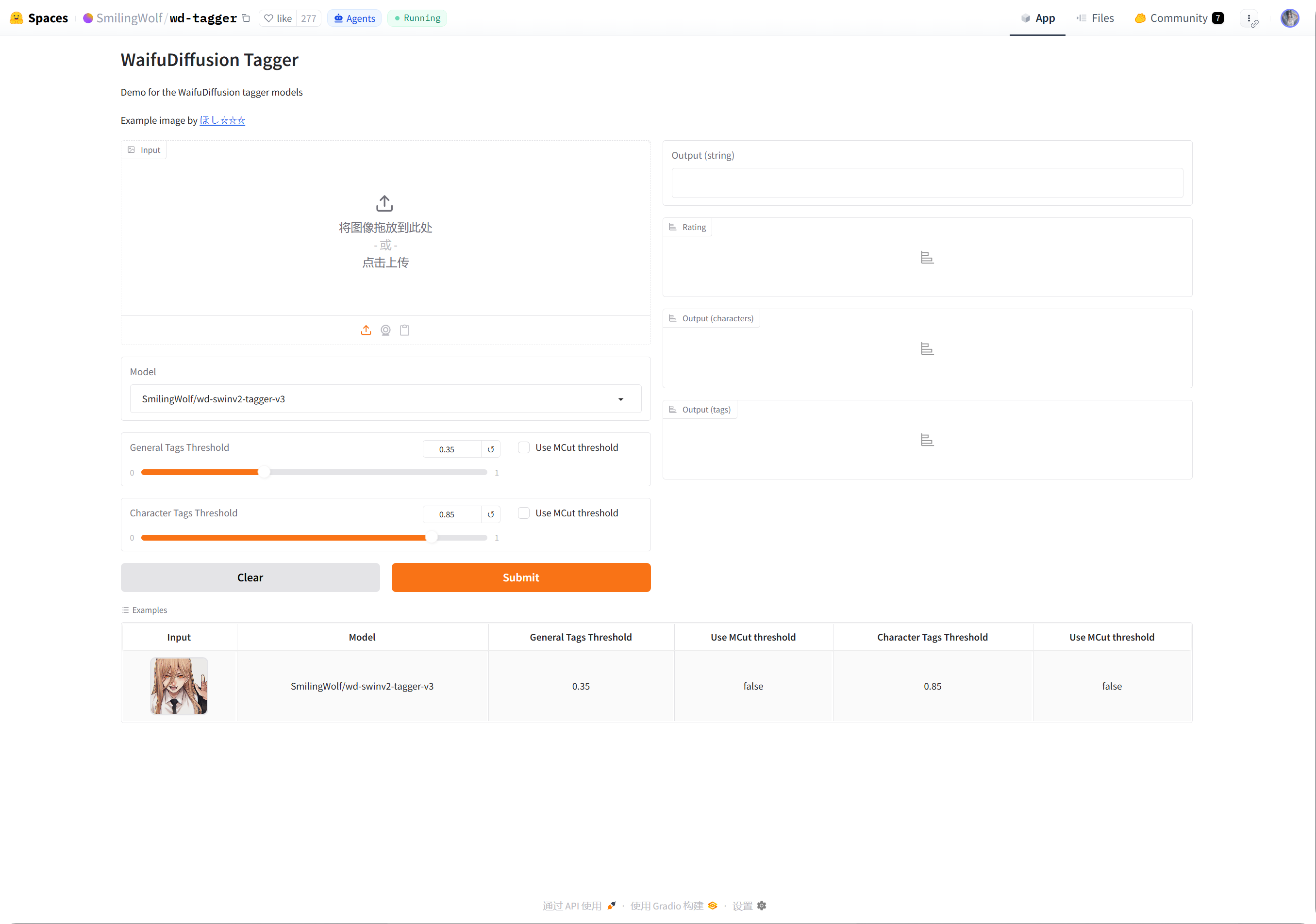
- คลิกเมนูสามจุดที่มุมขวาบน
- เลือก
Duplicate this Space - ใช้ชื่อ Space ตามค่าเริ่มต้น หรือกำหนดชื่อเอง เช่น
wd-tagger - ตั้งค่าการมองเห็นเป็น
Publicเพราะ Space แบบสาธารณะเรียกใช้จาก ImgHost ได้ง่ายกว่า - เริ่มต้นด้วยฮาร์ดแวร์ฟรีตามค่าเริ่มต้นก่อน ค่อยอัปเกรดภายหลังเมื่อเห็นปัญหาคิวชัดเจน
- สร้าง Space แล้วรอให้การสร้างเสร็จสิ้น
เมื่อการสร้างเสร็จแล้ว ให้เปิดหน้า Space ของคุณ URL มักมีรูปแบบดังนี้:
text
https://huggingface.co/spaces/your-name/wd-taggerคัดลอก URL จากเบราว์เซอร์แล้ววางลงใน Space URLs ของ ImgHost
การกรอก Space URLs หลายรายการ
กรอก Space URL หนึ่งรายการต่อหนึ่งบรรทัด
ตัวอย่าง:
| ค่า | คำอธิบาย |
|---|---|
https://huggingface.co/spaces/SmilingWolf/wd-tagger | Space สาธารณะของ SmilingWolf เหมาะสำหรับทดสอบชั่วคราว |
https://huggingface.co/spaces/lintonxue00/wd-tagger | URL ของหน้า Space ที่คัดลอกมา |
https://huggingface.co/spaces/your-name/wd-tagger | หน้า Space ที่คุณทำสำเนาไว้เอง |
คุณสามารถกรอก URL ได้หลายรายการ ImgHost จะใช้ Space หลายรายการร่วมกัน ซึ่งช่วยเพิ่มความเร็วได้
หาก Space ใดใช้งานไม่ได้ชั่วคราว รายการอื่นยังสามารถประมวลผลต่อได้
การตั้งค่า
| ตัวเลือก | คำแนะนำ |
|---|---|
Space URLs | กรอก Space URLs ที่เตรียมไว้ ใช้อย่างน้อยหนึ่งรายการ |
| โฟลเดอร์เป้าหมาย | เว้นว่างเพื่อใช้ทุกโฟลเดอร์ เลือกโฟลเดอร์เฉพาะเมื่อคุณต้องการประมวลผลไดเรกทอรีใดไดเรกทอรีหนึ่ง |
| โมเดลรู้จำ | ใช้ wd-swinv2-tagger-v3 เป็นค่าเริ่มต้น |
| เกณฑ์แท็กทั่วไป | ค่าเริ่มต้นเหมาะกับรูปภาพส่วนใหญ่ ค่าต่ำลงจะให้แท็กมากขึ้น ค่าสูงขึ้นจะให้แท็กน้อยลง |
| เกณฑ์แท็กตัวละคร | ค่าเริ่มต้นค่อนข้างระมัดระวังและช่วยลดแท็กตัวละครที่ผิดพลาด |
เกณฑ์อัตโนมัติ MCut | ปิดไว้ก่อนในช่วงแรก เปิดเมื่อคุณต้องการให้โมเดลตัดสินจำนวนแท็กเอง |
| ติดแท็กอัตโนมัติเมื่ออัปโหลด | เปิดหากต้องการให้รูปภาพที่อัปโหลดใหม่ได้รับแท็กโดยอัตโนมัติ |
| เริ่มติดแท็ก | ติดแท็กรูปภาพเก่าแบบชุดด้วยตนเอง |
ค่าเริ่มต้นที่แนะนำ
| ตัวเลือก | ค่าที่แนะนำ |
|---|---|
| โมเดลรู้จำ | wd-swinv2-tagger-v3 |
| เกณฑ์แท็กทั่วไป | 0.35 |
| เกณฑ์แท็กตัวละคร | 0.85 |
MCut | ปิดไว้ก่อน |
| ติดแท็กอัตโนมัติเมื่ออัปโหลด | เปิดเมื่อจำเป็น |
หากมีแท็กมากเกินไป ให้เพิ่มเกณฑ์แท็กทั่วไปเล็กน้อย
หากมีแท็กน้อยเกินไป ให้ลดเกณฑ์แท็กทั่วไปเล็กน้อย
การติดแท็กแบบชุด
- กรอก
Space URLs - เลือกโฟลเดอร์เป้าหมาย
- คลิกเริ่มติดแท็ก
- รอให้ความคืบหน้าเสร็จสิ้น
หากโฟลเดอร์เป้าหมายว่าง ImgHost จะประมวลผลทุกโฟลเดอร์
การติดแท็กแบบชุดเหมาะกับรูปภาพเก่า สำหรับรูปภาพใหม่ ให้เปิดการติดแท็กอัตโนมัติเมื่ออัปโหลด เพื่อไม่ต้องเรียกใช้งานด้วยตนเองทุกครั้ง
ติดแท็กอัตโนมัติเมื่ออัปโหลด
หลังจากเปิดการติดแท็กอัตโนมัติเมื่ออัปโหลด รูปภาพที่อัปโหลดใหม่จะเรียกใช้ Space URLs ที่กำหนดไว้โดยอัตโนมัติ
เหมาะสำหรับการใช้งานระยะยาว
หาก Space ของคุณกำลังรอคิว การอัปโหลดยังอาจเสร็จก่อนได้ แล้วการติดแท็กจะดำเนินต่อภายหลัง
รูปภาพใดบ้างที่จะถูกประมวลผล
การติดแท็กอัตโนมัติประมวลผลไฟล์รูปภาพเป็นหลัก
รูปภาพที่มีแท็ก แนวภาพ เรตติ้ง ความกว้าง และความสูงครบถ้วนแล้วจะถูกข้าม เพื่อหลีกเลี่ยงการเรียก Space โดยไม่จำเป็น
ImgHost จะเติมเฉพาะข้อมูลที่ขาดเมื่อทำได้ เช่น หากขาดเฉพาะแนวภาพ ระบบจะพยายามเพิ่มแนวภาพโดยไม่เรียกขั้นตอนแท็กเนื้อหาทั้งหมด
คำถามที่พบบ่อย
ทำไมต้องทำสำเนา Space ของตัวเอง?
Space สาธารณะถูกใช้ร่วมกันโดยผู้ใช้จำนวนมาก Space ที่คุณทำสำเนาเองจะถูกใช้โดยไซต์ ImgHost ของคุณเป็นหลัก จึงมักเร็วกว่าและเชื่อถือได้มากกว่า
Space เริ่มทำงานอยู่ตลอด
หลังสร้างครั้งแรก หรือหลังจากปล่อยว่างไว้นาน Space อาจต้องใช้เวลาสักครู่ในการเริ่มทำงาน
ให้เปิดหน้า Space ของคุณก่อน เมื่อสามารถรู้จำรูปภาพได้ตามปกติแล้ว ค่อยกลับไปที่ ImgHost และเริ่มติดแท็ก
คัดลอก Space URL อย่างไร?
เปิดหน้า Hugging Face Space ของคุณ แล้วคัดลอกที่อยู่จากเบราว์เซอร์
ตัวอย่าง:
text
https://huggingface.co/spaces/lintonxue00/wd-tagger
https://huggingface.co/spaces/SmilingWolf/wd-tagger
เพิ่ม Space หลายรายการได้หรือไม่?
ได้ กรอก Space URL หนึ่งรายการต่อหนึ่งบรรทัด
Space หลายรายการจะช่วยกันประมวลผลรูปภาพ และมีประโยชน์เมื่อคุณมีรูปภาพจำนวนมาก
ทำไมแท็กเป็นภาษาอังกฤษ?
โมเดลของ SmilingWolf ส่งออกแท็กภาษาอังกฤษ นี่เป็นพฤติกรรมที่คาดไว้
แท็กถูกใช้เป็นหลักสำหรับการค้นหา การกรอง API รูปภาพสุ่ม และตัวกรองของแกลเลอรีสาธารณะ
แท็กเรตติ้งใช้ทำอะไร?
ผลเรตติ้งทำงานร่วมกับโหมดการเข้าถึงในการตั้งค่าความปลอดภัย
ตัวอย่างเช่น เมื่อจำกัดการเข้าถึงของผู้เยี่ยมชมตามระดับอายุ การเรียกดูสาธารณะและฟีเจอร์รูปภาพสุ่มจะกรองรูปภาพตามกฎเหล่านั้น
ขั้นตอนแบบย่อ
text
Sign in to Hugging Face
-> Open SmilingWolf/wd-tagger
-> Duplicate this Space
-> Wait for the Space to build
-> Copy your Space URL
-> Fill Space URLs in ImgHost
-> Choose model and thresholds
-> Start tagging or enable auto-tag on upload