স্বয়ংক্রিয় ট্যাগিং
স্বয়ংক্রিয় ট্যাগিং এখানে কনফিগার করা হয়:
text
System Settings -> Other Settings -> Auto Taggingএটি ছবির ট্যাগ স্বয়ংক্রিয়ভাবে তৈরি করে। এসব ট্যাগ অনুসন্ধান, র্যান্ডম ছবি ফিল্টারিং, পাবলিক গ্যালারি ফিল্টারিং এবং বয়সভিত্তিক রেটিং অনুযায়ী প্রবেশাধিকার নিয়ন্ত্রণে কাজে লাগে।
স্বয়ংক্রিয় ট্যাগিং কী করতে পারে
| বৈশিষ্ট্য | বিবরণ |
|---|---|
| কনটেন্ট ট্যাগ তৈরি | মানুষ, দৃশ্য, বস্তু, শিল্পশৈলী এবং অনুরূপ ভিজ্যুয়াল কনটেন্টের ট্যাগ যোগ করে। |
| চরিত্র ট্যাগ তৈরি | অ্যানিমে ছবি এবং ইলাস্ট্রেশনের জন্য উপযোগী। |
| দিকনির্দেশ ট্যাগ যোগ | landscape, portrait অথবা square যোগ করে। |
| ছবির রেটিং যোগ | সাধারণ, সংবেদনশীল, সন্দেহজনক অথবা স্পষ্ট কনটেন্টের জন্য G/S/Q/E রেটিং ফলাফল সংরক্ষণ করে। |
| আপলোডের সময় স্বয়ংক্রিয় ট্যাগিং | নতুন আপলোড করা ছবি স্বয়ংক্রিয়ভাবে ট্যাগিং প্রক্রিয়ায় প্রবেশ করে। |
| ব্যাচ ট্যাগিং | সব ফোল্ডার অথবা নির্বাচিত ফোল্ডারের পুরোনো ছবিতে ট্যাগ যোগ করে। |
আগে যা প্রস্তুত করতে হবে
কমপক্ষে একটি প্রবেশযোগ্য Hugging Face Space URL প্রস্তুত করুন।
প্রস্তাবিত পদ্ধতি হলো SmilingWolf-এর wd-tagger Space নিজের Hugging Face অ্যাকাউন্টে কপি করা:
text
https://huggingface.co/spaces/SmilingWolf/wd-taggerআপনি অস্থায়ীভাবে পাবলিক Space ব্যবহার করতে পারেন, তবে পাবলিক Spaces অনেক ব্যবহারকারী ভাগ করে ব্যবহার করেন। ফলে সারি তৈরি হতে পারে, গতি কমতে পারে, অথবা সাময়িকভাবে অপ্রাপ্য হতে পারে। নিজের অ্যাকাউন্টে কপি করা Space দীর্ঘমেয়াদি স্বয়ংক্রিয় ট্যাগিংয়ের জন্য বেশি স্থিতিশীল।
SmilingWolf-এর Space কপি করা
- Hugging Face-এ সাইন ইন করুন।
https://huggingface.co/spaces/SmilingWolf/wd-taggerখুলুন।
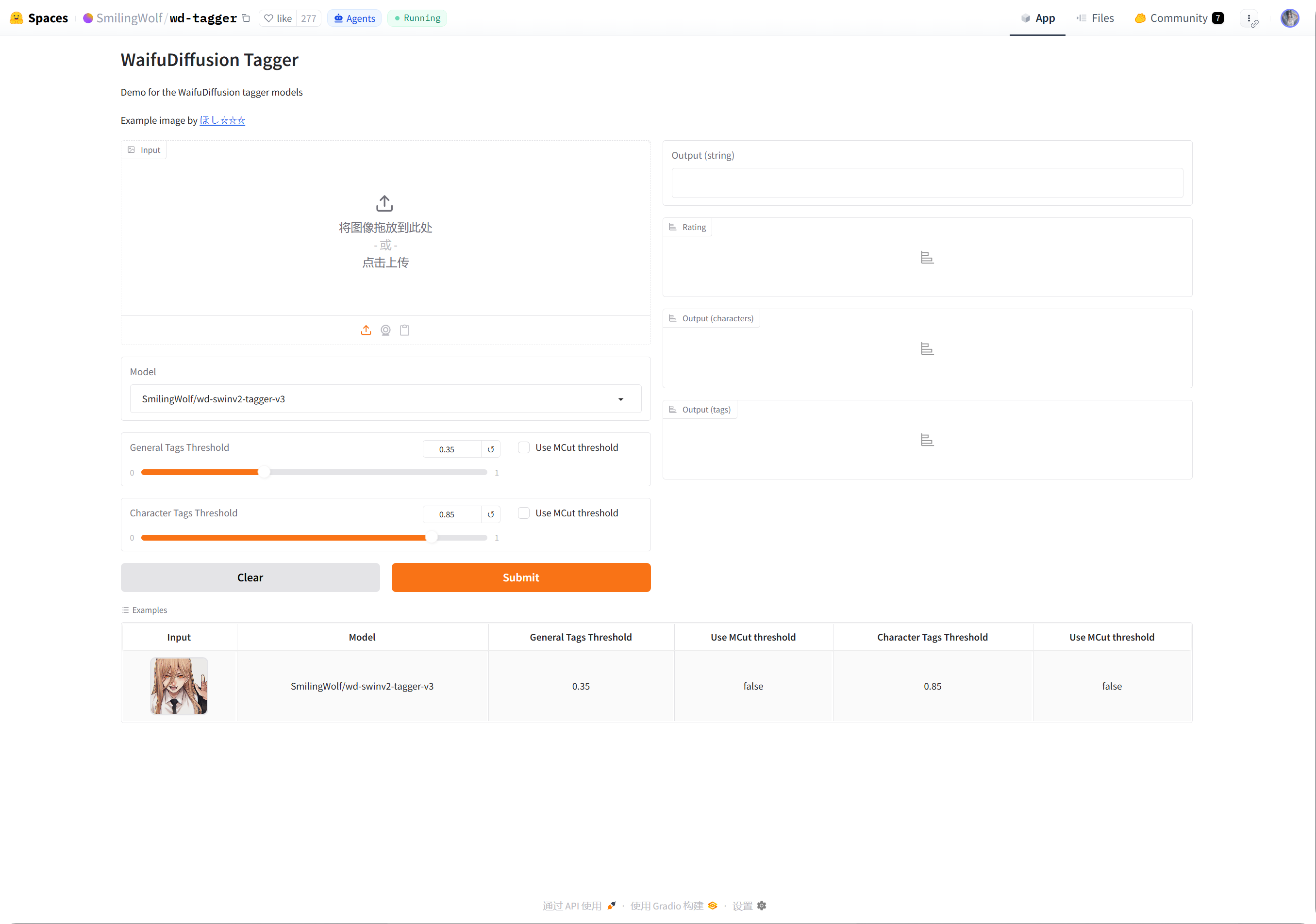
- ডান দিকের ওপরের কোণের তিন-ডট মেনুতে ক্লিক করুন।
Duplicate this Spaceনির্বাচন করুন।- ডিফল্ট Space নাম রাখুন অথবা নিজের নাম দিন, যেমন
wd-tagger। - দৃশ্যমানতা
Publicরাখুন। পাবলিক Spaces ImgHost থেকে কল করা সহজ। - শুরুতে ডিফল্ট ফ্রি হার্ডওয়্যার রাখুন। সারি স্পষ্ট হলে পরে আপগ্রেড করুন।
- Space তৈরি করুন এবং বিল্ড শেষ হওয়া পর্যন্ত অপেক্ষা করুন।
বিল্ড শেষ হলে আপনার Space পেজ খুলুন। URL সাধারণত এমন হয়:
text
https://huggingface.co/spaces/your-name/wd-taggerব্রাউজারের URL কপি করে ImgHost-এর Space URLs-এ পেস্ট করুন।
একাধিক Space URL পূরণ করা
প্রতি লাইনে একটি Space URL লিখুন।
উদাহরণ:
| মান | বিবরণ |
|---|---|
https://huggingface.co/spaces/SmilingWolf/wd-tagger | SmilingWolf-এর পাবলিক Space। অস্থায়ী পরীক্ষার জন্য ভালো। |
https://huggingface.co/spaces/lintonxue00/wd-tagger | কপি করা Space পেজের URL। |
https://huggingface.co/spaces/your-name/wd-tagger | আপনার নিজের কপি করা Space পেজের URL। |
আপনি একাধিক URL দিতে পারেন। ImgHost একসঙ্গে একাধিক Space ব্যবহার করে, যা গতি বাড়াতে পারে।
কোনো একটি Space সাময়িকভাবে অপ্রাপ্য হলে অন্যগুলো প্রক্রিয়াকরণ চালিয়ে যেতে পারে।
সেটিংস
| বিকল্প | সুপারিশ |
|---|---|
Space URLs | আপনি যে Space URL প্রস্তুত করেছেন সেগুলো লিখুন। অন্তত একটি ব্যবহার করুন। |
| লক্ষ্য ফোল্ডার | সব ফোল্ডারের জন্য খালি রাখুন। নির্দিষ্ট ডিরেক্টরি প্রক্রিয়াকরণ করতে চাইলে কেবল তখন একটি ফোল্ডার নির্বাচন করুন। |
| শনাক্তকরণ মডেল | ডিফল্ট হিসেবে wd-swinv2-tagger-v3 রাখুন। |
| সাধারণ ট্যাগ থ্রেশহোল্ড | ডিফল্ট মান বেশিরভাগ ছবির জন্য উপযোগী। কম মান বেশি ট্যাগ তৈরি করে; বেশি মান কম ট্যাগ তৈরি করে। |
| চরিত্র ট্যাগ থ্রেশহোল্ড | ডিফল্ট মান রক্ষণশীল এবং ভুল চরিত্র ট্যাগ এড়াতে সাহায্য করে। |
MCut স্বয়ংক্রিয় থ্রেশহোল্ড | শুরুতে বন্ধ রাখুন। মডেলকে ট্যাগের সংখ্যা স্বয়ংক্রিয়ভাবে নির্ধারণ করতে দিতে চাইলে চালু করুন। |
| আপলোডের সময় স্বয়ংক্রিয় ট্যাগিং | নতুন আপলোড করা ছবিতে স্বয়ংক্রিয়ভাবে ট্যাগ যোগ করতে চাইলে চালু করুন। |
| ট্যাগিং শুরু | পুরোনো ছবিতে ম্যানুয়ালি ব্যাচ ট্যাগিং চালায়। |
প্রস্তাবিত প্রাথমিক মান
| বিকল্প | প্রস্তাবিত মান |
|---|---|
| শনাক্তকরণ মডেল | wd-swinv2-tagger-v3 |
| সাধারণ ট্যাগ থ্রেশহোল্ড | 0.35 |
| চরিত্র ট্যাগ থ্রেশহোল্ড | 0.85 |
MCut | শুরুতে বন্ধ |
| আপলোডের সময় স্বয়ংক্রিয় ট্যাগিং | প্রয়োজন হলে চালু করুন |
ট্যাগ বেশি হলে সাধারণ ট্যাগ থ্রেশহোল্ড সামান্য বাড়ান।
ট্যাগ কম হলে সাধারণ ট্যাগ থ্রেশহোল্ড সামান্য কমান।
ব্যাচ ট্যাগিং
Space URLsপূরণ করুন।- লক্ষ্য ফোল্ডার নির্বাচন করুন।
- ট্যাগিং শুরুতে ক্লিক করুন।
- অগ্রগতি শেষ হওয়া পর্যন্ত অপেক্ষা করুন।
লক্ষ্য ফোল্ডার খালি থাকলে ImgHost সব ফোল্ডার প্রক্রিয়াকরণ করে।
ব্যাচ ট্যাগিং পুরোনো ছবির জন্য সবচেয়ে উপযোগী। নতুন ছবির জন্য আপলোডের সময় স্বয়ংক্রিয় ট্যাগিং চালু করুন, যাতে প্রতিবার ম্যানুয়ালি চালাতে না হয়।
আপলোডের সময় স্বয়ংক্রিয় ট্যাগিং
আপলোডের সময় স্বয়ংক্রিয় ট্যাগিং চালু হলে নতুন আপলোড করা ছবি কনফিগার করা Space URLs স্বয়ংক্রিয়ভাবে কল করে।
এটি দীর্ঘমেয়াদি ব্যবহারের জন্য উপযোগী।
আপনার Space সারিতে থাকলেও আপলোড নিজে আগে শেষ হতে পারে, আর ট্যাগিং পরে চলতে থাকে।
কোন ছবিগুলো প্রক্রিয়াকরণ করা হয়
স্বয়ংক্রিয় ট্যাগিং মূলত ছবির ফাইল প্রক্রিয়াকরণ করে।
যেসব ছবিতে পূর্ণ ট্যাগ, দিকনির্দেশ, রেটিং, প্রস্থ এবং উচ্চতা ইতিমধ্যে আছে, অপ্রয়োজনীয় Space কল এড়াতে সেগুলো বাদ দেওয়া হয়।
সম্ভব হলে ImgHost শুধু অনুপস্থিত তথ্য পূরণ করে। উদাহরণস্বরূপ, যদি শুধু দিকনির্দেশ অনুপস্থিত থাকে, তাহলে পূর্ণ কনটেন্ট ট্যাগিং প্রক্রিয়া না চালিয়ে দিকনির্দেশ যোগ করার চেষ্টা করে।
FAQ
নিজের Space কেন কপি করব?
পাবলিক Spaces অনেক ব্যবহারকারী ভাগ করে ব্যবহার করেন। আপনার নিজের কপি করা Space মূলত আপনার ImgHost সাইট ব্যবহার করে, তাই সাধারণত এটি দ্রুততর এবং বেশি নির্ভরযোগ্য।
Space বারবার চালু হচ্ছে
প্রথম তৈরি করার পর অথবা দীর্ঘ সময় নিষ্ক্রিয় থাকার পর Space চালু হতে কিছু সময় লাগতে পারে।
আগে আপনার Space পেজ খুলুন। যখন এটি স্বাভাবিকভাবে ছবি শনাক্ত করতে পারে, তখন ImgHost-এ ফিরে ট্যাগিং শুরু করুন।
Space URL কীভাবে কপি করব?
আপনার Hugging Face Space পেজ খুলুন এবং ব্রাউজারের ঠিকানা কপি করুন।
উদাহরণ:
text
https://huggingface.co/spaces/lintonxue00/wd-tagger
https://huggingface.co/spaces/SmilingWolf/wd-tagger
একাধিক Space যোগ করা যাবে?
হ্যাঁ। প্রতি লাইনে একটি Space URL লিখুন।
একাধিক Space একসঙ্গে ছবি প্রক্রিয়াকরণ করে, যা অনেক ছবি থাকলে উপযোগী।
ট্যাগ ইংরেজিতে কেন?
SmilingWolf মডেলগুলো ইংরেজি ট্যাগ আউটপুট করে। এটি প্রত্যাশিত আচরণ।
এই ট্যাগগুলো মূলত অনুসন্ধান, ফিল্টারিং, র্যান্ডম ছবি API এবং পাবলিক গ্যালারি ফিল্টারের জন্য ব্যবহৃত হয়।
রেটিং ট্যাগ কী কাজে লাগে?
রেটিং ফলাফল নিরাপত্তা সেটিংসের অ্যাক্সেস মোডের সঙ্গে কাজ করে।
উদাহরণস্বরূপ, দর্শনার্থীর অ্যাক্সেস বয়সভিত্তিক রেটিং দিয়ে সীমিত করা হলে, পাবলিক ব্রাউজিং এবং র্যান্ডম ছবি ফিচারগুলো সেই নিয়ম অনুযায়ী ছবি ফিল্টার করে।
দ্রুত ধাপ
text
Sign in to Hugging Face
-> Open SmilingWolf/wd-tagger
-> Duplicate this Space
-> Wait for the Space to build
-> Copy your Space URL
-> Fill Space URLs in ImgHost
-> Choose model and thresholds
-> Start tagging or enable auto-tag on upload