অতিরিক্ত ব্যাকআপ ও পড়ার উৎস পরিবর্তন
অতিরিক্ত ব্যাকআপ আগে আপলোড করা একটি ফাইলের আরেকটি কপি সংরক্ষণ করে।
প্রাথমিক ফাইল এবং ব্যাকআপ ফাইল দুটিই পড়ার উৎস হিসেবে ব্যবহার করা যায়। দর্শনার্থীরা সাধারণত কোনো পার্থক্য দেখেন না। পার্থক্য শুধু কোন স্টোরেজ চ্যানেল ফাইলটি সরবরাহ করছে।
অতিরিক্ত ব্যাকআপ কী করতে পারে
| বৈশিষ্ট্য | বিবরণ |
|---|---|
| অতিরিক্ত কপি সংরক্ষণ | একক চ্যানেল ব্যর্থতার ঝুঁকি কমাতে অন্য আপলোড চ্যানেলে ফাইল ব্যাকআপ করে। |
| পড়ার উৎস পরিবর্তন | ব্যাকআপ সফল হলে প্রাথমিক চ্যানেল এবং ব্যাকআপ চ্যানেলের মধ্যে ফাইল পড়ার উৎস পরিবর্তন করে। |
| একক ফাইল ব্যাকআপ | ফাইলের বিস্তারিত পেজ থেকে একটি ফাইল ব্যাকআপ করুন। |
| ব্যাচ ব্যাকআপ | অ্যাডমিন পেজে একাধিক ফাইল নির্বাচন করে একসঙ্গে ব্যাকআপ করুন। |
| সামগ্রিক অতিরিক্ত ব্যাকআপ | অন্যান্য সেটিংস থেকে ফোল্ডার অনুযায়ী ফাইল ব্যাকআপ করুন। |
অতিরিক্ত ব্যাকআপের প্রবেশপথ
খুলুন:
text
System Settings -> Other Settings -> Redundant Backup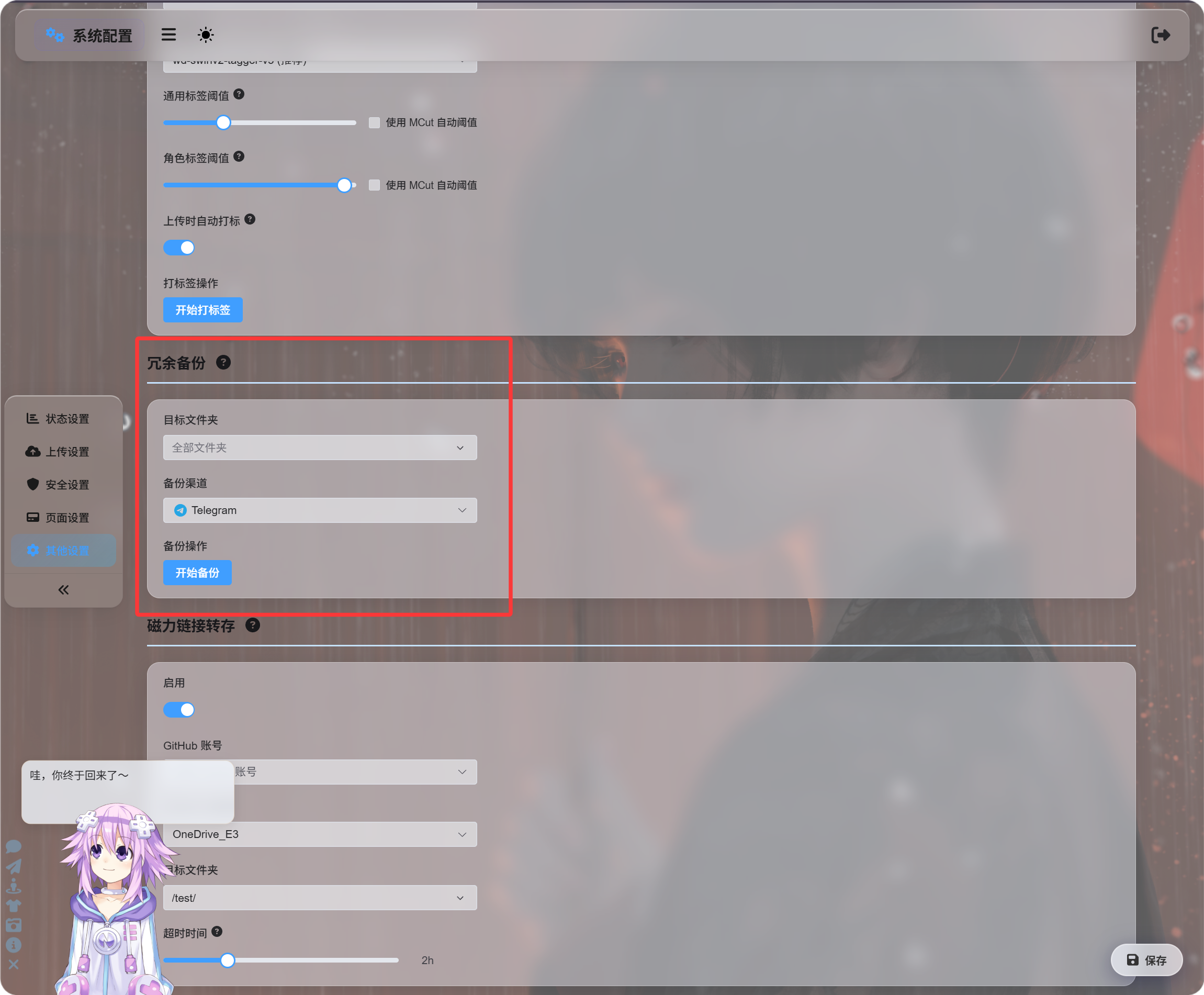
ফোল্ডারে অথবা সব ফাইলে একসঙ্গে ব্যাকআপ যোগ করার জন্য এই প্রবেশপথ সবচেয়ে উপযোগী।
ব্যাকআপ চ্যানেল হাতে নির্বাচন করা যায়, অথবা স্বয়ংক্রিয় পরিবর্তন বেছে নিয়ে ImgHost-কে উপযুক্ত ব্যাকআপ চ্যানেল খুঁজতে দিতে পারেন।
ফাইলের বিস্তারিত থেকে ব্যাকআপ
অ্যাডমিন প্যানেলে একটি ফাইলের বিস্তারিত পেজ খুলে ব্যাকআপে ক্লিক করুন।
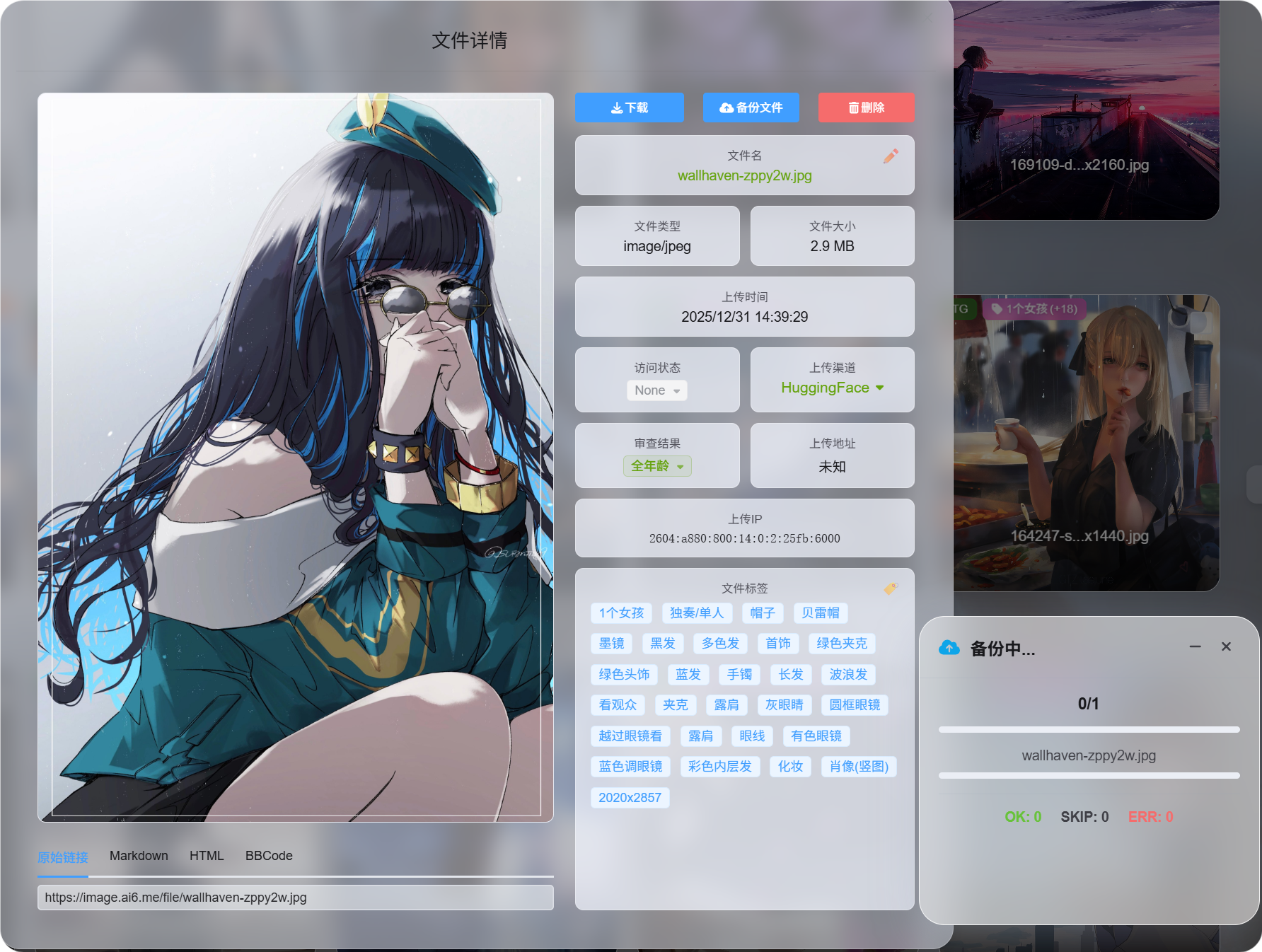
প্রয়োজন অনুযায়ী একটি গুরুত্বপূর্ণ ফাইল ব্যাকআপ করার জন্য এটি সবচেয়ে উপযোগী।
ব্যাকআপ সফল হলে ফাইলের বিস্তারিত পেজে উপলভ্য পড়ার উৎস দেখা যায়।
নির্বাচন করে ব্যাচ ব্যাকআপ
অ্যাডমিন প্যানেলে একাধিক ফাইল নির্বাচন করে ব্যাচ ব্যাকআপ চালান।
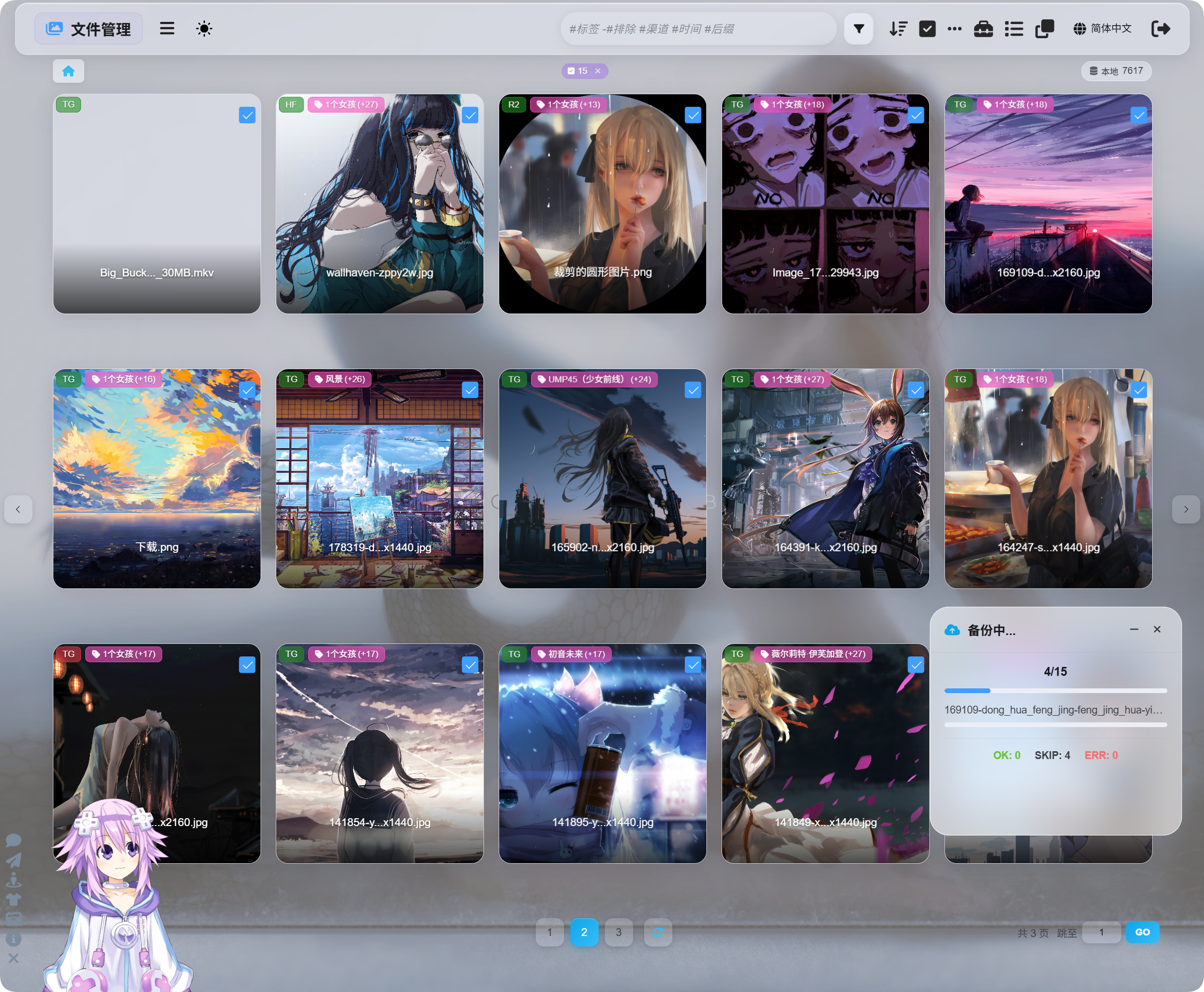
ফাইলের একটি দল প্রক্রিয়াকরণের জন্য এটি উপযোগী।
নির্বাচনভিত্তিক ব্যাকআপ, ফাইলের বিস্তারিত থেকে ব্যাকআপ এবং অন্যান্য সেটিংসের অতিরিক্ত ব্যাকআপ একই ব্যাকআপ ব্যবস্থা ব্যবহার করে। এগুলো কেবল আলাদা প্রবেশপথ।
ব্যাকআপের পর পড়ার উৎস পরিবর্তন
ব্যাকআপ সম্পন্ন হলে ফাইলের বিস্তারিত পেজ পড়ার উৎস পরিবর্তন করতে দেয়:
| পড়ার উৎস | বিবরণ |
|---|---|
| প্রাথমিক চ্যানেল | মূল আপলোড চ্যানেল থেকে পড়ে। |
| ব্যাকআপ চ্যানেল | ব্যাকআপ চ্যানেল থেকে পড়ে। |
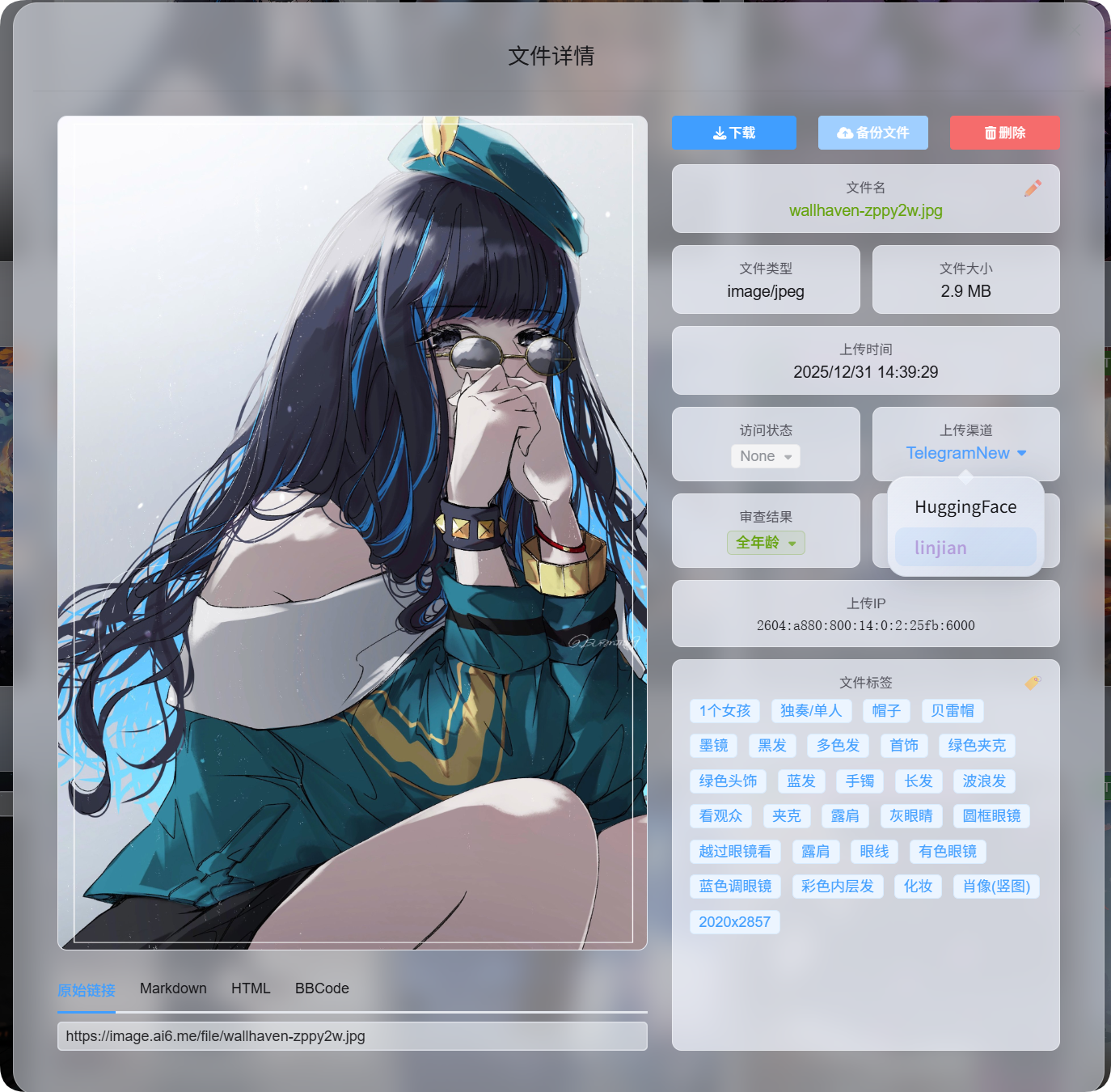
ফাইলটি প্রাথমিক চ্যানেল না ব্যাকআপ চ্যানেল থেকে সরবরাহ করা হচ্ছে, তা দর্শনার্থীদের জানার দরকার নেই।
আপনি যে পড়ার উৎস নির্বাচন করেন, সেটিই পরবর্তী ফাইল অ্যাক্সেসের পছন্দের উৎস হয়।
কখন ব্যাকআপ এড়িয়ে যাওয়া হয়
ব্যাকআপের সময় নিচের ঘটনাগুলো এড়িয়ে যাওয়া হয়। এগুলো ত্রুটি নয়।
| ঘটনা | কেন এড়িয়ে যাওয়া হয় |
|---|---|
| ইতিমধ্যে ব্যাকআপ আছে | যে ফাইলের ব্যাকআপ আগে থেকেই আছে, সেটি আবার ব্যাকআপ করা হয় না। |
| প্রাথমিক ও ব্যাকআপ চ্যানেল একই | অর্থপূর্ণ ব্যাকআপের জন্য কপি অন্য চ্যানেলে সংরক্ষণ করতে হবে। |
| ব্যবহারযোগ্য ব্যাকআপ চ্যানেল নেই | উপযুক্ত বিকল্প চ্যানেল উপলভ্য নয়। |
সংক্ষেপে: ব্যাকআপ অবশ্যই অন্য চ্যানেলে যেতে হবে, এবং আগে থেকেই ব্যাকআপ থাকা ফাইল আবার অতিরিক্ত স্থান ব্যবহার করে না।
প্রাথমিক চ্যানেল বনাম ব্যাকআপ চ্যানেল
| নাম | অর্থ |
|---|---|
| প্রাথমিক চ্যানেল | ফাইলটি প্রথম আপলোড করার সময় যে চ্যানেল ব্যবহার করা হয়েছিল। |
| ব্যাকআপ চ্যানেল | অতিরিক্ত কপি যে চ্যানেলে সংরক্ষিত। |
| প্রাথমিক পড়ার উৎস | ফাইলটি বর্তমানে প্রাথমিক চ্যানেল থেকে পড়া হচ্ছে। |
| ব্যাকআপ পড়ার উৎস | ফাইলটি বর্তমানে ব্যাকআপ চ্যানেল থেকে পড়া হচ্ছে। |
প্রাথমিক ও ব্যাকআপ পড়ার উৎস ব্যবহারকারীর দৃষ্টিতে একই আচরণ করে।
ব্যাকআপ ফাইল উপলভ্য থাকলে ব্যাকআপ পড়ার উৎসে পরিবর্তনের পরও ছবি, ভিডিও এবং ডাউনলোড লিংক কাজ করতে থাকে।
ফাইল মুছে দিলে কী হয়
ফাইল মুছে দিলে ImgHost প্রাথমিক ফাইল এবং ব্যাকআপ ফাইল দুটোই মুছে দেয়।