रिडंडेंट बैकअप और पढ़ने के स्रोत की अदला-बदली
रिडंडेंट बैकअप पहले से अपलोड की गई फ़ाइल की एक अतिरिक्त कॉपी सहेजता है।
मुख्य फ़ाइल और बैकअप फ़ाइल दोनों को पढ़ने के स्रोत के रूप में उपयोग किया जा सकता है। आगंतुकों को सामान्यतः कोई अंतर नहीं दिखता। अंतर केवल इतना है कि फ़ाइल किस स्टोरेज चैनल से परोसी जा रही है।
रिडंडेंट बैकअप क्या कर सकता है
| सुविधा | विवरण |
|---|---|
| अतिरिक्त कॉपी सहेजना | एक चैनल की विफलता का जोखिम घटाने के लिए फ़ाइलों का दूसरे अपलोड चैनल में बैकअप बनाता है। |
| पढ़ने का स्रोत बदलना | बैकअप सफल होने के बाद फ़ाइल पढ़ने को मुख्य चैनल और बैकअप चैनल के बीच बदलता है। |
| एकल-फ़ाइल बैकअप | फ़ाइल विवरण पेज से एक फ़ाइल का बैकअप बनाता है। |
| बैच बैकअप | एडमिन पेज में कई फ़ाइलें चुनकर उनका एक साथ बैकअप बनाता है। |
| वैश्विक रिडंडेंट बैकअप | अन्य सेटिंग्स से फ़ोल्डर के आधार पर फ़ाइलों का बैकअप बनाता है। |
रिडंडेंट बैकअप प्रवेश
खोलें:
text
System Settings -> Other Settings -> Redundant Backup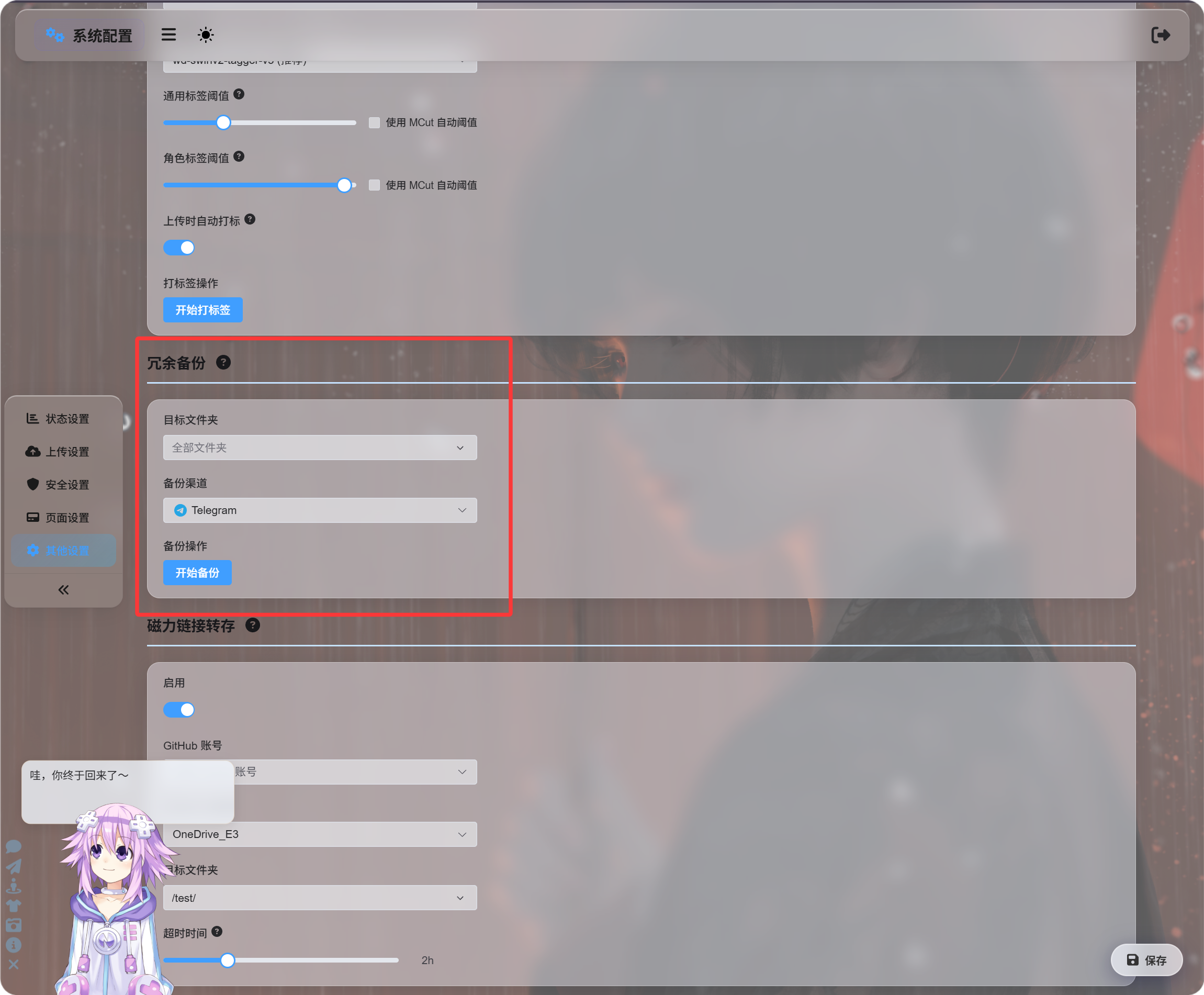
यह प्रवेश किसी फ़ोल्डर या सभी फ़ाइलों में एक साथ बैकअप जोड़ने के लिए सबसे उपयुक्त है।
बैकअप चैनल हाथ से चुना जा सकता है, या आप स्वचालित अदला-बदली चुनकर ImgHost को उपयुक्त बैकअप चैनल खोजने दे सकते हैं।
फ़ाइल विवरण से बैकअप
एडमिन पैनल में फ़ाइल विवरण पेज खोलें और बैकअप पर क्लिक करें।
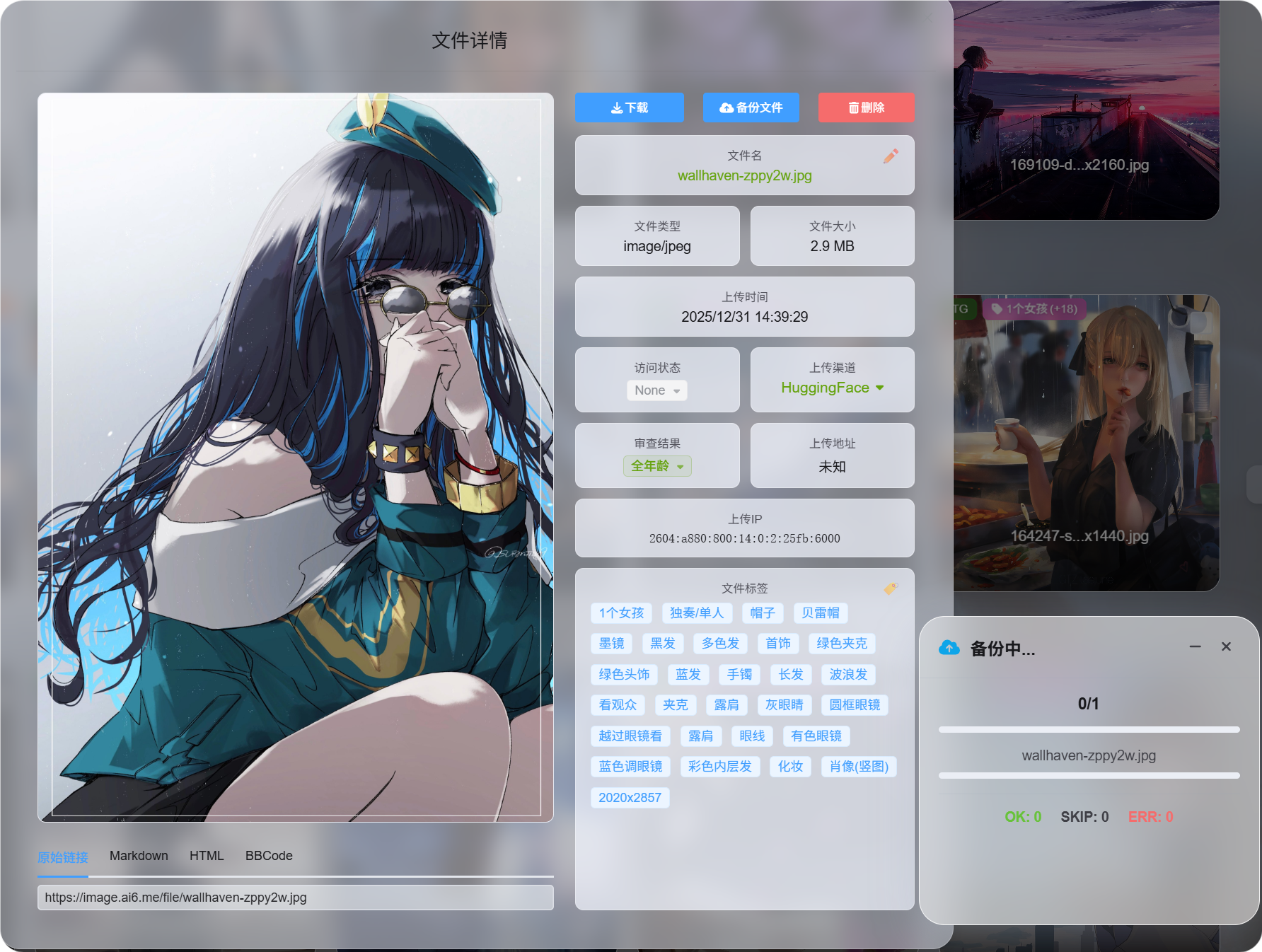
यह किसी एक महत्वपूर्ण फ़ाइल का आवश्यकता के अनुसार बैकअप बनाने के लिए सबसे उपयुक्त है।
बैकअप सफल होने के बाद फ़ाइल विवरण पेज उपलब्ध पढ़ने के स्रोत दिखाता है।
चयन के आधार पर बैच बैकअप
एडमिन पैनल में कई फ़ाइलें चुनें और बैच बैकअप चलाएँ।
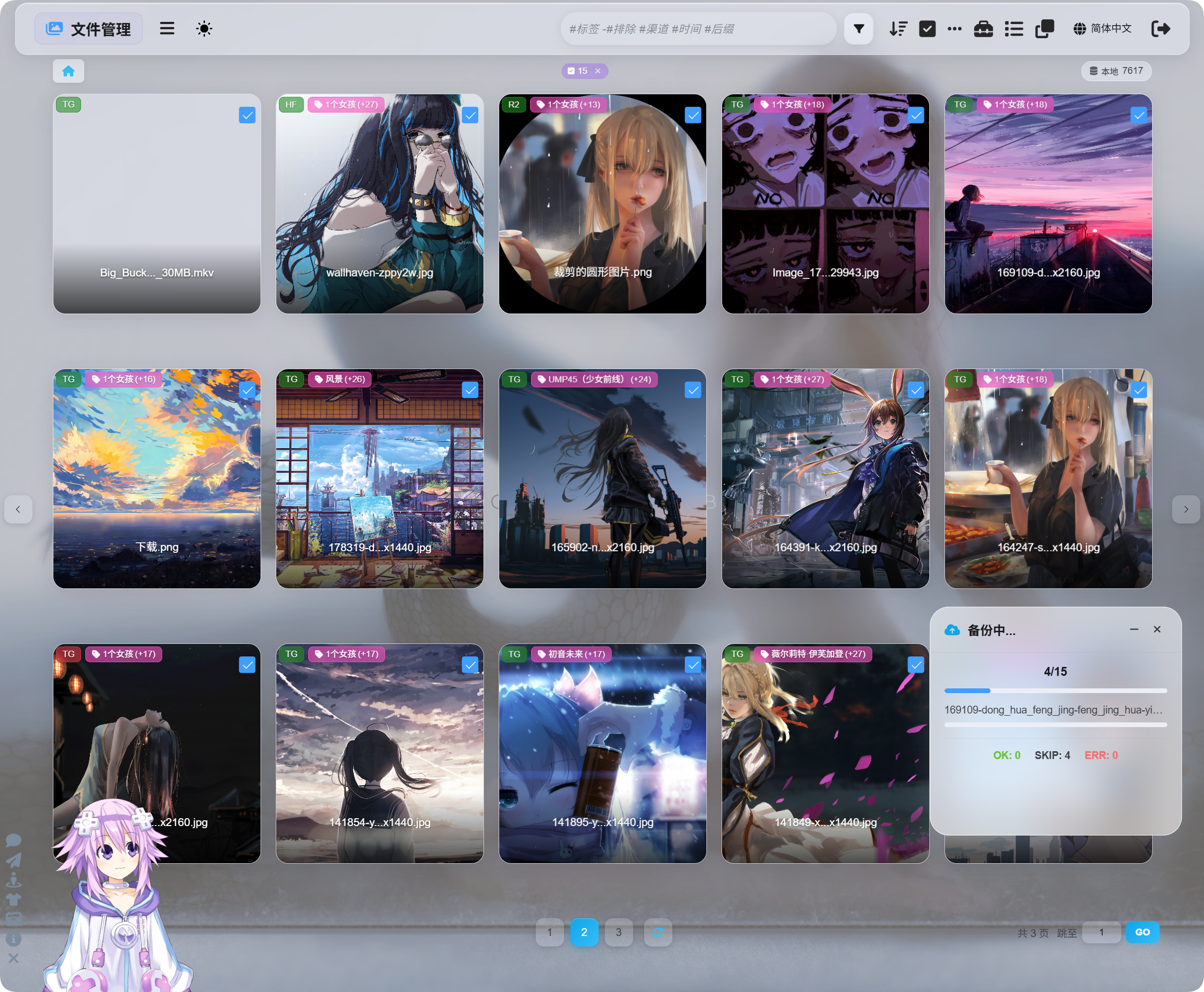
यह फ़ाइलों के किसी समूह को संसाधित करने के लिए सबसे उपयुक्त है।
चयन-आधारित बैकअप, फ़ाइल विवरण बैकअप और अन्य सेटिंग्स के अंतर्गत रिडंडेंट बैकअप सभी एक ही बैकअप सिस्टम का उपयोग करते हैं। ये केवल अलग-अलग प्रवेश बिंदु हैं।
बैकअप के बाद पढ़ने का स्रोत बदलना
बैकअप पूरा होने के बाद फ़ाइल विवरण पेज पढ़ने का स्रोत बदलने देता है:
| पढ़ने का स्रोत | विवरण |
|---|---|
| मुख्य चैनल | मूल अपलोड चैनल से पढ़ता है। |
| बैकअप चैनल | बैकअप चैनल से पढ़ता है। |
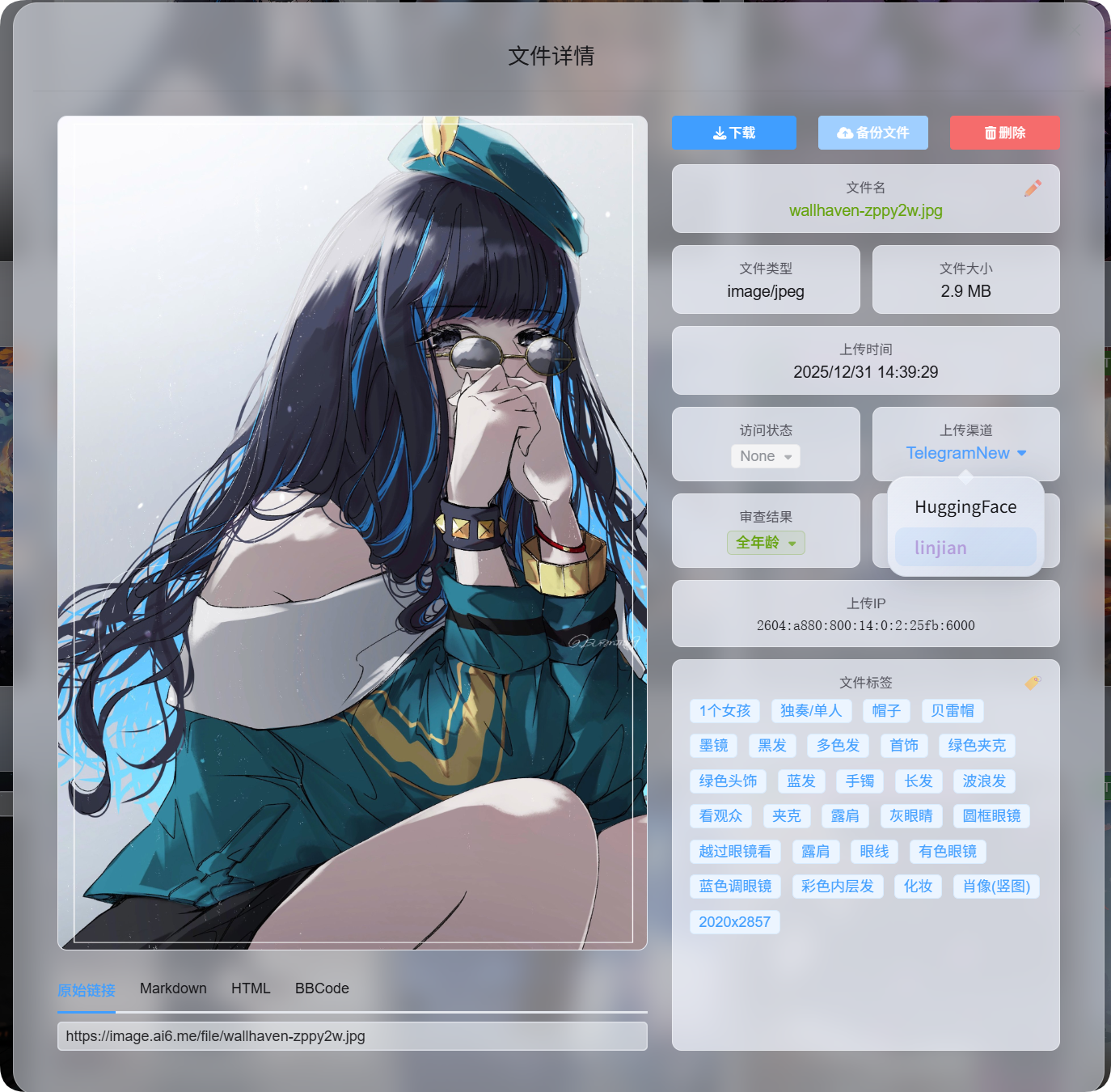
आगंतुकों को यह जानने की आवश्यकता नहीं होती कि फ़ाइल मुख्य चैनल से परोसी जा रही है या बैकअप चैनल से।
आप जो भी पढ़ने का स्रोत चुनते हैं, वही बाद की फ़ाइल पहुँच के लिए प्राथमिक स्रोत बन जाता है।
बैकअप कब छोड़ा जाता है
बैकअप के दौरान नीचे दिए गए मामले छोड़े जाते हैं। ये त्रुटियाँ नहीं हैं।
| मामला | क्यों छोड़ा जाता है |
|---|---|
| पहले से बैकअप है | जिस फ़ाइल का बैकअप पहले से है, उसका बैकअप दोबारा नहीं बनाया जाता। |
| मुख्य और बैकअप चैनल समान हैं | बैकअप का अर्थ तभी है जब उसे किसी दूसरे चैनल में सहेजा जाए। |
| उपयोग योग्य बैकअप चैनल नहीं है | कोई उपयुक्त वैकल्पिक चैनल उपलब्ध नहीं है। |
संक्षेप में: बैकअप किसी दूसरे चैनल में सहेजा जाना चाहिए, और पहले से बैकअप की गई फ़ाइलें फिर से अतिरिक्त स्थान नहीं लेतीं।
मुख्य चैनल और बैकअप चैनल
| नाम | अर्थ |
|---|---|
| मुख्य चैनल | वह चैनल जिसका उपयोग फ़ाइल पहली बार अपलोड करते समय किया गया था। |
| बैकअप चैनल | वह चैनल जो रिडंडेंट कॉपी सहेजता है। |
| मुख्य पढ़ने का स्रोत | फ़ाइल अभी मुख्य चैनल से पढ़ी जा रही है। |
| बैकअप पढ़ने का स्रोत | फ़ाइल अभी बैकअप चैनल से पढ़ी जा रही है। |
मुख्य और बैकअप पढ़ने के स्रोतों का उपयोगकर्ता-दृश्य व्यवहार समान होता है।
जब तक बैकअप फ़ाइल उपलब्ध है, बैकअप पढ़ने के स्रोत पर बदलने के बाद छवियाँ, वीडियो और डाउनलोड लिंक काम करते रहते हैं।
फ़ाइल हटाए जाने पर क्या होता है
जब कोई फ़ाइल हटाई जाती है, तो ImgHost मुख्य फ़ाइल और बैकअप फ़ाइल दोनों को हटा देता है।