IP जियोलोकेशन और उपयोगकर्ता प्रबंधन
IP जियोलोकेशन अपलोडर रिकॉर्ड, लॉगिन डिवाइस और इसी तरह के लॉग में मौजूद IP पतों को अनुमानित स्थानों में बदलता है।
कॉन्फ़िगर होने के बाद एडमिन पैनल अपलोड और पहुँच के स्रोतों को अधिक स्पष्ट रूप से दिखा सकता है। उपयोगकर्ता प्रबंधन संदिग्ध IP पतों के लिए अपलोड पहुँच को ब्लॉक या फिर से बहाल करने की सुविधा भी देता है।
इसे कहाँ कॉन्फ़िगर करें
खोलें:
text
System Settings -> Other Settings -> IP Geolocation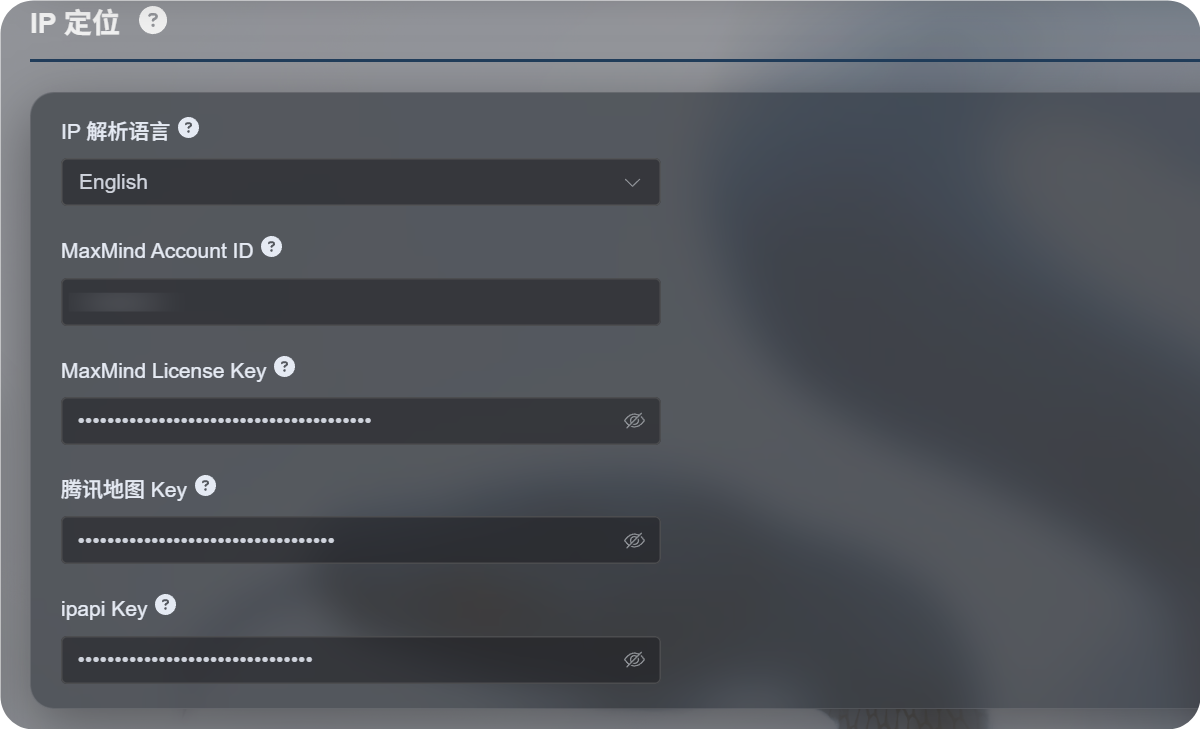
उपलब्ध सेटिंग्स
नया IP जियोलोकेशन प्रवाह किसी एक मानचित्र सेवा पर निर्भर रहने के बजाय कई स्रोतों का समर्थन करता है।
| सेटिंग | उद्देश्य |
|---|---|
| IP जियोलोकेशन भाषा | प्रदर्शन भाषा चुनती है, जैसे अंग्रेज़ी, सरलीकृत चीनी, जापानी, फ़्रांसीसी और अन्य। |
| MaxMind Account ID | MaxMind GeoLite Web Service के लिए MaxMind खाता ID। |
| MaxMind License Key | MaxMind License Key। |
| Tencent Map Key | Tencent Location Service कुंजी। चीनी भाषा में पतों और मुख्यभूमि चीन के IP के लिए उपयोगी। |
| ipapi Key | APILayer ipapi कुंजी। बहुभाषी IP जियोलोकेशन का समर्थन करती है। |
केवल वही सेवाएँ भरें जिनकी आपको आवश्यकता है। हर फ़ील्ड को कॉन्फ़िगर करना ज़रूरी नहीं है।
यदि कोई कुंजी नहीं दी गई है, तो ImgHost फिर भी अंतर्निहित मुफ़्त स्रोतों का प्रयास करता है, लेकिन स्थिरता, भाषा समर्थन और सटीकता आपके द्वारा स्वयं कॉन्फ़िगर की गई सेवा से कम हो सकती है।
अनुशंसित विकल्प
यदि आपको मुख्य रूप से चीनी भाषा में पते चाहिए:
- IP जियोलोकेशन भाषा को सरलीकृत चीनी पर सेट करें।
- Tencent Map Key कॉन्फ़िगर करें।
- वैकल्पिक रूप से MaxMind या ipapi को बैकअप स्रोत के रूप में जोड़ें।
यदि आपको मुख्य रूप से अंग्रेज़ी या बहुभाषी पते चाहिए:
- अपनी आवश्यक भाषा चुनें।
- MaxMind Account ID और License Key कॉन्फ़िगर करें।
- बेहतर बहुभाषी परिणामों की आवश्यकता हो तो ipapi Key जोड़ें।
MaxMind सेटअप
MaxMind के लिए आवश्यक है:
text
MaxMind Account ID
MaxMind License Key
MaxMind डैशबोर्ड में खाता ID खोजें और License Keys पेज से License Key जनरेट करें।
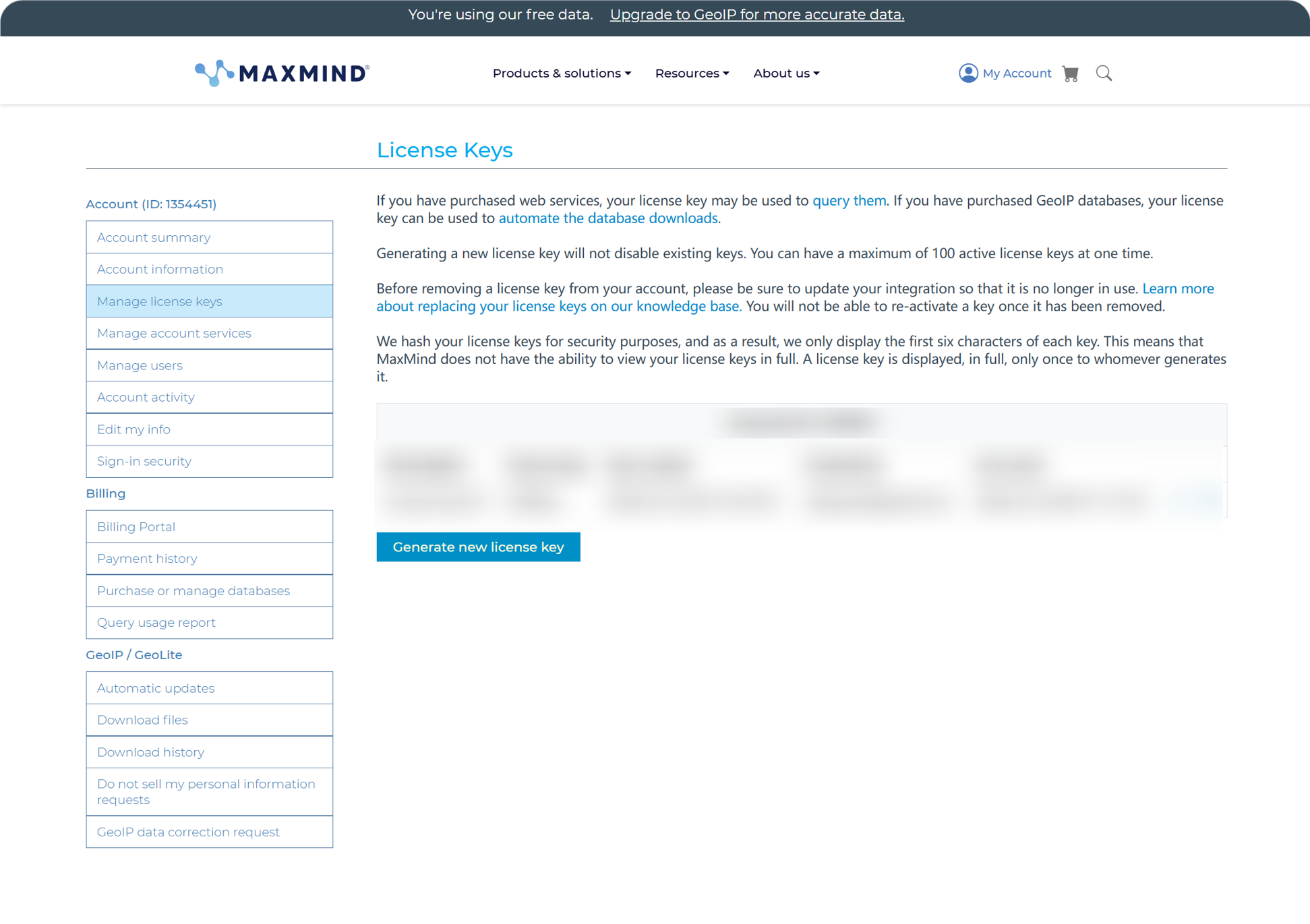
जनरेट होने के बाद Account ID और License Key को ImgHost में पेस्ट करें और सहेजें।
MaxMind का मुफ़्त प्लान रोज़मर्रा के उपयोग के लिए उपयुक्त है, लेकिन इसमें अनुरोध सीमा होती है। यदि कोटा पार हो जाता है, तो ImgHost उपलब्ध अन्य स्रोतों का प्रयास जारी रखता है।
ipapi सेटअप
ipapi APILayer API Key का उपयोग करता है।
ipapi कंसोल खोलें और वहाँ दिखाई गई API Key कॉपी करें।
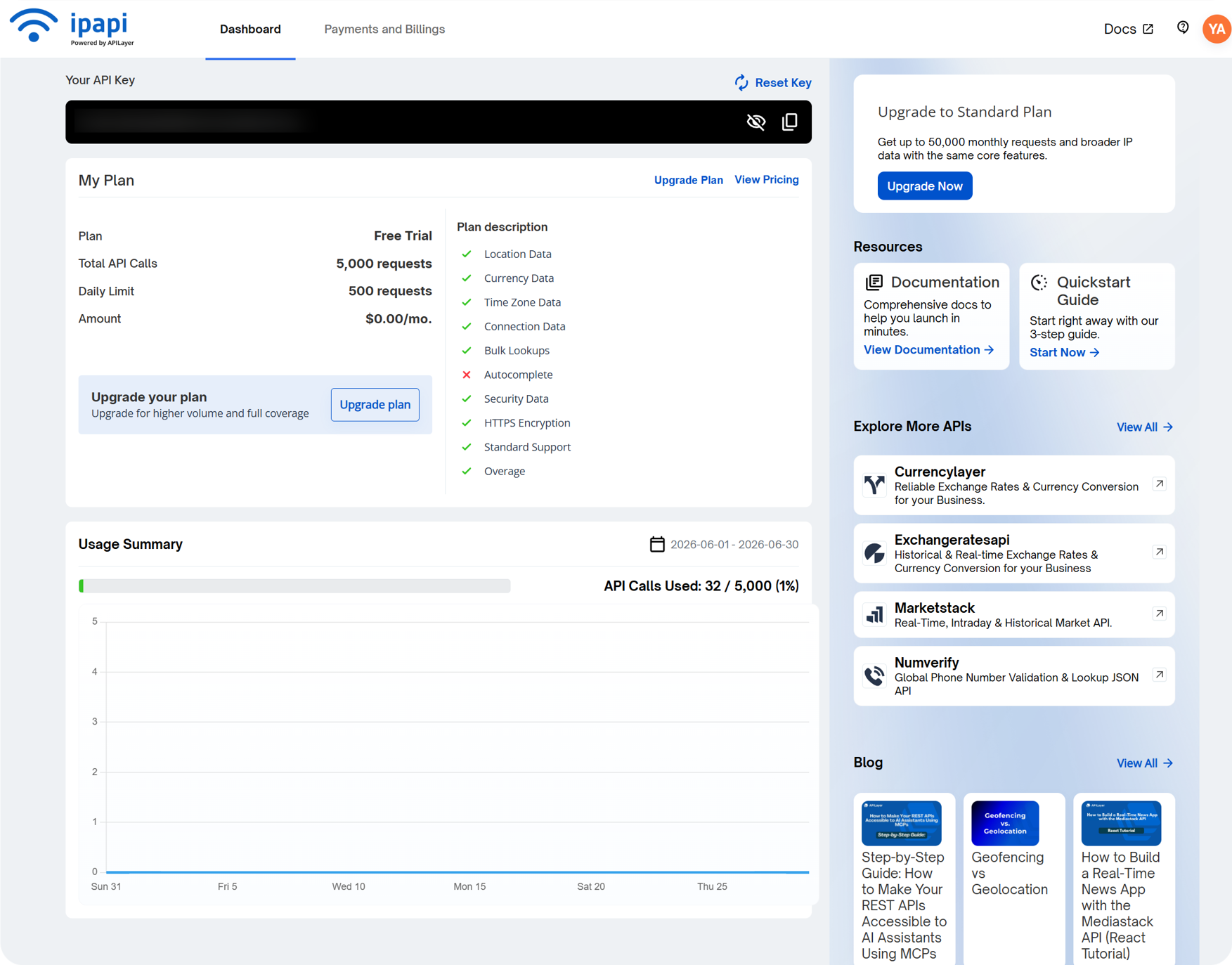
इसे ImgHost के ipapi Key फ़ील्ड में पेस्ट करें और सहेजें।
ipapi बहुभाषी IP जियोलोकेशन का समर्थन करता है और तब उपयोगी है जब आप चयनित भाषा में पते दिखाना चाहते हैं। इसके मुफ़्त प्लान में भी अनुरोध सीमा होती है। कोटा समाप्त होने पर ImgHost उपलब्ध अन्य स्रोतों का प्रयास जारी रखता है।
Tencent Map Key सेटअप
Tencent Map Key चीनी भाषा में पतों, विशेष रूप से मुख्यभूमि चीन के IP, के लिए उपयोगी है।
Tencent Location Service में कुंजी बनाते समय इसे सक्षम करें:
text
WebServiceAPIबनाने के बाद कुंजी को Tencent Map Key में पेस्ट करें और सहेजें।
यदि आपको केवल चीनी भाषा में बुनियादी IP जियोलोकेशन चाहिए, तो शुरुआत के लिए Tencent Map Key पर्याप्त है।
उपयोगकर्ता प्रबंधन में क्या देखें
उपयोगकर्ता प्रबंधन एडमिन पैनल के शीर्ष से उपलब्ध है।
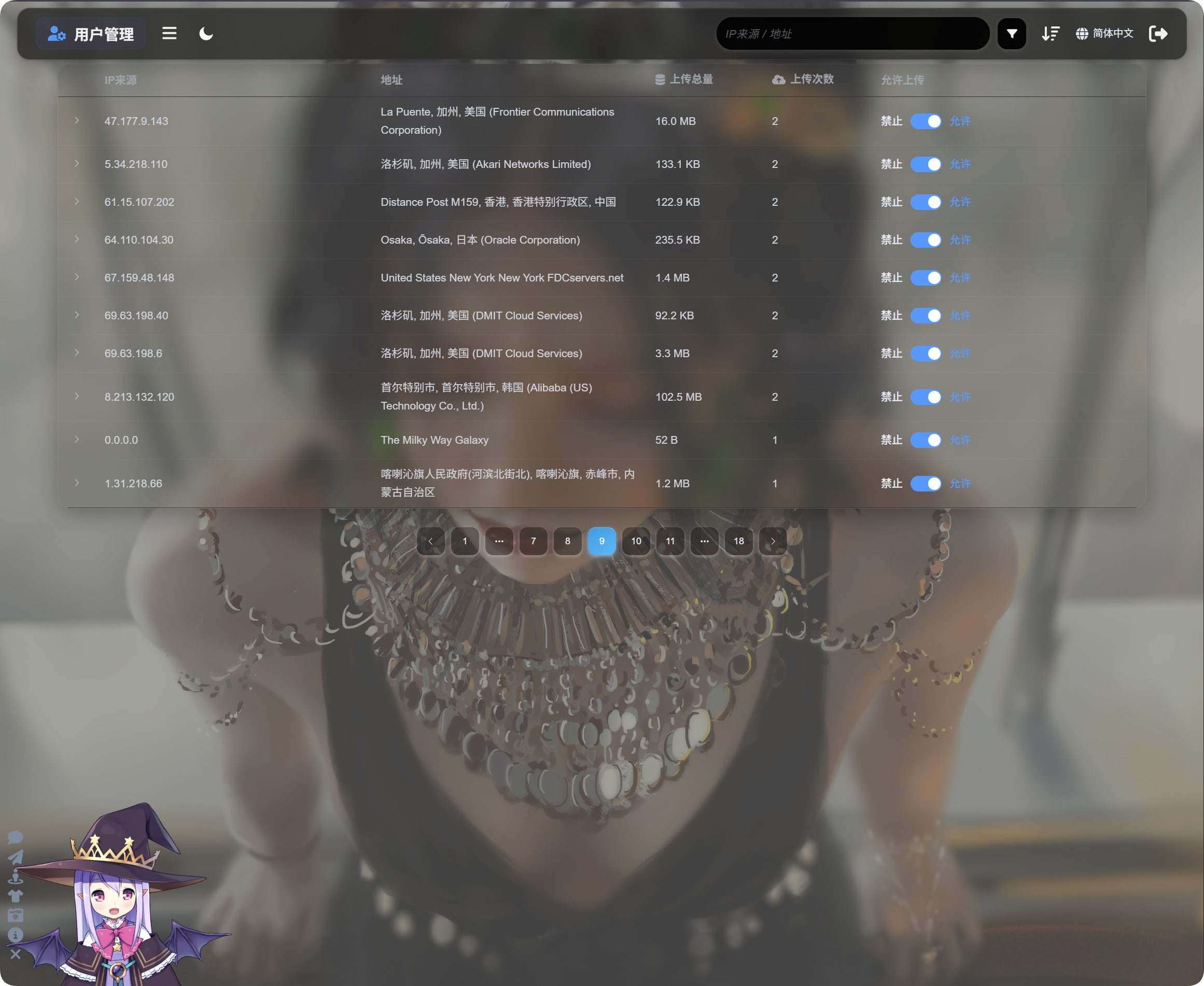
उपयोगकर्ता प्रबंधन IP के अनुसार अपलोड गतिविधि दिखाता है:
| फ़ील्ड | विवरण |
|---|---|
| IP स्रोत | अपलोडर का स्रोत IP। |
| पता | IP से प्राप्त अनुमानित स्थान। |
| कुल अपलोड आकार | इस IP द्वारा अपलोड की गई फ़ाइलों का कुल आकार। |
| अपलोड संख्या | इस IP से हुए अपलोड की संख्या। |
| अपलोड की अनुमति | चालू होने का अर्थ है कि अपलोड की अनुमति है। बंद होने का अर्थ है कि अपलोड ब्लॉक हैं। |
उस IP द्वारा अपलोड की गई फ़ाइलों की सूची खोलने के लिए बाईं ओर के तीर पर क्लिक करें।
फ़ाइल सूची में फ़ाइल नाम, पूर्वावलोकन, फ़ाइल आकार, मॉडरेशन परिणाम, फ़ाइल स्थिति और अपलोड समय दिखता है। जब अपलोड संदिग्ध लगें, तो पहले IP को विस्तृत करें, फ़ाइलों की समीक्षा करें, फिर तय करें कि आगे के अपलोड ब्लॉक करने हैं या नहीं।
यदि कोई IP संदिग्ध है, तो Upload allowed बंद करें। उस IP से भविष्य के अपलोड ब्लॉक हो जाएँगे।
खोज, क्रमबद्ध करना और उन्नत फ़िल्टर
उपयोगकर्ता प्रबंधन के शीर्ष पर IP स्रोत या पते से खोजें।
हाल के अपलोडर, अधिक बार अपलोड करने वाले या अधिक उपयोग वाली IP ढूँढने के लिए समय, अपलोड संख्या या कुल अपलोड आकार के आधार पर क्रमबद्ध करें।
गहन जाँच के लिए उन्नत फ़िल्टर खोलें।
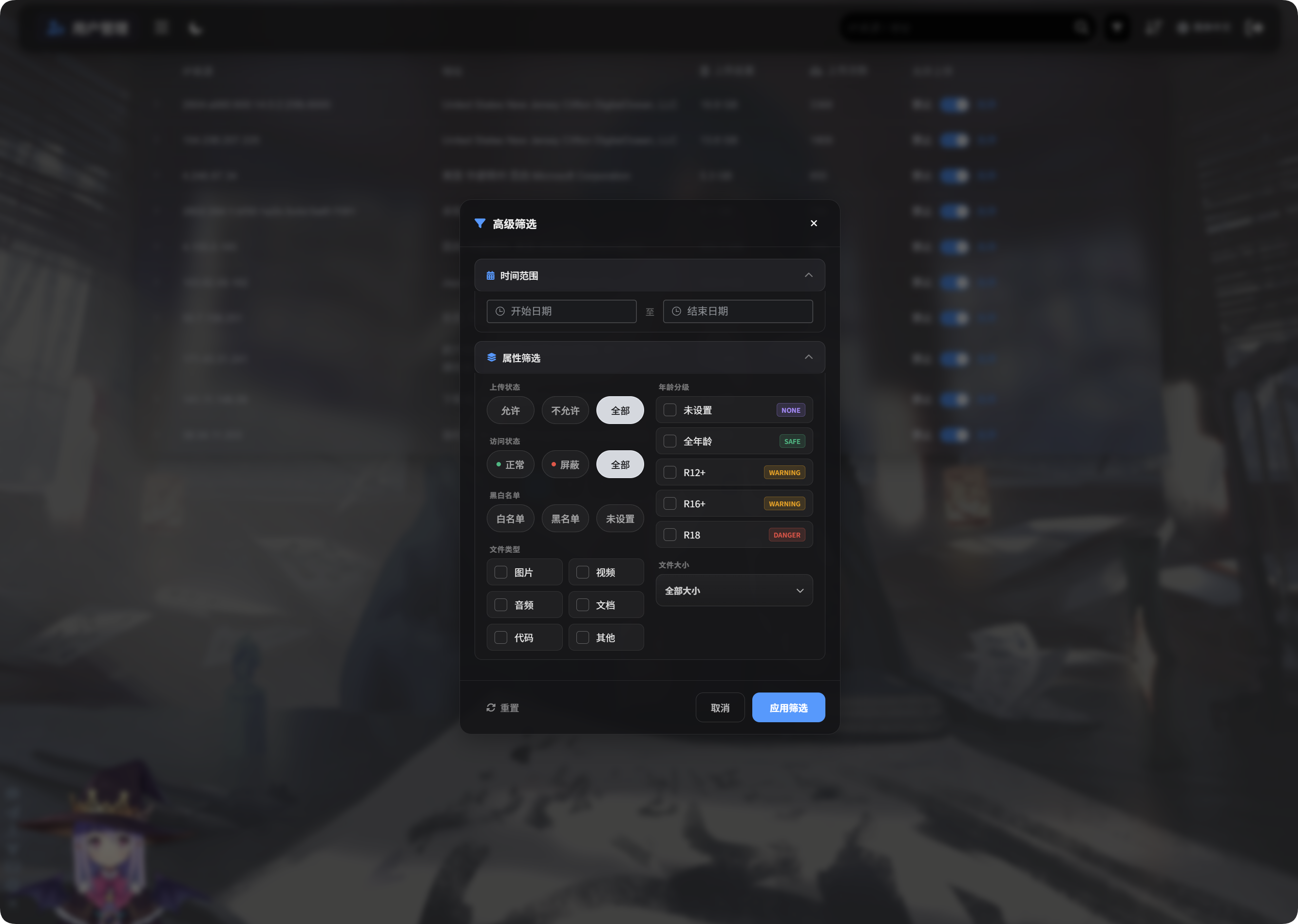
उन्नत फ़िल्टर इसका समर्थन करते हैं:
| फ़िल्टर | उपयोग |
|---|---|
| समय सीमा | चुनी गई अवधि में फ़ाइलें अपलोड करने वाले IP दिखाता है। |
| पहुँच स्थिति | सामान्य, ब्लॉक और समान स्थितियों से फ़िल्टर करता है। |
| अनुमति/ब्लॉक सूची | अनुमति सूची, ब्लॉक सूची या अनसेट के आधार पर फ़िल्टर करता है। |
| फ़ाइल प्रकार | छवियाँ, वीडियो, ऑडियो, दस्तावेज़, कोड या अन्य फ़ाइलें अपलोड करने वाले IP दिखाता है। |
| फ़ाइल आकार | अपलोड की गई फ़ाइलों के आकार दायरे से फ़िल्टर करता है। |
| आयु रेटिंग | अनसेट, General, R12+, R16+, R18 और समान रेटिंग के आधार पर फ़िल्टर करता है। |
| फ़ाइल स्थिति | असामान्य फ़ाइलों की जाँच के लिए मौजूदा फ़ाइल स्थिति से फ़िल्टर करता है। |
लागू करने के लिए Apply Filters पर क्लिक करें। सभी डेटा पर लौटने के लिए Reset का उपयोग करें।
मोबाइल दृश्य
मोबाइल पर उपयोगकर्ता प्रबंधन कार्ड लेआउट में बदल जाता है।
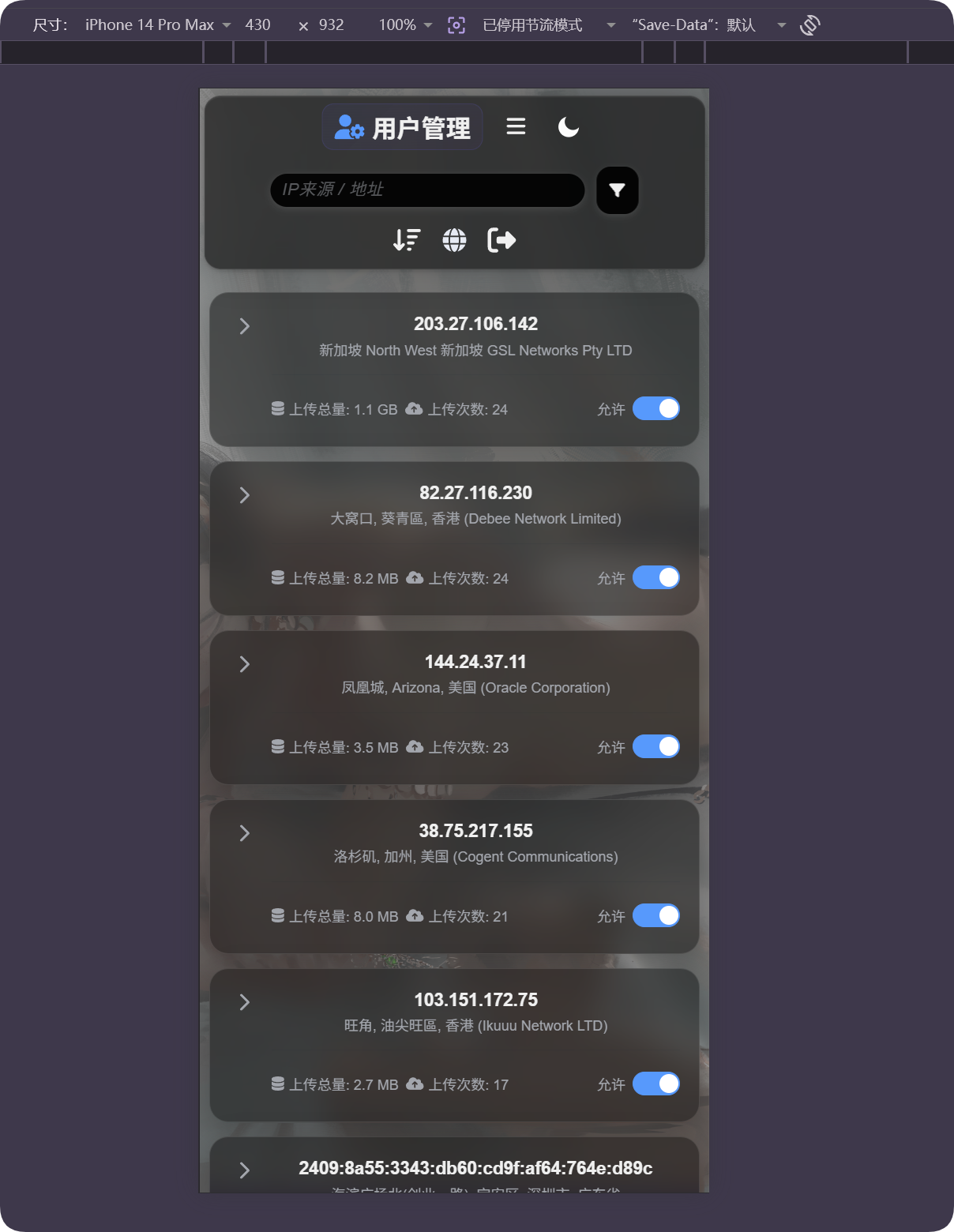
हर कार्ड IP, पता, कुल अपलोड आकार, अपलोड संख्या और अपलोड अनुमति स्विच दिखाता है। आप क्षैतिज तालिका स्क्रॉल किए बिना उपयोगकर्ताओं को प्रबंधित कर सकते हैं।
यदि स्थान गलत लगे
IP जियोलोकेशन अनुमानित होता है। यह सटीक सड़क पता नहीं है।
यदि उपयोगकर्ता प्रॉक्सी, डेटा सेंटर, क्लाउड सर्वर या सीमा-पार नेटवर्क के पीछे है, तो दिखाया गया स्थान वास्तविक स्थान से अलग हो सकता है।
इस सुविधा का उपयोग मोटा स्रोत समझने, असामान्य अपलोड खोजने और ब्लॉक करने के निर्णयों में मदद के लिए करें। इसे सटीक ट्रैकिंग न मानें।
सामान्य स्थितियाँ
| स्थिति | अर्थ |
|---|---|
| पता खाली है | IP अभी हल नहीं हुआ हो सकता है, या मौजूदा स्रोत अस्थायी रूप से अनुपलब्ध हो सकता है। |
| पते की भाषा गलत है | IP जियोलोकेशन भाषा और उस भाषा का समर्थन करने वाले स्रोत की कॉन्फ़िगरेशन जाँचें। |
| पता डेटा सेंटर दिखाता है | कई प्रॉक्सी, क्लाउड सर्वर और क्रॉलर डेटा सेंटर या ISP पते के रूप में दिखाई देते हैं। |
| अपलोड संख्या अधिक है | इस IP की सावधानी से समीक्षा करें और आवश्यकता होने पर अपलोड ब्लॉक करें। |
| कुल अपलोड आकार बड़ा है | क्रमबद्ध करें या फ़िल्टर करें, IP को विस्तृत करें और संबंधित फ़ाइलों की जाँच करें। |
| ब्लॉक करने के बाद बहाल करना है | Upload allowed फिर से चालू करें। |
त्वरित प्रवाह
text
Open IP Geolocation in Other Settings
-> Choose IP geolocation language
-> Fill MaxMind, Tencent Map, or ipapi credentials as needed
-> Save settings
-> Open User Management
-> Review IP source, address, total upload size, and upload count
-> Use search, sort, or advanced filters to find abnormal IPs
-> Allow or block uploads as needed