IP ভূ-অবস্থান ও ব্যবহারকারী ব্যবস্থাপনা
IP ভূ-অবস্থান আপলোডকারীর রেকর্ড, লগইন ডিভাইস এবং অনুরূপ লগে থাকা IP ঠিকানাকে আনুমানিক অবস্থানে রূপান্তর করে।
কনফিগার করার পর অ্যাডমিন প্যানেল আপলোড ও অ্যাক্সেসের উৎস আরও পরিষ্কারভাবে দেখাতে পারে। ব্যবহারকারী ব্যবস্থাপনা সন্দেহজনক IP ঠিকানার আপলোড অ্যাক্সেস বন্ধ বা পুনরুদ্ধার করতেও দেয়।
কোথায় কনফিগার করবেন
খুলুন:
text
System Settings -> Other Settings -> IP Geolocation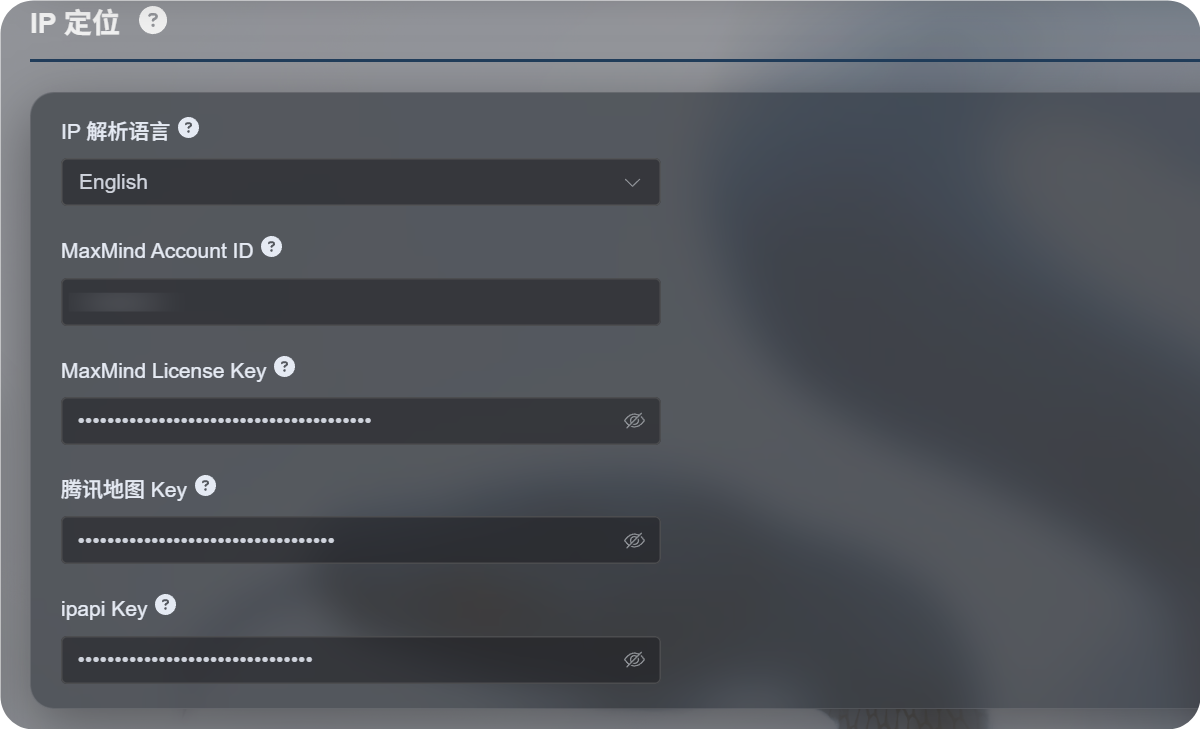
উপলভ্য সেটিংস
নতুন IP ভূ-অবস্থান প্রবাহ একটি মাত্র মানচিত্র পরিষেবার ওপর নির্ভর না করে একাধিক উৎস সমর্থন করে।
| সেটিং | উদ্দেশ্য |
|---|---|
| IP ভূ-অবস্থানের ভাষা | প্রদর্শনের ভাষা নির্বাচন করে, যেমন ইংরেজি, সরলীকৃত চীনা, জাপানি, ফরাসি ইত্যাদি। |
| MaxMind অ্যাকাউন্ট ID | MaxMind GeoLite Web Service-এর জন্য MaxMind অ্যাকাউন্ট ID। |
| MaxMind লাইসেন্স কী | MaxMind License Key। |
| Tencent Map কী | Tencent Location Service কী। চীনা ঠিকানা এবং চীনের মূল ভূখণ্ডের IP-এর জন্য উপযোগী। |
| ipapi কী | APILayer ipapi কী। বহু-ভাষিক IP ভূ-অবস্থান সমর্থন করে। |
শুধু যে পরিষেবাগুলো দরকার সেগুলো পূরণ করুন। সব ক্ষেত্র কনফিগার করার প্রয়োজন নেই।
কোনো কী না দিলে ImgHost বিল্ট-ইন ফ্রি উৎস ব্যবহার করার চেষ্টা করবে, তবে স্থিতিশীলতা, ভাষা সমর্থন এবং নির্ভুলতা নিজের কনফিগার করা পরিষেবার তুলনায় কম হতে পারে।
প্রস্তাবিত নির্বাচন
আপনার যদি প্রধানত চীনা ঠিকানা দরকার হয়:
- IP ভূ-অবস্থানের ভাষা সরলীকৃত চীনা করুন।
- Tencent Map কী কনফিগার করুন।
- বিকল্প উৎস হিসেবে MaxMind বা ipapi যোগ করতে পারেন।
আপনার যদি প্রধানত ইংরেজি বা বহু-ভাষিক ঠিকানা দরকার হয়:
- আপনার প্রয়োজনীয় ভাষা নির্বাচন করুন।
- MaxMind অ্যাকাউন্ট ID এবং লাইসেন্স কী কনফিগার করুন।
- আরও ভালো বহু-ভাষিক ফলাফল দরকার হলে ipapi কী যোগ করুন।
MaxMind সেটআপ
MaxMind-এর দরকার:
text
MaxMind Account ID
MaxMind License Key
MaxMind ড্যাশবোর্ডে অ্যাকাউন্ট ID খুঁজুন এবং License Keys পেজ থেকে লাইসেন্স কী তৈরি করুন।
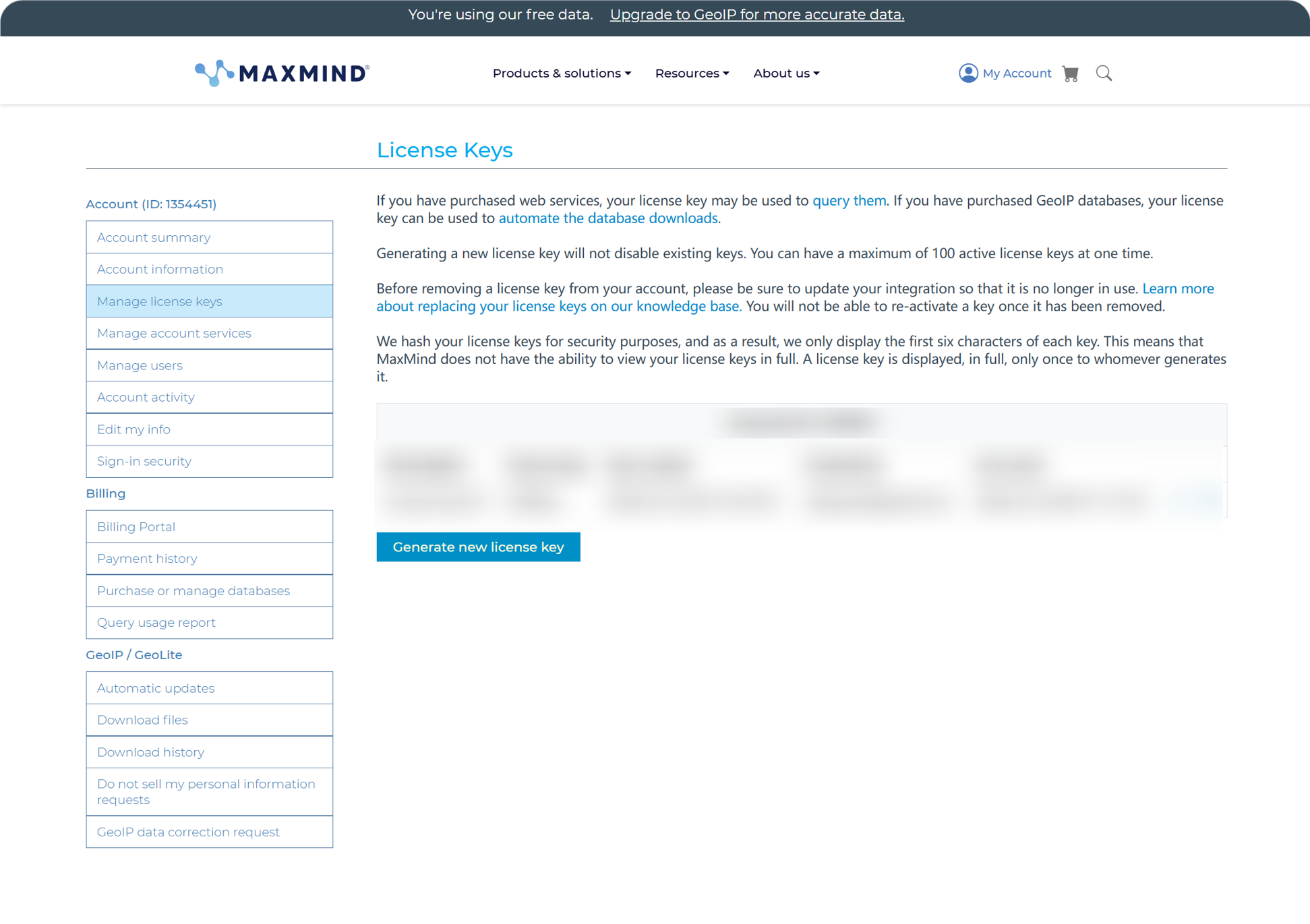
তৈরি করার পর অ্যাকাউন্ট ID এবং লাইসেন্স কী ImgHost-এ পেস্ট করে সংরক্ষণ করুন।
MaxMind-এর ফ্রি প্ল্যান দৈনন্দিন ব্যবহারের জন্য উপযোগী, তবে এতে অনুরোধের সীমা আছে। কোটা ছাড়িয়ে গেলে ImgHost অন্য উপলভ্য উৎস চেষ্টা করতে থাকে।
ipapi সেটআপ
ipapi একটি APILayer API Key ব্যবহার করে।
ipapi কনসোল খুলুন এবং সেখানে দেখানো API Key কপি করুন।
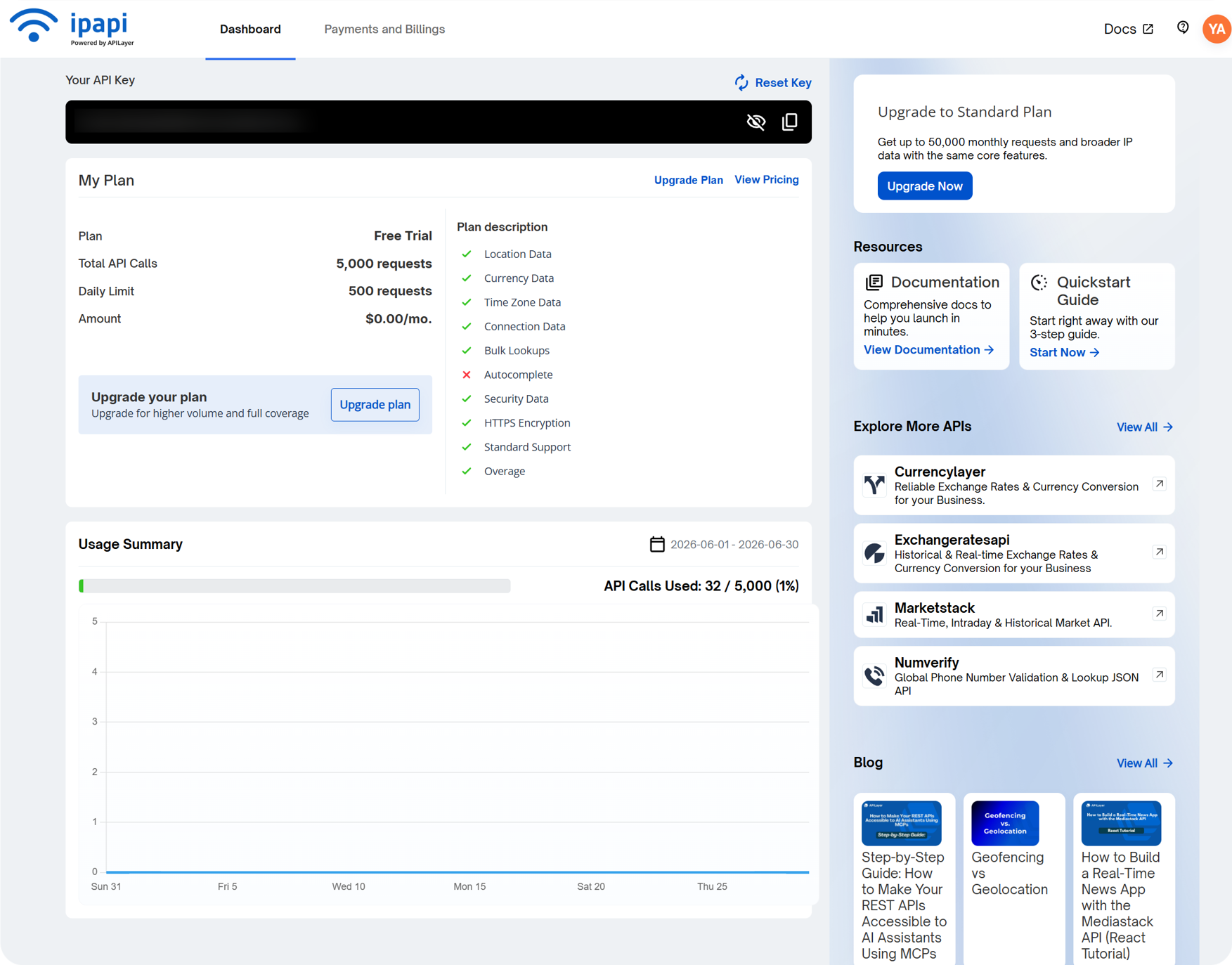
ImgHost-এর ipapi Key ক্ষেত্রে এটি পেস্ট করে সংরক্ষণ করুন।
ipapi বহু-ভাষিক IP ভূ-অবস্থান সমর্থন করে এবং নির্বাচিত ভাষায় ঠিকানা দেখাতে চাইলে উপযোগী। এর ফ্রি প্ল্যানেও অনুরোধের সীমা আছে। কোটা শেষ হলে ImgHost অন্য উপলভ্য উৎস চেষ্টা করতে থাকে।
Tencent Map কী সেটআপ
Tencent Map কী চীনা ঠিকানার জন্য উপযোগী, বিশেষ করে চীনের মূল ভূখণ্ডের IP-এর জন্য।
Tencent Location Service-এ কী তৈরি করার সময় চালু করুন:
text
WebServiceAPIতৈরি করার পর কীটি Tencent Map Key-এ পেস্ট করে সংরক্ষণ করুন।
শুধু মৌলিক চীনা IP ভূ-অবস্থান দরকার হলে Tencent Map কী দিয়েই শুরু করা যথেষ্ট।
ব্যবহারকারী ব্যবস্থাপনায় কী দেখবেন
ব্যবহারকারী ব্যবস্থাপনা অ্যাডমিন প্যানেলের ওপরের অংশ থেকে পাওয়া যায়।
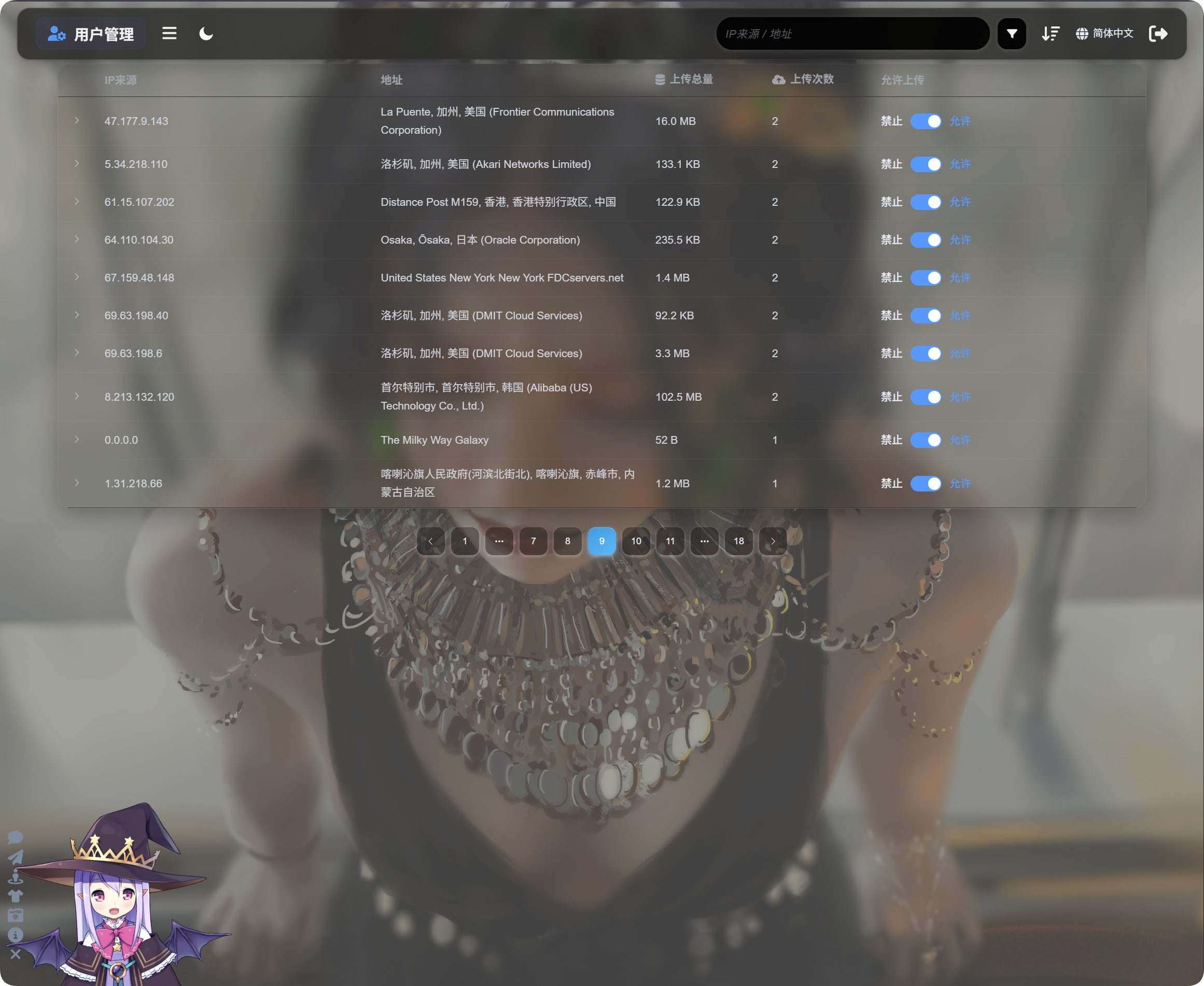
ব্যবহারকারী ব্যবস্থাপনা IP অনুযায়ী আপলোড কার্যকলাপ দেখায়:
| ক্ষেত্র | বিবরণ |
|---|---|
| IP উৎস | আপলোডকারীর উৎস IP। |
| ঠিকানা | IP থেকে নির্ণীত আনুমানিক অবস্থান। |
| মোট আপলোড আকার | এই IP থেকে আপলোড করা মোট ফাইল আকার। |
| আপলোড সংখ্যা | এই IP থেকে আপলোডের সংখ্যা। |
| আপলোড অনুমোদিত | চালু থাকলে আপলোড অনুমোদিত। বন্ধ থাকলে আপলোড অবরুদ্ধ। |
সেই IP থেকে আপলোড করা ফাইলের তালিকা খুলতে বাম দিকের তীর চিহ্নে ক্লিক করুন।
ফাইল তালিকায় ফাইলের নাম, প্রিভিউ, ফাইল আকার, মডারেশন ফলাফল, ফাইলের অবস্থা এবং আপলোড সময় দেখা যায়। আপলোড সন্দেহজনক মনে হলে আগে IP প্রসারিত করুন, ফাইল পর্যালোচনা করুন, তারপর পরবর্তী আপলোড বন্ধ করবেন কি না সিদ্ধান্ত নিন।
কোনো IP সন্দেহজনক হলে Upload allowed বন্ধ করুন। ভবিষ্যতের আপলোড সেই IP থেকে অবরুদ্ধ হবে।
অনুসন্ধান, সাজানো এবং উন্নত ফিল্টার
ব্যবহারকারী ব্যবস্থাপনার ওপরে IP উৎস বা ঠিকানা দিয়ে অনুসন্ধান করুন।
সাম্প্রতিক আপলোডকারী, বেশি-ঘনঘন আপলোডকারী অথবা বেশি ব্যবহৃত IP খুঁজতে সময়, আপলোড সংখ্যা অথবা মোট আপলোড আকার অনুযায়ী সাজান।
আরও গভীর তদন্তের জন্য উন্নত ফিল্টার খুলুন।
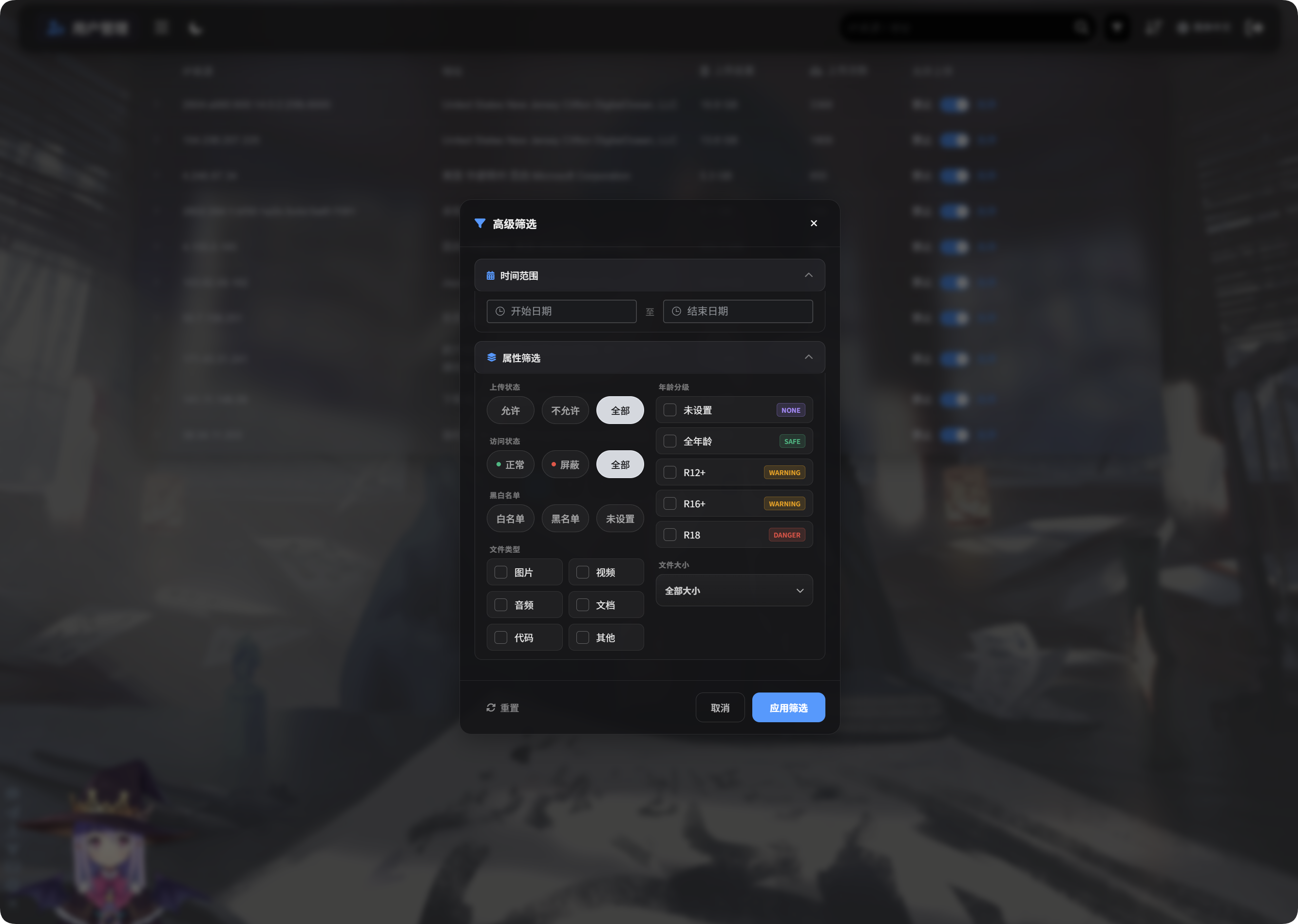
উন্নত ফিল্টার সমর্থন করে:
| ফিল্টার | ব্যবহার |
|---|---|
| সময়সীমা | নির্বাচিত সময়ের মধ্যে ফাইল আপলোড করা IP দেখায়। |
| অ্যাক্সেস অবস্থা | স্বাভাবিক, অবরুদ্ধ এবং অনুরূপ অবস্থা অনুযায়ী ফিল্টার করে। |
| অনুমোদন/অবরোধ তালিকা | অনুমোদন তালিকা, অবরোধ তালিকা অথবা নির্ধারিত নয় অনুযায়ী ফিল্টার করে। |
| ফাইলের ধরন | ছবি, ভিডিও, অডিও, ডকুমেন্ট, কোড বা অন্যান্য ফাইল আপলোড করা IP দেখায়। |
| ফাইল আকার | আপলোড করা ফাইল আকারের সীমা অনুযায়ী ফিল্টার করে। |
| বয়সভিত্তিক রেটিং | নির্ধারিত নয়, General, R12+, R16+, R18 এবং অনুরূপ রেটিং অনুযায়ী ফিল্টার করে। |
| ফাইলের অবস্থা | অস্বাভাবিক ফাইল তদন্ত করতে বর্তমান ফাইল অবস্থা অনুযায়ী ফিল্টার করে। |
প্রয়োগ করতে Apply Filters-এ ক্লিক করুন। সব ডেটায় ফিরতে Reset ব্যবহার করুন।
মোবাইল দৃশ্য
মোবাইলে ব্যবহারকারী ব্যবস্থাপনা কার্ড লেআউটে বদলে যায়।
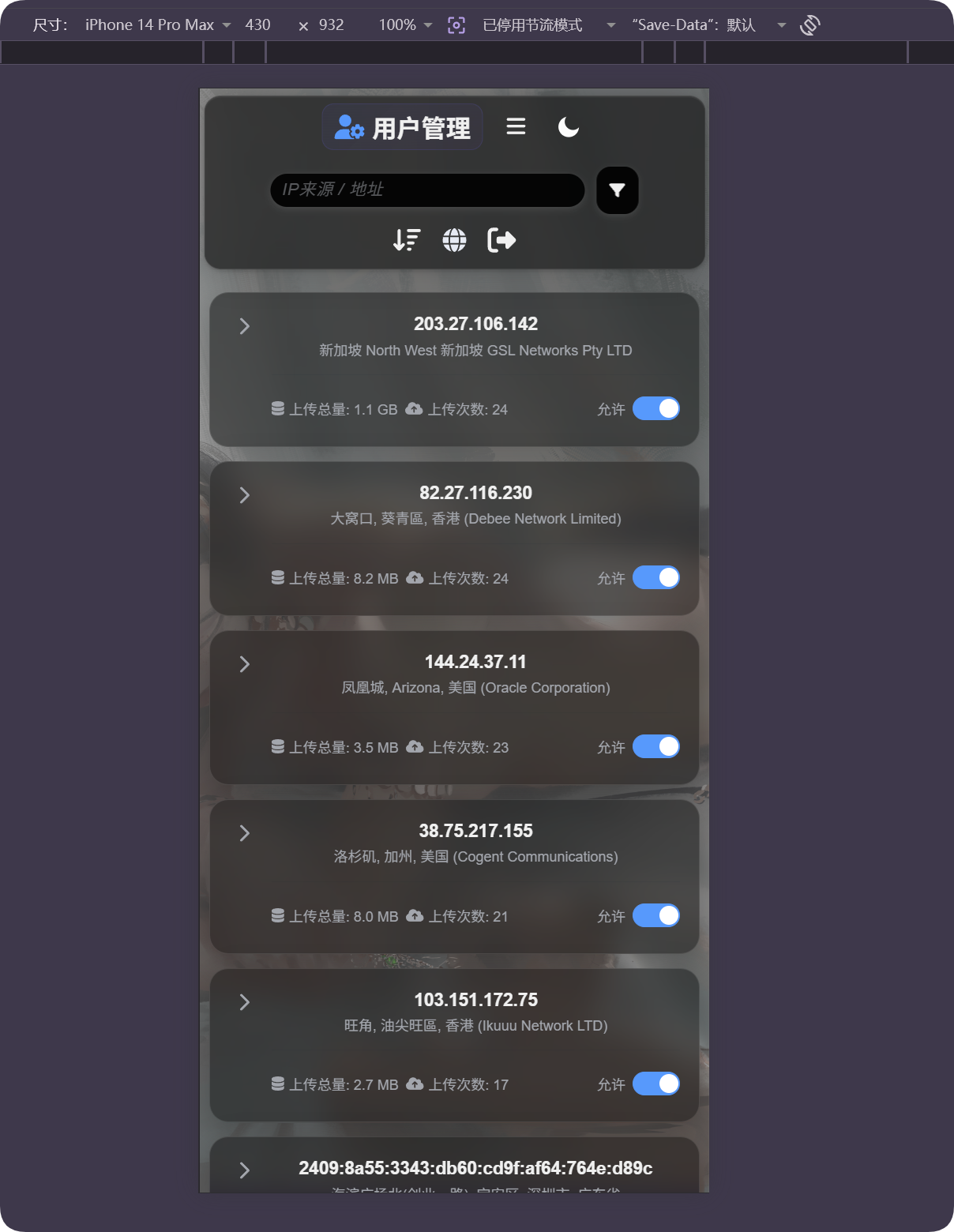
প্রতিটি কার্ডে IP, ঠিকানা, মোট আপলোড আকার, আপলোড সংখ্যা এবং আপলোড অনুমোদনের সুইচ দেখা যায়। অনুভূমিক টেবিল স্ক্রল ছাড়াই ব্যবহারকারী পরিচালনা করা যায়।
অবস্থান ভুল মনে হলে
IP ভূ-অবস্থান আনুমানিক। এটি নির্ভুল রাস্তার ঠিকানা নয়।
ব্যবহারকারী যদি প্রক্সি, ডেটা সেন্টার, ক্লাউড সার্ভার অথবা সীমান্ত-পারাপার নেটওয়ার্কের পেছনে থাকে, তাহলে প্রদর্শিত অবস্থান প্রকৃত অবস্থান থেকে ভিন্ন হতে পারে।
এই বৈশিষ্ট্যটি আনুমানিক উৎস বোঝা, অস্বাভাবিক আপলোড খুঁজে বের করা এবং অবরোধের সিদ্ধান্তে সহায়তার জন্য ব্যবহার করুন। এটিকে নির্ভুল ট্র্যাকিং হিসেবে ধরে নেবেন না।
সাধারণ ঘটনা
| ঘটনা | অর্থ |
|---|---|
| ঠিকানা খালি | IP এখনো নির্ণয় হয়নি, অথবা বর্তমান উৎস সাময়িকভাবে অপ্রাপ্য। |
| ঠিকানার ভাষা ভুল | IP ভূ-অবস্থানের ভাষা এবং সেই ভাষা সমর্থনকারী উৎস কনফিগার করা আছে কি না পরীক্ষা করুন। |
| ঠিকানায় ডেটা সেন্টার দেখা যাচ্ছে | অনেক প্রক্সি, ক্লাউড সার্ভার এবং ক্রলার ডেটা সেন্টার বা ISP ঠিকানা হিসেবে দেখা যায়। |
| আপলোড সংখ্যা বেশি | এই IP সতর্কভাবে পর্যালোচনা করুন এবং প্রয়োজনে আপলোড বন্ধ করুন। |
| মোট আপলোড আকার বড় | সাজান বা ফিল্টার করুন, IP প্রসারিত করুন এবং নির্দিষ্ট ফাইল পরীক্ষা করুন। |
| অবরোধের পর পুনরুদ্ধার দরকার | Upload allowed আবার চালু করুন। |
দ্রুত ধাপ
text
Open IP Geolocation in Other Settings
-> Choose IP geolocation language
-> Fill MaxMind, Tencent Map, or ipapi credentials as needed
-> Save settings
-> Open User Management
-> Review IP source, address, total upload size, and upload count
-> Use search, sort, or advanced filters to find abnormal IPs
-> Allow or block uploads as needed