IP တည်နေရာခန့်မှန်းခြင်းနှင့် အသုံးပြုသူစီမံခန့်ခွဲမှု
IP တည်နေရာခန့်မှန်းခြင်းသည် အပ်လုဒ်တင်သူမှတ်တမ်းများ၊ ဝင်ရောက်သုံးစွဲသောစက်များနှင့် အလားတူမှတ်တမ်းများထဲရှိ IP လိပ်စာများကို ခန့်မှန်းတည်နေရာများအဖြစ် ပြောင်းပေးသည်။
သတ်မှတ်ပြီးနောက် စီမံခန့်ခွဲရေးပန်နယ်တွင် အပ်လုဒ်တင်သည့်ရင်းမြစ်နှင့် ဝင်ရောက်သုံးစွဲသည့်ရင်းမြစ်များကို ပိုမိုရှင်းလင်းစွာ မြင်နိုင်သည်။ အသုံးပြုသူစီမံခန့်ခွဲမှုမှလည်း သံသယဖြစ်ဖွယ် IP လိပ်စာများအတွက် အပ်လုဒ်တင်ခွင့်ကို ပိတ်ဆို့ခြင်း သို့မဟုတ် ပြန်လည်ဖွင့်ခြင်း ပြုလုပ်နိုင်သည်။
မည်သည့်နေရာတွင် သတ်မှတ်ရမည်နည်း
ဖွင့်ပါ:
text
System Settings -> Other Settings -> IP Geolocation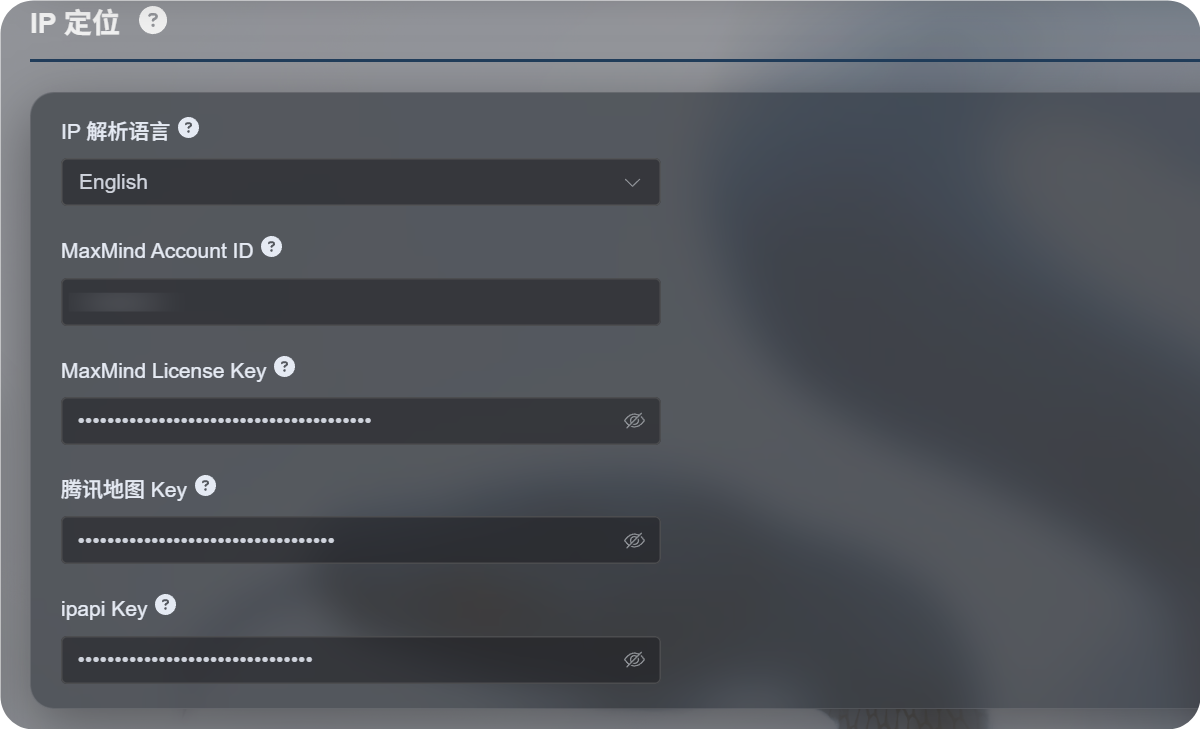
ရနိုင်သော ဆက်တင်များ
IP တည်နေရာခန့်မှန်းခြင်း လုပ်ငန်းစဉ်အသစ်သည် မြေပုံဝန်ဆောင်မှုတစ်ခုတည်းကိုသာ မမှီခိုတော့ဘဲ ရင်းမြစ်များစွာကို ထောက်ပံ့သည်။
| ဆက်တင် | ရည်ရွယ်ချက် |
|---|---|
| IP တည်နေရာ ဘာသာစကား | အင်္ဂလိပ်၊ တရုတ်ရိုးရှင်း၊ ဂျပန်၊ ပြင်သစ် စသည်ဖြင့် ပြသမည့်ဘာသာစကားကို ရွေးသည်။ |
| MaxMind Account ID | MaxMind GeoLite Web Service အတွက် MaxMind အကောင့် ID။ |
| MaxMind License Key | MaxMind ၏ License Key။ |
| Tencent Map Key | Tencent Location Service ၏ ကီး။ တရုတ်လိပ်စာများနှင့် တရုတ်ပြည်မ IP များအတွက် အသုံးဝင်သည်။ |
| ipapi Key | APILayer ipapi key။ ဘာသာစကားအများအပြားဖြင့် IP တည်နေရာခန့်မှန်းခြင်းကို ထောက်ပံ့သည်။ |
လိုအပ်သော ဝန်ဆောင်မှုများကိုသာ ဖြည့်ပါ။ အကွက်အားလုံးကို သတ်မှတ်ရန် မလိုပါ။
key မထည့်ထားပါက ImgHost သည် ပါရှိပြီးသား အခမဲ့ရင်းမြစ်များကို ဆက်လက်စမ်းသုံးမည်ဖြစ်သော်လည်း တည်ငြိမ်မှု၊ ဘာသာစကားထောက်ပံ့မှုနှင့် တိကျမှုသည် သင်ကိုယ်တိုင် သတ်မှတ်ထားသော ဝန်ဆောင်မှုထက် နိမ့်နိုင်သည်။
အကြံပြု ရွေးချယ်မှုများ
အဓိကအားဖြင့် တရုတ်လိပ်စာများ လိုအပ်ပါက:
- IP တည်နေရာ ဘာသာစကားကို တရုတ်ရိုးရှင်းအဖြစ် သတ်မှတ်ပါ။
- Tencent Map Key ကို သတ်မှတ်ပါ။
- လိုအပ်ပါက MaxMind သို့မဟုတ် ipapi ကို အရန်ရင်းမြစ်အဖြစ် ထည့်ပါ။
အဓိကအားဖြင့် အင်္ဂလိပ် သို့မဟုတ် ဘာသာစကားအများအပြားဖြင့် လိပ်စာများ လိုအပ်ပါက:
- လိုအပ်သော ဘာသာစကားကို ရွေးပါ။
- MaxMind Account ID နှင့် License Key ကို သတ်မှတ်ပါ။
- ပိုကောင်းသော ဘာသာစကားအများအပြားရလဒ်များ လိုအပ်ပါက ipapi Key ကို ထည့်ပါ။
MaxMind သတ်မှတ်ခြင်း
MaxMind အတွက် အောက်ပါတို့ လိုအပ်သည်:
text
MaxMind Account ID
MaxMind License Key
MaxMind ဒက်ရှ်ဘုတ်တွင် အကောင့် ID ကို ရှာပြီး License Keys စာမျက်နှာမှ License Key ကို ဖန်တီးပါ။
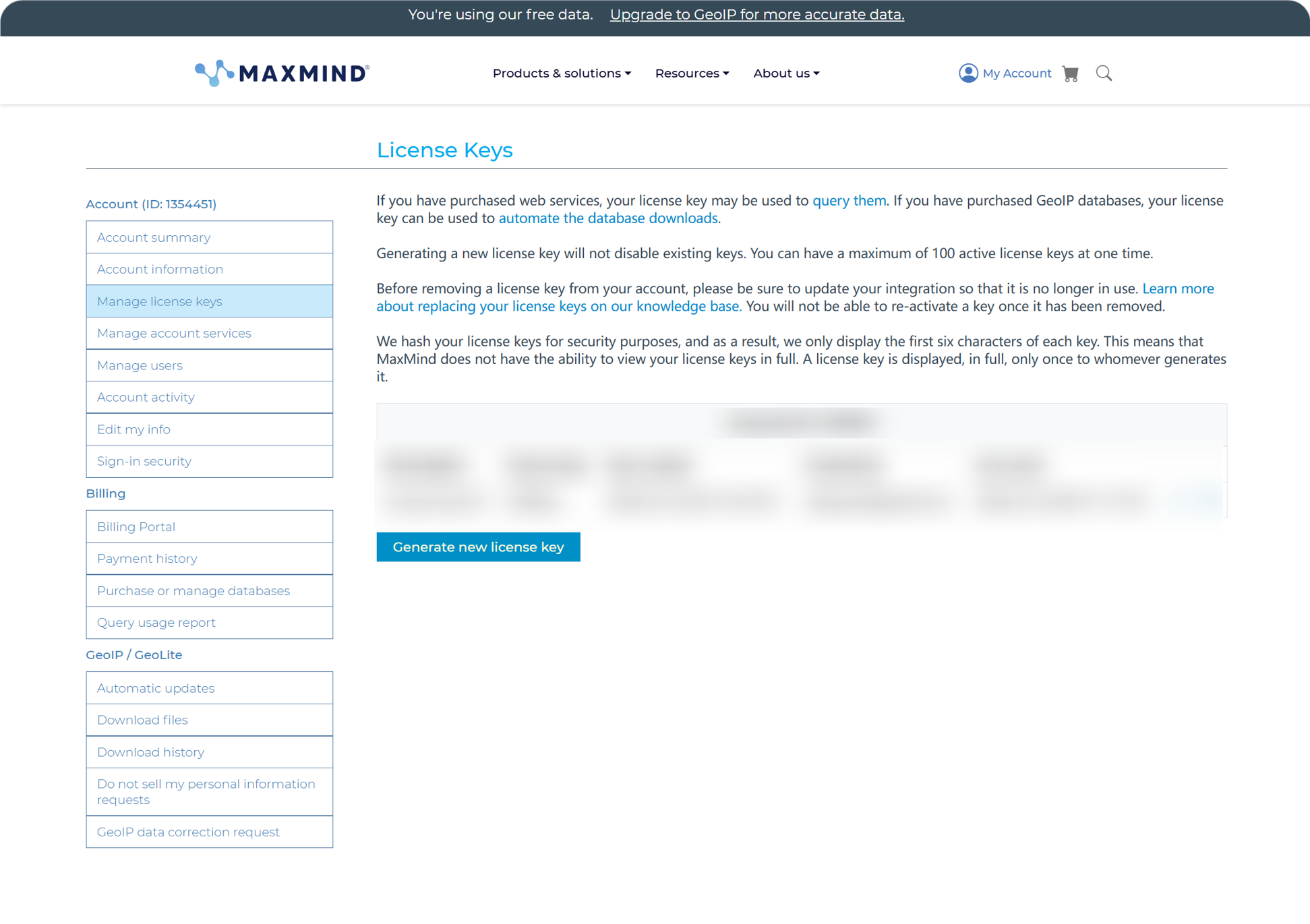
ဖန်တီးပြီးနောက် Account ID နှင့် License Key ကို ImgHost ထဲသို့ ထည့်ပြီး သိမ်းပါ။
MaxMind ၏ အခမဲ့အစီအစဉ်သည် နေ့စဉ်အသုံးပြုရန် သင့်တော်သော်လည်း တောင်းဆိုမှုအကြိမ်ရေ ကန့်သတ်ချက်ရှိသည်။ ခွဲတမ်းကျော်သွားပါက ImgHost သည် ရရှိနိုင်သော အခြားရင်းမြစ်များကို ဆက်လက်စမ်းသုံးမည်။
ipapi သတ်မှတ်ခြင်း
ipapi သည် APILayer API Key ကို အသုံးပြုသည်။
ipapi ကွန်ဆိုးလ်ကို ဖွင့်ပြီး ထိုနေရာတွင် ပြထားသော API Key ကို ကူးယူပါ။
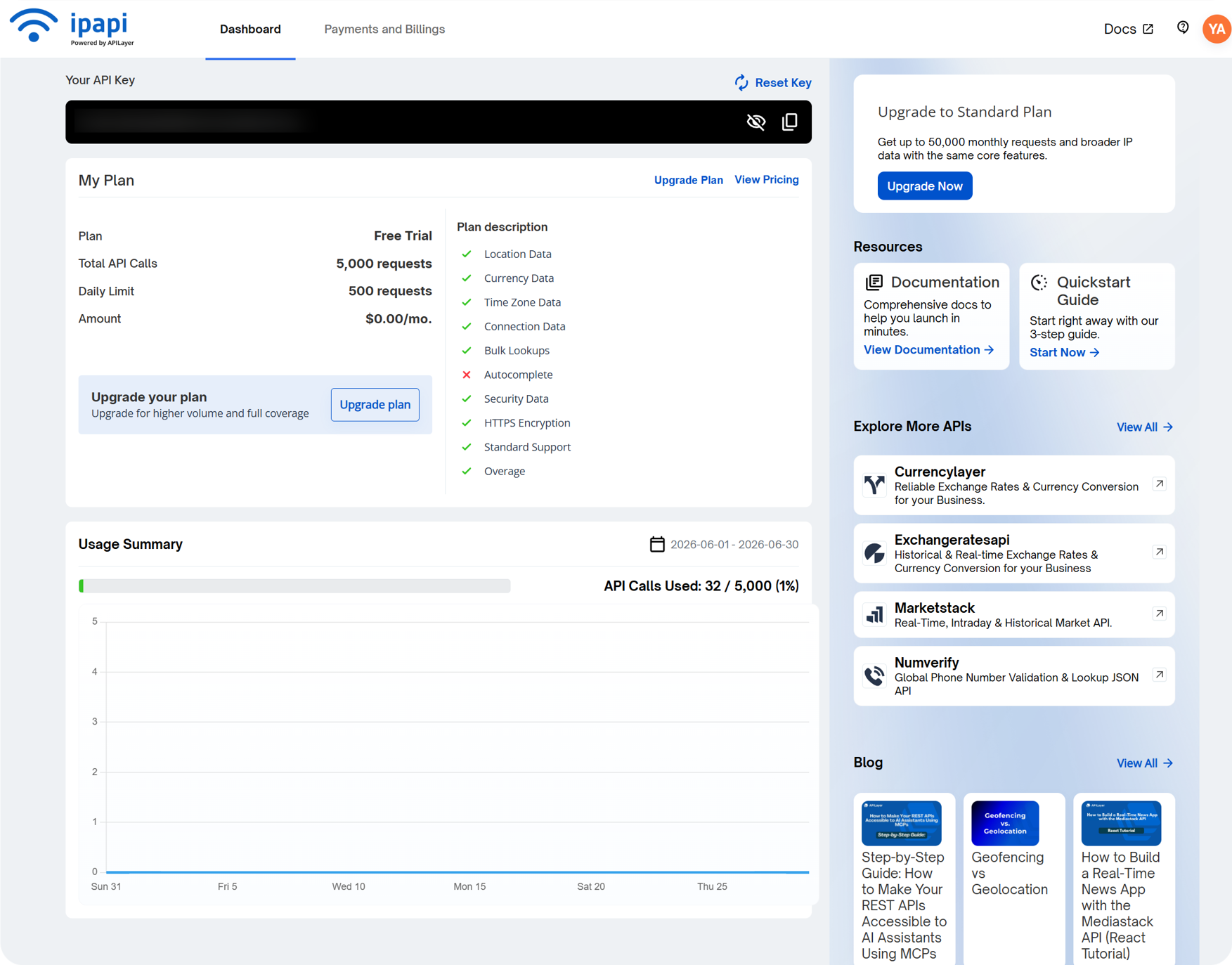
၎င်းကို ImgHost ထဲရှိ ipapi Key အကွက်သို့ ထည့်ပြီး သိမ်းပါ။
ipapi သည် ဘာသာစကားအများအပြားဖြင့် IP တည်နေရာခန့်မှန်းခြင်းကို ထောက်ပံ့ပြီး ရွေးထားသောဘာသာစကားဖြင့် လိပ်စာများ ပြလိုသည့်အခါ အသုံးဝင်သည်။ ၎င်း၏ အခမဲ့အစီအစဉ်တွင်လည်း တောင်းဆိုမှုအကြိမ်ရေ ကန့်သတ်ချက်ရှိသည်။ ခွဲတမ်းကုန်သွားပါက ImgHost သည် ရရှိနိုင်သော အခြားရင်းမြစ်များကို ဆက်လက်စမ်းသုံးမည်။
Tencent Map Key သတ်မှတ်ခြင်း
Tencent Map Key သည် တရုတ်လိပ်စာများ၊ အထူးသဖြင့် တရုတ်ပြည်မ IP များအတွက် အသုံးဝင်သည်။
Tencent Location Service တွင် ကီး ဖန်တီးသောအခါ အောက်ပါတို့ကို ဖွင့်ပါ:
text
WebServiceAPIဖန်တီးပြီးနောက် key ကို Tencent Map Key ထဲသို့ ထည့်ပြီး သိမ်းပါ။
အခြေခံ တရုတ် IP တည်နေရာခန့်မှန်းခြင်းသာ လိုအပ်ပါက Tencent Map Key သည် စတင်အသုံးပြုရန် လုံလောက်သည်။
အသုံးပြုသူစီမံခန့်ခွဲမှုတွင် စစ်ဆေးရမည့်အရာများ
အသုံးပြုသူစီမံခန့်ခွဲမှုကို စီမံခန့်ခွဲရေးပန်နယ်၏ အပေါ်ပိုင်းမှ အသုံးပြုနိုင်သည်။
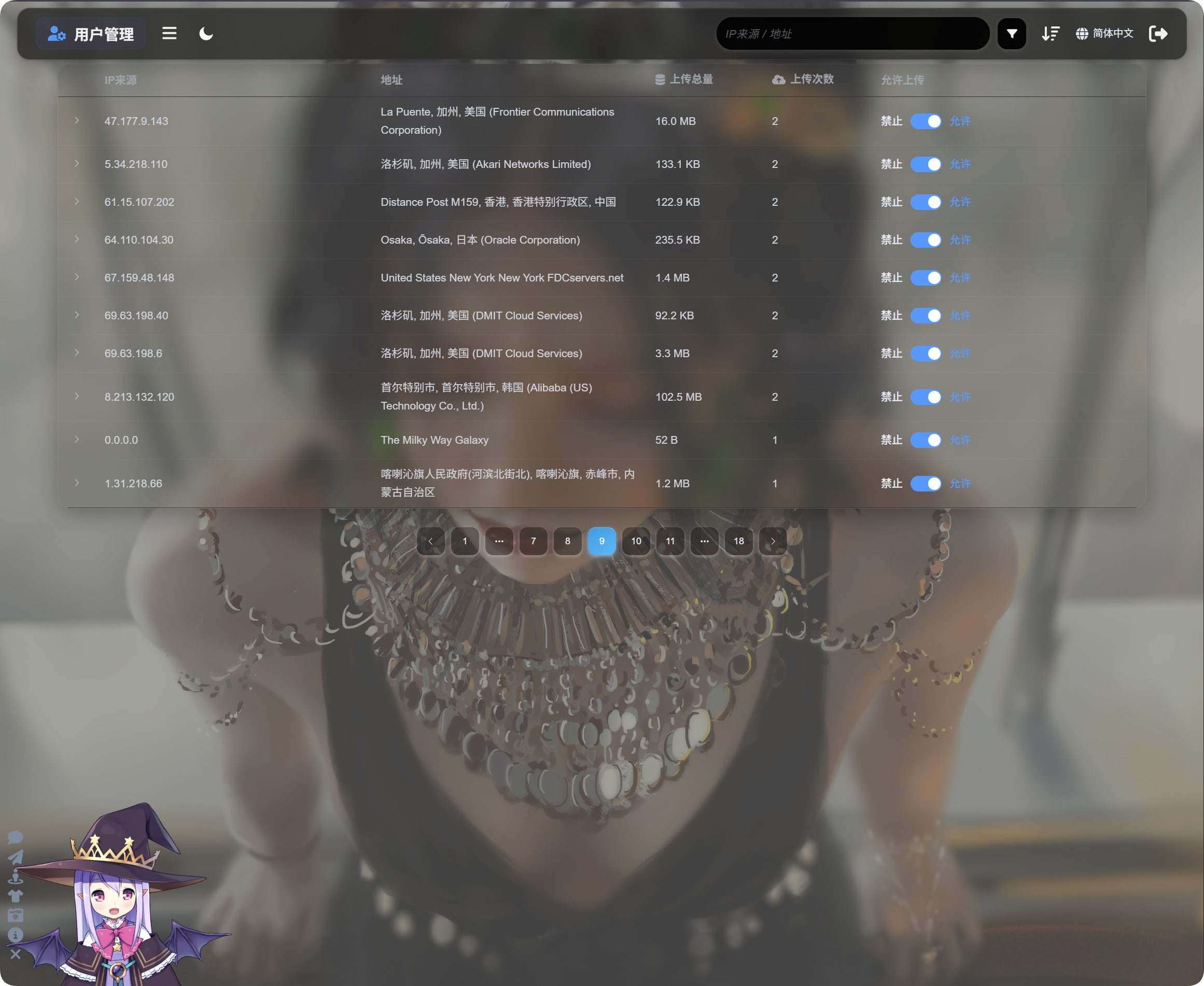
အသုံးပြုသူစီမံခန့်ခွဲမှုသည် IP အလိုက် အပ်လုဒ်လုပ်ဆောင်ချက်ကို ပြသသည်။
| အကွက် | ဖော်ပြချက် |
|---|---|
| IP ရင်းမြစ် | အပ်လုဒ်တင်သူ၏ ရင်းမြစ် IP။ |
| လိပ်စာ | IP မှ ဖြေရှင်းထားသော ခန့်မှန်းတည်နေရာ။ |
| အပ်လုဒ်စုစုပေါင်းအရွယ်အစား | ဤ IP မှ အပ်လုဒ်တင်ထားသော ဖိုင်စုစုပေါင်းအရွယ်အစား။ |
| အပ်လုဒ်အကြိမ်ရေ | ဤ IP မှ အပ်လုဒ်တင်ခဲ့သည့် အကြိမ်ရေ။ |
| အပ်လုဒ်ခွင့်ပြုမှု | ဖွင့်ထားပါက အပ်လုဒ်ခွင့်ပြုထားသည်။ ပိတ်ထားပါက အပ်လုဒ်ပိတ်ဆို့ထားသည်။ |
ဘယ်ဘက်ရှိ မြှားကို နှိပ်၍ ထို IP မှ အပ်လုဒ်တင်ထားသော ဖိုင်စာရင်းကို ချဲ့ကြည့်ပါ။
ဖိုင်စာရင်းတွင် ဖိုင်အမည်၊ အစမ်းကြည့်ပုံ၊ ဖိုင်အရွယ်အစား၊ စစ်ဆေးမှုရလဒ်၊ ဖိုင်အခြေအနေနှင့် အပ်လုဒ်တင်ချိန်တို့ကို ပြသည်။ အပ်လုဒ်များ သံသယဖြစ်ဖွယ် ဖြစ်ပါက IP ကို အရင်ချဲ့ကြည့်ပြီး ဖိုင်များကို စစ်ဆေးပါ။ ထို့နောက် နောက်ထပ်အပ်လုဒ်များကို ပိတ်ဆို့မည်ရှိမရှိ ဆုံးဖြတ်ပါ။
IP တစ်ခု သံသယဖြစ်ဖွယ် ဖြစ်ပါက Upload allowed ကို ပိတ်ပါ။ ထို IP မှ နောင်လာမည့် အပ်လုဒ်များကို ပိတ်ဆို့မည်။
ရှာဖွေခြင်း၊ စီခြင်းနှင့် အဆင့်မြင့်စစ်ထုတ်မှုများ
အသုံးပြုသူစီမံခန့်ခွဲမှု၏ အပေါ်ပိုင်းတွင် IP ရင်းမြစ် သို့မဟုတ် လိပ်စာဖြင့် ရှာဖွေနိုင်သည်။
မကြာသေးမီက အပ်လုဒ်တင်သူများ၊ အကြိမ်ရေမြင့် အပ်လုဒ်တင်သူများ သို့မဟုတ် အသုံးပြုမှုများသော IP များကို ရှာရန် အချိန်၊ အပ်လုဒ်အကြိမ်ရေ သို့မဟုတ် အပ်လုဒ်စုစုပေါင်းအရွယ်အစားအလိုက် စီပါ။
ပိုမိုနက်ရှိုင်းစွာ စစ်ဆေးရန် အဆင့်မြင့်စစ်ထုတ်မှုများကို ဖွင့်ပါ။
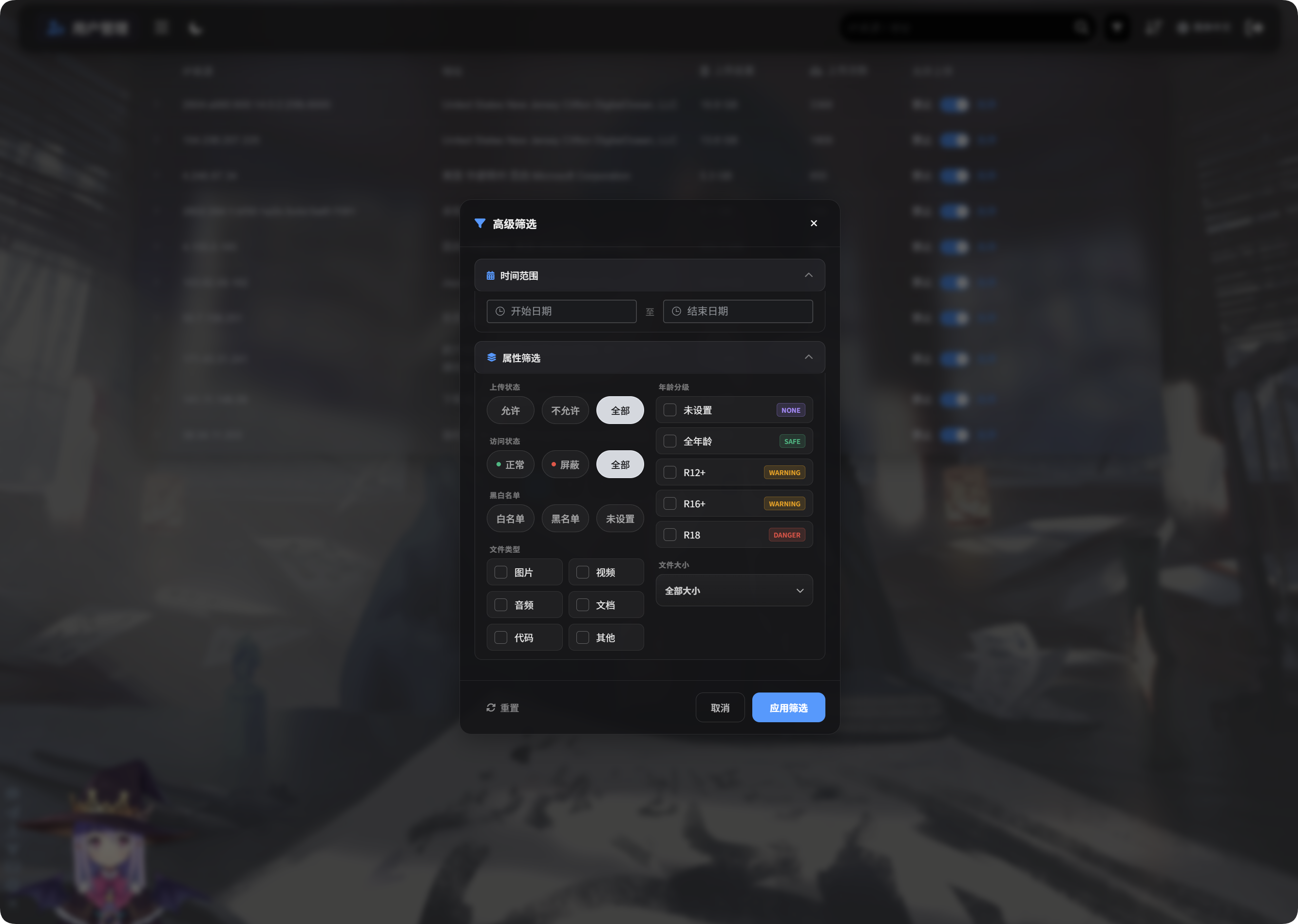
အဆင့်မြင့်စစ်ထုတ်မှုများသည် အောက်ပါတို့ကို ထောက်ပံ့သည်။
| စစ်ထုတ်မှု | အသုံးပြုပုံ |
|---|---|
| အချိန်အပိုင်းအခြား | ရွေးထားသောကာလအတွင်း ဖိုင်များ အပ်လုဒ်တင်ခဲ့သော IP များကို ပြသည်။ |
| ဝင်ရောက်မှုအခြေအနေ | ပုံမှန်၊ ပိတ်ဆို့ထားသောနှင့် အလားတူအခြေအနေများအလိုက် စစ်ထုတ်သည်။ |
| ခွင့်ပြုစာရင်း/ပိတ်စာရင်း | ခွင့်ပြုစာရင်း၊ ပိတ်စာရင်း သို့မဟုတ် မသတ်မှတ်ထားသောအခြေအနေအလိုက် စစ်ထုတ်သည်။ |
| ဖိုင်အမျိုးအစား | ပုံ၊ ဗီဒီယို၊ အသံ၊ စာရွက်စာတမ်း၊ ကုဒ် သို့မဟုတ် အခြားဖိုင်များ အပ်လုဒ်တင်ခဲ့သော IP များကို ပြသည်။ |
| ဖိုင်အရွယ်အစား | အပ်လုဒ်တင်ထားသော ဖိုင်အရွယ်အစားအပိုင်းအခြားအလိုက် စစ်ထုတ်သည်။ |
| အသက်အဆင့်သတ်မှတ်ချက် | မသတ်မှတ်ထားသော၊ General၊ R12+၊ R16+၊ R18 နှင့် အလားတူအဆင့်များအလိုက် စစ်ထုတ်သည်။ |
| ဖိုင်အခြေအနေ | မမှန်ကန်သောဖိုင်များကို စစ်ဆေးရန် လက်ရှိဖိုင်အခြေအနေအလိုက် စစ်ထုတ်သည်။ |
အသုံးပြုရန် Apply Filters ကို နှိပ်ပါ။ ဒေတာအားလုံးသို့ ပြန်သွားရန် Reset ကို အသုံးပြုပါ။
မိုဘိုင်းမြင်ကွင်း
မိုဘိုင်းတွင် အသုံးပြုသူစီမံခန့်ခွဲမှုသည် ကတ်ပုံစံသို့ ပြောင်းသည်။
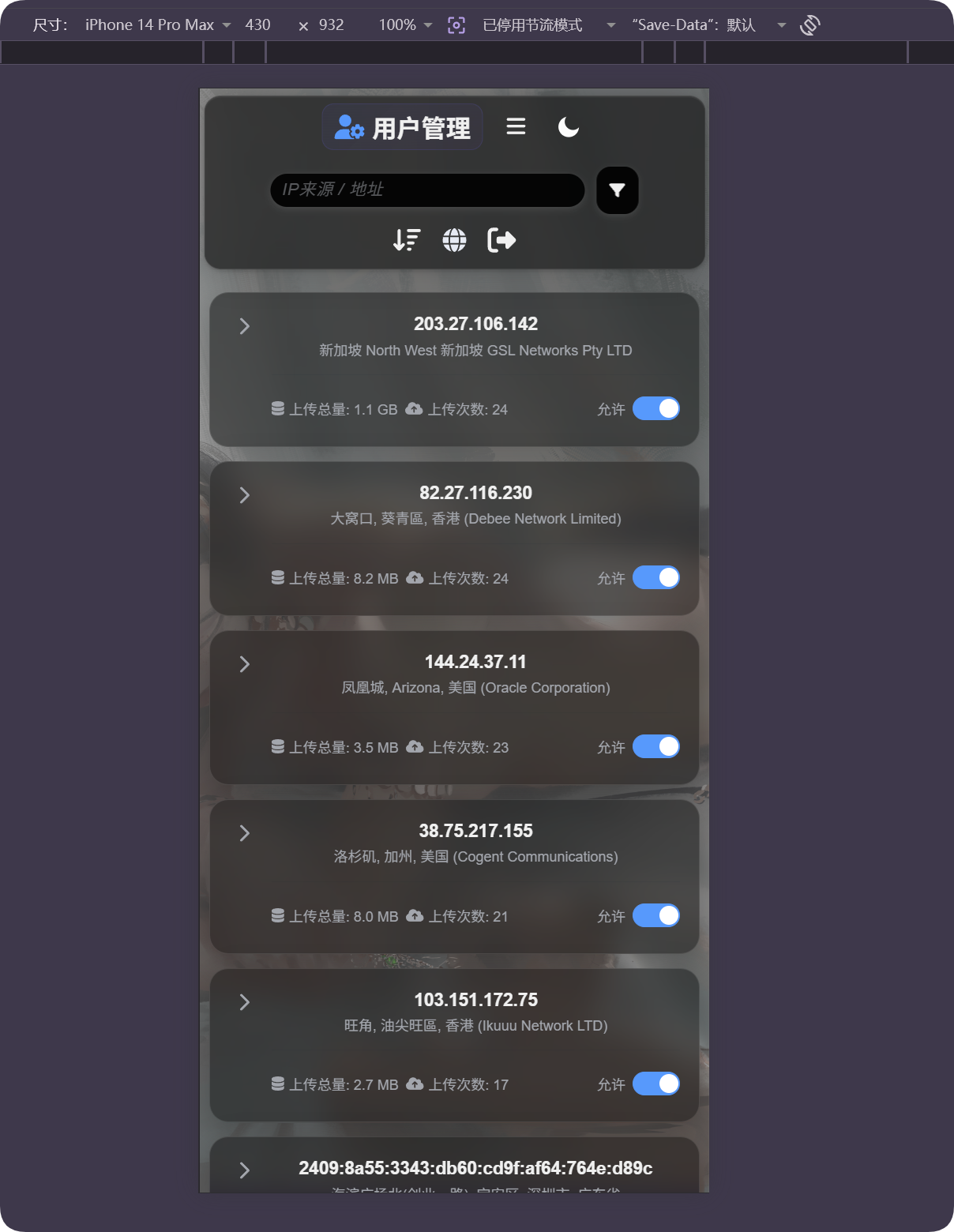
ကတ်တစ်ခုစီတွင် IP၊ လိပ်စာ၊ အပ်လုဒ်စုစုပေါင်းအရွယ်အစား၊ အပ်လုဒ်အကြိမ်ရေနှင့် အပ်လုဒ်ခွင့်ပြုမှုခလုတ်ကို ပြသည်။ ဇယားကို ဘေးတိုက်လှိမ့်ရန် မလိုဘဲ အသုံးပြုသူများကို စီမံနိုင်သည်။
တည်နေရာ မှားနေသည်ဟု ထင်ပါက
IP တည်နေရာခန့်မှန်းခြင်းသည် ခန့်မှန်းတည်နေရာသာ ဖြစ်သည်။ တိကျသော လမ်းလိပ်စာ မဟုတ်ပါ။
အသုံးပြုသူသည် proxy၊ ဒေတာစင်တာ၊ cloud server သို့မဟုတ် နိုင်ငံဖြတ်ကျော်ကွန်ရက်နောက်ကွယ်တွင် ရှိပါက ပြသထားသောတည်နေရာသည် အမှန်တကယ်တည်နေရာနှင့် ကွာခြားနိုင်သည်။
ဤလုပ်ဆောင်ချက်ကို မူလရင်းမြစ်ကို အကြမ်းဖျင်း နားလည်ရန်၊ မမှန်ကန်သောအပ်လုဒ်များကို ရှာရန်နှင့် ပိတ်ဆို့မှုဆုံးဖြတ်ချက်များတွင် အကူအညီဖြစ်စေရန် အသုံးပြုပါ။ ၎င်းကို တိကျသောခြေရာခံကိရိယာအဖြစ် မယူဆပါနှင့်။
တွေ့ရလေ့ရှိသော အခြေအနေများ
| အခြေအနေ | အဓိပ္ပါယ် |
|---|---|
| လိပ်စာ အလွတ် | IP ကို မဖြေရှင်းရသေးနိုင်သည် သို့မဟုတ် လက်ရှိရင်းမြစ်သည် ယာယီမရနိုင်ပါ။ |
| လိပ်စာဘာသာစကား မှားနေသည် | IP တည်နေရာ ဘာသာစကားနှင့် ထိုဘာသာစကားကို ထောက်ပံ့သောရင်းမြစ် သတ်မှတ်ထားရှိမရှိ စစ်ဆေးပါ။ |
| လိပ်စာသည် ဒေတာစင်တာကို ပြသည် | proxy၊ cloud server နှင့် crawler အများအပြားသည် ဒေတာစင်တာ သို့မဟုတ် ISP လိပ်စာများအဖြစ် ပေါ်နိုင်သည်။ |
| အပ်လုဒ်အကြိမ်ရေ မြင့်သည် | ဤ IP ကို ဂရုတစိုက် စစ်ဆေးပြီး လိုအပ်ပါက အပ်လုဒ်များကို ပိတ်ဆို့ပါ။ |
| အပ်လုဒ်စုစုပေါင်းအရွယ်အစား ကြီးသည် | စီခြင်း သို့မဟုတ် စစ်ထုတ်ခြင်း ပြုလုပ်ပါ။ IP ကို ချဲ့ပြီး သက်ဆိုင်ရာဖိုင်များကို စစ်ဆေးပါ။ |
| ပိတ်ဆို့ပြီးနောက် ပြန်ဖွင့်ရန် လိုသည် | Upload allowed ကို ပြန်ဖွင့်ပါ။ |
အမြန်လုပ်ငန်းစဉ်
text
Open IP Geolocation in Other Settings
-> Choose IP geolocation language
-> Fill MaxMind, Tencent Map, or ipapi credentials as needed
-> Save settings
-> Open User Management
-> Review IP source, address, total upload size, and upload count
-> Use search, sort, or advanced filters to find abnormal IPs
-> Allow or block uploads as needed