தானியக்க குறிச்சொல் சேர்த்தல்
தானியக்க குறிச்சொல் சேர்த்தல் இங்கு அமைக்கப்படுகிறது:
text
System Settings -> Other Settings -> Auto Taggingஇது படங்களுக்கு தானாக குறிச்சொற்களை உருவாக்குகிறது. தேடல், சீரற்ற படம் வடிகட்டல், பொது கேலரி வடிகட்டல், வயது மதிப்பீட்டின் அடிப்படையிலான அணுகல் கட்டுப்பாடு ஆகியவற்றில் இக்குறிச்சொற்கள் பயன்படும்.
தானியக்க குறிச்சொல் சேர்த்தல் செய்யக்கூடியவை
| அம்சம் | விளக்கம் |
|---|---|
| உள்ளடக்க குறிச்சொற்களை உருவாக்குதல் | மனிதர்கள், காட்சிகள், பொருட்கள், கலைப் பாணி மற்றும் இதற்கு ஒத்த காட்சி உள்ளடக்கங்களுக்கு குறிச்சொற்களை சேர்க்கும். |
| கதாபாத்திர குறிச்சொற்களை உருவாக்குதல் | அனிமே படங்கள் மற்றும் விளக்கப்படங்களுக்கு பயனுள்ளது. |
| திசை குறிச்சொற்களை சேர்த்தல் | landscape, portrait அல்லது square சேர்க்கும். |
| பட மதிப்பீட்டை சேர்த்தல் | பொதுவான, உணர்வுப்பூர்வமான, சந்தேகத்திற்குரிய அல்லது வெளிப்படையான உள்ளடக்கங்களுக்கு G/S/Q/E மதிப்பீட்டு முடிவுகளை சேமிக்கும். |
| பதிவேற்றும்போது தானியக்க குறிச்சொல் | புதியதாக பதிவேற்றப்படும் படங்கள் தானாக குறிச்சொல் செயல்முறைக்குள் செல்கின்றன. |
| தொகுதி குறிச்சொல் சேர்த்தல் | அனைத்து கோப்புறைகளிலோ தேர்ந்தெடுத்த கோப்புறைகளிலோ உள்ள பழைய படங்களுக்கு குறிச்சொற்களை சேர்க்கும். |
முதலில் தேவையானவை
அணுகக்கூடிய குறைந்தது ஒரு Hugging Face Space URL-ஐ தயார் செய்யவும்.
பரிந்துரைக்கப்படும் முறை: SmilingWolf-ன் wd-tagger Space-ஐ உங்கள் சொந்த Hugging Face கணக்கில் நகலெடுக்கவும்:
text
https://huggingface.co/spaces/SmilingWolf/wd-taggerபொது Space-ஐ தற்காலிக சோதனைக்கு பயன்படுத்தலாம். ஆனால் பொதுவான Spaces பல பயனர்களால் பகிரப்பட்டிருப்பதால் வரிசை, மந்தம் அல்லது தற்காலிக கிடைக்காமை ஏற்படலாம். உங்கள் கணக்கில் நகலெடுத்த Space நீண்டகால தானியக்க குறிச்சொல் சேர்த்தலுக்கு நிலையானதாக இருக்கும்.
SmilingWolf Space-ஐ நகலெடுக்குதல்
- Hugging Face-ல் உள்நுழையவும்.
https://huggingface.co/spaces/SmilingWolf/wd-taggerதிறக்கவும்.
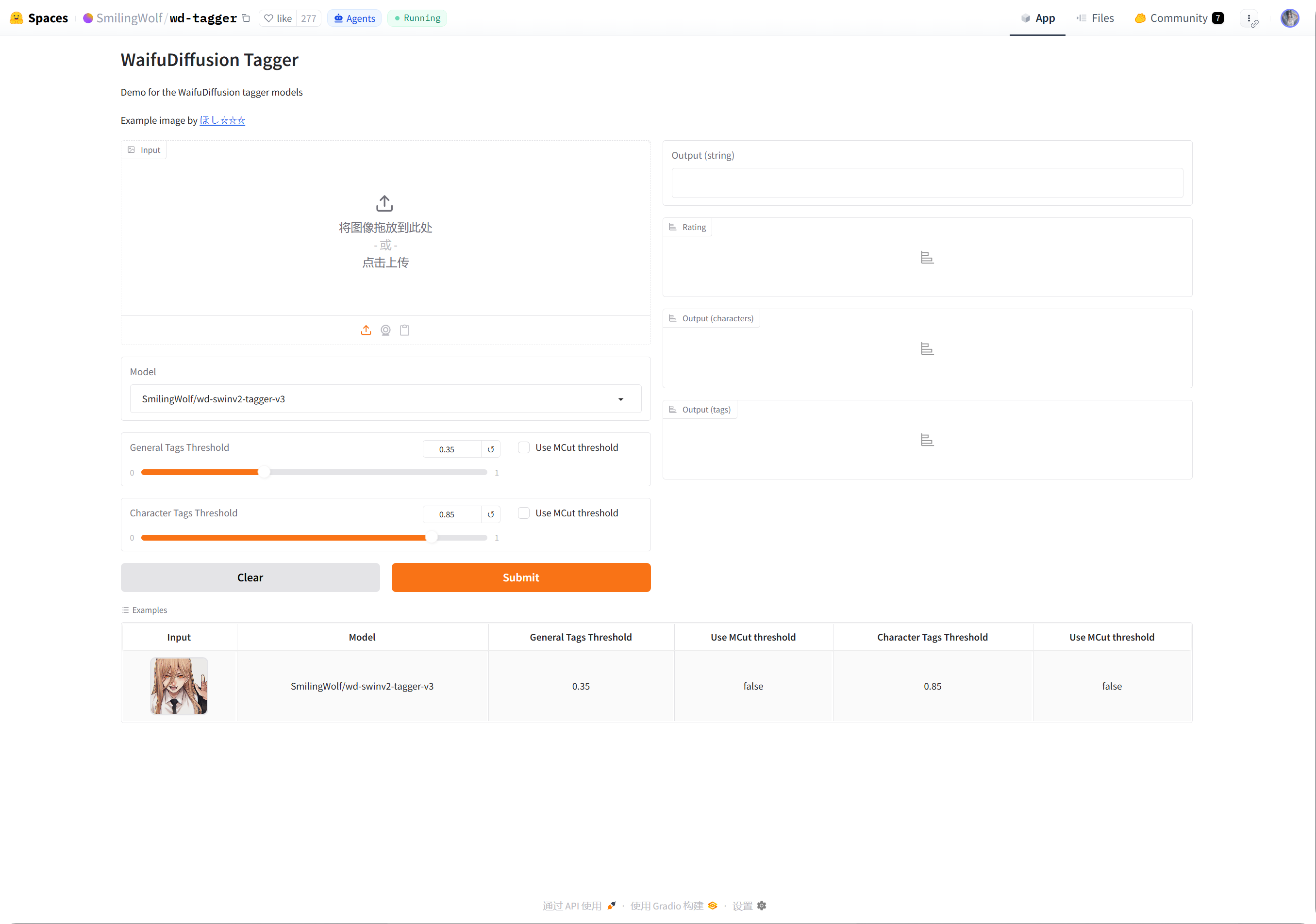
- மேல் வலது மூலையில் உள்ள மூன்று புள்ளி மெனுவை கிளிக் செய்யவும்.
Duplicate this Spaceஎன்பதை தேர்வு செய்யவும்.- இயல்புநிலை Space பெயரை வைத்திருக்கலாம் அல்லது
wd-taggerபோன்ற உங்கள் சொந்த பெயரை தேர்வு செய்யலாம். - தெரிவுநிலையை
Publicஆக அமைக்கவும். பொது Spaces-ஐ ImgHost அழைப்பது எளிதாக இருக்கும். - ஆரம்பத்தில் இயல்புநிலை இலவச வன்பொருளையே வைத்திருக்கவும். வரிசை பிரச்சினை தெளிவாக தெரிந்தால் மட்டுமே பின்னர் மேம்படுத்தவும்.
- Space-ஐ உருவாக்கி கட்டமைப்பு முடியும் வரை காத்திருக்கவும்.
கட்டமைப்பு முடிந்தபின் உங்கள் Space பக்கத்தை திறக்கவும். URL பொதுவாக இவ்வாறு இருக்கும்:
text
https://huggingface.co/spaces/your-name/wd-taggerஉலாவி URL-ஐ நகலெடுத்து ImgHost-ன் Space URLs-ல் ஒட்டவும்.
பல Space URLs நிரப்புதல்
ஒவ்வொரு வரியிலும் ஒரு Space URL-ஐ உள்ளிடவும்.
உதாரணங்கள்:
| மதிப்பு | விளக்கம் |
|---|---|
https://huggingface.co/spaces/SmilingWolf/wd-tagger | SmilingWolf பொது Space. தற்காலிக சோதனைக்கு ஏற்றது. |
https://huggingface.co/spaces/lintonxue00/wd-tagger | நகலெடுக்கப்பட்ட Space பக்க URL. |
https://huggingface.co/spaces/your-name/wd-tagger | உங்கள் சொந்த நகலெடுக்கப்பட்ட Space பக்க URL. |
பல URL-களை உள்ளிடலாம். ImgHost பல Spaces-ஐ ஒன்றாக பயன்படுத்தும்; இதனால் வேகம் மேம்படலாம்.
ஒரு Space தற்காலிகமாக கிடைக்காவிட்டாலும் மற்றவை செயலாக்கத்தை தொடரலாம்.
அமைப்புகள்
| விருப்பம் | பரிந்துரை |
|---|---|
Space URLs | நீங்கள் தயார் செய்த Space URLs-ஐ உள்ளிடவும். குறைந்தது ஒன்றாவது தேவை. |
| இலக்கு கோப்புறை | அனைத்து கோப்புறைகளுக்கும் காலியாக விடவும். குறிப்பிட்ட அடைவை மட்டும் செயலாக்க வேண்டும் என்றால் மட்டுமே கோப்புறையை தேர்வு செய்யவும். |
| அடையாளம் காணும் மாதிரி | இயல்பாக wd-swinv2-tagger-v3 வைத்திருக்கவும். |
| பொதுக் குறிச்சொல் வரம்பு | இயல்புநிலை பெரும்பாலான படங்களுக்கு பொருந்தும். குறைந்த மதிப்புகள் அதிக குறிச்சொற்களை உருவாக்கும்; அதிக மதிப்புகள் குறைவான குறிச்சொற்களை உருவாக்கும். |
| கதாபாத்திர குறிச்சொல் வரம்பு | இயல்புநிலை எச்சரிக்கையுடன் இருக்கும்; தவறான கதாபாத்திர குறிச்சொற்களைத் தவிர்க்க உதவும். |
MCut தானியக்க வரம்பு | ஆரம்பத்தில் அணைக்கப்பட்டிருக்கட்டும். குறிச்சொல் எண்ணிக்கையை மாதிரி தானாக தீர்மானிக்க வேண்டுமெனில் இயக்கவும். |
| பதிவேற்றும்போது தானியக்க குறிச்சொல் | புதிய படங்கள் தானாக குறிச்சொற்களை பெற வேண்டும் என்றால் இயக்கவும். |
| குறிச்சொல் சேர்த்தலை தொடங்கு | பழைய படங்களுக்கு கைமுறையாக தொகுதி குறிச்சொல் சேர்த்தலை தொடங்கும். |
பரிந்துரைக்கப்படும் தொடக்க மதிப்புகள்
| விருப்பம் | பரிந்துரைக்கப்படும் மதிப்பு |
|---|---|
| அடையாளம் காணும் மாதிரி | wd-swinv2-tagger-v3 |
| பொதுக் குறிச்சொல் வரம்பு | 0.35 |
| கதாபாத்திர குறிச்சொல் வரம்பு | 0.85 |
MCut | ஆரம்பத்தில் அணைப்பு |
| பதிவேற்றும்போது தானியக்க குறிச்சொல் | தேவையெனில் இயக்கவும் |
குறிச்சொற்கள் அதிகமாக இருந்தால் பொதுக் குறிச்சொல் வரம்பை சிறிது உயர்த்தவும்.
குறிச்சொற்கள் மிகக் குறைவாக இருந்தால் பொதுக் குறிச்சொல் வரம்பை சிறிது குறைக்கவும்.
தொகுதி குறிச்சொல் சேர்த்தல்
Space URLsநிரப்பவும்.- இலக்கு கோப்புறையை தேர்வு செய்யவும்.
- குறிச்சொல் சேர்த்தலை தொடங்க கிளிக் செய்யவும்.
- முன்னேற்றம் முடியும் வரை காத்திருக்கவும்.
இலக்கு கோப்புறை காலியாக இருந்தால், ImgHost அனைத்து கோப்புறைகளையும் செயலாக்கும்.
தொகுதி குறிச்சொல் சேர்த்தல் பழைய படங்களுக்கு சிறந்தது. புதிய படங்களுக்கு பதிவேற்றும்போது தானியக்க குறிச்சொல் சேர்த்தலை இயக்கினால் ஒவ்வொரு முறையும் அதை கைமுறையாக இயக்க தேவையில்லை.
பதிவேற்றும்போது தானியக்க குறிச்சொல்
பதிவேற்றும்போது தானியக்க குறிச்சொல் இயக்கப்பட்ட பிறகு, புதியதாக பதிவேற்றப்படும் படங்கள் அமைக்கப்பட்ட Space URLs-ஐ தானாக அழைக்கும்.
இது நீண்டகால பயன்பாட்டுக்கு ஏற்றது.
உங்கள் Space வரிசையில் இருந்தாலும், பதிவேற்றம் முதலில் முடிந்து, குறிச்சொல் சேர்த்தல் பின்னர் தொடரலாம்.
எந்த படங்கள் செயலாக்கப்படும்
தானியக்க குறிச்சொல் சேர்த்தல் முக்கியமாக படக் கோப்புகளை செயலாக்கும்.
முழுமையான குறிச்சொற்கள், திசை, மதிப்பீடு, அகலம் மற்றும் உயரம் ஏற்கனவே உள்ள படங்கள் தேவையற்ற Space அழைப்புகளைத் தவிர்க்க விடப்படும்.
சாத்தியமானபோது ImgHost இல்லாத தகவல்களை மட்டும் நிரப்பும். உதாரணமாக திசை மட்டும் இல்லையெனில், முழு உள்ளடக்க குறிச்சொல் செயல்முறையை அழைக்காமல் திசையைச் சேர்க்க முயலும்.
அடிக்கடி கேட்கப்படும் கேள்விகள்
ஏன் எனது சொந்த Space-ஐ நகலெடுக்க வேண்டும்?
பொது Spaces பல பயனர்களால் பகிரப்படுகின்றன. உங்கள் சொந்த நகலெடுக்கப்பட்ட Space பெரும்பாலும் உங்கள் ImgHost தளத்தால் மட்டுமே பயன்படுத்தப்படும்; எனவே அது பொதுவாக வேகமாகவும் நம்பகமாகவும் இருக்கும்.
Space தொடர்ந்து தொடங்கிக்கொண்டே உள்ளது
முதல் உருவாக்கத்திற்குப் பிறகோ அல்லது நீண்ட செயலற்ற காலத்திற்குப் பிறகோ, Space தொடங்க சிறிது நேரம் ஆகலாம்.
முதலில் உங்கள் Space பக்கத்தை திறக்கவும். அது ஒரு படத்தை வழக்கமாக அடையாளம் காண முடிந்த பிறகு ImgHost-க்கு திரும்பி குறிச்சொல் சேர்த்தலை தொடங்கவும்.
Space URL-ஐ எப்படி நகலெடுப்பது?
உங்கள் Hugging Face Space பக்கத்தை திறந்து உலாவி முகவரியை நகலெடுக்கவும்.
உதாரணங்கள்:
text
https://huggingface.co/spaces/lintonxue00/wd-tagger
https://huggingface.co/spaces/SmilingWolf/wd-tagger
பல Spaces சேர்க்கலாமா?
ஆம். ஒவ்வொரு வரியிலும் ஒரு Space URL-ஐ உள்ளிடவும்.
பல Spaces படங்களை ஒன்றாக செயலாக்கும்; படங்கள் அதிகமாக உள்ளபோது இது பயனுள்ளதாக இருக்கும்.
குறிச்சொற்கள் ஏன் ஆங்கிலத்தில் உள்ளன?
SmilingWolf மாதிரிகள் ஆங்கில குறிச்சொற்களையே வெளியிடுகின்றன. இது எதிர்பார்க்கப்பட்டதே.
குறிச்சொற்கள் முக்கியமாக தேடல், வடிகட்டல், சீரற்ற பட API மற்றும் பொது கேலரி வடிகட்டல்களுக்கு பயன்படுத்தப்படுகின்றன.
மதிப்பீட்டு குறிச்சொற்கள் எதற்காக?
மதிப்பீட்டு முடிவுகள் பாதுகாப்பு அமைப்புகளில் உள்ள அணுகல் முறையுடன் சேர்ந்து செயல்படும்.
உதாரணமாக, பார்வையாளர் அணுகல் வயது மதிப்பீட்டின் அடிப்படையில் கட்டுப்படுத்தப்பட்டால், பொது உலாவலும் சீரற்ற பட அம்சங்களும் அந்த விதிகளின் படி படங்களை வடிகட்டும்.
விரைவு நடைமுறை
text
Sign in to Hugging Face
-> Open SmilingWolf/wd-tagger
-> Duplicate this Space
-> Wait for the Space to build
-> Copy your Space URL
-> Fill Space URLs in ImgHost
-> Choose model and thresholds
-> Start tagging or enable auto-tag on upload