பயனர் பதிவேற்ற அதிர்வெண் வரம்புகள்
பயனர் பதிவேற்ற அதிர்வெண் வரம்புகள், சாதாரண பயனர்கள் அல்லது பார்வையாளர்கள் முகப்புப் பக்கத்திலிருந்து எவ்வளவு அடிக்கடி கோப்புகளைப் பதிவேற்றலாம் என்பதைக் கட்டுப்படுத்தும். இது பொதுப் பதிவேற்றப் பக்கம் தவறாகப் பயன்படுத்தப்படுவதைத் தடுக்க உதவும்.
இந்த அம்சம் முகப்புப் பக்க பதிவேற்றங்களையே பாதிக்கும். நிர்வாகி பதிவேற்றங்களும் API Tokens மூலம் செய்யப்படும் பதிவேற்றங்களும் இந்த பயனர் அதிர்வெண் வரம்புகளால் கட்டுப்படுத்தப்படாது.
எங்கே அமைப்பது
நிர்வாகப் பலகையைத் திறந்து இங்கே செல்லவும்:
text
System Settings -> Security Settings -> Upload Management -> User Rate Limits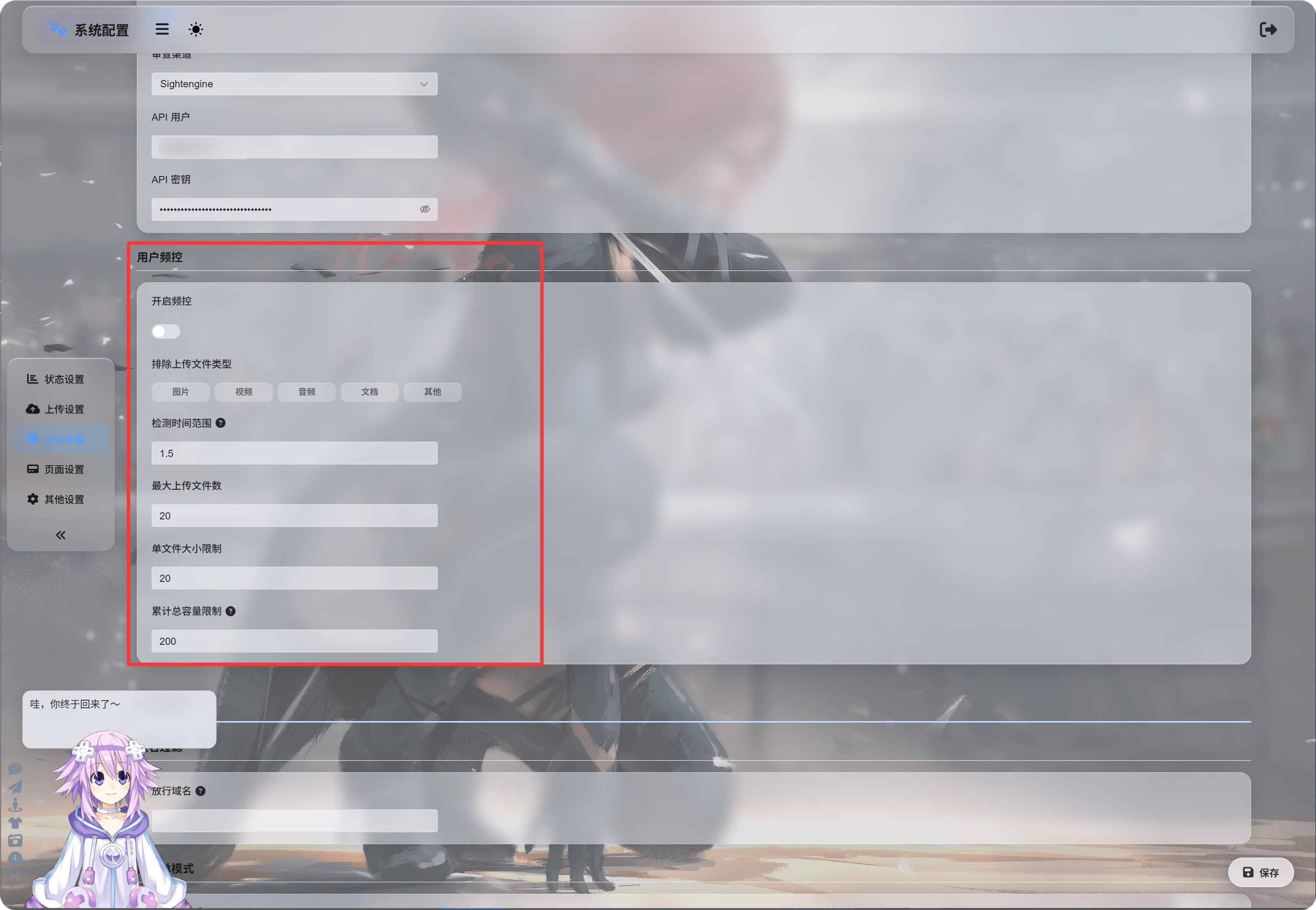
அதிர்வெண் வரம்புகளை இயக்குதல்
அதிர்வெண் வரம்புகளை இயக்கு இயக்கப்பட்ட பிறகு, பதிவேற்றுநரின் IP முகவரியை அடிப்படையாகக் கொண்டு ImgHost சமீபத்திய பதிவேற்றங்களை கண்காணிக்கும்.
இயல்புநிலை மதிப்புகள்:
| அமைப்பு | இயல்புநிலை | விளக்கம் |
|---|---|---|
| கண்டறிதல் சாளரம் | 1.5 hours | பதிவேற்றப் பதிவுகள் எவ்வளவு நேரம் பின்பக்கம் வரை கணக்கிடப்பட வேண்டும் என்பதை நிர்ணயிக்கும். |
| அதிகபட்ச கோப்பு எண்ணிக்கை | 20 | கண்டறிதல் சாளரத்தில் அனுமதிக்கப்படும் அதிகபட்ச கோப்பு எண்ணிக்கை. |
| ஒற்றை கோப்பு அளவு வரம்பு | 20 MB | ஒரு கோப்பின் அதிகபட்ச அளவு. |
| மொத்த பதிவேற்ற அளவு வரம்பு | 200 MB | கண்டறிதல் சாளரத்தில் மொத்த பதிவேற்ற அளவின் அதிகபட்சம். |
எடுத்துக்காட்டாக, 1.5 மணி நேர சாளரம், 20 கோப்புகள், ஒவ்வொரு கோப்புக்கும் 20 MB, மொத்தம் 200 MB என அமைத்திருந்தால், அதே IP-இலிருந்து வரும் பதிவேற்றங்கள் அமைக்கப்பட்ட எந்த வரம்பையும் மீறியவுடன் தடுக்கப்படும்.
கோப்பு வகைகளை விலக்குதல்
விலக்கப்பட்ட பதிவேற்ற கோப்பு வகைகள் தேர்ந்தெடுக்கப்பட்ட கோப்பு வகைகளை சாதாரண பயனர்கள் அல்லது பார்வையாளர்கள் பதிவேற்றுவதைத் தடுக்கும்.
கிடைக்கும் வகைகள்:
| வகை | விளக்கம் |
|---|---|
| படங்கள் | jpg, png, webp, gif மற்றும் இதற்கு ஒத்த படக் கோப்புகள் |
| வீடியோக்கள் | mp4, webm, mov மற்றும் இதற்கு ஒத்த வீடியோ கோப்புகள் |
| ஒலி | mp3, flac, wav மற்றும் இதற்கு ஒத்த ஒலி கோப்புகள் |
| ஆவணங்கள் | pdf, txt, md, docx மற்றும் இதற்கு ஒத்த ஆவணங்கள் |
| மற்றவை | மேலுள்ள வகைகளுக்கு வெளியான கோப்புகள், உதாரணமாக zip, rar, exe, apk |
இயல்பாக எந்த வகையும் தேர்ந்தெடுக்கப்படாது; அதனால் அந்த வகை அனுமதிக்கப்பட்டதாக இருக்கும்.
ஒரு வகையை அழுத்தினால் அது ஒளிர்த்துக் காட்டப்படும்; அதாவது அந்த வகை தடுக்கப்பட்டதாகும்.
மற்றவை தேர்ந்தெடுக்கப்பட்டால், zip அல்லது rar கோப்புகளை பதிவேற்றும் பார்வையாளர்கள் தடுக்கப்படுவார்கள்; அந்த கோப்பு வகை ஆதரிக்கப்படவில்லை என்ற செய்தி காட்டப்படும்.
தடுப்பு செய்திகள்
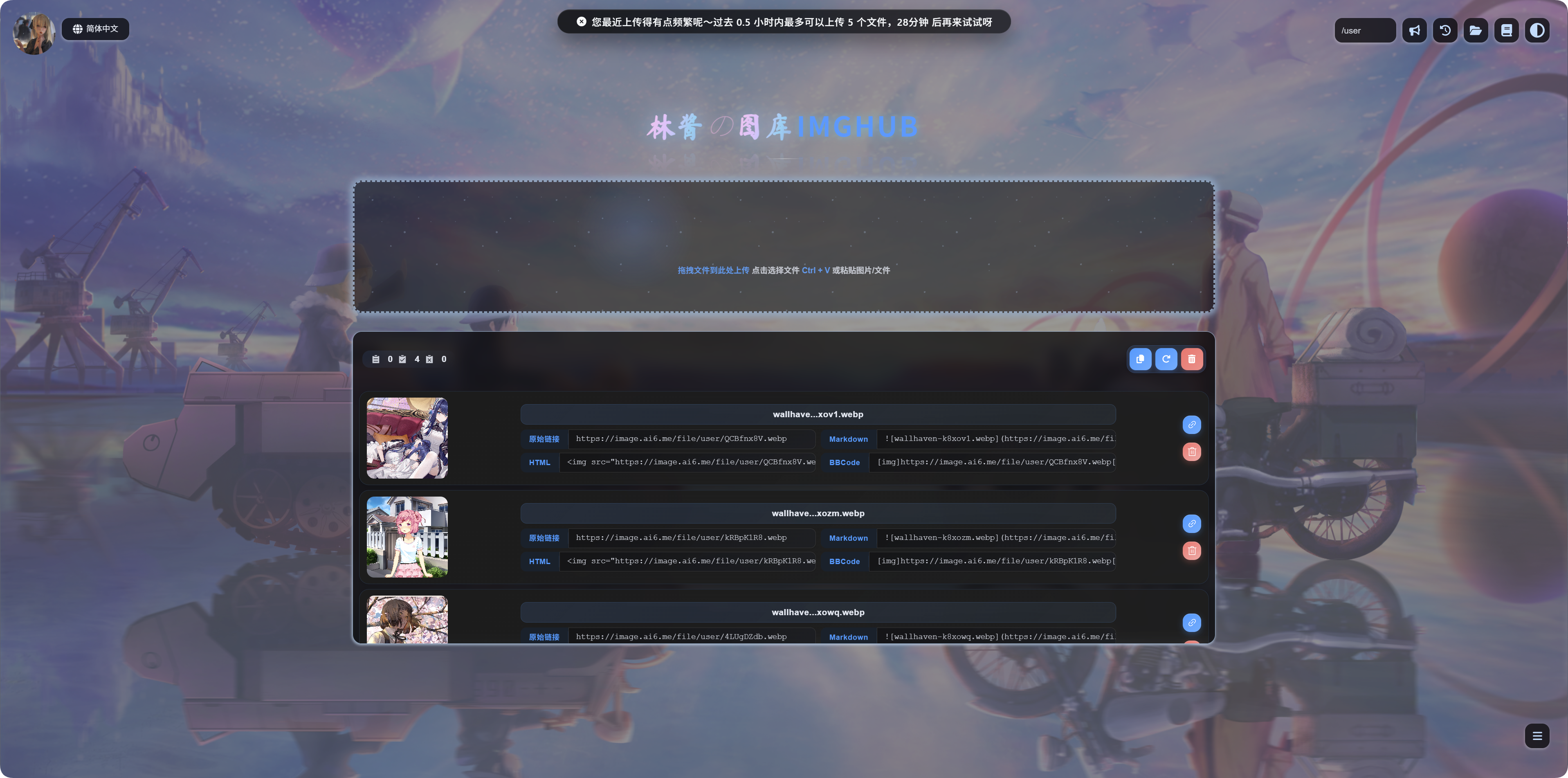
ஒரு வரம்பு செயல்பட்டால், பயனர்கள் அதற்கேற்ற செய்தியைப் பார்ப்பார்கள்:
| நிலை | செய்தியின் பொருள் |
|---|---|
| ஒற்றை கோப்பு மிகப் பெரியது | கோப்பு மிகப் பெரியது; பதிவேற்றுவதற்கு முன் அதைச் சுருக்க வேண்டும். |
| கோப்பு வகை தடுக்கப்பட்டது | இந்த கோப்பு வகை ஆதரிக்கப்படவில்லை. அதை நீக்கி மீண்டும் முயற்சிக்கவும். |
| பதிவேற்றங்கள் மிக அதிகமாக உள்ளன | சமீபத்திய பதிவேற்றங்கள் மிக அதிகமாக உள்ளன; மீண்டும் முயற்சிக்க வேண்டிய நேரம் காட்டப்படும். |
| மொத்த அளவு மிக அதிகம் | சமீபத்திய பதிவேற்றங்களின் மொத்த அளவு மிக அதிகம்; மீண்டும் முயற்சிக்க வேண்டிய நேரம் காட்டப்படும். |
எப்போது இயக்க வேண்டும்
உங்கள் பதிவேற்ற முகப்புப் பக்கம் பொதுமக்களுக்கு திறந்திருப்பின், பயனர் பதிவேற்ற அதிர்வெண் வரம்புகளை இயக்கவும்.
பொதுவான காரணங்கள்:
- தானியக்கமாக நடக்கும் பெருமளவு பதிவேற்றங்களைப் பற்றி கவலைப்படுகிறீர்கள்.
- பார்வையாளர்களின் பெரிய கோப்பு பதிவேற்றங்களை வரையறுக்க விரும்புகிறீர்கள்.
- சாதாரண பயனர்கள் காப்பகங்கள் அல்லது நிறுவல் கோப்புகள் அல்லாமல் படங்களையே பதிவேற்ற வேண்டும் என்று விரும்புகிறீர்கள்.
- பொதுப் பதிவேற்றத்தை திறந்துவைத்தபடியே வளப் பயன்பாட்டைக் கட்டுப்படுத்த விரும்புகிறீர்கள்.
இந்த தளம் உங்களுக்காக மட்டுமே இருந்தால், அல்லது நிர்வாகிகள் மட்டுமே பதிவேற்ற முடிந்தால், இதை அணைத்தே வைக்கலாம்.