محدودیت نرخ آپلود کاربران
محدودیت نرخ کاربران کنترل میکند کاربران عادی یا بازدیدکنندگان هر چند وقت یکبار میتوانند از صفحه اصلی فایل آپلود کنند. این کار از سوءاستفاده از صفحههای عمومی آپلود جلوگیری میکند.
این قابلیت فقط روی آپلودهای صفحه اصلی اثر دارد. آپلودهای مدیر و آپلودهایی که با API Tokens انجام میشوند تحت محدودیت نرخ کاربران نیستند.
محل پیکربندی
پنل مدیریت را باز کنید و به مسیر زیر بروید:
text
System Settings -> Security Settings -> Upload Management -> User Rate Limits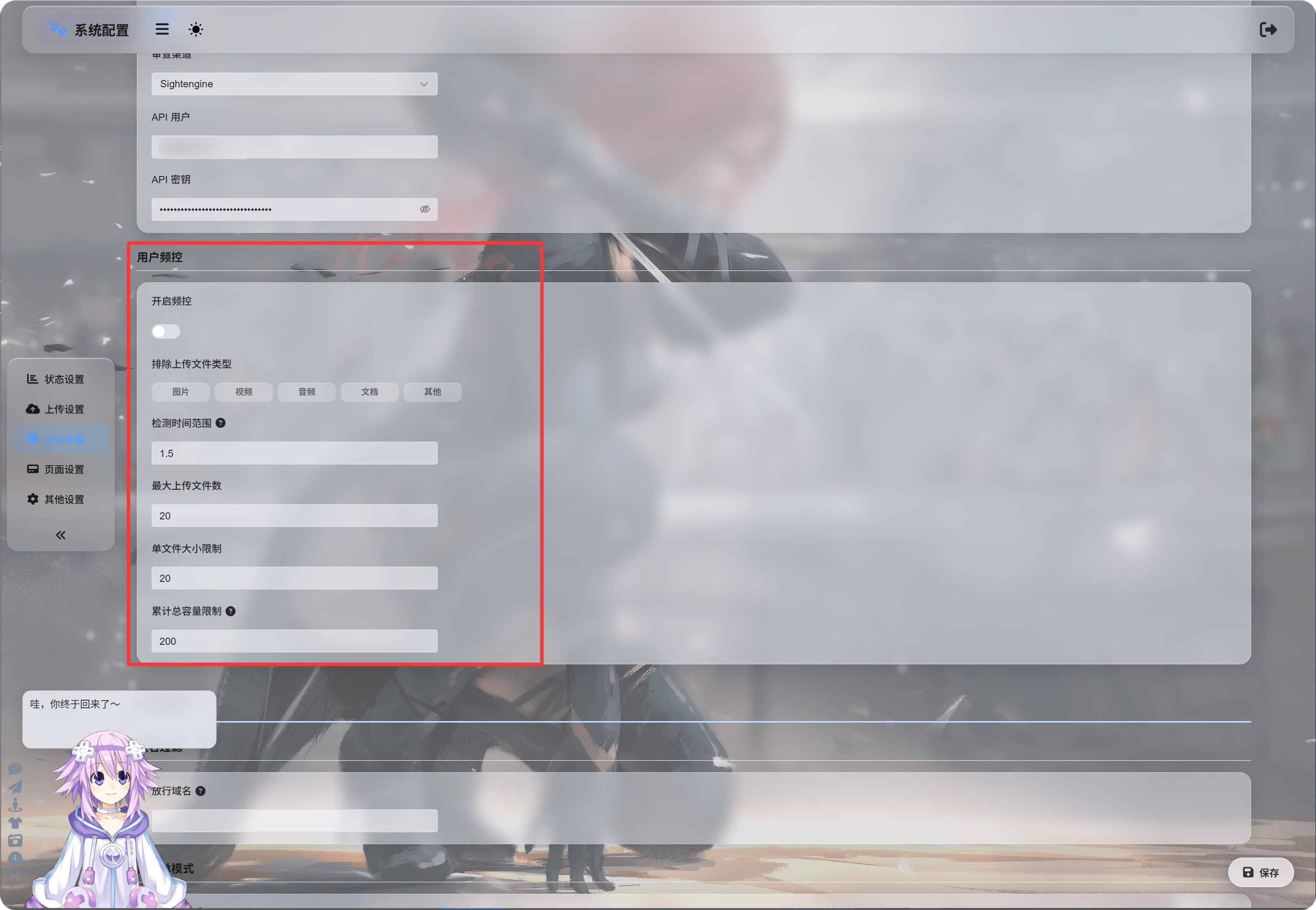
فعال کردن محدودیت نرخ
پس از روشن کردن «فعال کردن محدودیت نرخ»، ImgHost آپلودهای اخیر را بر اساس IP آپلودکننده دنبال میکند.
مقادیر پیشفرض:
| تنظیم | پیشفرض | توضیح |
|---|---|---|
| بازه تشخیص | 1.5 ساعت | رکوردهای آپلود تا چه مدت قبل شمرده شوند. |
| حداکثر تعداد فایل | 20 | بیشترین تعداد فایل مجاز در بازه تشخیص. |
| محدودیت اندازه یک فایل | 20 MB | حداکثر اندازه یک فایل. |
| محدودیت اندازه کل آپلود | 200 MB | حداکثر اندازه کل آپلود در بازه تشخیص. |
برای مثال، با بازه 1.5 ساعت، 20 فایل، 20 MB برای هر فایل و 200 MB در کل، آپلودهای همان IP بهمحض عبور از هر محدودیت تنظیمشده مسدود میشوند.
مستثنی کردن نوع فایلها
«نوع فایلهای آپلود مستثنیشده» کاربران عادی یا بازدیدکنندگان را از آپلود دستههای انتخابشده فایل منع میکند.
دستههای موجود:
| نوع | توضیح |
|---|---|
| تصاویر | فایلهای تصویری مانند jpg، png، webp، gif و موارد مشابه |
| ویدئوها | فایلهای ویدئویی مانند mp4، webm، mov و موارد مشابه |
| صدا | فایلهای صوتی مانند mp3، flac، wav و موارد مشابه |
| اسناد | فایلهای سند مانند pdf، txt، md، docx و موارد مشابه |
| سایر | فایلهای خارج از دستههای بالا، مانند zip، rar، exe، apk |
بهصورت پیشفرض هیچ نوعی انتخاب نشده است، یعنی مجاز است.
با کلیک روی یک نوع، آن نوع برجسته میشود و یعنی مسدود است.
اگر «سایر» انتخاب شود، بازدیدکنندگانی که فایل zip یا rar آپلود میکنند مسدود میشوند و به آنها گفته میشود این نوع فایل پشتیبانی نمیشود.
پیامهای مسدودسازی
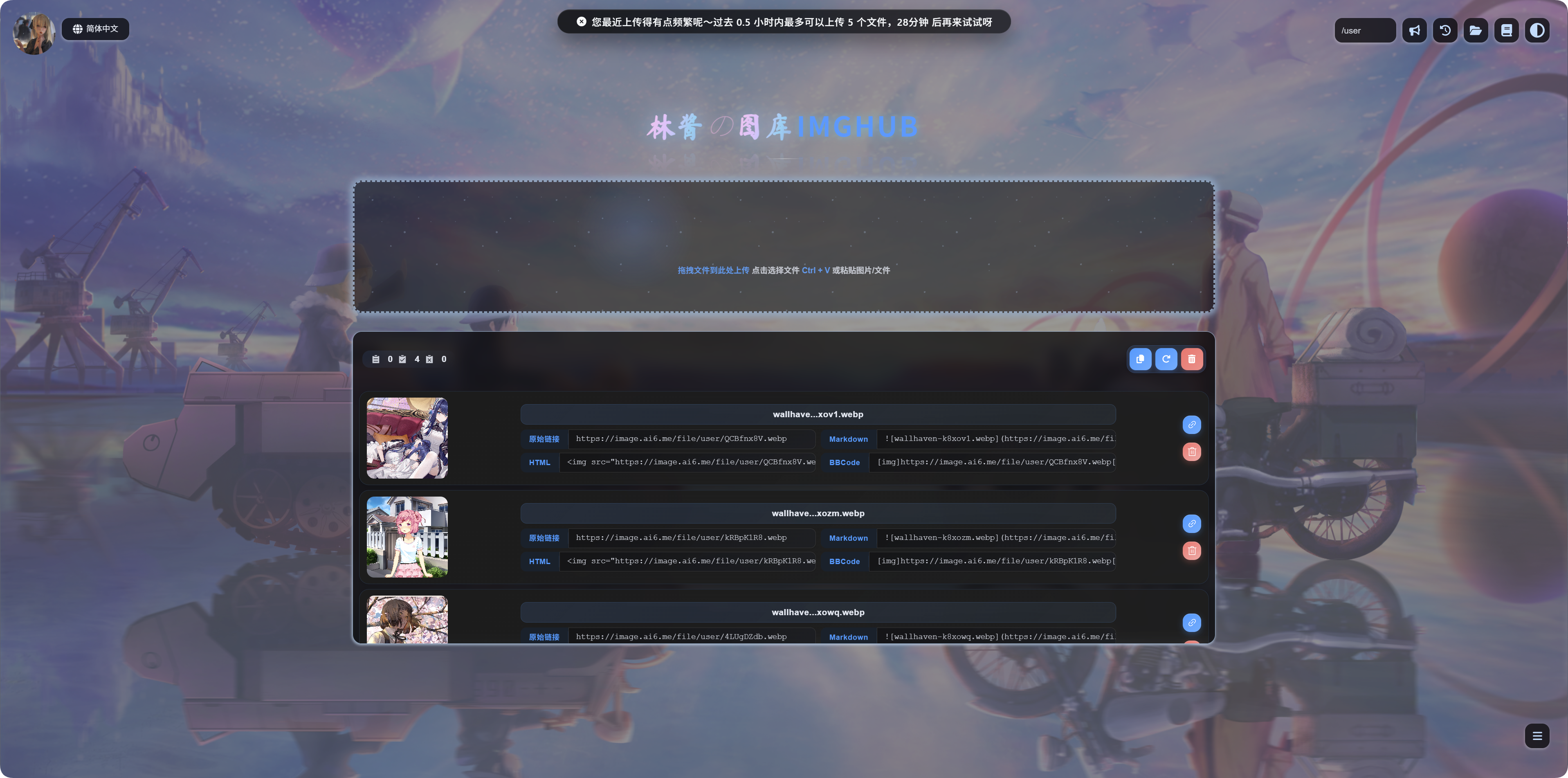
وقتی یک محدودیت فعال شود، کاربران پیام متناسب را میبینند:
| وضعیت | معنی پیام |
|---|---|
| یک فایل بیش از حد بزرگ است | فایل بیش از حد بزرگ است و باید پیش از آپلود فشرده شود. |
| نوع فایل مسدود است | این نوع فایل پشتیبانی نمیشود. آن را حذف کنید و دوباره تلاش کنید. |
| آپلودها بیش از حد مکرر هستند | آپلودهای اخیر بیش از حد مکرر هستند و زمان تلاش دوباره نمایش داده میشود. |
| اندازه کل بیش از حد زیاد است | اندازه کل آپلودهای اخیر بیش از حد زیاد است و زمان تلاش دوباره نمایش داده میشود. |
چه زمانی آن را فعال کنید
اگر صفحه اصلی آپلود شما عمومی است، محدودیت نرخ کاربران را فعال کنید.
دلایل رایج:
- نگران آپلودهای انبوه اسکریپتی هستید.
- میخواهید آپلودهای بزرگ بازدیدکنندگان را محدود کنید.
- میخواهید کاربران عادی فقط تصویر آپلود کنند، نه آرشیو یا فایل نصب.
- میخواهید آپلود عمومی در دسترس بماند، اما مصرف منابع کنترل شود.
اگر سایت فقط برای خودتان است، یا فقط مدیران میتوانند آپلود کنند، میتوانید این گزینه را غیرفعال بگذارید.