ขีดจำกัดความถี่การอัปโหลดของผู้ใช้
ขีดจำกัดความถี่การอัปโหลดของผู้ใช้ควบคุมว่าผู้ใช้ทั่วไปหรือผู้เยี่ยมชมสามารถอัปโหลดไฟล์จากหน้าแรกได้บ่อยเพียงใด วิธีนี้ช่วยป้องกันไม่ให้หน้าสาธารณะสำหรับอัปโหลดถูกใช้งานในทางที่ผิด
ฟีเจอร์นี้มีผลกับการอัปโหลดจากหน้าแรกเท่านั้น การอัปโหลดของผู้ดูแลระบบและการอัปโหลดผ่าน API Tokens จะไม่ถูกจำกัดด้วยขีดจำกัดความถี่ของผู้ใช้
ตั้งค่าที่ไหน
เปิดแผงผู้ดูแลระบบ แล้วไปที่:
text
System Settings -> Security Settings -> Upload Management -> User Rate Limits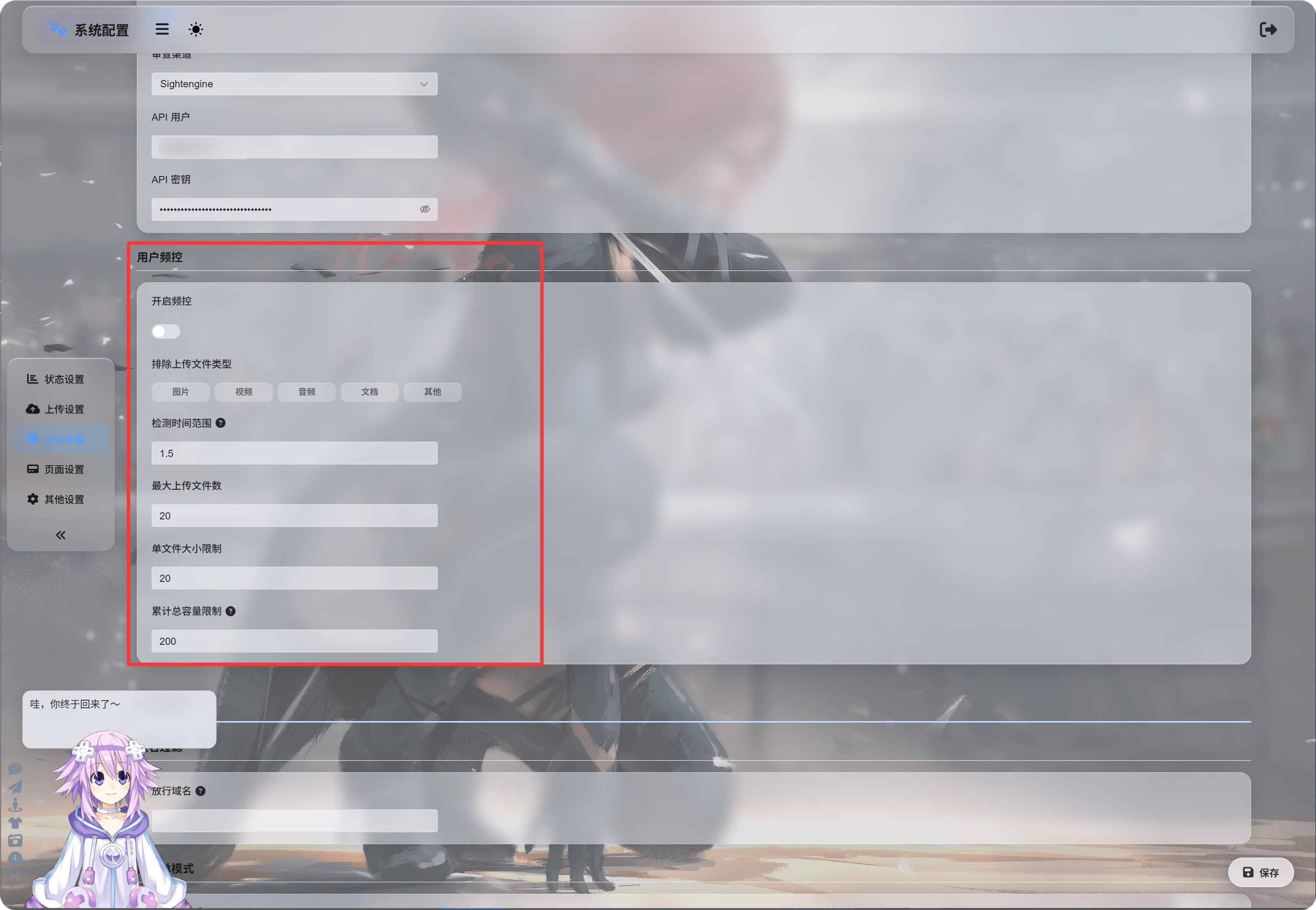
การเปิดใช้ขีดจำกัดความถี่
หลังจากเปิด เปิดใช้ขีดจำกัดความถี่ แล้ว ImgHost จะติดตามการอัปโหลดล่าสุดตามที่อยู่ IP ของผู้อัปโหลด
ค่าเริ่มต้น:
| การตั้งค่า | ค่าเริ่มต้น | คำอธิบาย |
|---|---|---|
| ช่วงเวลาตรวจจับ | 1.5 hours | ระยะเวลาย้อนหลังที่ใช้ในการนับบันทึกการอัปโหลด |
| จำนวนไฟล์สูงสุด | 20 | จำนวนไฟล์สูงสุดที่อนุญาตในช่วงเวลาตรวจจับ |
| ขีดจำกัดขนาดไฟล์เดี่ยว | 20 MB | ขนาดสูงสุดของไฟล์หนึ่งไฟล์ |
| ขีดจำกัดขนาดอัปโหลดรวม | 200 MB | ขนาดรวมสูงสุดของการอัปโหลดในช่วงเวลาตรวจจับ |
ตัวอย่างเช่น หากตั้งช่วงเวลาไว้ที่ 1.5 ชั่วโมง, 20 ไฟล์, 20 MB ต่อไฟล์ และรวม 200 MB การอัปโหลดจาก IP เดียวกันจะถูกบล็อกทันทีเมื่อเกินขีดจำกัดที่ตั้งไว้ข้อใดข้อหนึ่ง
การยกเว้นประเภทไฟล์
ประเภทไฟล์อัปโหลดที่ถูกยกเว้น จะบล็อกไม่ให้ผู้ใช้ทั่วไปหรือผู้เยี่ยมชมอัปโหลดหมวดหมู่ไฟล์ที่เลือกไว้
หมวดหมู่ที่ใช้ได้:
| ประเภท | คำอธิบาย |
|---|---|
| รูปภาพ | jpg, png, webp, gif และไฟล์รูปภาพที่คล้ายกัน |
| วิดีโอ | mp4, webm, mov และไฟล์วิดีโอที่คล้ายกัน |
| เสียง | mp3, flac, wav และไฟล์เสียงที่คล้ายกัน |
| เอกสาร | pdf, txt, md, docx และเอกสารที่คล้ายกัน |
| อื่น ๆ | ไฟล์นอกเหนือจากหมวดหมู่ข้างต้น เช่น zip, rar, exe, apk |
โดยค่าเริ่มต้น ประเภทไฟล์จะไม่ถูกเลือก ซึ่งหมายความว่าอนุญาตให้อัปโหลดได้
เมื่อคลิกประเภทหนึ่ง ประเภทนั้นจะถูกไฮไลต์ ซึ่งหมายความว่าประเภทนั้นถูกบล็อก
หากเลือก อื่น ๆ ผู้เยี่ยมชมที่อัปโหลดไฟล์ zip หรือ rar จะถูกบล็อกและได้รับแจ้งว่าไม่รองรับไฟล์ประเภทนี้
ข้อความเมื่อถูกบล็อก
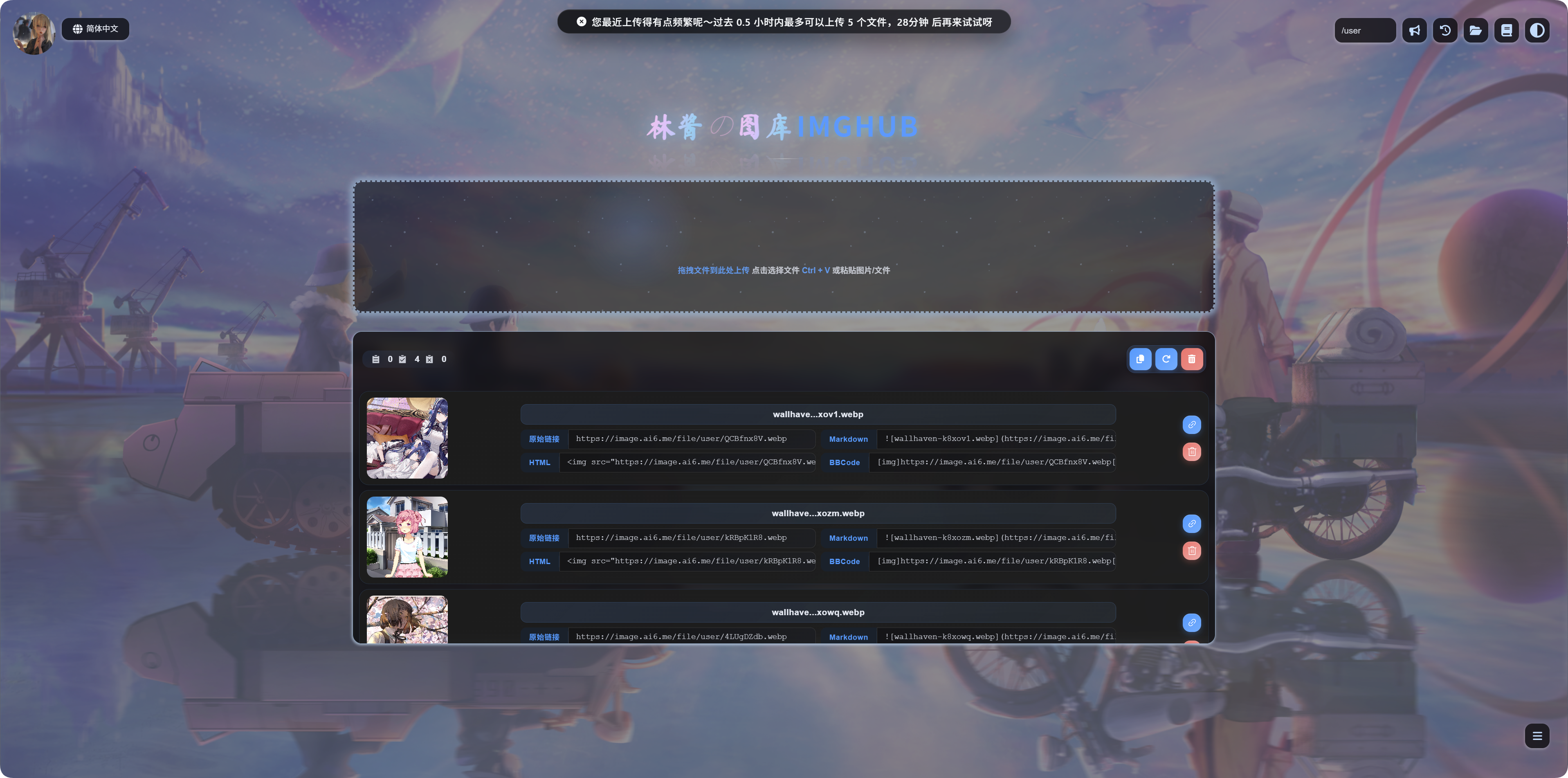
เมื่อขีดจำกัดถูกเรียกใช้ ผู้ใช้จะเห็นข้อความที่ตรงกับสถานการณ์:
| สถานการณ์ | ความหมายของข้อความ |
|---|---|
| ไฟล์เดี่ยวใหญ่เกินไป | ไฟล์มีขนาดใหญ่เกินไปและควรบีบอัดก่อนอัปโหลด |
| ประเภทไฟล์ถูกบล็อก | ไม่รองรับไฟล์ประเภทนี้ ให้นำไฟล์ออกแล้วลองอีกครั้ง |
| อัปโหลดถี่เกินไป | การอัปโหลดล่าสุดถี่เกินไป และจะแสดงเวลาที่ลองใหม่ได้ |
| ขนาดรวมสูงเกินไป | ขนาดรวมของการอัปโหลดล่าสุดสูงเกินไป และจะแสดงเวลาที่ลองใหม่ได้ |
ควรเปิดใช้เมื่อใด
เปิดใช้ขีดจำกัดความถี่ของผู้ใช้หากหน้าแรกสำหรับอัปโหลดของคุณเปิดให้สาธารณะเข้าถึงได้
เหตุผลที่พบบ่อย:
- คุณกังวลเรื่องการอัปโหลดจำนวนมากด้วยสคริปต์
- คุณต้องการจำกัดการอัปโหลดไฟล์ขนาดใหญ่จากผู้เยี่ยมชม
- คุณต้องการให้ผู้ใช้ทั่วไปอัปโหลดเฉพาะรูปภาพ ไม่ใช่ไฟล์บีบอัดหรือตัวติดตั้ง
- คุณต้องการเปิดการอัปโหลดสาธารณะไว้ แต่ควบคุมการใช้ทรัพยากร
หากไซต์นี้ใช้เฉพาะคุณเอง หรือมีเพียงผู้ดูแลระบบที่อัปโหลดได้ คุณสามารถปิดฟีเจอร์นี้ไว้ได้