เพิ่มช่องทาง GitHub Releases
สิ่งที่ต้องเตรียมก่อนเริ่ม
ต้องใช้เพียงสามอย่าง:
| ข้อกำหนด | วัตถุประสงค์ |
|---|---|
| GitHub account | ใช้สร้าง access token และเป็น owner ของ repository |
| GitHub Access Token | ImgHost ใช้เข้าถึง GitHub API, สร้าง releases และอัปโหลดไฟล์ |
| Repository name | ใส่เฉพาะ repository name ก็ได้ เช่น image |
ขั้นตอนตั้งค่า
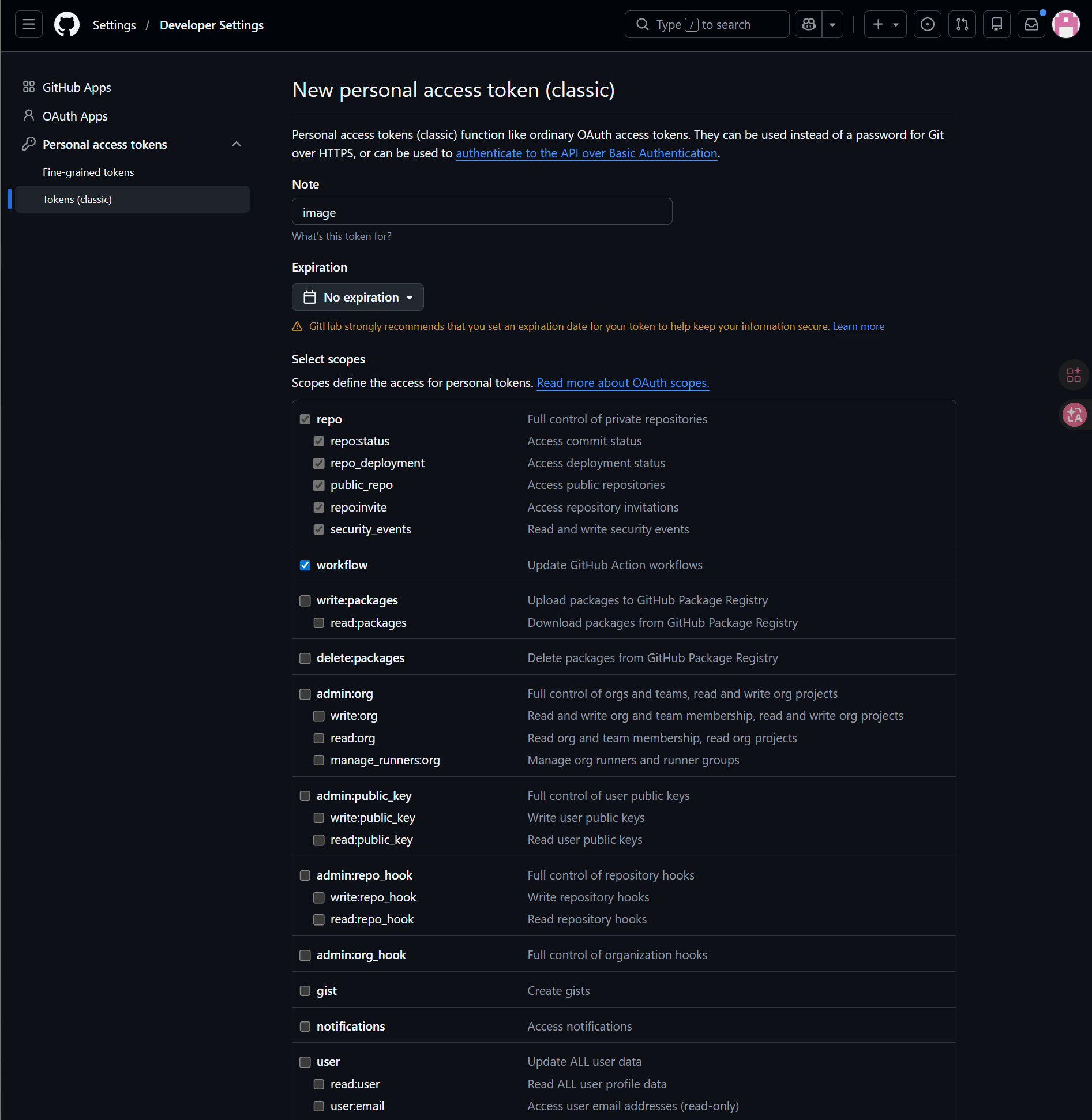
ขั้นตอนที่ 1: เข้าสู่ระบบ GitHub และสร้าง Access Token
- เข้าสู่ระบบ GitHub
- คลิก avatar มุมขวาบนแล้วเปิด
Settings - เปิด
Developer settingsจากแถบด้านซ้าย - เปิด
Personal access tokens - เปิด
Tokens (classic) - คลิก
Generate new token (classic) - ตั้งชื่อ token ให้จำง่าย
- เลือก expiration date ตามแนวทางการดูแลของคุณ
- เลือก scopes
repoและworkflow - คัดลอกและบันทึก token ทันทีหลังสร้างเสร็จ
ขั้นตอนที่ 2: ใส่ช่องทาง GitHub Releases ใน ImgHost
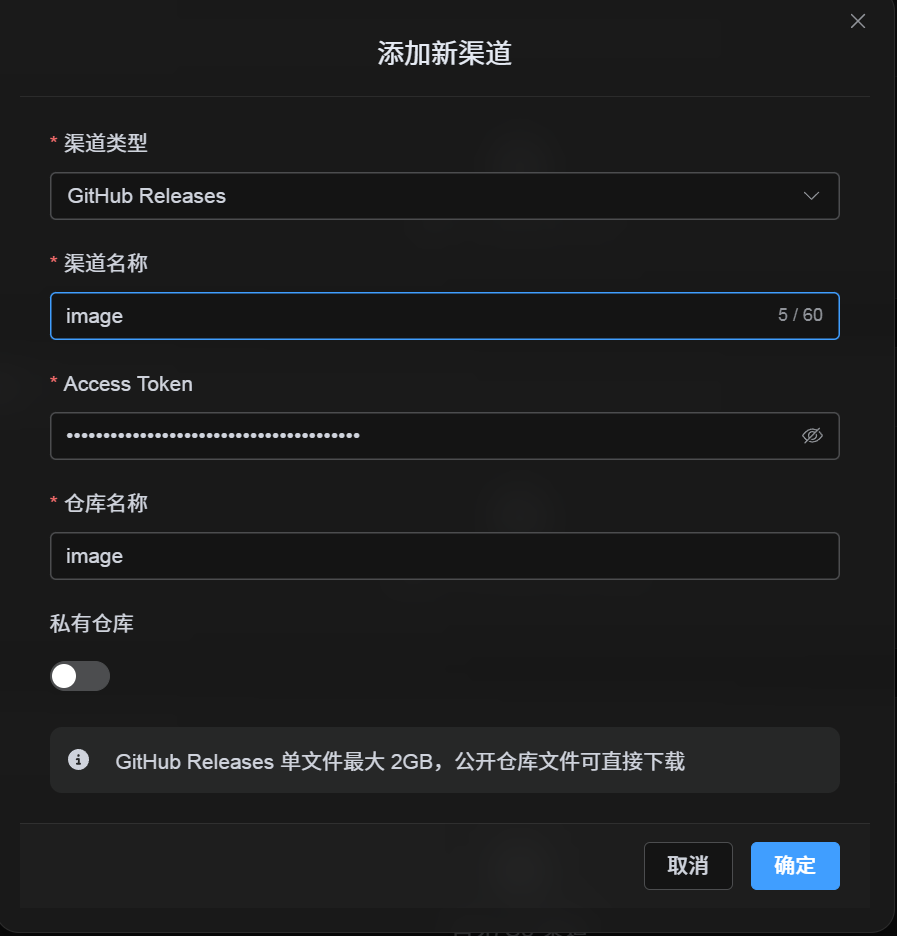
หลังเลือก GitHub Releases ใน Upload Settings ให้กรอกฟิลด์ดังนี้:
| ฟิลด์ UI | ใส่อะไร |
|---|---|
| Channel name | ชื่อที่คุณตั้งเอง เช่น GitHubPrimary |
| Access Token | GitHub Personal Access Token ที่เพิ่งสร้าง |
| Repository name | repo name แบบสั้น เช่น image หรือพาธแบบเต็ม เช่น username/image |
| Private repository | เปิดหรือปิดตามความต้องการ |
| Remark | ไม่บังคับ เช่น Primary upload channel |
ขั้นตอนที่ 3: บันทึกช่องทาง
กรอกครบแล้วคลิก Save
ระบบจะจัดการรายละเอียดเหล่านี้:
| พฤติกรรมของระบบ | คำอธิบาย |
|---|---|
| Short repository name | ImgHost ระบุ GitHub account ปัจจุบัน แล้วขยายค่าเป็นพาธ repository แบบเต็ม |
| Full repository path | ImgHost ใช้ path username/repository ตามที่ใส่มาแบบตรงตัว |
| การตรวจสอบ repository | ถ้าใช้พาธของ personal account ปัจจุบัน ImgHost จะสร้าง repository อัตโนมัติเมื่อยังไม่มี ถ้าใส่พาธแบบเต็มเอง ImgHost จะใช้พาธนั้นโดยตรง |
| Public/private state | Repository visibility จะ sync ตาม switch ปัจจุบัน |
รายการตรวจสอบด่วน
GitHub Releases ทำงานตาม flow นี้:
text
Sign in to GitHub
-> Create an Access Token
-> Return to ImgHost and enter the token and repository name
-> Save
-> If only a repo name is entered, ImgHost adds the current username automatically
-> If username/repo is entered, ImgHost uses it as-is
-> Upload a test image