GitLab Packages சேனல் சேர்க்கவும்
தொடங்குவதற்கு முன் தேவையானவை
மூன்று விஷயங்கள் மட்டும்:
| தேவை | பயன்பாடு |
|---|---|
| GitLab கணக்கு | அணுகல் டோக்கன் உருவாக்கவும் திட்டம் own செய்யவும் |
| GitLab Personal அணுகல் டோக்கன் | ImgHost GitLab API அணுக, திட்டம்s உருவாக்க, Generic Packages-க்கு கோப்புகள் பதிவேற்றம் செய்ய |
| திட்டப் பெயர் | திட்டம் name மட்டும் கொடுக்கலாம், உதா. imgbed |
அமைப்பு படிகள்
படி 1: GitLab-ல் உள்நுழைய செய்து அணுகல் டோக்கன் உருவாக்கவும்
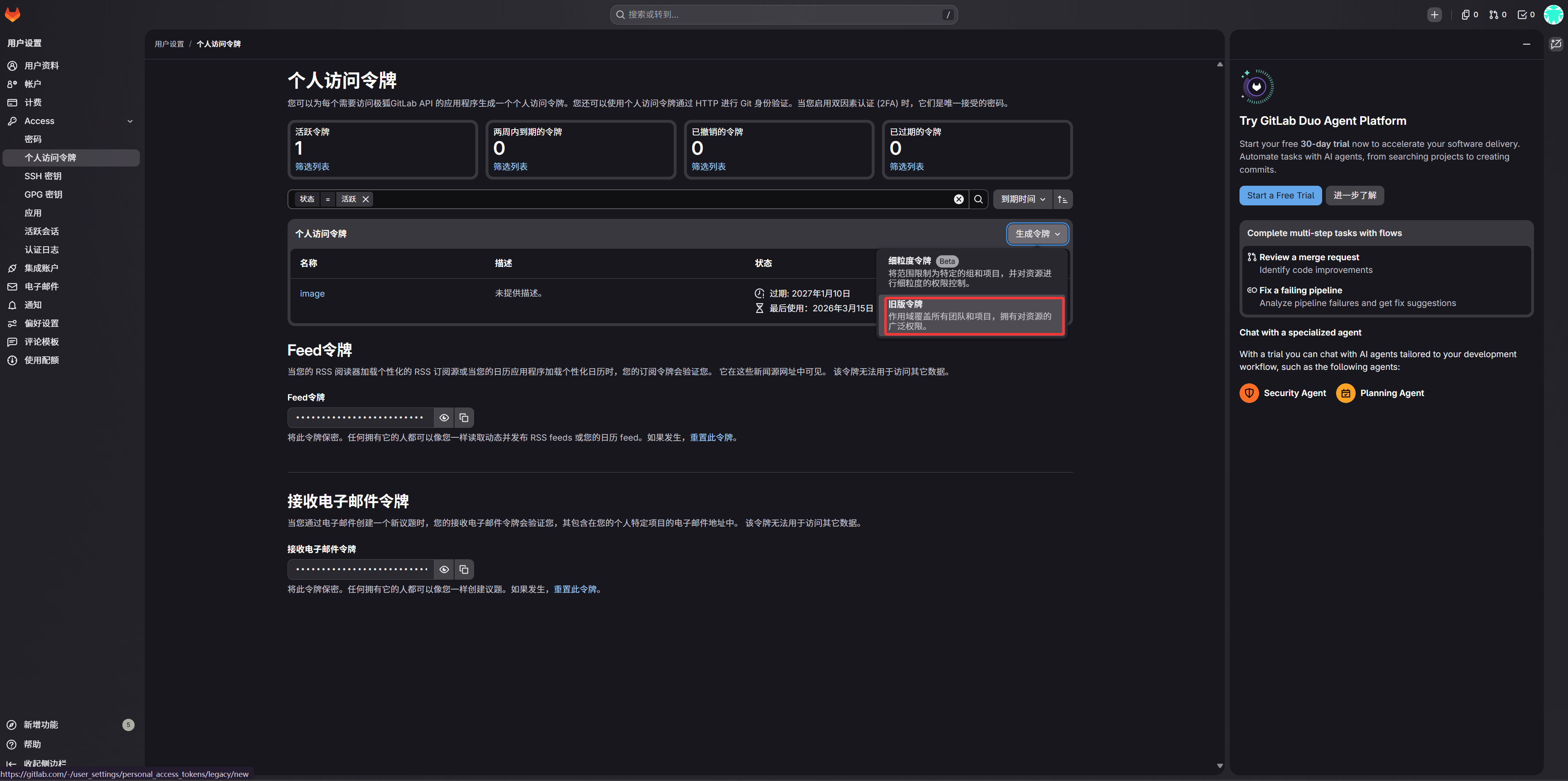
- GitLab-ல் உள்நுழைய செய்யவும்.
- மேல் வலது மூலையில் avatar கிளிக் செய்து
Preferencesதிறக்கவும். - இடது பக்கப்பட்டி-ல்
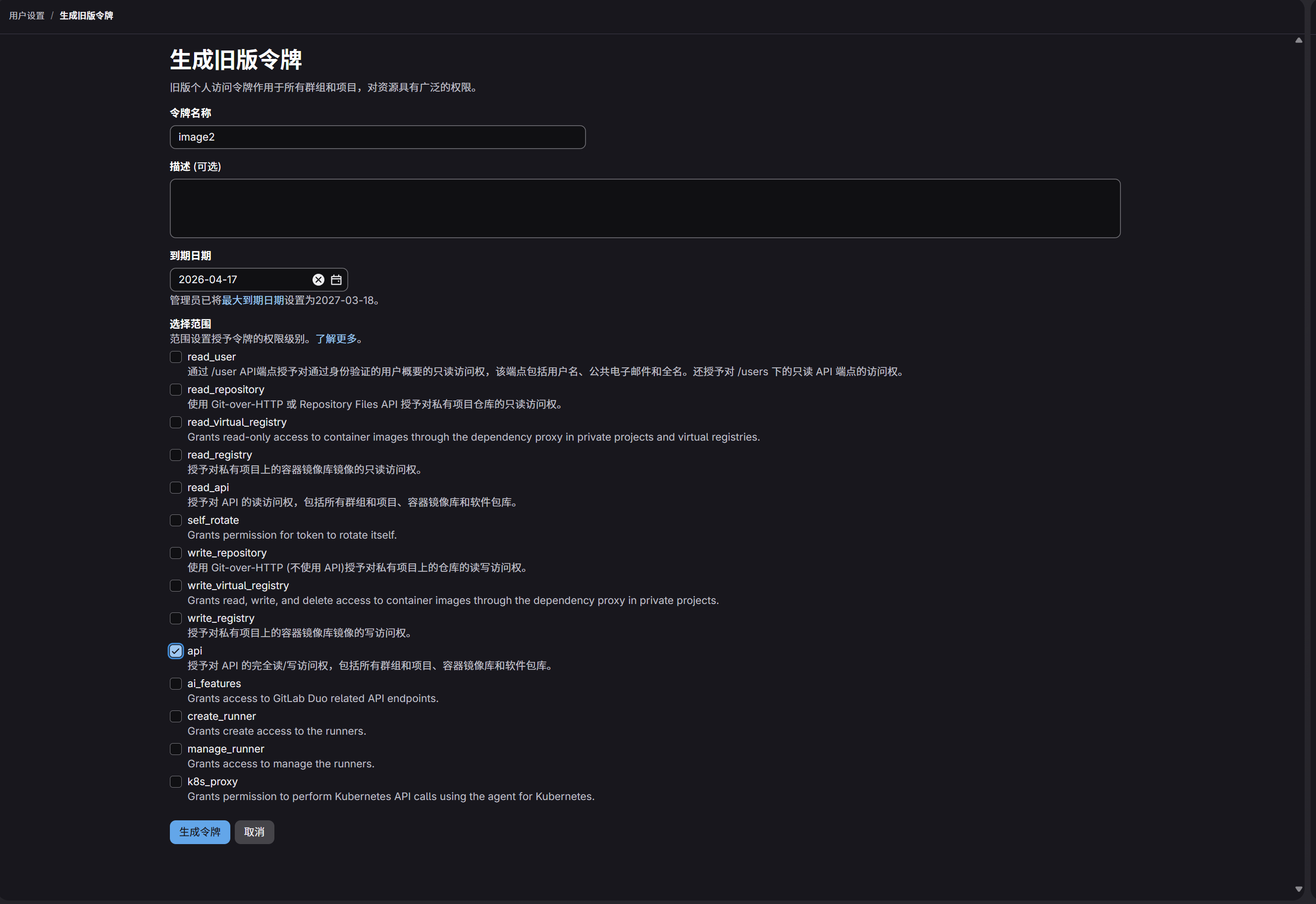
Access Tokensதிறக்கவும். - டோக்கன்-க்கு அடையாளம் காண எளிதான பெயர் கொடுக்கவும்.
- பராமரிப்பு விருப்பம் படி காலாவதி தேதி தேர்வு செய்யவும்.
apiscope தேர்வு செய்யவும்.- டோக்கன் உருவானதும் உடனே நகலெடு செய்து சேமிக்கவும்.
படி 2: ImgHost-ல் GitLab Packages சேனல் நிரப்பவும்
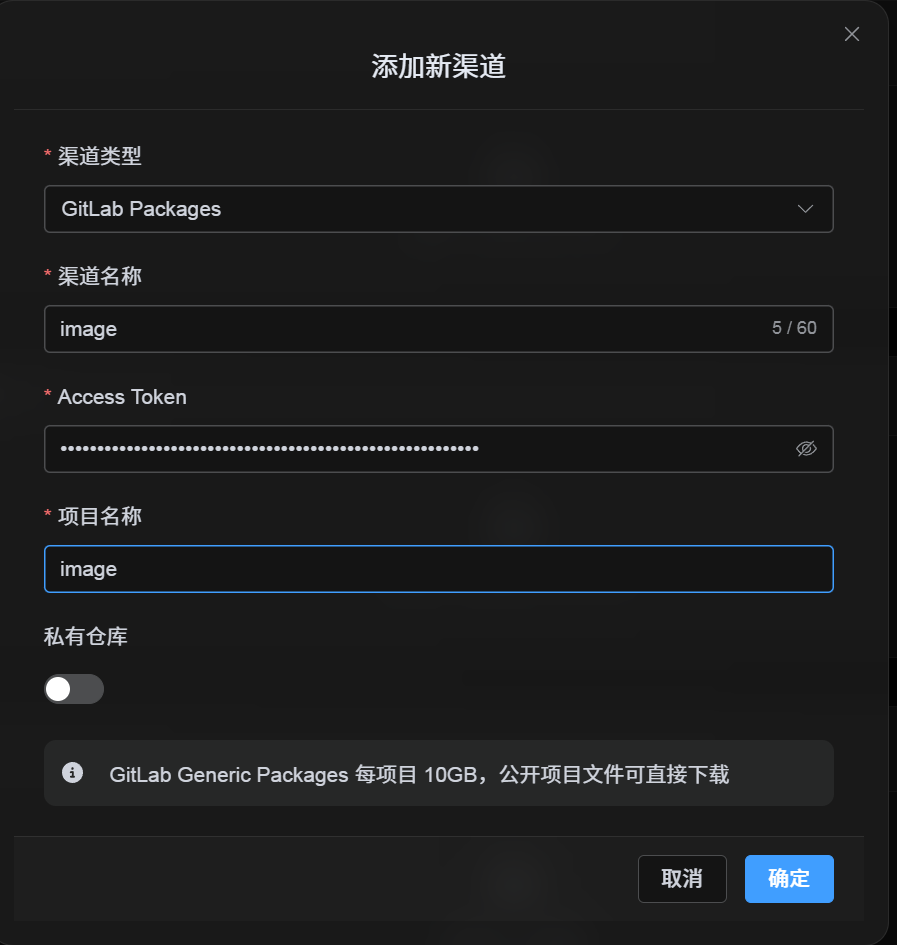
பதிவேற்ற அமைப்புகள்-ல் GitLab Packages தேர்வு செய்த பிறகு:
| UI புலம் | எதை உள்ளிட வேண்டும் |
|---|---|
| சேனல் பெயர் | உங்கள் பெயர், உதா. GitLabPrimary. |
| அணுகல் டோக்கன் | இப்போது உருவாக்கிய GitLab Personal அணுகல் டோக்கன். |
| திட்டப் பெயர் | குறுகிய திட்டப் பெயர் imgbed, அல்லது முழு பாதை username/imgbed. |
| தனியார் repository | தேவைக்கேற்ப on/off. |
| குறிப்பு | விருப்பமான, உதா. Primary upload channel. |
படி 3: சேனல் சேமி செய்யவும்
புலங்களை நிரப்பிய பிறகு சேமி என்பதைக் கிளிக் செய்யவும்.
அமைப்பு இதை தானாக கையாளும்:
| அமைப்பு நடத்தை | விளக்கம் |
|---|---|
| குறுகிய திட்டப் பெயர் | ImgHost தற்போதைய GitLab கணக்கை கண்டறிந்து, அதை முழு திட்டப் பாதையாக விரிவாக்கும். |
| முழு திட்டப் பாதை | username/project பாதை உள்ளிட்டபடியே பயன்படுத்தப்படும். |
| திட்டச் சரிபார்ப்பு | தற்போதைய தனிப்பட்ட கணக்கு பாதையாக இருந்தால், திட்டம் இல்லாதபோது ImgHost அதை தானாக உருவாக்கும். முழு பாதை கைமுறையாக கொடுக்கப்பட்டிருந்தால், அதையே பயன்படுத்தும். |
| Public/private நிலை | திட்ட visibility தற்போதைய switch படி ஒத்திசைக்கப்படும். |
விரைவு சரிபார்ப்பு பட்டியல்
text
Sign in to GitLab
-> Create an Access Token
-> Select only the api scope
-> Return to ImgHost and enter the token and project name
-> Save
-> If only a project name is entered, ImgHost adds the current username automatically
-> If username/project is entered, ImgHost uses it as-is
-> Upload a test image