د pCloud چینل اضافه کول
د چا لپاره ښه دی
- pCloud حساب لرئ او غواړئ ImgHost انځورونه په pCloud کې وساتي.
- د چینل اعتبارلیکونه په توګه د pCloud حساب email او password کارول درته منل شوي دي.
مخکې څه ته اړتیا لرئ
| اړتیا | ولې ورته اړتیا ده |
|---|---|
| د pCloud حساب email | pCloud API ته د ننوځئ لپاره |
| pCloud password | pCloud API ته د ننوځئ لپاره |
| API host | اصلي یې api.pcloud.com دی. EU حسابs کولای شي eapi.pcloud.com وکاروي. |
| د زېرمه کولو ډایرکټري | فایلونه هلته ساتل کېږي. اصلي یې imgbed دی. |
چېرته یې اضافه کړئ
- د سیسټم تنظیمات پرانیزئ.
- د اپلوډ تنظیمات پرانیزئ.
- په ښي پورتني کونج کې
Add Channelکلیک کړئ. pCloudوټاکئ.
د فیلډ لارښود
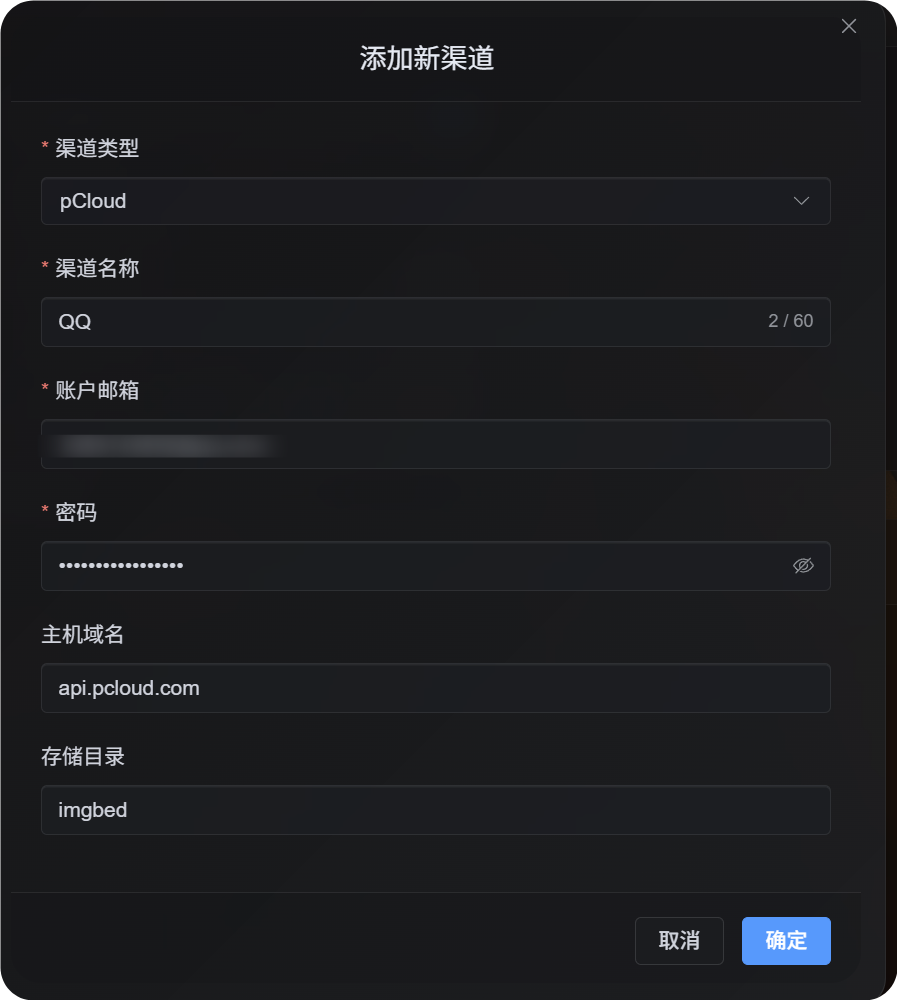
| فیلډ | موخه | اړین |
|---|---|---|
| د چینل نوم | دا pCloud چینل پېژندل کېږي، د بېلګې په توګه Personal pCloud | Yes |
| د حساب ایمېل | ستاسو د pCloud login email | Yes |
| پټنوم | ستاسو pCloud password | Yes |
| API host | د pCloud API host. اصلي یې api.pcloud.com دی. | No |
| د زېرمه کولو ډایرکټري | د فایلونو د ساتلو directory. اصلي یې imgbed دی. | No |
د خپل حساب region له مخې API host وټاکئ:
| حساب Region | API Host |
|---|---|
| اصلي / US | api.pcloud.com |
| Europe | eapi.pcloud.com |
د تنظیم پړاوونه
- د اپلوډ تنظیمات پرانیزئ.
Add Channelکلیک کړئ.pCloudوټاکئ.- داسې چینل name ولیکئ چې وپېژندل شي.
- د خپل pCloud حساب email ولیکئ.
- خپل pCloud password ولیکئ.
- API host پر
api.pcloud.comپرېږدئ، یا د EU حسابs لپارهeapi.pcloud.comوکاروئ. - زېرمه directory پر
imgbedپرېږدئ، یا یې خپلې خوښې folder ته بدل کړئ. - چینل خوندي کړئ.
څنګه یې verify کړئ
| کتنه | تمه کېدونکې پایله |
|---|---|
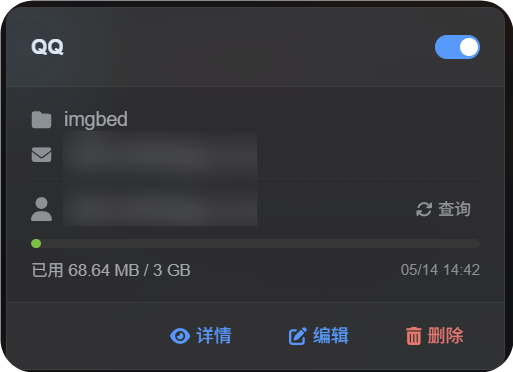
| چینل card | د خوندي وروسته pCloud چینل card ښکاره کېږي. |
| چینل switch | د card switch فعال پاتې کېږي. |
| Email display | card نښلول شوی pCloud email ښيي. |
| Quota query | له بریالۍ query وروسته used او total capacity ښکاره کېږي. |
| اپلوډ test | test image په ټاکل شوي pCloud زېرمه directory کې ښکاري. |
ستونزې او حل
ولې OAuth2 نه؟
pCloud OAuth2 عموما په اصلي ډول self-خدمت نه دی. باید pCloud ته email وکړئ او ترې وغواړئ چې دا درته enable کړي.
د pCloud اوسنی OAuth2 flow هم هغه short-lived اپلوډ link workflow نه ملاتړوي چې ImgHost ورته اړتیا لري، نو دا چینل د حساب email او password login کاروي.
کوم API Host وکاروم؟
اصلي:
text
api.pcloud.comد EU حسابs لپاره:
text
eapi.pcloud.comچټک بهیر
text
Prepare your pCloud email and password
-> Open Upload Settings
-> Add Channel
-> Choose pCloud
-> Fill channel name / email / password
-> Keep API host as api.pcloud.com unless your account is in Europe
-> Keep storage directory as imgbed unless you need another folder
-> Save
-> Query quota
-> Upload a test image