Thêm pCloud Channel
Phù hợp nhất khi
- Bạn có pCloud account và muốn ImgHost lưu images trong pCloud.
- Bạn chấp nhận dùng pCloud account email và password làm channel credentials.
Cần chuẩn bị trước
| Yêu cầu | Vì sao cần |
|---|---|
| pCloud account email | Dùng để sign in vào pCloud API |
| pCloud password | Dùng để sign in vào pCloud API |
| API host | Mặc định là api.pcloud.com. EU accounts có thể dùng eapi.pcloud.com. |
| Storage directory | Nơi lưu files. Mặc định là imgbed. |
Thêm ở đâu
- Mở Cài đặt hệ thống.
- Mở Cài đặt tải lên.
- Nhấn
Add Channelở góc trên bên phải. - Chọn
pCloud.
Tham chiếu trường
| Trường | Mục đích | Bắt buộc |
|---|---|---|
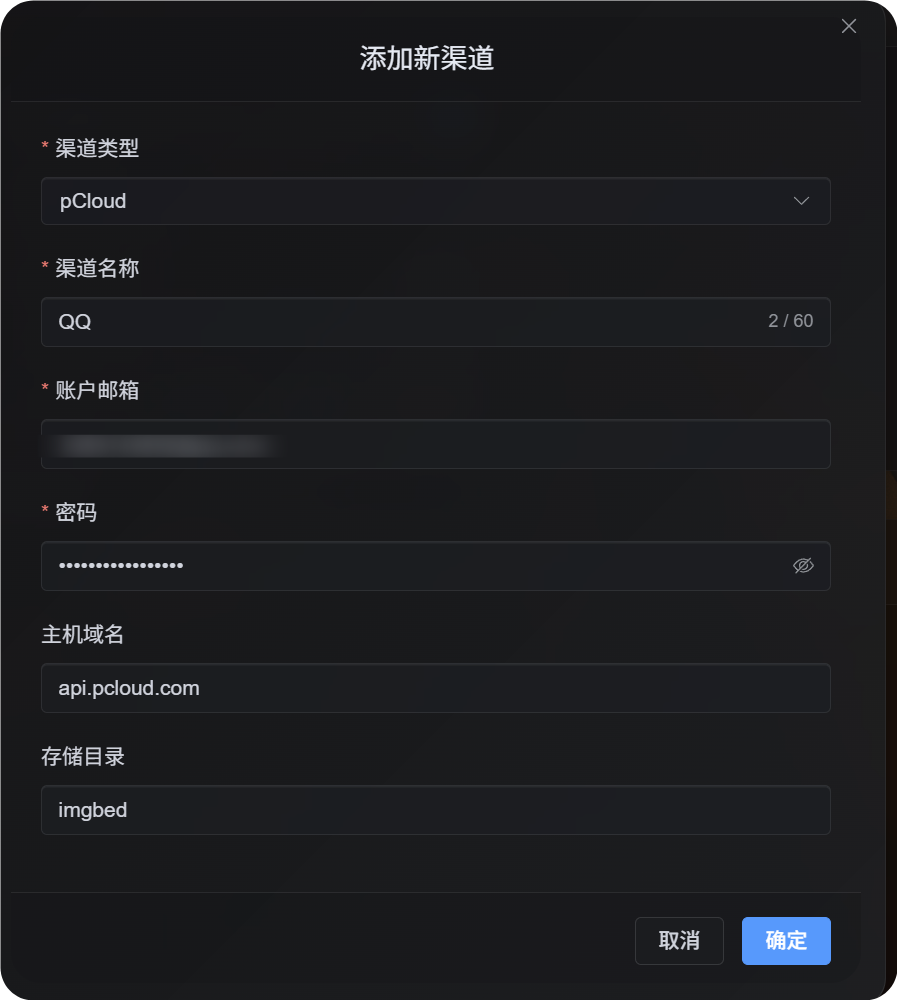
| Channel name | Xác định pCloud channel này, ví dụ Personal pCloud | Có |
| Account email | Email đăng nhập pCloud của bạn | Có |
| Password | pCloud password của bạn | Có |
| API host | pCloud API host. Mặc định api.pcloud.com. | Không |
| Storage directory | Directory dùng để lưu files. Mặc định imgbed. | Không |
Chọn API host theo account region:
| Account Region | API Host |
|---|---|
| Mặc định / US | api.pcloud.com |
| Europe | eapi.pcloud.com |
Các bước thiết lập
- Mở Cài đặt tải lên.
- Nhấn
Add Channel. - Chọn
pCloud. - Nhập channel name dễ nhận biết.
- Nhập pCloud account email.
- Nhập pCloud password.
- Giữ API host là
api.pcloud.com, hoặc dùngeapi.pcloud.comcho EU accounts. - Giữ storage directory là
imgbed, hoặc đổi sang folder bạn muốn. - Save channel.
Cách kiểm tra
| Kiểm tra | Kết quả mong đợi |
|---|---|
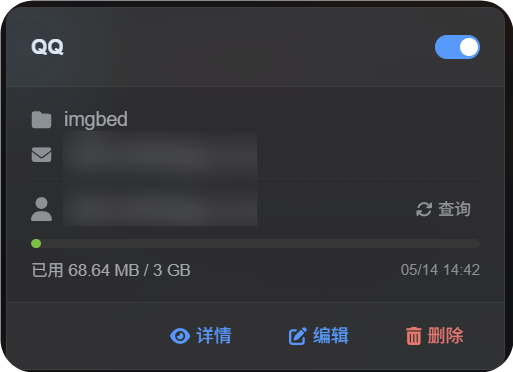
| Channel card | pCloud channel card xuất hiện sau khi save. |
| Channel switch | Switch trên card vẫn bật. |
| Email display | Card hiển thị kết nốied pCloud email. |
| Quota query | Sau khi query thành công, used và total capacity được hiển thị. |
| Upload test | Test image xuất hiện trong đã cấu hình pCloud storage directory. |
Khắc phục sự cố
Vì sao không dùng OAuth2?
pCloud OAuth2 mặc định không self-service. Bạn cần email cho pCloud để yêu cầu họ bật.
Flow pCloud OAuth2 hiện tại cũng không hỗ trợ short-lived upload link workflow mà ImgHost cần, nên channel này dùng account email và password login.
Nên dùng API Host nào?
Mặc định:
text
api.pcloud.comVới EU accounts:
text
eapi.pcloud.comLuồng nhanh
text
Prepare your pCloud email and password
-> Open Upload Settings
-> Add Channel
-> Choose pCloud
-> Fill channel name / email / password
-> Keep API host as api.pcloud.com unless your account is in Europe
-> Keep storage directory as imgbed unless you need another folder
-> Save
-> Query quota
-> Upload a test image