Thêm S3 Channel
Phù hợp nhất khi nào
Dùng S3 channel khi:
- Bạn muốn kết nối object storage service tương thích S3, như Cloudflare R2, Backblaze B2, MinIO, AWS S3 hoặc provider tương thích khác.
- Bạn thích mô hình cấu hình S3 chuẩn:
Endpoint, Access Key và Secret Key. - Bạn không muốn dùng native Cloudflare R2 binding channel, hoặc storage provider của bạn không phải Cloudflare R2.
Cần chuẩn bị gì trước khi bắt đầu
| Yêu cầu | Mục đích |
|---|---|
| S3 Endpoint | S3 API endpoint của object storage service. |
| Bucket name | Bucket dùng để lưu files. |
| Region | Storage region. Với Cloudflare R2 thường là auto. |
| Access Key ID | S3 access key ID. |
| Secret Access Key | S3 secret access key. |
| CDN domain | Custom domain tùy chọn cho file access. |
Ví dụ Cloudflare R2 qua S3 API:
text
Endpoint: https://your-account-id.r2.cloudflarestorage.com
Bucket: your-r2-bucket-name
Region: auto
Access Key ID: copied from the Cloudflare R2 API token
Secret Access Key: copied from the Cloudflare R2 API token
Thêm ở đâu
- Mở Cài đặt hệ thống.
- Vào Cài đặt tải lên.
- Nhấn Thêm kênh ở góc trên bên phải.
- Chọn
S3.
Tham chiếu trường
| Trường | Tác dụng | Bắt buộc |
|---|---|---|
| Channel name | Tên dễ nhận biết cho S3 channel, ví dụ s3test hoặc R2-S3. | Có |
| Enable channel | Kiểm soát channel này có tham gia upload selection hay không. | Khuyến nghị |
| Endpoint | Full S3 service endpoint, bao gồm https://. | Có |
| Custom CDN domain | Không bắt buộc. Khi đặt, đã tạo file links sẽ ưu tiên domain này. | Không |
| Bucket name | Bucket name, ví dụ s3test hoặc img-r2. | Có |
| Bucket region | Region. Với Cloudflare R2 thường là auto. | Có |
| Access Key ID | S3 access key ID. | Có |
| Secret Access Key | S3 secret access key. | Có |
| Path-style access | Compatibility switch. Mặc định off. Một số MinIO, OpenList hoặc self-hosted S3 service có thể cần. | Không |
| Quota limit | Kiểm soát S3 channel này có tham gia upload selection theo capacity hay không. | Không |
| Capacity limit | Bắt buộc sau khi bật quota limit, ví dụ 10 GB. | Bắt buộc khi bật quota limit |
| Threshold | Dừng ghi khi usage đạt percentage này, ví dụ 90%. | Bắt buộc khi bật quota limit |
| Remark | Ghi chú để tự bảo trì. | Không |
Tạo Cloudflare R2 S3 API Keys
- Mở Cloudflare Dashboard.
- Vào
R2 Object Storage. - Tìm
Manage R2 API Tokenshoặc mục quản lý API token.
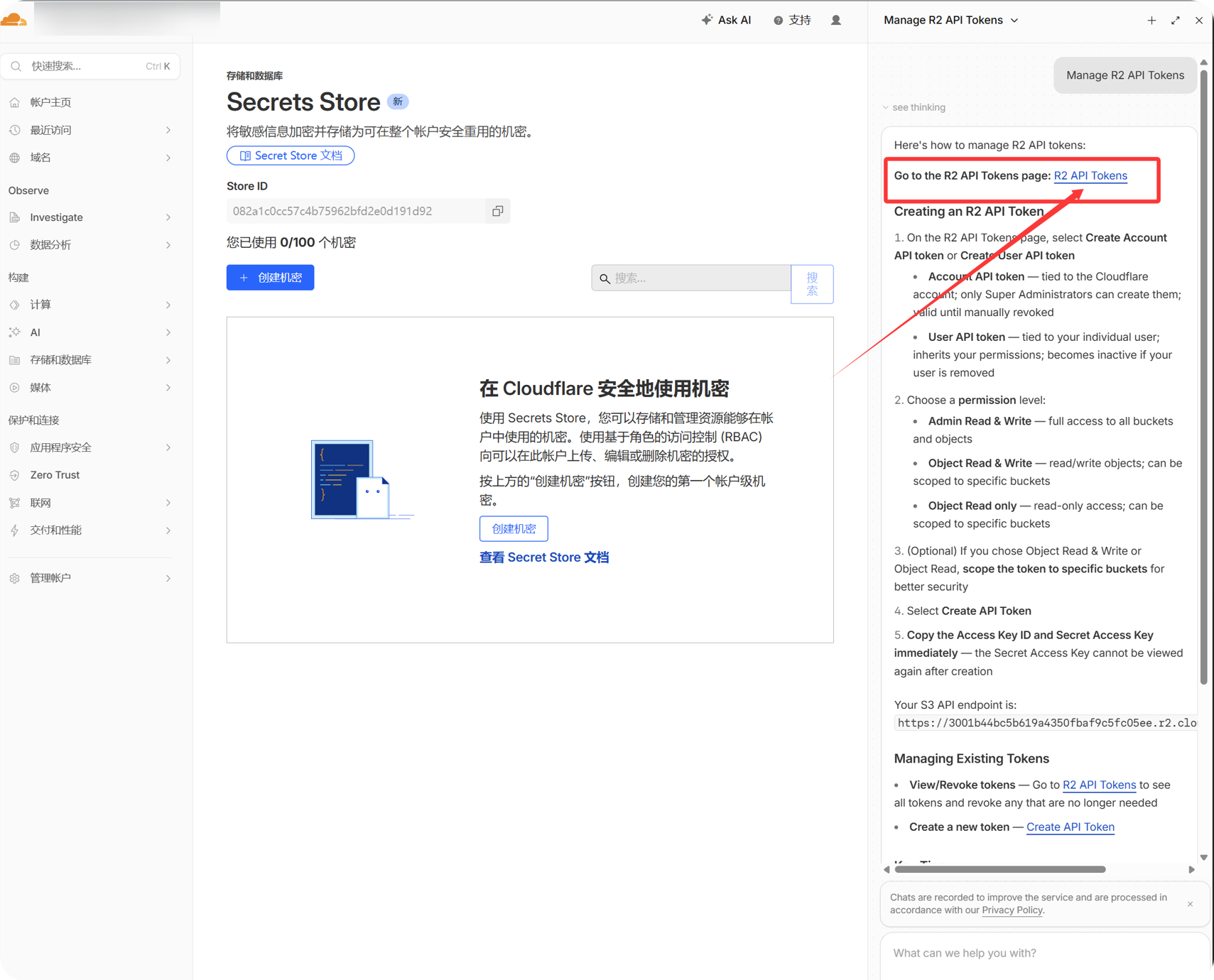
- Tạo R2 API token có quyền access target bucket.
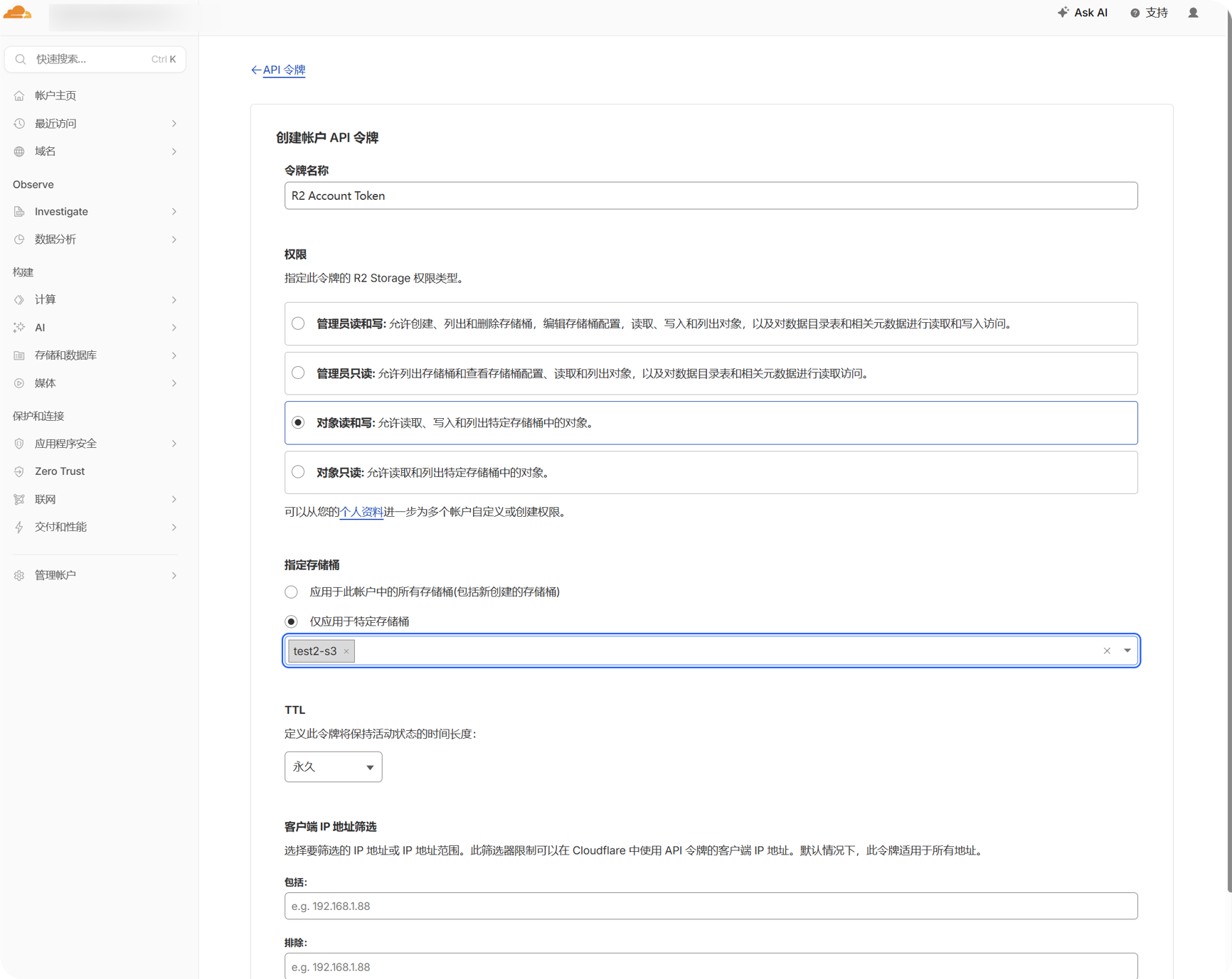
- Sao chép
Access Key IDvàSecret Access Keyđược tạo.
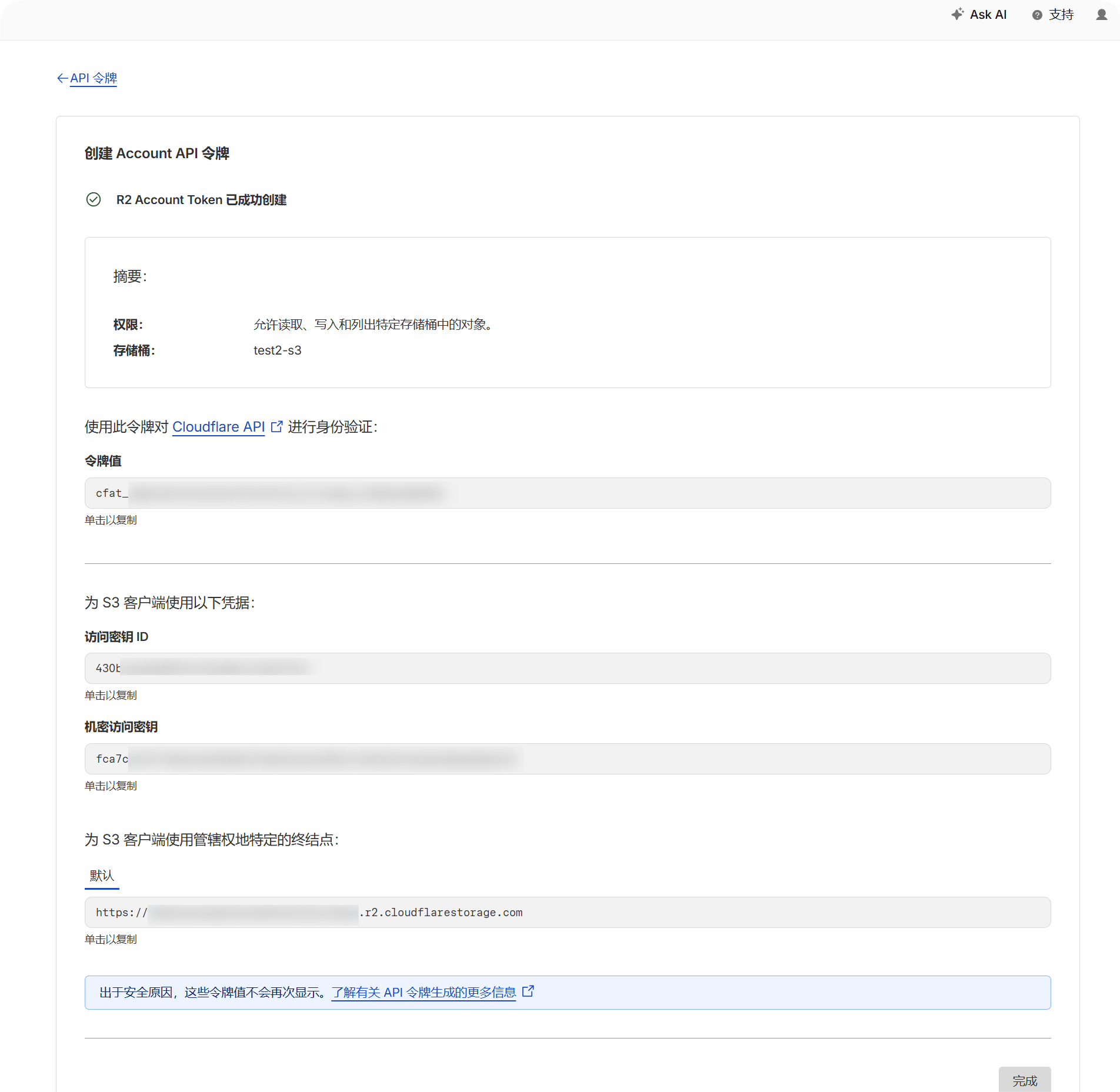
- Quay lại trang R2 bucket và xác nhận bucket name.
- Ghi lại S3 API endpoint của account. Thường có dạng:
text
https://your-account-id.r2.cloudflarestorage.comCác bước thiết lập
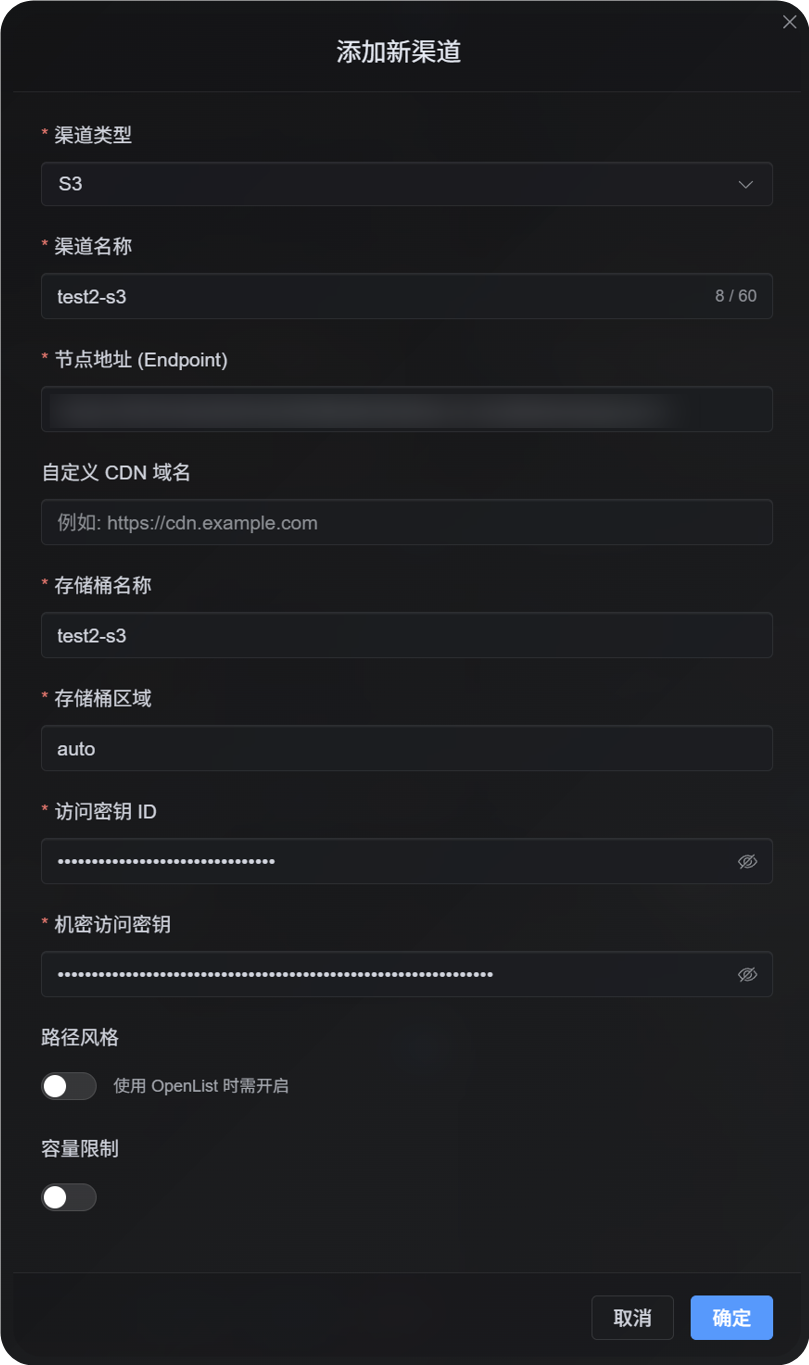
- Mở Cài đặt tải lên.
- Nhấn Thêm kênh.
- Chọn
S3. - Nhập channel name dễ nhận biết, ví dụ
s3test. - Nhập S3 API endpoint trong
Endpoint. - Nếu dùng custom CDN, nhập trong
Custom CDN domain; nếu không thì để trống. - Nhập bucket name.
- Nhập region. Với ví dụ Cloudflare R2, dùng
auto. - Nhập Access Key ID và Secret Access Key.
- Giữ path-style access ở off trừ khi provider yêu cầu rõ.
- Nếu muốn capacity control, bật quota limit rồi nhập capacity limit và threshold.
- Nhấn Save.
Cách kiểm tra
| Kiểm tra | Cách kiểm tra |
|---|---|
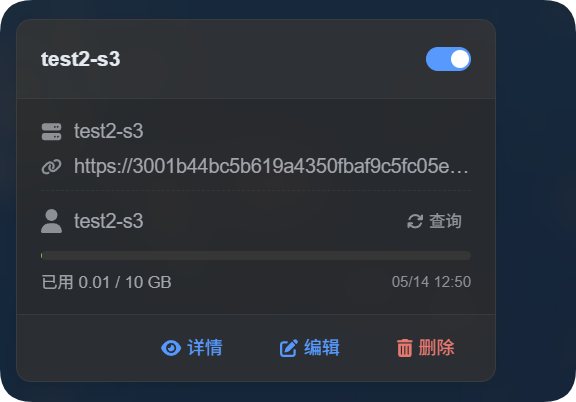
| Channel card xuất hiện | Sau khi save, trang Cài đặt tải lên cần hiển thị S3 channel card. |
| Channel bật | Switch ở góc trên bên phải card nên ở trạng thái on. |
| Các trường khóa đã lưu | Detail view cần hiển thị Endpoint, Bucket, Region, path-style access và các trường liên quan. |
| Upload hoạt động | Upload test image và xác nhận object xuất hiện trong target bucket. |
| Link mở được | Image link trả về sau upload cần mở bình thường. |
| Capacity display hoạt động | Nếu bật quota limit, card cần hiển thị used capacity và đã cấu hình limit. |
S3 capacity statistics được tính từ local file records của ImgHost, không query provider bucket theo real time. Sau khi lưu S3 configuration, hệ thống sẽ tính lại quota ledger từ D1 records hiện tại.
FAQ
Có nên bật path-style access không?
Thường là không.
Chỉ bật khi S3-compatible provider không hỗ trợ virtual-hosted-style URLs, hoặc provider documentation yêu cầu path-style access rõ ràng. Một số MinIO, self-hosted S3 và OpenList-compatible endpoints có thể cần.
CDN domain dùng để làm gì?
Nếu bạn đặt CDN hoặc custom access domain trước bucket, nhập domain đó ở đây.
Sau khi cấu hình, đã tạo file links sẽ ưu tiên domain này. Nếu không dùng CDN, để trống.
Vì sao upload lỗi?
Kiểm tra các mục này trước:
- Endpoint là full
https://URL. - Bucket name chính xác.
- Region khớp với yêu cầu của provider.
- Access Key ID và Secret Access Key được sao chép đầy đủ.
- Key có write permission cho target bucket.
- Provider không yêu cầu path-style access, hoặc đã bật path-style access nếu cần.
Danh sách kiểm tra nhanh
text
Prepare S3 Endpoint, Bucket, Region, Access Key, and Secret Key
-> Open Upload Settings
-> Add Channel
-> Select S3
-> Enter Endpoint / Bucket / Region / Access Key / Secret Key
-> Enter a CDN domain if needed
-> Leave path-style access off by default
-> Enable quota limit if needed
-> Save
-> Upload a test image and check the result